1
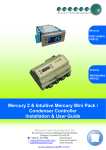
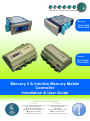
Mercury 2 & Intuitive Mobile Controller User Guide
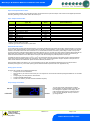
The Mercury & Intuitive Range
From Resource Data Management
For Version Mob 1.0
The Mercury Mk2 Mobile controller is intended for use in refrigeration display cabinets with one or two integral compressors with each
compressor having a temperature probe fitted to enable the compressor to be stopped if a set (discharge) temperature is exceeded. The
controller will switch on one or two compressors based on the average of an air on and air off temperature probes and has outputs to
control lights, fans and defrost control. The lighting relay can be set to operate as an alarm relay if required. The controller also has an
inbuilt defrost timer and 7 day lighting control timer which can also be used to switch the cabinet off and on at specific times, this can be a
useful energy saving feature if the cabinet contains non perishable goods (such as drinks) and can be automatically switched off at night.
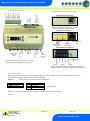
There is also a DIN rail mounted version, known as the Intuitive Mercury, which is designed to be used in a control panel or electrical
tray. This range has the same features as the Mercury Mk2 controller with additional benefits such as higher rated relays, each protected
by an integral fuse and fuse protection for the incoming power supply. All connections are plug in socket and there are multiple network
interfaces to choose from including Ethernet.
The controller supports PT1000, NTC2K, 470R, 700R, 3K, 5K, 6K, NTC2K25, NTC10K or NTC10K(2) temperature probes (note: probe
types cannot be mixed)
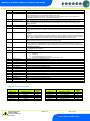
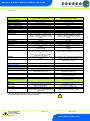
Variants
Description
Mercury Mk2 Single or Twin Compressor Controller, integral display.
Mercury Mk2 Single or Twin Compressor Controller, remote display.
Intuitive Mercury Single or Twin Compressor Controller, integral display.
Intuitive Mercury Single or Twin Compressor Controller, remote display.
Intuitive Mercury Single or Twin Compressor Controller, integral display, built in IP network card.
Intuitive Mercury Single or Twin Compressor Controller, remote display, built in IP network card.
Part Number
PR0710-MOB
PR0720-MOB
PR0750-MOB
PR0760-MOB
PR0750-MOB-IP
PR0760-MOB-IP
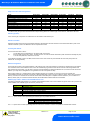
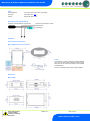
Compatible Displays
The following displays are compatible with the Mercury / Intuitive Remote Display Controllers (PR0720 & PR0760): Description
Mercury Remote Display with 5m cable
Mercury Keyswitch Remote Display with 5m cable
Mercury DIN Remote Display with 5m cable
Mercury DIN Keyswitch Remote Display with 5m cable
Mercury mk2 Remote Display with 5m cable
Part Number
PR0325
PR0326
PR0327
PR0328
PR0725
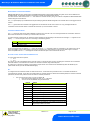
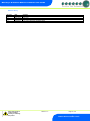
Configuration
The controller gives you two configuration options: Display value
1
2
Type
Integral controller HT
Integral controller LT
The controller is delivered pre-configured as type 1.
Compatible Network Interfaces
Mercury and Intuitive Mercury controllers are capable of connecting to either a TCP/IP local area network, an RS485 Genus compatible
network, an RDM wireless mesh network or they can be used in standalone mode with no network output. To connect to a network you
must add the correct communications module. Connecting to any of these communication modules will automatically be detected on
power up and will affect the set up screens available to you.
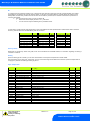
Description
IP Futura (Single Mercury to IP Interface)
RS485 Interface (Single Mercury to RS485 Interface)
Mercury IP Switch (IP support for 10 controllers)
Mercury IP Switch with Pressure/Humidity Inputs
Wireless Mesh Interface (for single Mercury)
Part Number
PR0016
PR0026
PR0018
PR0018-PHI
PR0730
The Intuitive Mercury Controller is supplied as standard with an internal RS232 network card, this allows connection to any of the above
external network interfaces. Three alternative internal network cards are also available, these can be supplied factory fitted as an option
or purchased separately as an interface kit.
Warning
Ensure that all power is
switched off before
installing or maintaining
this product
Revision 1.2
Page 4 of 21
www.resourcedm.com
Please Note