1
X
Installing a Mini PCI Card
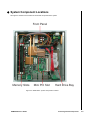
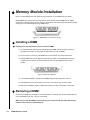
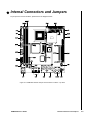
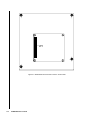
The KUBE-8020 provides space for one Mini PCI expansion card as shown in Figure 2-3 above. To install a
Mini PCI card fully insert card into the slot, then press down to lock the card in place.
X
Installing a Wi-Fi Antenna
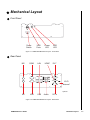
The KUBE-8020 provides an opening to install a Wi-Fi antenna, shown in Figure 1-2. KUBE-8020 Mechanical
Layout - Rear Panel. To install a Wi-Fi antenna, remove the circular pre-cut punch-out and secure the
antenna to the chassis.
X
Wall Mounting
The KUBE-8020 comes with two L-brackets for wall mounting. Secure the L-brackets to the chassis as shown
using the screws provided.
Figure 2-6. Secure the wallmount L-brackets to the KUBE-8020 chassis
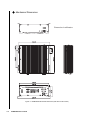
Refer to Figure 1-3. KUBE-8020 Mechanical Dimensions for wallmount hole spacing. The shape of the screw
holes allows the KUBE-8020 to be mounted with the Front Panel facing either up or down, and provides for
easy removal of the chassis for repair of maintanence. Use standard M4 or M5 screws to mount the KUBE8020.
KUBE-8020 User’s Guide
Installing a Mini PCI Card
2-7