1
8. Telnet Capabilities
8.1.
Network Port Numbers
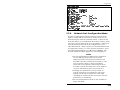
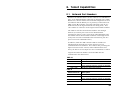
Whenever an inbound Telnet session connects to a CMS RS232
Port, or an outbound Telnet connection is initiated from a CMS
RS232 Port, the Port Status Screen and Port Diagnostics Screen
will indicate that the RS232 port is presently connected to Port
"Nn" (where "N" indicates a network connection, and "n" is a
number that lists the logical Network Port being used.) This
"Nn" number is referred to as the logical Network Port Number.
The CMS-16 will list Network Port Numbers one through
nineteen (seventeen ports reserved for inbound Telnet
connections, plus two ports reserved for outbound Telnet) and
the CMS-8 will list Network Port Numbers one through eleven
(nine ports reserved for inbound Telnet connections, plus two
ports reserved for outbound Telnet.)
In addition, both the CMS-8 and the CMS-16 include one
inbound logical Network Port, where Supervisor Level
commands cannot be disabled. This ensures that, providing the
Supervisor Password is entered, remote administrators will
always be able to access Supervisor Level commands via Telnet.
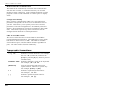
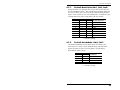
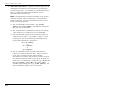
Logical Network Port Numbers for both CMS units are
summarized in the tables below:
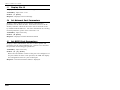
CMS-16
Network Port No.
N1 - N16
N17
N18 - N19
Description
Inbound Telnet Connections.
Inbound Telnet Connection; Supervisor
Level Command Access cannot be disabled.
Outbound Telnet Connections.
CMS-8
Network Port No.
N1 - N8
N9
N10 - N11
Description
Inbound Telnet Connections.
Inbound Telnet Connection; Supervisor
Level Command Access cannot be disabled.
Outbound Telnet Connections.
8-1