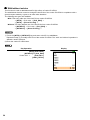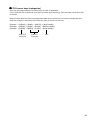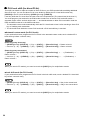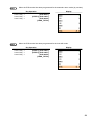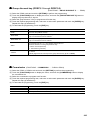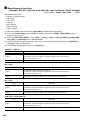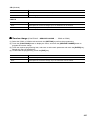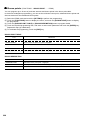
1
POS TERMINAL
MODEL
UP-3515
INSTRUCTION MANUAL
CAUTION: Please observe the following when an optional drawer is used.
The drawer unit should be securely fitted to the supporting platform to avoid instability when the drawers
are open.
CAUTION:
The socket-outlet shall be installed near the equipment and shall be easily accessible.
VORSICHT:
Die Netzsteckdose muß nahe dem Gerät angebracht und leicht zugänglich sein.
ATTENTION:
La prise de courant murale devra être installée à proximité de l’équipement et devra être facilement
accessible.
AVISO:
El tomacorriente debe estar instalado cerca del equipo y debe quedar bien accesible.
VARNING:
Det matande vägguttaget skall placeras nära apparaten och vara lätt åtkomligt.
LET OP:
Het stopcontact dient in de buurt van de kassa en gemakkelijk toegangbaar te zijn.
CAUTION:
For a complete electrical disconnection pull out the mains plug.
VORSICHT:
Zur vollständigen elektrischen Trennung vom Netz den Netzstecker ziehen.
ATTENTION:
Pour obtenir une mise hors-circuit totale, débrancher la prise de courant secteur.
AVISO:
Para una desconexión eléctrica completa, desenchufar el enchufe de tomacorriente.
VARNING:
För att helt koppla från strömmen, dra ut stickproppen.
LET OP:
Trek de stekker uit het stopcontact indien u de stroom geheel wilt uitschakelen.
INTRODUCTION
Thank you very much for your purchase of the SHARP POS Terminal Model UP-3515.
Please read this manual carefully before operating your POS terminal.
Please keep this manual for future reference.
IMPORTANT
• Install this terminal in a location that is not subject to direct radiation, unusual temperature
changes, and high humidity or exposure to water or other liquids.
Installation in such locations could cause damage to the cabinet and the electronic components.
• Do not drop this terminal nor subject it to any strong shock.
This may cause damage to the terminal.
• Do not apply excessive pressure to the display. Do not use a sharp-pointed object on the
display.
This may cause damage to the LCD display.
• When cleaning this terminal, use a dry, soft cloth. Never use solvents, such as benzine or
thinner.
The use of such chemicals will lead to discoloration or deterioration of the cabinet.
• The terminal plugs into any standard wall outlet official (nominal) voltage.
Other electrical devices on the same electrical circuit could cause the terminal to malfunction.
• If the terminal malfunctions, call your local authorized dealer for service. Do not try to repair the
terminal yourself.
• Be sure to use the supplied AC adapter and AC power cord. Otherwise, an electric shock or fire
may be caused.
• For a complete electrical disconnection, remove the AC power cord from the wall outlet.
PRECAUTION
This POS terminal has a built-in memory protection circuit which is operated by a rechargeable battery
pack.
Please note that all batteries will, in time, dissipate their charge even if not used. Therefore to insure an
adequate initial charge in the protection circuit and to prevent any possible loss of memory upon
installation, it is recommended that each unit be allowed to be recharged for a period of 24 to 48 hours prior
to use by the customer.
After installation, the battery pack is charged when the machine is plugged in. This recharging precaution
can prevent unnecessary initial service calls.
This product utilizes fluorescent tubes containing a small amount of mercury.
Disposal of these materials may be regulated due to environmental considerations. For disposal or
recycling information, please contact your local authorities.
1
CONTENTS
INTRODUCTION ··········································································································································· 1
IMPORTANT ················································································································································· 1
PRECAUTION ·············································································································································· 1
CONTENTS ·················································································································································· 2
1. Part Names and Functions ··················································································································· 7
External View ······································································································································· 7
Front view ···································································································································· 7
Rear view ····································································································································· 7
Displays ··············································································································································· 9
Operator display (touch panel) ···································································································· 9
Customer display ······················································································································· 12
Screen save mode ····················································································································· 12
Clerk keys ·········································································································································· 13
2. Before Operating the POS Terminal ·································································································· 14
Display Adjusttment ··························································································································· 14
Connecting the Printer and Installing the Paper Rolls ······································································· 14
3. Selecting an Operating Mode ············································································································ 15
Operating Mode ································································································································· 15
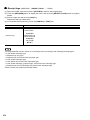
Mode Selection ·································································································································· 16
Selecting a mode ······················································································································· 16
4. Prior to Making Entries ······················································································································· 17
Preparations for Entries ····················································································································· 17
Error Warning ···································································································································· 17
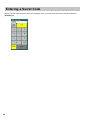
Entering a Secret Code ····················································································································· 18
5. Entries ·················································································································································· 19
Function Key Description ··················································································································· 19
Screen transitions ······················································································································ 19
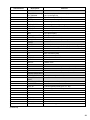
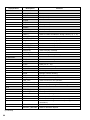
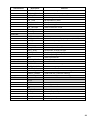
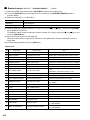
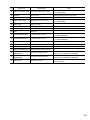
Function key list (using default key labels) ················································································ 20
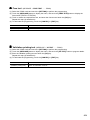
How to Use the Touch Panel ············································································································· 24
Cursor control by touching option(s) or items(s) in the window ················································· 24
Clerk Assignment (Sign-on/Sign-off) ································································································· 25
Clerk assignment ······················································································································· 25
Item Selection from the Menu ············································································································ 27
Starting Cash Memory Entry ·············································································································· 28
Item Entries ········································································································································ 29
Registration screen ···················································································································· 29
Single item entries ····················································································································· 29
Repeat entries ···························································································································· 32
Multiplication entries ·················································································································· 33
Split-pricing entries ···················································································································· 35
Successive multiplication entries ······························································································· 37
Scale entries ······························································································································ 39
Single item cash sale (SICS)/single item finalize (SIF) entries ················································· 40
Non-turnover sales ···················································································································· 41
Special Entries for PLU/EAN ············································································································· 42
Promotion function ····················································································································· 42
PLU/EAN link entries ················································································································· 44
EAN learning function ················································································································ 45
EAN/ITF-to-PLU conversion ······································································································ 46
PLU/EAN information inquiry (view) function ············································································· 47
EAN price change function ········································································································ 48
Combo meal PLU/EAN entries ·································································································· 49
2
With/without entries ··················································································································· 50
PLU menu keys (categories) ····································································································· 51
PLU level shift (for direct PLUs) ································································································ 52
Price level shift ··························································································································· 54
Condiment entries ······················································································································ 56
Pint entries ································································································································· 59
Happy hour ································································································································ 60
Crate entries ······························································································································ 61
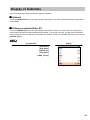
Display of Subtotals ··························································································································· 63
Subtotal ······································································································································ 63
Difference subtotal (Differ ST) ··································································································· 63
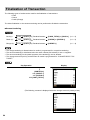
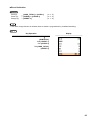
Finalization of Transaction ················································································································· 64
Computation of VAT (Value Added Tax)/Tax ······················································································ 66
VAT/tax system ·························································································································· 66
VAT shift entries ························································································································· 67
Guest Check (GLU) ··························································································································· 68
GLU system ······························································································································· 68
Room GLU entry ························································································································ 71
Deposit entries ··························································································································· 74
Transferring guest out or in (Transfer-out/in) ············································································· 75
Bill printing ································································································································· 76
Intermediate GLU reading ········································································································· 77
Bill totalizing/bill transfer ············································································································ 78
Bill separating ···························································································································· 80
Transaction migration ················································································································ 86
Recall transaction ······················································································································ 87
Ordering System ································································································································ 88
Customer advance ordering ······································································································ 88
Credit customer advance ordering ···························································································· 91
Article order masks ···················································································································· 94
Auxiliary Entries ································································································································· 95
Percent calculations (% premium or % discount) ······································································ 95
Discount entries (-) ···················································································································· 96
Refund entries ···························································································································· 97
Return entries ···························································································································· 97
Printing of non-add code numbers ···························································································· 98
Printing of free text ····················································································································· 98
Payment Treatment ··························································································································· 99
Tip-in entries ······························································································································ 99
Tip paid entries ························································································································ 100
Currency exchange ·················································································································· 101
Received-on-account entries ··································································································· 102
Paid-out entries ························································································································ 104
No-sale (exchange) ·················································································································· 105
Transferring cash ····················································································································· 105
Cashing a check ······················································································································ 106
Service charge ························································································································· 107
VIP sales ·································································································································· 108
Customer Management ··················································································································· 109
Basic operations ······················································································································· 111
Name and address printing on receipt/bill ··············································································· 112
Customer bill printing ··············································································································· 114
Employee Function ·························································································································· 115
Employee’s working time recording ························································································· 116
Employee’s working time shift ································································································· 120
Customer Relation Management ····································································································· 121
Group discount entries ············································································································· 121
Bonus points ···························································································································· 122
3
WASTE Mode ·································································································································· 123
TRAINING Mode ······························································································································ 124
Supervisor Clerk ······························································································································ 125
Overlapped Clerk Entry ··················································································································· 126
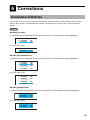
6. Corrections ········································································································································ 127
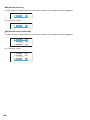
Correction of Entries ························································································································ 127
Subtotal Void ···································································································································· 129
Correction of Incorrect Entries Not Handled by the Direct, Indirect or Subtotal Void Function ······· 129
7. Special Printing Function ················································································································· 130
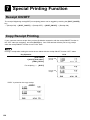
Receipt ON/OFF ······························································································································ 130
Copy Receipt Printing ······················································································································ 130
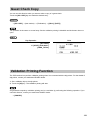
Guest Check Copy ··························································································································· 131
Validation Printing Function ············································································································· 131
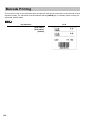
Barcode Printing ······························································································································ 132
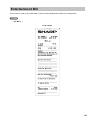
Entertainment Bill ····························································································································· 133
Type of Receipt ································································································································ 134
Sorted Receipt Function ·················································································································· 137
Electronic Journal ···························································································································· 139
Electronic Mail ································································································································· 139
8. Manager mode ··································································································································· 140
Entering the Manager Mode ············································································································ 140
Override Entries ······························································································································· 140
Tip Paid Entries ································································································································ 141
Bill Recording/Bill Void ····················································································································· 141
Correction after Finalizing a Transaction (Void mode) ···································································· 142
9. Reading (X) and Resetting (Z) of Sales Totals ··············································································· 143
How to take a reading (X1, X2, or OPX) or resetting (Z1, Z2, or OPZ) report ························· 143
Flash report ······························································································································ 143
Report list ································································································································· 144
Daily Report Samples ······················································································································ 147
Periodic Report Samples ················································································································· 182
Non-accessed EAN and Customer Deletion ··················································································· 191
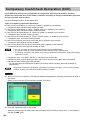
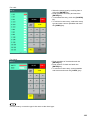
Compulsory Cash/Check Declaration (CCD) ·················································································· 192
10. Programming ····································································································································· 194
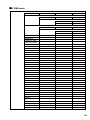
Programming Menu Processing ······································································································ 194
PGM1 mode ····························································································································· 194
PGM2 mode ····························································································································· 195
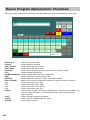
How to Program Alphanumeric Characters ····················································································· 200
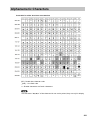
Alphanumeric Characters ················································································································ 201
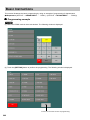
Basic Instructions ····························································································································· 202
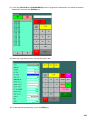
Programming example ············································································································· 202
Programming function key ······································································································· 204
POS Setting Data ····························································································································· 205
Department ······························································································································ 205
PLU/EAN ·································································································································· 207
PLU range ································································································································ 207
Dynamic EAN ··························································································································· 207
Happy hour ······························································································································ 210
PLU menu key ························································································································· 211
Combo meal table ···················································································································· 212
Link PLU/EAN table ················································································································· 212
PLU condiment table ··············································································································· 213
Promotion table (global/individual type) ··················································································· 215
Crate table ······························································································································· 217
EAN-to-PLU converting table ··································································································· 218
4
ITF-to-PLU converting table ····································································································· 218
EAN Non-PLU code format ······································································································ 219
Press code (for EAN) ··············································································································· 220
Scale table ······························································································································· 221
PLU/EAN stock ························································································································ 221
EAN delete ······························································································································· 222
Direct key ································································································································· 223
Discount key ((-)1 through (-)9) ······························································································· 224
Percent key (%1 through %9) ·································································································· 224
Group discount key (GDSC%1 through GDSC%9) ································································· 225
Commission ····························································································································· 225
Miscellaneous functions (deposit, RA, PO, cash tip, non-cash tip, cash in drawer,
check change) ························································································································· 226
Service charge ························································································································· 227
Bonus points ···························································································································· 228
Cash key ·································································································································· 229
Check key ································································································································ 230
Credit key ································································································································· 231
Hotel transfer ··························································································································· 232
Check cashing ························································································································· 232
Customer charge key ··············································································································· 233
Currency exchange key ··········································································································· 234
Foreign currency drawer ·········································································································· 234
Currency money ······················································································································· 235
Training text/clerk programming ······························································································ 236
Function text ···························································································································· 237
Department group text ············································································································· 242
PLU group text ························································································································· 242
PLU hourly group text ·············································································································· 243
PLU information text ················································································································ 243
Clerk ········································································································································· 244
Cashier ····································································································································· 246
Manager ··································································································································· 247
Employee ································································································································· 248
Job location table ····················································································································· 249
Working time shift ···················································································································· 249
Contact-less key ······················································································································ 250
Prohibition of the contact-less key ··························································································· 250
Terminal programming ············································································································· 251
License programming ·············································································································· 252
Date/time programming ··········································································································· 252
Function prohibition ················································································································· 253
Function selection 1 ················································································································· 255
Function selection 2 ················································································································· 256
Printing selection 1 ·················································································································· 257
Printing selection 2 ·················································································································· 258
Display selection ······················································································································ 259
EURO ······································································································································· 259
Zero skip ·································································································································· 260
General report format ·············································································································· 261
Transaction report format ········································································································· 262
Clerk report format ··················································································································· 266
Department report format ········································································································ 269
Hourly report ···························································································································· 269
Stacked report ·························································································································· 270
Receipt logo ····························································································································· 272
Free text ··································································································································· 273
Validation printing text ·············································································································· 273
5
Bill header text ························································································································· 274
Bill footer text ··························································································································· 274
Payee name ····························································································································· 275
Entertainment bill message ····································································································· 275
Scrolling message for pole display ·························································································· 276
Scrolling message for main display ························································································· 276
Function menu key ·················································································································· 277
Function key text/color ············································································································· 277
Journal printer ·························································································································· 278
Receipt/report printer ··············································································································· 279
Bill printer ································································································································· 280
Remote printer ························································································································· 281
BCR (SCANNER) ···················································································································· 282
SCALE ····································································································································· 283
On-line ····································································································································· 283
Pole display ······························································································································ 284
Tax programming ····················································································································· 284
Customer code ························································································································· 285
Customer control programming ······························································································· 286
Branch programming (order mask) ·························································································· 287
Transfer mask (order mask) ····································································································· 287
Backup data send programming ······························································································ 288
Backup data receive programming ·························································································· 288
On-line configuration programming ························································································· 289
VMP configuration programming ····························································································· 290
Dynamic EAN Data Loading ············································································································ 291
Data Clear ········································································································································ 292
PRICE Mode Programming ············································································································· 293
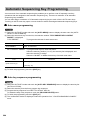
Automatic Sequencing Key Programming ······················································································· 294
Auto menu programming ········································································································· 294
Auto key sequence programming ···························································································· 294
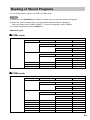
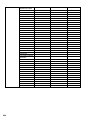
Reading of Stored Programs ··········································································································· 295
PGM 1 mode ···························································································································· 295
PGM 2 mode ···························································································································· 295
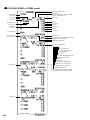
Sample Reports of Stored Program Reading ·················································································· 297
11. Data Saving or Loading (SD Card) ·································································································· 323
Insertion and Removing an SD Memory Card ················································································· 323
SD card formatting ··················································································································· 323
Folder code programming ········································································································ 323
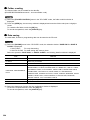
Folder creating ························································································································· 324
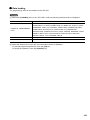
Data saving ······························································································································ 324
Data loading ····························································································································· 325
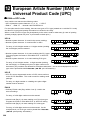
12. European Article Number (EAN) or Universal Product Code (UPC) ············································ 326
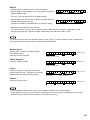
EAN or UPC code ···························································································································· 326
Add-on code ···································································································································· 328
EAN file ············································································································································ 328
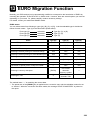
13. EURO Migration Function ················································································································ 329
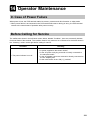
14. Operator Maintenance ······················································································································ 331
In Case of Power Failure ················································································································· 331
Before Calling for Service ················································································································ 331
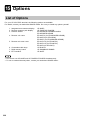
15. Options ·············································································································································· 332
List of Options ·································································································································· 332
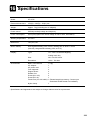
16. Specifications ···································································································································· 333
6
1 Part Names and Functions
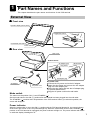
This chapter describes the part names and functions of this POS terminal.
External View
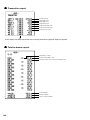
■ Front view
Operator display (touch panel)
Brightness control
Dark
Bright
Contactless clerk switch
Power indicator
■ Rear view
Side cover
Bottom cabinet
AC adapter jack
Mode switch
Plug frame
2
2
3
4
AC adapter plug
AC adapter
1
AC power cord
AC power cord
1 Connect the AC power cord to the AC adapter.
2 Open the plug frame and connect the AC adapter
plug to the AC adapter jack.
3 Close the plug frame and lock the AC adapter plug
to prevent disconnection.
4 Plug the AC power cord into the wall outlet.
Mode switch
The switch has the position ON ( I ) and STANDBY ( ).
Set the mode switch to the ON ( I ) position after the terminal has been plugged into the wall outlet.
The STANDBY ( ) position locks all operations of the POS terminal. When you select this position, the
screen will disappear.
Power indicator
When the mode switch is set to the ON ( I ) position with the POS terminal plugged in, the power indicator
at the lower right corner of the LCD panel will light up. When the mode switch is set to the STANDBY ( )
position or the POS terminal is unplugged, the power indicator will light out. The power indicator will remain
on while the display’s backlight is off.
7
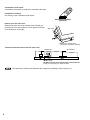
Contactless clerk switch
Contactless clerk switch is used with contactless clerk keys.
Contactless clerk key
Put the key to the contactless clerk switch.
Contactless clerk key
(optional)
How to open the side cover
While moving the side cover release lever towards you,
pull the side cover and rotate the cover upward as shown
in the illustration at the right.
Side cover
3
2
1 Side cover release lever
(located at the bottom cabinet)
Terminal Connection/slot inside the side cover
RS232 port
SD card slot
RESET switch
DO NOT move the reset switch unless instructed to do.
Doing so may damage or delete the data.
The application software will determine the usage and availability of the external port.
8
Displays
This POS terminal is equipped with a color LCD operator display. The operator display is a touch panel.
Operations can be performed by touching the screen (that shows keys or items in the window) of the
operator display.
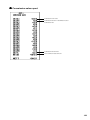
■ Operator display (touch panel)
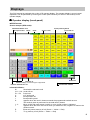
• Initial screen
Screen example (REG mode):
Information/Status area
Receipt window
Mode
Touch-panel keyboard
Clerk
Screen name
Terminal no.
Numeric entry: An entered figure is appeared.
Product name/Version no.
Level shift no.
Date/Time
Function bar window
Information/Status:
M:
Received the electronic mail
L01 – L10: Level shift no.
P1 – P8:
Price level
V:
VAT shift mode
R:
Receipt switch off
r:
Receipt shift symbol
X:
Appears when the cash in drawer exceeds the programmed sentinel amount.
The sentinel check is performed for the total cash in drawer.
1 - 3:
When a VMP file used memory is 90% or more, its file number is indicated.
!:
Appears when the stock of the PLU which you entered is zero, negative or reaches the
minimum stock.
E:
Electronic journal memory is full. (Green ➝ Yellow ➝ Red)
T:
T-Log memory is full. (Green ➝ Yellow ➝ Red)
9
Ten key pad window:
The Ten key pad is used to enter various numerical data (e.g. clerk code, amounts, quantities).
When numeric entries are necessary (e.g. secret code is forced), the ten key pad pops up automatically.
Clerk code/name
Numeric entry: The entry displays here.
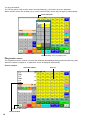
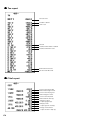
• Registration screen
The registration screen consists of several sub-windows (Receipt/Menu/Category/Function/Ten key pad).
When the cashier is signed-on, a registration screen is displayed automatically.
Screen example:
Information/Status
Function bar window
Receipt window
10
Item key
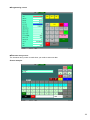
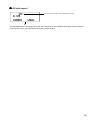
• Programming screen
• Character entry screen
The character entry screen is used when you need to enter text data.
Screen example:
11
■ Customer display
There are two customer display options available for the UP-3515.
The pole type customer display or an integrated type rear display can be installed.
■ Screen save mode
The screen save function starts when the POS terminal is left idle for an extended period of time. You can
program the time for which your POS terminal should keep the normal status before it goes into the screen
saver mode. If the time has not been preset, the screen saver will be started after 100 minutes.
To exit the screen saver mode, touch anywhere on the touch panel (a secret code may be required at this
time).
12
Clerk Keys
This POS terminal allows the operator to use the following four clerk identification systems:
• Contactless clerk keys (max. 126 clerks)
• Clerk code entry (max. 255 clerks)
• Clerk entry keys (max. 10 clerks)
• WMF clerk keys (max. 127 clerks)*
* The WMF clerk key is not a SHARP product.
The standard POS terminal comes with a combination of the contactless clerk key and clerk code entry
systems by default. If you want to change the clerk identification system, contact your authorized SHARP
dealer.
Contactless clerk keys (optional)
Put one of the contactless clerk keys to the clerk switch.
Clerk code entry (1 through 9999)
Enter the clerk code by using the following procedure:
(XXXX: Clerk code) ➝ [CLK#] (Sign On)
Clerk entry keys
➝ [CLK n] (Sign On)
These keys identify clerks. Touch any one of these keys.
WMF clerk keys
Put one of the WMF clerk keys in the WMF clerk switch.
13
2
Before Operating the POS
Terminal
This chapter describes those steps required prior to using the POS terminal for the first time.
Display Adjustment
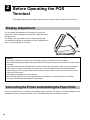
You can adjust the brightness of the display by using the
brightness control (to adjust the brightness, rotate the dial to
the right or left).
The display may be positioned for the best viewing angle.
The allowable tilt angle of the display is within 53 degrees as
shown in the illustration at the right.
53˚
CAUTION:
• Do not pull the display beyond the maximum tilt angle nor apply excessive pressure to the display.
When adjusting the display, hold the body of the terminal when pulling the display of the terminal to minimize terminal
movement.
• The LCD module built in this POS terminal is manufactured with highly precise technology. However bright pixels or
blank pixels may appear. Occasionally, an irregular colour or uneven brightness may occur depending on the
display settings or the view angle. Please note that this type of phenomena is common for LCDs and may not be a
malfunction of the system.
• The backlight in the display is a consumable part.
When the LCD display can no longer be adjusted and becomes darker, you should replace the LCD module.
Consult your authorized SHARP dealer for further details.
Connecting the Printer and Installing the Paper Rolls
This POS terminal can be configured with multiple types of printers. For specific instructions related to the
handling and care of the printer, please refer to the applicable printer’s instruction manual.
14
3 Selecting an Operating Mode
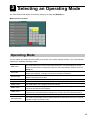
The POS terminal will display the following listing by touching the [MODE] key.
Mode selection window:
Operating Mode
You can select any mode other than REG from the list in the mode selection window. Your POS terminal
supports the following operating modes:
REG mode
This mode allows you to enter various sales information. The mode selection window
does not list this mode. To select this mode from the mode selection window, touch the
[EXIT] key.
OFF mode
This mode locks all operations of the POS terminal. When you select this mode, the
window will disappear. Touching any key turns the POS terminal ON.
OP X/Z mode
This mode allows clerks to take X or Z reports on their sales information. It can also be
used for employee time function.
X1/Z1 mode
This mode is used to take various daily reports (X1/Z1 reports).
X2/Z2 mode
This mode is used to take various weekly or monthly reports (X2/Z2 reports).
PRICE mode
This mode allows you to program unit price of PLUs.
PGM1 mode
This mode allows you to program those items which need to be changed often such as
unit prices and discount percentages.
PGM2 mode
This mode allows you to program those items which can be programmed in the PGM1
mode and do not require frequent changes such as date, time, and terminal functions.
AUTO KEY mode
This mode allows you to program AUTO menu keys and automatic sequencing keys.
SD CARD mode
This mode provides data communications between the POS terminal and your personal
computer using a SD memory card.
15
Mode Selection
■ Selecting a mode
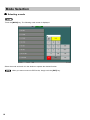
Touch the [MODE] key. The following mode screen is displayed.
Select the mode and touch it in the window to operate the desired function.
When you want to enter the REG mode, simply touch the [EXIT] key.
16
4 Prior to Making Entries
Preparations for Entries
Ensure that all printers in your system have adequate paper rolls prior to beginning entries. For more
information, please refer to the applicable printer’s manual.
Error Warning
In the following examples, your POS terminal will go into an error state accompanied with a warning beep
and the error message on the display. Clear the error state by touching the [CLEAR] key and then take the
proper action to remedy the problem.
• When you make an error in key operation:
Clear the error and try the entry again.
• When you make an entry beyond a programmed amount entry limit:
Check to see if the entered amount is correct. If it is correct, contact your manager.
• When an including-tax subtotal exceeds eight digits:
Clear the error message by touching the [CLEAR] key and then touch a media key to finalize the
transaction.
17
Entering a Secret Code
When a secret code has been set for the assigned clerk, you must enter the secret code and touch the
[ENTER] key.
18
5 Entries
Function Key Description
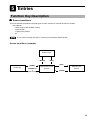
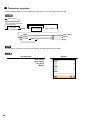
■ Screen transitions
This POS terminal provides the several types of basic screens for various functions or modes.
For example:
· REG mode screen (HOME screen)
· Mode screen
· Payment key screen
etc.
If you want to change the layout, consult your authorized SHARP dealer.
Screen transitions (example)
Mode screen
▲
[MODE]
[EXIT]
▲
▲
▲
[SCREEN n]
or
{screen no. entry}
REG mode screen
(Home)
[HOME]
▲
Screen (n)
[PAY]
▲
[HOME]
Payment key
screen
19
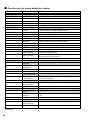
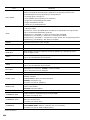
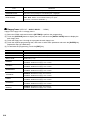
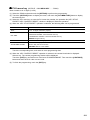
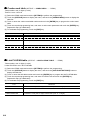
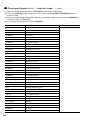
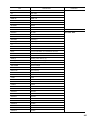
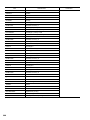
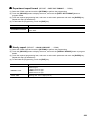
■ Function key list (using default key labels)
Classification
Description
Function
TEN KEY
0 through 9
Used to enter a numeric data (0 through 9).
00
000
•
X/QTY
Used to enter a numeric data (00).
Used to enter a numeric data (000).
Decimal point key
Multiplication key
HOME
CANCEL (or EXIT)
CLEAR
MODE
▲ (Up)
(Down)
(Left)
(Right)
ENTER
PAGE_UP
PAGE_DOWN
Used to return to HOME keyboard screen.
Used to cancel your current operation.
Used to clear the entered data and the error messages.
Used to go to MODE selection window.
Used to control the cursor (up arrow).
Used to control the cursor (down arrow).
Used to change the keyboard.
Used to change the keyboard.
Used to accept entered data.
Used to scroll page up.
Used to scroll page down.
Used to backs up the cursor for deleting the character or
figure at the left of the cursor.
Used to delete a character or figure in the cursor position.
SYSTEM
▲
▲
▲
BACK_SPACE
DELETE
SCREEN
SCREEN
SCREEN3 through
SCREEN 30
SCREEN#
Go to SCREEN(n). (n: 3 - 30)
Used to enter the screen number.
BACK
Back to the previous screen.
FUNCTION MENU
FUNC_MENU01 through
FUNC_MENU30
AUTO MENU
Used to display the function menu (nn).
(nn: 01 through 30)
AUTO_MENU1 through
AUTO_MENU6
PAY
Used to display the auto-key menu (nn). (nn: 1 through 6)
Used to display the payment screen.
ITEM
LEVEL
LEVEL1 through
LEVEL10
LEVEL#
Used to shift the direct PLU key level (level 1 through
10).
Used to enter the direct PLU key level number.
PRICE
PRICE_SHIFT1 through Used to shift the price level (level 1 through 8).
PRICE_SHIFT8
PRICE_SHIFT#
Used to enter the price level shift number.
(Continued)
20
Classification
Description
Function
PLU MENU
PLU_MENU01 through
PLU_MENU50
Used to display the PLU menu (nn).
(nn: 01 through 50)
PLU_EAN
DEPT#
Specified item(PLU/EAN) number
Used to enter the department number.
SCALE
OPEN _TARE
Scale entry
Scale entry, tare weight entry
WITH
WITHOUT
Add tied PLU for combo/set PLU.
Delete tied PLU from combo/set PLU.
C NEXT
INQ
Used to skip the next table of condiments.
PLU price inquiry
PRICE_CHANGE
AMOUNT
Change the price of PLU
Used to enter the amouint.
HALF_PINT
CRATE
Used to perform the half pint entry.
CRATEnn
CRATE#
Used to perform the crate(nn) entry. (nn: 01 through 99)
Used to enter the crate number (nn). (nn: 01 through 99)
ITF
Used to enter the ITFcode.
[+]
[-]
Item correction (add)
Item correction (delete)
REFUND
RETURN
Refund item
Return item
WASTE
%
Waste mode
%n
(-)
Discount or markdown by fixed rate (n: 1 - 9)
(-) n
GROUP DISCOUNT%
Discount or markdown by amount (n: 1 - 9)
GROUP_DISC% nn
Group discount (nn: 01 - 10)
FUNCTION
GROUP DISCOUNT
SHIFT
GR. DISC_SHIFT n
FREE TEXT
Group discount shift (n: 1 - 10)
TEXT nn
TEXT #
Free text (fixed number) (nn: 01 - 99)
Free text (specified number)
RA
RA2
Received on account
Received on account 2
PO
PO2
Paid out
Paid out 2
NO SALE
No sale
#
Non-add code
G.C.COPY
Guest check copy
(Continued)
21
Classification
Description
Function
PAYMENT
CASH_TOTAL
Cash
CASH
CASH n
Cash (n: 2 -5)
CHECK
CHECK
Check
CHECK n
Check (n: 2 - 5)
CREDIT
CREDIT n
Credit (n: 1 - 9)
EXCHANGE
EXCH n
Used to creates a subtotal in foreign currency (n: 1 - 9).
CASH_TIP
Used to enter the cash tip.
NONCASH_TIP
Used to enter the non-cash tip.
TIP_PAID
Used to execute the tip paid function.
VAT
Used to enter the manual VAT.
VATSFT_ITEM
Used to enter the VAT shift for item.
VATSFT_TRANS.
Used to enter the VAT shift for transaction.
SUBTOTAL
Used to display subtotals.
DIFFER_ST
Used to calculate the difference subtotal.
REMOVE_SERV.CHG
Service charge exemption key
CLK#
Clerk number entering
PERSONNEL
CLERK
CLKnn
Clerk (nn: 01 - 10)
CSR#
Casier number entering
CASHIER
CSR n
Cashier (n: 1 - 10)
MGR#
Manager number entering
EMPL#
Employee number entering
TIME_IN
Used to enter time-in operation.
TIME_OUT
Used to enter time-out operation.
BREAK
Used to enter break-in/out operation.
WORK_CHANGE
Used to specify working time shift change.
OPENED_GLU
Go to opened GLU list screen.
OPENED_ROOM
Go to opened ROOM GLU list screen.
GLU
(Continued)
22
GLU
Used to lookup the guest check.
ROOM
Used to enter the ROOM GLU.
NBAL
Used to finalize the guest check temporarily.
FINAL
DEPOSIT
Used to finalize the guest check temporarily (with the tax
calculation).
Used to enter the deposit.
DEPOSIT_REFUND
Used to refund the deposit.
Classification
Description
Function
GUEST#
Used to enter the guest number.
RECALL_TRANS.
Used to re-call the corresponding transaction.
INTER_MED.
Intermediate GLU key
B.T.
Bill totalizing
B.S._ITEM
Bill separation by items
B.S._AMOUNT
Bill separation by amount
B.S._PERSON
Bill separate by person
B.S._RETURN
Used to return B.S. mode.
TRANS_OUT
Used to enter the transfer-out function.
TRANS_IN
Used to enter the transfer-in function.
RCPT
Used to print the receipt after transaction.
PRINTING
RCPT_ON/OFF
Used to switch the receipt printing state (ON/OFF).
CUST_BILL
Customer bill printing
C. BILL
Used to enter the cumulated bill
E. BILL
Entertainment bill printing
G.C._RCPT
Bill on receipt
RCPT_SHIFT
Receipt shift, change print type
SORT_SHIFT
Temporary change sort group
VP
Validation printing
BILL
Used to print the bill.
CHECK_PRINT
Check printing
CUSTOMER
Used for customer management.
CUST_CHARGE
Customer charge key
NAME& ADD
Used to enter name/address data.
ADVANCE_ORDER
Advance order key (customer ordering)
CREDIT_ORDER
Credit order key (customer ordering)
CORRECT_ORDER
Correct order key (customer ordering)
CUSTOMER
OTHER
AUTO
AUTO
Auto key
AUTO n
Auto key (n: 2 - 99)
VIP
VIP_SALE n
VIP sales (n: 1 - 3)
POINT_REDEMP
Point redemption key
MASK
Mask key
BANK_CONSOLE
Bank console key
E-MAIL
E-mail key
23
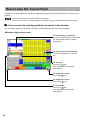
How to Use the Touch Panel
Operations can be performed by touching corresponding key(s) and/or selecting option(s) or Item(s) in the
window.
Do not use extreme force when touching the display.
Do not use any sharp or pointed objects, and avoid using your fingernails to touch the display.
■ Cursor control by touching option(s) or item(s) in the window
You can select option(s) or item(s) by touching corresponding line(s) in the window as follows.
• Example (registration screen)
To select item(s) or option(s):
Touch the desired line(s). (If you touch
the selected item again, it will be
deselected.)
To enter the item or function key:
Touch the desired item or function
key.
To scroll up:
Touch the [ ] key.
(The selected item will remain
unchanged.)
To change the screen:
Touch the [ ] key.
To change the screen:
Touch the [ ] key.
To scroll down:
Touch the [ ] key.
(The selected item will remain
unchanged.)
24
Clerk Assignment (Sign-on/Sign-off)
■ Clerk assignment
Prior to any item entries, a clerk must enter his/her clerk codes into the POS terminal. On your POS
terminal, You can use any of the following procedures to assign your clerk code.
• Contact-less clerk key
This type allows clerks to be assigned by setting corresponding contact-less clerk keys.
* The contact-less clerk key is optional.
• Clerk code entry system
If you select this type, clerks can be assigned by entering his or her clerk code with the [CLK#] key in
advance.
• Clerk entry key system
If you select this type, clerks can be assigned by touching corresponding clerk keys ([CLK n]) on the
keyboard.
• Clerk card entry system
This type allows clerks to be assigned by scanning the clerk card.
* The card reader is optional.
<Sign on operation>
1) Clerk code (max. 4 digits) ➝ [CLK#] (Sign On) / or touching the [CLK n] key / or setting the contact-less
clerk key
2) Entering the password (if required)
3) Entering the drawer number (if required)
25
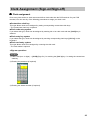
<Sign-off operation>
After each transaction, the clerk will be signed-off automatically if the terminal has been programmed for
the clerk code entry as “automatic clerk sign-off mode”.
If the terminal is not programmed to require a clerk code to be entered for each transaction operation
(“clerk stay-down mode”), transaction operations are continued with the same clerk code, the clerk code
does not need to be re-entered. In this case, touch the [CLK#] to sign-off.
➝ [CLK#]
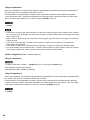
• Contact-less clerk key type has the priority over the clerk code entry type, that is, while a clerk is signed
on by the clerk code entry type, the other clerk can sign on by the contact-less clerk key type (the former
clerk is signed off).
• While a clerk is signed on by the contact-less clerk key type, the other clerk can not sign on by the clerk
code entry type.
• In the clerk code entry type, if another clerk is signed on while a clerk is signed on, the latter will
automatically be signed off.
• If you want to enter a clerk code before every transaction, consult your authorized SHARP dealer.
• Your POS terminal can provide the clerk + cashier system instead of current system (clerk only system).
If you want to change the system, please consult your authorized SHARP dealer.
Cashier assignment (Clerk + cashier system)
<Sign on operation>
1) Cashier code (max. 4 digits) ➝ [CSR#] (Sign On) / or touching the [CSR n] key
2) Entering the password (if required)
3) Entering the drawer number (if required)
<Sign-off operation>
After each transaction, the cashier will be signed-off automatically if the terminal has been programmed for
the cashier code entry as “automatic cashier sign-off mode”.
If the terminal is not programmed to require a cashier code to be entered for each transaction operation
(“cashier stay-down mode”), transaction operations are continued with the same cashier code, the cashier
code does not need to be re-entered. In this case, touch the [CSR#] to sign-off.
➝ [CSR#]
26
Item Selection from the Menu
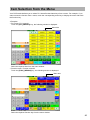
Your POS terminal allows you to select PLU items/functions/auto-keys from a menu. For example, if you
want to enter the function from a menu, touch the corresponding menu key to display the menu and touch
the function key.
<Example>
• PLU menu: PLU menu01
Touch the [PLU_MENU01] key, the following window is displayed.
Menu title
Select the required item from the menu window.
• Function menu: Function menu03
Touch the [FUNC_MENU03] key, the following window is displayed.
Menu title
Select the required function key from the menu window.
27
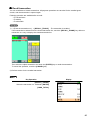
Starting Cash Memory Entry
If you enter the amount of currency for the starting amount in the drawer before entry operations, you can
separate that amount from the sales amount when reports are generated.
Your POS terminal can be programmed to enforce the entry of starting cash into memory.
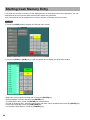
1) Touch the [OPXZ] mode to display the SCM job menu screen.
2) Touch the [SCM+] or [SCM-] key to open the drawer and to display the SCM entry window.
•
•
•
•
•
•
28
Select the money type by touching item or using the [ENTER] key.
Enter quantities of money and touch the [ENTER] key.
To terminate the entry, touch the [ENTER] key at the last line.
To void an incorrect entry, select the money type and enter correct quantities and touch the [ENTER] key.
To print the SCM data, touch the [CONTINUE] key.
To cancel the SCM function, touch the [CANCEL] key.
Item Entries
■ Registration screen
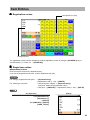
Item (direct PLU) key
Receipt window
The registration screen can be changed to another registration screen by using the [SCREEN n] key or
screen# entries (➝ Screen no. ➝ [SCREEN#]).
■ Single item entries
• Department entries
Enter a unit price and touch a department key.
If you use a programmed unit price, touch a department key only.
For “using a programmed unit price”: ➝ [Department key]
➝ Department code (1 - 99) ➝ [DEPT#]
For “entering a unit price”:
➝ Unit price (max. 8 digits) ➝ [Department key]
(unit price: within the programmed HALO)
➝ Unit price ➝ [AMOUNT] ➝ Department code (1 - 99) ➝ [DEPT#]
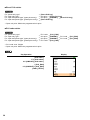
Key Operation
Display
1200 [Department 6 ]
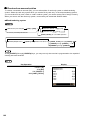
[Department 7 ]
2 [DEPT#]
600 [AMOUNT] 5 [DEPT#]
[CASH_TOTAL]
29
• Direct PLU entries
For “preset only type”:
For “open only type”:
For “open and preset type” (open price entry):
For “open and preset type” (preset price entry):
➝
➝
➝
➝
[Direct PLU key]
Unit price ➝ [Direct PLU key]
Unit price ➝ [AMOUNT] ➝ [Direct PLU key]
[Direct PLU key]
• Open unit price: Within the programmed unit price
• PLU code entries
For “preset only type”:
For “open only type”:
For “open and preset type” (open price entry):
For “open and preset type” (preset price entry):
➝
➝
➝
➝
PLU code ➝ [PLU_EAN]
Unit price ➝ [AMOUNT] ➝ PLU code ➝ [PLU_EAN]
Unit price ➝ [AMOUNT] ➝ PLU code ➝ [PLU_EAN]
PLU code ➝ [PLU_EAN]
• PLU code: max. 5 digits
• Open unit price: Within the programmed unit price
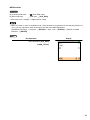
Key Operation
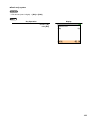
[PLU 00001 ]
570 [PLU 00002 ]
860 [AMOUNT] [PLU 00001 ]
1 [PLU_EAN]
600 [AMOUNT] 3 [PLU_EAN]
[CASH_TOTAL]
30
Display
• EAN entries
By scanning EAN code: ➝
By EAN code entry:
(Scan EAN code)
➝ EAN code ➝ [PLU_EAN]
• EAN code: max. 13 digits + 5 digits (add-on code)
• When you enter or scan an undefined code, (if the terminal is programmed for the learning function as
“yes”,) you are required to enter its unit price and the associated department.
(Undefined EAN entry) ➝ Unit price ➝ [ENTER] ➝ Dept. code ➝ [ENTER] ➝ (Delete/ no delete
selection) ➝ [ENTER]
Key Operation
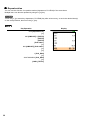
Display
4901780438532 [PLU_EAN]
[CASH_TOTAL]
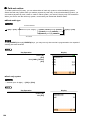
31
■ Repeat entries
You can use this function for repetitive entries (department, PLU/EAN) of the same items.
Multiple items can also be repeated by using the [ + ] key.
Touch the [ + ] (or same key: department, PLU/EAN) key after an item entry, or touch the desired item(s)
on the receipt window, then touch the [ + ] key.
Key Operation
1200 [Department 6 ]
[+]
600 [AMOUNT] 5 [DEPT#]
[DEPT#]
[DEPT#]
[PLU 00001 ]
[+]
860 [AMOUNT] [PLU 00001 ]
[+]
[+]
1 [PLU_EAN]
[+]
4901780438532 [PLU_EAN]
[+]
[CASH_TOTAL]
32
Display
■ Multiplication entries
Use this feature when you need to enter two or more of the same items.
This feature helps you when you sell multiples of items or need to enter quantities that contain decimals.
When the kitchen printer is used under “Issuing S/D receipts by the number of times of multiplication: Yes”
programming, the number of multiplier may be limited by “Maximum number of ticket issuing” programming.
• Department entries
For “using a programmed unit price”: ➝ Q’ty ➝ [X/QTY] ➝ [Department key]
➝ Q’ty ➝ [X/QTY] ➝ Department code (1 - 99) ➝ [DEPT#]
For “entering a unit price”:
➝ Q’ty ➝ [X/QTY] ➝ Unit price (max. 8 digits) ➝ [Department key]
➝ Q’ty ➝ [X/QTY] ➝ Unit price ➝ [AMOUNT] ➝ Deprt. code ➝
[DEPT#]
• Q’ty: Up to 4 digits integer + 3 digits decimal
• Unit price: Less than a programmed upper limit
• Q’ty x unit price: Up to 8 digits
• Direct PLU entries
< FF method (for speedy entries) >
For “preset only type”:
➝ Q’ty ➝ [Direct PLU key]
For “open and preset type” (preset price entry): ➝ Q’ty ➝ [Direct PLU key]
< Normal method >
For “preset only type”:
For “open only type”:
For “open and preset type” (open price entry):
For “open and preset type” (preset price entry):
➝
➝
➝
➝
Q’ty ➝ [X/QTY] ➝ [Direct PLU key]
Q’ty ➝ [X/QTY] ➝ Unit price ➝ [Direct PLU key]
Q’ty ➝ [X/QTY] ➝ Unit price ➝ [Direct PLU key]
Q’ty ➝ [X/QTY] ➝ [Direct PLU key]
• Q’ty: Up to 4 digits integer + 3 digits decimal
• Open unit price: Within the programmed upper limit
• Q’ty x unit price: Up to 8 digits
• PLU code entries
For “preset only type”: ➝ Q’ty ➝ [X/QTY] ➝ PLU code ➝ [PLU_EAN]
For “open only type”: ➝ Q’ty ➝ [X/QTY] ➝ Unit price ➝ [AMOUNT] ➝ PLU code ➝ [PLU_EAN]
For “open and preset type” (open price entry):
➝ Q’ty ➝ [X/QTY] ➝ Unit price ➝ [AMOUNT] ➝ PLU code ➝ [PLU_EAN]
For “open and preset type” (preset price entry):
➝ Q’ty ➝ [X/QTY] ➝ PLU code ➝ [PLU_EAN]
•
•
•
•
PLU code: max. 5 digits
Q’ty: Up to 4 digits integer + 3 digits decimal
Open unit price: Within the programmed upper limit
Q’ty x unit price: Up to 8 digits
33
• EAN entries
By scanning EAN code: ➝ Q’ty ➝ [X/QTY] ➝
(Scan EAN code)
By EAN code entry:
➝ Q’ty ➝ [X/QTY] ➝ EAN code ➝ [PLU_EAN]
• EAN code: max. 13 digits + 5 digits (add-on code)
• Q’ty: Up to 4 digits integer + 3 digits decimal
• Q’ty x unit price: Up to 8 digits
• When you enter or scan an undefined code, (if the terminal is programmed for the learning function as
“yes”,) you are required to enter its unit price and the associated department.
(Undefined EAN entry) ➝ Unit price ➝ [ENTER] ➝ Dept. code ➝ [ENTER] ➝ (Delete/no delete
selection) ➝ [ENTER]
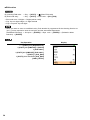
Key Operation
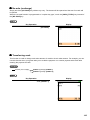
2 . 5 [X/QTY] 650 [Department 6 ]
5 [X/QTY] 600 [AMOUNT] 5 [DEPT#]
2 [PLU 00001 ]
2 [X/QTY] 860 [AMOUNT] [PLU 00001 ]
2 [X/QTY] 1 [PLU_EAN]
3 [X/QTY] 4901780438532 [PLU_EAN]
[CASH_TOTAL]
34
Display
■ Split-pricing entries
You will use this function when your customer wants to purchase more or less than the base quantity of a
loose item.
• Department entries
For “using a programmed unit price”:
➝ Selling q’ty ➝ [X/QTY] ➝ Base q’ty ➝ [X/QTY] ➝ [Department key]
➝ Selling q’ty ➝ [X/QTY] ➝ Base q’ty ➝ [X/QTY] ➝ Dept. code ➝ [DEPT#]
For “entering a unit price”:
➝ Selling q’ty ➝ [X/QTY] ➝ Base q’ty ➝ [X/QTY] ➝ Unit price ➝ [Department key]
➝ Selling q’ty ➝ [X/QTY] ➝ Base q’ty ➝ [X/QTY] ➝ Unit price ➝ [AMOUNT] ➝ Deprt. code ➝
[DEPT#]
• Selling q’ty: Up to 4 digits integer + 3 digits decimal
• Base q’ty: Up to 2 digits integer
• Direct PLU entries
< FF method (for speedy entries) >
For “preset only type”:
➝ Selling q’ty ➝ [X/QTY] ➝ Base q’ty ➝ [Direct PLU key]
For “open and preset type” (preset price entry): ➝ Selling q’ty ➝ [X/QTY] ➝ Base q’ty ➝ [Direct PLU key]
< Normal method >
For “preset only type”: ➝ Selling q’ty ➝ [X/QTY] ➝ Base q’ty ➝ [X/QTY] ➝ [Direct PLU key]
For “open only type”: ➝ Selling q’ty ➝ [X/QTY] ➝ Base q’ty ➝ [X/QTY] ➝ Unit price ➝ [Direct PLU key]
For “open and preset type” (open price entry):
➝ Selling q’ty ➝ [X/QTY] ➝ Base q’ty ➝ [X/QTY] ➝ Unit price ➝ [Direct PLU key]
For “open and preset type” (preset price entry):
➝ Selling q’ty ➝ [X/QTY] ➝ Base q’ty ➝ [X/QTY] ➝ [Direct PLU key]
• Selling q’ty: Up to 4 digits integer + 3 digits decimal
• Base q’ty: Up to 2 digits integer
• When you use a programmed base q’ty, skip the base q’ty entry (Base q’ty ➝ [X/QTY]).
• PLU code entries
For “preset only type”: ➝ Selling q’ty ➝ [X/QTY] ➝ Base q’ty ➝ [X/QTY] ➝ PLU code ➝ [PLU_EAN]
For “open only type”:
➝ Selling q’ty ➝ [X/QTY] ➝ Base q’ty ➝ [X/QTY] ➝ Unit price ➝ [AMOUNT] ➝ PLU code ➝ [PLU_EAN]
For “open and preset type” (open price entry):
➝ Selling q’ty ➝ [X/QTY] ➝ Base q’ty ➝ [X/QTY] ➝ Unit price ➝ [AMOUNT] ➝ PLU code ➝ [PLU_EAN]
For “open and preset type” (preset price entry):
➝ Selling q’ty ➝ [X/QTY] ➝ Base q’ty ➝ [X/QTY] ➝ PLU code ➝ [PLU_EAN]
• Selling q’ty: Up to 4 digits integer + 3 digits decimal
• Base q’ty: Up to 2 digits integer
• When you use a programmed base q’ty, skip the base q’ty entry (Base q’ty ➝ [X/QTY]).
35
• EAN entries
By scanning EAN code: ➝ Selling q’ty ➝ [X/QTY] ➝ Base q’ty ➝ [X/QTY] ➝
(Scan EAN code)
By EAN code entry:
➝ Selling q’ty ➝ [X/QTY] ➝ Base q’ty ➝ [X/QTY] ➝ EAN code ➝ [PLU_EAN]
• Selling q’ty: Up to 4 digits integer + 3 digits decimal
• Base q’ty: Up to 2 digits integer
• When you use a programmed base q’ty, skip the base q’ty entry (Base q’ty ➝ [X/QTY]).
• When you enter or scan an undefined code, (if the terminal is programmed for the learning function as
“yes”,) you are required to enter its unit price and the associated department.
(Undefined EAN entry) ➝ Unit price ➝ [ENTER] ➝ Dept. code ➝ [ENTER] ➝ (Delete/no delete
selection) ➝ [ENTER]
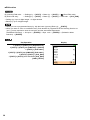
Key Operation
2 [X/QTY] 10 [X/QTY] 650 [Department 6 ]
8 [X/QTY] 5 [X/QTY] 600 [AMOUNT] 5 [DEPT#]
6 [X/QTY] 2 [PLU 00001 ]
2 [X/QTY] 5 [X/QTY] 860 [AMOUNT] [PLU 00001 ]
2 [X/QTY] 8 [X/QTY] 1 [PLU_EAN]
3 [X/QTY] 4 [X/QTY] 4901780438532 [PLU_EAN]
[CASH_TOTAL]
36
Display
■ Successive multiplication entries
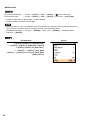
This function is practical for example when you enter a sale of items sold by area (square meter).
• Department entries
For “using a programmed unit price”:
➝ Length ➝ [X/QTY] ➝ Width ➝ [X/QTY] ➝ [Department key]
➝ Length ➝ [X/QTY] ➝ Width ➝ [X/QTY] ➝ Dept. code ➝ [DEPT#]
For “entering a unit price”:
➝ Length ➝ [X/QTY] ➝ Width ➝ [X/QTY] ➝ Unit price ➝ [Department key]
➝ Length ➝ [X/QTY] ➝ Width ➝ [X/QTY] ➝ Unit price ➝ [AMOUNT] ➝ Deprt. code ➝
[DEPT#]
• Length or width: Up to 4 digits integer + 3 digits decimal
• Unit price (per m2): Less than a programmed upper limit
• Length x Width x Unit price: up to 8 digits
• Direct PLU entries
For “preset only type”: ➝ Length ➝ [X/QTY] ➝ Width ➝ [X/QTY] ➝ [Direct PLU key]
For “open only type”: ➝ Length ➝ [X/QTY] ➝ Width ➝ [X/QTY] ➝ Unit price ➝ [Direct PLU key]
For “open and preset type” (open price entry):
➝ Length ➝ [X/QTY] ➝ Width ➝ [X/QTY] ➝ Unit price ➝ [Direct PLU key]
For “open and preset type” (preset price entry:
➝ Length ➝ [X/QTY] ➝ Width ➝ [X/QTY] ➝ [Direct PLU key]
• Length or width: Up to 4 digits integer + 3 digits decimal
• Unit price (per m2): Less than a programmed upper limit
• Length x Width x Unit price: up to 8 digits
• PLU code entries
For “preset only type”: ➝ Length ➝ [X/QTY] ➝ Width ➝ [X/QTY] ➝ PLU code ➝ [PLU_EAN]
For “open only type”:
➝ Length ➝ [X/QTY] ➝ Width ➝ [X/QTY] ➝ Unit price ➝ [AMOUNT] ➝ PLU code ➝ [PLU_EAN]
For “open and preset type” (open price entry):
➝ Length ➝ [X/QTY] ➝ Width ➝ [X/QTY] ➝ Unit price ➝ [AMOUNT] ➝ PLU code ➝ [PLU_EAN]
For “open and preset type” (preset price entry):
➝ Length ➝ [X/QTY] ➝ Width ➝ [X/QTY] ➝ PLU code ➝ [PLU_EAN]
• Length or width: Up to 4 digits integer + 3 digits decimal
• Unit price (per m2): Less than a programmed upper limit
• Length x Width x Unit price: up to 8 digits
37
• EAN entries
By scanning EAN code: ➝ Length ➝ [X/QTY] ➝ Width ➝ [X/QTY] ➝
(Scan EAN code)
By EAN code entry:
➝ Length ➝ [X/QTY] ➝ Width ➝ [X/QTY] ➝ EAN code ➝ [PLU_EAN]
• Length or width: Up to 4 digits integer + 3 digits decimal
• Length x Width x Unit price: up to 8 digits
• When you enter or scan an undefined code, (if the terminal is programmed for the learning function as
“yes”,) you are required to enter its unit price and the associated department.
(Undefined EAN entry) ➝ Unit price ➝ [ENTER] ➝ Dept. code ➝ [ENTER] ➝ (Delete/no delete
selection) ➝ [ENTER]
Key Operation
3 [X/QTY] 4 [X/QTY] 500 [Department 6 ]
2 . 5 [X/QTY] 5 [X/QTY] 600 [AMOUNT] 5 [DEPT#]
2 [X/QTY] 5 [X/QTY] 860 [PLU 00001 ]
2 . 5 [X/QTY] 4 . 5 [X/QTY] 1 [PLU_EAN]
4 [X/QTY] 1 . 5 [X/QTY] 4901780438532 [PLU_EAN]
[CASH_TOTAL]
38
Display
■ Scale entries
This function is used to sell items by weight. There are two types of weight entry systems available; auto
scale entries and manual scale entries. Auto scale entry is used when the weight is read automatically from
the connected scale (option).
In the case of manual scale entry, the weight is entered by using the ten key pad function.
• Auto scale entries
Open tare weight entry: ➝ [OPEN_TARE] ➝ Tare weight ➝ [SCALE] ➝ (Single item entry)
Tare table number entry: ➝ Tare table number ➝ [SCALE] ➝ (Single item entry)
• Open tare weight: Up to 5 digits (integer + decimal)
• Scale table number: 1 to 9
• Net weight: Up to 5 digits (integer + decimal)
• When you use a programmed tare table number, skip the tare table no. entry (➝ Tare table number ).
• When the item is programmed for “compulsory scale entry”, it is not necessary to touch the [SCALE] key.
• To issue a receipt which shows only a tare weight (Issuing the Tare receipt):
➝ [OPEN_TARE] ➝ Tare weight ➝ [SCALE] ➝ [CASH_TOTAL]
• The currency descriptor is displayed/printed when it is programmed for the CHECK.
Key Operation
Display
2 [SCALE] 650 [Department 6 ]
3 [SCALE] 1 [PLU_EAN]
[CASH_TOTAL]
• Manual scale item entry
➝ Net weight ➝ [SCALE] ➝ (Single item entry)
• Gross weight: Up to 5 digits (integer + decimal)
• The net weight is automatically calculated using the programmed tare weight.
• The currency descriptor is displayed/printed when it is programmed for the CHECK.
39
Key Operation
Display
3 [SCALE] 1 [PLU_EAN]
[CASH_TOTAL]
■ Single item cash sale (SICS)/single item finalize (SIF) entries
The operation is the same as that for normal department/PLU/EAN entries. The SICS and SIF functions
can be available only when the KP receipt type is “addition receipt type.”
• SICS entries
• This function is useful when a sale is for only one item and is for cash; such as a pack of cigarettes. This
function is applicable only to those departments that have been set for SICS or to their associated PLUs
or EANs.
• The transaction is finalized and the drawer opens as soon as you touch the department key, [DEPT#]
key, [PLU_EAN] key or the direct PLU key.
If an entry to a department, PLU or EAN set for SICS follows the ones to departments, PLUs or EANs not
set for SICS, it does not finalize and results in a normal sale.
Key Operation
350
For finishing the transaction ➝ [Department 9 ]
40
Display
• SIF entries
• If an entry to a department, PLU or EAN set for SIF follows the ones to departments, PLUs or EANs not
set for SIF, the transaction is finalized immediately as a cash sale.
• Like the SICS function, this function is available for single-item cash settlement.
Key Operation
Display
750 [Department 6 ]
350
For finishing the transaction ➝ [Department 8 ]
■ Non-turnover sales
This function is used to perform transaction other than ordinary sales (turnover) as is the case when
cigarettes or bouquets are ordered in a restaurant and the like. In this case, a clerk once pays the bill and
demands together with other payment.
It is performed by entering a department belonging to the non-turnover group or PLU belonging to the
department.
If you need this function, contact your authorized SHARP dealer.
41
Special Entries for PLU/EAN
■ Promotion function
You have a choice of either global or individual type for promotion entry.
You also need to select a promotion type from the following:
Amount discount : discounts the programmed amount.
Percent discount : discounts the amount at the programmed percent rate.
Give free item
: offers the programmed objected item for free.
Cheaper item free : offers the cheaper ones of the objected items for free.
Selling price
: changes the total amount of the registered objected items to the programmed
selling price.
For EAN item entry, you cannot enter NON-PLU type EAN code and press code.
• Global type
This function is convenient for matching several PLU/EAN items and selling them in a lump (e.g. value
meal, etc.). Operation is the same as for normal PLU/EAN. The promotion table consists of the text for the
table, a maximum of 25 objected items (selected from PLU/EAN, department or group), trip level (the
number of entries to be satisfied), promotion type and promotion detail. The promotion detail depends on
the promotion type. In the example below, amount discount is used as the promotion type.
The programmed promotion entry will be made under the following condition:
• The total quantity of the objected items meet the trip level programmed in the promotion type.
Objected items of table no. 1:
Trip level:
Promotion type:
Promotion detail:
Item-A (*2.30), Item-B (*3.10), Item-C (*2.50)
3
Amount discount
Discount amount (1.00)
<Sale 1>
Item-A
*2.30
Item-B
*3.10
Item-C
*2.50
<Sale 2>
Item-C
*2.50
Item-C
*2.50
Item-C
*2.50
Subtotal
Discount
*7.90
-1.00
Subtotal
Discount
*7.50
-1.00
Total
*6.90
Total
*6.50
In the case of <Sale 1> above
Key Operation
Treated as *2.30 item ➝ [PLU 00040 ]
Treated as *3.10 item ➝ [PLU 00041 ]
Treated as *2.50 item ➝ [PLU 00042 ]
[CASH_TOTAL]
42
Display
• Individual type
This function is convenient for matching several PLU/EAN items and selling them in a lump (e.g. value
meal etc.).
Operation is the same as for normal PLU/EAN. The promotion table consists of the text for the table, a
maximum of 25 objected items (selected from PLU/EAN, department or group), trip levels (the number of
entries to be satisfied) for each item, promotion type and promotion detail. The promotion detail depends on
the promotion type.
In the example below, percent discount is used as the promotion type.
The programmed promotion entry will be made under the following condition:
• The quantities of each of the objected items meet the corresponding trip levels programmed in the
promotion table.
Objected items of table no. 2:
Trip levels for each item:
Promotion type:
Promotion detail:
Item-A (*3.00), Item-B (*2.50), Item-C (*2.10)
Item-A (1), Item-B (1), Item-C (2)
Percent discount
Percent rate (40.00%)
<Sale 1>
Item-A
*3.00
Item-B
*2.50
Item-C
*2.10
Item-C
*2.10
<Sale 2>
Item-A
*3.00
Item-A
*3.00
Item-B
*2.50
Item-C
*2.10
Subtotal
Discount
*9.70
-3.88
Subtotal
Discount
Total
*5.82
Total
*10.60
-0.00 ← Discount is not allowed
(Q’ty of the item-C should be two.)
*10.60
In the case of <Sale 1> above
Key Operation
Display
Treated as *3.00 item ➝ [PLU 00040 ]
Treated as *2.50 item ➝ [PLU 00041 ]
Treated as *2.10 item ➝ [PLU 00042 ]
Treated as *2.10 item ➝ [PLU 00042 ]
[CASH_TOTAL]
43
■ PLU/EAN link entries
In case that you register a PLU or EAN that has any PLU linked with the PLU or EAN, the linked PLU(s) are
automatically registered together with the leading link PLU or EAN when it is registered. The print format on
the receipt depends on the programming (PRINT SELECT2 in OPTIONAL menu in PGM2 mode) as
described below.
Printing detailed information
The description texts and amounts of the leading link PLU/EAN and the linked PLUs are printed
individually.
Key Operation
Display
[PLU 00021 ]
[CASH_TOTAL]
Printing leading link PLU/EAN and total sales amount
The description text of the leading link PLU/EAN and the total sales amount of the leading link PLU/EAN
and the linked PLUs are printed.
Key Operation
Display
[PLU 00021 ]
[CASH_TOTAL]
If a discount entry is made for a link PLU/EAN entry, the discount amount is calculated based on the total
sales amount. The discount itself is given to the leading link PLU/EAN.
44
■ EAN learning function
When you enter or scan an undefined code, you are required to enter its unit price and the associated
department. The code, associated department and unit price entered are stored in the EAN file or the
dynamic EAN file and used for future EAN sales entries.
(1) Enter the EAN (by undefined EAN code). The following window will be displayed.
If the EAN code is entered by mistake, touch the [CANCEL] key and enter the correct EAN code.
(2) Enter the price and touch the [ENTER] key. The following window will be displayed.
(3) Enter the associated department number, then select the delete method.
Select “1 AUTO DELETE” when you want to exempt the EAN code entered from the non-accessed EAN
delete function (deletion by selecting DELETE option from EAN DELETE menu in Z1 mode).
• When there is no capacity remained in the file, the data is not stored in the file.
• For the text for the EAN code, the text of its associated department is applied.
• You can use the EAN learning function in the training mode. This may be convenient to practice the
scanning system.
45
■ EAN/ITF-to-PLU conversion
EAN/ITF-to-PLU conversion allows you to convert an EAN/ITF code to a PLU code.
• Link an EAN/ITF code to a PLU code in the EAN/ITF-to-PLU converting table to use this function.
• Follow the same key procedure as for ordinary EAN entries.
• The item programmed in the converting table is registered as the linked PLU.
• EAN-to-PLU conversion
Use this function to sell the same type of item marked with different EAN codes such as packs of cigarettes
(They have different EAN codes in some countries because of different package designs).
EAN code 4901234567894 linked to PLU code 19
Key Operation
Display
4901234567894 [PLU_EAN]
[CASH_TOTAL]
• ITF-to-PLU conversion
ITF (Interleaved Two of Five) is a standard distribution code usually printed on corrugated cardboard boxes.
Use this function to sell packaged items marked with ITF codes.
ITF code 1234567890123456 linked to PLU code 19
Key Operation
1234567890123456 [ITF]
[CASH_TOTAL]
46
Display
■ PLU/EAN information inquiry (view) function
You can use this function when you want to know the unit price of the PLU/EAN item during transaction.
The PLU/EAN can be registered in VIEW mode. The unit price of a PLU/EAN can be temporarily changed.
The programmed unit price is not changed.
(1) Touch the [INQ] key.
(2) Enter the PLU/EAN.
Scanning EAN code:
PLU/EAN code entry:
Direct PLU entry:
➝
(Scan EAN code)
➝ PLU or EAN code ➝ [PLU_EAN]
➝ [Direct PLU key]
The following window is displayed.
Original price
PLU information text
(3) Select one of the following operations.
Confirmation only:
Entering the PLU/EAN (by programmed price):
Entering the PLU/EAN (by override price):
Printing on the receipt:
➝
➝
➝
➝
[CANCEL]
[ENTER]
Override price ➝ [ENTER]
[PRINT]
47
■ EAN price change function
You can use this function when you need to change the preset price and/or associated department of an
EAN item. The programmed price and/or associated department is changed to the new ones.
There are two methods for change:
1. Price change mode
You can change the preset price and/or the associated department of an EAN item without entering
PGM mode.
2. Changing price during a transaction
When you has found a wrong EAN price and/or associated department upon transaction, you can
correct them at the time of transaction. With the entry of new price and/or associated department, the
preset price and/or associated department is automatically changed to the new price and/or associated
department.
(1) Touch the [PRICE_CHANGE] key, then enter the EAN item (Price Change mode).
Touch the [PRICE_CHANGE] key just after the EAN entry (during the transaction).
The following window is displayed.
If you need to cancel the price change function, touch the [CANCEL] key.
(2) Enter the price and associated department number, then touch the [ENTER] key.
(To keep the current price and department number, touch the [ENTER] key.)
For the Non-PLU type EAN codes having price info. and press codes, the prices in the codes have the
priority over the preset prices. So, for these codes, a changed price is valid only when price change is
executed.
48
■ Combo meal PLU/EAN entries
Operation is the same as that for normal PLU/EAN entries.
When a Combo meal PLU/EAN is entered, the labels of those PLUs tied to the Combo PLU/EAN are
printed automatically. The sum of all adjusted prices (of those PLUs tied to the Combo PLU) becomes the
“combo” price setting.
Key Operation
Display
[PLU 00011 ]
[CASH_TOTAL]
When combo meal is registered, q’ty totalizer of the combo PLU/EAN and amount totalizer of each
tied PLU are updated.
49
■ With/without entries
This function is used to add/delete tied PLU(s) to/from a Combo PLU/EAN.
The with/without function is used to change the tied PLUs of the combo PLU/EAN in compliance with a
special request made by a guest or to meet other situations.
The following two types are available:
With: This entry adds one of the tied PLUs to combo PLU/EAN.
➝ [WITH] ➝ PLU code ➝ [PLU_EAN] ➝
➝ [WITH] ➝ [Direct PLU key] ➝
Without: This entry deletes one of the tied PLUs from combo PLU/EAN.
➝ [WITHOUT] ➝ PLU code ➝ [PLU_EAN] ➝
➝ [WITHOUT] ➝ [Direct PLU key] ➝
1) Touch the [WITH] or [WITHOUT] key and enter a tied PLU to add/delete.
Repeat this step (1) to modify tied PLUs of the combo PLU/EAN. The “with” and “without” operation is
allowed a total of 20 times.
2) Enter the combo PLU/EAN item.
Key Operation
[WITH] [PLU 00008 ]
[WITHOUT] 32 [PLU_EAN]
Combo PLU ➝
[PLU 00011 ]
[CASH_TOTAL]
50
Display
■ PLU menu keys (categories)
Items can be categorized into PLU menu keys for ease of registration.
A PLU menu key can contain both PLU items and other PLU menu keys. This can make a PLU menu tree
of choices.
When the item (direct PLU) key is programmed within the PLU menu key, touch the corresponding PLU
menu key (main PLU menu key), then select the item (or sub-PLU menu key).
(Example: ➝ [DRINK] ➝ [WINE] ➝ [WHITE] ➝ [NICE WINE] )
(Example: ➝ [DRINK] ➝ [WINE] ➝ [ROSE] ➝ [GREAT WINE] )
(Example: ➝ [DRINK] ➝ [BEER] ➝ [LIGHT] ➝ [NICE BEER] )
Main PLU
menu key
Sub-PLU
menu key
Item
51
■ PLU level shift (for direct PLUs)
This shift can double or triple the number of direct PLUs on your POS terminal without adding additional
direct PLU keys. You can use direct PLUs in ten levels by utilizing the PLU level shift number key
[LEVEL#] or the PLU level shift keys [LEVEL1] through [LEVEL10].
Level key shifts the PLU level from the other nine to the required level. (The normal level is the level 1.)
You must program your terminal in the PGM mode to select one of the two PLU level shift modes —
automatic return mode* and lock shift mode** — and decide whether to allow PLU level shift in both the
REG and MGR modes or in the MGR mode alone.
* The automatic return mode automatically shifts the PLU level back to level 1 after touching a direct PLU
key or finalizing each transaction.
** The lock shift mode holds the current PLU level until a PLU level shift key is touched.
• Automatic return mode (for PLU levels)
If your terminal has been programmed for PLU level in the automatic return mode, touch a desired PLU
level shift key before a numeric entry.
(Returning every item entry)
➝ [LEVEL2] through [LEVEL10] ➝ { Q’ty ➝ [X/QTY] } ➝ [Direct PLU key] ➝ Return to level 1
➝ Level no. (2 - 10) ➝ [LEVEL#] ➝ { Q’ty ➝ [X/QTY] } ➝ [Direct PLU key] ➝ Return to level 1
(Returning every transaction)
➝ [LEVEL1] through [LEVEL10] ➝ { Q’ty ➝ [X/QTY] } ➝ [Direct PLU key] ➝ … ➝ (Finalization) ➝
Return to level 1
➝ Level no. (1 - 10) ➝ [LEVEL#] ➝ { Q’ty ➝ [X/QTY] } ➝ [Direct PLU key] ➝ … ➝ (Finalization) ➝
Return to level 1
When you use the FF method, you need not touch the [X/QTY] key for multiplication entries.
• Lock shift mode (for PLU levels)
If your terminal has been programmed for PLU level in the lock shift mode, touch a desired PLU level shift
key before a numeric entry.
➝ [LEVEL1] through [LEVEL10] ➝ { Q’ty ➝ [X/QTY] } ➝ [Direct PLU key] ➝ Stay in the current level
➝ Level no. (1 - 10) ➝ [LEVEL#] ➝ { Q’ty ➝ [X/QTY] } ➝ [Direct PLU key] ➝ Stay in the current level
When you use the FF method, you need not touch the [X/QTY] key for multiplication entries.
52
When the POS terminal has been programmed for the automatic return mode (by one item):
Key Operation
Level 1 key ➝
Level 2 key ➝
Level 1 key ➝
Display
[PLU 00001 ]
[LEVEL2] [PLU 00051 ]
[PLU 00002 ]
[CASH_TOTAL]
When the POS terminal has been programmed for the lock shift mode:
Key Operation
Level 1 key ➝
Level 2 key ➝
Level 2 key ➝
Display
[LEVEL1] [PLU 00001 ]
[LEVEL2] [PLU 00051 ]
[PLU 00052 ]
[CASH_TOTAL]
53
■ Price level shift
Eight different price levels can be programmed for each PLU/EAN.
The price levels can be changed for PLU/EAN registrations.
You can shift the PLU/EAN price level (level 1 through 8) by utilizing the price level shift number key
[PRICE_SHIFT#] or the price shift keys [PRICE_SHIFT1] through [PRICE_SHIFT8].
You must program a price level shift mode (i.e. automatic return mode* or lock shift mode**) and the
operating modes to be used for the price level shift (i.e. both REG and MGR modes or MGR mode alone).
* The automatic return mode automatically shifts the PLU/EAN price level back to level 1 after a PLU/EAN
shift entry. You can select whether the price level should return each time you enter one item or each
time you finalize one transaction.
** The lock shift mode holds the current PLU/EAN price level until touching a price level shift key.
• Automatic return mode (for price shifts)
If your terminal has been programmed for PLU/EAN price level in the automatic return mode, touch a
desired Price level shift key before a numeric entry.
(Each item)
➝ [PRICE_SHIFT1] through [PRICE_SHIFT8] ➝ { PLU/EAN entry } ➝ Return to level 1
➝ Price level no. (1 - 10) ➝ [PRICE_SHIFT#] ➝ { PLU/EAN entry } ➝ Return to level 1
(Each transaction)
➝ [PRICE_SHIFT1] through [PRICE_SHIFT8] ➝ { PLU/EAN entry } ➝ … ➝ (Finalization) ➝ Return to
level 1
➝ Price level no. (1 - 10) ➝ [PRICE_SHIFT#] ➝ { PLU/EAN entry } ➝ … ➝ (Finalization) ➝ Return to
level 1
• Lock shift mode (for PLU levels)
If your terminal has been programmed for PLU/EAN price level in the lock shift mode, touch a desired price
level shift key before a numeric entry.
➝ [PRICE_SHIFT1] through [PRICE_SHIFT8] ➝ { PLU/EAN entry } ➝ Stay in the current level
➝ Price level no. (1 - 10) ➝ [PRICE_SHIFT#] ➝ { PLU/EAN entry } ➝ Stay in the current level
54
When the POS terminal has been programmed for the automatic return mode (by one item):
Key Operation
Price level 1 ➝
Price level 2 ➝
Price level 1 ➝
Display
[PLU 00001 ]
[PRICE_SHIFT2] [PLU 00001 ]
[PLU 00002 ]
[CASH_TOTAL]
When the POS terminal has been programmed for the lock shift mode:
Key Operation
Price level 1 ➝
Price level 2 ➝
Price level 2 ➝
Display
[PRICE_SHIFT1] [PLU 00001 ]
[PRICE_SHIFT2] [PLU 00001 ]
[PLU 00002 ]
[CASH_TOTAL]
55
■ Condiment entries
The terminal may be programmed for prompting condiment and instructions for a menu-item PLU.
Example:
When you enter a menu-item PLU, a message such as “HOWCOOK?” is prompted and a list of the
“Condiment PLUs” will appear. You must specify one of the “Condiment PLUs” such as “WELLDONE” to
meet a special order of the guest. In an example of the condiment table shown below, it is assumed that
condiment table no.1 is assigned to PLU number 21 (programmed text “STEAK”) and table no. 4 is
assigned to table no. 1 as the next table no. When you enter the PLU number 21, the message
“HOWCOOK?” will appear to prompt you to specify one of “RARE,” “MED.RARE,” and “WELLDONE.” If the
guest chooses “RARE,” select it from the list. Then the next message “POTATO?” will appear to prompt you
to specify one of “P.CHIPS,” “MASHED.P,” and “BAKED.P.” If the guest chooses mashed potato, select it.
If the guest chooses baked potato, the flavor list will appear to prompt you to specify one of “BUTTER” and
“SOUR CREAM”.
Here is an example of how to perform a condiment entry when your condiment table is as shown below.
(Example:)
PLU:
PLU
Name
Price
Condiment Table #
PLU00021
STEAK
20.00
1
PLU00038
BAKED.P
0.50
5
Condiment table:
Condiment
Table #
1
4
5
Linking
Condiment
Table #
Contents
HOWCOOK?
POTATO?
FLAVOR
4
End (nothing)
End (nothing)
Condiment PLU
PLU
Name
Price
PLU00023
RARE
0.00
PLU00025
MED.RARE
0.00
PLU00027
WELLDONE
0.00
PLU00033
P.CHIPS
0.60
PLU00037
MASHED.P
0.60
PLU00038
BAKED.P
0.50
PLU00040
BUTTER
0.00
PLU00041
SOUR CREAM
0.00
Operation:
Entry
[STEAK]
[RARE]
[MASHED.P]
Printing
STEAK
RARE
MASHED.P
20.00
0.60
The terminal will continue to operate for the condiment entry until you finish the entire condiment entry
programmed for the PLU. During the condiment entry, if you enter a normal PLU, which is not in the
condiment table, an error message will appear.
56
When the [C NEXT] key is touched, the entry skips to the next table which is programmed.
When the [CANCEL] key is touched, its condiment entry is canceled.
When you enter a PLU priced at “0.00,” only the text will be printed on the receipt.
• Single entry method
The items of the condiment table must be entered for each menu-item by one-set individually.
(Example:) 3 steaks process:
Operation
Display
Receipt window
Note
3 [Steak]
How cook?
for 1’st steak
[Rare]
Vegetable?
[Peas]
1x Steak
Rare
Peas
How cook?
for 2’nd steak
[Rare]
Vegetable?
[Carrot]
1x Steak
Rare
Carrot
How cook?
for 3’rd steak
[Medium]
Vegetable?
[Peas]
1x Steak
Medium
Peas
• Multiplication entry method
The items of the condiment table can be entered by multiplication entry.
(Example:) 3 steaks process:
Operation
Display
3 [Steak]
2 [Rare]
[Medium]
Receipt window
Note
1x Steak
1x Steak
1x Steak
How cook?
Vegetable?
Select item
2 [Peas]
Select items
1x Steak
Rare
1x Steak
Rare
1x Steak
Medium
1x Steak
Rare
1x Steak
Rare
1x Steak
Medium
1’st condiment is
automatically processed.
After 2’nd condiment, it is
necessary to select items.
1x Steak
Rare
Peas
1x Steak
Rare
1x Steak
Medium
Peas
[Carrot]
Vegetable?
1x Steak
Rare
Peas
1x Steak
Rare
Carrot
1x Steak
Medium
Peas
Last item. (Not necessary
to select items.)
57
Key Operation
Display
[PLU 00021 ]
[RARE]
[MASHED.P]
[CASH_TOTAL]
58
■ Pint entries
Using this function, you can sell an item with the desired quantity such as a half and a double.
To perform this function, touch the [HALF_PINT] key and enter an item assigned a PLU/EAN code for
which you have programmed a pint price and a pint quantity. The price for the pint quantity will appear on
the receipt. For details, contact your authorized SHARP dealer.
< FF method (for speedy entries) >
➝ [HALF_PINT] ➝ [Direct PLU key]
< Normal method >
➝
➝
➝
➝
[HALF_PINT] ➝ [Direct PLU key]
[HALF_PINT] ➝ PLU code ➝ [PLU_EAN]
[HALF_PINT] ➝
(Scan EAN code)
[HALF_PINT] ➝ EAN code ➝ [PLU_EAN]
Key Operation
Display
[HALF_PINT] 2 [X/QTY] [PLU 00001 ]
[HALF_PINT] [PLU 00002 ]
[CASH_TOTAL]
59
■ Happy hour
If the date/time range is programmed for each happy hour, the price corresponding to the price level is
automatically registered within the time range. When the entry time becomes to be out of the time range,
the price level returns to the level before the time range:
You can program “Happy hour price shift: YES/NO” for each clerk.
The following examples show that 9:00 AM and 11:00 AM are programmed for price level 2.
• Between 9:00 AM and 11:00 AM
Key Operation
Display
[PLU 00001 ]
[CASH_TOTAL]
• Excepting the time range from 9:00 AM and 11:00 AM
Key Operation
Display
[PLU 00001 ]
[CASH_TOTAL]
60
■ Crate entries
Using the [CRATE#] or [CRATE01] through [CRATE99] key, you can sell bottles of drinks in a crate (A
crate is a box for transporting and storing drink bottles). To use this function, you need to program the
following items in the PGM2 mode:
• Crate table no.
• Crate PLU/EAN and its preset price
• Number of bottles to pack into the crate
• PLU/EANs in the bottles (max. 10 PLU/EANs) and their price level
• Price of the crate table
• Combination function: Yes (combination entries) / No (single entries)
• Crate table text
There are two types of crate entries as shown below.
• Single entries
Use this type of entry to sell a crate of one kind of drink.
Crate table no.:
Number of bottles:
Price of the crate table:
Crate table text:
1
12
9.80
CRATE01
Crate PLU/EAN:
PLU code 13 (preset price: 0.20)
PLU/EAN in the bottles: PLU code 14 (price level: 1)
Combination function: No
Key Operation
Display
1 [CRATE#]
[PLU 00014 ]
[CASH_TOTAL]
The preset price of the PLU code 14 is 1.20, but it is ignored in the calculation of the amount registered.
See the following formula:
• The amount registered = the price of the crate table + the price of the crate PLU/EAN
In the above example, the registered amount (10.00) = 9.80 + 0.20
The entry of the PLU/EAN in the bottles only (PLU code 14 in the above example) is allowed.
61
• Combination entries
Use this type of entry to sell a crate of several kinds of drinks.
Crate table no.:
Number of bottles:
Price of the crate table:
Crate table text:
2
6
5.50
CRATE02
Crate PLU/EAN:
PLU/EANs in the bottles:
Combination function:
Key Operation
(PLU/EANs in the bottles need to be
Entered until the quantity reaches the
Specified number of bottles.)
PLU code 9 (preset price: 0.20)
PLU code 10, 12, 13 (price level: 1)
Yes
Display
2 [CRATE#]
[PLU 00010 ]
[PLU 00010 ]
[PLU 00013 ]
[PLU 00013 ]
[PLU 00013 ]
[PLU 00012 ]
[CASH_TOTAL]
The preset prices of the PLU codes 10, 12, and 13 are ignored. The formula for the amount registered is
the same as that of single entries.
• The entry of the PLU/EANs in the bottles only (PLU codes 10, 12, 13 in the above example) is allowed.
• If open price entry is preset for the PLU/EANs in the bottles, the setting is ignored.
• When you want to make a multiplication entry, the quantity must be an integer and no more than the
number of bottles specified in the crate table.
62
Display of Subtotals
Your POS terminal provides the following types of subtotals:
■ Subtotal
Touch the [SUBTOTAL] key at any point during a transaction. The sales subtotal including tax will appear
in the display.
■ Difference subtotal (Differ ST)
Touch the [DIFFER_ST] key at any point during a transaction. When you touch it first, the subtotal of all
entries which have been made is displayed and printed. If you touch it second, you will get the subtotal of
entries which have been made after you got the first subtotal. Taxes are calculated each time you touch the
[DIFFER_ST] key.
Key Operation
Display
[PLU 00001 ]
[PLU 00002 ]
[DIFFER_ST]
[PLU 00003 ]
[CASH_TOTAL]
63
Finalization of Transaction
The following types of media can be used for the finalization of transactions.
• Cash
• Check
• Credit (Charge)
The direct finalization or the amount tendering can be performed to finalize the transaction.
• Amount tendering
•
•
•
•
Cash (n):
Q’ty
[X/QTY]
Tendered amount
[CASH_TOTAL] or [CASH n]
(n: 2 - 5)
Check (n):
Q’ty
[X/QTY]
Tendered amount
[CHECK] or [CHECK n]
(n: 2 - 5)
Charge (n):
Q’ty
[X/QTY]
Tendered amount
[CREDIT n]
(n: 1 - 9)
The charge tendering is allowed when its media is programmed for compulsive tendering.
The amount tendering is disallowed when the sales subtotal (full subtotal) is zero or negative.
The amount tendering for the partial payment (short tendering) can be allowed.
The change amount is paid by a ticket when its media is programmed for “CHANGE SELECT: BY
TICKET”.
Key Operation
Display
[SUBTOTAL]
600 [CREDIT 1]
400 [CHECK 2]
800 [CASH_TOTAL]
(The following contents is displayed when the change amount is paid by ticket.)
64
• Direct finalization
Cash (n):
Check (n):
Charge (n):
➝ [CASH_TOTAL] or [CASH n]
➝ [CHECK] or [CHECK n]
➝ [CREDIT n]
(n: 2 - 5)
(n: 2 - 5)
(n: 1 - 9)
• The direct charge function is allowed when its media is programmed for prohibited tendering.
Key Operation
Display
[SUBTOTAL]
1000 [CREDIT 1]
500 [CHECK 2]
700 [CASH_TOTAL]
[CREDIT 2]
65
Computation of VAT (Value Added Tax)/Tax
■ VAT/tax system
The POS terminal may be programmed for the following six tax systems by your authorized SHARP dealer.
• Automatic VAT 1 through 6 system (Automatic operation method using programmed percentages)
This system, at settlement, calculates VAT for taxable 1, taxable 2, taxable 3, taxable 4, taxable 5, and
taxable 6 subtotals by using the corresponding programmed percentages.
• Automatic tax 1 through 6 system (Automatic operation method using programmed percentages)
This system, at settlement, calculates taxes for taxable 1, taxable 2, taxable 3, taxable 4, taxable 5, and
taxable 6 subtotals by using the corresponding programmed percentages, and also adds the calculated
taxes to those subtotals, respectively.
• Manual VAT 1 through 6 system (Manual entry method using programmed percentages)
➝ [SUBTOTAL] ➝ [VAT]
This system provides the VAT calculation for taxable 1, taxable 2, taxable 3, taxable 4, taxable 5, and
taxable 6 subtotals. This calculation is performed using the corresponding programmed percentages when
the [VAT] key is touched just after the [SUBTOTAL] key.
• Manual VAT 1 through 6 system (Manual entry method using programmed percentages)
➝ [SUBTOTAL] ➝ VAT rate ➝ [VAT]
➝ [SUBTOTAL] ➝ [VAT] (When the programmed rate is used.)
This system enables the VAT calculation for the then subtotal. This calculation is performed using the VAT
1 preset percentages when the [VAT] key is touched just after the [SUBTOTAL] key. For this system, the
keyed-in tax rate can be used.
• Manual tax 1 through 6 system (Manual entry method using programmed percentages)
➝ [SUBTOTAL] ➝ [VAT]
This system provides the tax calculation for taxable 1, taxable 2, taxable 3, taxable 4, taxable 5, and taxable
6 subtotals. This calculation is performed using the corresponding programmed percentages when the
[VAT] key is touched just after the [SUBTOTAL] key. After this calculation, you must finalize the transaction.
• Automatic VAT 1 through 3 and tax 4 through 6 system
This system enables the calculation in the combination with automatic VAT 1 through 3 and tax 4 through 6.
This combination can be any of VAT 1 through 3 and tax 4 through 6. The tax amount is calculated
automatically with the percentages previously programmed for these taxes.
VAT/tax assignment is printed at the fixed right position of the amount on the receipt and bill as follows:
VAT1/tax1 ➝ A
VAT2/tax2 ➝ B
VAT3/tax3 ➝ C
VAT4/tax4 ➝ D
VAT5/tax5 ➝ E
VAT6/tax6 ➝ F
When the multiple VAT/tax is assigned to a department or a PLU, a smaller number of the VAT/tax will be
printed. For details, contact your authorized SHARP dealer.
66
Key Operation
Print
[PLU 00008 ]
[SUBTOTAL]
[VAT]
[CASH_TOTAL]
(When the manual VAT1 through
VAT6 system is selected.)
■ VAT shift entries
This feature is intended to shift the tax status of a particular item to another tax status.
“VAT item shift” and “VAT transaction shift” are available to shift a tax status.
• VAT item shift
The tax status of one item only is shifted. You can use the [VATSFT_ITEM] key.
• VAT transaction shift
Tax status of all sales items are shifted. By touching the [VATSFT_TRANS.] key during a transaction.
• Automatic VAT shift operation
VAT shift operation may be activated automatically under the following situations:
• Automatic VAT shift by clerk
The VAT shift is performed automatically by programmed VAT shift status for each clerk.
• Automatic VAT shift by terminal
The VAT shift is performed automatically by programmed VAT shift status for each terminal.
• Manual VAT shift operation
For the manual VAT shift operation, take the following procedures:
For the VAT item shift, touch the [VATSFT_ITEM] key to activate the VAT shift prior to entering of PLU/
EAN concerned.
For the VAT transaction shift, touch the [VATSFT_TRANS.] key at the end of a transaction.
In case of “VAT shift by transaction”
Key Operation
(When the automatic VAT1 through
VAT6 system is selected.)
Print
[VATSFT_TRANS.]
[PLU 00008 ]
[CASH_TOTAL]
• If you want to achieve the VAT shift at the end of transaction, contact your authorized SHARP dealer.
• To program the initial status of the POS terminal to be in the VAT shift mode (Initial VAT SHIFT), please
contact your authorized SHARP dealer.
67
Guest Check (GLU)
Your POS terminal is provided the guest lookup (GLU) system.
GLU system: The balance due and the details of the order are placed in the guest check file. The
information can be automatically recalled by entering a guest check code (= a GLU code)
when additional ordering occurs.
■ GLU system
• New guest
For automatic GLU
code generation
*1
GLU code
(1 to 9999.9)
[GLU]
Guest no. entry
(max. 2 digits)
[Item entries]
*4
[G.C._RCPT]
[NBAL]
*2 [FINAL]
XXXXXX
[SLIP]
[RA]
[Payment operations]
[VP]
*3 When paid in full. (settlement)
• A clerk must has been registered before starting GLU entry in case the clerk system or the clerk +
cashier system is selected.
• The GLU code refers to a code that will be used whenever the guest check must be accessed for reordering or final payment.
• Your POS terminal can be programmed GLU codes in a sequential fashion (automatic GLU code
generation). If your POS terminal has not been programmed to do so, each GLU code can be entered
manually.
*1 The guest number refers to the number of people in the party. When the cover count entry is
compulsory, enter the guest number (max. 2 digits) and touch the [ENTER] key. When it is noncompulsory, enter the guest number and touch the [GUEST#] key.
To correct the number of guests, re-enter a number and touch the [GUEST#] key.
*2 This is the optional function (Temporary finalization).
You can temporarily finalize a guest check by touching the [NBAL] or [FINAL] key. It is recommended
to use the [NBAL] key to temporarily finalize a guest check when printing is not desired and to use the
[FINAL] key when printing the current balance including tax is desired. The guest check, however, is
still “open.” This means you can still make additional orders to it.
*3 The tax is calculated and is added to the tax totalizer.
*4 In case the copy receipt function is enabled, [G.C._RCPT] and [SLIP] key operations can be repeated
only once.
Validation printing operation can be repeated once by default. You can set the number of VP
operations between 0 to 9.
68
Key Operation
Display
1001 [GLU]
[PLU 00002 ]
[PLU 00003 ]
[NBAL]
• Additional ordering
To cancel
[CANCEL]
[OPENED_GLU]
[ENTER]
(Select the GLU code (
(Touch the GLU code)
))
(Enter the GLU code)
[ENTER]
*1
GLU code
(1 to 9999.9)
[GLU]
Guest no. entry
(max. 2 digits)
[Item entries]
[NBAL]
[G.C._RCPT]
*2 [FINAL]
XXXXXX
[SLIP]
[RA]
[Payment operations]
[VP]
When paid in full. (settlement)
*1 The guest number refers to the number of people in the party. When the cover count entry is
compulsory, enter the guest number (max. 2 digits) and touch the [ENTER] key. When it is noncompulsory, enter the guest number and touch the [GUEST#] key.
To correct the number of guests, re-enter a number and touch the [GUEST#] key.
*2 This is the optional function (Temporary finalization).
You can temporarily finalize a guest check by touching the [NBAL] or [FINAL] key. It is recommended to
use the [NBAL] key to temporarily finalize a guest check when printing is not desired and to use the
[FINAL] key when printing the current balance including tax is desired. The guest check, however, is still
“open.” This means you can still make additional orders to it.
Key Operation
Display
1001 [GLU]
[PLU 00008 ]
[CASH_TOTAL]
69
(When the GLU code is selected from the opened GLU list).
Key Operation
Display
[OPENED_GLU]
(Selection of “GLU#1001”)
[PLU 00008 ]
[CASH_TOTAL]
70
■ Room GLU entry
• New order
Room GLU code
(1 to 9999.9)
[ROOM]
Guest no. entry
(max. 2 digits)
Selection of the
price level
[Item entries]
[NBAL]
[G.C._RCPT]
[FINAL]
XXXXXX
[SLIP]
[RA]
[Payment operations]
[VP]
When paid in full. (settlement)
Key Operation
Display
5 [ROOM]
(Selection of the price level)
[PLU 00002 ]
[PLU 00003 ]
[NBAL]
• Additional ordering
[CANCEL]
[OPENED_ROOM]
To cancel
(Select the room GLU code (
(Touch the room GLU code)
(Enter the room GLU code)
Room GLU code
(1 to 9999.9)
[ROOM]
Guest no. entry
(max. 2 digits)
))
[ENTER]
[ENTER]
[Item entries]
[NBAL]
[G.C._RCPT]
[FINAL]
XXXXXX
[SLIP]
[RA]
[Payment operations]
[VP]
When paid in full. (settlement)
71
Key Operation
Display
5 [ROOM]
[PLU 00008 ]
[PLU 00007 ]
[CASH_TOTAL]
(When the room GLU code is selected from the opened room GLU list).
Key Operation
Display
[OPENED_ROOM]
(Selection of “room GLU#5”)
[PLU 00008 ]
[PLU 00007 ]
[CASH_TOTAL]
72
• Transfer the transaction to room GLU (hotel transfer)
[CANCEL]
[Item entries]
[OPENED_ROOM]
To cancel
(Select the room GLU code (
(Touch the room GLU code)
(Enter the room GLU code)
Room GLU code
(1 to 9999.9)
))
[ENTER]
[ENTER]
[ROOM]
Key Operation
Display
[PLU 00002 ]
[PLU 00003 ]
[OPENED_ROOM]
(Selection of the room GLU code)
(The confirmation window “OK/CANCEL” is
displayed, select “OK” to transfer the data.)
73
■ Deposit entries
Deposit refers to a prepayment on a guest check. It can be received in cash or by check or credit (1
through 9).
You can make a deposit entry only when entering a guest check. It cannot be done during handling of a
tendered amount.
A received deposit can be refunded by touching the [DEPOSIT_REFUND] key. You cannot attempt to
refund an amount larger than the deposit balance.
Deposit amount
(max. 8 digits)
[CASH_TOTAL] or [CASH n]
(n: 2 - 5)
[DEPOSIT]
[CHECK] or [CHECK n]
(n: 2 - 5)
[DEPOSIT_REFUND]
[CREDIT n]
(n: 1 - 9)
Key Operation
Display
1001 [GLU]
5000 [DEPOSIT]
[CASH_TOTAL]
[NBAL]
Key Operation
1001 [GLU]
5000 [DEPOSIT_REFUND]
[CASH_TOTAL]
[NBAL]
74
Display
■ Transferring guest check out or in (Transfer-out/in)
Open guest checks can be transferred from a clerk to another clerk. This function may be convenient at the
end of a clerk shift or whenever a clerk is relieved. It is possible to transfer one, several or all open tables.
The clerk who has served the table must be signed on.
• Transferring guest check out
When all open GLU codes of the active clerk are transferred.
[TRANS_OUT]
[OPENED_GLU]
(Enter the GLU code)
[ENTER]
(Select the GLU code (
(Touch the GLU code)
))
(Enter the GLU code)
[GLU]
[ENTER]
[TRANS_OUT]
For the next guest check
Key Operation
Print
[TRANS_OUT]
1001 [GLU]
[TRANS_OUT]
• Transferring guest check in
When the second clerk is assigned to be responsible for guest checks that have been transferred out:
When all guest checks which are transferred out from a clerk are transferred.
[TRANS_IN]
[CLK#]
(Clerk code)
(Select the GLU code (
[OPENED_GLU]
(Touch the GLU code)
(Enter the GLU code)
(Enter the GLU code)
[GLU]
))
[ENTER]
[TRANS_IN]
[ENTER]
For the next guest check
Key Operation
Print
[TRANS_IN]
1001 [GLU]
[TRANS_IN]
75
■ Bill printing
This function is used for issuing the bill to the guest. Your POS terminal can print the bill (normal bill or
cumulated bill) on the slip, receipt, or journal printer. For selecting these printers, contact your authorized
SHARP dealer.
Normal bill
Bill on the slip (auto feed)
[C.BILL]
Cumulated bill
XX (No. of lines of slip feed)
[BILL]
[G.C.RCPT]
Bill on the receipt
• This function is available immediately after the finalization of transaction.
• If the copy function is allowed, you can print the bill copy on slip and receipt only once. If you need the bill
copy, contact your authorized SHARP dealer.
Key Operation
Print
[G.C._RCPT]
76
■ Intermediate GLU reading
This function is used for temporary inspection of the guest check. The details of the guest check can be
printed on the receipt or the slip.
1) Touch the [INTER_MED.] key. The following window is displayed.
2) Select the GLU type (“normal GLU” or “room GLU”).
Enter the GLU# or select the GLU# from the opened GLU list by touching the [LIST] key.
Select the output printer (“receipt printer” or “bill printer”).
3) Touch the [ENTER] or [CONTINUE] key to perform printing.
To cancel the operation, touch the [CANCEL] key.
This function is available after finishing the guest check entry.
77
■ Bill totalizing/bill transfer
• Bill totalizing
The bill totalizing function is used to totalize multiple bills when, for example, a particular guest pays not
only his or her bill, but also the bills of other guests.
[OPENED_GLU]
#1
(Select the GLU code (
(Touch the GLU code)
[CANCEL]
))
[ENTER]
(Enter the GLU code)
[ENTER]
(Enter the GLU code)
[GLU]
[B.T.]
Adding the total amount of the previous bill to that of the new bill
[OPENED_GLU]
#2
(Select the GLU code (
(Touch the GLU code)
))
[ENTER]
(Enter the GLU code)
[ENTER]
(Enter the GLU code)
[GLU]
[NBAL] or
[Payment operation]
• #1 bill and #2 bills are merged into one bill. The GLU code on the merged bill is determined by the last
entered #2 bill. A maximum of 5 bills is available for #2.
• The GLU code of #1 must be in use. If the guest check(s) of #1 or #2 has already been handled by
another clerk, the guest check(s) must have been made “Transferring out.”
Key Operation
Display
1005 [GLU]
[B.T.]
1006 [GLU]
[NBAL]
78
• Bill transfer
This function is used to change the GLU code of a particular bill.
[OPENED_GLU]
#1
(Select the GLU code (
(Touch the GLU code)
[CANCEL]
))
[ENTER]
(Enter the GLU code)
[ENTER]
(Enter the GLU code)
[GLU]
#2
(Enter the new GLU code)
[GLU]
[B.T.]
[NBAL]
• This function requires that the current GLU code be entered for #1 and a new GLU code be entered for
#2.
• A #1 bill is transferred to a #2 bill. The #1 bill is then cleared and set free.
Key Operation
Display
1001 [GLU]
[B.T.]
1010 [GLU]
[NBAL]
79
■ Bill separating
This function is used when each guest of a group pays his or her own order. With this function, you can
select some items from a guest check and make an entry for the payment. Also, you can transfer the items
you have selected to other guest checks.
There are three types of the bill separating functions: bill separating by item, amount and person.
• Bill separating by item
< Opening GLU for the original GLU code >
[OPENED_GLU]
[ENTER]
(Select the GLU code (
(Touch the GLU code)
))
(Enter the GLU code)
[ENTER]
(Enter the GLU code)
[GLU]
To enter total q’ty
[B.S._ITEM]
(GLU code for receiving)
[GLU]
[Payment operation]
[NBAL]
[Item selection]
(Q’ty)
[ENTER]
[B.S._ITEM]
[B.S._RETURN]
• Bill separating by amount
< Opening GLU for the original GLU code >
[CANCEL]
[B.S._AMOUNT]
(Amount)
[ENTER]
[Payment operation]
[NBAL]
[B.S._RETURN]
• Bill separating by person
< Opening GLU for the original GLU code >
[CANCEL]
[B.S._PERSON]
[All payment operation]
(Guest no.)
[ENTER]
[Payment selection]
[Individual payment operation]
[B.S._RETURN]
80
Bill separating by item
Key Operation
Display
1001 [GLU]
[B.S._ITEM]
▼
Touch the item to be separated.
▼
[ENTER]
▼
81
[CASH_TOTAL]
▼
[NBAL]
82
Bill separating by amount
Key Operation
Display
1002 [GLU]
[B.S._AMOUNT]
▼
250 [ENTER]
▼
[CASH_TOTAL]
[NBAL]
▼
83
Bill separating by person
Key Operation
Display
1003 [GLU]
[B.S._PERSON]
2 [ENTER]
▼
▼
Select “1. IND. PAYMENT”
▼
[CASH_TOTAL]
▼
84
[B.S._RETURN]
▼
[CASH_TOTAL]
85
■ Transaction migration
This POS terminal allows you to migrate the transaction of non-GLU type to the GLU file.
[Item entries]
For automatic GLU/PBLU
code generation
GLU code
(1 to 9999.9)
[GLU]
Guest no. entry
(max. 2 digits)
[Item entries]
[NBAL]
[G.C._RCPT]
[FINAL]
XXXXXX
[SLIP]
[RA]
[Payment operations]
[VP]
When paid in full. (settlement)
The transaction migration can be operated before payment operation was made.
Key Operation
Display
[PLU 00002 ]
[PLU 00003 ]
1006 [GLU]
[NBAL]
86
■ Recall transaction
You can recall data of closed transactions. All payment operations are canceled for the recalled guest
checks, and the transaction is opened again.
Following operation are available after a recall:
• To correct items
• To add tip
• To edit media
1) ➝ (Enter the transaction no.) ➝ [RECALL_TRANS.] : The transaction is recalled.
If the transaction is selected from the closed transaction list, touch the [RECALL_TRANS.] key without a
transaction no. entry to display the closed transaction list.
Then select the object transaction and touch the [ENTER] key to recall the transaction.
To cancel the operation, touch the [CANCEL] key.
2) Perform entries for the recalled transaction.
Key Operation
Display
[RECALL_TRANS.]
Select the transaction no. “0000186” [ENTER]
[CASH_TOTAL]
87
Ordering System
■ Customer advance ordering
Perform this function to register a customer advance order.
An ordering number is assigned to each customer advance order. Every time a new customer advance
order is registered, an incremented ordering number is assigned to the order. If the order is finalized or
canceled, the once-assigned ordering number will never be used again.
• New ordering
1) Touch the [ADVANCE_ORDER] key, the following window is displayed.
2) Touch the [NEW] key, the following window is displayed.
To cancel the operation, touch the [CANCEL] key.
3) Enter each item (DATE/TIME) and touch the [ENTER] key.
4) Perform the sales registration entry.
New advanced orders must be temporarily closed with the [NBAL] or [FINAL] key. When the purchase
order date comes, finalize them by cash, check or credit tendering.
88
• Additional ordering
1) ➝ (Enter the ordering no.) ➝ [ADVANCE_ORDER] : The order record is appeared. Skip to the next
step 2).
If the order record is selected from the list, touch the [ADVANCE_ORDER] key without a ordering no. to
display the list.
Then select the order record and touch the [ENTER] key to display the record.
To cancel the operation, touch the [CANCEL] key.
2) Perform the sales registration entry.
To correct the DATE/TIME, touch the [CORRECT_ORDER] key. The confirmation window “YES/NO” is
displayed.
Then select “YES”. The following display is displayed.
Enter each item (DATE/TIME) and touch the [ENTER] key.
89
• Delete the order record
1) Touch the [ADVANCE_ORDER] key, the following window is displayed.
2) Select the order record and touch the [RECORD_DELETE] key. The confirmation message is displayed.
To delete the order, select “YES”. To cancel the deletion, select “NO”.
To cancel the operation, touch the [CANCEL] key.
90
■ Credit customer advance ordering
Perform this function to register a credit customer advance order. Unlike a customer advance order, a
credit customer advance order contains the following two numbers: customer number and customer related
consecutive number.
The customer number is six digits and the customer related consecutive number is 1 to 10 by default. They
can be changed to five digits and 1 to 99 respectively by programming. To program the setting, please
consult your authorized SHARP dealer.
The customer related consecutive number is incremented every time a credit customer advance order is
registered.
• New ordering
1) ➝ (Enter the customer code) ➝ [CREDIT_ORDER] : The order record is appeared. Skip to the next
step 2).
If the customer is selected from the list, touch the [CREDIT_ORDER] key without a customer code to
display the list.
Then select the customer and touch the [ENTER] key. The order record is appeared. Skip to the next
step 2).
To cancel the operation, touch the [CANCEL] key.
2) Touch the [NEW] key, the following window is displayed.
To cancel the operation, touch the [CANCEL] key.
3) Enter each item (DATE/TIME) and touch the [ENTER] key.
4) Perform the sales registration entry.
New advanced orders must be temporarily closed with the [NBAL] or [FINAL] key. When the purchase
order date comes, finalize them by cash, check or credit tendering.
91
• Additional ordering
1) ➝ (Enter the customer code) ➝ [CREDIT_ORDER] : The order record is appeared. Skip to the next
step 2).
If the customer is selected from the list, touch the [CREDIT_ORDER] key without a customer code to
display the list.
Then select the customer and touch the [ENTER] key. The order record is appeared. Skip to the next
step 2).
To cancel the operation, touch the [CANCEL] key.
2) Select the order record and touch the [ENTER] key to display the record.
To cancel the operation, touch the [CANCEL] key
3) Perform the sales registration entry.
To correct the DATE/TIME, touch the [CORRECT_ORDER] key. The confirmation window “YES/NO” is
displayed.
Then select “YES”. The following display is displayed.
Enter each item (DATE/TIME) and touch the [ENTER] key.
92
• Delete the order record
1) ➝ (Enter the customer code) ➝ [CREDIT_ORDER] : The order record is appeared. Skip to the next
step 2).
If the customer is selected from the list, touch the [CREDIT_ORDER] key without a customer code to
display the list.
Then select the customer and touch the [ENTER] key. The order record is appeared. Skip to the next
step 2).
To cancel the operation, touch the [CANCEL] key.
2) Select the order record and touch the [RECORD_DELETE] key. The confirmation message is displayed.
To delete the order, select “YES”. To cancel the deletion, select “NO”.
To cancel the operation, touch the [CANCEL] key.
93
■ Article order masks
To use this function, please consult your SHARP authorized dealer.
Article order masks are basically the data entry forms of orders to be sent from the POS terminal to the
headquarters. They are also used for the forms of merchandise returns, inventories, delivery notes, etc.
There are two types of article order masks: order masks and universal masks. You can create up to 25
masks (mask no 1 to 25) in total. The first five of them are used for order masks and the rest are used for
universal masks.
• Order masks
Order masks are mainly used to send orders to the headquarters. Mask no. 1 to 5 are reserved for order
masks.
In an order mask, you can program orders the number of deliveries a day. One delivery is called “TOUR”.
For example, 100 sandwiches are delivered at 6 a.m. as TOUR1, 200 sandwiches at 11 a.m. as TOUR2
and 50 sandwiches at 3 p.m. as TOUR3.
The mask data (article codes, texts and order proposals) are downloaded to the POS terminal from the
back office. On the POS terminal, you open the mask data, confirm the order proposals and enter the
quantities for the articles. The mask data is uploaded online using a computer.
• Universal masks
Universal masks enable you to send information such as merchandise returns, inventories, etc. to the
headquarters. Mask no. 6 to 25 are reserved for universal masks.
The mask data (article codes and texts) are downloaded to the POS terminal from the headquarters. On the
POS terminal, you enter information such as the quantities of returns, inventories, etc. into the mask data.
The mask data is uploaded online using a computer.
One of the universal masks can also be utilized as branch-to-branch stock transfer. To use this function,
you need to specify the mask no. to be used as stock transfer in the PGM2 mode.
➝ (Mask no.) ➝ [MASK] ➝ [Date entry]
If the mask is selected from the list, touch the [MASK] key without a mask no. to display the list.
Select the mask no. and touch the [ENTER] key. The procedure skips to the date entry.
To cancel the operation, touch the [CANCEL] key.
94
Auxiliary Entries
■ Percent calculations (% premium or % discount)
Your POS terminal provides percent calculations for a merchandise subtotal or each item entry. You need
to program, in advance, for which merchandise subtotal or which item entry your POS terminal should
perform a percent calculation.
For percent calculations (premium, discount, merchandise subtotal or individual), you may use the [% n]
key.
Percentage: 0.01 to 100.00%
For item entries: (Item entry) ➝ Percent rate ➝ [% n]
When the programmed percent rate is used, touch the [% n] key without entering the
percent rate.
For the subtotal: ➝ [SUBTOTAL] ➝ Percent rate ➝ [% n]
When the programmed percent rate is used, touch the [% n] key without entering the
percent rate.
Key Operation
Display
[PLU 00002 ]
[%1 ]
[PLU 00003 ]
[SUBTOTAL]
7.5 [%2 ]
[CASH_TOTAL]
95
■ Discount entries ( - )
For item discount or subtotal discount, you can use the [( - ) n] key when it is allowed by the programming.
For item entries: (Item entry) ➝ Discount amount ➝ [( - ) n]
When the programmed discount amount is used, touch the [( - ) n] key without entering
the discount amount.
For the subtotal: ➝ Discount amount ➝ [( - ) n]
When the programmed discount amount is used, touch the [( - ) n] key without entering
the discount amount.
Key Operation
Display
[PLU 00002 ]
[( - )1 ]
[PLU 00003 ]
85 [( - )2 ]
[CASH_TOTAL]
96
■ Refund entries
For a refund entry, touch the [REFUND] key just before you touch a department key, [DEPT#] key, direct
PLU key or [PLU_EAN] key or just before you scan an EAN code. The operation before touching the
[REFUND] key is the same as the one of normal operation. For example, if a refund item is the one entered
into a department, enter the amount of the refund, then touch the [REFUND] key and the corresponding
department key in this order; if an item entered into a PLU is returned, enter the corresponding PLU code,
then touch the [REFUND] and [PLU_EAN] keys; and if a refund item is the one entered into an EAN, touch
the [REFUND] key and scan the EAN code.
Key Operation
Display
[PLU 00002 ]
[REFUND] [PLU 00003 ]
7 [X/QTY] 6 [REFUND] [PLU_EAN]
285 [AMOUNT] 2 [REFUND] [DEPT#]
[CASH_TOTAL]
■ Return entries
For a return entry, touch the [RETURN] key just before you touch a department key, [DEPT#] key, direct
PLU key or [PLU_EAN] key or just before you scan an EAN code. The operation before touching the
[RETURN] key is the same as the one of normal operation. For example, if a return item is the one entered
into a department, enter the amount of the return, then touch the [RETURN] key and the corresponding
department key in this order; if an item entered into a PLU is returned, enter the corresponding PLU code,
then touch the [RETURN] and [PLU_EAN] keys; and if a return item is the one entered into an EAN, touch
the [RETURN] key and scan the EAN code.
Key Operation
Display
[PLU 00002 ]
[RETURN] [PLU 00003 ]
7 [X/QTY] 6 [RETURN] [PLU_EAN]
285 [AMOUNT] 2 [RETURN] [DEPT#]
[CASH_TOTAL]
97
■ Printing of non-add code numbers
Enter a non-add code number such as a guest code number and credit card number within a maximum of
16 digits and touch the [ # ] key at any point during the entry of a sale. Your POS terminal will print at once.
Key Operation
Display
[PLU 00002 ]
123450 [ # ]
[PLU 00003 ]
[CASH_TOTAL]
■ Printing of free text
You can perform the free text entry before (or after) item entry.
Programmed free text can be printed out by entering the corresponding text code and touching the [TEXT
#] key or by touching the corresponding direct text key ([TEXT n]).
• Direct key entry:
➝ Q’ty ➝ [TEXT n]
When the q’ty is “1”, it is unnecessary to enter the q’ty (“➝ Q’ty ➝”).
• Text code entry:
➝ Q’ty ➝ [x/QTY] ➝ Text code ➝ [TEXT #]
When the q’ty is “1”, it is unnecessary to enter the q’ty (“➝ Q’ty ➝ [x/QTY] ➝ ”).
• Text entry by the list: ➝ Q’ty ➝ [x/QTY] ➝ [TEXT #] ➝ Selecting the text
When the q’ty is “1”, it is unnecessary to enter the q’ty (“➝ Q’ty ➝ [x/QTY] ➝ ”).
• You can void the free text by cursor or touching void operation.
• You can enter free texts before item entry by default. If you want to enter free texts after item entry,
please contact your authorized SHARP dealer.
Key Operation
2 [TEXT# ] [PLU 00003 ]
[PLU 00001 ]
[CASH_TOTAL]
98
Display
Payment Treatment
■ Tip-in entries
Your POS terminal allows the entry of tips that your guests give to clerks in cash or other media (check or
credit). The tip in entry assumes that it is carried out in the following system:
• Tip paid by a guest to a clerk is entered in the POS terminal by tip entry, and the restaurant pays the tip
amount to the clerk later in cash.
• Tip amount entry to the POS terminal is normally performed by a clerk.
The entry is allowed before payment operation is performed. After the tip entry is performed, item entry is
not allowed. The transaction operation must be finalized by payment operation. Two types of tip, cash tip
and non-cash tip, are not allowed to be mixed in entry during one transaction operation. Tip entry only in
either of them is allowed.
Cash tip entry:
In a transaction in which cash tip entry is made, when payment operation is started, the
process is as follows:
Cash tender (which may be foreign money) is compulsory until total cash tender
exceeds or equals to cash tip amount. Then, check (or credit) tender operation is
allowed.
Non-cash tip entry: In a transaction in which non-cash tip entry is made, when payment operation is
started, the process is as follows:
Check (or credit) tender is compulsory until total check (or credit) tender exceeds or
equals to non-cash tip amount. Then, cash tender operation is allowed.
• Cash tip entry
➝ Tip amount ➝ [CASH_TIP]
• Non-cash tip entry
➝ Tip amount ➝ [NONCASH_TIP]
Key Operation
Display
1007 [GLU]
200 [CASH_TIP]
200 [CASH_TOTAL]
1500 [CREDIT 1]
99
■ Tip paid entries
This operation is used when tips that guests have paid by using credit card are paid to respective clerks in
cash.
To perform the tip paid entry, touch the [TIP_PAID] key in the MGR mode.
Key Operation
(in the MGR mode) ➝
100
Display
[TIP_PAID]
■ Currency exchange
Your POS terminal allows payment entries in foreign currency after sales entry or during amount tendered
entry.
Touching the [EXCH1] through [EXCH9] keys creates a subtotal in foreign currency. Cash alone can be
handled after currency conversion.
For direct finalization
[EXCH1] thru [EXCH9]
Amount tendered (max. 8 digits)
[CLEAR]
[CASH_TOTAL] through [CASH5]
[CHECK] through [CHECK5]
[CREDIT1] through [CREDIT9]
For re-entry of currency conversion, next registration, or
payment in domestic currency
• The terminal also allows you to enter currency conversion from the exchange menu, touch the exchange
menu key and select exchange items, then touch the [ENTER] key.
• When the amount tendered is short, its equivalent in deficit is shown in domestic currency.
• Change amount will be displayed in domestic currency.
• Availability of credit and check tendering depends on the programming. (Only for the exchange 1).
Case of opening foreign currency drawer:
• At the time of issuing receipt after tendering exchange amount.
• At the time of issuing X/Z report (included CCD)
• The Exchange drawer open function is executed.
When the [EXCH n] key is touched the foreign currency drawer will be opened.
Preset exchange rate (1.550220): EXCH1
Key Operation
Display
[PLU 00002 ]
[PLU 00003 ]
[EXCH1]
(Amount tendered in foreign currency) 12000 [CASH_TOTAL]
101
■ Received-on-account entries
To receive a received-on-account (RA), you can select either of cash only system or mixed tendering
system. Select the cash only system when you receive RA by cash only. In the mixed tendering system,
you can receive RA by cash, check or credit. In either system, you cannot receive RA in foreign currency.
When you want to use the cash only system, contact with your authorized SHARP dealer.
• Mixed tendering system
RA amount (max. 8 digits)
Discount amount
[RA] or [RA2]
[-]
Discount rate
[( - ) n]
[% n]
To correct (overwrite) RA amount
[CASH_TOTAL] To cancel RA operation
XXXX (Multiplication)
[X/QTY]
Amount tendered
[CASH_TOTAL] through [CASH5]
[CHECK] through [CHECK5]
[CREDIT1] through [CREDIT9]
Of the [CREDIT1] through [CREDIT9] keys, you may use only the one that is programmed to be capable of
entering amounts tendered.
Key Operation
1234567 [ # ]
4500 [RA]
500 [CREDIT 1]
4000 [CASH_TOTAL]
102
Display
• Cash only system
➝ RA amount (max. 8 digits) ➝ [RA] or [RA2]
Key Operation
Display
1234567 [ # ]
4500 [RA]
103
■ Paid-out entries
To make a paid-out (PO) entry, you can select either of cash only system or mixed tendering system.
Select the cash only system when you make a payment by cash only. In the mixed tendering system, you
can make a payment by cash, check or credit. In either system, you must a PO entry only in a transaction.
When you want to use the cash only system, contact with your authorized SHARP dealer.
• Mixed media type
For the next PO
[PO] or [PO2]
Amount (max. 8 digits)
[CASH_TOTAL] through [CASH5]
[CHECK] through [CHECK5]
[CREDIT1] through [CREDIT9]
[PO] or [PO2]
To cancel
Of the [CREDIT1] through [CREDIT9] keys, you may use only the one that is programmed to be capable of
entering amounts tendered.
Key Operation
Display
12345 [ # ]
[PO]
3500 [CASH_TOTAL]
[PO]
• Cash only system
➝ Amount (max. 8 digits) ➝ [PO] or [PO2]
Key Operation
Display
123008 [ # ]
1500 [PO]
104
■ No-sale (exchange)
Simply touch the [NO SALE] key without any entry. The drawer will be opened and the text of no-sale will
be printed.
When the no-sale function is programmed to “complex key type”, touch the [CASH_TOTAL] key instead of
the [NO SALE] key.
Key Operation
Display
[NO SALE]
■ Transferring cash
This function is used to change cash sales amount for credit or check sales amount. For example, you can
use this function when your guest asks you to credit the payment or to receive payment with check after
entering the payment as cash.
Amount (max. 8 digits)
[CHECK 1] through [CHECK 5]
[CREDIT 1] through [CREDIT 9]
Key Operation
Display
2000 [CREDIT 1]
105
■ Cashing a check
To use this function, please consult your authorized SHARP dealer, while you cannot use this function
together with the cash transferring function.
➝ Check amount ➝ [CHECK 1] through [CHECK 5]
Key Operation
Display
435678 [ # ]
2000 [CHECK]
106
■ Service charge
When the payment operation is made for sales registrations, the service charge amount is calculated and
printed. You can program a percent rate for calculating the service charge. If the percent rate is
programmed as 0%, the POS terminal does not print any service charge. Service charge is available in
automatic VAT 1-6, automatic tax 1-6, automatic VAT 1-3 and automatic tax 4-6 system.
Key Operation
Display
[PLU 00002 ]
[PLU 00003 ]
[SUBTOTAL]
[CASH_TOTAL]
To exampt the service charge, touch the [REMOVE_SERV.CHG] key before starting payment operation.
Key Operation
Display
[PLU 00002 ]
[PLU 00003 ]
[REMOVE_SERV.CHG]
[CASH_TOTAL]
107
■ VIP sales
This function is used for transaction for the important guest who is free of charge. In this mode, any unit
price is not counted.
➝ [VIP_SALE 1] through [VIP_SALE 3] ➝ [Item entries] ➝ [CASH_TOTAL]
Key Operation
Display
[VIP_SALES 1]
[PLU 00002 ]
[PLU 00003 ]
[CASH_TOTAL]
108
Customer Management
Your POS terminal can provide the customer management function.
To enable the customer management function, enter the customer code assigned to a customer. You can
enter the customer code at any point during a transaction.
Normally customer information (name, code and address) are previously set by the programming. However,
you can enter a new customer information during transaction. When an undefined customer code is
entered, the message, “UNDEFINED CODE” is displayed, then you can enter the customer’s name and
address, which are saved in the customer file.
For the customer registered, you can defer his/her payment. Take the tentative finalization using the charge
key. The sales amount is accumulated to the charge amount of each customer. When the customer settles
his/her charge account take the received-on account entry.
<Look-up of the customer code>
• Direct entry of the customer code
➝ Reading the customer card (by card reader)
➝ Customer code (max. 13 digits) ➝ [CUSTOMER]
*If the customer code is not found in the file, the message “UNDEFINED CODE” is displayed, then the
window is displayed to enter a new customer record.
• Entry from the window
1) Touch the [CUSTOMER] key, the following window is displayed.
2) Enter the customer code and touch the [ENTER] key, or scanning the customer code.
* If the customer code is not found in the file, the message “UNDEFINED CODE” is displayed, then the
window is displayed to enter a new customer record.
If you want to search the customer record by name, touch the [SEARCH BY NAME] key, the text entry
window is displayed. In the text entry window, enter the name and touch the [OK] key, the customer
record list is displayed. Select the record and touch the [ENTER] key.
109
* If the customer name is not found in the list, the new record can be created by touching the [NEW]
key, then the window is displayed to enter a new customer record.
To cancel the operation, touch the [CANCEL] key.
*If the customer record is not found in the list, the new record can be created in the following window.
Touch the [EDIT] key for each item and enter “NAME/ADDRESS/VAT ID” data, and touch the [OK] key.
To cancel the operation, touch the [CANCEL] key.
110
■ Basic operations
Key Operation
Print
[CUSTOMER]
0800000000075 [ENTER]
[PLU 00003 ]
[CASH_TOTAL]
• To enter a new customer code in the REG/MGR mode
Key Operation
Print
[PLU 00003 ]
[CUSTOMER]
0800000001232 [ENTER]
[EDIT] NAME_5 [OK]
[EDIT] ADDR_5 [OK]
[OK]
[CASH_TOTAL]
• When you allow the customer to defer the payment;
Key Operation
Print
[CUSTOMER]
0800000000075 [ENTER]
[PLU 00003 ]
[CUST_CHARGE]
• When the customer settles his/her charge account or partial payment is done;
Key Operation
Print
[CUSTOMER]
0800000000075 [ENTER]
3000 [RA]
[CASH_TOTAL]
111
■ Name and address printing on receipt/bill
To use this function, please consult your SHARP authorized dealer.
This function allows you to print on the receipt or bill a name and address saved in the name and address
file. The data of the name and address file can be created on your computer and transferred to the POS
terminal via online communications or optional SD card.
This function is available in the following situations:
• Touch the [NAME&ADD] key during a transaction.
• Touch the [NAME&ADD] key in the name input box for a new customer entry.
• After touching a media key programmed to make name and address entries compulsory.
1) Touch the [NAME&ADD] key (or after touching a media key programmed to make name and address
entries compulsory). The following window is displayed for “NAME” entry.
2) Enter a name and touch the [OK] key. The following window is displayed.
3) Select the customer record and touch the [OK] key. To cancel the operation, touch the [CANCEL] key.
If the customer name is not found in the list, the new record can be created by touching the [NEW] key,
then the window is displayed to enter a new customer record.
112
Key Operation
Display
[PLU 00003 ]
[NAME&ADD]
▼
Enter a name (In this example, “N” is entered) [ OK ]
(The customer list is displayed.)
Select the customer [ENTER]
[PLU 00002 ]
[CASH_TOTAL]
▼
▼
113
■ Customer bill printing
This function prints the data of customer transactions finalized with the [CUST_CHARGE] key.
Enter a customer code for which you want to print the transaction data. The range of data to be printed can
be specified by date. You can also choose to clear or keep the printed data.
1) Touch the [CUST_BILL] key. The following window is displayed.
2) Enter the customer code (or scan the customer code by bar-code scanner).
Enter the start date (enter “0” to print the data of last date).
Enter the end date.
Select the printer type (“RECEIPT PRINTER/BILL PRINTER”) by using the [LIST] key.
Then touch the [CONTINUE] or [ENTER] key to print the bill.
To cancel the operation, touch the [CANCEL] key.
After the bill printing, the message “Delete ?” is displayed, to delete the printed bill data, select “1.YES”.
Key Operation
[CUST_BILL]
0800000000075 [ENTER]
221208 [ENTER]
251208 [ENTER]
Select “Receipt PRINTER”
[CONTINUE]
(The bill print processing)
To delete the data, select “1.YES”.
To keep the data, select “2.NO”.
114
Print
Employee Function
You can use the following functions by using employee codes:
Clerks or managers can be signed on by entering employee codes, or they can be signed on by using
employee cards. To use an employee card, you need a magnetic card reader (MCR). Contact your
authorized SHARP dealer.
Use the following procedures:
• Clerk sign-on
[EMPL#]
Reading an employee card
[EMPL#]
Employee code (max. 10 digits)
Employee code (max. 10 digits)
XXXX (Secret code)
[ENTER]
[ENTER]
[EMPL#]
In the case of “Contact-less clerk key system,” sign-on cannot be done by this procedure.
• Manager sign-on
[EMPL#]
Reading an employee card
[EMPL#]
Employee code (max. 10 digits)
Employee code (max. 10 digits)
XXXX (Secret code)
[ENTER]
[ENTER]
[EMPL#]
115
■ Employee’s working time recording
You can manage the number of hours for which employees work.
The working time can be recorded by the following operations:
• Time-in/out and break-in/out operations
The POS terminal allows a clerk to sign-on or off without checking the clerk’s time-in or out.
• Time-in
1) Touch the [TIME_IN] key. The following window is displayed to enter the employee code.
2) Enter the employee code (max. 10 digits) and touch the [ENTER] key (or read the employee card).
3) If the secret code is requested, enter the secret code and touch the [ENTER] key in the following
window.
4) If the job location entry is requested, select the job location in the following window.
116
5) Enter or select the clerk code in the following window. If the clerk is not assigned, enter “0” as a code.
6) If the working time shift window is displayed, select the working time shift from the list.
7) If the drawer selection window is displayed, select the drawer (or none).
• Time-out
1) Touch the [TIME_OUT] key. The following window is displayed to enter the employee code.
2) Enter the employee code (max. 10 digits) and touch the [ENTER] key (or read the employee card).
3) If the secret code is requested, enter the secret code and touch the [ENTER] key in the following
window.
117
• Break-in
1) Touch the [BREAK] key. The following window is displayed to enter the employee code.
2) Enter the employee code (max. 10 digits) and touch the [ENTER] key (or read the employee card).
3) If the secret code is requested, enter the secret code and touch the [ENTER] key in the following
window.
• Break-out
1) Touch the [BREAK] key. The following window is displayed to enter the employee code.
2) Enter the employee code (max. 10 digits) and touch the [ENTER] key (or read the employee card).
3) If the secret code is requested, enter the secret code and touch the [ENTER] key in the following
window.
4) If the job location entry is requested, select the job location in the following window.
118
• Time-edit operations
A manager can edit employee’s time-in/out data to record his or her time correctly.
1) Select the “OPXZ” mode and touch the “EMPLOYEE” menu, then touch the “TIME EDIT” job.
The following window is displayed.
2) Enter the manager code and secret code, then touch the [ENTER] key or the [CONTINUE] key.
The following window is displayed to enter the employee code.
3) Enter the employee code and touch the [ENTER] key (or read the employee card). If you want to
select the employee from the list, touch the [LIST] key and select the employee.
Enter the date of editing the working time, then touch the [ENTER] key or the [CONTINUE] key.
The working time data window is displayed.
4) Select the line to edit the time, then enter a correct time and touch the [ENTER] key.
To finish the editing job, touch the [EXIT] key.
119
■ Employee’s working time shift
This function enables you to control the employees’ working time shifts. Working time shifts of a day are
divided into a maximum of nine.
You can also use this function to control CCD entries, forcing the employees to make those entries at this
operation (CCD per shift).
In case the shift 2 (MORNING02) is shifted to the shifts 3 (LUNCH).
6:00 - 9:00 :
9:00 - 11:00 :
11:00 - 14:00 :
14:00 - 16:00 :
16:00 - 19:00 :
19:00 - 23:00 :
MORNING01
MORNING02
LUNCH
AFTERNOON
EVENING
NIGHT
(SHIFT1)
(SHIFT2)
(SHIFT3)
(SHIFT4)
(SHIFT5)
(SHIFT6)
Key Operation
In this example, SHIFT7 to 9 are not used.
Touch the [WORK_CHANGE] key to move the
current shift to the next one.
When the shift reaches the last one (SHIFT6 in
this example), it returns to the SHIFT1.
Display
[WORK_CHANGE]
[WORK_CHANGE]
▼
• To use this function, the employee must assign their working time shift at the time-in operation.
• The employee can make operations only at the assigned working time shift.
• If you program the POS terminal to require a CCD entry at the working time shift operation, the CCD
entry window is displayed.
• You can also program the POS terminal to allow the employee to make a CCD entry anytime after the
working time shift operation. In this case, the message “CCD IS NOT DONE” appears to remind you to
complete the CCD entry if the employee makes a time-out operation without completing the CCD entry
when the woking time is shifted.
120
Customer Relation Management
■ Group discount entries
The terminal provides the percent calculation (discount/premium) for associated group.
Percentage: 0.01 to 100.00% (programmed rate)
• Display of the group discountable subtotal
➝ [GR.DISC_SHIFT n] ➝ [SUBTOTAL]
• Group discount entry
When you use a programmed rate
(Display of the group discountable subtotal)
Group discount rate
[GROUP_DISC% n]
• Group discount status shift
The terminal allows you to shift the programmed group discount status of each item by touching the
[GR.DISC_SHIFT n] key before (or after) item entries. After each entry is completed, the programmed
group discount status of each item is resumed.
➝ [GR.DISC_SHIFT n] ➝ (Item entry)
Key Operation
Display
[PLU 00002 ]
[GR.DISC_SHIFT 1] [PLU 00003 ]
[GR.DISC_SHIFT 1] [SUBTOTAL]
[GROUP_DISC% 1]
[CASH_TOTAL]
121
■ Bonus points
Customers can get redeemable bonus points for their purchases. There are the following two types of
bonus points:
• Bonus points to be given for purchasing specified PLU/EANs.
• Bonus points to be given for purchasing more than the specified amount.
For the former type, the number of bonus points to be given can be programmed in the PLU/EAN article
programming.
For the latter type, it can be programmed in the bonus point table.
In the bonus point table, you can also program the discount amount redeemable for the programmed
number of bonus points.
<Bonus point table>
Amount1 (1.00) ➝ 1
Amount2 (2.00) ➝ 2
Amount3 (5.00) ➝ 5
Amount4 (10.00) ➝ 10
➝
PLU code 1
point
points
points
points
2 points
Key Operation
Print
[PLU 00001 ]
[PLU 00002 ]
[CASH_TOTAL]
• Redemption of bonus points
Customers can redeem their accumulated bonus points for discounts.
Touch the [POINT_REDEMP] key at any time before payment operation.
[POINT_REDEMP]
Points (max. 7 digits)
[ADD]
[ OK ] or
Points (max. 7 digits)
Redeemed points: 10
Redeemed amount: 1.00
Key Operation
[PLU 00001 ]
[POINT_REDEMP]
3 [ADD]
7 [ OK ]
[CASH_TOTAL]
122
Print
[POINT_REDEMP]
WASTE Mode
This mode is used to throw away an article which has already been prepared and is no longer serviceable.
[WASTE]
[Item registration]
[WASTE]
WASTE mode
• PLU entries are only allowed in the WASTE mode, and direct and indirect void operations are also
allowed in this mode.
• When a WASTE-mode transaction is finalized , the drawer does not open.
• The consecutive number is incremented every WASTE-mode transaction.
• When the WASTE mode is activated by touching the [WASTE] key, the mode caption “WASTE” is
displayed.
Key Operation
Print
[WASTE]
[PLU 00002 ]
[PLU 00003 ]
[WASTE]
123
TRAINING Mode
The training mode is used when the operator or the manager practices POS terminal operations.
In case “clerk and cashier system” is applied to your POS terminal, cashiers can enter to the training mode.
When a clerk/cashier set in training is selected, the POS terminal automatically enters the training mode,
while a clerk/cashier not set in training is selected, the POS terminal automatically enters the ordinary REG
mode. A training text and a maximum of two training clerks/cashiers can be programmed.
The training operations are valid in all modes.
A mark which is identifying a training receipt is printed on the receipt which is issued in the training mode.
The journal report completely stops in the training mode. The consecutive number is not updated. The
preceding number is repeated in printing.
The memory in clerk/cashier is updated in the training mode. Other memories are not updated.
The GLU codes which are opened in the training mode are also printed on the GLU report. In this case,
those GLU codes are distinguished from others by the character of “T.” The data of training GLU codes are
not added to the total.
The reading and resetting of training clerks/cashiers is printed on the clerk/cashier reports. However, the
sales total of training clerks/cashiers is not included in the clerk/cashier total on the full clerk/cashier report.
Key Operation
Print
(Selecting the clerk set in training)
[PLU 00005 ]
[PLU 00006 ]
[CASH_TOTAL]
124
Supervisor Clerk
This function is used to substitute a supervisor clerk for an ordinary clerk. The supervisor clerk can make
entry as an ordinary clerk by assigning the ordinary clerk code. You can use the supervisor clerk function
only for substituting for an ordinary clerk. This function is available only in the real clerk key system.
To use this function, insert a real clerk key assigned supervisor clerk, enter the ordinary clerk code and
touch the [CLK#] key. When you insert a supervisor clerk key and open an existing guest check, the
original clerk who usually controls the guest check will automatically be assigned.
• This function is unavailable when the “overlapped clerk function” is enabled.
• When the supervisor clerk and the original clerk are entered, the operation in OPXZ, X1/Z1, X2/Z2,
PGM1, or PGM2 mode is inhibited.
To open an existing guest check
Inserting a supervisor clerk key
Clerk code
[CLK#]
When working outside guest check
or opening a new guest check
• When opening a new guest check (GLU code 1010) with this function:
Key Operation
Display
(Inserting a supervisor clerk key: Clerk#12)
1 [CLK#]
1010 [GLU]
[PLU 00002 ]
[NBAL]
If it is programmed to display the clerk popup window (“CLERK POPUP” in FUNC.SELECT2 menu), you
can start the operation from a GLU code entry. After you touch the [GLU] key, the popup window will open
for a clerk# entry.
• When receiving payment for the order stored in the GLU code 1010:
Key Operation
Display
(Inserting a supervisor clerk key: Clerk#12)
1010 [GLU]
[NBAL]
125
Overlapped Clerk Entry
This function allows you to switch from one clerk to another clerk and to interrupt the first clerk’s entry. So
the second clerk can do his or her entry in this mode. Interrupt handling is possible only in the overlapped
clerk entry. For actual use of this function, contact your authorized SHARP dealer.
• The overlapped clerk entry is available only in the clerk entry system.
• The overlapped clerk entry is not effective while the tendering sale is going on.
• If any clerk is still making an entry (or has not finalized the transaction yet), the POS terminal does not
run in any mode other than REG and MGR, and no X/Z reports can be printed. The message “CLERK
REMAINED” and the related clerk are displayed.
Clerk 1:
Clerk 2:
Clerk 2:
Clerk 1:
Entry started
Clerk change (1 to 2), interrupt initiated
Transaction finished
Clerk change (2 to 1), entry restarted
Key Operation
126
Display
Clerk 1 is assigned.
(Clerk key 1 is inserted.)
[PLU 00001 ]
[PLU 00002 ]
[PLU 00002 ]
Clerk 2 is assigned.
(Clerk key 2 is inserted.)
[PLU 00003 ]
[PLU 00005 ]
[CASH_TOTAL]
Clerk 1 is assigned.
(Clerk key 1 is inserted.)
[PLU 00006 ]
[PLU 00002 ]
[CASH_TOTAL]
6 Corrections
Correction of Entries
If you make an incorrect entry (relating to item entries, percent entries, amount discount entries, refund
entries, return entries, manual amount tax entries, and tip entries), you can void or correct entries as
follows.
• Voiding the entry
(1) Select the line of designated item in the receipt window. (The selected line will be highlighted.)
1 PLU00001
1 PLU00002
1 PLU00003
1.00
2.00
3.00
(2) Touch the [ - ] key.
1 PLU00001
1 PLU00002
1.00
2.00
• Voiding the printed entry
(1) Select the line of designated item in the receipt window. (The selected line will be highlighted.)
1 PLU00001
1 PLU00002
1 PLU00003
-----------------1 PLU00004
1.00
2.00
3.00
4.00
(2) Touch the [ - ] key.
1 PLU00001
1 PLU00002
1 PLU00003
-----------------1 PLU00004
1 PLU00002 V -
1.00
2.00
3.00
4.00
2.00
• Voiding multiple item
(1) Select the lines of designated items in the receipt window. (The selected line will be highlighted.)
2 PLU00001
2 PLU00002
2 PLU00003
2.00
4.00
6.00
(2) Touch the [ - ] key.
1 PLU00001
1 PLU00002
1 PLU00003
1.00
2.00
3.00
127
• Repeat the item entry
(1) Select the line of designated item in the receipt window. (The selected line will be highlighted.)
1 PLU00001
1 PLU00002
1 PLU00003
1.00
2.00
3.00
(2) Touch the [ + ] key.
1 PLU00001
1 PLU00002
2 PLU00003
1.00
2.00
6.00
• Repeat the serviced item entry
(1) Select the line of designated item in the receipt window. (The selected line will be highlighted.)
1 PLU00001
1 PLU00002
1 PLU00003
-----------------1 PLU00004
1.00
2.00
3.00
4.00
(2) Touch the [ + ] key.
1 PLU00001
1 PLU00002
1 PLU00003
-----------------1 PLU00004
1 PLU00002
128
1.00
2.00
3.00
4.00
2.00
Subtotal Void
You can void an entire transaction. Once subtotal void is executed, the transaction is aborted and the POS
terminal issues a receipt.
(1)
(2)
(3)
(4)
Make item registrations
Touch the [SUBTOTAL] key.
Touch the [ - ] key.
Touch the [SUBTOTAL] key.
Key Operation
Display
[PLU 00002 ]
[PLU 00003 ]
[SUBTOTAL]
[-]
[SUBTOTAL]
Correction of Incorrect Entries Not Handled by
the Direct, Indirect or Subtotal Void Function
Any errors found after the entry of a transaction has been completed or during an amount tendered entry
cannot be voided. These errors must be handled by the manager.
The following steps should be taken.
1. If you are making the amount tendered entry, finalize the transaction.
2. Make correct entries from the beginning.
3. Hand the incorrect receipt to your manager for its cancellation.
129
7 Special Printing Function
Receipt ON/OFF
The receipt ON(printing receipt)/OFF(no receipting) status can be toggled by touching the [RCPT_ONOFF]
key.
➝ (Receipt ON) ➝ [RCPT_ONOFF] ➝ (Receipt OFF) ➝ [RCPT_ONOFF] ➝ (Receipt ON)
Copy Receipt Printing
If your customer wants a receipt after you have finalized a transaction with the receipt ON/OFF function in
the “OFF” state (no receipting), touch the [RCPT] key. Your POS terminal will also print a copy receipt
when the receipt ON/OFF function is in the “ON” state.
Printing a receipt after making the entries shown below with the receipt ON-OFF function “OFF” status
Key Operation
Print
[PLU 00002 ]
3 [X/QTY] [PLU 00001 ]
[CASH_TOTAL]
For receipting ➝
Print on the
journal
[RCPT]
Print on the
receipt
“COPY” is printed on the copy receipt.
130
Guest Check Copy
You can use this function when you want to make a copy of a guest check.
Touch the [GC COPY] key and make the desired entry.
➝ [GC COPY] ➝ (Item entries) ➝ (Finalization) ➝ ([BILL] / [RCPT])
The operation is the same as normal entry. But the validation printing is disabled and the drawer does not
open.
Key Operation
Print
[G.C.COPY]
10 [X/QTY] [PLU 00001 ]
[CASH_TOTAL]
Validation Printing Function
The POS terminal can perform validation printing when it is connected with the slip printer. For the details of
slip printer, contact your authorized SHARP dealer.
1. Set a validation slip to the slip printer.
2. Touch the [VP] key. The validation printing will start.
Programmed compulsory validation printing can be overridden by performing the following operation. If you
need this function, contact your authorized SHARP dealer.
➝ [CANCEL]
131
Barcode Printing
This function is used to print a barcode which encodes the total amount of the sales or the amounts of each
department sales. The transaction must be finalized with the [CASH2] key. For details, please contact your
authorized SHARP dealer.
Key Operation
Print
[PLU 00001 ]
[PLU 00002 ]
[CASH2]
132
Entertainment Bill
This function is used to print sales data on guest checks (Entertainment bill) on a receipt printer.
➝ [E. BILL] ➝
Print sample
133
Type of Receipt
You can select one of the following five types of receipts. These types of receipts are available for the
transaction receipt. By default, the addition receipt type is selected.
•
•
•
•
•
Addition receipt type
Single/double receipt type
Addition + single receipt type
Double addition receipt type
Double (addition + single) receipt type
You can shift the printing mode of items for the receipt by touching the [RCPT SHIFT] key before item entry
(Receipt Shift function).
➝ [RCPT SHIFT] (shift to addition) ➝ Item entries ➝ [RCPT SHIFT] (shift to single/double) ➝ Item entries ➝
• Addition receipt type
The addition receipt is a standard type. Several items can be printed on one receipt.
Addition receipt
134
• Single/double receipt type
When you select this type:
• One receipt is issued and the transaction is finalized each time you enter an item.
• A single receipt or a double receipt is issued depending on the PGM2 programming for the department.
• Each sales transaction is automatically handled as a cash deal.
• Items specified as SICS or SIF are treated as a single type.
• GLU entry is allowed.
Double receipt
Single receipt
Perforation
135
• Addition + single receipt type
When you select this type:
• An addition receipt and each single receipt are issued in series after you finalize the transaction.
• Footer logo message is printed at the end of the addition receipt part.
• The information on multiplication entry will be printed on a single receipt.
Addition recceipt
Perforation
Single recceipt
Single recceipt
• Double addition receipt type
The contents of this type of receipt is same as the addition receipt type.
However, the same receipt will be issued two times.
• Double (addition + single) receipt type
The contents of this type of receipt is same as the (addition + single) receipt type.
However, the same receipt will be issued two times.
136
Sorted Receipt Function
When the sorted receipt function is programmed for your POS terminal, PLUs are printed in sorted form by
PLU group regardless of the order that you enter items.
The sort group number is temporarily changed by using the [SORT SHIFT] key (Sort Shift function).
➝ Group number ➝ [SORT SHIFT] ➝ Item entry
It is assumed that you enter the items in the following order:
Operation
PLU00001 : Group 0
PLU00002 : Group 1
PLU00003 : Group 2
PLU00004 : Group 1
The print format differs depending on the programmed receipt type as follows:
• Addition receipt type
This is printed
immediately
after entering
the PLU of
group “0”.
They are printed
when the
transaction is
finalized.
This is printed
when you touch
the [G.C.RCPT]
key after the
transaction.
(After transaction
receipt)
137
• Addition + single receipt type
This is printed
immediately
after entering
the PLU of
group “0”.
This is printed
when you touch
the [G.C.RCPT]
key after the
transaction.
(After transaction
receipt)
They are printed
when the
transaction is
finalized.
Single receipt
138
Electronic Journal
This function is intended to record the journal data in electronic memory instead of journal paper. Also, this
data is used instead of Transaction Log data. All transaction data and the operation log is kept in the
Electronic Journal File.
Electronic Mail
When the information/status “M” is displayed, the electronic mail is received.
To display the mail contents, touch the [E-MAIL] key.
139
8 Manager mode
The manager mode is used when managerial decisions must be made concerning POS terminal entries, for
example, for overriding limitations and for other various non-programming managerial tasks.
Normal POS terminal operations may also be performed in this mode.
Entering the Manager Mode
To enter the manager mode, use the following procedure in the REG mode:
Manager code (max. 2 digits)
[MGR#]
XXXX (Secret code)
[ENTER]
Override Entries
Programmed limits (such as maximum amounts) for functions can be overridden by placing the POS
terminal in the manager mode.
140
Tip Paid Entries
This operation is used when tips that guests have paid by using media other than cash (check or credit) are
paid to respective clerks in cash.
You can make tip paid entries in the MGR mode only. The tips are paid to corresponding clerks according
to their portions.
To perform the tip paid entry, enter the clerk code, then touch the [TIP_PAID] key.
Bill Recording / Bill Void
The bill information is recorded to the Closed Transaction File (Bill recording). Each record contains “bill
consecutive number”, “cashier number”, “issued date”, and “amount”.
The bill record can be voided from the Closed Transaction File (Bill void). The voided bill number will be
used on a newly issued bill to fill the bill report completely.
➝ Bill number ➝ [ - ] ➝ ([BILL] / [GC RCPT])
141
Correction after Finalizing a Transaction (Void mode)
When you need to void incorrect entries that clerks cannot correct (incorrect entries that are found after
finalizing a transaction or cannot be corrected by subtotal void), the following procedure can be performed
in the MGR mode.
(1) Enter the manager code and touch the [MGR#] key, then enter the secret code if applicable.
(2) Touch the [ - ] key to put your POS terminal in the VOID mode. (Note the mode indication on the
display.)
(3) Repeat the entries that are recorded on the incorrect receipt. (All data on the incorrect receipt is
removed from POS terminal memory; the voided amounts are added to the void mode totalizer.)
Your POS terminal leaves the VOID mode whenever a transaction is cancelled (i.e. finalized in the VOID
mode). To void additional transactions, repeat steps (2) and (3) above.
Incorrect receipt
142
Cancellation receipt
9 Reading (X) and Resetting (Z)
of Sales Totals
• Use the reading function (X) when you need to take the reading of sales information entered after the last
resetting. You can take this reading any number of times. It does not affect the POS terminal’s memory.
• Use the resetting function (Z) when you need to clear the POS terminal’s memory. Resetting prints all
sales information and clears the entire memory except for the GT1 through GT3, reset count, and
consecutive number.
• X1 and Z1 reports show daily sales information. You can take these reports in the X1/Z1 mode.
• X2 and Z2 reports show periodic (monthly) consolidation information. You can take these reports in the
X2/Z2 mode.
• In the OPXZ mode, a clerk and/or cashier can take his or her report.
• If you want to stop the printing report, touch the [CANCEL] key. Even if the printing is stopped, the
consecutive number (and Z counter if you are printing a Z report) is increased by one.
Only when “clerk + cashier system” is applied to your machine, you can take both of Clerk and Cashier
reports.
■ How to take a reading (X1, X2, or OPX) or resetting (Z1, Z2, or OPZ)
report
[To take a reading (X1, X2, or OPX) report]
1. Select “X1”, “X2”, or “OPX” MODE in the mode menu window to display the report list.
2. Select a report from the table shown on the next page.
3. If needed, enter corresponding values described in the “Data to be entered” column on the table
shown later.
4. Select a device (“DISPLAY” or “PRINT”) to receive the output.
[To take a resetting (Z1, Z2, or OPZ) report]
1. Select “Z1”, “Z2”, or “OPZ” MODE in the mode menu window to display the report list.
2. Select a report from the table shown on the next page.
3. If needed, enter corresponding values described in the “Data to be entered” column on the table
shown later.
■ Flash report
You can take flash reports (display only) in the X1 mode for department sales, cash in drawer (CID) and
sales total at the point you take the report.
1. Select “FLASH MODE” in the X1/Z1 mode menu window to display the items list.
2. Select “DEPT. SALES” to take a flash report of department sales, “CID” to take a flash report of cash in
drawer, or “SALES TOTAL” to take a flash report of sales total.
143
■ Report list
Report
Description
Operating modes
Data to be entered/(Remarks)
OPX/Z
X1/Z1 X2/Z2
General report
-
X1/Z1 X2/Z2
DEPT./GROUP
Department by group report
-
X1
X2
Department code
(The range can be specified by
entering start and end codes.)
DEPT. IND. GROUP
Individual department group
report
-
X1
X2
Department group no. (1 to 17)
DEPT. GROUP TOTAL
Department group total
report
-
X1
X2
PLU
PLU/EAN sales report
-
PLU/EAN code
X1/Z1 X2/Z2 (The range can be specified by
entering start and end codes.)
PLU PICK UP
PLU/EAN pickup report
-
X1/Z1 X2/Z2
COMBO SALES
Combo sales report
-
X1
X2
PLU code
(The range can be specified by
entering start and end codes.)
COMBO PICKUP
Combo sales pickup report
-
X1
X2
Using the new picking table or
the last picking table
PLU BY DEPT.
PLU/EAN report by
associated department
-
PLU IND. GROUP
PLU/EAN individual group
report
-
X1
X2
PLU GROUP TOTAL
PLU/EAN group total report
-
X1
X2
PLU STOCK
PLU/EAN stock report
-
X1
-
PLU/EAN code
(The range can be specified by
entering start and end codes.)
PLU STOCK PICK UP
PLU/EAN stock pickup
report
-
X1
-
Using the new picking table or
the last picking table
PLU/EAN top 20 sales
report by sales amount
-
X1
X2
PLU/EAN top 20 sales
report by sales quantity
-
X1
X2
PLU/EAN zero sales report
-
X1
X2
PLU/EAN zero sales report
by associated department
-
X1
X2
PLU MINIMUM STOCK
PLU/EAN minimum stock
report
-
X1
-
PLU PRICE CATEGORY
PLU/EAN sales report by
price category
-
X1
X2
PLU/EAN hourly group
report (by specified range)
-
X1
-
PLU/EAN hourly group
report (all)
-
X1,Z1
-
Promotion PLU/EAN report
-
X1,Z1
-
GENERAL
<Department>
<PLU/EAN>
PLU TOP 20
PLU ZERO SALES
PLU HOURLY GROUP
PROMOTION PLU
144
Using the new picking table or
the last picking table
X1/Z1 X2/Z2 Department code
PLU/EAN group no.
Department code
PLU/EAN code
(The range can be specified by
entering start and end codes.)
For an individual time range
Promotion no.
(The range can be specified by
entering start and end codes.)
Report
Description
Operating modes
OPX/Z
X1/Z1 X2/Z2
Data to be entered/(Remarks)
<Transaction>
TRANSACTION
Transaction report
-
X1
TL-ID
Total-in-drawer report
-
X1
X2
X2
COMMISSION SALES
Commission sales report
-
X1
X2
TAX
Tax report
-
X1
X2
CHIEF
Chief report
-
X1
-
ALL CLERK
All clerk report
-
IND.CLERK
Individual clerk report
ALL CASHIER
All cashier report
IND.CASHIER
Individual cashier report
EMPLOYEE
Employee report
-
-
EMP. ADJUSTMENT
Employee time
adjustment report
-
-
X2
Employee code
(The range can be specified by
entering start and end codes.)
EMP. ACTIVE STATUS
Employee active status
report
-
-
X2
Employee code
(The range can be specified by
entering start and end codes.)
EMP. OVER TIME
Employee over time
report
-
-
HOURLY
Hourly report
(by specified range)
-
X1
Hourly report (all)
-
X1,Z1
-
DAILY NET
Daily net report
-
-
X2,Z2
LABOR COST%
Labor cost % report
-
X1
-
GLU
GLU report
-
X1,Z1
-
GLU BY CLERK
GLU report by clerk
-
X1,Z1
-
ROOM GLU
Room GLU report
-
X1,Z1
-
ROOM GLU BY CLERK
Room GLU report by clerk
-
X1,Z1
-
BALANCE
Balance report
-
X1
X2
BILL
Bill report
-
X1,Z1
-
CUSTOMER SALES
Customer sales report
-
-
X2
Customer code
(The range can be specified by
entering start and end codes.)
CUSTOMER SALES1
Customer sales report 1
(Only details)
-
-
Z2
Customer code
(The range can be specified by
entering start and end codes.)
CUSTOMER SALES2
Customer sales report 2
(Detail/amount & total)
-
-
Z2
Customer code
(The range can be specified by
entering start and end codes.)
CUSTOMER BY AMT
Customer sales report by
specified sales range
-
-
X2
Customer sales range
CHARGE ACCOUNT
Customer charge account
report (Customer no
payment report)
-
-
X2
<Personnel>
X,Z
X1,Z1 X2,Z2
X1,Z1 X2,Z2
-
X1,Z1 X2,Z2 Only for the clerk + cashier system
X,Z
X1,Z1 X2,Z2 Only for the clerk + cashier system
Employee code
X2,Z2 (The range can be specified by
entering start and end codes.)
Employee code
X2,Z2 (The range can be specified by
entering start and end codes.)
<Others>
-
For an individual time range
GLU code
(The range can be specified by
entering start and end codes.)
Room GLU code
(The range can be specified by
entering start and end codes.)
145
Report
CUSTOMER
ORDERING
STACKED REPORT
E.JOURNAL
Description
Operating modes
OPX/Z
X1/Z1 X2/Z2
Data to be entered/(Remarks)
Customer ordering report
(by specified code range)
-
-
Customer code
X2,Z2 (The range can be specified by
entering start and end codes.)
Customer ordering report
(by specified date range)
-
-
Date
X2,Z2 (The range can be specified by
entering start and end date.)
Stacked report 1
Stacked report 2
Electronic journal
X,Z
X1,Z1 X2,Z2
X1,Z1
-
• You can pick up PLU/EAN codes for issuing the report. You can pick up new PLU/EAN codes or the
codes that were picked up the last time. To pick up new codes, select “NEW PICKING”, then enter the
required PLU/EAN codes and touch the [CONTINUE] button to accept the new list.
To pick up the codes that were picked up last time, select “LAST PICKING”.
• The following reports relating to PLU/EAN is issued in the sequence of PLUs and EANs.
PLU, PLU BY DEPT, PLU IND. GROUP, PLU ZERO SALES, PLU STOCK, PLU MINIMUM STOCK and
PLU PRICE CATEGORY
Also the EAN codes are printed in the sequence shown below.
EAN-13
EAN-8
UPC-A
UPC-E
146
Daily Report Samples
■ General report
• Sample X report
Read symbol
Report title
Dept. code
Sales q’ty
Ratio of dept. 1 sales amount to “+” dept. total
Dept. description and sales amount
Guest counter
Item deduction q’ty
Item deduction amount
Group 1 total q’ty
Ratio of dept. group 1 sales amount to “+” dept. total
Group 1 total amount
Group 1 text
Group 1 item deduction amount
Group 1 item deduction q’ty
“+” dept. sales q’ty and total
“+” dept. deduction q’ty and total
“–” dept. counter and total
147
“+” hash dept. counter and total
“–” hash dept. counter and total
“+” bottle return dept. counter and total
“–” bottle return dept. counter and total
Non-turnover 1 counter and total
Non-turnover 2 counter and total
Non-turnover 3 counter and total
Report title
Subtotal (–) counter and total
Subtotal % counter and total
Net sales total
148
Memory of difference due to rounding *1
Taxable 1 subtotal
VAT 1 total
Tax total
Credit customer taxable 1 subtotal
Credit customer VAT 1 total
Credit customer tax total
Net sales total without VAT
VAT shift total
Tax delete total
Credit customer VAT shift total
Credit customer tax delete total
Service charge total
*2
Item (–) counter and total
Item % counter and total
Group discount % counter and total
Discount in promotion sale
Coupon-like PLU counter and total
Bonus points for item
Bonus points for amount
Bonus points total
Bonus point redemption
Bonus point redemption total
Refund counter and total
REG-mode item void counter and total
Void-mode transaction counter and total
Manager item void counter and total
Subtotal void counter and total
Waste mode transaction
Return counter and total
Hash item void counter and total
Hash item refund counter and total
Hash item return counter and total
Non-turnover item void counter and total
Non-turnover item refund counter and total
Non-turnover item return counter and total
Validation print counter
Bill print counter
No-sale (exchange) counter
PBAL counter
NBAL counter
Guest check copy counter
Guest counter
149
Order total
Paid total
Paid total average per guest
Order total – paid total
Vip 1 sale
Vip 2 sale
Vip 3 sale
Trans out counter and total
Trans in counter and total
Bill balance (Trans out – trans in) counter and total
Starting cash memory (+)
Starting cash memory (–)
Starting cash memory total
Received-on-account counter and total
Received-on-account (–) counter and total
Received-on-account % counter and total
Paid-out counter and total
Check cashing counter and total
Deposit (+) counter and total
Deposit (–) counter and total
Cash tip counter and total
Non-cash tip counter and total
Tip paid counter and total
Hotel transfer counter and total
Cash counter and total
Cash 2 counter and total
Check sale counter and total
Credit 1 sale and tendering counter and total
Charge counter and total
Exchange 1 cash counter and total
150
Cash in drawer
Check in drawer
Cash+check in drawer
Change total for check tendering
Ticket total for change due
• Sample Z report
Reset counter
Net grand total (GT2 – GT3)
Grand total of plus registration
Grand total of minus registration
Order – paid total
Grand total of training-mode registrations
The subsequent printout occurs in the same format as in the sample X1 report.
*1 Printed in case “Memory of difference due to rounding” is programmed. For details please consult your
authorized SHARP dealer.
*2 The following is printed in case add-on tax is included. For details please consult your authorized
SHARP dealer.
151
■ Department by group report
Dept. code
Sales q’ty
Dept. description
Sales amount
Guest counter
Item deduction q’ty
Item deduction amount
Ratio of dept. 2 sales amount to “+” dept. total
Group 1 total sales q’ty
Ratio of dept. group 1 sales amount to “+” dept. total
Group 1 total sales amount
Group 1 text
Group 1 deduction total amount
Group 1 deduction total q’ty
“+” dept. counter and total
“+” department deduction q’ty and total
“–” dept. counter and total
“+” hash dept. counter and total
“–” hash dept. counter and total
“+” bottle return dept. counter and total
152
“–” bottle return dept. counter and total
Non-turnover 1 counter and total
■ Individual department group report
Dept. code
Sales q’ty
Dept. description
Sales amount
Guest counter
Item deduction q’ty
Item deduction amount
Group 1 text/sales q’ty and total
Group 1 deduction total q’ty and total
153
■ Department group total report
Group 1 text/sales q’ty and total
“+” dept. counter and total
“–” dept. counter and total
“+” hash dept. counter and total
“–” hash dept. counter and total
“+” bottle return dept. counter and total
“–” bottle return dept. counter and total
Non-turnover 1 counter and total
154
■ PLU/EAN sales report by specified range
When you take a Z report, “Z1” is printed instead of “X1”.
PLU code
PLU range
Price level 1 description, sales q’ty and total
Price level 1 waste q’ty and total
Price level 2 description, sales q’ty and total
Price level 2 waste q’ty and total
Price level 3 description, sales q’ty and total
Price level 3 waste q’ty and total
Total sales q’ty and total for price level 1
Total waste q’ty and total for price level 1
Combo meal PLU sales
Total for combo meal PLU sales
155
EAN code
Price level 1 description, sales q’ty and amount total
Price level 1 waste q’ty and amount total
Add-on code (5 digit)
Add-on code (2 digit)
Price level 2 description, sales q’ty and amount total
Price level 2 waste q’ty and amount total
Price level 3 description, sales q’ty and amount total
Price level 3 waste q’ty and amount total
Total for EAN sales
Combo meal EAN sales
156
Total for combo meal EAN sales
■ Combo sales report
PLU code
PLU range
Price level 1 description, sales q’ty and total
Price level 1 waste q’ty and total
Price level 1 combo sales q’ty and total
Price level 1 combo waste q’ty and total
157
Total for price level 1
■ PLU/EAN report by associated department
When you take a Z report, “Z1” is printed instead of “X1”.
Description of associated dept.
Associated dept. code
PLU code
Price level 1 description, sales q’ty and total
Price level 1 waste q’ty and total
Price level 1 combo sales q’ty and total
Price level 1 combo waste q’ty and total
158
Total for price level 1
EAN code
Price level 1 description, sales q’ty and total
Price level 1 waste q’ty and total
Add-on code (5 digit)
Add-on code (2 digit)
159
Total for price level 1
■ PLU/EAN individual group report
PLU code
Price level 1 description, sales q’ty and total
Price level 1 waste q’ty and total
EAN code
Price level 1 description, sales q’ty and total
Price level 1 waste q’ty and total
Add-on code (5 digit)
Add-on code (2 digit)
160
Group 8 sales q’ty and total
Group 8 label
Plus dept. total
■ PLU/EAN group total report
Group 1 text
Group 1 sales q’ty and total
Plus dept. total
■ PLU/EAN stock report
Range
PLU code
Stock q’ty
Description
EAN code
161
■ PLU/EAN top 20 sales report by sales amount
Ranking
PLU code
Price level 1 description, sales q’ty and total
Total sales q’ty and amount for price level 1
162
■ PLU/EAN top 20 sales report by sales quantity
Ranking
PLU code
Price level 1 description, sales q’ty and total
Total sales q’ty and amount for price level 1
163
■ PLU/EAN zero sales report
PLU code
Description
Description
EAN code
■ PLU/EAN zero sales report by associated department
Description of dept.
Associated dept. code
PLU code
■ PLU/EAN minimum stock report
Range
PLU code
Stock q’ty
Description
164
■ PLU/EAN sales report by price category
Price range
165
■ PLU/EAN hourly group report
When you take a Z report, “Z1” is printed instead of “X1”.
Time
Transaction counter
Sales total
166
■ Promotion PLU/EAN report
Promotion sales counter and discount total
Quantity for promotion sales
167
■ Transaction report
Plus dept. total
Minus dept. total
Hash dept. total
Hash minus total
Bottle return dept. total
Bottle return minus total
Non-turnover 1 total
In this report, the same transaction data as those printed in the general report are printed.
■ Total-in-drawer report
Exchange 1 counter
Currency exchange 1 total
Domestic currency for currency exchange 1 total
Total in drawer
Check in drawer
Cash + check in drawer
168
■ Commission sales report
Commission sale 1 total
Commission amount 1 = Commission sale x
Commission rate
Commission amount total
Non-commission sales amount
169
■ Tax report
Net sales total
Taxable 1 subtotal
VAT 1 total
Tax total
Credit customer taxable 1 subtotal
Credit customer VAT 1 total
Credit customer tax total
Net sales total without tax
■ Chief report
Turnover amount per table
Order total/used guest check
Turnover amount per guest
Order total/guest counter
Turnover amount per bill
Order total/new check q’ty
Item q’ty per guest
“+” dept. q’ty/guest q’ty
Item q’ty per bill
“+” dept. q’ty/new check q’ty
Average of item amount
“+” dept. amount/“+” dept. q’ty
170
■ All clerk report
When you take a Z report, “Z1” is printed instead of “X1”.
The subsequent items are printed out in the same format as in the individual clerk report from the clerk #1.
In the all clerk report, the total sales of all clerks are also printed.
171
■ Individual clerk report (In case of clerk only system)
When you take a Z report, “Z1” is printed instead of “X1”.
Clerk code
Clerk name
Order total
Commission sale 1 total
Commission amount 1
Commission amount total
Non-commission sales amount
Paid total
Paid total average per guest
Order total – paid total
Non-turnover 1 total
Vip 1 sale
Vip 2 sale
Vip 3 sale
Trans out counter and total
Trans in counter and total
Bill balance (Trans out – trans in)
Refund counter and total
Item void-mode transaction counter and total
Void-mode transaction counter and total
Manager item void counter and total
Subtotal item void counter and total
Waste mode transaction
Return counter and total
PBAL counter
No sale counter
Guest check copy counter
Guest counter
172
Deposit (+) counter and total
Deposit (–) counter and total
Received-on-account counter and total
Received-on-account (–) counter and total
Received-on-account % counter and total
Paid-out counter and total
Starting cash memory (+)
Starting cash memory (–)
Starting cash memory total
Service charge total
Hotel transfer counter and total
Cash counter and total
Check 1 sale counter and total
Credit 1 sale and tendering and total
Exchange 1 counter and total
173
Cash in drawer
Cash + check in drawer
Change total for check tendering
Ticket total for change due
Open GLU code
Open room GLU code
From here, the printing is selectable by programming;
“PRINT ON CLK” in department and PLU/EAN programming in ARTICLE menu.
When “YES” is selected, the printing of department report and/or PLU/EAN report will be done.
■ Individual clerk report (In case of clerk + cashier system)
When you take a Z report, “Z1” is printed instead of “X1”.
From here, the printing is selectable by programming;
“PRINT ON CLK” in department and PLU/EAN programming in ARTICLE menu.
When “YES” is selected, the printing of department report and/or PLU/EAN report will be done.
174
■ All cashier report (In case of clerk + cashier system)
When you take a Z report, “Z1” is printed instead of “X1”.
The subsequent items are printed out in the same format as in the individual cashier report from the cashier
#1. In the all cashier report, the total sales of all cashiers are also printed.
■ Individual cashier report (In case of clerk + cashier system)
When you take a Z report, “Z1” is printed instead of “X1”.
175
176
■ Hourly report
When you take a Z report, “Z1” is printed instead of “X1”.
Time
Transaction counter
Sales total
Average of sales amount
■ Labor cost % report
Time
Transaction counter
Employee cost
Labor cost %
Sales total
177
■ GLU report
When you take a Z report, “Z1” is printed instead of “X1”.
GLU code
Range
Clerk code
PBAL
Deposit (+) total
Deposit (–) total
“T” indicates that the transaction was handled by a
clerk under training.
Free GLU code (This code has been transferred out.)
Total
■ GLU report by clerk
When you take a Z report, “Z1” is printed instead of “X1”.
Clerk code
Clerk name
GLU code
PBAL
Deposit (+) total
Deposit (–) total
Total
178
■ Room GLU report
When you take a Z report, “Z1” is printed instead of “X1”.
Room GLU code
Range
Clerk code
PBAL
Deposit (+) total
Deposit (–) total
“T” indicates that the transaction was handled by a
clerk under training.
Total
■ Room GLU report by clerk
When you take a Z report, “Z1” is printed instead of “X1”.
Clerk code
Clerk name
Room GLU code
PBAL
Deposit (+) total
Deposit (–) total
Total
179
■ Balance report
Grand total balance of the previous day
Order total
Paid total
Old balance + today’s balance
■ Bill report
When you take a Z report, “Z1” is printed instead of “X1”.
Bill number
Date
Clerk code
Amount
■ X1/Z1 stacked report
You can print multiple X1/Z1 reports in sequence under a single transaction. In this case you need to
program in advance which X1/Z1 reports should be printed. Refer to “Stacked report” under Section “POS
Setting Data” in Chapter “10. Programming” of INSTRUCTION MANUAL.
180
■ Non-accessed EAN report
*1
EAN code
Item label
*2
*1 When you select “DELETE”, “Z1” is printed instead of “X1”.
*2 When there is any sales data of the EAN for PLU/EAN report, the data is printed here.
When you delete the EAN in Z1 mode under this situation, the EAN data for PLU/EAN report is also
deleted.
181
Periodic Report Samples
Your POS terminal allows you to take consolidation X and Z reports of a chosen period (the period is
usually one week or month).
■ General information
The periodic reading or resetting reports are the same in format as those in the X1/Z1 report for daily sales
information except mode indication (“X2” or “Z2”).
• Sample X report
Read symbol
Report title
• Sample Z report
Reset symbol
Reset counter of daily total
Reset counter of periodic
consolidation
Grand totals
Report title
The subsequent items are printed out in the same
format as in the X/Z report on daily totals.
182
■ Employee report
When you take a Z report, “Z2” is printed instead of “X2”.
Employee code
Range
Employee name
Date
Time-in
Job location no./Job location name
Break-in
Break-out
Edited time
Time-out
Total break time per location
Total working time per location
Total cost per location
Total hour
Overtime
Total labor cost
183
■ Employee time adjustment report
Range
Date
Operation
Operation time before time editing
Edited time
■ Employee active status report
Employee code
Range
Employee name
Indicates that the employee is under break.
Indicates that the employee is not timed in.
184
■ Employee over time report
When you take a Z report, “Z2” is printed instead of “X2”.
Employee code
Range
Employee name
Date
Over time (Hour)
Over time cost
■ Daily net report
When you take a Z report, “Z2” is printed instead of “X2”.
Date
Guest q’ty
Sales total
Guest total
Net amount total
185
■ Customer sales report (1 and 2 in Z2 mode)
• You can print detailed or total sales information on customer sales report. Select “DETAIL” or “TOTAL” in
FUNCTION SELECT2 menu.
• In Z2 mode, you can select customer sales report 1 or customer sales report 2. Customer sales report 1
allows you to reset charge total of each customer, date and sales items. Customer sales report 2 allows
you to reset sales quantity, total, charge total of each customer, date and sales items.
When you take a Z report, “Z2” is printed instead of “X2”.
Range
Customer code
Name
Address
VAT-ID
Sales q’ty and total
Charge account
Date
Sales items
Charge total
186
The full total on the customer file
■ Customer sales report by specified sales range
Sales range
Customer code
Name
Address
VAT-ID
Sales q’ty and total
Charge account
Date
Sales items
187
Subtotal on the report
The full total on the customer file
■ Customer charge account report
Customer code
Name
Address
VAT-ID
188
■ Customer ordering report
When you take a Z report, “Z2” is printed instead of “X2”.
Customer advance order
Ordering number
Date/Time
Balance
“T” indicates that the transaction was handled by a
clerk under training.
Credit customer advance order
Customer number/Consecutive number
■ X2/Z2 stacked report
You can print multiple X2/Z2 reports in sequence under a single transaction. In this case you need to
program in advance which X2/Z2 reports should be printed. Refer to “Stacked report” under Section “POS
Setting Data” in Chapter “10. Programming” of INSTRUCTION MANUAL.
189
■ Non-accessed customer report
*
Customer code
Name
Address
VAT-ID
* When you select “DELETE”, “Z2” is printed instead of “X2”.
■ Customer delete report
Customer range
Customer code
Name
Address
VAT-ID
190
Non-accessed EAN and Customer Deletion
You can delete EANs and customers that had not been accessed for a certain period. You can program a
period
in the PGM2 mode. As for customer, you can also delete customers with regardless to a non-accessed
period.
Follow the procedure shown below.
• Non-accessed EAN deletion
1. Select the X1/Z1 mode.
2. Select “NON ACCESSED EAN”.
3. To take a reading report, select “READING”.
To delete non-accessed EANs, select “DELETE”. The selection window “ALL DELETE/IND.DELETE” is
displayed.
To delete all the non-accessed EANs, select “ALL DELETE”.
To delete the non-accessed EANs individually, select “IND.DELETE”.
4. To terminate the operation, touch the [EXIT] button.
It is recommended to take a report first before executing deleting operation.
• Non-accessed customer deletion
1. Select the X2/Z2 mode.
2. Select “NON ACCESSED CUST.”.
3. To take a reading report, select “READING”.
To delete non-accessed customers, select “DELETE”. The selection window “ALL DELETE/
IND.DELETE” is displayed.
To delete all the non-accessed customers, select “ALL DELETE”.
To delete the non-accessed customers individually, select “IND.DELETE”.
4. To terminate the operation, touch the [EXIT] button.
It is recommended to take a report first before executing deleting operation.
• Customer deletion
1. Select the X2/Z2 mode.
2. Select “CUSTOMER DELETE”.
3. Specify the range (start/end customer codes) you want to delete.
191
Compulsory Cash/Check Declaration (CCD)
If your POS terminal has been programmed for compulsory cash/check declaration, you must
declare the cash/check value in the drawer in advance according to the type of declaration specified
for when you take clerk Z reports.
Use the following procedure for this declaration.
Types of compulsory cash/check declaration
In case CCD by clerk/cashier (in “Clerk only system”) is applied to your machine:
• Compulsive when individual clerk resetting is taken.
In case CCD by clerk/cashier (in “Clerk + Cashier system”) is applied to your machine:
• Compulsive when individual cashier resetting is taken.
In case CCD for all clerks/cashiers (in “Clerk only system”) is applied to your machine:
• Compulsive when all clerk resetting is taken.
In case CCD for all clerks/cashiers (in “Clerk + Cashier system”) is applied to your machine:
• Compulsive when all cashier resetting is taken.
In case CCD by terminal (CCD at the end of the day) is applied to your machine:
• Compulsive when general resetting is taken.
In case CCD per shift (CCD per each working time shift) is applied to your machine:
• Compulsive per shift when general resetting is taken.
• You can not make a CCD entry at the already-CCD-completed shift.
• You can not make any sales registration at the already-CCD-completed shift.
• You need to complete CCD entries at all of the programmed working time shifts before taking
a general Z1 report.
• Compulsive when “CCD SHIFT ENTRY” is selected in the OPXZ mode.
• Compulsive when general resetting is taken with CCD of the last working time shift uncompleted.
• Compulsive at the working time shift operation.*
* You can also allow the employee to make the CCD entry after the working time shift operation by
programming.
Compulsory cash/check declaration is available in the above six types. You can choose either
of these. Contact your authorized SHARP dealer for details.
(1) When CCD entry is compulsory, the following window is displayed for declaring the cash/check value in
the drawer.
Select an item from the CCD media list to perform CCD entry.
(2) Enter the cash/check value in the drawer.
When an incorrect entry is made, select the designated cell and make a correct entry or void operation
with the [ CORR. ] key.
192
For cash:
• Select the money type by touching item or
using the [ENTER] key.
• Enter quantities of money and touch the
[ENTER] key.
• To terminate the entry, touch the [OK/ADD]
key.
• To void an incorrect entry, select the money
type and enter correct quantities and touch
the [CORR.] key.
For check:
• Enter quantities of check and touch the
[ENTER] key.
• Enter amount of check and touch the
[ENTER] key.
• To void an incorrect entry, enter quantities
and amount and touch the [ CORR. ] key.
For the currency conversion type is the same as the check type.
193
10 Programming
This chapter explains how to program various items. Before you start programming, select the
PGM1 or PGM2 mode from the mode selection window depending on the item you are going to
program.
Programming Menu Processing
The programming menu processing is shown below tables.
■ PGM1 mode
READING
DEPARTMENT
PLU/EAN
RANGE
PICK UP
NEW PICKING
LAST PICKING
DYNAMIC EAN
RANGE
PICK UP
NEW PICKING
LAST PICKING
FUNCTIONS
CLERK
CASHIER
SETTING
ARTICLE
DEPARTMENT
PLU/EAN
DYNAMIC EAN
PLU/EAN STOCK
OVER WRITE
ADD
SUBTRACT
FUNCTIONS
(-)
%
COMMISSION
SERVICE CHARGE
FOREIGN CURRENCY
PERSONNEL
CLERK
CASHIER
LICENCE
194
■ PGM2 mode
READING
DEPARTMENT
PLU/EAN
RANGE
PICK UP
NEW PICKING
LAST PICKING
DYNAMIC EAN
RANGE
PICK UP
NEW PICKING
LAST PICKING
LINK PLU/EAN TABLE
COMBO MEAL
CONDIMENT TABLE
EAN PLU CONVERT
ITF PLU CONVERT
CRATE TABLE
PROMOTION TABLE
EAN OTHERS
PLU INFORMATION
PLU MENU KEY
SCALE TABLE
HAPPY HOUR
FUNCTIONS
MEDIA
TRAINING TEXT/CLK
CLERK
CASHIER
MANAGER
EMPLOYEE
WORKING TIME SHIFT
JOB LOCATE TABLE
CONTACTLESS KEY
OPTIONAL
REPORT
FUNCTION TEXT
FUNCTION KEY
FUNCTION MENU KEY
DEPT. GROUP
PLU GROUP
PLU HOURLY GROUP
MESSAGE
TAX
AUTO MENU
AUTO KEY SEQUENCE
CUSTOMER
CUSTOMER PROG.
195
BRANCHES
TRANSFER MASK
DEVICE CONFIG
DIRECT KEY
ONLINE CONFIG
INLINE CONFIG
MWS CONFIG
VMP CONFIG
ROM VERSION
SETTING
ARTICLE
DEPARTMENT
PLU/EAN
DYNAMIC EAN
PLU RANGE
HAPPY HOUR
PLU MENU KEY
COMBO MEAL
LINK PLU/EAN TABLE
CONDIMENT TABLE
PROMOTION TABLE
BASIC PRESET
OBJECTED ITEM
LEVEL1
LEVEL2
LEVEL3
LEVEL4
LEVEL5
CRATE TABLE
EAN PLU CONVERT
ITF PLU CONVERT
EAN NON-PLU
PRESS CODE
GERMAN TYPE1
U.K.
FRENCH
SWEDEN
GERMAN TYPE2
SCALE TABLE
PLU/EAN STOCK
OVER WRITE
ADD
SUBTRACT
EAN DELETE
196
DIRECT KEY
FUNCTIONS
(-)
%
GROUP DISCOUNT %
COMMISSION
MISC. FUNCTIONS
DEPOSIT
DEPO. ( - )
***RA
***RA2
***PO
***PO2
CASH TIP
NON CASH TIP
CID
CHK/CG
SERVICE CHARGE
BONUS POINT
BONUS POINT TABLE
BONUS REDEMPTION
MEDIA
CASH
CHECK
CREDIT
HOTEL TRANSFER
CA/CHK
CUSTOMER CHARGE
FOREIGN CURRENCY
CURRENCY MONEY
TAINING TEXT/CLK
TEXT
FUNCTION TEXT
DEPT. GROUP
PLU GROUP
PLU HOURLY GROUP
PLU INFORMATION
PERSONNEL
CLERK
CASHIER
MANAGER
EMPLOYEE
JOB LOCATE TABLE
WORKING TIME SHIFT
CONTACTLESS KEY
CLERK KEY DEL.
197
TERMINAL
DATE/TIME
OPTIONAL
FUNCTION PROHIBIT
FUNCTION SELECT1
FUNCTION SELECT2
PRINT SELECT1
PRINT SELECT2
DISPLAY SELECT
EURO
REPORT
0 SKIP
GENERAL RPT FORMAT
TRANS. RPT FORMAT
CLERK RPT FORMAT
HOURLY REPORT
DEPT. RPT FORMAT
STACKED REPORT
REPORT 1
REPORT 2
MESSAGE
RECEIPT LOGO
FREE TEXT
VP TEXT
BILL TEXT
BILL FOOTER
PAYEE NAME
E. BILL MESSAGE
SCROLL POLE DISP.
SCROLL MAIN DISP.
FUNCTION KEY
FUNCTION MENU KEY
FUNCTION KEY
DEVICE CONFIG
JOURNAL PRINTER
RECEIPT/REPORT PRINTER
BILL PRINTER
KP#1
:
:
:
KP#9
BCR (SCANNER)
SCALE
ONLINE
POLE DISPLAY
198
TAX
CUSTOMER
CUSTOMER
CUSTOMER PROG.
ORDER MASK
BRANCHES
TRANSFER MASK
BACKUP SEND
BACKUP RECEIVE
ONLINE CONFIG
INLINE CONFIG
MWS CONFIG
VMP CONFIG
D-EAN LOAD
DATA CLEAR
E. JOURNAL
T-LOG
TRANSACTION
CLERK
CASHIER
HOURLY
DAILY NET
SIGN ON FLAG
GLU USED FLAG
INITIAL D/L
MAINTENANCE D/L
DECLARE &
RECOVERY MA/BMA
199
How to Program Alphanumeric Characters
When you program alphanumeric characters, the character keyboard will be displayed as shown below.
▲
[TEXTCOPY]
: Used to copy the text data.
[PASTE]
: Used to paste the text data.
[TEXT_START]
: Used to skip to the start of a text.
[TEXT_END]
: Used to skip to the end of a text.
[CANCEL]
: Used to cancel programming and to get back to the previous screen.
[OK]
: Used to finalize programming.
[NORMAL/DOUBLE] : Used to change the normal size or double size.
[INS]
: Used to switch the insert/over-write mode.
[DELETE]
: Used to delete the character or figure at the cursor position.
[BACK_SPACE]
: Backs up the cursor for deleting the character or figure at the left of the cursor.
[ ]
: Used to control the cursor (left)
[ ]
: Used to control the cursor (right)
[ ]
: Used to control the cursor (down)
[▲]
: Used to control the cursor (up)
[SHIFT]
: You can enter an upper-case letter by using this key. Touch this key just before you
enter the upper-case letter. You should touch this key each time you enter an
upper-case letter.
[LIST]
: Used to change the page of characters.
[CAPS]
: Used to enter the capital-letters lock mode.
[ENTER]
: Used to start a new line.
▲
▲
200
Alphanumeric Characters
Code table for alpha descriptor programming
(DC) Double-size character code
_(095) : Line feed code
Shaded characters are Czech characters.
▲
▲
The characters “ ▲ , , , ” of the character list can not be printed, they are only for display.
201
▲
Basic Instructions
This section illustrates the basic programming by using an example of programming for departments.
(■ Department (ARTICLE ➝ DEPARTMENT ....... PGM1) (ARTICLE ➝ DEPARTMENT ....... PGM2))
■ Programming example
(1) Select the PGM2 mode in the mode window. The following window is displayed.
(2) Touch the [SETTING] button to perform the programming. The following window is displayed.
To return to the home screen of programming
202
(3) Touch the [ARTICLE] and [DEPARTMENT] button to program the department, and select the desired
department and touch the [ENTER] key.
(4) Select the programming items, and set the proper data.
(5) To terminate the programming, touch the [EXIT] key.
203
■ Programming function key
[RECORD_DELETE] : Used to delete the data or item.
[BACK_SPACE]
: Backs up the cursor for deleting the character or figure at the left of the cursor.
[COPY]
: Used to copy the data from the designated item. Touch this key and select
designated item.
[PAGE 1]
: Used to change the page of the data or items.
[PAGE 10]
[ENTER]
[EXIT]
[CLEAR]
[LIST]
[NEXT]
[PREVIOUS]
[TEXT ENTRY]
[LIST MENU]
[REG MENU]
[SELECT SCREEN]
[MOV.WINDW]
[PAGE_UP]
[PAGE_DOWN]
[ ]
[▲ ]
[TEXTCOPY]
[PASTE]
▲
204
: Used to change the page of the data or items.
: Used to enter the data.
: Used to terminate the programming.
: Used to clear entered data.
: Used to display the variation of parameter.
: Used to skip to next item.
: Used to back to previous item.
: Used to enter the text data.
: Used to display item list.
: Used to display registration screen.
: Used to select the screen.
: Used to change the display position of sub-window.
: Used to page up the window.
: Used to page down the window.
: Used to control the cursor (down)
: Used to control the cursor (up)
: Used to copy the text data.
: Used to paste the text data.
POS Setting Data
The POS setting data can be confirmed with the following tables.
The default programming data of parameters is emphasized in bold character.
■ Department
(ARTICLE ➝ DEPARTMENT ....... PGM2 or PGM1)
(1) Select the PGM2 or PGM1 mode in the mode selection window, and touch the [SETTING] to perform
the programming.
(2) Touch the [ARTICLE] button to display the detail menu.
(3) Touch the [DEPARTMENT] button to program the each department.
(4) Enter or select the department number and touch the [ENTER] key.
(5) Touch the required programming item, and enter or select each parameter and touch the [ENTER] key.
Repeat this step (5) satisfactorily.
(6) To terminate the programming, touch the [EXIT] key.
Text
Parameter
PRICE
Unit price (max. 6 digits)
GROUP No.
01-09: Plus department
10: Minus department
11: Plus hash department
12: Minus hash department
13: Plus bottle return department
14: Minus bottle return department
15-17: Non-turnover 1-3
DESCRIPT.
Description for a department. Up to 20 characters can be entered. (DPT.X_X_)
KEY TEXT
Description for a dept. key. Up to 16 characters can be displayed. (DPT.X_X_)
KEY COLOR
232 colors (Fore color/Back color: BLACK/BLUE)
ENTRY TYPE
Type of unit price entry for departments
OPEN & PRESET: Open & preset
PRESET: Preset only
OPEN: Open only
INHIBIT: Inhibited
COMMISSION No.
Commission group number (1 through 9)
If the number “0” is entered, no commission group number will be assigned to a
department.
OUTPUT KP No.1
ID number of the network remote printer 1 (1 through 9)
If the number “0” is entered, no remote printer will operate.
OUTPUT KP No.2
ID number of the network remote printer 2 (1 through 9)
If the number “0” is entered, no remote printer will operate.
RECEIPT PRINT
YES: Prints the department sales information on the receipt.
NO: Prints nothing on the receipt.
SIF/SICS/NORMAL
Department type selection
SIF: SIF department
SICS: SICS department
NORMAL: Department other than SIF or SICS department
RECEIPT TYPE
Receipt type selection (When the receipt type is “single/double” or “single/double + addition.”)
DOUBLE: Double receipt type
SINGLE: Single receipt type
(To be continued)
205
Text
Parameter
PRNT ON CLK
YES: Prints the department sales information on the clerk report.
NO: Prints nothing on the clerk report.
ITEM VP
COMPULSORY: Makes item validation printing compulsory.
NON-COMPULSORY: Makes item validation printing non-compulsory.
HALO
• You can set an upper limit amount (HALO) for each department. The limit is effective
for the REG mode operations and can be overridden in the MGR mode.
• AB is the same as A x 10B.
A: Significant digit for HALO (1 through 9)
B: Number of zeros to follow the significant digit for HALO (0 through 8)
SCALE
COMPULSORY: Makes a scale entry compulsory.
ENABLE: Enables a scale entry.
INHIBIT: Inhibits a scale entry.
TARE TABLE
Scale table number associated with scale entry (1 through 9)/0
VMP No.
VMP file number for EAN (1 through 3)
If the number “0” is entered, no VMP file number is assigned.
TAXABLE1
YES: Taxable 1
NO: Non-taxable 1
:
:
:
:
TAXABLE6
YES: Taxable 6
NO: Non-taxable 6
GROUP DISCOUNT1
YES: Discountable 1
NO: Non-discountable 1
:
:
GROUP DISCOUNT10
206
:
:
YES: Discountable 10
NO: Non-discountable 10
■ PLU/EAN
(ARTICLE ➝ PLU/EAN ....... PGM2 or PGM1)
PLU code: max. 5 digits (1 to 99999)
UPC/EAN code: max. 13 digits (EAN13, EAN8, UPC-A)
(1) Select the PGM1 or PGM2 mode and touch the [SETTING] to perform the programming.
(2) Touch the [ARTICLE] button to display the menu, and touch the [PLU/EAN] button to display the each
PLU/EAN.
(3) Touch the direct PLU key or the [LIST MENU] key to open the PLU list. Select now the PLU to be
programmed and touch the [ENTER] key. You can also touch the corresponding PLU in the PLU list to
program this. By touching the [SELECT SCREEN] key you can select other screens which show other
direct PLU keys.
(4) Touch the required programming item, and enter or select each parameter and touch the [ENTER] key.
Repeat this step (4) satisfactorily. For the programming items, refer to the following tables. (same as
dynamic EAN).
(5) To terminate the programming, touch the [EXIT] key.
■ PLU range (ARTICLE ➝ PLU RANGE ....... PGM2)
PLU code: max. 5 digits (1 to 99999)
(1) Select the PGM2 mode and touch the [SETTING] to perform the programming.
(2) Touch the [ARTICLE] button to display the menu, and touch the [PLU RANGE] button to display the
PLU range window.
(3) Enter the following range data and touch the [ENTER] key to program the range PLU.
Text
Parameter
START CODE
Start code of the range max. 5 digits (00000-99999)
END CODE
End code of the range max. 5 digits (00000-99999)
OPERATION
Type for the operation
DELETE: Delete
MAINTENANCE: Maintenance
NEW&MAINTENANCE: New create and maintenance
(4) Touch the required programming item, and enter or select each parameter and touch the [ENTER] key.
Repeat this step (4) satisfactorily. For the programming items, refer to the following tables. (same as
dynamic EAN).
(5) To terminate the programming, touch the [EXIT] key.
■ Dynamic EAN (ARTICLE ➝ DYNAMIC EAN ....... PGM2 or PGM1)
UPC/EAN code: max. 13 digits (EAN13, EAN8, UPC-A)
(1) Select the PGM1 or PGM2 mode and touch the [SETTING] to perform the programming.
(2) Touch the [ARTICLE] button to display the menu, and touch the [DYNAMIC EAN] button to display the
dynamic EAN.
(3) Touch or enter the dynamic EAN number and touch the [ENTER] key to program the each dynamic
EAN.
(4) Touch the required programming item, and enter or select each parameter and touch the [ENTER] key.
Repeat this step (4) satisfactorily.
(5) To terminate the programming, touch the [EXIT] key.
207
Text
Parameter
DEPT.CODE
Department code to be associated with the entered PLU/EAN (01 through 99)
When a PLU/EAN is associated with a department, the following functions of the
PLU/EAN depend on the programming for the department.
• Grouping (group 1 through 17)
• Item validation print compulsory/non-compulsory
• Single item cash sale/Single item finalize
• Single receipt/double receipt
• HALO (only for subdepartments)
SIGN
+: Plus PLU/EAN
-: Minus PLU/EAN
The function of every PLU/EAN varies according to the combination of its sign and the
sign of its associated department as follows:
Department (+) / PLU/EAN (+) : Serves as a normal plus PLU/EAN
Department (-) / PLU/EAN (-) : Serves as a normal minus PLU/EAN.
Department (+) / PLU/EAN (-) : Accepts store coupon entries, but not split-pricing entries.
Department (-) / PLU/EAN (+) : Not valid; not accepted
PRICE1
Unit price of price level 1 (max. 6 digits)
:
:
:
:
PRICE8
Unit price of price level 8 (max. 6 digits)
BASE QTY
Base quantity for each PLU/EAN that should be applied only to split-pricing entries
(max. 2 digits: 0 to 99)
TEXT1
Description for a PLU/EAN (for price level 1) : PLUXXXXX
Up to 16 or 20 characters can be entered.
:
:
:
:
TEXT8
Description for a PLU/EAN (for price level 8) : “space”
Up to 16 or 20 characters can be entered.
KEY TEXT
Description for a touch key : XXXXX or “space”(for EAN)
Up to 16 characters can be displayed.
KEY COLOR
232 colors (Fore color/Back color: BLACK/YELLOW)
ENTRY TYPE
OPEN: Open price only
INHIBIT: Inhibited
OPEN&PRESET: Open price and preset price
PRESET: Preset price only
(For EAN, it is fixed to “PRESET”.)
MENU TYPE
COMBO: Combo PLU/EAN
LINK: Link PLU/EAN
NORMAL: Normal PLU/EAN
COMBO#/LINK#
Table number for combo PLU/EANs/link PLUs (1 through 99)/0
CONDIMENT TBL#
Table number for condiment entry (01 through 99)/00
(For EAN, it is fixed to “00”.)
CONDIMENT TYPE
YES: Condiment type
NO: Non-condiment type
(For EAN, it is fixed to “NO”.)
CONDIMENT
COMPULSORY: Makes a condiment entry compulsory.
NON-COMPULSORY: Makes a condiment entry non-compulsory.
(For EAN, it is fixed to “NON-COMPULSORY”.)
(To be continued.)
208
Text
Parameter
PRICE SHIFT
COMPULSORY: Makes PLU/EAN price level shift compulsory.
INHIBIT: Inhibits PLU/EAN price level shift.
ALLOWED: Allows PLU/EAN price level shift.
SCALE
COMPULSORY: Makes a scale entry compulsory.
ENABLE: Enables a scale entry.
INHIBIT: Inhibits a scale entry.
TARE TABLE#
Scale table number associated with scale entry (1 through 9)/0
SORT GROUP
PLU sort group number (00 through 99)/01
INFORMATION#
Information text number (max. 4 digits: 0001 to 9999)/0000
COMMISSION No.
You can assign a PLU/EAN to a commission group (1 through 9).
If the number “0” is entered, no commission group number will be assigned to a PLU/EAN.
OUTPUT KP No.1
ID number of the network remote printer 1 (1 through 9)
If the number “0” is entered, no remote printer will operate.
OUTPUT KP No.2
ID number of the network remote printer 2 (1 through 9)
If the number “0” is entered, no remote printer will operate.
RECEIPT PRINT
YES: Prints the PLU/EAN sales information on the receipt.
NO: Prints nothing on the receipt.
PRINT ON CLK
YES: Printing on the clerk report.
NO: No printing
TAXABLE1
YES: Makes the PLU/EAN taxable 1.
NO: Makes the PLU/EAN non-taxable 1.
:
:
:
:
TAXABLE6
YES: Makes the PLU/EAN taxable 6.
NO: Makes the PLU/EAN non-taxable 6.
PINT PRICE1
Pint price of price level 1 (max. 6 digits)
:
:
:
:
PINT PRICE8
Pint price of price level 8 (max. 6 digits)
PINT BASE QTY
Base quantity for each PLU/EAN that should be applied only to half/double pint entries
(max. 2 digits: 0.0 to 9.9)/1
HAPPY HOUR1
YES: Enables the happy hour 1 entry.
NO: Disables the happy hour 1 entry.
:
:
:
:
HAPPY HOUR9
YES: Enables the happy hour 9 entry.
NO: Disables the happy hour 9 entry.
GROUP DISCOUNT1
YES: Discountable
NO: Non-discountable
:
:
:
:
GROUP DISCOUNT10
YES: Discountable
NO: Non-discountable
HOURLY GR.#1
PLU hourly group number to classify PLUs for PLU hourly group reports (1 through 9)/0
HOURLY GR.#2
PLU hourly group number to classify PLUs for PLU hourly group reports (1 through 9)/0
HOURLY GR.#3
PLU hourly group number to classify PLUs for PLU hourly group reports (1 through 9)/0
(To be continued.)
209
Text
Parameter
BONUS POINT
Bonus points for a PLU/EAN (max. 7 digits)/0
MINIMUM STOCK
Minimum stock quantity for a PLU/EAN (max. 7 digits)/0
NON-ACCESS
NON DEL.: Not delete non-accessed EANs by Z1 report.
DEL. BY Z: Delete non-accessed EANs by Z1 report.
(For PLU, it is fixed to “NON DEL.”.)
■ Happy hour (ARTICLE ➝ HAPPY HOUR ....... PGM2)
Happy hour: happy hour 1 to happy hour 9
(1) Select the PGM2 mode and touch the [SETTING] to perform the programming.
(2) Touch the [ARTICLE] button to display the menu, and touch the [HAPPY HOUR] button to display the
each happy hour.
(3) Touch the happy hour 1 through 9 to program the each happy hour.
(4) Touch the required programming item, and enter or select each parameter and touch the [ENTER] key.
Repeat this step (4) satisfactorily.
(5) To terminate the programming, touch the [EXIT] key.
Text
Parameter
START TIME
Start time: hour/minute (0000 to 2359)
END TIME
End time: hour/minute (0000 to 2359)
SHIFT LEVEL
Shift level (1 to 9)
MONDAY
ENABLE: Enables the happy hour function.
DISABLE: Disables the happy hour function.
TUESDAY
ENABLE: Enables the happy hour function.
DISABLE: Disables the happy hour function.
WEDNESDAY
ENABLE: Enables the happy hour function.
DISABLE: Disables the happy hour function.
THURSDAY
ENABLE: Enables the happy hour function.
DISABLE: Disables the happy hour function.
FRIDAY
ENABLE: Enables the happy hour function.
DISABLE: Disables the happy hour function.
SATURDAY
ENABLE: Enables the happy hour function.
DISABLE: Disables the happy hour function.
SUNDAY
ENABLE: Enables the happy hour function.
DISABLE: Disables the happy hour function.
210
■ PLU menu key
(ARTICLE ➝ PLU MENU KEY ....... PGM2)
Menu number: max. 2 digits (1 to 50)
(1) Select the PGM2 mode and touch the [SETTING] to perform the programming.
(2) Touch the [ARTICLE] button to display the menu, and touch the [PLU MENU KEY] button to display
the menu key list.
(3) Select the PLU menu key or enter the PLU menu key number, the operation list (“KEY STYLE
PRESET”/“KEY CONTENT PRESET”) window is displayed. Select the operation.
(4) When the “KEY STYLE PRESET” operation is selected, the following data can be programmed.
Text
Parameter
TEXT
max. 16 digits characters (“space”)
KEY SIZE
2x2: 2x2 size key
VERTICAL DOUBLE: Vertical double size key
HORIZONTAL DOUBLE: Horizontal double size key
SINGLE: Single size key
SCREEN NO.
Screen no. : max. 2 digits (1 to 30/0)
AFTER MENU ENTRY
After menu entry operation:
STAY: Stay the current screen
RETURN: Return to the HOME
Touch the corresponding item, and select or enter programming data.
(4)’ When the “KEY CONTENT PRESET” operation is selected, the content list window is displayed.
Select a key. The content programming window will be displayed.
Touch the [LIST] key and select one of the items PLU/MENU/INHIBIT. Then touch the [CONTINUE]
button and enter the PLU code or menu code.
(5) To finish the programming, touch the [EXIT] key.
211
■ Combo meal table (ARTICLE ➝ COMBO MEAL ....... PGM2)
Table number: max. 2 digits (1 to 99)
Tied PLU: max. 10 PLUs
(1) Select the PGM2 mode and touch the [SETTING] to perform the programming.
(2) Touch the [ARTICLE] button to display the menu, and touch the [COMBO MEAL] button to display the
table list.
(3) Touch or enter the combo meal table number and touch the [ENTER] key to program the combo meal
table.
(4) Touch the required programming item, and enter or select each parameter and touch the [ENTER] key.
Repeat this step (4) satisfactorily.
(5) To terminate the programming, touch the [EXIT] key.
Text
Parameter
COMBO PLU1
Tied PLU code (max. 5 digits)
PRICE
Unit price of each combo menu (max. 6 digits)
:
:
:
:
COMBO PLU10
Tied PLU code (max. 5 digits)
PRICE
Unit price of each combo menu (max. 6 digits)
■ Link PLU/EAN table (ARTICLE ➝ LINK PLU/EAN TABLE ....... PGM2)
Table number: max. 2 digits (1 to 99)
Linked PLU/EAN: max. 30 PLUs/EANs
(1) Select the PGM2 mode and touch the [SETTING] to perform the programming.
(2) Touch the [ARTICLE] button to display the menu, and touch the [LINK PLU/EAN TABLE] button to
display the table list.
(3) Touch or enter the link table number and touch the [ENTER] key to program the link PLU/EAN table.
(4) Touch the required programming item, and enter PLU/EAN code and touch the [ENTER] key.
Repeat this step (4) satisfactorily.
(5) To terminate the programming, touch the [EXIT] key.
Text
LINK PLU/EAN #1
:
:
LINK PLU/EAN #30
212
Parameter
Linked PLU code (max. 5 digits) or EAN code (max. 8 - 13 digits)
:
:
Linked PLU code (max. 5 digits) or EAN code (max. 8 - 13 digits)
■ PLU condiment table (ARTICLE ➝ CONDIMENT TABLE ....... PGM2)
Table number: max. 2 digits (1 to 99)
Condiment PLU: max. 30 condiment PLUs
Example:
When you enter a menu-item PLU, a message such as “HOWCOOK?” is prompted and a list of the
“Condiment PLUs” will appear. You must specify one of the “Condiment PLUs” such as “WELLDONE” to
meet a special order of the guest. In an example of the condiment table shown below, it is assumed that
condiment table no.1 is assigned to PLU number 21 (programmed text “STEAK”) and table no. 4 is
assigned to table no. 1 as the next table no. When you enter the PLU number 21, the message
“HOWCOOK?” will appear to prompt you to specify one of “RARE,” “MED.RARE,” and “WELLDONE.” If the
guest chooses “RARE,” select it from the list. Then the next message “POTATO?” will appear to prompt you
to specify one of “P.CHIPS,” “MASHED.P,” and “BAKED.P.” If the guest chooses mashed potato, select it.
If the guest chooses baked potato, the flavor list will appear to prompt you to specify one of “BUTTER” and
“SOUR CREAM”.
Here is an example of how to perform a condiment entry when your condiment table is as shown below.
(Example:)
PLU:
PLU
Name
Price
Condiment Table #
PLU00021
STEAK
20.00
1
PLU00038
BAKED.P
0.50
5
Condiment table:
Condiment
Table #
1
4
5
Contents
HOWCOOK?
POTATO?
FLAVOR
Linking Condiment
Table #
4
End (nothing)
End (nothing)
Condiment PLU
PLU
Name
Price
PLU00023
RARE
0.00
PLU00025
MED.RARE
0.00
PLU00027
WELLDONE
0.00
PLU00033
P.CHIPS
0.60
PLU00037
MASHED.P
0.60
PLU00038
BAKED.P
0.50
PLU00040
BUTTER
0.00
PLU00041
SOUR CREAM
0.00
213
Table number: max. 2 digits (1 to 99)
Condiment PLU: max. 30 condiment PLUs
(1) Select the PGM2 mode and touch the [SETTING] to perform the programming.
(2) Touch the [ARTICLE] button to display the menu, and touch the [CONDIMENT TABLE] button to
display the table list.
(3) Touch or enter the condiment table number and touch the [ENTER] key to program the table.
(4) Touch the required programming item, and enter or select each parameter and touch the [ENTER] key.
Repeat this step (4) satisfactorily.
(5) To terminate the programming, touch the [EXIT] key.
Text
Parameter
TEXT
Message text max.16 characters
NEXT LINK TBL#
Next link condiment table# max. 2 digits (1 to 99/0)
KEY SIZE
2x2: 2x2 size key
VERTICAL DOUBLE: Vertical double size key
HORIZONTAL DOUBLE: Horizontal double size key
SINGLE: Single size key
PLU#01
Condiment PLU 1: 5 digits (PLU code)
PRICE LEVEL#1
Price level for condiment PLU#1 (0 to 8)
:
:
:
:
PLU#30
Condiment PLU30: 5 digits (PLU code)
PRICE LEVEL#30
Price level for condiment PLU#30 (0 to 8)
214
■ Promotion table (global/individual type)
(ARTICLE ➝ PROMOTION TABLE ....... PGM2)
There are two types of promotion tables: the global type and individual type. The global type requires you to
program a trip level for a set of objected items while the individual type requires you to program a trip level
for each objected item.
Table number: max. 3 digits (1 to 999)
(1) Select the PGM2 mode and touch the [SETTING] to perform the programming.
(2) Touch the [ARTICLE] button to display the menu, and touch the [PROMOTION TABLE] button to
display the table list.
(3) Touch or enter the promotion table number and touch the [ENTER] key to program the table.
(4) Touch the [BASIC PRESET], [OBJECTED ITEM], or [LEVEL1] through [LEVEL5] button to program
details.
(5) Touch the required programming item, and enter or select each parameter and touch the [ENTER] key.
Repeat this step (5) satisfactorily.
(6) To terminate the programming, touch the [EXIT] key.
• Basic preset (ARTICLE ➝ PROMOTION TABLE ➝ BASIC PRESET ....... PGM2)
Text
Parameter
TEXT
Description for each promotion table (max. 12 characters)
TYPE
GLOBAL: global type
INDIVIDUAL: individual type
START TIME
Start time: hhmm (0000 to 2359)
END TIME
End time: hhmm (0000 to 2359)
MONDAY
ENABLE:
DISABLE:
TUESDAY
ENABLE:
DISABLE:
WEDNESDAY
ENABLE:
DISABLE:
THURSDAY
ENABLE:
DISABLE:
FRIDAY
ENABLE:
DISABLE:
SATURDAY
ENABLE:
DISABLE:
SUNDAY
ENABLE:
DISABLE:
PROMOTION REPORT
YES:
NO:
215
• Objected item (ARTICLE ➝ PROMOTION TABLE ➝ OBJECTED ITEM ....... PGM2)
Objected items for promotion: max. 25 items
Text
Parameter
ITEM KIND
PLU/EAN: Select to program a PLU/EAN.
DEPT: Select to program a department.
GROUP: Select to program a PLU group.
INHIBIT: Inhibited
PLU/EAN CODE
PLU code (max. 5 digits)/EAN code (6 - 13 digits)/0
DEPT
Dept. code (1 - 99)/0
GROUP
Group no. (1 - 99)/0
• Trip level (ARTICLE ➝ PROMOTION TABLE ➝ LEVEL1 through LEVEL5 ....... PGM2)
• For global type
Text
Parameter
WAY
Promotion way:
AMOUNT DISCOUNT:
% DISCOUNT:
GIVE FREE ITEM:
CHEAPER ITEM FREE:
SELLING PRICE:
AMOUNT DISCOUNT
Discount amount: max. 6 digits (0 to 999999)
% DISCOUNT
Discount rate: 0.00 to 100.00%
GIVE FREE ITEM
PLU/EAN code:
PLU code (max. 5 digits)/EAN code (6 - 13 digits)/0
CHEAPER ITEM FREE
Quantity: max. 2 digits (0 to 99)
SELLING PRICE
Selling price: max. 6 digits (0 to 999999)
TRIP LEVEL
Trip level: max. 2 digits (1 to 99)/0
Selects
Selects
Selects
Selects
Selects
the amount discount type.
the percent discount type.
the give-free-item type.
the cheaper-item-free type.
the selling price type.
• For individual type
Text
Parameter
WAY
Promotion way:
AMOUNT DISCOUNT:
% DISCOUNT:
GIVE FREE ITEM:
CHEAPER ITEM FREE:
SELLING PRICE:
AMOUNT DISCOUNT
Discount amount: max. 6 digits (0 to 999999)
% DISCOUNT
Discount rate: 0.00 to 100.00%
GIVE FREE ITEM
PLU/EAN code:
PLU code (max. 5 digits)/EAN code (6 - 13 digits)/0
CHEAPER ITEM FREE
Quantity: max. 2 digits (0 to 99)
SELLING PRICE
Selling price: max. 6 digits (0 to 999999)
TRIP LEVEL1
Trip level for objected item 1: max. 2 digits (1 to 99)/0
:
:
TRIP LEVEL25
216
Selects
Selects
Selects
Selects
Selects
the amount discount type.
the percent discount type.
the give-free-item type.
the cheaper-item-free type.
the selling price type.
:
:
Trip level for objected item 25: max. 2 digits (1 to 99)/0
■ Crate table
(ARTICLE ➝ CRATE TABLE ....... PGM2)
Table number: max. 2 digits (1 to 99)
(1) Select the PGM2 mode and touch the [SETTING] to perform the programming.
(2) Touch the [ARTICLE] button to display the menu, and touch the [CRATE TABLE] button to display the
table list.
(3) Touch or enter the crate table number and touch the [ENTER] key to program the table.
(4) Touch the required programming item, and enter or select each parameter and touch the [ENTER] key.
Repeat this step (4) satisfactorily.
(5) To terminate the programming, touch the [EXIT] key.
Text
Parameter
CRATE PLU/EAN#
Crate PLU/EAN code:
PLU code (max. 5 digits)/EAN code (6 - 13 digits)/0
COMBINATION FUNC.
YES:
NO:
TEXT
Description for each crate table (max. 16 characters)
NUMBER OF BOTTLE
Number of bottles in the crate: max. 2 digits (0 to 99)
PRICE
Crate table price: max. 6 digits (0 to 999999)
PRICE LEVEL
Price level: LEVEL1 to LEVEL8
PLU/EAN#1
PLU/EAN code in the bottles:
PLU code (max. 5 digits)/EAN code (6 - 13 digits)/0
:
:
PLU/EAN#10
:
:
PLU/EAN code in the bottles:
PLU code (max. 5 digits)/EAN code (6 - 13 digits)/0
217
■ EAN- to-PLU converting table
(ARTICLE ➝ EAN PLU CONVERT ....... PGM2)
EAN code: 6 - 13 digits
(1) Select the PGM2 mode and touch the [SETTING] to perform the programming.
(2) Touch the [ARTICLE] button to display the menu, and touch the [EAN PLU CONVERT] button to
display the convert list.
(3) Touch or enter the EAN number and touch the [ENTER] key to program the convert table.
(4) Enter the PLU code, and touch the [ENTER] key.
Repeat steps (3) - (4) satisfactorily.
(5) To terminate the programming, touch the [EXIT] key.
Text
PLU CODE
Parameter
PLU code (max. 5 digits)/0
■ ITF- to-PLU converting table
(ARTICLE ➝ ITF PLU CONVERT ....... PGM2)
ITF code: more less 14 digits or 16 digits
(1) Select the PGM2 mode and touch the [SETTING] to perform the programming.
(2) Touch the [ARTICLE] button to display the menu, and touch the [ITF PLU CONVERT] button to display
the convert list.
(3) Touch or enter the ITF code and touch the [ENTER] key to program the convert table.
(4) Enter the PLU code, and touch the [ENTER] key.
Repeat steps (3) - (4) satisfactorily.
(5) To terminate the programming, touch the [EXIT] key.
Text
PLU CODE
218
Parameter
PLU code (max. 5 digits)/0
■ EAN Non-PLU code format
(ARTICLE ➝ EAN NON-PLU ....... PGM2)
Format table: Format 1 through Format 12
EAN-13 type
EAN-8 type
C
Flag
(02 or 20-29)
D
C
2
Free format
D
Free format
Flag
Price check digit
Field 1
Field 2
Free format area
(1) Select the PGM2 mode and touch the [SETTING] to perform the programming.
(2) Touch the [ARTICLE] button to display the menu, and touch the [EAN NON-PLU] button to display the
format list.
(3) Touch or enter the format number and touch the [ENTER] key to program the format.
(4) Touch the required programming item, and enter or select each parameter and touch the [ENTER] key.
Repeat this step (4) satisfactorily.
(5) To terminate the programming, touch the [EXIT] key.
Text
Parameter
TYPE OF CODE
EAN8: EAN-8 format code
EAN13: EAN-13 format code
(UPC-A is “0n”of EAN13)
SYSTEM CODE
n:EAN8, nn:EAN13(UPC-A)
LENGTH FIELD#1
Length of field 1 (0 to 9)
LENGTH FIELD#2
Length of field 2 (0 to 9)
FIELD#1 DATA
FREE (fixed “FREE”)
FIELD#2 DATA
Meaning of field 2
QUANTITY: quantity
PRICE: Price
PRICE CHECK DIGIT
Price Check digit
YES: Use the price check digit
NO: Not use the price check digit
TAB
TAB or decimal point of field 2 : 3/2/1/0
219
■ Press code (for EAN) (ARTICLE ➝ PRESS CODE ....... PGM2)
Press code format: GERMAN TYPE1/U.K./FRENCH/SWEDEN/German TYPE2
1: GERMAN TYPE1 (prefix code: 434/439)
2: U.K. (prefix code: 988/989)
3: FRENCH (prefix code: 378/379)
4: SWEDEN (prefix code: 7388)
5: GERMAN TYPE2 (prefix code: 414/419)
(1) Select the PGM2 mode and touch the [SETTING] to perform the programming.
(2) Touch the [ARTICLE] button to display the menu, and touch the [PRESS CODE] button to display the
format list.
(3) Touch the [GERMAN TYPE1], [U.K.], [FRENCH], [SWEDEN], or [GERMAN TYPE2] button to program
details.
(4) Touch the required programming item, and enter or select each parameter and touch the [ENTER] key.
Repeat this step (4) satisfactorily.
(5) To terminate the programming, touch the [EXIT] key.
GERMAN TYPE1/U.K./FRENCH/SWEDEN/GERMAN TYPE2
Text
Parameter
TYPE OF CODE
NORMAL: Normal EAN
PRESS: Press code
PRICE
Price entry method for press code (This setting is valid only when PRESS CODE is set
for TYPE OF CODE.)
PRESET: Using the EAN preset price
ENCODED: Using the encoded price
COMPULSORY: Compulsory entry
LABEL TYPE
Label of record in EAN file (This setting is valid only when PRESS CODE is set for
TYPE OF CODE.)
ARTICLE: Prefix + article code
Select this option when you want to summarize the sales of items having
press codes by each item.
PREFIX: Prefix only
Select this option when you want to summarize the sales of items having
press codes by category.
220
■ Scale table
( ARTICLE ➝ SCALE TABLE ....... PGM2)
Scale table no.: 1 digit (1 to 9)
(1) Select the PGM2 mode and touch the [SETTING] to perform the programming.
(2) Touch the [ARTICLE] button to display the menu, and touch the [SCALE TABLE] button to display the
scale table list.
(3) Touch the scale table number button to program the tare weight.
(4) Enter the tare weight and touch the [ENTER] key.
(5) To terminate the programming, touch the [EXIT] key.
Text
WEIGHT
Parameter
Tare weight : max. 4 digits (0 to 9.999) kg (or 0 to 99.99 lbs)
When the “DEL” key is touched on table number selection menu, the table is deleted.
■ PLU/EAN stock (ARTICLE ➝ PLU/EAN STOCK ....... PGM2 or PGM1)
PLU/EAN stock: max. 7 digits
(1) Select the PGM1 or PGM2 mode and touch the [SETTING] to perform the programming.
(2) Touch the [ARTICLE] button to display the menu, and touch the [PLU/EAN STOCK] button to display
the operation menu (over-write, addition, or subtraction). To create the new stock, select the over-write
operation.
(3) Touch the [OVER WRITE], [ADD], or [SUB] button to program details.
(4) Touch or enter the PLU/EAN code and touch the [ENTER] key to program the stock.
(5) Enter the stock data to over-write/addition/subtraction and touch the [ENTER] key.
(6) To terminate the programming, touch the [EXIT] key.
OVER WRITE
Text
Parameter
CURRENT STOCK
Current stock (display only)
NEW STOCK
max. 7 digits
ADD
Text
Parameter
CURRENT STOCK
Current stock (display only)
ADD
max. 7 digits
SUBTRACT
Text
Parameter
CURRENT STOCK
Current stock (display only)
SUB
max. 7 digits
221
■ EAN delete (ARTICLE ➝ EAN DELETE ....... PGM2)
You can delete the EAN codes which have not been accessed during the period you set in this program
when you execute the delete job in EAN DELETE in X1/Z1 mode.
(1) Select the PGM2 mode and touch the [SETTING] to perform the programming.
(2) Touch the [ARTICLE] button to display the menu, and touch the [EAN DELETE] button to program the
detail.
(3) Enter the delete period and touch the [ENTER] key.
(4) To terminate the programming, touch the [EXIT] key.
EAN DELETE
Text
PERIOD(DAY)
222
Parameter
Delete period
Day : 2 digits
(01 to 99/00) (00 = No deleting)
■ Direct key (DIRECT KEY ....... PGM2)
(1) Select the PGM2 mode and touch the [SETTING] to perform the programming.
(2) Touch the [DIRECT KEY] button to display the screen list.
(3) Select the corresponding screen, the “SETTING/COPY” selection window is displayed.
To program the key, select the “SETTING”. When the “SETTING” is selected, the keyboard screen is
displayed.
(If you want to copy another keyboard screen, select “COPY” and select the proper screen.)
(4) Touch the desired key position to program.
The “CREATE NEW KEY/EDIT KEY CONTENT/DELETE THIS KEY” menu is displayed. Select the
proper operation from the menu.
• When the “CREATE NEW DIRECT KEY” is selected, the key type window is displayed. Select the key
size (SINGLE/2X2/HORIZONTAL DOUBLE/HORIZONTAL TRIPLE/VERTICAL DOUBLE) and
program the key contents.
• When the “EDIT KEY CONTENT “ is selected, the key contents window is displayed, program the key
contents.
• When the “DELETE THIS KEY” is selected, the required key is deleted.
(5) To finish the programming touch the [EXIT] key.
<Key contents>
PLU CODE
Text
Parameter
LEVEL1
PLU code (max. 5 digits )
LEVEL 2
PLU code (max. 5 digits )
:
:
:
:
LEVEL10
PLU code (max. 5 digits )
DEPT. CODE
Text
DEPT. CODE
Parameter
Dept. code (max. 2 digits)
223
■ Discount key (( - )1 through ( - )9) (FUNCTIONS ➝ ( - ) ....... PGM2 or PGM1)
(1) Select the PGM1 or PGM2 mode and touch the [SETTING] to perform the programming.
(2) Touch the [FUNCTIONS] button to display the menu, and touch the [( - )] button to display the ( - ) key
list.
(3) Select the ( - ) key to program each ( - ) key.
(4) Touch the required programming item, and enter or select each parameter and touch the [ENTER] key.
Repeat this step (4) satisfactorily.
(5) To terminate the programming, touch the [EXIT] key.
Text
Parameter
AMOUNT
Discount amount (max. 6 digits)/0
TEXT
Description for the discount key. Up to 12 characters can be entered.
SIGN
Programming of the + or - sign assigns the premium or
discount function to each discount key.
-: Minus amount (discount)
+: Plus amount (premium)
HALO
A: Significant digit for HALO (1 through 9)
B: Number of zeros to follow the significant digit for HALO (0 through 8)
AB is the same as A x 10B.
ENTRY TYPE
RA: Received on account (-)
ITEM: Item (-)
SBTL: Subtotal (-)
■ Percent key (%1 through %9) (FUNCTIONS ➝ % ....... PGM2 or PGM1)
(1)
(2)
(3)
(4)
Select the PGM1 or PGM2 mode and touch the [SETTING] to perform the programming.
Touch the [FUNCTIONS] button to display the menu, and touch the [%] button to display the % key list.
Select the % key to program each % key.
Touch the required programming item, and enter or select each parameter and touch the [ENTER] key.
Repeat this step (4) satisfactorily.
(5) To terminate the programming, touch the [EXIT] key.
Text
Parameter
RATE
Percent rate (0.00 to 100.00)
TEXT
Description for the percent key. Up to 12 characters can be entered.
SIGN
Programming of the + or - sign assigns the premium or
discount function to each percent key.
-: Minus amount (discount)
+: Plus amount (premium)
%HALO
% HALO:
HALO (High Amount Lockout) for the percent key (0.00 to 100.00)
ENTRY TYPE
RA: Received on account %
ITEM: Item %
SBTL: Subtotal %
224
■ Group discount key (GDSC%1 through GDSC%9)
(FUNCTIONS ➝ GROUP DISCOUNT % ....... PGM2)
(1) Select the PGM2 mode and touch the [SETTING] to perform the programming.
(2) Touch the [FUNCTIONS] button to display the menu, and touch the [GROUP DISCOUNT %] button to
display the group discount % key list.
(3) Select the group discount % key to program each function key.
(4) Touch the required programming item, and enter or select each parameter and touch the [ENTER] key.
Repeat this step (4) satisfactorily.
(5) To terminate the programming, touch the [EXIT] key.
Text
Parameter
RATE
Percent rate (0.00 to 100.00)
TEXT DISC.
Description for the group discount key
Up to 12 characters can be entered.
TEXT DISC. ST
Description for group discount subtotal
Up to 12 characters can be entered.
SIGN
Programming of the + or - sign assigns the premium or
discount function to each group discount key.
-: Minus amount (discount)
+: Plus amount (premium)
%HALO
% HALO:
HALO (High Amount Lockout) for the group discount key (0.00 to 100.00)
■ Commission
(FUNCTIONS ➝ COMMISSION ....... PGM2 or PGM1)
(1) Select the PGM1 or PGM2 mode and touch the [SETTING] to perform the programming.
(2) Touch the [FUNCTIONS] button to display the menu, and touch the [COMMISSION] button to display
the commission list.
(3) Select the commission to program each function.
(4) Touch the required programming item, and enter or select each parameter and touch the [ENTER] key.
Repeat this step (4) satisfactorily.
(5) To terminate the programming, touch the [EXIT] key.
Text
Parameter
RATE
Percent rate (0.00 to 99.999)
TEXT
Description for the commission. Up to 12 characters can be entered.
225
■ Miscellaneous functions
(deposit, RA, PO, cash tip, non-cash tip, cash in drawer, check change)
(FUNCTIONS ➝ PMISC. FUNCTIONS ....... PGM2)
Miscellaneous functions:
• Deposit or Deposit refund
• RA or RA2
• PO or PO2
• Cash tip
• Non-Cash tip
• Cash in drawer
• Check change
(1) Select the PGM2 mode and touch the [SETTING] to perform the programming.
(2) Touch the [FUNCTIONS] button to display the menu, and touch the [MISC. FUNCTIONS] button to
display the function list.
(3) Touch the [DEPOSIT], [DEPO. ( - )], [***RA], [***RA2], [***PO], [***PO2], [CASH TIP], [NON CASH
TIP], [CID], or [CHK/CG] button to program details.
(4) Touch the required programming item, and enter or select each parameter and touch the [ENTER] key.
Repeat this step (4) satisfactorily.
(5) To terminate the programming, touch the [EXIT] key.
DEPOSIT or DEPO. ( - )
Text
Parameter
HALO
A: Significant digit for HALO (1 through 9)
B: Number of zeros to follow the significant digit for HALO (0 through 8)
AB is the same as A x 10B.
TEXT
Description for the deposit or deposit refund. Up to 12 characters can be entered.
RA or RA2
Text
Parameter
HALO
A: Significant digit for HALO (1 through 9)
B: Number of zeros to follow the significant digit for HALO (0 through 8)
AB is the same as A x 10B.
TEXT
Description for the RA or RA2. Up to 12 characters can be entered.
PO or PO2
Text
Parameter
HALO
A: Significant digit for HALO (1 through 9)
B: Number of zeros to follow the significant digit for HALO (0 through 8)
AB is the same as A x 10B.
TEXT
Description for the PO or PO2. Up to 12 characters can be entered.
CASH TIP or NON CASH TIP
Text
Parameter
HALO
A: Significant digit for HALO (1 through 9)
B: Number of zeros to follow the significant digit for HALO (0 through 8)
AB is the same as A x 10B.
TEXT
Description for the cash tip or non-cash tip. Up to 12 characters can be entered.
226
CID (Sentinel)
Text
Parameter
TEXT
Description for the cash in drawer. Up to 12 characters can be entered.
HALO
max. 9 digits (0 to 999999999)
CHK/CG
Text
Parameter
TEXT
Description for the check change. Up to 12 characters can be entered.
HALO
max. 8 digits (0 to 99999999)
■ Service charge (FUNCTIONS ➝ SERVICE CHARGE ....... PGM2 or PGM1)
(1) Select the PGM1 or PGM2 mode and touch the [SETTING] to perform the programming.
(2) Touch the [FUNCTIONS] button to display the menu, and touch the [SERVICE CHARGE] button to
program the service charge.
(3) Touch the required programming item, and enter or select each parameter and touch the [ENTER] key.
Repeat this step (3) satisfactorily.
(4) To terminate the programming, touch the [EXIT] key.
Text
Parameter
RATE
Percent rate (0.00 to 100.00)
TEXT
Description for the service charge. Up to 12 characters can be entered.
227
■ Bonus points
(FUNCTIONS ➝ BONUS POINT ....... PGM2)
You can program up to 10 sets of purchase amounts and bonus points in the bonus point table.
In the bonus redemption programming, you can set the minimum bonus point, redeemed bonus points and
discount amount for the redeemed bonus points.
(1) Select the PGM2 mode and touch the [SETTING] to perform the programming.
(2) Touch the [FUNCTIONS] button to display the menu, and touch the [BONUS POINT] button to display
the program list.
(3) Touch the [BONUS POINT TABLE] or [BONUS REDEMPTION] button to program details.
(4) Touch the required programming item, and enter or select each parameter and touch the [ENTER] key.
Repeat this step (4) satisfactorily.
(5) To terminate the programming, touch the [EXIT] key.
BONUS POINT TABLE
Text
Parameter
AMOUNT1
Amounts for bonus point 1 (max. 9 digits)/0
BONUS POINT1
Bonus points for amount 1 (max. 7 digits)/0
:
:
:
:
AMOUNT10
Amounts for bonus point 10 (max. 9 digits)/0
BONUS POINT10
Bonus points for amount 10 (max. 7 digits)/0
BONUS REDEMPTION
Text
Parameter
MINIMUM POINT
Minimum bonus point (max. 7 digits)/0
REDEEMED POINTS
Bonus points redeemed for the following amount (max. 7 digits)/0
REDEEMED AMOUNT
Discount amount for the redeemed points (max. 5 digits)/0
228
■ Cash key (MEDIA ➝ CASH ....... PGM2)
(1) Select the PGM2 mode and touch the [SETTING] to perform the programming.
(2) Touch the [MEDIA] button to display the menu, and touch the [CASH] button to display the cash key
list.
(3) Select the cash key to program details.
(4) Touch the required programming item, and enter or select each parameter and touch the [ENTER] key.
Repeat this step (4) satisfactorily.
(5) To terminate the programming, touch the [EXIT] key.
Text
Parameter
TEXT
Description for the cash key. Up to 12 characters can be entered.
HALO
A: Significant digit for HALO (1 through 9)
B: Number of zeros to follow the significant digit for HALO (0 through 8)
AB is the same as A x 10B.
BILL PRINT
COMPULSORY:
Makes bill printing compulsory.
NON-COMPULSORY: Makes bill printing non-compulsory.
FOOTER PRINT
This item decides whether or not your POS terminal should print a message at the foot
of a receipt when a specified cash key is used.
YES: Enables footer printing on the receipt.
NO: Disables footer printing on the receipt.
NAME&ADDRESS
Threshold amount to prompt the name and address entry.
max. 8 digits (0 to 99999999)
AMOUNT ENTRY
You may select compulsory or non-compulsory amount tender.
COMPULSORY:
Compulsory amount tendered entry
NON-COMPULSORY: Non-compulsory amount tendered entry
NON-ADD#
You can make the non-add code entry compulsory when a cash entry is accepted.
COMPULSORY:
Compulsory non-add code entry
NON-COMPULSORY: Non-compulsory non-add code entry
VP
COMPULSORY:
Compulsory validation printing
NON-COMPULSORY: Non-compulsory validation printing
DRAWER OPEN
YES: Opens the drawer.
NO: Disables the drawer opening.
CHANGE SELECT
Change selection:
BY TICKET:
BY CASH:
CLOSED TRANSACTION
Retention on “closed transaction file”:
RETAINED:
NO RETAINED:
229
■ Check key (MEDIA ➝ CHECK ....... PGM2)
(1) Select the PGM2 mode and touch the [SETTING] to perform the programming.
(2) Touch the [MEDIA] button to display the menu, and touch the [CHECK] button to display the check key
list.
(3) Select the check key to program details.
(4) Touch the required programming item, and enter or select each parameter and touch the [ENTER] key.
Repeat this step (4) satisfactorily.
(5) To terminate the programming, touch the [EXIT] key.
Text
Parameter
TEXT
Description for the check key. Up to 12 characters can be entered.
HALO
A: Significant digit for HALO (1 through 9)
B: Number of zeros to follow the significant digit for HALO (0 through 8)
AB is the same as A x 10B.
BILL PRINT
COMPULSORY:
Makes bill printing compulsory.
NON-COMPULSORY: Makes bill printing non-compulsory.
FOOTER PRINT
This item decides whether or not your POS terminal should print a message at the foot
of a receipt when a specified check key is used.
YES: Enables footer printing on the receipt.
NO: Disables footer printing on the receipt.
NAME&ADDRESS
Threshold amount to prompt the name and address entry.
max. 8 digits (0 to 99999999)
AMOUNT ENTRY
You may select compulsory or non-compulsory amount tender.
COMPULSORY:
Compulsory amount tendered entry
NON-COMPULSORY: Non-compulsory amount tendered entry
NON-ADD#
You can make the non-add code entry compulsory when a check entry is accepted.
COMPULSORY:
Compulsory non-add code entry
NON-COMPULSORY: Non-compulsory non-add code entry
EFT
COMPULSORY:
Makes EFT function compulsory.
NON-COMPULSORY: Makes EFT function non-compulsory.
DRAWER OPEN
YES: Opens the drawer.
NO: Disables the drawer opening.
CHANGE DUE
Either change enable or disable can be selected for each check key.
DISABLE: Disables change calculation.
ENABLE: Enables change calculation.
DESCRIPTOR
Currency descriptor. Up to 4 characters can be entered.
VP
COMPULSORY:
Compulsory validation printing
NON-COMPULSORY: Non-compulsory validation printing
CHANGE SELECT
Change selection:
BY TICKET:
BY CASH:
CLOSED TRANSACTION
Retention on “closed transaction file”:
RETAINED:
NO RETAINED:
230
■ Credit key (MEDIA ➝ CREDIT ....... PGM2)
(1) Select the PGM2 mode and touch the [SETTING] to perform the programming.
(2) Touch the [MEDIA] button to display the menu, and touch the [CREDIT] button to display the credit key
list.
(3) Select the credit key to program details.
(4) Touch the required programming item, and enter or select each parameter and touch the [ENTER] key.
Repeat this step (4) satisfactorily.
(5) To terminate the programming, touch the [EXIT] key.
Text
Parameter
TEXT
Description for the credit key. Up to 12 characters can be entered.
HALO
A: Significant digit for HALO (1 through 9)
B: Number of zeros to follow the significant digit for HALO (0 through 8)
AB is the same as A x 10B.
BILL PRINT
COMPULSORY:
Makes bill printing compulsory.
NON-COMPULSORY: Makes bill printing non-compulsory.
FOOTER PRINT
This item decides whether or not your POS terminal should print a message at the foot
of a receipt when a specified credit key is used.
YES: Enables footer printing on the receipt.
NO: Disables footer printing on the receipt.
NAME&ADDRESS
Threshold amount to prompt the name and address entry.
max. 8 digits (0 to 99999999)
AMOUNT ENTRY
You may select compulsory or non-compulsory amount tender.
COMPULSORY: Compulsory amount tendered entry
INHIBITED:
Inhibits amount tendered entry
NON-ADD#
You can make the non-add code entry compulsory when a credit entry is accepted.
COMPULSORY:
Compulsory non-add code entry
NON-COMPULSORY: Non-compulsory non-add code entry
EFT
COMPULSORY:
Makes EFT function compulsory.
NON-COMPULSORY: Makes EFT function non-compulsory.
DRAWER OPEN
YES: Opens the drawer.
NO: Disables the drawer opening.
CHANGE DUE
Either change enable or disable can be selected for each credit key.
DISABLE: Disables change calculation.
ENABLE: Enables change calculation.
VP
COMPULSORY:
Compulsory validation printing
NON-COMPULSORY: Non-compulsory validation printing
CLOSED TRANSACTION
Retention on “closed transaction file”:
RETAINED:
NO RETAINED:
231
■ Hotel transfer (MEDIA ➝ HOTEL TRANSFER ....... PGM2)
(1)
(2)
(3)
(4)
Select the PGM2 mode and touch the [SETTING] to perform the programming.
Touch the [MEDIA] button to display the menu.
Touch the [HOTEL TRANSFER] button to program details.
Touch the required programming item, and enter or select each parameter and touch the [ENTER] key.
Repeat this step (4) satisfactorily.
(5) To terminate the programming, touch the [EXIT] key.
Text
Parameter
TEXT
Description for the hotel transfer. Up to 12 characters can be entered.
BILL PRINT
COMPULSORY:
Makes bill printing compulsory.
NON-COMPULSORY: Makes bill printing non-compulsory.
■ Check cashing (MEDIA ➝ CA/CHK ....... PGM2)
(1)
(2)
(3)
(4)
Select the PGM2 mode and touch the [SETTING] to perform the programming.
Touch the [MEDIA] button to display the menu.
Touch the [CA/CHK] button to program details.
Touch the required programming item, and enter or select each parameter and touch the [ENTER] key.
Repeat this step (4) satisfactorily.
(5) To terminate the programming, touch the [EXIT] key.
Text
Parameter
TEXT
Description for the check cashing. Up to 12 characters can be entered.
HALO
max. 8 digits (0 to 99999999)
232
■ Customer charge key (MEDIA ➝ CUSTOMER CHARGE ....... PGM2)
(1)
(2)
(3)
(4)
Select the PGM2 mode and touch the [SETTING] to perform the programming.
Touch the [MEDIA] button to display the menu.
Touch the [CUSTOMER CHARGE] button to program details.
Touch the required programming item, and enter or select each parameter and touch the [ENTER] key.
Repeat this step (4) satisfactorily.
(5) To terminate the programming, touch the [EXIT] key.
Text
Parameter
TEXT
Description for the customer charge key. Up to 12 characters can be entered.
HALO
A: Significant digit for HALO (1 through 9)
B: Number of zeros to follow the significant digit for HALO (0 through 8)
AB is the same as A x 10B.
BILL PRINT
COMPULSORY:
Makes bill printing compulsory.
NON-COMPULSORY: Makes bill printing non-compulsory.
FOOTER PRINT
This item decides whether or not your POS terminal should print a message at the foot
of a receipt when a specified customer charge key is used.
YES: Enables footer printing on the receipt.
NO: Disables footer printing on the receipt.
NON-ADD#
You can make the non-add code entry compulsory when a customer charge entry is
accepted.
COMPULSORY:
Compulsory non-add code entry
NON-COMPULSORY: Non-compulsory non-add code entry
DRAWER OPEN
YES: Opens the drawer.
NO: Disables the drawer opening.
VP
COMPULSORY:
Compulsory validation printing
NON-COMPULSORY: Non-compulsory validation printing
233
■ Currency exchange key
(MEDIA ➝ FOREIGN CURRENCY ➝ FOREIGN1 through FOREIGN9 ....... PGM2)
(FOREIGN CURRENCY ➝ FOREIGN1 through FOREIGN9 ....... PGM1)
(1) Select the PGM2 or PGM1 mode and touch the [SETTING] to perform the programming.
When the PGM2 mode is selected, touch the [MEDIA] button to display the menu.
(2) Touch the [FOREIGN CURRENCY] button to display the currency exchange key list.
(3) Select the currency exchange key to program details.
(4) Touch the required programming item, and enter or select each parameter and touch the [ENTER] key.
Repeat this step (4) satisfactorily.
(5) To terminate the programming, touch the [EXIT] key.
Text
Parameter
RATE
Currency exchange rate (0.000000 to 999.999999)
TEXT
Description for the currency exchange key. Up to 12 characters can be entered.
TAB
Tabulation (0 to 3)
DESCRIPTOR
Currency descriptor
Up to 4 characters can be entered.
■ Foreign currency drawer (MEDIA ➝ FOREIGN CURRENCY ➝ FOREIGN DRW# ....... PGM2)
(1) Select the PGM2 mode and touch the [SETTING] to perform the programming.
(2) Touch the [MEDIA] button to display the menu, and touch the [FOREIGN CURRENCY] button to
display the currency exchange menu list.
(3) Touch the [FOREIGN DRW#] button to program details.
(4) Touch the required programming item, and touch the [ENTER] key.
(5) To terminate the programming, touch the [EXIT] key.
Text
FOREIGN DRW#
234
Parameter
DRAWER1:
DRAWER2:
NONE
■ Currency money (MEDIA ➝ CURRENCY MONEY ....... PGM2)
You can program the texts and amounts of each domestic bill, coin and foreign currency used for the
starting cash memory. Up to 20 currencies (MOENY1 through 20) can be programmed.
(1) Select the PGM2 mode and touch the [SETTING] to perform the programming.
(2) Touch the [MEDIA] button to display the menu, and touch the [CURRENCY MONEY] button to display
the currency money list (MONEY1 through MONEY20).
(3) Select the currency money to program details.
(4) Touch the required programming item, and enter or select each parameter and touch the [ENTER] key.
Repeat this step (4) satisfactorily.
(5) To terminate the programming, touch the [EXIT] key.
Text
Parameter
TEXT
Description for the currency money
Up to 12 characters can be entered.
AMOUNT
Amount for the currency money (max. 6 digits)
The default data is the followings;
Classification
Default text
Default amount
MONEY1
1 CENT
0.01
MONEY2
2 CENT
0.02
MONEY3
5 CENT
0.05
MONEY4
10 CENT
0.10
MONEY5
20 CENT
0.20
MONEY6
50 CENT
0.50
MONEY7
1 EURO
1.00
MONEY8
2 EURO
2.00
MONEY9
5 EURO
5.00
MONEY10
10 EURO
10.00
MONEY11
20 EURO
20.00
MONEY12
50 EURO
50.00
MONEY13
100 EURO
100.00
MONEY14
200 EURO
200.00
MONEY15
500 EURO
500.00
MONEY16
(Null)
0
MONEY17
(Null)
0
MONEY18
(Null)
0
MONEY19
(Null)
0
MONEY20
(Null)
0
235
■ Training text/clerk programming (TRAINING TEXT/CLK ....... PGM2)
You can set the text for the training mode title and up to 2 clerks/cashiers in training.
(1) Select the PGM2 mode and touch the [SETTING] to perform the programming.
(2) Touch the [TRAINING TEXT/CLK] button to program details.
(3) Touch the required programming item, and enter or select each parameter and touch the [ENTER] key.
Repeat this step (3) satisfactorily.
(4) To terminate the programming, touch the [EXIT] key.
Text
Parameter
TEXT
Description for the training mode title
Up to 8 characters can be entered.
CLK/CSR1 CODE
Clerk/cashier code in training (max. 4 digits)
CLK/CSR2 CODE
Clerk/cashier code in training (max. 4 digits)
236
■ Function text (TEXT ➝ FUNCTION TEXT ....... PGM2)
You can program a maximum of 12 characters for each function by using the following table:
(1) Select the PGM2 mode and touch the [SETTING] to perform the programming.
(2) Touch the [TEXT] button to display the menu, and touch the [FUNCTION TEXT] button to display the
function text list.
(3) Touch or select the function text and touch the [ENTER] key to program characters.
(4) Enter characters and touch the [OK] key.
(5) To terminate the programming, touch the [EXIT] key.
No
Default text
Classification
1
DISCOUNT
Promotion discount
2
DIFFER
Difference
3
TAX1 ST
Taxable 1 subtotal
4
TAX2 ST
Taxable 2 subtotal
5
TAX3 ST
Taxable 3 subtotal
6
TAX4 ST
Taxable 4 subtotal
7
TAX5 ST
Taxable 5 subtotal
8
TAX6 ST
Taxable 6 subtotal
9
VAT 1
VAT/tax 1
10
VAT 2
VAT/tax 2
11
VAT 3
VAT/tax 3
12
VAT 4
VAT/tax 4
13
VAT 5
VAT/tax 5
14
VAT 6
VAT/tax 6
15
NET1
Net 1
16
NET2
Net 2
17
CP PLU
Coupon-like PLU
18
VD
Void issued order-receipt
19
SBTL VD
Subtotal void
20
MGR VD
MGR void
21
VOID
Void mode
22
REFUND
Refund
23
RETURN
Return
24
HASH VD
Hash void issued order-receipt
25
HASH RF
Hash refund
26
HASH RT
Hash return
27
NOTURNVD
Non-turnover void
28
NOTURNRF
Non-turnover refund
29
NOTURNRT
Non-turnover return
30
VAT SFT
VAT shift
31
TAX DELE
VAT/tax delete
32
VP CNT
VP counter
33
BILL CNT
Bill counter
34
NO SALE
No sale
35
G.C. CNT
Guest check counter
Note
max. 12 characters
237
No
238
Default text
Classification
36
***PBAL
PBAL (for GLU)
37
***NBAL
NBAL (for GLU)
38
SCM (+)
Starting cash memory (+)
39
SCM (-)
Starting cash memory (-)
40
EXCH1 IS
Exchange 1 is
41
EXCH2 IS
Exchange 2 is
42
EXCH3 IS
Exchange 3 is
43
EXCH4 IS
Exchange 4 is
44
EXCH5 IS
Exchange 5 is
45
EXCH6 IS
Exchange 6 is
46
EXCH7 IS
Exchange 7 is
47
EXCH8 IS
Exchange 8 is
48
EXCH9 IS
Exchange 9 is
49
CASH IS
Cash is
50
CHECK IS
Check is
51
CA/CHK ID
Cash/check in drawer
52
GUEST
Guest
53
NON COM.
Non-commission sale
54
VIP1 SALE
VIP1 sale
55
VIP2 SALE
VIP2 sale
56
VIP3 SALE
VIP3 sale
57
WASTE TL
WASTE total
58
ORDER TL
Order total
59
PAID TL
Paid total
60
TRAN.OUT
Transfer out
61
TRAN.IN
Transfer in
62
TIP PAID
Tip paid
63
DOM.CUR1
Domestic currency 1
64
DOM.CUR2
Domestic currency 2
65
DOM.CUR3
Domestic currency 3
66
DOM.CUR4
Domestic currency 4
67
DOM.CUR5
Domestic currency 5
68
DOM.CUR6
Domestic currency 6
69
DOM.CUR7
Domestic currency 7
70
DOM.CUR8
Domestic currency 8
71
DOM.CUR9
Domestic currency 9
72
*NT TL1
Non-turnover total 1
73
*NT TL2
Non-turnover total 2
74
*NT TL3
Non-turnover total 3
75
*CHECK ID
Check in drawer
76
TICKET
Ticket
77
*DEPT TL
(+)dept. total
78
DEPT(-)
(-)dept. total
Note
max. 12 characters
No
Default text
Classification
79
*HASH TL
Hash(+) total
80
HASH(-)
Hash(-) total
81
*BTTL TL
Bottle return (+) total
82
BTTL (-)
Bottle return (-) total
83
NET 1
Net 1 (Taxable 1 - VAT/tax 1)
84
NET 2
Net 2 (Taxable 2 - VAT/tax 2)
85
NET 3
Net 3 (Taxable 3 - VAT/tax 3)
86
NET 4
Net 4 (Taxable 4 - VAT/tax 4)
87
NET 5
Net 5 (Taxable 5 - VAT/tax 5)
88
NET 6
Net 6 (Taxable 6 - VAT/tax 6)
89
SUBTOTAL
Subtotal
90
MDSE ST
Merchandise subtotal
91
***TOTAL
Total
92
DIFF ST
Difference subtotal
93
NON-TURN
Non-turnover subtotal
94
CHANGE
Change
95
CHECK PR
English check print
96
DUE
Due
97
TIP DUE
Tip due
98
BALANCE
Balance
99
ITEMS
Sales q’ty
100
ITEM ST
Item subtotal (for LINK PLU/EAN)
101
COPY
Copy receipt title
102
G.C COPY
Guest check copy title
103
B.T.
Bill totalize/transfer title
104
B.S.
Bill separation title
105
INTERMED.
Intermediate GLU reading title
106
BILL
Bill on receipt title
107
VIP1 SALE
VIP1 sale title
108
VIP2 SALE
VIP2 sale title
109
VIP3 SALE
VIP3 sale title
110
WASTE
WASTE mode title
111
NEXT P.
Slip next page
112
AVE.
Average
113
CCD
CCD
114
CCD DIF.
CCD difference
115
DIF. TL
CCD difference total
116
O-P
Order total - Paid total
117
COM.AMT1
Commission amount 1
118
COM.AMT2
Commission amount 2
119
COM.AMT3
Commission amount 3
120
COM.AMT4
Commission amount 4
121
COM.AMT5
Commission amount 5
Note
max. 12 characters
239
No
Default text
Classification
122
COM.AMT6
Commission amount 6
123
COM.AMT7
Commission amount 7
124
COM.AMT8
Commission amount 8
125
COM.AMT9
Commission amount 9
126
COM.TTL
Commission amount total
127
BILL BAL
Bill balance
128
FREE GLU
Free GLU
129
OLD BAL.
Old balance
130
SCM TTL
Starting cash memory total
131
T.TABLE
Turnover per table
132
T.GUEST
Turnover per guest
133
T.BILL
Turnover per bill
134
I.GUEST
Item per guest
135
I.BILL
Item per bill
136
AVE.ITEM
Average price per item
137
TTL COST
Total labor cost
138
LOC#
Location no.
139
L.COST
Location cost
140
TTL HOUR
Total hour
141
OVR TIME
Over time
142
OVR COST
Over cost
143
TIME-IN
Time-in
144
TIME-OUT
Time-out
145
BREAK-IN
Break-in
146
BREAK-OUT
Break-out
147
BREAK TL
Break total
148
LABOR%
Labor percent
149
TTL TAX
Total tax
150
NET
Net without tax
151
TOWNNAME
Town name 1
152
TOWNNAME
Town name 2
153
TRANSFER
Cash transfer
154
GLU#
GLU code
155
ROOM#
Room GLU text
156
HF PINT SAL
Half pint sale
157
ALL FOODS &
C. Bill general text (left half)
158
DRINKS
C. Bill general text (right half)
159
TARE WT.
Tare weight
160
RCP SW.
Receipt switch
161
BILL VOID
Bill void text
162
WASTE
WASTE on PLU report
163
COMBO
COMBO on PLU report
164
COMBO WASTE
COMBO WASTE on PLU report
240
Note
max. 12 characters
No
Default text
Classification
165
EX1 CHK
Check payment for exchange 1
166
EX1 CREDIT
Credit payment for exchange 1
167
DOM. CUR1 CHK
Domestic currency 1 for check
168
DOM. CUR1 CR
Domestic currency 1 for credit
169
VOID
VOID text on KP
170
REFUND
REFUND text on KP
171
RETURN
RETURN text on KP
172
NEW CODE
New Code for customer
173
CHARGE
Remained charge for customer
174
DEDUCTION
Deduction
175
PR.CHNG
Price change receipt title
176
BON.PTS.
Bonus points for item
177
BON.PTS.AMT
Bonus points for total amount
178
BONUS POINTS
Total bonus points
179
BON.PTS.RDM
Bonus points redemption
180
REDEMPT.TL
Total bonus points redemption
181
PARTIAL PAY
Parital payment
182
CC TAX1 ST
Credit customer taxable 1 ST
183
CC TAX2 ST
Credit customer taxable 2 ST
184
CC TAX3 ST
Credit customer taxable 3 ST
185
CC TAX4 ST
Credit customer taxable 4 ST
186
CC TAX5 ST
Credit customer taxable 5 ST
187
CC TAX6 ST
Credit customer taxable 6 ST
188
CC VAT 1
Credit customer VAT/TAX 1
189
CC VAT 2
Credit customer VAT/TAX 2
190
CC VAT 3
Credit customer VAT/TAX 3
191
CC VAT 4
Credit customer VAT/TAX 4
192
CC VAT 5
Credit customer VAT/TAX 5
193
CC VAT 6
Credit customer VAT/TAX 6
194
CC TTL TAX
Credit customer total tax
195
CC VAT SFT
Credit customer VAT shift
196
CC TAX DELE
Credit customer VAT/TAX delete
197
TRANSACTION#
transaction number
198
LICENSE END
License expire message
199
C. BILL
Cumulated bill
Note
max. 12 characters
241
■ Department group text (TEXT ➝ DEPT. GROUP ....... PGM2)
You can program a maximum of 12 characters for each department group (1 to 9).
(1) Select the PGM2 mode and touch the [SETTING] to perform the programming.
(2) Touch the [TEXT] button to display the menu, and touch the [DEPT. GROUP] button to display the
group list.
(3) Touch or select the group and touch the [ENTER] key to program characters.
(4) Enter characters and touch the [OK] key.
(5) To terminate the programming, touch the [EXIT] key.
Text
Parameter
max. 12 characters (G ROUP1 through G ROUP9)
TEXT
■ PLU group text (TEXT ➝ PLU GROUP ....... PGM2)
You can program a maximum of 12 characters for each PLU group (0 to 99).
(1) Select the PGM2 mode and touch the [SETTING] to perform the programming.
(2) Touch the [TEXT] button to display the menu, and touch the [PLU GROUP] button to display the group
list.
(3) Touch or select the group and touch the [ENTER] key to program characters.
(4) Enter characters and touch the [OK] key.
(5) To terminate the programming, touch the [EXIT] key.
Text
TEXT
242
Parameter
max. 12 characters (PLU GR00 through PLU GR99)
■ PLU hourly group text (TEXT ➝ PLU HOURLY GROUP ....... PGM2)
You can program a maximum of 12 characters for each PLU hourly group (1 to 9).
(1) Select the PGM2 mode and touch the [SETTING] to perform the programming.
(2) Touch the [TEXT] button to display the menu, and touch the [PLU HOURLY GROUP] button to display
the group list.
(3) Touch or select the group and touch the [ENTER] key to program characters.
(4) Enter characters and touch the [OK] key.
(5) To terminate the programming, touch the [EXIT] key.
Text
TEXT
Parameter
max. 12 characters (HOUR GR1 through HOUR GR9)
■ PLU information text (TEXT ➝ PLU INFORMATION ....... PGM2)
You can program information text in PLU information text tables (1 to 9999). The PLU information text table
consists of 10 lines and up to 20 characters can be entered in each line.
(1) Select the PGM2 mode and touch the [SETTING] to perform the programming.
(2) Touch the [TEXT] button to display the menu, and touch the [PLU INFORMATION] button to display the
information table list.
(3) Touch or enter the table number and touch the [ENTER] key to program characters.
(4) Enter characters and touch the [OK] key.
(5) To terminate the programming, touch the [EXIT] key.
Text
PLU INFORMATION nnnn
Parameter
max. 20 characters X 10 lines
243
■ Clerk (PERSONNEL ➝ CLERK ....... PGM2 or PGM1)
(1) Select the PGM1 or PGM2 mode and touch the [SETTING] to perform the programming.
(2) Touch the [PERSONNEL] button to display the menu, and touch the [CLERK] button to display the
clerk list.
(3) Touch or select the clerk and touch the [ENTER] key to program details.
(4) Touch the required programming item, and enter or select each parameter and touch the [ENTER] key.
Repeat this step (4) satisfactorily.
(5) To terminate the programming, touch the [EXIT] key.
Text
Parameter
SECRET CODE
Secret code (max. 4 digits: 0001 to 9999/0000)
NAME
Name for the clerk. Up to 12 characters can be entered (CLERKxxxx).
KEY No.
Key number (0 through 255)
The entry of “0” disables the use of real clerk keys.
SUPERVISOR
YES: Enables supervisor clerk.
NO: Disables supervisor clerk.
VIP1 SALE
DISABLE: Disables VIP sale.
ENABLE: Enables VIP sale.
VIP2 SALE
DISABLE: Disables VIP sale.
ENABLE: Enables VIP sale.
VIP3 SALE
DISABLE: Disables VIP sale.
ENABLE: Enables VIP sale.
GLU TYPE
GLU:
Makes GLU system compulsory.
ROOM GLU:
Makes ROOM GLU compulsory.
NON-COMPULSORY: Makes GLU/ROOM GLU system non-compulsory.
G.C.COPY
DISABLE: Disables guest check copy.
ENABLE: Enables guest check copy.
VAT SHIFT
STATE: Enables VAT shift entry.
NOT:
Disables VAT shift entry.
DRAWER No.
DRAWER2:
DRAWER1:
NONE:
START GLU
Starting GLU code (1 to 9999)
END GLU
Ending GLU code (1 to 9999)
START ROOM GLU
Starting ROOM GLU code (1 to 9999)
END ROOM GLU
Ending ROOM GLU code (1 to 9999)
PGM2 MODE
DISABLE: Disables operation in the PGM2 mode.
ENABLE: Enables operation in the PGM2 mode.
PGM1 MODE
DISABLE: Disables operation in the PGM1 mode.
ENABLE: Enables operation in the PGM1 mode.
PRICE MODE
DISABLE: Disables operation in the PRICE mode.
ENABLE: Enables operation in the PRICE mode.
X1 MODE
DISABLE: Disables operation in the X1 mode.
ENABLE: Enables operation in the X1 mode.
Z1 MODE
DISABLE: Disables operation in the Z1 mode.
ENABLE: Enables operation in the Z1 mode.
X2Z2 MODE
DISABLE: Disables operation in the X2Z2 mode.
ENABLE: Enables operation in the X2Z2 mode.
(To be continued.)
244
FLASH MODE
DISABLE: Disables operation in the FLASH mode.
ENABLE: Enables operation in the FLASH mode.
AUTO KEY MODE
DISABLE: Disables operation in the AUTO KEY mode.
ENABLE: Enables operation in the AUTO KEY mode.
SD CARD MODE
DISABLE: Disables operation in the SD CARD mode.
ENABLE: Enables operation in the SD CARD mode.
Z1 IN OPX/Z
DISABLE: Disables resetting operation in OPXZ mode.
ENABLE: Enables resetting operation in OPXZ mode.
RECALL TRANSACTION
DISABLE: Disables the transaction recall operation
ENABLE: Enables the transaction recall operation.
P.SFT START
Price level range (start): (PRICE 1 through PRICE 8)
P.SFT END
Price level range (end): (PRICE 1 through PRICE 8)
HAPPY HOUR
NO: Disables the happy hour price shift.
YES: Enables the happy hour price shift.
CUST BILL PRINT
DISABLE: Disables customer bill printing.
ENABLE: Enables customer bill printing.
CUST BILL DELETE
DISABLE: Disables customer bill deletion.
ENABLE: Enables customer bill deletion.
AUTO MENU1
DISABLE: Disables each AUTO menu 1 key.
ENABLE: Enables each AUTO menu 1 key.
AUTO MENU2
DISABLE: Disables each AUTO menu 2 key.
ENABLE: Enables each AUTO menu 2 key.
:
:
:
:
AUTO MENU6
DISABLE: Disables each AUTO menu 6 key.
ENABLE: Enables each AUTO menu 6 key.
SCREEN LIMITATION
Screen limitation:
Screen no. max. 2 digits (2 to 30)
To select “no limitation”, set the screen no. “0”.
245
■ Cashier (PERSONNEL ➝ CASHIER ....... PGM2 or PGM1)
(1) Select the PGM1 or PGM2 mode and touch the [SETTING] to perform the programming.
(2) Touch the [PERSONNEL] button to display the menu, and touch the [CASHIER] button to display the
cashier list.
(3) Touch or select the cashier and touch the [ENTER] key to program details.
(4) Touch the required programming item, and enter or select each parameter and touch the [ENTER] key.
Repeat this step (4) satisfactorily.
(5) To terminate the programming, touch the [EXIT] key.
Text
Parameter
SECRET CODE
Secret code (max. 4 digits: 0001 to 9999/0000)
NAME
Name for the cashier. Up to 12 characters can be entered (CLERKxxxx).
KEY No.
Key number (0 through 255)
The entry of “0” disables the use of real cashier keys.
VIP1 SALE
DISABLE: Disables VIP sale.
ENABLE: Enables VIP sale.
VIP2 SALE
DISABLE: Disables VIP sale.
ENABLE: Enables VIP sale.
VIP3 SALE
DISABLE: Disables VIP sale.
ENABLE: Enables VIP sale.
G.C.COPY
DISABLE: Disables guest check copy.
ENABLE: Enables guest check copy.
VAT SHIFT
STATE: Enables VAT shift entry.
NOT:
Disables VAT shift entry.
DRAWER No.
DRAWER2:
DRAWER1:
NONE:
PGM2 MODE
DISABLE: Disables operation in the PGM2 mode.
ENABLE: Enables operation in the PGM2 mode.
PGM1 MODE
DISABLE: Disables operation in the PGM1 mode.
ENABLE: Enables operation in the PGM1 mode.
PRICE MODE
DISABLE: Disables operation in the PRICE mode.
ENABLE: Enables operation in the PRICE mode.
X1 MODE
DISABLE: Disables operation in the X1 mode.
ENABLE: Enables operation in the X1 mode.
Z1 MODE
DISABLE: Disables operation in the Z1 mode.
ENABLE: Enables operation in the Z1 mode.
X2Z2 MODE
DISABLE: Disables operation in the X2Z2 mode.
ENABLE: Enables operation in the X2Z2 mode.
FLASH MODE
DISABLE: Disables operation in the FLASH mode.
ENABLE: Enables operation in the FLASH mode.
AUTO KEY MODE
DISABLE: Disables operation in the AUTO KEY mode.
ENABLE: Enables operation in the AUTO KEY mode.
SD CARD MODE
DISABLE: Disables operation in the SD CARD mode.
ENABLE: Enables operation in the SD CARD mode.
Z1 IN OPX/Z
DISABLE: Disables resetting operation in OPXZ mode.
ENABLE: Enables resetting operation in OPXZ mode.
P.SFT START
Price level range (start): (PRICE 1 through PRICE 8)
(To be continued.)
246
P.SFT END
Price level range (end): (PRICE 1 through PRICE 8)
HAPPY HOUR
NO: Disables the happy hour price shift.
YES: Enables the happy hour price shift.
CUST BILL PRINT
DISABLE: Disables customer bill printing.
ENABLE: Enables customer bill printing.
CUST BILL DELETE
DISABLE: Disables customer bill deletion.
ENABLE: Enables customer bill deletion.
AUTO MENU1
DISABLE: Disables each AUTO menu 1 key.
ENABLE: Enables each AUTO menu 1 key.
:
:
:
:
AUTO MENU6
DISABLE: Disables each AUTO menu 6 key.
ENABLE: Enables each AUTO menu 6 key.
■ Manager (PERSONNEL ➝ MANAGER ....... PGM2)
(1) Select the PGM2 mode and touch the [SETTING] to perform the programming.
(2) Touch the [PERSONNEL] button to display the menu, and touch the [MANAGER] button to display the
manager list.
(3) Select or enter the manager number and touch the [ENTER] key to program details.
(4) Enter the secret code and touch the [ENTER] key.
(5) To terminate the programming, touch the [EXIT] key.
Text
SECRET CODE
Parameter
Secret code (max. 4 digits: 0000 to 9999)
247
■ Employee (PERSONNEL ➝ EMPLOYEE ....... PGM2)
(1) Select the PGM2 mode and touch the [SETTING] to perform the programming.
(2) Touch the [PERSONNEL] button to display the menu, and touch the [EMPLOYEE] button to display the
employee list.
(3) Select or enter the employee number and touch the [ENTER] key to program details.
(4) Touch the required programming item, and enter or select each parameter and touch the [ENTER] key.
Repeat this step (4) satisfactorily.
(5) To terminate the programming, touch the [EXIT] key.
Text
Parameter
SECRET CODE
Secret code (max. 4 digits: 0001 to 9999)/0000
NAME
Name for the employee
Up to 12 characters can be entered.
CLERK CODE
Clerk code (max. 4 digits: 0001 to 9999)/0000
MANAGER CODE
Manager code (max. 2 digits: 01 to 99)/00
The manager who is responsible or capable for adjustments to the employee’s hours
DAILY WORK TIME
Standard number of hours for which the employee should work a day.
(max. 3 digits: 0.0 to 99.9)
WORKING SHIFT1
ENABLE: Enables the working shift 1.
DISABLE: Disables the working shift 1.
WORKING SHIFT2
ENABLE: Enables the working shift 2.
DISABLE: Disables the working shift 2.
:
:
:
:
WORKING SHIFT9
ENABLE: Enables the working shift 9.
DISABLE: Disables the working shift 9.
LOCATION#1
Job location table number (max. 2 digits: 01 to 99)/00
LOCATION#2
Job location table number (max. 2 digits: 01 to 99)/00
:
:
LOCATION#7
248
:
:
Job location table number (max. 2 digits: 01 to 99)/00
■ Job location table (PERSONNEL ➝ JOB LOCATE TBL ....... PGM2)
(1) Select the PGM2 mode and touch the [SETTING] to perform the programming.
(2) Touch the [PERSONNEL] button to display the menu, and touch the [JOB LOCATE TBL] button to
display the job location table.
(3) Select or enter the table number and touch the [ENTER] key to program details.
(4) Touch the required programming item, and enter or select each parameter and touch the [ENTER] key.
Repeat this step (4) satisfactorily.
(5) To terminate the programming, touch the [EXIT] key.
Text
Parameter
TEXT
Description for the job location table
Up to 12 characters can be entered.
SALARY AMOUNT
Salary amount paid for the employee (max. 5 digits: 0 to 999.99)
OVER-TIME RATE
Rate for overtime work (max. 4 digits: 0.01 to 99.99)/0
Overtime pay = SALARY AMOUNT x OVER-TIME RATE
■ Working time shift (PERSONNEL ➝ WORKING TIME SHIFT ....... PGM2)
(1) Select the PGM2 mode and touch the [SETTING] to perform the programming.
(2) Touch the [PERSONNEL] button to display the menu, and touch the [WORKING TIME SHIFT] button to
display the working time shift list (1 to 9).
(3) Touch or select the working time shift number and touch the [ENTER] key to program details.
(4) Enter characters and touch the [OK] key.
(5) To terminate the programming, touch the [EXIT] key.
Text
TEXT
Parameter
Description for the working time shift
Up to 12 characters can be entered.
249
■ Contact-less key (PERSONNEL ➝ CONTACTLESS KEY ....... PGM2)
(1) Select the PGM2 mode and touch the [SETTING] to perform the programming.
(2) Touch the [PERSONNEL] button to display the menu, and touch the [CONTACTLESS KEY] button to
program the contact less key.
(3) Set the contact less key to define, the programming window is displayed to assign a clerk code.
(4) Enter the clerk code to assign.
Text
CLERK CODE
Parameter
Clerk code (max. 4 digits: 0001 to 9999)
The entry of “0” disables the use of contact less clerk keys.
(5) To terminate the programming, touch the [EXIT] key.
(When the [EXIT] key is touched in the programming window, the confirmation window of the clerk
code/name is displayed.)
When you confirm a clerk code and clerk name for each contact less clerk key, perform the program
reading sequence “CONTACTLESS KEY” in the PGM2 mode.
■ Prohibition of the contact-less key (PERSONNEL ➝ CLERK KEY DEL. ....... PGM2)
(1) Select the PGM2 mode and touch the [SETTING] to perform the programming.
(2) Touch the [PERSONNEL] button to display the menu, and touch the [CLERK KEY DEL.] button to
delete the contact less key. The programming window is displayed to delete a clerk key.
(3) Enter the clerk code to delete.
Text
CLERK CODE
Parameter
Clerk code (max. 4 digits: 0001 to 9999)
The entry of “0” disables the use of contact less clerk keys.
The confirmation window is displayed,
to perform the deletion, select “YES”,
to cancel the deletion, select “NO”.
(4) To terminate the programming, touch the [CANCEL] or [EXIT] key.
250
■ Terminal programming (TERMINAL ....... PGM2)
(1) Select the PGM2 mode and touch the [SETTING] to perform the programming.
(2) Touch the [TERMINAL] button to program details.
(3) Touch the required programming item, and enter or select each parameter and touch the [ENTER] key.
Repeat this step (3) satisfactorily.
(4) To terminate the programming, touch the [EXIT] key.
Text
Parameter
MACHINE NAME
Description for the terminal. (max. 16 characters)
MACHINE#
Machine number (max. 6 digits: 0 to 999999)
CONSECUTIVE#
Enter a number (max. 4 digits: 0 to 9999) that is one less than the desired starting
number.
BILL NUMBER
Enter a number (max. 4 digits: 0 to 9999) that is the desired starting number.
DRAWER ALARM
Alarm length of time with drawer opening (0 to 255 seconds)
Your POS terminal starts to monitor how long the drawer is kept open the moment the
drawer is opened at the end of a transaction in the REG/VOID mode. It stops the time
monitoring when a valid key is touched for the next transaction.
SCREEN SAVE
Screen save mode timer (max. 2 digits: 0 to 99 minutes)
If the number “0” is entered, the POS terminal will turn the display off after 100 min., if it
remains idle.
AUTO SIGN OFF
Auto sign off timer (max. 3 digits: 0 to 999 seconds)
If the number “0” is entered, “auto sign off” function is prohibited.
LICENSE WARNING
License warning day (0 to 99 days)/10
If the number “0” is entered, “license warning” function is prohibited.
SCALE DISPLAY
Scale data display timer (max. 2 digits: 0 to 99 seconds)/1
If the number “0” is entered, “scale display timer” function is prohibited.
INFO. AREA COLOR
Information area color;
Select a key color from the colors list 232 Colors
(Fore color/Back color) (BLACK/SILVER/)
251
■ License programming (LICENSE ....... PGM1)
(1) Select the PGM1 mode and touch the [SETTING] to perform the programming.
(2) Touch the [LICENSE] button to program details.
(3) Enter the activation code for license and touch the [ENTER] key.
Text
LICENSE
Parameter
Activation code for license (max. 16 digits)/0
(4) To terminate the programming, touch the [EXIT] key.
■ Date/time programming (DATE/TIME ....... PGM2)
(1) Select the PGM2 mode and touch the [SETTING] to perform the programming.
(2) Touch the [DATE/TIME] button to program details.
(3) Touch the required programming item, and enter or select each parameter and touch the [ENTER] key.
Repeat this step (3) satisfactorily.
(4) To terminate the programming, touch the [EXIT] key.
Text
Parameter
DATE
Enter the day (2 digits), month (2 digits), and year (2 digits) in this sequence.
TIME
Set the time (max. 4 digits) on the 24-hour system. For example, when the time is set to
2:30 AM, enter 0230; and when it is set to 2:30 PM, enter 1430. The time will be printed
and displayed. Once you set the time, the internal clock unit will continue to run as long
as the built-in battery pack is charged and also update the date (day, month, year)
properly.
252
■ Function prohibition
(OPTIONAL ➝ FUNCTION PROHIBIT ....... PGM2)
(1) Select the PGM2 mode and touch the [SETTING] to perform the programming.
(2) Touch the [OPTIONAL] button to display the menu, and touch the [FUNCTION PROHIBIT] button to
program details.
(3) Touch the required programming item, and enter or select each parameter and touch the [ENTER] key.
Repeat this step (3) satisfactorily.
(4) To terminate the programming, touch the [EXIT] key.
Text
Parameter
OPX/Z REPORT
DISABLE: Disables clerk report printing in the OPXZ mode.
ENABLE: Enables clerk report printing in the OPXZ mode.
PAID OUT
LIMITED: Allowed only in the MGR mode.
PUBLIC: Allowed in the REG and MGR modes.
REFUND/RETURN
LIMITED: Allowed only in the MGR mode.
PUBLIC: Allowed in the REG and MGR modes.
ISSUE ITEM VOID
LIMITED: Allowed only in the MGR mode.
PUBLIC: Allowed in the REG and MGR modes.
NO ISSUED VOID
LIMITED: Allowed only in the MGR mode.
PUBLIC: Allowed in the REG and MGR modes.
SBTL VOID
LIMITED: Allowed only in the MGR mode.
PUBLIC: Allowed in the REG and MGR modes.
ITEM VP
DISABLE: Disables item validation printing.
ENABLE: Enables item validation printing.
INTERMEDIATE GLU
LIMITED: Allowed only in the MGR mode.
PUBLIC: Allowed in the REG and MGR modes.
GLU FINALIZE
DISABLE: Disables GLU finalization after ordering.
ENABLE: Enables GLU finalization after ordering.
VIP SALES
LIMITED: Allowed only in the MGR mode.
PUBLIC: Allowed in the REG and MGR modes.
WASTE MODE
LIMITED: Allowed only in the MGR mode.
PUBLIC: Allowed in the REG and MGR modes.
INTERMEDIATE FINAL
DISABLE: Disables GLU finalization before intermediate GLU reading.
ENABLE: Enables GLU finalization before intermediate GLU reading.
OPEN GLU DISPLAY
NORMAL GLU:
ROOM GLU:
DISABLE:
EAN LEARNING
DISABLE: Disables EAN learning function.
ENABLE: Enables EAN learning function.
PRICE CHANGE
LIMITED: Allowed only in the MGR mode.
PUBLIC: Allowed in the REG and MGR modes.
CUSTOMER LEARNING
LIMITED: Allowed only in the MGR mode.
PUBLIC: Allowed in the REG and MGR modes.
CUSTOMER BILL
DISABLE: Disables customer bill printing.
ENABLE: Enables customer bill printing.
CUSTOMER BILL DEL
DISABLE: Disables customer bill deletion.
ENABLE: Enables customer bill deletion.
FINALIZE ST=0
LIMITED: Allows finalization when the subtotal is “0” only in the MGR mode.
PUBLIC: Allows finalization when the subtotal is “0” in the REG and MGR modes.
(To be continued.)
253
0 RECEIPT DRAWER
DISABLE: Disables drawer opening when the sales amount printed on the receipt is “0”.
ENABLE: Enables drawer opening when the sales amount printed on the receipt is “0”.
VOID AFTER ST-KEY
LIMITED: Allows void operation after the subtotal key is touched only in the MGR mode.
PUBLIC: Allows void operation after the subtotal key is touched in the REG and MGR
modes.
DRAWER OPEN X1/X2
DISABLE: Disables drawer opening in the X1/X2 mode.
ENABLE: Enables drawer opening in the X1/X2 mode.
DRAWER OPEN Z1/Z2
DISABLE: Disables drawer opening in the Z1/Z2 mode.
ENABLE: Enables drawer opening in the Z1/Z2 mode.
DRAWER OPEN OP X/Z
DISABLE: Disables drawer opening in the OPXZ mode.
ENABLE: Enables drawer opening in the OPXZ mode.
254
■ Function selection 1 (OPTIONAL ➝ FUNCTION SELECT1 ....... PGM2)
(1) Select the PGM2 mode and touch the [SETTING] to perform the programming.
(2) Touch the [OPTIONAL] button to display the menu, and touch the [FUNCTION SELECT1] button to
program details.
(3) Touch the required programming item, and enter or select each parameter and touch the [ENTER] key.
Repeat this step (3) satisfactorily.
(4) To terminate the programming, touch the [EXIT] key.
Text
Parameter
REFUND VP
COMPULSORY:
Compulsory refund validation printing
NON-COMPULSORY: Non-compulsory refund validation printing
( - ) VP
COMPULSORY:
Compulsory minus validation printing
NON-COMPULSORY: Non-compulsory minus validation printing
DOUBLE RCPT HEADER
1 LINE:
Prints a one-line header on a double receipt.
NORMAL: Prints a normal header on a double receipt.
VAT SHIFT
BY SHIFT: Allows VAT shift to be accomplished by the shift key.
BY CLERK: Allows VAT shift to be accomplished by a clerk.
LEVEL SHIFT TYPE
MANUAL: Lock shift mode
AUTO:
Automatic return mode
LEVEL SHIFT
LIMITED: Allowed only in the MGR mode.
PUBLIC: Allowed in the REG and MGR modes.
LEVEL RETURNTIMING
When the PLU level shift system is set to “AUTO,” the PLU level can be returned to level
1 by one of the following methods:
RECEIPT: Returns the PLU level to level 1 by one receipt.
BY ITEM: Returns the PLU level to level 1 by one item.
PRICE SHIFT TYPE
MANUAL: Lock shift mode
AUTO:
Automatic return mode
PRICE SHIFT
LIMITED: Allowed only in the MGR mode.
PUBLIC: Allowed in the REG and MGR modes.
PRICE RETURNTIMING
When the PLU price level shift method is set to “AUTO,” the price level can be returned
to price 1 by one of the following methods:
RECEIPT: Returns the price level to price 1 by one receipt.
BY ITEM: Returns the price level to price 1 by one item.
NON-TURNOVER
IN. VAT: Enables non-turnover including VAT.
EX. VAT: Disables non-turnover including VAT.
QTY IN VIP
UPDATE: Updates the sales quantity of VIP sale.
NON:
Does not update the sales quantity of VIP sale.
CR IN RA/PO
UPDATE: Updates a credit totalizer when finalizing a received-on-account or a paid-out
entry by a credit key.
NON:
Does not update a credit totalizer when finalizing a received-on-account or a
paid-out entry by a credit key.
255
■ Function selection 2 (OPTIONAL ➝ FUNCTION SELECT2 ....... PGM2)
(1) Select the PGM2 mode and touch the [SETTING] to perform the programming.
(2) Touch the [OPTIONAL] button to display the menu, and touch the [FUNCTION SELECT2] button to
program details.
(3) Touch the required programming item, and enter or select each parameter and touch the [ENTER] key.
Repeat this step (3) satisfactorily.
(4) To terminate the programming, touch the [EXIT] key.
Text
Parameter
T-LOG FULL
Programming whether or not to lock item entry when the TLOG file is full.
CONTINUE:
LOCK:
WHEN E.J. FULL
Programming whether or not to lock item entry when the Electronic Journal file is full.
CONTINUE:
LOCK:
PAY FOR EX1
Payment for exchange1 amount
CASH: Cash only
ALL: All media
EX1 CALC.
Exchange1 calculation method
DIVIDE: Division
MULTI.: Multiplication
CLERK POPUP
If a clerk is not sign on under the supervisor clerk, CLERK POPUP is displayed.
ENABLE:
DISABLE:
ISBN PRICE
Price entry after ISBN/ISSN code entry
INHIBIT:
COMPULSORY:
VMP FULL
VMP EAN entry when the VMP file is full
ERROR:
CONTINUE:
ADD-ON FULL
Entry of EAN with add-on code when the EAN ADD-ON file is full.
ERROR:
CONTINUE:
CUSTOMER DATA
TOTAL: Sales total and charge sales total
DETAIL: Detail data (Sales total, charge sales total, sales date, item’s name, amount
and quantity)
ROOM TRANS. DATA
TOTAL: Sales total
DETAIL: Detail data
EURO NON-PLU
Converting the unit price of EAN NON-PLU codes (suffix code: 21, 22, 23, 27) between
EURO and the local currency.
CONVERT:
NO CONVERT:
EURO ALL CONVERT
Converting the unit price of EAN NON-PLU codes (all types of codes) between EURO
and the local currency.
CONVERT:
NO CONVERT:
256
■ Printing selection 1
(OPTIONAL ➝ PRINT SELECT1 ....... PGM2)
(1) Select the PGM2 mode and touch the [SETTING] to perform the programming.
(2) Touch the [OPTIONAL] button to display the menu, and touch the [PRINT SELECT1] button to program
details.
(3) Touch the required programming item, and enter or select each parameter and touch the [ENTER] key.
Repeat this step (3) satisfactorily.
(4) To terminate the programming, touch the [EXIT] key.
Text
Parameter
PURCHASE NO.
NO: Does not print the number of purchases.
YES: Prints the number of purchases.
TIME PRINT
NO: Does not print the time on the receipt and journal.
YES: Prints the time on the receipt and journal.
JOURNAL SELECTIVE
PARTIAL: Prints the information on all entries other than normal department entries
(entries into “+” departments and their associated “+” PLUs) on the journal.
FULL:
Prints the detailed information on the journal.
JOURNAL TEXT SIZE
NORMAL: Prints the normal-size letters on the journal.
SMALL: Prints the compressed-size letters on the journal.
VAT/TAX AMT ON R/J
NO: Does not print VAT or tax amounts on the receipt and journal.
YES: Prints VAT or tax amounts on the receipt and journal.
TAXABLE AMT ON R/J
NO: Does not print taxable amounts on the receipt and journal.
YES: Prints taxable amounts on the receipt and journal.
NET AMOUNT ON R/J
NO: Does not print net amounts on the receipt and journal.
YES: Prints net amounts on the receipt and journal.
VAT/TAX AMT BILL
NO: Does not print VAT or tax amounts on the bill.
YES: Prints VAT or tax amounts on the bill.
TAXABLE AMT BILL
NO: Does not print taxable amounts on the bill.
YES: Prints taxable amounts on the bill.
NET AMOUNT ON BILL
NO: Does not print net amounts on the bill.
YES: Prints net amounts on the bill.
TIME PRINT ON BILL
NO: Does not print the time on the bill.
YES: Prints the time on the bill.
TABLE# PRINT BILL
NO: Does not print the table number on the bill.
YES: Prints the table number on the bill.
ROOM# PRINT BILL
NO: Does not print the room number on the bill.
YES: Prints the room number on the bill.
BILL PRINT ON SLIP
NO: Does not print the bill on the slip.
YES: Prints the bill on the slip.
BILL PRINT ON RCPT
NO: Does not print the bill on the receipt.
YES: Prints the bill on the receipt.
INTERMEDIATE SLIP
NO: Does not print the details of intermediate GLU reading on the slip.
YES: Prints the details of intermediate GLU reading on the slip.
INTERMEDIATE RCPT
NO: Does not print the details of intermediate GLU reading on the receipt.
YES: Prints the details of intermediate GLU reading on the receipt.
EDITING PRINT
NO: Does not print the same articles (DEPT/PLU/EAN) collectively.
YES: Prints the same articles (DEPT/PLU/EAN) collectively.
CUSTOMER ADDRESS
NO: Does not print customer addresses on the receipt.
YES: Prints customer addresses on the receipt.
257
■ Printing selection 2
(OPTIONAL ➝ PRINT SELECT2 ....... PGM2)
(1) Select the PGM2 mode and touch the [SETTING] to perform the programming.
(2) Touch the [OPTIONAL] button to display the menu, and touch the [PRINT SELECT2] button to program
details.
(3) Touch the required programming item, and enter or select each parameter and touch the [ENTER] key.
Repeat this step (3) satisfactorily.
(4) To terminate the programming, touch the [EXIT] key.
Text
Parameter
SEPARATOR LINE
YES: Prints separator lines in the report.
NO: Creates one-line space instead of printing separator lines in the report.
LINK PLU
PARENT+TTL: Prints parent PLU text of linked PLUs with totalizer.
EACH PLU:
Prints each PLU text of linked PLUs.
FREE TEXT ON KP
YES: Prints free text on KP.
NO: Does not print free text on KP.
ITEM CODE ON KP
YES: Prints item code on KP.
NO: Does not print item code on KP.
PRICE ON KP
YES: Prints unit price on KP.
NO: Does not print unit price on KP.
AMOUNT ON KP
YES: Prints amount on KP.
NO: Does not print amount on KP.
GUEST# ON KP
YES: Prints guest# on KP.
NO: Does not print guest# on KP.
QTY=1 ON KP
YES: Prints quantity when quantity is 1.
NO: Does not print quantity when quantity is 1.
TOTAL&CHANGE
Exchange1 amount print for total and change
DOMESTIC: Displays in domestic currency only.
WITH EX1: Displays both in domestic and EX1 currencies.
PAYMENT VP
Exchange1 amount print for payment VP
DOMESTIC: Displays in domestic currency only.
WITH EX1: Displays both in domestic and EX1 currencies.
MAXIMUM TICKET
Maximum number of ticket issuing (1 to 99)/15
NON-PAY CUST. REP
Non-payment customer report format
DETAIL: Detail data
CHARGE: Charge amount data
UNIT PRICE PRINT
NO: Does not print unit price on the receipt (1 line printing).*
YES: Prints unit price on the receipt (2 line printing).
* Except when special entries such as split-pricing entries, scale entries, etc are entered.
258
■ Display selection
(OPTIONAL ➝ DISPLAY SELECT ....... PGM2)
(1) Select the PGM2 mode and touch the [SETTING] to perform the programming.
(2) Touch the [OPTIONAL] button to display the menu, and touch the [DISPLAY SELECT] button to
program details.
(3) Touch the required programming item, and enter or select each parameter and touch the [ENTER] key.
Repeat this step (3) satisfactorily.
(4) To terminate the programming, touch the [EXIT] key.
Text
RCPT WINDOW EDIT
■ EURO
Parameter
YES:
NO:
(OPTIONAL ➝ EURO ....... PGM2)
(1) Select the PGM2 mode and touch the [SETTING] to perform the programming.
(2) Touch the [OPTIONAL] button to display the menu, and touch the [EURO] button to program details.
(3) Touch the required programming item, and enter or select each parameter and touch the [ENTER] key.
Repeat this step (3) satisfactorily.
(4) To terminate the programming, touch the [EXIT] key.
Text
Parameter
DATE
Preset the date to execute the automatic EURO modification operation.
Enter the day (2 digits), month (2 digits), and year (2 digits) in this sequence.
TIME
Preset the time of the date to execute the automatic EURO modification operation.
Enter the hour (00-23)
NO:
PRICE CONVERT
Does not convert the preset unit prices of Dept./PLU/EAN to the ones of EURO
currency in the automatic EURO modification operation.
YES: Converts the preset unit prices of Dept./PLU/EAN in the automatic EURO
modification operation.
(The preset rate of the [EXCH 1] key is applied as the conversion rate, and the
calculation method is set to “division”)
EURO JOB
NON-COMPULSORY: Non-compulsory the automatic EURO modification operation in
the X2/Z2 mode after the preset date.
COMPULSORY:
Compulsory the automatic EURO modification operation in the
X2/Z2 mode after the preset date.
(When the EURO STATUS of your POS terminal is already “D” (i.e. the domestic
currency has been changed to EURO in your POS terminal), this programming is
disabled.)
259
■ Zero skip
(REPORT ➝ 0 SKIP ....... PGM2)
(1) Select the PGM2 mode and touch the [SETTING] to perform the programming.
(2) Touch the [REPORT] button to display the menu, and touch the [0 SKIP] button to program details.
(3) Touch the required programming item, and enter or select each parameter and touch the [ENTER] key.
Repeat this step (3) satisfactorily.
(4) To terminate the programming, touch the [EXIT] key.
Text
Parameter
CLERK
SKIP:
Skips those data that are “0” in the clerk report.
NOT SKIP: Does not skip those data that are “0” in the clerk
CASHIER
SKIP:
Skips those data that are “0” in the cashier report.
NOT SKIP: Does not skip those data that are “0” in the cashier report.
TRANSACTION
SKIP:
Skips those data that are “0” in the transaction report.
NOT SKIP: Does not skip those data that are “0” in the transaction report.
DEPARTMENT
SKIP:
Skips those data that are “0” in the department report.
NOT SKIP: Does not skip those data that are “0” in the department report.
PLU
SKIP:
Skips those data that are “0” in the PLU/EAN report.
NOT SKIP: Does not skip those data that are “0” in the PLU/EAN report.
HOURLY
SKIP:
Skips those data that are “0” in the hourly report.
NOT SKIP: Does not skip those data that are “0” in the hourly report.
DAILY NET
SKIP:
Skips those data that are “0” in the daily net report.
NOT SKIP: Does not skip those data that are “0” in the daily net report.
260
■ General report format
(REPORT ➝ GENERAL RPT FORMAT ....... PGM2)
(1) Select the PGM2 mode and touch the [SETTING] to perform the programming.
(2) Touch the [REPORT] button to display the menu, and touch the [GENERAL RPT FORMAT] button to
program details.
(3) Touch the required programming item, and enter or select each parameter and touch the [ENTER] key.
Repeat this step (3) satisfactorily.
(4) To terminate the programming, touch the [EXIT] key.
Text
Parameter
DEPARTMENT
SKIP:
Skips department data in the general report.
NOT SKIP: Does not skip department data in the general report.
TRANSACTION
SKIP:
Skips transaction data in the general report.
NOT SKIP: Does not skip transaction data in the general report.
(The programming is effective except the tax data/cash-in-drawer data.)
TAX SALE
SKIP:
Skips tax data in the general report.
NOT SKIP: Does not skip tax data in the general report.
CID
SKIP:
Skips cash-in-drawer data in the general report.
NOT SKIP: Does not skip cash-in-drawer data in the general report.
DEPT. Q’TY
SKIP:
Skips department quantity in the general report.
NOT SKIP: Does not skip department quantity in the general report.
DEPT. %SHARE
SKIP:
Skips department %share in the general report.
NOT SKIP: Does not skip department %share in the general report.
261
■ Transaction report format
(REPORT ➝ TRANS. RPT FORMAT ....... PGM2)
(1) Select the PGM2 mode and touch the [SETTING] to perform the programming.
(2) Touch the [REPORT] button to display the menu, and touch the [TRANS. RPT FORMAT] button to
program details.
(3) Touch the required programming item, and enter or select each parameter and touch the [ENTER] key.
Repeat this step (3) satisfactorily.
(4) To terminate the programming, touch the [EXIT] key.
Text
Classification
*DEPT TL
(+) dept. total
DEPT(-)
(-) dept. total
*HASH TL
Hash(+) total
HASH(-)
Hash(-) total
*BTTL TL
Bottle return (+) total
BTTL(-)
Bottle return (-) total
*NT TL1
Non-turnover 1 total
*NT TL2
Non-turnover 2 total
*NT TL3
Non-turnover 3 total
ST(-)
Discount for subtotal
ST %
Percent calculation for subtotal
NET1
Net sales total
DIFFER
Difference
TAX1 ST
Taxable 1 subtotal
VAT1
VAT/tax 1
TAX2 ST
Taxable 2 subtotal
VAT2
VAT/tax 2
TAX3 ST
Taxable 3 subtotal
VAT3
VAT/tax 3
TAX4 ST
Taxable 4 subtotal
VAT4
VAT/tax 4
TAX5 ST
Taxable 5 subtotal
VAT5
VAT/tax 5
TAX6 ST
Taxable 6 subtotal
VAT6
VAT/tax 6
TTL TAX
Total tax
CC TAX1 ST
Credit customer taxable 1 ST
CC VAT1
Credit customer VAT/TAX 1
CC TAX2 ST
Credit customer taxable 2 ST
CC VAT2
Credit customer VAT/TAX 2
CC TAX3 ST
Credit customer taxable 3 ST
CC VAT3
Credit customer VAT/TAX 3
CC TAX4 ST
Credit customer taxable 4 ST
CC VAT4
Credit customer VAT/TAX 4
CC TAX5 ST
Credit customer taxable 5 ST
CC VAT5
Credit customer VAT/TAX 5
262
Parameter
SKIP/NOT SKIP
Text
Classification
CC TAX6 ST
Credit customer taxable 6 ST
CC VAT6
Credit customer VAT/TAX 6
CC TTL TAX
Credit customer total tax
NET
Net without tax
VAT SFT
VAT shift
TAX DELE
VAT/tax delete
CC VAT SFT
Credit customer VAT shift
CC TAX DELE
Credit customer VAT/tax delete
SER.CHRG
Service charge
NET2
Net 2
ITEM(-)
Discount for item
ITEM %
Percent calculation for item
GR.DISCOUNT
Group discount
DISCOUNT
Promotion discount
CP PLU
Coupon-like PLU
BON.PTS.
Bonus points for item
BON.PTS.AMT
Bonus points for amount
BONUS POINTS
Bonus points total
BON.PTS.RDM
Bonus point redemption
REDEMPT.TL
Bonus point redemption total
REFUND
Refund
VD
Item void
VOID
Void mode transaction
MGR VD
MGR void
ST VD
Subtotal void
WASTE
WASTE mode transaction
RETURN
Return
HASH VD
Hash void
HASH RF
Hash refund
HASH RT
Hash return
NOTURNVD
Non-turnover void
NOTURNRF
Non-turnover refund
NOTURNRT
Non-turnover return
VPCNT
Validation counter
BILL CNT
Bill print counter
NOSALE
No sale
Parameter
SKIP/NOT SKIP
***PBAL
PBAL
***NBAL
NBAL
SKIP/NOT SKIP
G.C. CNT
Guest check counter
SKIP/NOT SKIP
GUEST
Guest counter
ORDER TL
Order total
PAID TL
Paid total
AVE.
Average (paid total / guest)
263
Text
Classification
O-P
Difference (order total - paid total)
VIP SALES1
VIP1 sale
VIP SALES2
VIP2 sale
VIP SALES3
VIP3 sale
TRANS OUT
Transfer out
TRANS IN
Transfer in
BILL BAL
Transfer out - transfer in
SCM (+)
Starting cash memory (+)
SCM (-)
Starting cash memory (-)
SCM TTL
Starting cash memory total
***RA
Received-on-account
***RA2
Received-on-account2
RA -
Discount for received-on-account
RA %
Percent calculation for received-on-account
***PO
Paid out
***PO2
Paid out2
CA/CHK
Cash check operation
DEPOSIT
Deposit(+)
DEPO.(-)
Deposit(-)
CASH TIP
Cash tip
NOCA TIP
Non-cash tip
TIP PAID
Tip paid
H.TRANS
Hotel transfer
CASH
Cash
CASH2
Cash2
CASH3
Cash3
CASH4
Cash4
CASH5
Cash5
CHECK
Check
CHECK2
Check2
CHECK3
Check3
CHECK4
Check4
CHECK5
Check5
CREDIT1
Credit1
CREDIT2
Credit2
CREDIT3
Credit3
CREDIT4
Credit4
CREDIT5
Credit5
CREDIT6
Credit6
CREDIT7
Credit7
CREDIT8
Credit8
CREDIT9
Credit9
CHARGE
Charge
264
Parameter
SKIP/NOT SKIP
Text
Classification
EXCH 1
Exchange 1
DOM.CUR1
Domestic currency 1
EX1 CHK
Exchange 1 paid by check
DOM.CUR CHK
Domestic currency 1 paid by check
EX1 CREDIT
Exchange 1 paid by credit
DOM.CR 1
Domestic currency 1 paid by credit
EXCH 2
Exchange 2
DOM.CUR2
Domestic currency 2
EXCH 3
Exchange 3
DOM.CUR3
Domestic currency 3
EXCH 4
Exchange 4
DOM.CUR4
Domestic currency 4
EXCH 5
Exchange 5
DOM.CUR5
Domestic currency 5
EXCH 6
Exchange 6
DOM.CUR6
Domestic currency 6
EXCH 7
Exchange 7
DOM.CUR7
Domestic currency 7
EXCH 8
Exchange 8
DOM.CUR8
Domestic currency 8
EXCH 9
Exchange 9
DOM.CUR9
Domestic currency 9
***CID
Cash in drawer
*CH ID
Check in drawer
CA/CH ID
Cash check in drawer
CHK/CG
Check change
TICKET
Ticket
Parameter
SKIP/NOT SKIP
265
■ Clerk report format
(REPORT ➝ CLERK RPT FORMAT ....... PGM2)
(1) Select the PGM2 mode and touch the [SETTING] to perform the programming.
(2) Touch the [REPORT] button to display the menu, and touch the [CLERK RPT FORMAT] button to
program details.
(3) Touch the required programming item, and enter or select each parameter and touch the [ENTER] key.
Repeat this step (3) satisfactorily.
(4) To terminate the programming, touch the [EXIT] key.
Text
Classification
Z1 COUNTER
Clerk Z1 reset counter
CLERK CODE
Clerk code
CLERK NAME
Clerk name
ORDER TL
Order total
COM.SAL1
Commission sales 1
COM.AMT1
Commission amount 1
COM.SAL2
Commission sales 2
COM.AMT2
Commission amount 2
COM.SAL3
Commission sales 3
COM.AMT3
Commission amount 3
COM.SAL4
Commission sales 4
COM.AMT4
Commission amount 4
COM.SAL5
Commission sales 5
COM.AMT5
Commission amount 5
COM.SAL6
Commission sales 6
COM.AMT6
Commission amount 6
COM.SAL7
Commission sales 7
COM.AMT7
Commission amount 7
COM.SAL8
Commission sales 8
COM.AMT8
Commission amount 8
COM.SAL9
Commission sales 9
COM.AMT9
Commission amount 9
COM.TTL
Commission amount total
NON COM.
Non-commission
PAID TL
Paid total
AVE.
Average (paid total / guest)
O-P
Difference (order total - paid total)
*NT TL1
Non-turnover 1 total
*NT TL2
Non-turnover 2 total
*NT TL3
Non-turnover 3 total
VIP SALES1
VIP1 sale
VIP SALES2
VIP2 sale
VIP SALES3
VIP3 sale
TRANS OUT
Transfer out
TRANS IN
Transfer in
BILL BAL
Transfer out - transfer in
266
Parameter
SKIP/NOT SKIP
Text
Classification
REFUND
Refund
VD
Item void
VOID
Void mode transaction
MGR VD
MGR void
ST VD
Subtotal void
WASTE
WASTE mode transaction
RETURN
Return
Parameter
SKIP/NOT SKIP
***PBAL
PBAL
***NBAL
NBAL
SKIP/NOT SKIP
NOSALE
No sale
SKIP/NOT SKIP
G.C. CNT
Guest check counter
GUEST
Guest counter
DEPOSIT
Deposit(+)
DEPO.(-)
Deposit(-)
***RA
Received-on-account
***RA2
Received-on-account2
RA -
Discount for received-on-account
RA %
Percent calculation for received-on-account
***PO
Paid out
***PO2
Paid out2
SCM (+)
Starting cash memory (+)
SCM (-)
Starting cash memory (-)
SCM TTL
Starting cash memory total
SER.CHRG
Service charge
CASH TIP
Cash tip
NOCA TIP
Non-cash tip
TIP PAID
Tip paid
H.TRANS
Hotel transfer
CASH
Cash
CASH2
Cash2
CASH3
Cash3
CASH4
Cash4
CASH5
Cash5
CHECK
Check
CHECK2
Check2
CHECK3
Check3
CHECK4
Check4
CHECK5
Check5
CREDIT1
Credit1
CREDIT2
Credit2
CREDIT3
Credit3
CREDIT4
Credit4
CREDIT5
Credit5
267
Text
Classification
CREDIT6
Credit6
CREDIT7
Credit7
CREDIT8
Credit8
CREDIT9
Credit9
CHARGE
Charge
EXCH 1
Exchange 1
DOM.CUR1
Domestic currency 1
EX1 CHK
Exchange 1 paid by check
DOM.CUR CHK
Domestic currency 1 paid by check
EX1 CREDIT
Exchange 1 paid by credit
DOM.CR 1
Domestic currency 1 paid by credit
EXCH 2
Exchange 2
DOM.CUR2
Domestic currency 2
EXCH 3
Exchange 3
DOM.CUR3
Domestic currency 3
EXCH 4
Exchange 4
DOM.CUR4
Domestic currency 4
EXCH 5
Exchange 5
DOM.CUR5
Domestic currency 5
EXCH 6
Exchange 6
DOM.CUR6
Domestic currency 6
EXCH 7
Exchange 7
DOM.CUR7
Domestic currency 7
EXCH 8
Exchange 8
DOM.CUR8
Domestic currency 8
EXCH 9
Exchange 9
DOM.CUR9
Domestic currency 9
***CID
Cash in drawer
*CH ID
Check in drawer
CA/CH ID
Cash check in drawer
CHK/CG
Check change
TICKET
Ticket
NBAL GLU
NBAL GLU
NBAL ROOM GLU
NBAL ROOM GLU
DEPARTMENT
Department printing
PLU
PLU printing
EAN/D-EAN
EAN/Dynamic-EAN printing
268
Parameter
SKIP/NOT SKIP
■ Department report format
(REPORT ➝ DEPT. RPT FORMAT ....... PGM2)
(1) Select the PGM2 mode and touch the [SETTING] to perform the programming.
(2) Touch the [REPORT] button to display the menu, and touch the [DEPT. RPT FORMAT] button to
program details.
(3) Touch the required programming item, and enter or select each parameter and touch the [ENTER] key.
Repeat this step (3) satisfactorily.
(4) To terminate the programming, touch the [EXIT] key.
Text
CUSTOMER COUNTER
■ Hourly report
Parameter
SKIP:
NOT SKIP:
(REPORT ➝ HOURLY REPORT ....... PGM2)
(1) Select the PGM2 mode and touch the [SETTING] to perform the programming.
(2) Touch the [REPORT] button to display the menu, and touch the [HOURLY REPORT] button to program
details.
(3) Touch the required programming item, and enter or select each parameter and touch the [ENTER] key.
Repeat this step (3) satisfactorily.
(4) To terminate the programming, touch the [EXIT] key.
Text
Parameter
MEMORY TYPE
Memory type;
15MIN: 15-minute type
30MIN: 30-minute type
60MIN: 60-minute type
START TIME
Starting time: max. 2 digits (0 to 23)
269
■ Stacked report
(REPORT ➝ STACKED REPORT ....... PGM2)
(1) Select the PGM2 mode and touch the [SETTING] to perform the programming.
(2) Touch the [REPORT] button to display the menu, and touch the [STACKED REPORT] button to
program details.
(3) Select the “REPORT 1” or “REPORT 2”.
Text
Parameter
REPORT1
max. 20 reports
REPORT2
max. 20 reports
(4) Touch or select the contents number (01 to 20) by using the [ ▼ ] or [ ▲ ] key, and touch the [ENTER]
key to display the report list.
To delete the report contents, select the contents number (01 to 20) by using the [ ▼ ] or [ ▲ ] key, and
touch the [DELETE] key.
(5) Select the proper report from the report list.
When the report with the range data is selected, the sub-parameters window is displayed, enter the
range data.
(6) To finish the programming touch the [EXIT] key.
<Report list>
No.
01
Report text
Classification
Note
GENERAL
General report
02
DEPT./GROUP
Full department report
03
DEPT.GROUP TOTAL
Full group total report on departments
04
PLU
PLU report by designated range
Starting PLU code/ending PLU code (1 to 99999)
05
COMBO SALES
Combo sales report
Starting PLU code/ending PLU code (1 to 99999)
06
PLU GROUP TOTAL
Full group total report on PLUs
07
PLU STOCK
PLU stock report
Starting PLU code/ending PLU code (1 to 99999)
08
PLU ZERO SALES
PLU zero sales report
1 ALL
2 BY DEPT.: department code (1 to 99)
09
PLU MINIMUM STOCK
PLU minimum stock report
10
PLU PRICE CATEGORY PLU/EAN by price category
Starting price/ending price
11
PLU HOURLY GROUP
PLU hourly group report
Starting time/ending time (0 to 2345)
12
PROMOTION PLU
Promotion PLU report
Starting promotion code/ending promotion code
(1 to 99999)
Starting dept. code/ending dept. code (1 to 99)
Starting PLU code/ending PLU code (1 to 99999)
13
TRANSACTION
Transaction report
14
TL-ID
Total in drawer report
15
COMMISSION SALES
Commission sales report
16
TAX
Tax report
17
CHIEF
Chief report
18
All CLERK
Full clerk report
19
All CASHIER
Full cashier report
20
EMPLOYEE
Employee report
Starting employee code/ending employee code
(1 to 9999999999)
21
EMP. ADJUSTMENT
Employee adjustment report
Starting employee code/ending employee code
(1 to 9999999999)
270
No.
Report text
Classification
Note
Employee active status report
Starting employee code/ending employee code
(1 to 9999999999)
HOURLY
Hourly report
Starting time/ending time (0 to 2345)
LABOR COST%
Labor cost percent report
25
EMP. OVER TIME
Employee over time report
26
DAILY NET
Daily net report
27
GLU
GLU report
22
EMP. ACTIVE STATUS
23
24
Starting employee code/ending employee code
(1 to 9999999999)
Starting GLU code/ending GLU code (1 to 9999)
28
BALANCE
Balance report
29
BILL
Bill report
30
CUSTOMER SALES1
Customer sales 1 report
Starting customer code/ending customer code
(1 to 9999999999999)
31
CUSTOMER SALES2
Customer sales 2 report
Starting customer code/ending customer code
(1 to 9999999999999)
32
CUSTOMER BY AMT
Customer sales report by amount
Starting price/ending price (0 through 99999.99)
33
CHARGE ACCOUNT
Charge account report
34
NON ACCESSED EAN
Non-accessed EAN report
35
NON ACCESSED CUST. Non-accessed customer report
36
CUSTOMER
ORDERING1
Customer ordering report 1
Starting customer ordering code/ending customer
ordering code (10000000 to 29999999)
37
CUSTOMER
ORDERING2
Customer ordering report 2
Starting customer ordering code/ending customer
ordering code (10000000 to 29999999)
38
ROOM GLU
ROOM GLU report
Starting ROOM GLU code/ending ROOM GLU
code (1 to 9999)
271
■ Receipt logo
(MESSAGE ➝ RECEIPT LOGO ....... PGM2)
(1) Select the PGM2 mode and touch the [SETTING] to perform the programming.
(2) Touch the [MESSAGE] button to display the menu, and touch the [RECEIPT LOGO] button to program
details.
(3) Enter the logo text and touch the [OK] key.
Repeat this step (3) satisfactorily.
(4) To terminate the programming, touch the [CANCEL] or [EXIT] key.
Text
Parameter
Receipt logo text: max. 30 characters X 6 lines
<Default data>
SHARP
(Receipt logo)
PRESENTS THE
BEST MACHINE
SHARP
IS THE
BEST
The programmable number of lines for a message varies according to the following message types:
• 3-line header message type
• Graphical logo only type
• Graphical logo and 3-line footer message type
• 6-line header message type
• 3-line header and 3-line footer messages type
• 3-line header message, graphical logo, and 3-line footer message type
• Graphical logo and 3-line header and 3-line footer messages type
Please contact your authorized SHARP dealer.
272
■ Free text
(MESSAGE ➝ FREE TEXT ....... PGM2)
(1) Select the PGM2 mode and touch the [SETTING] to perform the programming.
(2) Touch the [MESSAGE] button to display the menu, and touch the [FREE TEXT] button to display the
free text list (TEXT01 to TEXT99).
(3) Touch or select the required free text, and enter the free text and touch the [OK] key.
Repeat this step (3) satisfactorily.
(4) To terminate the programming, touch the [CANCEL] or [EXIT] key.
Text
(Free text nn)
Parameter
Max. 20 characters (Free text for departments, PLUs/EANs)
■ Validation printing text
(MESSAGE ➝ VP TEXT ....... PGM2)
(1) Select the PGM2 mode and touch the [SETTING] to perform the programming.
(2) Touch the [MESSAGE] button to display the menu, and touch the [VP TEXT] button to program details.
(3) Enter the validation printing text and touch the [OK] key.
Repeat this step (3) satisfactorily.
(4) To terminate the programming, touch the [CANCEL] or [EXIT] key.
Text
(Validation printing text)
Parameter
Max. 30 characters X 3 lines
273
■ Bill header text
(MESSAGE ➝ BILL TEXT ....... PGM2)
(1) Select the PGM2 mode and touch the [SETTING] to perform the programming.
(2) Touch the [MESSAGE] button to display the menu, and touch the [BILL TEXT] button to program
details.
(3) Enter the validation printing text and touch the [OK] key.
Repeat this step (3) satisfactorily.
(4) To terminate the programming, touch the [CANCEL] or [EXIT] key.
Text
(Bill header text)
■ Bill footer text
Parameter
Max. 30 characters X 3 lines
(MESSAGE ➝ BILL FOOTER ....... PGM2)
(1) Select the PGM2 mode and touch the [SETTING] to perform the programming.
(2) Touch the [MESSAGE] button to display the menu, and touch the [BILL FOOTER] button to program
details.
(3) Enter the validation printing text and touch the [OK] key.
Repeat this step (3) satisfactorily.
(4) To terminate the programming, touch the [CANCEL] or [EXIT] key.
Text
(Bill footer text)
274
Parameter
Max. 30 characters X 3 lines
■ Payee name
(MESSAGE ➝ PAYEE NAME ....... PGM2)
(1) Select the PGM2 mode and touch the [SETTING] to perform the programming.
(2) Touch the [MESSAGE] button to display the menu, and touch the [PAYEE NAME] button to program
details.
(3) Enter the validation printing text and touch the [OK] key.
Repeat this step (3) satisfactorily.
(4) To terminate the programming, touch the [CANCEL] or [EXIT] key.
Text
(Payee name)
Parameter
Max. 21 characters X 2 lines (Payee name for the English check)
■ Entertainment bill message
(MESSAGE ➝ E.BILL MESSAGE ....... PGM2)
(1) Select the PGM2 mode and touch the [SETTING] to perform the programming.
(2) Touch the [MESSAGE] button to display the menu, and touch the [E.BILL MESSAGE] button to
program details.
(3) Enter the validation printing text and touch the [OK] key.
Repeat this step (3) satisfactorily.
(4) To terminate the programming, touch the [CANCEL] or [EXIT] key.
Text
(Entertainment bill message)
Parameter
Max. 30 characters
275
■ Scrolling message for pole display
(MESSAGE ➝ SCROLL PLOE DISP. ....... PGM2)
(1) Select the PGM2 mode and touch the [SETTING] to perform the programming.
(2) Touch the [MESSAGE] button to display the menu, and touch the [SCROLL PLOE DISP.] button to
program details.
(3) Enter the validation printing text and touch the [OK] key.
Repeat this step (3) satisfactorily.
(4) To terminate the programming, touch the [CANCEL] or [EXIT] key.
Text
(Scrolling message for pole display)
Parameter
Max. 64 characters
■ Scrolling message for main display
(MESSAGE ➝ SCROLL MAIN DISP. ....... PGM2)
(1) Select the PGM2 mode and touch the [SETTING] to perform the programming.
(2) Touch the [MESSAGE] button to display the menu, and touch the [SCROLL MAIN DISP.] button to
program details.
(3) Enter the validation printing text and touch the [OK] key.
Repeat this step (3) satisfactorily.
(4) To terminate the programming, touch the [CANCEL] or [EXIT] key.
Text
(Scrolling message for main display)
276
Parameter
Max. 64 characters
■ Function menu key
(FUNCTION KEY ➝ FUNCTION MENU KEY ....... PGM2)
Max. 15 function keys can be programmed to each of 30 function menu keys.
(1) Select the PGM2 mode and touch the [SETTING] to perform the programming.
(2) Touch the [FUNCTION KEY] button to display the menu, and touch the [FUNCTION MENU KEY]
button to display the function menu key list.
(3) Select the function menu key from the list, the job selection window “TITLE PRESET/KEY CONTENT
PRESET” is displayed.
TITLE PRESET:
To program the title text for each menu key.
Text
TITLE PRESET
Parameter
Max. 16 characters
KEY CONTENT PRESET: To program function keys for each menu key.
Select the function key position (1 to 15), the function key list is displayed,
and select the function key to assign.
Select the “INHIBIT” to delete the function key from each function menu.
Text
(Function menu key nn)
Parameter
(Function key 1)
:
(Function key 15)
(4) To finish the programming touch the [EXIT] key.
■ Function key text/color
(FUNCTION KEY ➝ FUNCTION KEY ....... PGM2)
(1) Select the PGM2 mode and touch the [SETTING] to perform the programming.
(2) Touch the [FUNCTION KEY] button to display the menu, and touch the [FUNCTION KEY] button to
display the function key list.
(3) Select the function key from the list, the programming window is displayed.
(4) Select the required programming item, and enter or select each parameter, then touch the [ENTER]
key.
Repeat this step (4) satisfactorily.
(5) To terminate the programming, touch the [EXIT] key.
Text
Parameter
KEY TEXT
Description for a dept. key. Up to 16 characters can be displayed.
KEY COLOR
232 colors (Fore color/Back color)
277
■ Journal printer
(DEVICE CONFIG ➝ JOURNAL PRINTER ....... PGM2)
(1) Select the PGM2 mode and touch the [SETTING] to perform the programming.
(2) Touch the [DEVICE CONFIG] button to display the menu, and touch the [JOURNAL PRINTER] button
to program details.
(3) Select the required programming item, and enter or select each parameter, then touch the [ENTER]
key.
Repeat this step (3) satisfactorily.
(4) To terminate the programming, touch the [EXIT] key.
Text
Parameter
TERMINAL#
[0] : [SELF TERMINAL No.] : This means local device.
[1-254 (EXCEPT SELF TERMINAL NO.)] : RS232 connection (SHARED DEVICE)
TCP/IP (4th octet of IP address)
CHANNEL#
0: not connect/TCP/IP connection
1-5 : RS232 connection (channel#)
PRINTER
ER-01PU
TM-T90
TM-H6000
TM-T88(3)/T88(4)
TM-U200/230
278
■ Receipt/report printer
(DEVICE CONFIG ➝ RECEIPT/REPORT PRINTER ....... PGM2)
(1) Select the PGM2 mode and touch the [SETTING] to perform the programming.
(2) Touch the [DEVICE CONFIG] button to display the menu, and touch the [RECEIPT/REPORT
PRINTER] button to program details.
(3) Select the required programming item, and enter or select each parameter, then touch the [ENTER]
key.
Repeat this step (3) satisfactorily.
(4) To terminate the programming, touch the [EXIT] key.
Text
Parameter
TERMINAL#
[0] : [SELF TERMINAL No.] : This means local device.
[1-254 (EXCEPT SELF TERMINAL NO.)] : RS232 connection (SHARED DEVICE)
TCP/IP (4th octet of IP address)
CHANNEL#
0: not connect/TCP/IP connection
1-5 : RS232 connection (channel#)
PRINTER
ER-01PU
TM-T90
TM-H6000
TM-T88(3)/T88(4)
TM-U200/230
TM-T88(3)(4)+LOGO
AUTO CUTTER
NO: Disables auto cutter
YES: Enables auto cutter
HEAD LOGO PRINT
PRE-PRINT: Pre-print the header logo
EACH ISSUE: Header logo is printed at each receipt issuing.
RCPT LENGTH
Minimum length for bill on receipt (0 to 30 lines)
279
■ Bill printer
(DEVICE CONFIG ➝ BILL PRINTER ....... PGM2)
(1) Select the PGM2 mode and touch the [SETTING] to perform the programming.
(2) Touch the [DEVICE CONFIG] button to display the menu, and touch the [BILL PRINTER] button to
program details.
(3) Select the required programming item, and enter or select each parameter, then touch the [ENTER]
key.
Repeat this step (3) satisfactorily.
(4) To terminate the programming, touch the [EXIT] key.
Text
Parameter
TERMINAL#
[0] : [SELF TERMINAL No.] : This means local device.
[1-254 (EXCEPT SELF TERMINAL NO.)] : RS232 connection (SHARED DEVICE)
TCP/IP (4th octet of IP address)
CHANNEL#
0: not connect/TCP/IP connection
1-5 : RS232 connection (channel#)
PRINTER
ER-01PU
TM-T90
TM-H6000
TM-U295
TM-T88(3)/T88(4)
TM-U200/230
TM-T88(3)(4)+LOGO
INITIAL FEED#
Initial line feed for a slip (0 to 64 lines)
SLIP MAX LINE
Maximum number of lines printable on a slip (0 to 99)
VP PRINT TIMES
Number of times of validation printing (0 to 9)/1
PAPER SHEET
TWO OR MORE: Two or more copy sheet
ONE SHEET:
One sheet
280
■ Remote printer
(DEVICE CONFIG ➝ KP#1 through KP#9 ....... PGM2)
(1) Select the PGM2 mode and touch the [SETTING] to perform the programming.
(2) Touch the [DEVICE CONFIG] button to display the menu, and touch the [KP#1] through [KP#9] button
to program details.
(3) Select the required programming item, and enter or select each parameter, then touch the [ENTER]
key.
Repeat this step (3) satisfactorily.
(4) To terminate the programming, touch the [EXIT] key.
Text
Parameter
TERMINAL#
[0] : [SELF TERMINAL No.] : This means local device.
[1-254 (EXCEPT SELF TERMINAL NO.)] : RS232 connection (SHARED DEVICE)
TCP/IP (4th octet of IP address)
CHANNEL#
0: not connect/TCP/IP connection
1-5 : RS232 connection (channel#)
PRINTER
ER-01PU
TM-T90
TM-H6000
TM-T88(3)/T88(4): (42 digits)
TM-U200/230: (40 digits)
AUTO CUTTER
NO: Disables auto cutter
YES: Enables auto cutter
PRINT TYPE
Select the type of receipt print formats.
ADDITION: Addition
S/D:
Single/Double
ADD.+S:
Addition + Single
D ADD.:
Double addition
D ADD+S: Double addition + Single
SECOND KP
You can assign a second remote printer to which data should be output when the first
remote printer encounters an error during transmission of the data.
Second remote printer number (0 to 9)
NAME
Description for the remote printer (max. 12 characters)
INITIAL FEED#
Initial line feed for a remote printer (0 to 64)
SORT RCPT. CUTTING
Sort receipt cutting between each sort group
YES: Enables sort receipt cutting.
NO: Disables sort receipt cutting.
SEQUENTIAL PRINT
Sequential print from sort group 1 except header and footer
YES: Enables sequential print.
NO: Disables sequential print.
281
■ BCR (SCANNER)
(DEVICE CONFIG ➝ BCR (SCANNER) ....... PGM2)
(1) Select the PGM2 mode and touch the [SETTING] to perform the programming.
(2) Touch the [DEVICE CONFIG] button to display the menu, and touch the [BCR (SCANNER)] button to
program details.
(3) Select the required programming item, and enter or select each parameter, then touch the [ENTER]
key.
Repeat this step (3) satisfactorily.
(4) To terminate the programming, touch the [EXIT] key.
Text
Parameter
CHANNEL#
0 - 5: “0”means no RS-232 channel is assigned.
BAUD RATE
Transmission data rate (Baud rate)
19200 bps:
9600 bps:
4800 bps:
DATA BITS
7 bits:
8 bits:
PARITY
NON: Non-parity
ODD: Odd parity
EVEN: Even parity
STOP BIT
1 bit:
2 bits:
282
■ SCALE
(DEVICE CONFIG ➝ SCALE ....... PGM2)
(1) Select the PGM2 mode and touch the [SETTING] to perform the programming.
(2) Touch the [DEVICE CONFIG] button to display the menu, and touch the [SCALE] button to program
details.
(3) Select the required programming item, and enter or select each parameter, then touch the [ENTER]
key.
Repeat this step (3) satisfactorily.
(4) To terminate the programming, touch the [EXIT] key.
Text
CHANNEL#
■ On-line
Parameter
0 - 5: “0”means no RS-232 channel is assigned.
(DEVICE CONFIG ➝ ONLINE ....... PGM2)
(1) Select the PGM2 mode and touch the [SETTING] to perform the programming.
(2) Touch the [DEVICE CONFIG] button to display the menu, and touch the [ONLINE] button to program
details.
(3) Select the required programming item, and enter or select each parameter, then touch the [ENTER]
key.
Repeat this step (3) satisfactorily.
(4) To terminate the programming, touch the [EXIT] key.
Text
CHANNEL#
Parameter
0 - 5: “0”means no RS-232 channel is assigned.
283
■ Pole display
(DEVICE CONFIG ➝ POLE DISPLAY ....... PGM2)
(1) Select the PGM2 mode and touch the [SETTING] to perform the programming.
(2) Touch the [DEVICE CONFIG] button to display the menu, and touch the [POLE DISPLAY] button to
program details.
(3) Select the required programming item, and enter or select each parameter, then touch the [ENTER]
key.
Repeat this step (3) satisfactorily.
(4) To terminate the programming, touch the [EXIT] key.
Text
WAITING TIME
Parameter
Waiting time until the message is displayed on the pole display (0 to 999seconds)
When you program as “0”, no message is displayed.
■ Tax programming (TAX ....... PGM2)
(1)
(2)
(3)
(4)
Select the PGM2 mode and touch the [SETTING] to perform the programming.
Touch the [TAX] button to display the tax list (tax1 to tax6).
Select the required tax from the list to program details.
Touch the required programming item, and enter or select each parameter and touch the [ENTER] key.
Repeat this step (4) satisfactorily.
(5) To terminate the programming, touch the [EXIT] key.
Text
Parameter
RATE SIGN
-: Minus rate
+: Plus rate
TAX RATE
Tax rate (max. 7 digits: 0.0000 to 999.9999%)
284
■ Customer code (CUSTOMER ➝ CUSTOMER ....... PGM2)
(1) Select the PGM2 mode and touch the [SETTING] to perform the programming.
(2) Touch the [CUSTOMER] button to display the menu, and touch the [CUSTOMER] button to display the
customer list.
(3) Select or enter the customer code and touch the [ENTER] key to program details.
(4) Touch the required programming item, and enter or select each parameter and touch the [ENTER] key.
Repeat this step (4) satisfactorily.
(5) To terminate the programming, touch the [EXIT] key.
Text
Parameter
NAME
Enter a customer’s name (max. 16 characters)
ADDRESS
On the second line, enter the customer’s address (max. 40 characters)
VAT ID
VAT ID (max. 16 characters)
AUTO GROUP DISC.#
Automatic group discount number (0 to 10)
PRICE LEVEL
Price level (0 to 8)
285
■ Customer control programming (CUSTOMER ➝ CUSTOMER PROG. ....... PGM2)
(1) Select the PGM2 mode and touch the [SETTING] to perform the programming.
(2) Touch the [CUSTOMER] button to display the menu, and touch the [CUSTOMER PROG.] button to
program details.
(3) Touch the required programming item, and enter or select each parameter and touch the [ENTER] key.
Repeat this step (3) satisfactorily.
(4) To terminate the programming, touch the [EXIT] key.
Text
Parameter
PERIOD:MONTH
Preset a period to delete customer detail data.
Enter the period in a unit of month. (01 to 99)
If you enter “00”, the customer detail data will not be deleted.
LIMIT CHARGE
Limit of charge amount (max. 8 digits: 0 to 99999999)
If the following condition is satisfied, its code is deleted using the deleting operation.
Date of the deleting (Year, Month) ≥ Date of the last access (Year, Month) + programmed period + 1
[Example] Date of the deleting = (1 to 31)/8/2008, Period = 12 months:
Customer
Date of the last access
Customer A
((1 to 30)/6/2007)
➝ Deleted
Customer B
((1 to 30)/7/2007)
➝ Deleted
Customer C
((1 to 30)/8/2007)
➝ Kept intact
286
■ Branch programming (order mask)
(ORDER MASK ➝ BRANCHES ....... PGM2)
Branch number: max. 8 digits (1 to 99999999)
(1) Select the PGM2 mode and touch the [SETTING] to perform the programming.
(2) Touch the [ORDER MASK] button to display the menu, and touch the [BRANCHES] button to display
the branch numbers list.
(3) Select or enter the branch number and touch the [ENTER] key to program details.
(4) Touch the required programming item, and enter or select each parameter and touch the [ENTER] key.
Repeat this step (4) satisfactorily.
(5) To terminate the programming, touch the [EXIT] key.
Text
BRANCH NAME
Parameter
Branch name (Up to 16 characters can be programmed.)
■ Transfer mask (order mask)
(ORDER MASK ➝ TRANSFER MASK ....... PGM2)
(1) Select the PGM2 mode and touch the [SETTING] to perform the programming.
(2) Touch the [ORDER MASK] button to display the menu, and touch the [TRANSFER MASK] button to
program details.
(3) Touch the required programming item, and enter or select each parameter and touch the [ENTER] key.
Repeat this step (3) satisfactorily.
(4) To terminate the programming, touch the [EXIT] key.
Text
MASK NO.
Parameter
Mask number (max. 2 digits: 6 to 25)
287
■ Backup data send programming
(BACKUP SEND ....... PGM2)
(1) Select the PGM2 mode and touch the [SETTING] to perform the programming.
(2) Touch the [BACKUP SEND] button to program details.
(3) Touch the required programming item, and enter or select each parameter and touch the [ENTER] key.
Repeat this step (3) satisfactorily.
(4) To terminate the programming, touch the [EXIT] key.
Text
Parameter
SEND DATA
Select one of the following options (data sources):
ALL RAM:
SSP:
SPEED
Select one of the following options (data transmission speeds):
PROGRAMMED: Sends data at a programmed speed.
115200bps:
Sends data at 115200 bps.
57600bps:
Sends data at 57600 bps.
38400bps:
Sends data at 38400 bps.
19200bps:
Sends data at 19200 bps.
9600bps:
Sends data at 9600 bps.
4800bps:
Sends data at 4800 bps.
2400bps:
Sends data at 2400 bps.
■ Backup data receive programming
(BACKUP RECEIVE ....... PGM2)
(1) Select the PGM2 mode and touch the [SETTING] to perform the programming.
(2) Touch the [BACKUP RECEIVE] button to program details.
(3) Touch the required programming item, and enter or select each parameter and touch the [ENTER] key.
Repeat this step (3) satisfactorily.
(4) To terminate the programming, touch the [EXIT] key.
Text
SPEED
288
Parameter
Select one of the following options (data transmission speeds):
PROGRAMMED: Sends data at a programmed speed.
115200bps:
Sends data at 115200 bps.
57600bps:
Sends data at 57600 bps.
38400bps:
Sends data at 38400 bps.
19200bps:
Sends data at 19200 bps.
9600bps:
Sends data at 9600 bps.
4800bps:
Sends data at 4800 bps.
2400bps:
Sends data at 2400 bps.
■ On-line configuration programming
(ONLINE CONFIG ....... PGM2)
(1) Select the PGM2 mode and touch the [SETTING] to perform the programming.
(2) Touch the [ONLINE CONFIG] button to program details.
(3) Touch the required programming item, and enter or select each parameter and touch the [ENTER] key.
Repeat this step (3) satisfactorily.
(4) To terminate the programming, touch the [EXIT] key.
Text
Parameter
TERMINAL No.
6 digits ((0 to 999999) : 000001)
CI SIGNAL
SENSING: Sensing of the CI signal
NON: Non sensing of the CI signal
LINE FORM
Transmission line form;
HALF: Half duplex system
FULL: Full duplex system
BAUD RATE
Transmission data rate (Baud rate)
115200 bps
57600 bps
38400 bps
19200 bps
9600 bps
4800 bps
2400 bps
START CODE
Start code: 3 digits ((0 to 127) : 002)
END CODE
End code: 3 digits ((0 to 127) : 013)
TIME OUT
Time out time: 3 digits ((1 to 255 (sec)) : 007)
AT OPEN STORE
At command with open store: max. 50 characters (null)
AT CLOSE STORE
At command with close store: max. 50 characters (null)
289
■ VMP configuration programming
(VMP CONFIG ....... PGM2)
(1) Select the PGM2 mode and touch the [SETTING] to perform the programming.
(2) Touch the [VMP CONFIG] button to program details.
(3) Touch the required programming item, and enter or select each parameter and touch the [ENTER] key.
Repeat this step (3) satisfactorily.
(4) To terminate the programming, touch the [EXIT] key.
Text
Parameter
PASSWORD
Max. 4 digits (0 to 9999)
VMP1 PASSWORD
Max. 4 digits (0 to 9999)
VMP2 PASSWORD
Max. 4 digits (0 to 9999)
VMP3 PASSWORD
Max. 4 digits (0 to 9999)
VMP1 ID
Max. 10 digits (0 to 9999999999)
VMP2 ID
Max. 10 digits (0 to 9999999999)
VMP3 ID
Max. 10 digits (0 to 9999999999)
290
Dynamic EAN Data Loading
This function is used to load the dynamic EAN data to the EAN data file.
(1) Select the PGM2 mode and touch the [D-EAN LOAD] button to perform the loading job.
The confirmation window “ARE YOU SURE ?” is displayed to perform the loading job.
(2) Select the [1. YES] button to perform the loading job.
Select the [2. NO] button to cancel the loading job.
291
Data Clear
The DATA CLEAR is chiefly used for clearing data in the event some system trouble occurred.
Use the following procedure to perform the data clear operation only when instructed by your authorized
SHARP dealer.
(1) Select the PGM2 mode and touch the [DATA CLEAR] button to perform the data clear job.
The data file list is displayed to clear.
(2) Select the data file from the list to clear the data.
Data file
1 E.JOURNAL
Classification
Electronic journal data
2 T-LOG
T-LOG data file
3 TRANSACTION
Transaction data file
4 CLERK
Clerk data file
5 CASHIER
Cashier data file
6 HOURLY
Hourly data file
7 DAILY NET
Daily net data file
8 SIGN ON FLAG
Sign on flag
9 GLU USED FLAG
GLU used flag
(3) To finish the operation touch the [EXIT] key.
292
PRICE Mode Programming
The PRICE mode programming is mainly used for daily changes of the PLU’s unit price.
To program a unit price for a PLU as follows.
(1) Select the PRICE mode in the mode selection window, the programming window is displayed.
(2) To select the screen touch the [SELECT SCREEN] button and select the required screen.
Touch the objective PLU key.
(2)’ When you want to use the PLU list, touch the [LIST MENU] button and enter the PLU code or select
the PLU in the PLU list window.
(3) Enter the new unit price for a PLU.
(4) To finish the operation touch the [EXIT] key.
293
Automatic Sequencing Key Programming
Just one touch of an automatic sequencing key enables you to perform a set of frequently used key
operations that are assigned to the automatic sequencing key. There are a maximum of 99 automatic
sequencing keys available.
You can also assign a maximum of 15 automatic sequencing keys to each of the 6 AUTO menu keys.
Touching an AUTO menu key opens a menu window to select the assigned automatic sequencing keys.
■ Auto menu programming
(1) Select the AUTO KEY mode and touch the [AUTO MENU] button to display the auto menu list (AUTO
MENU1 to AUTO MENU6).
(2) Select the auto menu key from the list, the selection window “TITLE PRESET/KEY CONTENT
PRESET” is displayed.
TITLE PRESET:
To program the title text for each auto menu.
Text
TITLE PRESET
Parameter
Max. 16 characters
KEY CONTENT PRESET: To program auto keys for each auto menu.
Select the auto key position (1 to 15), the auto key list is displayed, and
select the auto key to assign.
Select the “INHIBIT” to delete the auto key from each auto menu.
Text
(Auto menu key n)
Parameter
(Auto key 1)
:
(Auto key 15)
(3) To finish the programming touch the [EXIT] key.
■ Auto key sequence programming
(1) Select the AUTO KEY mode and touch the [AUTO KEY SEQUENCE] button to display the auto key list
(AUTO to AUTO99).
(2) Select the auto key from the list to program key sequence.
(3) Program the key sequence from DEPT./PLU/FUNC. KEY list.
To delete the step of key sequence, touch the [RECORD DELETE] button.
(4) To finish the programming touch the [EXIT] key.
(5) The confirmation window is displayed. Select the operation from “1.SAVE/2.ABANDON/3.CANCEL”
menu.
294
Reading of Stored Programs
You can read programs stored in the PGM1 or PGM2 mode.
(1) Select the menu [READING] in the PGM1 or PGM2 mode, the job menu window is displayed.
(2) Select the required reading menu, the output device selection window is displayed.
Select the output device “DISPLAY/PRINT”. To cancel the operation, select “CANCEL”.
(3) To finish the operation touch the [EXIT] key.
PGM reading jobs:
■ PGM1 mode
READING
DEPARTMENT
PLU/EAN
RANGE
PICK UP
NEW PICKING
LAST PICKING
DYNAMIC EAN
RANGE
PICK UP
NEW PICKING
LAST PICKING
FUNCTIONS
CLERK
CASHIER
■ PGM2 mode
READING
DEPARTMENT
PLU/EAN
RANGE
PICK UP
NEW PICKING
LAST PICKING
DYNAMIC EAN
RANGE
PICK UP
NEW PICKING
LAST PICKING
LINK PLU/EAN TABLE
COMBO MEAL
CONDIMENT TABLE
EAN PLU CONVERT
ITF PLU CONVERT
CRATE TABLE
295
PROMOTION TABLE
EAN OTHERS
PLU INFORMATION
PLU MENU KEY
SCALE TABLE
HAPPY HOUR
FUNCTIONS
MEDIA
TRAINING TEXT/CLK
CLERK
CASHIER
MANAGER
EMPLOYEE
WORKING TIME SHIFT
JOB LOCATE TABLE
CONTACTLESS KEY
OPTIONAL
REPORT
FUNCTION TEXT
FUNCTION KEY
FUNCTION MENU KEY
DEPT. GROUP
PLU GROUP
PLU HOURLY GROUP
MESSAGE
TAX
AUTO MENU
AUTO KEY SEQUENCE
CUSTOMER
CUSTOMER PROG.
BRANCHES
TRANSFER MASK
DEVICE CONFIG
DIRECT KEY
ONLINE CONFIG
INLINE CONFIG
MWS CONFIG
VMP CONFIG
ROM VERSION
296
Sample Reports of Stored Program Reading
■ Department (PGM1 or PGM2 mode)
Operating mode*
Report type
Group discount 1 to 9 (Yes/no)
Tax status (taxable1 – taxable6)
Dept. code
Unit price
Description
Group no.
Commission group
HALO limit
Print station (Remote printer 1/2/receipt)
Function programming
1001003
Amount entry type
(open and preset/preset/
open/inhibited)
Receipt type
(double/single)
SIF/SICS/normal
Scale status
(Scale compulsory/enable/
inhibited)
Scale table no.
Item validation print
(compulsory/non-compulsory)
Print on clerk report (Yes/no)
* When you take this report in the PGM1 mode, the PGM2 indication in replaced by “PGM1”.
297
■ PLU/EAN (PGM1 or PGM2 mode)
Report type
Tax status
PLU code
Associated dept. code
Menu type
(space: normal PLU, L: link PLU table
no., C: combo meal no.)
Base q’ty
Group no.
Price 1
Description for
price level 1
Pint price 1
Condiment
table no.
Pint price 2
Price 2
Price 3
Pint price 3
Touch key text
Group discount
1 to 9 (Yes/no)
Pint base q’ty
Print station (Remote printer 1/2/receipt)
Happy hour 1 to 9 (Yes/no)
Minimum stock/Stock
Function programming
001003
Amount entry type
(open and preset/preset/
open/inhibited)
Price shift
(compulsory/inhibited/allowed)
Printing on clerk report
(Yes/no)
Scale status
(compulsory/enable/inhibit)
Bonus point
Condiment entry to menu item
(compulsory/non-compulsory)
Condiment type (Yes/no)
Tare table no./PLU information table
no./Commission group/Hourly group
EAN code
298
Non-accessed EAN delete method
(*: Non-delete, space: Delete in the
Z1 mode)
■ Dynamic EAN (PGM2 mode)
Report type
■ Link PLU table (PGM2 mode)
Report type
Link PLU table no.
Assigned PLU codes
299
■ Combo meal (PGM2 mode)
Report type
Combo meal no.
Assigned PLU codes and prices
■ Condiment table (PGM2 mode)
Report type
Condiment table no.
Assigned PLU codes
Linked condiment table no.
Message text
■ EAN-to-PLU converting table (PGM2 mode)
Report type
EAN code
Converted PLU code
■ ITF-to-PLU converting table (PGM2 mode)
Report type
ITF code
Converted PLU code
300
■ Crate table (PGM2 mode)
Report type
Crate table no.
Text
Number of bottles
Price level
Crate PLU or EAN
Single function
Price
Assigned PLU codes or EAN
Combination function
■ Promotion table (PGM2 mode)
Report type
Promotion table no.
Text
Type (GLOBAL/INDIVIDUAL)
Objected items
Level/Trip level
Promotion way/Discount amount
Level
Trip level 1 to 25/Counter 1 to 25
Promotion way/Discount rate
301
Promotion way/Discount amount
■ EAN other functions (PGM2 mode)
Report type
Non-PLU format setting
Delete period
Press code function
302
■ PLU information text (PGM2 mode)
Report type
Table no.
PLU information text
■ PLU menu key (PGM2 mode)
Report type
Menu key no.
Menu title
Menu item
■ Scale table (PGM2 mode)
Report type
Scale table no.
Tare weight
303
■ Happy hour (PGM2 mode)
Report type
Start time/End time/Shift level
Day of week
(1: Enable, 0: Disable)
■ Function groups (PGM1 or PGM2 mode)
Report type
Function text
Sign (plus/minus)
Amount
HALO
Type : I = Item
S = Subtotal
R = Received-on-account
Rate
304
Sentinel
HALO
305
Amount for getting bonus point 1
Bonus point 1
Minimum bonus point
Redeemed bonus point
Redeemed amount
■ Media key (PGM2 mode)
Report type
Function text
HALO
Programming
306
Rate
Tab
307
■ Training text/clerk (PGM2 mode)
Report type
Training clerk or cashier code
Training mode title text
■ Clerk (PGM1 or PGM2 mode)
Report type
Clerk code
Linked GLU code
Key number
Clerk name
Linked room GLU code
VIP sale programming (VIP1/2/3)
Drawer number/Secret code
Operation mode programming
(PGM2/PGM1/PRICE/X1/Z1/X2Z2/AUTO KEY/
FLASH/SD CARD/AUTO MENU 1 to 6)
Function programming
00000018100
Customer bill deletion
Customer bill printing
Happy hour
Price level end
Price level start
Re-call GLU
VAT shift
G.C. copy
GLU system
Supervisor clerk
Resetting in OPXZ mode
308
■ Cashier (PGM1 or PGM2 mode)
Report type
Cashier code
Cashier name
VIP sale
programming
(VIP1/2/3)
Drawer number/Secret code
Operation mode programming
(PGM2/PGM1/PRICE/X1/Z1/X2Z2/AUTO KEY/
FLASH/SD CARD/AUTO MENU 1 to 6)
Key number
Function programming
00018100
Customer bill deletion
Customer bill printing
Happy hour
Price level end
Price level start
VAT shift
G.C. copy
Resetting in OPXZ mode
■ Manager (PGM2 mode)
Report type
Manager code
Secret code
■ Employee (PGM2 mode)
Report type
Employee code
Employee name
Standard number of working hours
Job location numbers
Linked clerk code/Linked manager code
Secret code
Working time shift
309
■ Working time shift (PGM2 mode)
Report type
Text
■ Job location table (PGM2 mode)
Report type
Job location table number
Text
Overtime pay rate
Salary pay amount
■ Contactless key (PGM2 mode) - (only display)
310
■ Optional features (PGM2 mode)
Report type
Setting
Item
Drawer open alarm time
Information area color (fore color/back color)
311
■ Report (PGM2 mode)
Report type
Item
Setting
Hourly report
Stacked report 1
Stacked report 2
312
■ Function text (PGM2 mode)
Report type
Function text (default)
Text (preset)
313
■ Function key (PGM2 mode)
Report type
Key no.
Key text
Key color
314
■ Function menu key (PGM2 mode)
Report type
Function menu key no.
Menu title
Touch key no./Touch key text/Key no.
315
■ Department group (PGM2 mode)
Report type
Function text (default)
Text (preset)
■ PLU group (PGM2 mode)
Report type
Function text (default)
Text (preset)
■ PLU hourly group (PGM2 mode)
Report type
Function text (default)
Text (preset)
316
■ Message (PGM2 mode)
Report type
Receipt logo text
Free text
VP text
Bill text
Bill footer
Payee name for English check
Entertainment bill message
Scrolling message for pole display
Scrolling message for main display
317
■ Tax (PGM2 mode)
Report type
Tax no.
Rate
■ Auto menu (PGM2 mode)
Report type
AUTO menu no.
Text
Automatic sequencing key no.
Key no.
318
■ Auto key sequence (PGM2 mode)
Report type
Automatic sequencing key no.
Key operation
■ Customer (PGM2 mode)
Report type
Customer code
Customer name
Customer address
Price level (0 - 6)
Automatic group discount no. (0-10)
■ Customer control (PGM2 mode)
Report type
Limit of charge amount
Non-accessed customer delete period
■ Branches (PGM2 mode)
Report type
Branch no.
Branch name
319
■ Transfer mask (PGM2 mode)
Report type
Mask no.
■ Device configuration (PGM2 mode)
Report type
Device name
Terminal no./Channel no.
Head logo print
Minimum length for bill on receipt/Auto cutter
Initial slip feed line no./Maximum line no. of slip printing/
No. of times of VP
Model no. of printer
Initial KP feed line no.
Channel no.
Data bit/Stop bit
Parity
Baud rate
Waiting time
320
■ Direct key (PGM2 mode)
Report type
Key no.
PLU level
PLU code
321
■ On-line configuration (PGM2 mode)
■ VMP configuration (PGM2 mode)
■ ROM version (PGM2 mode)
322
11 Data Saving or Loading (SD Card)
The POS terminal data can be saved to the SD memory card, and the programming data can be loaded
from the SD memory card.
To use the SD card function, select the “SD CARD” mode in the mode selection window and perform the
following operations.
Inserting and Removing an SD Memory Card
The SD card slot is located on the left side of your POS terminal and has a side cover.
Inserting an SD memory card
Insert an SD memory card into the SD card slot with the
printed SD logo facing upwards. Push the card in steady
with a finger until it clicks and release it slowly.
Removing the SD memory card
Push the card in gently with a finger and release it. The
card will Come out.
• This model supports SD cards only. Use of any other types of SD cards such as mini SD, micro SD, etc.
with an adapter is not supported.
• When inserting or removing the SD memory card, be sure to release it slowly. Otherwise, the card may
pop out and injure your finger.
• Never touch or remove the SD memory card while it is accessed, otherwise the data stored in it may be
damaged.
• Formatting the SD memory card erases all the data in it.
■ SD card formatting
When the SD card is not formatted yet, take the formatting operation.
(1) Select the [FORMATTING] menu in the “SD CARD” mode, the confirmation window is displayed.
(2) To perform the format operation, touch the [OK] key.
To cancel the operation, touch the [CANCEL] key.
■ Folder code programming
The programmed code is used the file folder structure. Up to 8 digits code can be programmed.
(1) Select the [FOLDER CONTROL] menu in the “SD CARD” mode, the folder code list window is
displayed.
(2) Select the required folder code from the list, and enter the [ENTER] key.
To approve the selected folder code, touch the [JOB SELECTION] key.
To cancel the operation, touch the [CANCEL] key.
323
■ Folder creating
The master folder can be created for the data file.
(¥SHARP¥ECRXXX05¥nnnnnnnn¥ : nnnnnnnn/folder code)
(1) Select the [FOLDER CONTROL] menu in the “SD CARD” mode, the folder code list window is
displayed.
(2) Touch the [NEW] key, the text entry window is displayed and enter the folder code (max. 8 digits) to
create.
To create the file folder, touch the [OK] key.
To cancel the operation, touch the [CANCEL] key.
■ Data saving
The sales data, EJ data or programming data can be saved to the SD card.
(1) Select the [SAVING] menu in the “SD CARD” mode, the selection window “SAVE ONLY or SAVE &
CLEAR” is displayed.
1. SAVE ONLY:
For only data saving
2. SAVE & CLEAR: For data saving with memory clear
Select the operation “SAVE ONLY or SAVE & CLEAR”, the following data list window is displayed.
Text
SALES DATA
Data list
Sales data
EJ DATA
Electronic journal data
T-LOG DATA
T-LOG data file
INDIVIDUAL PROGRAMMING
DATA
Select the individual programming data:
DEPARTMENT, PLU/EAN, DYNAMIC EAN, PLU MENU KEY, LINK PLU TABLE,
CONDIMENT TABLE, PLU CONVERT, CRATE TABLE, PROMOTION TABLE,
COMBO MEAL, EAN NON-PLU, PRESS CODE, PLU INFORMATION,
TRANSACTION, TRAINING TEXT/CLK, CLERK, CASHIER, MANAGER, OTHER
PRESET, DIRECT KEY, FUNCTION MENU, FUNCTION KEY, MESSAGE,
DEVICE CONFIG, TAX, CUSTOMER, VMP ID
ALL PROGRAMMING DATA
All programming data
CUSTOMER NAME LIST
Customer name list
(2) Select the data menu from the list, the confirmation window is displayed.
To save the required data file, touch the [OK] key.
To cancel the operation, touch the [CANCEL] key.
324
■ Data loading
The programming data can be loaded from the SD card.
(1) Select the [LOADING] menu in the “SD CARD” mode, the following data list window is displayed.
Text
Data list
INDIVIDUAL PROGRAMMING
DATA
Select the individual programming data:
DEPARTMENT, PLU/EAN, DYNAMIC EAN, PLU MENU KEY, LINK PLU TABLE,
CONDIMENT TABLE, PLU CONVERT, CRATE TABLE, PROMOTION TABLE,
COMBO MEAL, EAN NON-PLU, PRESS CODE, PLU INFORMATION,
TRANSACTION, TRAINING TEXT/CLK, CLERK, CASHIER, MANAGER, OTHER
PRESET, DIRECT KEY, FUNCTION MENU, FUNCTION KEY, MESSAGE,
DEVICE CONFIG, TAX, CUSTOMER, VMP ID
ALL PROGRAMMING DATA
All programming data
CUSTOMER NAME LIST
Customer name list
(2) Select the data menu from the list, the confirmation window is displayed.
To load the programming data file, touch the [OK] key.
To cancel the operation, touch the [CANCEL] key.
325
12 European Article Number (EAN) or
Universal Product Code (UPC)
■ EAN or UPC code
Your machine can transact the following codes:
• UPC-A (Number system character: 0, 2, 3, 4) • UPC-E
• EAN-8 • EAN-13 • Internal code EAN-8/EAN-13
For the codes used in-store marking, there are two types of PLU type (treated as a code like PLU code)
and Non-PLU type (price/quantity information is included in the code).
When a code is non-PLU type, the price/quantity in the code is read for sales entry (in case of quantity,
“quantity multiplys preset unit price” is processed to obtain price.)
UPC-A
• Number system character: 0 <used in the source marking>
• Number system character: 3 <used as NDC or HRI>
C
0
Maker code
Number system character
For entry, a full 12 digits number or 11 digits number (omitting
the check digits) must be entered.
• Number system character: 2 <In-store marking Non-PLU type>
You can program the format in “EAN NON-PLU” in ARTICLE
setting.
• Number system character: 4 <In-store marking PLU type>
D
Item code
Check digit
C
3
D
NCD (or HRI) format
2
*
*
Item code
*
*
*
C
D
Price
Price check digit
C
4
(Free code)
D
✱
✱
✱
✱
✱
✱
✱
✱
For entry, a full 12 digits number, 11 digits number (omitting
the check digit), or a leading zero plus 12 digits number must
be entered. (Any numbers are allowed for the digits marked with *, and on the receipt/journal, non-PLU
type code is printed like 2020008
(
: price information).)
UPC-E
• UPC-E is a zero-suppressed version of UPC-A that conforms
to the UPC-E Standards. This code is used for marking small
package.
For entry, a 6 digits number or a leading zero plus 6 digits
number must be entered.
EAN 8
• Ordinary EAN-8 code (flag: neither 0 nor 2) <used in the
source marking>
• Internal code (flag 2) <in-store marking non-PLU short type>
Program the format in “EAN NON-PLU” in ARTICLE setting.
• Internal code (flag 0) <in-store marking PLU short type>
✱
✱
✱
✱
For entry, a full 8 digits number must be entered. On the
receipt/journal, non-PLU type code is printed like 208
(
: price/quantity information)
D
Maker code
Nation code
For entry, a full 8 digits number must be entered.
✱
✱
✱
✱
326
C
Item code
C
2
D
(Free format)
Program the format in EAN NON-PLU.
C
0
(Free code)
D
EAN-13
• Ordinary EAN-13 code (used in the source marking)
• Specific EAN-13 code (flag 977, 978, 979) (used in the source
marking: ISBM, ISSN)
C
Maker code
D
Item code
Nation code
For entry, you must enter a full of 13 digits number.
• Internal code (used in the in-store marking, the flag character
number: 20 through 29 and 02)
Program the format in “EAN NON-PLU” in ARTICLE setting.
C
Flag
02, 20-29
D
(Free format)
Program the format in EAN NON-PLU.
• EAN press code (used for press articles)
For a press article, you must use a 13 digits number EAN code plus a 2-digit or 5-digit add-on code,
though your register can register 13 digits number EAN code without an add-on code.
The format for press articles is decided unique by each country. For the formats for other countries than
the ones shown below, please ask your authorized SHARP dealer.
German type 2
(EURO code - The price is coded in EURO
from January 2002)
Currency for price is EURO.
Article code
C
D (+ Add-on code)
C
D (+ Add-on code)
Price (xx.xx)
Prefix code 414 or 419
United Kingdom
Currency for price is GBP.
Article code
Price (xx.xx)
Prefix code 988 or 989
France
Currency for price on the prefix code 378 is
EURO, and 379 is FFr. (The price is converted
automatically according to EURO status.)
3 7 8
S
Article code
Prefix code
C
D (+ Add-on code)
C
D (+ Add-on code)
Price (xx.xx)
Supplier code
Sweden
Currency for price is SKr.
7 3 8 8
Prefix code
Article code
Price (xxx.x)
• The availability of these press codes on your register depends on the programming.
• Since the price in a press code is read for sales entries, and the currency is decided by the code, note
that the code you enter for sales matches your domestic currency.
327
■ Add-on code
UPC-A and EAN-13 may be followed by a two digits number or a five digits number as add-on code,
excepting UPC-A without a check digit plus two or five digits add-on code.
Therefore, the total number of digits enterable for sales entries are as shown below:
Code entry
No add-on code
2-digit add-on code
5-digit add-on code
UPC-A
12
14
17
UPC-A w/leading zero
13
15
18
UPC-A w/o check digit
11
–
–
UPC-E
6
–
–
EAN-8
8
–
–
EAN-13
13
15
18
Your register automatically judges the add-on code in an EAN code entered from the total number of digits
and the flag.
■ EAN file
Your POS terminal has an EAN main file and can provide a Dynamic EAN (D-EAN) file.
EAN main file
In general use, all EAN items are managed in the EAN main file.
The programming data and sales information is recorded in the EAN main file.
Dynamic EAN file
If an dynamic EAN file is allocated, the items entered by EAN learning function (refer to “EAN learning
function” section.) are saved in this file temporarily. (If not generated, they are directly saved in the EAN
main file.) The data saved temporarily can be transferred to the EAN main file when necessary by
executing D-EAN LOAD in the PGM2 mode.
If you want to use the dynamic EAN file, consult your authorized SHARP dealer.
328
13 EURO Migration Function
Basically your POS terminal can be automatically modified to correspond to the introduction of EURO by
executing the operation “EURO STATUS” in X2/Z2 mode. However, there are several options you must set
depending on your need. So, please carefully conduct necessary settings.
For details, contact your authorized SHARP dealer.
EURO status:
You can select status from following 4 types ((A), (B), (C), or (D)). And the selectable type is decided as
follows for each status. Type (A) is the base status (initial status).
selectable
selectable
selectable
Items
▲ ▲ ▲
From type (A)
From type (B)
From type (C)
Type (B), (C), or (D)
Type (C), (D)
Type (D)
Type (B)
Type (C)
General Z1 report
ISSUE
ISSUE
ISSUE
General Z2 report
ISSUE
ISSUE
ISSUE
—
CLEAR
CLEAR
Exchange1 amount printing for total and change
YES
YES
NO
Exchange1 amount printing for total validation print
YES
YES
NO
DIVISION
MULTI
MULTI
Domestic currency symbol
—
[EURO]
[EURO]
Domestic TAB
—
2
2
Conversion of preset prices of Dept./PLU/EAN*
—
YES
YES
[EURO]
The current
domestic
currency symbol
—
2
The current
domestic TAB
GT1/GT2/GT3 memory
Exchange1 calculation method
Exchange1 currency descriptor
Exchanger1 TAB
Type (D)
—
The marked items “—” is remaining the current data.
*: The preset rate of the [EXCH1] key is applied as the conversion rate, and the calculation method is set
to “division”. When the conversion has been made, the message “PRICE CONVERTED” is printed on
the report.
329
Setting the date and time when the automatic EURO modification operation should be executed
To certainly execute the automatic modification operation, you can program the scheduled date and time to
execute the automatic EURO modification operation. From ten days before the preset date, the remaining
days are printed at the bottom of the daily full resetting report.
Date and time setting will be reset after the execution of automatic modification operation, and again you
can program the date and time for the next automatic modification operation.
Also you can make the automatic EURO modification operation compulsory. When the above-mentioned
preset date and time has come, and also when you start an entry in the REG/MGR mode, the error
message “EURO CHANGE ENTRY COMPULSORY” will be displayed. You cannot start any operation in
the REG/MGR mode until you make the operation.
Automatic EURO modification operation
1. Select the X2/Z2 mode.
2. Select “8 EURO STATUS” from the menu.
3. Select the status you want to set (B, C or D) referring to the table on the previous page. Touch the [ . ]
key to toggle the options.
Please note that once you set a status, you cannot return to the previous status(es).
Important note
As for the miscellaneous keys, such as [( - )] and [%] keys, and for the HALO setting, the automatic
conversion will not be made. You need to change the % rates or amounts in the PGM1/PGM2 mode
after the execution of the automatic modification operation for EURO so that they are based on
amounts in EURO.
It is executed some of following operation which is needed for each status.
(1) Issue general Z1 report. (2) Issue general Z2 report. (3) Clear GT1/GT2/GT3. (4) Change PGM function
“Total and change amount printing — With foreign/Domestic only”. (5) Change PGM function “Exchange1
amount printing for total validation print — YES/NO” and “Total validation print amount printing — With
foreign/Domestic only”. (6) Change PGM function “Exchange1 calculation method — Division/
Multiplication”. (9) Change PGM function “Converting the preset unit prices of departments/PLUs/EANs to
the ones in EURO currency — YES/NO. (10) Set “Exchange1 currency descriptor” as the suitable data.
(11) Set “Exchange1 TAB as the suitable.
This job cannot set the following additional EURO function. You must set the following items by each
programming after executing the automatic EURO modification operation.
(1) Exchange1 rate, (2) “Check, Credit operation for Exchange1 — YES/NO”
(3) Foreign currency drawer number (if installed)
Also when you are using any of the [EXCH2] through [EXCH9] keys, you must change these rates.
330
14 Operator Maintenance
In Case of Power Failure
When power is lost, the POS terminal retains its memory contents and all information on sales totals.
• When power failure is encountered in the POS terminal idle state or during an entry, the POS terminal
returns to the normal state of operation after power recovery.
Before Calling for Service
The malfunction shown in the left-hand column below, labeled “Condition”, does not necessarily indicate
functional faults of the terminal. The condition listed is only meant to be a reference for the items shown in
the “Checking” column at the right before calling for service.
Condition
• The power indicator is not lit.
Checking
• Is power supplied to the electric outlet?
• Is the AC power cord plug removed or loosely connected to
the electrical outlet?
• Is the AC adapter connector removed or loosely connected to
the AC adapter jack?
• Is the mode switch in the “ON ( l )” position?
331
15 Options
List of Options
For your UP-3515 POS terminal, the following options are available:
For details, contact your authorized SHARP dealer. Do not try to install any options yourself.
1. Integrated rear customer display:
2. Remote customer pole display:
3. Remote drawer:
4. Remote coin case:
5. Remote coin case cover:
6. Contactless clerk keys:
7. RAM memory board:
8. EFT interface:
UP-I20DP
UP-P20DP/UP-P20DPB
ER-03DW/ER-03DWB/ER-04DW
ER-05DW/ER-05DWB
ER-48CC2 (for ER-03DW/ER-03DWB)
ER-48CC3 (for ER-04DW)
ER-58CC (for ER-05DW/ER-05DWB)
ER-01CV1-5 (for ER-48CC2)
ER-02CV1-5 (for ER-48CC3)
ER-03CV (for ER-58CC)
UP-R10CL2
UP-S04MB2/UP-S08MB
UP-I04EF
• You cannot use UP-I20DP and UP-P20DP/UP-P20DPB simultaneously.
• To use an external thermal printer, contact your authorized SHARP dealer.
332
16 Specifications
Model:
UP-3515
External dimensions:
370(W) × 320(D) × 320(H) mm
Weight:
Approx. 7 kg (excluding the AC adapter)
Power source:
Official (nominal) voltage and frequency
Power consumption:
65 W (max) (When the official voltage is 220 to 240V, 50Hz/60Hz)
Working temperature:
0 to 40°C
Electronics:
LSI (CPU) etc.
Built-in battery:
Rechargeable battery pack, memory holding time of about 1 month
(with fully charged built-in battery pack, at 25°C)
Display:
Type:
TFT color LCD with backlighting
Analog touch key
Accessories:
Size:
381 mm full screen
Resolution:
1024 × 768 dots
Basic User Manual:
AC adapter:
AC power cord:
Foot supporter:
Support sheet:
Rubber foot:
Screw (M4 × 25):
Screw (M3 × 8):
Ferrite core (for LAN cable):
1 copy
1
1
4
4
4
4
1
1 (Please keep this accessory. Contact your
authorized SHARP dealer for intallation.)
1
Nylon clamp:
• Specifications and appearance are subject to change without notice for improvement.
333
CAUTION:
Shielded interface cables must be used with this equipment to maintain compliance with
EMC regulations.
VORSICHT:
Zur Gewährleistung der elektromagnetischen Verträglichkeit (EMV-Vorschriften) müssen bei
diesem Gerät geschirmte Schnittstellenkabel verwendet werden.
ATTENTION:
Les câbles d’interface blindés doivent être utilisés avec cet équipement pour maintenir la
conformité aux normes EMC.
PRECAUCIÓN:
En este equipo deberán utilizarse cables blindados de interconexión para respetar las
normas de interferencias electromagnéticas.
Noise level: 58.2 dB(A)
Measured according to EN ISO 7779:2001
[Maximum value if the optional cash drawer springs open: 77.5 dB(A)]
Geräuschpegel: 58,2 dB(A)
Gemessen nach EN ISO 7779:2001
[Spitzenwert bei Aufspringen der optionalen Kassenschublade: 77,5 dB(A)]
Niveau de bruit: 58,2 dB(A)
Mesuré selon la norme EN ISO 7779:2001
[Valeur de crête à l’ouverture du tiroir caisse en option: 77,5 dB(A)]
Nivel de ruido: 58,2 dB(A)
Medido conforme a EN ISO 7779:2001
[Valor máximo al abrir el cajón opcional de la caja: 77,5 dB(A)]
UP3515V_MIE10