1
2. Installation: Windows
k Installing CASIO Program-Link
1. Insert the Windows installation disk into your computer’s floppy disk drive.
2. Double click on setup.exe to install Program-Link.
• On the dialog box that appears, specify the installation path and then click
OK.
3. A confirmation dialog box appears after installation is complete. Click OK.
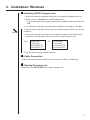
If the procedure described above does not install Program-Link for you, do the
following.
1. Change the names of the files on the installation disk as shown below and
copy them to the directory where you want to install Program-Link.
From:
FA123.EX_
FA123.HL_
FA123GRF.TT_
FA123ALG.TT_
To:
FA123.EXE
FA123.HLP
FA123GRF.TTF
FA123ALG.TTF
2. Use the control panel to install the fonts.
k Cable Connection
Connect the communication cable to your computer’s COM1 or COM2 port.
k Starting Program-Link
Double click the FA-123.EXE file to start Program-Link.
7