1
Example
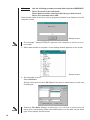
Use the following procedure to send data from the ALGEBRA FX.
Select Transmit in the LINK mode.
Select Select and then select the data item you want to sent.
Select Tran and then select YES.
Data transfer starts at this time, with its progress indicated by a dialog box on the
computer screen.
Sample screen
The message “Transmit ERROR!” appears if the computer is not set up to receive data.
3. When data transfer is complete, a new catalog window appears on the screen.
Sample screen
4. Save the data as a file.
Select File-Save .
Specify a file name and click OK (Save in the case of a Macintosh) to save it as
a catalog file.
• Selecting File-Save displays a dialog box you can use to specify the file
name, drive, and directory (folder on the Macintosh). You can also use the “Save
type” box to specify the file format.
10