1
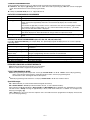
TO ENTER PROGRAMMING MODE:
Local programming requires the use of an alpha keypad connected to the keypad terminals on the control.
A. POWER UP, then depress [✱] and [#] both at once, within 50 seconds of powering up (if ✱98 was used to exit program
mode, this method must be used to reenter program mode).
OR
B. Initially, key: Installer Code (4 + 1 + 1 + 2) plus 8 + 0 + 0.
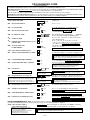
DATA FIELD PROGRAMMING PROCEDURES
Task
Procedure
Go to a Data Field
Entering Data
Press [∗] + [Field Number], followed by the required entry.
When the desired field number appears, simply make the required entry. When the last entry for a
field is entered, the keypad beeps three times and automatically displays the next data field in
sequence.
If the number of digits that you need to enter in a data field is less than the maximum digits available
(for example, the phone number fields *41, *42), enter the desired data, then press [∗ ] to end the
entry. The next data field number is displayed.
Press [#] + [Field Number].
Data will be displayed for that field number. No changes will be accepted in this mode.
Press [∗] + [Field Number] + [∗]. (Applies only to fields ∗40 thru *46, *94, and pager programming
fields)
Review a Data Field
Deleting an Entry
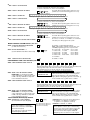
INTERACTIVE MODE PROGRAMMING (∗
∗56, ∗57, ∗58, ∗79, ∗80, ∗81, ∗82, ∗187)
Press [✱] + [Interactive Mode No.] (for example, ✱56). The alpha display keypad will display the first of a series of prompts
requesting entries.
Interactive Mode
Used to Program
✱56 Zone Programming
Zone characteristics, report codes, alpha descriptors, and serial numbers for 5800 RF
transmitters.
✱57 Function Key Programming Unlabeled keypad keys (known as ABCD keys) for special functions
✱58 Zone Programming
Same options as *56 mode, but with fewer prompts. Intended for those familiar with
(Expert mode)
this type of programming, otherwise *56 mode is recommended.
Assign module addresses and map individual relays/powerline carrier devices
✱79 Output Device Mapping
✱80 Output Programming
4229 or 4204 Relay modules, Powerline Carrier devices, or on-board triggers
✱81 Zone List Programming
Zone Lists for relay/powerline carrier activation, chime zones, pager zones, etc.
✱82 Alpha Programming
Zone alpha descriptors
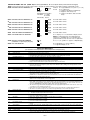
INITIALIZE DOWNLOAD and RESET DEFAULTS
✱96 Initializes download ID and subscriber account number.
✱97 Sets all data fields to original factory default values.
TO EXIT PROGRAMMING MODE:
✱98 Exits programming mode and prevents re-entry by: Installer Code + 8 + 0 + 0. If ✱98 is used to exit programming
mode, system must be powered down, and method A above used to enter the programming mode.
See field *88 for other *98 Program mode lockout options.
✱99 Exits programming mode and allows re-entry by: Installer Code + 8 + 0 + 0 or method 1 above.
Special Messages
OC = OPEN CIRCUIT (no communication between Keypad and Control).
EE or ENTRY ERROR = ERROR (invalid field number entered; re-enter valid field number).
After powering up, AC, dI (disabled) or Busy Standby and NOT READY will be displayed after approximately 4 seconds.
This will revert to a “Ready” message in approximately 1 minute, which allows PIRS, etc. to stabilize. You can bypass this
delay by pressing [#] + [0].
If E4 or E8 appears, more zones than the expansion units can handle have been programmed. The display will clear after
you correct the programming.
–2–