1
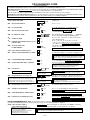
✱ 41 PRIMARY PHONE No.
|
|
|
|
|
|
|
|
|
|
|
|
|
|
|
|
|
|
|
✱ 42 SECOND PHONE No.
|
|
|
|
|
|
|
|
|
|
|
|
|
|
|
|
|
|
|
Enter up to 20 digits. To clear entries, press ✱41✱ or ✱42✱ respectively.
NOTE: Entry of a number other than one specified will give unpredictable results. For fields *43 thru *46: Enter 0–9; #+11 for B; #+12 for C;
#+13 for D; #+14 for E; #+15 for F. Enter [✱] as the fourth digit if a 3-digit account number (for 3+1 dialer reporting format) is used. Enter 0 as the first digit of a 4digit account number for Nos. 0000-0999. Exit field by pressing ✱ if only 3 digits are used. E.g., For Acct. B234, enter #+11-2-3-4.
✱ 43
PARTITION 1 PRIMARY ACCT. No.
| | | /
| | | | |
✱ 44
PART. 1 SECONDARY ACCT. No.
| | | /
| | | | |
✱ 45
PARTITION 2 PRIMARY ACCT. No.
| | | /
| | | | |
✱ 46
| | | /
| | | | |
✱47
PARTITION 2 SECONDARY ACCT.
No.
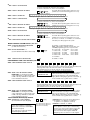
PHONE SYSTEM SELECT
✱48
REPORT FORMAT
SPLIT/DUAL REPORTING
✱50
BURGLARY DIALER DELAY
If Cent. Sta. IS NOT on a WATS line: 0=Pulse; 1=Tone;
if Cent. Sta. IS on a WATS line: 2 = Pulse; 3 = Tone
0 = 3+1, 4+1 ADEMCO L/S STANDARD
1 = 3+1, 4+1 RADIONICS STANDARD
2 = 4+2 ADEMCO L/S STANDARD
3 = 4+2 RADIONICS STANDARD
5 = 10-digit ADEMCO CONTACT ID® REPORTING
6 = 4+2 ADEMCO EXPRESS
7 = 4-digit ADEMCO CONTACT ID® REPORTING
8 = 3+1, 4+1 ADEMCO L/S EXPANDED
9 = 3+1, 4+1 RADIONICS EXPANDED
0 = Standard/backup reporting only (all to primary)
Primary Phone No.
2nd Phone No.
1 = Alarms, Restore, Cancel
Others
2 = All except Open/Close, Test Open/Close, Test
3 = Alarms, Restore, Cancel
All
4 = All except Open/Close, Test All
5 = All
All
[1]
[77]
primary
✱49
Enter 4 or 10 digits, depending on selection in *48 Report
Format. See box above. To clear, press *43*. [FFFFFFFFFF]
Enter 4 or 10 digits, depending on selection in *48 Report
Format. See box above. To clear, press *44*. [FFFFFFFFFF]
Enter 4 or 10 digits, depending on selection in *48 Report
Format. See box above. To clear, press *45*. [FFFFFFFFFF]
Enter 4 or 10 digits, depending on selection in *48 Report
Format. See box above. To clear, press *46*. [FFFFFFFFFF]
secondary
[0]
[2,0]
Delay Time SIA-Comp. Controls
Delay Disable
Delay Time:
0 = no delay UL: must be “0”
1 = 15 seconds; 2 = 30 seconds; 3 = 45 seconds
SIA Guidelines: delay must be minimum of 30 seconds
SIA-Compliant Controls:
Delay Time: 1 = 15 seconds; 2 = 30 seconds; 3 = 45 seconds
Delay Disable:
0 = use delay set in entry 1
1 = dial delay disabled for zones listed in zone list 6 (use zone list
6 to enter those zones that require dial delay to be disabled;
these zones ignore the setting in entry 1)
UL: Dial delay plus entry delay must not exceed one minute; use
zone list 6 to disable dial delay from appropriate zones, if necessary.
✱53
SESCOA/RADIONICS SELECT
[0]
✱54
DYNAMIC SIGNALING DELAY
[0]
✱55
DYNAMIC SIGNALING PRIORITY
[0]
✱56, *57, *58
MENU MODES
0 = Radionics (0-9, B-F)
1 = SESCOA (0-9 reporting); Use “0” for all other formats.
Select delay from 0 to 225 secs, in 15-sec increments.
0 = no delay (both signals sent), 1 = 15 secs,
2 = 30 secs, etc.
UL: Grade AA must be “0;” Grade A must be “15” max
0 = Primary Dialer first; 1 = Long Range Radio first.
For UL Commercial Burglary installations that use a DACT
and LRR, this field must be “0”.
These are Menu Mode commands, not data fields, for Zone Programming, Function Key
Programming, and Expert Mode Zone Programming respectively. See page 2 and their
respective sections in the Installation and Setup Guide for procedures.
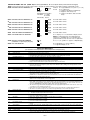
TO PROGRAM SYSTEM STATUS, & RESTORE REPORT CODES (✱59 thru *68, *70 thru ✱76, and ✱89):
For 3+1 or 4+1 Standard Format: Enter a code in the first box: 1–9, #+10 for 0, #+11 for B, #+12 for C, #+13 for D, #+14 for E, #+15 for F.
A 0 (not #+10) in the first box will disable a report. A 0 (not #+10) in the second box will result in automatic advance to the next field.
For Expanded or 4+2 Format: Enter codes in both boxes (1st and 2nd digits) for 1–9, 0, or B–F, as described above.
A 0 (not #+10) in the second box will eliminate the expanded message for that report. A 0 (not #+10) in both boxes will disable the report.
For Ademco Contact ID® Reporting: Enter any digit (other than 0) in the first box, to enable zone to report (entries in the second boxes are ignored).
A 0 (not #+10) in the first box disables the report. UL: see installation instructions for requirements
SYSTEM STATUS REPORT CODES (✱59–✱68)
✱59 EXIT ERROR REPORT CODE
[0]
See box above.
✱60
TROUBLE REPORT CODE
|
[00]
See box above.
✱61
BYPASS REPORT CODE
|
[00]
See box above.
–4–
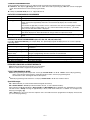
SIA-Compliant Controls: [1] Always enabled.