1
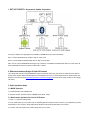
1. EXT1-EXT2 PORTS - Accessories Cables Connection
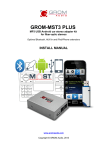
Connect the cables to the appropriate slots available on GROM-MST3 (see above illustration).
EXT1- connect GROM Bluetooth Dongle or AUX-In 3.5mm cable
EXT2– connect GROM compatible IPOD cable or AUX-In 3.5mm cable
Note: You can connect GROM Bluetooth Dongle only to the EXT1, and GROM compatible IPOD cable only to the EXT2. All
other cables/add-ons can be connected to either EXT1 or EXT2.
2. Differences between Single CD and 6CD stereos
Volvo XC90 2007-2013 and Volvo S40/S60/V50 Single CD and 6CD stereos may look similar or exactly the same. But Six
(6) CD stereo requires different firmware flashed on the GROM main unit. If you have Single CD stereo, please update your
firmware to the correct one at http://www.gromaudio.com/software-mst3.html and refer to the usage manual for Volvo Single
CD stereos.
3. Quick operation steps
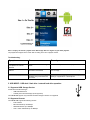
3.1 MODE Selection
1. Press Mode/CD to enter GROM mode
2. Use EJECT button to switch between 3 MODES (USB, EXT1, EXT2).
3.2 Quick button operation for Volvo 6 CD Stereos
1. Press < or > button to change tracks
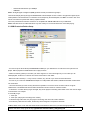
2. On the 6-CD stereos you can create up to 6 Folders/Playlists with unlimited number of tracks on your USB memory device,
Android device, iPod or iPhone. Each playlist will be assigned to the particular Disc button on the stereo.
3. Track title, time and number, Disc number will be shown on the stereo.