1
4.1
Setting Jumpers and Switches
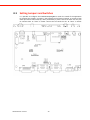
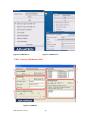
It is possible to configure the In‐Vehicle Computing Box to match the needs of the application
by resetting the jumpers. A jumper is the simplest kind of electrical switch. It consists of two
metal pins and a small metal clip, often protected by a plastic cover that slides over the pins
to connect them. To “close” a jumper, connect the pins with the clip. To “open” a jumper,
remove the clip. Sometimes a jumper has three pins, labeled 1, 2, and 3. In this case,
connect either pins 1 and 2, or pins 2 and 3.
open
closed
closed 2‐3
open
closed
closed 2‐3
A pair of needle‐nose pliers may be helpful when working with jumpers. If there are any
doubts about the best hardware configuration for the application, contact the local
distributor or sales representative before making any changes.
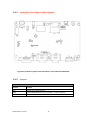
An arrow is used on the motherboard to indicate the first pin of each jumper.
TREK‐510 User manual
24