1
Contents
1. Introduction .................................................................................... 5
1.1 Key features ........................................................................................... 5
1.2 Package contents (models AV4osd and AV8osd) ................................. 6
1.3 Rack mount kit contents (part code: AVrmk).......................................... 6
1.4 Remote controller contents (part code: AVremote) ................................ 6
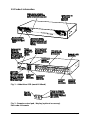
1.5 Product information ............................................................................... 7
2. Installation ...................................................................................... 9
2.1 What you will need ................................................................................ 9
2.2 Mounting the AdderView ....................................................................... 10
2.3 Connecting your devices ....................................................................... 10
2.4 ‘Interface powered’ operation without the optional power adapter ........ 11
2.5 Configuring your PCs ............................................................................ 11
2.6 Configuring the AdderView ................................................................... 11
2.7 Summary of AdderView configuration options ...................................... 12
2.8 Other useful installation information ...................................................... 14
2.9 Re-enabling a disconnected PS/2 mouse ............................................. 15
2.10 Hot plugging the AdderView into running systems and re-enabling
disconnected PS/2 CPU mouse connections .............................................. 15
3. Using the AdderView .................................................................... 18
3.1 Power on status ..................................................................................... 18
3.2 Front panel keys and remote controller.................................................. 19
3.3 Status display......................................................................................... 19
3.4 Keyboard hotkey control ........................................................................ 20
3.5 On-screen menu control......................................................................... 22
3.6 Mouse control......................................................................................... 24
3.7 RS232 control ........................................................................................ 24
3.8 Cascading AdderViews ......................................................................... 24
AdderView
Installation and Use
Page 3