1
Mac OS X Server
Open Directory Administration
Version 10.6 Snow Leopard
KKApple Inc.
© 2009 Apple Inc. All rights reserved.
The owner or authorized user of a valid copy of
Mac OS X Server software may reproduce this
publication for the purpose of learning to use such
software. No part of this publication may be reproduced
or transmitted for commercial purposes, such as selling
copies of this publication or for providing paid-for
support services.
Every effort has been made to make sure that the
information in this manual is correct. Apple Inc., is not
responsible for printing or clerical errors.
Apple
1 Infinite Loop
Cupertino CA 95014
www.apple.com
The Apple logo is a trademark of Apple Inc., registered
in the U.S. and other countries. Use of the “keyboard”
Apple logo (Option-Shift-K) for commercial purposes
without the prior written consent of Apple may
constitute trademark infringement and unfair
competition in violation of federal and state laws.
Apple, the Apple logo, iCal, iChat, Leopard, Mac,
Macintosh, QuickTime, Xgrid, and Xserve are trademarks
of Apple Inc., registered in the U.S. and other countries.
Finder is a trademark of Apple Inc.
Adobe and PostScript are trademarks of Adobe Systems
Incorporated.
UNIX is a registered trademark of The Open Group.
Other company and product names mentioned herein
are trademarks of their respective companies. Mention
of third-party products is for informational purposes
only and constitutes neither an endorsement nor a
recommendation. Apple assumes no responsibility with
regard to the performance or use of these products.
019-1413/2009-08-01
Contents
11
12
13
14
15
15
15
16
Preface:  About This Guide
17
17
18
19
19
21
22
23
23
25
26
26
27
28
28
28
30
Chapter 1:  Directory Services with Open Directory
31
31
31
32
33
34
Chapter 2:  Open Directory Search Policies
What’s in This Guide
Using Onscreen Help
Documentation Map
Viewing PDF Guides Onscreen
Printing PDF Guides
Getting Documentation Updates
Getting Additional Information
Benefits of Using Directory Services
Directory Services and Directory Domains
A Historical Perspective
Data Consolidation
Data Distribution
Uses of Directory Data
Access to Directory Services
Inside a Directory Domain
About the Structure of LDAP Entries
Local and Shared Directory Domains
About the Local Directory Domain
About Shared Directory Domains
Shared Data in Existing Directory Domains
SMB Services and Open Directory
Open Directory as a Primary Domain Controller (PDC)
Open Directory as a Backup Domain Controller (BDC)
Search Policy Levels
Local Directory Domain Search Policy
Two-Level Search Policies
Multilevel Search Policies
Automatic Search Policies
3
36
36
Custom Search Policies
Search Policies for Authentication and Contacts
37
37
38
38
39
39
40
40
41
42
43
43
44
45
45
46
47
47
47
47
48
49
50
Chapter 3:  Open Directory Authentication
52
53
54
54
55
55
58
59
60
61
61
62
63
63
64
4
About Password Types
Authentication and Authorization
About Open Directory Passwords
About Shadow Passwords
About Crypt Passwords
Providing Secure Authentication for Windows Users
Offline Attacks on Passwords
Determining Which Authentication Option to Use
About Password Policies
About Single Sign-On Authentication
About Kerberos Authentication
Breaking the Barriers to Kerberos Deployment
Single Sign-On Experience
Secure Authentication
Moving Beyond Passwords
Multiplatform Authentication
Centralized Authentication
About Kerberized Services
Configuring Services for Kerberos After Upgrading
About Kerberos Principals and Realms
About the Kerberos Authentication Process
About Open Directory Password Server and Shadow Password Authentication
Methods
Disabling Open Directory Authentication Methods
Disabling Shadow Password Authentication Methods
Contents of the Open Directory Password Server Database
LDAP Bind Authentication
Chapter 4:  Open Directory Planning and Management Tools
General Planning Guidelines
Estimating Directory and Authentication Requirements
Identifying Servers for Hosting Shared Domains
Replicating Open Directory Services
Replica Sets
Cascading Replication
Planning the Upgrade of Multiple Open Directory Replicas
Load Balancing in Small, Medium, and Large Environments
Replication in a Multibuilding Campus
Using an Open Directory Master, Replica, or Relay with NAT
Contents
64
65
66
66
67
68
69
69
69
71
72
73
74
74
75
76
76
Open Directory Master and Replica Compatibility
Mixing Active Directory and Open Directory Master and Replica Services
Integrating with Existing Directory Domains
Integrating with Cross-domain Authorization
Integrating with a Magic Triangle
Integrating with Augment Records
Integrating Without Schema Changes
Integrating With Schema Changes
Avoiding Kerberos Conflicts with Multiple Directories
Improving Performance and Redundancy
Open Directory Security
Service Access Control Lists (SACLs)
Tools for Managing Open Directory Services
Server Admin
Directory Utility
Workgroup Manager
Command-Line Tools
77
77
78
79
79
80
81
83
84
85
86
86
87
89
89
90
91
92
93
94
96
97
98
99
100
Chapter 5:  Setting Up Open Directory Services
Setup Overview
Before You Begin
Managing Open Directory on a Remote Server
Turning Open Directory On
Setting Up a Standalone Directory Service
Setting Up an Open Directory Master
Instructing Users How to Log In
Setting Up a Primary Domain Controller (PDC)
Setting Up Windows Vista for Domain Login
Setting Up Windows XP for Domain Login
Setting Up Windows 2000 for Domain Login
Setting Up an Open Directory Replica
Creating Multiple Replicas of an Open Directory Master
Setting Up Open Directory Relays for Cascading Replication
Setting Up a Server as a Backup Domain Controller (BDC)
Setting Up Open Directory Failover
Setting Up a Connection to a Directory Server
Setting Up a Server as a Mac OS X Server PDC Domain Member
Setting Up a Server as an Active Directory Domain Member
Setting Up Single Sign-On Kerberos Authentication
Setting Up an Open Directory Kerberos Realm
Starting Kerberos After Setting Up an Open Directory Master
Disabling Kerberos After Setting Up an Open Directory Master
Delegating Authority to Join an Open Directory Kerberos Realm
Contents
5
102
Joining a Server to a Kerberos Realm
103 Magic Triangle General Setup Overview
104
105
105
106
107
107
109
109
110
110
112
113
114
115
116
116
117
117
Chapter 6:  Managing User Authentication Using Workgroup Manager
Composing a Password
Changing a User’s Password
Resetting the Passwords of Multiple Users
Changing a User’s Password Type
Changing the Password Type to Open Directory
Changing the Password Type to Crypt Password
Changing the Password Type to Shadow Password
Enabling Single Sign-On Kerberos Authentication for a User
Changing the Global Password Policy
Setting Password Policies for Individual Users
Selecting Authentication Methods for Shadow Password Users
Selecting Authentication Methods for Open Directory Passwords
Assigning Administrator Rights for Open Directory Authentication
Keeping the Primary Administrator’s Passwords in Sync
Enabling LDAP Bind Authentication for a User
Setting Passwords of Exported or Imported Users
Migrating Passwords from Mac OS X Server v10.1 or Earlier
119 Chapter 7:  Managing Directory Clients Using Accounts Preferences
119 Connecting Clients to Directory Servers
119
About Directory Server Connections
120 Automated Client Configuration
121
Adding an Active Directory Server Connection
121
Adding an Open Directory Server Connection
122
Removing a Directory Server Connection
123
Editing a Directory Server Connection
123
Monitoring Directory Server Connections
124 Managing the Root User Account
124
Enabling the Root User Account
125
Changing the Root User Account Password
126 Chapter 8:  Advanced Directory Client Settings
126 About Advanced Directory Services Settings
127 Setting Up Directory Utility on a Remote Server
127 Using Advanced Search Policy Settings
128
Defining Automatic Search Policies
129
Defining Custom Search Policies
130
Defining Local Directory Search Policies
131
Waiting for a Search Policy Change to Take Effect
6
Contents
131
132
132
133
133
134
134
135
137
140
141
143
143
145
146
149
150
151
152
152
153
153
154
155
155
155
157
157
158
158
160
163
164
165
166
167
168
169
169
170
171
172
172
Protecting Computers from a Malicious DHCP Server
Using Advanced Directory Services Settings
Enabling or Disabling Active Directory Service
Enabling or Disabling LDAP Directory Services
Using Advanced LDAP Service Settings
Accessing LDAP Directories in Mail and Address Book
Showing or Hiding Configurations for LDAP Servers
Configuring Access to an LDAP Directory
Configuring Access to an LDAP Directory Manually
Changing a Configuration for Accessing an LDAP Directory
Duplicating a Configuration for Accessing an LDAP Directory
Deleting a Configuration for Accessing an LDAP Directory
Changing the Connection Settings for an LDAP Directory
Changing the Security Policy for an LDAP Connection
Configuring LDAP Searches and Mappings
Setting Up Trusted Binding for an LDAP Directory
Stopping Trusted Binding with an LDAP Directory
Changing the Open/Close Timeout for an LDAP Connection
Changing the Query Timeout for an LDAP Connection
Changing the Rebind-Try Delay Time for an LDAP Connection
Changing the Idle Timeout for an LDAP Connection
Ignoring LDAP Server Referrals
Authenticating an LDAP Connection
Changing the Password Used for Authenticating an LDAP Connection
Mapping Config Record Attributes for LDAP Directories
Editing RFC 2307 Mapping to Enable Creating Users
Preparing a Read-Only LDAP Directory for Mac OS X
Populating LDAP Directories with Data for Mac OS X
Using Advanced Active Directory Service Settings
About Active Directory Access
Configuring Access to an Active Directory Domain
Setting Up Mobile User Accounts in Active Directory
Setting Up Home Folders for Active Directory User Accounts
Setting a UNIX Shell for Active Directory User Accounts
Mapping the UID to an Active Directory Attribute
Mapping the Primary Group ID to an Active Directory Attribute
Mapping the Group ID in Group Accounts to an Active Directory Attribute
Specifying a Preferred Active Directory Server
Changing the Active Directory Groups That Can Administer the Computer
Controlling Authentication from All Domains in the Active Directory Forest
Unbinding from the Active Directory Server
Editing User Accounts and Other Records in Active Directory
Setting Up LDAP Access to Active Directory Domains
Contents
7
174 Specifying NIS Settings
175 Specifying BSD Configuration File Settings
176
Setting Up Data in BSD Configuration Files
177
177
178
178
179
180
180
180
181
181
182
182
183
183
184
184
185
186
186
187
187
189
189
190
190
192
192
192
195
196
197
199
199
199
200
201
204
205
206
8
Chapter 9:  Maintaining Open Directory Services
Controlling Access to Open Directory Servers and Services
Controlling Access to a Server’s Login Window
Controlling Access to SSH Service
Configuring Open Directory Service Access Control
Monitoring Open Directory
Checking the Status of an Open Directory Server
Monitoring Replicas and Replays of an Open Directory Master
Viewing Open Directory Status and Logs
Monitoring Open Directory Authentication
Viewing and Editing Directory Data
Showing the Directory Inspector
Hiding the Directory Inspector
Setting LDAP Access Control Lists (ACLs)
Deleting Records
Deleting Users or Computers Using Inspector or the Command Line
Changing a User’s Short Name
Importing Records of Any Type
Setting Options for an Open Directory Server
Setting a Binding Policy for an Open Directory Server
Setting a Security Policy for an Open Directory Server
Limiting Search Results for LDAP Service
Setting the Search Timeout Interval for LDAP Service
Setting Up SSL for LDAP Service
Creating a Custom SSL Configuration for LDAP
Managing Open Directory Replication
Making an Open Directory Replica into a Relay
Promoting an Open Directory Replica
Decommissioning an Open Directory Replica
Archiving an Open Directory Master
Restoring an Open Directory Master
Managing OpenLDAP
Configuring OpenLDAP
Configuring slapd and slurpd Daemons
Idle Rebinding Options
Searching the LDAP Server
Using LDIF Files
Maintaining Kerberos
Managing Principals
Contents
207 Using kadmin to Kerberize a Service
207 Kerberizing Services with an Active Directory Server
208 Using Directory Service Tools
208
Operating on Directory Service Domains
208
Manipulating a Single Named Group Record
209
Adding or Removing LDAP Server Configurations
209
Configuring the Active Directory Connector
210 Chapter 10:  Solving Open Directory Problems
210 Solving Open Directory Master and Replica Problems
210
If Kerberos Is Stopped on an Open Directory Master or Replica
211
If You Can’t Create an Open Directory Replica
211
If You Can’t Create an Open Directory Master or Replica from a Configuration File
211
If You Can’t Connect a Replica to Your Relay
211
If You Can’t Join an Open Directory Replica to an Open Directory That Is a
Subordinate of an Active Directory Server
212 Solving Directory Connection Problems
212
If a Delay Occurs During Startup
212 Solving Authentication Problems
212
If You Can’t Change a User’s Open Directory Password
212
If a User Can’t Access Some Services
213
If a User Can’t Authenticate for VPN Service
213
If You Can’t Change a User’s Password Type to Open Directory
213
If Users Relying on a Password Server Can’t Log In
213
If Users Can’t Log In with Accounts in a Shared Directory Domain
214
If You Can’t Log In as an Active Directory User
214
If Users Can’t Authenticate Using Single Sign-On Kerberos
216
If Users Can’t Change Their Passwords
216
If You Can’t Join a Server to an Open Directory Kerberos Realm
217
If You Must Reset an Administrator Password
218 Appendix A:  Command-Line Parameters for Open Directory
218 Open Directory Service Settings
219 OpenLDAP Standard Distribution Tools
220 Appendix B:  Mac OS X Directory Data
221 Open Directory Extensions to LDAP Schema
222
Object Classes in Open Directory LDAP Schema
231
Attributes in Open Directory LDAP Schema
253 Mapping Standard Record Types and Attributes to LDAP and Active Directory
253
Mappings for Users
258
Mappings for Groups
259
Mappings for Mounts
Contents
9
260
Mappings for Computers
262
Mappings for ComputerLists
263
Mappings for Config
265
Mappings for People
266
Mappings for PresetComputerLists
267
Mappings for PresetGroups
268
Mappings for PresetUsers
270
Mappings for Printers
272
Mappings for AutoServerSetup
272
Mappings for Locations
273 Standard Open Directory Record Types and Attributes
273
Standard Attributes in User Records
278
Format of MailAttribute in User Records
281
Standard Attributes in Group Records
282
Standard Attributes in Computer Records
283
Standard Attributes in Computer Group Records
284
Standard Attributes in Mount Records
285
Standard Attributes in Config Records
286
10
Index
Contents
Preface
About This Guide
This guide describes the directory and authentication
services you can set up using Mac OS X Server. It also
explains how to configure Mac OS X Server and Mac OS X
client computers for directory services.
Mac OS X Server’s Open Directory provides directory and authentication services for
mixed networks of Mac OS X, Windows, and UNIX computers.
Open Directory uses OpenLDAP, the open source implementation of Lightweight
Directory Access Protocol (LDAP), to provide directory services. It’s compatible with
other standards-based LDAP servers, and can be integrated with proprietary services
such as Microsoft’s Active Directory and Novell’s eDirectory.
For the LDAP database back end, Open Directory uses the open source Berkeley
Database. It’s a highly scalable database for high-performance indexing of hundreds of
thousands of user accounts and other records.
Open Directory plug-ins enable a Mac OS X client or Mac OS X Server computer to
read and write authoritative information about users and network resources from any
LDAP server—even Microsoft’s proprietary Active Directory. The server can also access
records in legacy directories such as NIS and local BSD configuration files (/etc).
Open Directory also provides authentication service. It can securely store and validate
the passwords of users who want to log in to client computers on your network or to
use other network resources that require authentication.
Open Directory can enforce such policies as password expiration and minimum length.
Open Directory can also authenticate Windows computer users for domain log in, file
service, and other Windows services provided by Mac OS X Server.
An MIT Kerberos Key Distribution Center (KDC) is fully integrated with Open Directory
and provides strong authentication with support for secure single sign-on. This means
users can authenticate only once, with a single user name and password pair, for
access to the range of Kerberos-enabled network services.
11
For services that don’t accept Kerberos authentication, the integrated Secure
Authentication and Service Layer (SASL) service negotiates the strongest possible
authentication mechanism.
In addition, directory and authentication replication maximizes availability and
scalability. By creating replicas of Open Directory servers, you can easily maintain
failover servers and remote servers for fast client interaction on distributed networks.
What’s in This Guide
This guide includes the following sections:
ÂÂ Chapter 1, “Directory Services with Open Directory,” explains what directory domains
are, how they are used, and how they are organized.
ÂÂ Chapter 2, “Open Directory Search Policies,” describes search policies with directory
domains, and describes automatic, custom, and local-only search policies.
ÂÂ Chapter 3, “Open Directory Authentication,” describes Open Directory authentication,
shadow and crypt passwords, Kerberos, LDAP bind, and single sign-on.
ÂÂ Chapter 4, “Open Directory Planning and Management Tools,” helps you assess
directory domain needs, estimate directory and authentication requirements,
identify servers for hosting shared domains, improve performance and redundancy,
deal with replication in a multibuilding campus, and make Open Directory services
secure. This chapter also introduces the tools to manage Open Directory services.
ÂÂ Chapter 5, “Setting Up Open Directory Services,” tells you how to set up an Open
Directory server and explains the configurations and roles you can configure. This
chapter also tells you how to set options of the LDAP service of an Open Directory
master or replica and explains how to set up single sign-on Kerberos authentication
on an Open Directory master.
ÂÂ Chapter 6, “Managing User Authentication Using Workgroup Manager,” describes
how to set password policies, change a user’s password type, assign administrator
rights for Open Directory authentication, reset passwords of imported user accounts,
and migrate passwords to Open Directory authentication.
ÂÂ Chapter 7, “Managing Directory Clients Using Accounts Preferences,” explains how
to use Directory Utility to configure and manage how Mac OS X computers access
directory services.
ÂÂ Chapter 8, “Advanced Directory Client Settings,” explains how to use the Directory
Utility application to enable, disable, and configure service discovery protocols. It
also explains how to configure authentication and contacts search policies and
explains how to configure access to directory domains, including LDAP, Active
Directory, NIS, and BSD configuration files.
12
Preface    About This Guide
ÂÂ Chapter 9, “Maintaining Open Directory Services,” tells you how to monitor
Open Directory services, view and edit directory data with the Inspector, archive
an Open Directory master, and perform other directory maintenance.
ÂÂ Chapter 10, “Solving Open Directory Problems,” describes common problems and
provides information on what to do if you encounter problems while working with
Open Directory.
ÂÂ Appendix A, “Command-Line Parameters for Open Directory,” provides command-
line procedures for Open Directory.
ÂÂ Appendix B, “Mac OS X Directory Data,” lists the Open Directory extensions to the
LDAP schema and specifies the standard record types and attributes of Mac OS X.
Note: Because Apple periodically releases new versions and updates to its software,
images shown in this book may be different from what you see on your screen.
Using Onscreen Help
You can get task instructions onscreen in Help Viewer while you’re managing
Mac OS X Server. You can view help on a server, or on an administrator computer.
(An administrator computer is a Mac OS X computer with Mac OS X Server
administrator software installed on it.)
To get the most recent onscreen help for Mac OS X Server:
mm Open Server Admin or Workgroup Manager and then:
ÂÂ Use the Help menu to search for a task you want to perform.
ÂÂ Choose Help > Server Admin Help or Help > Workgroup Manager Help to browse
and search the help topics.
The onscreen help contains instructions taken from Advanced Server Administration
and other administration guides.
To see the most recent server help topics:
mm Make sure the server or administrator computer is connected to the Internet while
you’re getting help.
Help Viewer automatically retrieves and caches the most recent server help topics
from the Internet. When not connected to the Internet, Help Viewer displays cached
help topics.
Preface    About This Guide
13
Documentation Map
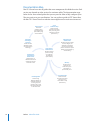
Mac OS X Server has a suite of guides that cover management of individual services. Each
service may depend on other services for maximum utility. The documentation map
below shows some related guides that you may need in order to fully configure Open
Directory services to your specifications. You can get these guides in PDF format from
the Mac OS X Server Resources website at www.apple.com/server/macosx/resources/.
Getting Started
Covers basic
installation, setup,
and management of
Open Directory using
Server Preferences.
Server
Preferences Help
Provides onscreen
instructions and answers
when you’re using Server
Preferences to manage
Open Directory.
Information
Technologies
Dictionary
Advanced Server
Administration
Provides onscreen
definitions of server
and Open Directory
terminology.
Introduction to
Command-Line
Administration
Explains how to use
UNIX shell commands to
configure and manage
servers and services.
Open Directory
Administration
Describes advanced
options for setting
up, configuring,
and managing
Open Directory.
Describes using Server Admin
to install, configure, and
administer server software
and services. Includes best
practices and advice for system
planning, security, backing up,
and monitoring.
Mac Help
Provides onscreen
instructions and
answers when you’re
connecting to an
Open Directory server.
Server Admin Help
User Management
Describes using
Workgroup Manager to
create and manage user
accounts, groups, and
computers, and to set up
and manage preferences
for Mac OS X clients.
14
Preface    About This Guide
Provides onscreen
instructions and answers
when you’re using
Server Admin to set up
Open Directory.
Viewing PDF Guides Onscreen
While reading the PDF version of a guide onscreen:
ÂÂ Show bookmarks to see the guide’s outline, and click a bookmark to jump to the
corresponding section.
ÂÂ Search for a word or phrase to see a list of places where it appears in the guide.
Click a listed place to see the page where it occurs.
ÂÂ Click a cross-reference to jump to the referenced section. Click a web link to visit
the website in your browser.
Printing PDF Guides
If you want to print a guide, you can take these steps to save paper and ink:
ÂÂ Save ink or toner by not printing the cover page.
ÂÂ Save color ink on a color printer by looking in the panes of the Print dialog for
an option to print in grays or black and white.
ÂÂ Reduce the bulk of the printed document and save paper by printing more than one
page per sheet of paper. In the Print dialog, change Scale to 115% (155% for Getting
Started). Then choose Layout from the untitled pop-up menu. If your printer supports
two-sided (duplex) printing, select one of the Two-Sided options. Otherwise, choose
2 from the Pages per Sheet pop-up menu, and optionally choose Single Hairline from
the Border menu. (If you’re using Mac OS X v10.4 or earlier, the Scale setting is in the
Page Setup dialog and the Layout settings are in the Print dialog.)
You may want to enlarge the printed pages even if you don’t print double sided,
because the PDF page size is smaller than standard printer paper. In the Print dialog
or Page Setup dialog, try changing Scale to 115% (155% for Getting Started, which has
CD-size pages).
Getting Documentation Updates
Periodically, Apple posts revised help pages and new editions of guides. Some revised
help pages update the latest editions of the guides.
ÂÂ To view new onscreen help topics for a server application, make sure your server or
administrator computer is connected to the Internet and click “Latest help topics” or
“Staying current” in the main help page for the application.
ÂÂ To download the latest guides in PDF format, go to the Mac OS X Server Resources
website at www.apple.com/server/macosx/resources/.
ÂÂ An RSS feed listing the latest updates to Mac OS X Server documentation and
onscreen help is available. To view the feed, use an RSS reader application such as
Safari or Mail and go to:
feed://helposx.apple.com/rss/snowleopard/serverdocupdates.xml
Preface    About This Guide
15
Getting Additional Information
For more information, consult these resources:
ÂÂ Read Me documents—get important updates and special information. Look for them
on the server discs.
ÂÂ Mac OS X Server website (www.apple.com/server/macosx/)—enter the gateway to
extensive product and technology information.
ÂÂ Mac OS X Server Support website (www.apple.com/support/macosxserver/)—access
hundreds of articles from Apple’s support organization.
ÂÂ Apple Discussions website (discussions.apple.com/)—share questions, knowledge,
and advice with other administrators.
ÂÂ Apple Mailing Lists website (www.lists.apple.com/)—subscribe to mailing lists so you
can communicate with other administrators using email.
ÂÂ Apple Training and Certification website (www.apple.com/training/)—hone
your server administration skills with instructor-led or self-paced training, and
differentiate yourself with certification.
ÂÂ OpenLDAP website (www.openldap.org)—learn about the open source software that
Open Directory uses to provide LDAP directory service.
ÂÂ MIT Kerberos website (web.mit.edu/kerberos/www)—get background information
and specifications for the protocol that Open Directory uses to provide robust single
sign-on authentication.
ÂÂ Berkeley DB website (www.sleepycat.com)—investigate feature descriptions and
technical documentation for the open source database that Open Directory uses to
store LDAP directory data.
ÂÂ RFC3377, “Lightweight Directory Access Protocol (v3): Technical Specification”
(www.rfc-editor.org/rfc/rfc3377.txt)—lists a set of eight other Request for Comment
(RFC) documents with overview information and detailed specifications for the
LDAPv3 protocol.
16
Preface    About This Guide
Directory Services with Open
Directory
1
Use this chapter to learn about directory domains, how they
are used, and how they are organized.
Benefits of Using Directory Services
A directory service provides a central repository for information about computer users
and resources in an organization.
Storing administrative data in a central repository has many benefits:
ÂÂ It reduces data entry effort.
ÂÂ It certifies that network services and clients have consistent information about users
and resources.
ÂÂ It simplifies administration of users and resources.
ÂÂ It provides identification, authentication, and authorization information for other
network services.
In education and enterprise environments, directory services are the ideal way to
manage users and computing resources. Organizations with as few as 10 people can
benefit by deploying a directory service.
Directory services are doubly beneficial: they simplify system and network
administration, and they simplify a user’s experience on the network.
With directory services, administrators can maintain information about all users—such
as their names, passwords, and locations of network home directories—centrally,
rather than on each computer. Directory services can also maintain centralized
information about printers, computers, and other network resources.
Centralizing information about users and resources can reduce the system
administrator’s information management burden, and each user has a centralized user
account for logging in on any authorized computer on the network.
17
With centralized directory service and file service set up to host network home folders,
wherever a user logs in, the user gets the same home folder, personal desktop, and
individual preferences. The user always has access to personal networked files and can
easily locate and use authorized network resources.
Directory Services and Directory Domains
A directory service acts as an intermediary between application and system software
processes, which need information about users and resources, and the directory
domains that store the information.
As shown in the following illustration, Open Directory provides directory services for
Mac OS X and Mac OS X Server.
Users
Groups
Printers
Computers
Mounts
Directory
domains
Open
Directory
Application and
system software
processes
Open Directory can access information in one or several directory domains. A directory
domain stores information in a specialized database that is optimized to handle many
requests for information and to find and retrieve information quickly.
Processes running on Mac OS X computers can use Open Directory services to save
information in directory domains.
For example, when you create a user account with Workgroup Manager, it has
Open Directory store user name and other account information in a directory domain.
You can then review user account information in Workgroup Manager, which uses
Open Directory to retrieve the user information from a directory domain.
18
Chapter 1    Directory Services with Open Directory
Other application and system software processes can also use the user account
information stored in directory domains. When someone attempts to log in to a
Mac OS X computer, the login process uses Open Directory services to validate the
user name and password:
Directory
domain
Workgroup Manager
Open
Directory
A Historical Perspective
Like Mac OS X, Open Directory has a UNIX heritage. Open Directory provides access to
administrative data that UNIX systems have generally kept in configuration files, which
require painstaking work to maintain. (Some UNIX systems still rely on configuration
files.) Open Directory consolidates the data and distributes it for ease of access and
maintenance.
Data Consolidation
For years, UNIX systems have stored administrative information in a collection of files
located in the /etc directory, as show in the following illustration.
/etc/hosts
/etc/group
UNIX processes
/etc/master.passwd
This scheme requires each UNIX computer to have its own set of files, and processes
that are running on a UNIX computer read its files when they need administrative
information.
Chapter 1    Directory Services with Open Directory
19
If you’re experienced with UNIX, you probably know about the files in the /etc
directory—group, hosts, hosts.equiv, master.passwd, and so forth. For example, a
UNIX process that needs a user’s password consults the /etc/master.passwd file.
The /etc/master.passwd file contains a record for each user account. A UNIX process
that needs group information consults the /etc/group file.
Open Directory consolidates administrative information, simplifying the interaction
between processes and the administrative data they create and use:
Open
Directory
Mac OS X processes
Processes no longer need to know how and where administrative data is stored.
Open Directory gets the data for them. If a process needs the location of a user’s
home folder, the process has Open Directory retrieve the information.
Open Directory finds the requested information and then returns it, insulating the
process from the details of how the information is stored, as shown in the following
illustration.
Directory
domain
Directory
domain
Open
Directory
Mac OS X processes
If you set up Open Directory to access administrative data from more than one
directory domain, Open Directory consults the domains as needed.
Some data stored in a directory domain is identical to data stored in UNIX
configuration files. For example, the home folder location, real name, user ID, and
group ID are stored in user records of a directory domain instead of the standard
/etc/passwd file.
20
Chapter 1    Directory Services with Open Directory
However, a directory domain stores much more data to support functions that are
unique to Mac OS X, such as support for managing Mac OS X client computers.
Data Distribution
A characteristic of UNIX configuration files is that the administrative data they contain
is available only to the computer they are stored on. Each computer has its own UNIX
configuration files.
With UNIX configuration files, each computer that someone wants to use must have
that person’s user account settings stored on it, and each computer must store the
account settings for every person who can use the computer. To set up a computer’s
network settings, the administrator must to go to the computer and enter the IP
address and other information that identifies the computer on the network.
Similarly, when user or network information must be changed in UNIX configuration
files, the administrator must make the changes on the computer where the files reside.
Some changes, such as network settings, require the administrator to make the same
changes on multiple computers. This approach becomes unwieldy as networks grow
in size and complexity.
Open Directory solves this problem by letting you store administrative data in a
directory domain that can be managed by a network administrator from one location.
Open Directory lets you distribute the information so it is visible on a network to
the computers that need it and the administrator who manages it, as shown in the
following illustration.
Directory
domain
System
administrator
Open
Directory
Users
Chapter 1    Directory Services with Open Directory
21
Uses of Directory Data
Open Directory makes it possible to consolidate and maintain network information
easily in a directory domain, but this information has value only if application and
system software processes running on network computers access the information.
Here are some ways in which Mac OS X system and application software use
directory data:
ÂÂ Login: Workgroup Manager can create user records in a directory domain, and these
records can be used to authenticate users who log in to Mac OS X computers and
Windows computers. When a user specifies a name and a password in the Mac OS X
login window, the login process asks Open Directory to authenticate the name
and password. Open Directory uses the name to find the user’s account record in a
directory domain and uses other data in the user record to validate the password.
ÂÂ Folder and file access: After logging in, a user can access files and folders. Mac OS X
uses other data from the user record to determine the user’s access privileges for
each file or folder.
ÂÂ Home folders: Each user record in a directory domain stores the location of
the user’s home folder. This is where the user keeps personal files, folders, and
preferences. A user’s home folder can be located on a computer the user always
uses or it can be located on a network file server.
ÂÂ Automount share points: Share points can be configured to automount (appear
automatically) in the /Network folder (the Network globe) in the Finder windows
of client computers. Information about these automount share points is stored in a
directory domain. Share points are folders, disks, or disk partitions you have made
accessible over the network.
ÂÂ Mail account settings: Each user’s record in a directory domain specifies whether
the user has mail service, which mail protocols to use, how to present incoming
mail, whether to alert the user when mail arrives, and so forth.
ÂÂ Resource usage: Disk, print, and mail quotas can be stored in each user record of
a directory domain.
ÂÂ Managed client information: The administrator can manage the Mac OS X
environment of users whose account records are stored in a directory domain. The
administrator makes mandatory preference settings that are stored in the directory
domain and override users’ personal preferences.
ÂÂ Group management: In addition to user records, a directory domain also stores
group records. Each group record affects all users who are in the group. Information
in group records specifies preference settings for group members. Group records
also determine access to files, folders, and computers.
22
Chapter 1    Directory Services with Open Directory
ÂÂ Managed network views: The administrator can set up custom views that users see
when they select the Network icon in the sidebar of a Finder window. Because these
managed network views are stored in a directory domain, they’re available when a
user logs in.
Access to Directory Services
Open Directory can access directory domains for the following kinds of directory
services:
ÂÂ Lightweight Directory Access Protocol (LDAP), an open standard common in
mixed environments of Macintosh, UNIX, and Windows systems. LDAP is the native
directory service for shared directories in Mac OS X Server.
ÂÂ Local directory domain, the local directory service for every Mac OS X and Mac OS X
Server v10.6 or later.
ÂÂ Active Directory, the directory service of Microsoft Windows 2000 and 2003 servers.
ÂÂ Network Information System (NIS), the directory service of many UNIX servers.
ÂÂ BSD flat files, the legacy directory service of UNIX systems.
Inside a Directory Domain
Information in a directory domain is organized by record type. Record types are specific
categories of information such as users, groups, and computers. For each record type,
a directory domain can contain any number of records. Each record is a collection of
attributes, and each attribute has values.
If you think of each record type as a spreadsheet that contains a category of
information, records are like the rows of the spreadsheet, attributes are like
spreadsheet columns, and each spreadsheet cell contains values.
For example, when you define a user account by using Workgroup Manager, you are
creating a user record (a record of the “user” record type). The settings you configure
for the user account—short name, full name, home folder location, and so on—
become values of attributes in the user record. The user record and the values of its
attributes reside in a directory domain.
In some directory services, such as LDAP and Active Directory, directory information
is organized by object class. Like record types, object classes define categories of
information. An object class defines similar information, named entries, by specifying
attributes that an entry must or may contain.
Chapter 1    Directory Services with Open Directory
23
For an object class, a directory domain can contain multiple entries, and each entry
can contain multiple attributes. Some attributes have a single value, while others
have multiple values. For example, the inetOrgPerson object class defines entries that
contain user attributes.
The inetOrgPerson class is a standard LDAP class defined by RFC 2798. Other standard
LDAP object classes and attributes are defined by RFC 2307. Open Directory’s default
object classes and attributes are based on these RFCs.
A collection of attributes and record types or object classes provides a blueprint for
the information in a directory domain. This blueprint is named the schema of the
directory domain. However, Open Directory uses a directory-based schema that is
different from a locally based stored schema.
Using a locally based schema configuration file can be complex. The issue with an
Open Directory master that services replica servers is that if you change or add an
attribute to the locally based schema of a Open Directory master you must also make
that change to each replica. Depending on the number of replicas you have, the
manual update process can take an enormous amount of time.
If you don’t make the same schema change locally on each replica, your replica servers
generate errors and fail when values for the newly added attribute are sent to replica
servers.
To eliminate this possibility of failure, Mac OS X uses a directory-based schema that
is stored in the directory database and is updated for each replica server from the
replicated directory database. This keeps the schema for replicas synchronized and
provides greater flexibility to make changes to the schema.
24
Chapter 1    Directory Services with Open Directory
About the Structure of LDAP Entries
In an LDAP directory, entries are arranged in a hierarchical treelike structure. In some
LDAP directories, this structure is based on geographic and organizational boundaries.
More commonly, the structure is based on Internet domain names.
In a simple directory organization, entries representing users, groups, computers, and
other object classes are immediately below the root level of the hierarchy, as shown here:
dc=com
dc=example
cn=users
uid=anne
cn=Anne Johnson
cn=groups
cn=computers
uid=juan
cn=Juan Chavez
An entry is referenced by its distinguished name (DN), which is constructed by taking
the name of the entry, referred to as the relative distinguished name (RDN), and
concatenating the names of its ancestor entries.
For example, the entry for Anne Johnson could have an RDN of uid=anne and a DN of
uid=anne, cn=users, dc=example, dc=com.
The LDAP service retrieves data by searching the hierarchy of entries. The search can
begin at any entry. The entry where the search begins is the search base.
You can designate a search base by specifying the distinguished name of an entry
in the LDAP directory. For example, the search base cn=users, dc=example, dc=com
specifies that the LDAP service begin searching at the entry whose cn attribute has a
value of “users.”
You can also specify how much of the LDAP hierarchy to search below the search
base. The search scope can include all subtrees below the search base or the first level
of entries below the search base. If you use command-line tools to search an LDAP
directory, you can also restrict the search scope to include only the search base entry.
Chapter 1    Directory Services with Open Directory
25
Local and Shared Directory Domains
Where you store your server’s user information and other administrative data is
determined by whether the data must be shared. This information can be stored in
the server’s local directory domain or in a shared directory domain.
About the Local Directory Domain
Every Mac OS X computer has a local directory domain. A local directory domain’s
administrative data is visible only to applications and system software running on the
computer where the domain resides. It is the first domain consulted when a user logs
in or performs any operation that requires data stored in a directory domain.
When the user logs in to a Mac OS X computer, Open Directory searches the
computer’s local directory domain for the user’s record. If the local directory domain
contains the user’s record (and if the user entered the correct password), the login
process proceeds and the user gets access to the computer.
After login, the user could choose “Connect to Server” from the Go menu and connect
to Mac OS X Server for file service. In this case, Open Directory on the server searches
for the user’s record in the server’s local directory domain.
If the server’s local directory domain has a record for the user (and if the user
enters the correct password), the server grants the user access to file services, as
shown below:
Log in to
Mac OS X
Local directory
domain
Connect to Mac OS X
Server for file service
Local directory
domain
When you set up a Mac OS X computer, its local directory domain is created and
populated with records. For example, a user record is created for the user who
performed the installation. It contains the user name and password entered during
setup and other information, such as a unique ID for the user and the location of
the user’s home folder.
26
Chapter 1    Directory Services with Open Directory
About Shared Directory Domains
Although Open Directory on any Mac OS X computer can store administrative data in
the computer’s local directory domain, the real power of Open Directory is that it lets
multiple Mac OS X computers share administrative data by storing the data in shared
directory domains.
When a computer is configured to use a shared domain, administrative data in the
shared domain is also visible to applications and system software running on that
computer.
If Open Directory does not find a user’s record in the local directory domain of a
Mac OS X computer, Open Directory can search for the user’s record in any shared
domains the computer has access to.
In the following example, the user can access both computers because the shared
domain accessible from both computers contains a record for the user.
Shared
directory
domain
Log in to
Mac OS X
Local directory
domain
Connect to Mac OS X
Server for file service
Local directory
domain
Shared domains generally reside on servers because directory domains store
extremely important data, such as the data for authenticating users.
Access to servers is usually tightly restricted to protect the data on them. In addition,
directory data must always be available. Servers often have extra hardware features
that enhance their reliability, and servers can be connected to uninterruptible power
sources.
Chapter 1    Directory Services with Open Directory
27
Shared Data in Existing Directory Domains
Some organizations—such as universities and worldwide corporations—maintain user
information and other administrative data in directory domains on UNIX or Windows
servers. Open Directory can search these non-Apple domains and shared Open
Directory domains of Mac OS X Server systems, as shown in the illustration below.
Local
directory
domain
Mac OS X Server
Windows server
Active
Directory
domain
Shared
directory
domain
Local
directory
domain
Mac OS X user
Mac OS X user
Windows user
The order in which Mac OS X searches directory domains is configurable. A search
policy determines the order in which Mac OS X searches directory domains. Search
policies are explained in Chapter 2, “Open Directory Search Policies.”
SMB Services and Open Directory
You can configure your Mac OS X Server with Open Directory and SMB services
to serve Windows-based workstations. Using these to services together, you can
configure your Mac OS X Server to be a primary domain controller (PDC) or a backup
domain controller (BDC).
Open Directory as a Primary Domain Controller (PDC)
Mac OS X Server can be configured to serve as a Windows primary domain controller
(PDC), which enables users of Windows NT-compatible workstations to log in using
domain accounts. A PDC gives each Windows user one user name and password for
logging in from any Windows NT 4.x, Windows 2000, Windows XP, or Windows Vista
workstation on the network.
Then, instead of logging in with a user name and password that are defined locally on a
workstation, each user can log in with the user name and password defined on the PDC.
28
Chapter 1    Directory Services with Open Directory
The same user account that can be used for logging in from a Windows workstation
can also be used for logging in from a Mac OS X computer. Therefore, someone who
uses both platforms can have the same home folder, mail account, and print quotas
on both platforms. Users can change their passwords while logging in to the Windows
domain.
User accounts are stored in the server’s LDAP directory with group, computer, and
other information. The PDC has access to this directory information because you set up
the PDC on a server that is an Open Directory master, which hosts an LDAP directory.
Further, the PDC uses the Open Directory master’s Password Server to authenticate
users when they log in to the Windows domain. The Password Server can validate
passwords using NTLMv2, NTLMv1, LAN Manager, and other authentication methods.
The Open Directory master can also have a Kerberos Key Distribution Center (KDC).
The PDC doesn’t use Kerberos to authenticate users for Windows services, but mail and
other services can be configured to use Kerberos to authenticate Windows workstation
users who have accounts in the LDAP directory.
To have its password validated by the Open Directory Password Server and Kerberos,
a user account must have a password type of Open Directory. A user account with a
password type of crypt password can’t be used for Windows services because a crypt
password isn’t validated using the NTLMv2, NTLMv1, or LAN Manager authentication
methods.
The server can also have user accounts in its local directory domain. Every Mac OS X
Server computer has one. The PDC doesn’t use these accounts for Windows domain
login, but the PDC can use these accounts to authenticate users for Windows file
service and other services.
User accounts in the local directory domain that have a password type of shadow
password can be used for Windows services because a shadow password can be
validated using NTLMv2, NTLMv1, LAN Manager, and other authentication methods.
For compatibility, Mac OS X Server supports user accounts that were configured to use
the legacy Authentication Manager technology for password validation in Mac OS X
Server v10.0–10.2. After upgrading a server to Mac OS X Server v10.6, existing users can
continue to use their same passwords.
A user account uses Authentication Manager if the account is in a local directory
domain that Authentication Manager is enabled for, and if the account is set to use a
crypt password.
If you migrate a directory from NetInfo to LDAP, all user accounts that used
Authentication Manager for password validation are converted to have a password
type of Open Directory.
Chapter 1    Directory Services with Open Directory
29
When setting up Mac OS X Server as a PDC, make sure your network doesn’t have
another PDC with the same domain name. The network can have multiple Open
Directory masters, but it can have only one PDC.
Open Directory as a Backup Domain Controller (BDC)
Setting a Mac OS X server as a backup domain controller (BDC) provides failover and
backup for the PDC. The PDC and BDC share Windows client requests for domain login
and other directory and authentication services. If the Mac OS X Server PDC becomes
unavailable, the Mac OS X Server BDC provides domain login and other directory and
authentication services.
The BDC has a synchronized copy of the PDC’s user, group, computer, and other
directory data. The PDC and BDC also have synchronized copies of authentication data.
Mac OS X Server synchronizes the directory and authentication data.
Before setting up Mac OS X Server as a BDC, you must set up the server as an Open
Directory replica. The BDC uses the read-only LDAP directory, Kerberos KDC, and
Password Server of the Open Directory replica.
Mac OS X Server synchronizes the PDC and BDC by updating the Open Directory
replica with changes made to the Open Directory master.
You use Server Admin after installation to make Mac OS X Server an Open Directory
replica and BDC. You can set up multiple BDCs, each on a separate Open Directory
replica server.
Important: You must not have duplicate PDCs on a network.
30
Chapter 1    Directory Services with Open Directory
Open Directory Search Policies
2
Use this chapter to learn how to use search policies with
domains and to understand automatic, custom, and localonly search policies.
Each Mac OS X computer has a search policy, also commonly referred to as a search
path, that specifies which directory domains Open Directory can access, such as the
computer’s local directory domain and a particular shared directory.
The search policy also specifies the order in which Open Directory accesses directory
domains. Open Directory searches each directory domain and stops searching when it
finds a match. For example, Open Directory stops searching for a user record when it
finds a record whose user name matches the name it’s looking for.
Search Policy Levels
A search policy can include only the local directory domain, the local directory domain
and a shared directory, or the local directory domain and multiple shared directories.
On a network with a shared directory, several computers generally access the shared
directory. This arrangement can be depicted as a tree-like structure with the shared
directory at the top and local directories at the bottom.
Local Directory Domain Search Policy
The simplest search policy consists only of a computer’s local directory domain. In this
case, Open Directory looks for user information and other administrative data only in
the local directory domain of each computer.
If a server on the network hosts a shared directory, Open Directory does not look there
for user information or administrative data because the shared directory is not part of
the computer’s search policy.
31
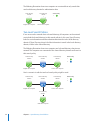
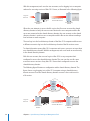
The following illustration shows two computers on a network that only search their
own local directory domain for administrative data.
Local directory
domain
Local directory
domain
English class computer
Science class computer
Search Policy
1
Two-Level Search Policies
If one server on the network hosts a shared directory, all computers on the network
can include the shared directory in their search policies. In this case, Open Directory
looks for user information and other administrative data first in the local directory
domain. If Open Directory doesn’t find the information it needs in the local directory
domain, it looks in the shared directory.
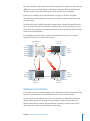
The following illustration shows two computers and a shared directory domain on a
network. The computers are connected to the shared directory domain and have it in
their search policy.
Local directory
domain
Shared directory
domain
Local directory
domain
Search Policy
1
2
English class computer
Science class computer
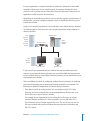
Here’s a scenario in which a two-level search policy might be used:
Local directory
domain
Shared directory
domain
Local directory
domain
Search Policy
1
2
English class computer
Science class computer
Local directory
domain
Math class computer
32
Chapter 2    Open Directory Search Policies
Each class (English, math, science) has its own computer. The students in each class are
defined as users in the local domain of that class’s computer. All three of these local
domains have the same shared domain, in which all instructors are defined.
Instructors, as members of the shared domain, can log in to all class computers.
The students in each local domain can log in to only the computer where their local
account resides.
Local domains reside on their respective computers but a shared domain resides on a
server accessible from the local domain’s computer. When an instructor logs in to any
of the three class computers and cannot be found in the local domain, Open Directory
searches the shared domain.
In the following example, there is only one shared domain, but in more complex
networks, there may be more shared domains.
School Mac OS X
Server
Science class
computer
Local
directory
domain
Local
directory
domain
Shared
directory
domain
Local
directory
domain
Local
directory
domain
English class
computer
Math class
computer
Multilevel Search Policies
If more than one server on the network hosts a shared directory, the computers on the
network can include two or more shared directories in their search policies.
As with simpler search policies, Open Directory looks for user information and other
administrative data first in the local directory domain. If Open Directory does not
find the information it needs in the local directory domain, it searches each shared
directory in the sequence specified by the search policy.
Chapter 2    Open Directory Search Policies
33
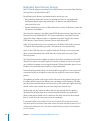
Here’s a scenario in which more than one shared directory might be used:
Search Policy
1
Math directory
domain
2
3
English directory
domain
School directory
domain
Science directory
domain
Each class (English, math, science) has a server that hosts a shared directory domain.
Each classroom computer’s search policy specifies the computer’s local domain, the
class’s shared domain, and the school’s shared domain.
The students in each class are defined as users in the shared domain of that class’s
server, so each student can log in to any computer in the class. Because the instructors
are defined in the shared domain of the school server, they can log in to any classroom
computer.
You can affect an entire network or a group of computers by choosing the domain in
which to define administrative data. The higher the administrative data resides in a
search policy, the fewer places it needs to be changed as users and system resources
change.
Probably the most important aspect of directory services for administrators is planning
directory domains and search policies. These should reflect the resources you want
to share, the users you want to share them among, and the way you want to manage
your directory data.
Automatic Search Policies
Mac OS X computers can be configured to set search policies automatically.
An automatic search policy consists of two parts, one of which is optional:
ÂÂ Local directory domain
ÂÂ Shared LDAP directory (optional)
34
Chapter 2    Open Directory Search Policies
A computer’s automatic search policy always begins with the computer’s local
directory domain. If a Mac OS X computer is not connected to a network, the
computer searches its local directory domain for user accounts and other
administrative data.
The automatic search policy then determines whether the computer is configured
to connect to a shared local directory domain. The computer can be connected to a
shared local directory domain, which can in turn be connected to another shared local
directory domain, and so on.
A local directory domain connection, if any, constitutes the second part of the
automatic search policy. For more information, see “About the Local Directory
Domain” on page 26.
Finally, a computer with an automatic search policy can connect to a shared LDAP
directory. When the computer starts, it can get the address of an LDAP directory server
from DHCP service. The DHCP service of Mac OS X Server can supply an LDAP server
address in the same way it supplies the addresses of DNS servers and a router.
A non-Apple DHCP service can also supply an LDAP server address. This feature is
known as DHCP option 95.
If you want the DHCP service of Mac OS X Server to supply clients with an LDAP
server’s address for automatic search policies, configure the LDAP options of DHCP
service. For more information, see the DHCP chapter in Network Services Administration.
If you want a Mac OS X computer to get the address of an LDAP server from DHCP
service:
ÂÂ The computer must be configured to use an automatic search policy. For more
information, see “Using Advanced Search Policy Settings” on page 127.
ÂÂ The computer’s network preferences must be configured to use DHCP or DHCP with
a manual IP address. Mac OS X is initially configured to use DHCP. For information
about setting network preferences, search Mac Help.
An automatic search policy offers convenience and flexibility, especially for mobile
computers. If a computer with an automatic search policy is disconnected from
the network, connected to a different network, or moved to a different subnet, the
automatic search policy can change.
If the computer is disconnected from the network, it uses its local directory domain.
If the computer is connected to a different network or subnet, it can automatically
change its local directory domain connection and can get an LDAP server address
from the DHCP service on the current subnet.
With an automatic search policy, a computer doesn’t need to be reconfigured to get
directory and authentication services in its new location.
Chapter 2    Open Directory Search Policies
35
Important: If you configure Mac OS X to use an automatic authentication search
policy and a DHCP-supplied LDAP server or a DHCP-supplied local directory domain,
you increase the risk of an attacker gaining control of your computer. The risk is higher
if your computer is configured to connect to a wireless network. For more information,
see “Protecting Computers from a Malicious DHCP Server” on page 131.
Custom Search Policies
If you don’t want a Mac OS X computer to use the automatic search policy supplied by
DHCP, you can define a custom search policy for the computer.
For example, a custom search policy could specify that an Active Directory domain
be searched before an Open Directory server’s shared directory domain. Users can
configure their computer to log in using their user records from the Active Directory
domain and have their preferences managed by group and computer records from
the Open Directory domain.
A custom search policy generally does not work in multiple network locations or while
not connected to a network because it relies on the availability of specific directory
domains on the network.
If a portable computer is disconnected from its usual network, it no longer has access to
the shared directory domains on its custom search policy. However, the disconnected
computer still has access to its own local directory domain because it is the first
directory domain on every search policy.
The portable computer user can log in using a user record from the local directory
domain, which can include mobile user accounts. These mirror user accounts from the
shared directory domain that the portable computer accesses when it’s connected to
its usual network.
Search Policies for Authentication and Contacts
A Mac OS X computer has a search policy for finding authentication information and
it has a separate search policy for finding contact information:
ÂÂ Open Directory uses the authentication search policy to locate and retrieve user
authentication information and other administrative data from directory domains.
ÂÂ Open Directory uses the contacts search policy to locate and retrieve name, address,
and other contact information from directory domains. Mac OS X Address Book uses
this contact information, and other applications can be programmed to use it as well.
Each search policy can be automatic, custom, or local directory domain only.
36
Chapter 2    Open Directory Search Policies
Open Directory Authentication
3
Use this chapter to learn how to use Open Directory
authentication, shadow and crypt passwords, Kerberos, LDAP
bind, and single sign-on.
Open Directory offers several options for authenticating users whose accounts
are stored in directory domains on Mac OS X Server, including Kerberos and the
traditional authentication methods that network services require. Open Directory can
authenticate users by one or more of the following methods:
ÂÂ Kerberos authentication for single sign-on
ÂÂ Traditional authentication methods and a password stored securely in the
Open Directory Password Server database
ÂÂ Traditional authentication methods and a shadow password stored in a secure
shadow password file for each user
ÂÂ A crypt password stored directly in the user’s account, for backward compatibility
with legacy systems
ÂÂ A non-Apple LDAP server for LDAP bind authentication
In addition, Open Directory lets you set up a password policy for all users and specific
password policies for each user, such as automatic password expiration and minimum
password length. (Password policies do not apply to administrators, crypt password
authentication, or LDAP bind authentication.)
About Password Types
Each user account has a password type that determines how the user account is
authenticated. In a local directory domain, the standard password type is shadow
password. On a server upgraded from Mac OS X Server v10.3, user accounts in the local
directory domain can also have an Open Directory password type.
For user accounts in the LDAP directory of Mac OS X Server, the standard password
type is Open Directory. User accounts in the LDAP directory can also have a password
type of crypt password.
37
Authentication and Authorization
Services such as the login window and Apple Filing Protocol (AFP) service request user
authentication from Open Directory. Authentication is part of the process by which a
service determines whether it should grant a user access to a resource. Usually this
process also requires authorization.
Authentication proves a user’s identity, and authorization determines what the
authenticated user is permitted to do. A user typically authenticates by providing
a valid name and password. A service can then authorize the authenticated user to
access specific resources. For example, file service authorizes full access to folders
and files that an authenticated user owns.
You experience authentication and authorization when you use a credit card. The
merchant authenticates you by comparing your signature on the sales slip to the
signature on your credit card. Then the merchant submits your authorized credit
card account number to the bank, which authorizes payment based on your account
balance and credit limit.
Open Directory authenticates user accounts, and service access control lists (SACLs)
authorize use of services. If Open Directory authenticates you, the SACL for login
window determines whether you can log in, then the SACL for AFP service determines
whether you can connect for file service, and so on.
Some services also determine whether a user is authorized to access specific resources.
This authorization can require retrieving other user account information from the
directory domain. For example, AFP service needs the user ID and group membership
information to determine which folders and files the user is authorized to read from
and write to.
About Open Directory Passwords
When a user’s account has a password type of Open Directory, the user can be
authenticated by Kerberos or the Open Directory Password Server. Kerberos is a
network authentication system that uses credentials issued by a trusted server. Open
Directory Password Server supports the traditional password authentication methods
that some clients of network services require.
Kerberos and Open Directory Password Server do not store the password in the user’s
account. Instead, they store passwords in secure databases apart from the directory
domain, and passwords can never be read. Passwords can only be set and verified.
Malicious users might attempt to log in over the network hoping to gain access to
Kerberos and Open Directory Password Server. Open Directory logs can alert you
to unsuccessful login attempts. (See “Viewing Open Directory Status and Logs” on
page 181.)
38
Chapter 3    Open Directory Authentication
User accounts in the following directory domains can have Open Directory passwords:
ÂÂ The LDAP directory of Mac OS X Server
ÂÂ The local directory domain of Mac OS X Server
Note: Open Directory passwords can’t be used to log in to Mac OS X v10.1 or
earlier. Users who log in using the login window of Mac OS X v10.1 or earlier must
be configured to use crypt passwords. The password type doesn’t matter for other
services. For example, a user of Mac OS X v10.1 could authenticate for AFP service with
an Open Directory password.
About Shadow Passwords
Shadow passwords support the same traditional authentication methods as Open
Directory Password Server. These authentication methods are used to send shadow
passwords over the network in a scrambled form, or hash.
A shadow password is stored as several hashes in a file on the same computer as the
directory domain where the user account resides. Because the password is not stored
in the user account, the password is not easy to capture over the network. Each user’s
shadow password is stored in a different file, named a shadow password file, and these
files are protected so they can be read only by the root user account.
Only user accounts that are stored in a computer’s local directory domain can have
a shadow password. User accounts that are stored in a shared directory can’t have a
shadow password.
Shadow passwords also provide cached authentication for mobile user accounts. For
complete information about mobile user accounts, see User Management.
About Crypt Passwords
A crypt password is stored in a hash in the user account. This strategy, historically
named basic authentication, is most compatible with software that needs to access
user records directly. For example, Mac OS X v10.1 and earlier expect to find a crypt
password stored in the user account.
Crypt authentication supports a maximum password length of eight bytes (eight
ASCII characters). If a longer password is entered in a user account, only the first eight
bytes are used for crypt password validation. Shadow passwords and Open Directory
passwords are not subject to this length limit.
For secure transmission of passwords over a network, crypt supports the DHX
authentication method.
Chapter 3    Open Directory Authentication
39
Providing Secure Authentication for Windows Users
Mac OS X Server also offers the same types of secure passwords for Windows users:
ÂÂ Open Directory passwords are required for domain login from a Windows
workstation to a Mac OS X Server PDC and can be used to authenticate for Windows
file service. This type of password can be validated using many authentication
methods, including NTLMv2, NTLMv1, and LAN Manager. Open Directory passwords
are stored in a secure database, not in user accounts.
ÂÂ Shadow passwords can’t be used for domain login but they can be used for
Windows file service and other services. This type of password can also be validated
using NTLMv2, NTLMv1, and LAN Manager authentication methods. Shadow
passwords are stored in secure files, not in user accounts.
ÂÂ A crypt password with Authentication Manager enabled provides compatibility
for user accounts on a server that has been upgraded from Mac OS X Server v10.1.
After upgrading the server to Mac OS X Server v10.6, these user accounts should be
changed to use Open Directory passwords, which are more secure than the legacy
Authentication Manager.
Offline Attacks on Passwords
Because crypt passwords are stored in user accounts, they are potentially subject
to attack.
User accounts in a shared directory domain are accessible on the network. Anyone on
the network who has Workgroup Manager or knows how to use command-line tools
can read the contents of user accounts, including crypt passwords stored in them.
Open Directory passwords and shadow passwords aren’t stored in user accounts,
so these passwords can’t be read from directory domains.
A malicious attacker, or cracker, could use Workgroup Manager or UNIX commands
to copy user records to a file. The cracker can then transport this file to a system and
use various techniques to decode crypt passwords stored in the user records. After
decoding a crypt password, the cracker can log in unnoticed with a legitimate user
name and crypt password.
This form of attack is known as an offline attack because it does not require successive
login attempts to gain access to a system.
An effective way to thwart password cracking is to use good passwords and avoid
using crypt passwords. A password should contain letters, numbers, and symbols in
combinations that can’t be easily guessed by unauthorized users.
Good passwords should not consist of actual words. They can include digits and
symbols (such as # or $), or they can consist of the first letter of all words in a phrase.
Use both uppercase and lowercase letters.
40
Chapter 3    Open Directory Authentication
Shadow passwords and Open Directory passwords are far less susceptible to offline
attack because they are not stored in user records.
Shadow passwords are stored in separate files that can be read only by someone
who knows the password of the root user account (also known as the system
administrator).
Open Directory passwords are stored securely in the Kerberos KDC and in the Open
Directory Password Server database. A user’s Open Directory password can’t be
read by other users, not even by a user with administrator rights for Open Directory
authentication. (This administrator can change only Open Directory passwords and
password policies.)
Crypt passwords are not considered secure. They should be used only for user
accounts that must be compatible with UNIX clients that require them, or for
Mac OS X v10.1 clients. Being stored in user accounts, they’re too accessible and
therefore subject to offline attack. Although stored in an encoded form, they’re
relatively easy to decode. For more information, see “Offline Attacks on Passwords” on page 40.
How Crypt Passwords Are Encrypted
Crypt passwords are not stored in clear text; they are concealed and made unreadable
by encryption. A crypt password is encrypted by supplying the clear text password
with a random number to a mathematical function, known as a one-way hash
function. A one-way hash function always generates the same encrypted value
from particular input but cannot be used to recreate the original password from the
encrypted output it generates.
To validate a password using the encrypted value, Mac OS X applies the function to
the password entered by the user and compares it with the value stored in the user
account or shadow file. If the values match, the password is considered valid.
Determining Which Authentication Option to Use
To authenticate a user, Open Directory must determine which authentication option to
use—Kerberos, Open Directory Password Server, shadow password, or crypt password.
The user’s account contains information that specifies which authentication option to
use. This information is named the authentication authority attribute.
Open Directory uses the name provided by the user to locate the user’s account in the
directory domain. Then Open Directory consults the authentication authority attribute
in the user’s account and learns which authentication option to use.
You can change a user’s authentication authority attribute by changing the password
type in the Advanced pane of Workgroup Manager, as shown in the following table.
For more information, see “Changing a User’s Password Type” on page 107.
Chapter 3    Open Directory Authentication
41
Password type
Authentication authority
Open Directory
Open Directory Password Server Either or both:
and Kerberos1
ÂÂ ;ApplePasswordServer;
ÂÂ ;Kerberosv5;
Shadow password
Password file for each user,
readable only by the root user
account
Either:
Encoded password in user
record
Either:
Crypt password
Attribute in user record
2
;ShadowHash;
ÂÂ ;ShadowHash;<list of enabled
authentication methods>
ÂÂ
ÂÂ
ÂÂ
;basic;
no attribute at all
User accounts from Mac OS X Server v10.2 must be reset to include the Kerberos
authentication authority attribute. See “Enabling Single Sign-On Kerberos
Authentication for a User” on page 110.
If the attribute in the user record is ;ShadowHash; without a list of enabled
authentication methods, default authentication methods are enabled. The list of
default authentication methods is different for Mac OS X Server and Mac OS X.
The authentication authority attribute can specify multiple authentication options.
For example, a user account with an Open Directory password type normally has an
authentication authority attribute that specifies both Kerberos and Open Directory
Password Server.
A user account doesn’t need to include an authentication authority attribute. If a user’s
account contains no authentication authority attribute, Mac OS X Server assumes a
crypt password is stored in the user’s account. For example, user accounts created
using Mac OS X v10.1 or earlier contain a crypt password but not an authentication
authority attribute.
About Password Policies
Open Directory enforces password policies for users whose password type is Open
Directory or shadow password. For example, a user’s password policy can specify a
password expiration interval. If the user is logging in and Open Directory determines
that the user’s password has expired, the user must replace the expired password.
Then Open Directory can authenticate the user.
Password policies can disable a user account on a specified date, after a number of
days, after a period of inactivity, or after a number of failed login attempts. Password
policies can also require passwords to be a minimum length, contain at least one
letter, contain at least one numeral, differ from the account name, differ from recent
passwords, or be changed periodically.
42
Chapter 3    Open Directory Authentication
The password policy for a mobile user account applies when the account is used while
disconnected from the network and while connected to the network. A mobile user
account’s password policy is cached for use while offline. For more information about
mobile user accounts, see User Management.
Password policies do not affect administrator accounts. Administrators are exempt from
password policies because they can change the policies at will. In addition, enforcing
password policies on administrators could subject them to denial-of-service attacks.
Kerberos and Open Directory Password Server maintain password policies separately.
An Open Directory server synchronizes the Kerberos password policy rules with Open
Directory Password Server password policy rules.
About Single Sign-On Authentication
Mac OS X Server uses Kerberos for single sign-on authentication, which relieves users
from entering a name and password separately for every service. With single sign-on,
a user always enters a name and password in the login window. Thereafter, the user
does not need to enter a name and password for AFP service, mail service, or other
services that use Kerberos authentication.
To take advantage of single sign-on, users and services must be Kerberized—
configured for Kerberos authentication—and use the same Kerberos KDC server.
User accounts that reside in an LDAP directory of Mac OS X Server and have a
password type of Open Directory use the server’s built-in KDC. These user accounts are
configured for Kerberos and single sign-on. The server’s Kerberized services use the
server’s built-in KDC and are configured for single sign-on.
This Mac OS X Server KDC can also authenticate users for services provided by other
servers. Having more servers with Mac OS X Server use the Mac OS X Server KDC
requires only minimal configuration.
About Kerberos Authentication
Kerberos was developed at MIT to provide secure authentication and communication
over open networks like the Internet. It’s named for the three-headed dog that
guarded the entrance to the underworld of Greek mythology.
Kerberos provides proof of identity for two parties. It enables you to prove who
you are to network services you want to use. It also proves to your applications that
network services are genuine, not spoofed.
Like other authentication systems, Kerberos does not provide authorization. Each
network service determines what you are permitted to do based on your proven
identity.
Chapter 3    Open Directory Authentication
43
Kerberos permits a client and a server to identify each other much more securely than
typical challenge-response password authentication methods. Kerberos also provides
a single sign-on environment where users authenticate only once a day, week, or other
period of time, thereby easing authentication frequency.
Mac OS X Server offers integrated Kerberos support that virtually anyone can deploy.
In fact, Kerberos deployment is so automatic that users and administrators may not
realize it’s deployed.
Mac OS X v10.3 and later use Kerberos when someone logs in using an account set
for Open Directory authentication. It is the default setting for user accounts in the
Mac OS X Server LDAP directory. Other services provided by the LDAP directory server,
such as AFP and mail service, also use Kerberos automatically.
If your network has other servers with Mac OS X Server v10.6, joining them to the
Kerberos server is easy, and most of their services use Kerberos automatically.
Alternatively, if your network has a Kerberos system such as Microsoft Active Directory,
you can set up your Mac OS X Server and Mac OS X computers to use it
for authentication.
Mac OS X Server and Mac OS X v10.3 or later support Kerberos v5. Mac OS X Server
and Mac OS X v10.6 do not support Kerberos v4.
Breaking the Barriers to Kerberos Deployment
Until recently Kerberos was a technology for universities and government sites. It
wasn’t more widely deployed because adoption barriers needed to be taken down.
Mac OS X and Mac OS X Server v10.3 or later eliminate the following historical barriers
to adoption of Kerberos:
ÂÂ An Administrator had to set up a Kerberos KDC. This was difficult to deploy and
administer.
ÂÂ There was no standard integration with a directory system. Kerberos only does
authentication. It doesn’t store user account data such as user ID (UID), home
folder location, or group membership. The administrator had to determine how to
integrate Kerberos with a directory system.
ÂÂ Servers had to be registered with the Kerberos KDC. This added an extra step to the
server setup process.
ÂÂ After setting up a Kerberos server, the administrator had to visit all client computers
and configure each one to use Kerberos. This was time consuming and required
editing configuration files and using command-line tools.
44
Chapter 3    Open Directory Authentication
ÂÂ You needed a suite of Kerberized applications (server and client software). Some of
the basics were available but porting them and adapting them to work with your
environment was difficult.
ÂÂ Not all network protocols used for client-server authentication are Kerberos-enabled.
Some network protocols still require traditional challenge-response authentication
methods and there is no standard way to integrate Kerberos with these legacy
network authentication methods.
ÂÂ Kerberos client supports failover so if one KDC is offline it can use a replica, but the
administrator had to figure out how to set up a Kerberos replica.
ÂÂ Administration tools were never integrated. Tools for creating and editing user
accounts in the directory domain didn’t know anything about Kerberos, and the
Kerberos tools knew nothing about user accounts in directories. Setting up a user
record was a site-specific operation based on how the KDC was integrated with the
directory system.
Single Sign-On Experience
Kerberos is a credential or ticket-based system. The user logs in once to the Kerberos
system and is issued a ticket with a life span. During the life span of this ticket the user
doesn’t need to authenticate again to access a Kerberized service.
The user’s Kerberized client software, such as the Mac OS X Mail application, presents
a valid Kerberos ticket to authenticate the user for a Kerberized service. This provides a
single sign-on experience.
A Kerberos ticket is like a press pass to a jazz festival held at multiple nightclubs
over a three-day weekend. You prove your identity once to get the pass. Until the
pass expires, you can show it at any nightclub to get a ticket for a performance. All
participating nightclubs accept your pass without seeing your proof of identity again.
Secure Authentication
The Internet is inherently insecure, yet few authentication protocols provide real
security. Malicious hackers can use readily available software tools to intercept
passwords being sent over a network.
Many applications send passwords unencrypted, and these are ready to use as soon as
they’re intercepted. Even encrypted passwords are not completely safe. Given enough
time and computing power, encrypted passwords can be cracked.
To isolate passwords on your private network you can use a firewall, but this does
not solve all problems. For example, a firewall does not provide security against
disgruntled or malicious insiders.
Chapter 3    Open Directory Authentication
45
Kerberos was designed to solve network security problems. It never transmits the
user’s password across the network, nor does it save the password in the user’s
computer memory or on disk. Therefore, even if the Kerberos credentials are cracked
or compromised, the attacker does not learn the original password, so he or she can
potentially compromise only a small portion of the network.
In addition to superior password management, Kerberos is also mutually
authenticated. The client authenticates to the service, and the service authenticates to
the client. A man-in-the-middle or spoofing attack is impossible when you are using
Kerberized services, and that means users can trust the services they are accessing.
Moving Beyond Passwords
Network authentication is difficult: To deploy a network authentication method, the
client and server must agree on the authentication method. Although it is possible for
client/server processes to agree on a custom authentication method, getting pervasive
adoption across a suite of network protocols, platforms, and clients is virtually
impossible.
For example, suppose you wanted to deploy smart cards as a network authentication
method. Without Kerberos, you’d have to change every client/server protocol to
support the new method. The list of protocols includes SMTP, POP, IMAP, AFP, SMB,
HTTP, FTP, IPP, SSH, QuickTime Streaming, DNS, LDAP, local directory domain, RPC, NFS,
AFS, WebDAV, and LPR, and goes on and on.
Considering all the software that does network authentication, deploying a new
authentication method across the entire suite of network protocols would be a
daunting task. Although this might be feasible for software from one vendor, you’d be
unlikely to get all vendors to change their client software to use your new method.
Further, you’d probably also want your authentication to work on multiple platforms
(such as Mac OS X, Windows, and UNIX).
Due to the design of Kerberos, a client/server binary/protocol that supports Kerberos
doesn’t even know how the user proves identity. Therefore you only need to change
the Kerberos client and the Kerberos server to accept a new proof of identity such as a
smart card. As a result, your entire Kerberos network has now adopted the new proofof-identity method, without deploying new versions of client and server software.
46
Chapter 3    Open Directory Authentication
Multiplatform Authentication
Kerberos is available on every major platform, including Mac OS X, Windows, Linux,
and other UNIX variants.
Centralized Authentication
Kerberos provides a central authentication authority for the network. All Kerberosenabled services and clients use this central authority. Administrators can centrally
audit and control authentication policies and operations.
About Kerberized Services
Kerberos can authenticate users for the following services of Mac OS X Server:
ÂÂ Login window
ÂÂ Mail service
ÂÂ AFP file service
ÂÂ FTP file service
ÂÂ SMB file service (as a member of an Active Directory Kerberos realm)
ÂÂ VPN service
ÂÂ Apache web service
ÂÂ LDAP directory service
ÂÂ iChat service
ÂÂ Print service
ÂÂ NFS file service
ÂÂ Xgrid service
These services have been Kerberized whether they are running or not. Only services
that are Kerberized can use Kerberos to authenticate a user. Mac OS X Server includes
command-line tools for Kerberizing other services that are compatible with MIT-based
Kerberos.
Configuring Services for Kerberos After Upgrading
After upgrading to Mac OS X Server v10.6, you may need to configure some services to
use single sign-on Kerberos authentication. These services either weren’t configured to
use Kerberos or weren’t included with the earlier version of Mac OS X Server.
If this condition exists, a message about it appears when you connect to the server in
Server Admin. The message appears in the Overview pane when you select the server
(not a service) in the Servers list.
Chapter 3    Open Directory Authentication
47
To configure new and upgraded services to use Kerberos:
1 Open Server Admin and connect to the upgraded server.
2 Click the triangle at the left of the server.
The list of services appears.
3 From the expanded Servers list, select Open Directory.
4 Click Settings, then click General.
5 Click Kerberize Services, then enter the name and password of an LDAP directory
administrator account.
Services that were already configured to use Kerberos are not affected.
From the command line:
Kerberize a service from a terminal running on that host.
1 To create the service principal:
$ sudo kadmin -p admin_principal -q "addprinc -randkey service-principal"
2 Import the principal key into the keytab file:
$ sudo kadmin -p admin_principal -q "ktadd service-principal"
3 Configure the service to use the new principal:
This step is service-specific. For information about how to perform this step, see the
service documentation.
About Kerberos Principals and Realms
Kerberized services are configured to authenticate principals who are known to a
Kerberos realm. You can think of a realm as a Kerberos database or authentication
domain that contains validation data for users, services, and sometimes servers, which
are all known as principals.
For example, a realm contains principals’ secret keys, which are the result of a one-way
function applied to passwords.
Service principals are generally based on randomly generated secrets rather than
passwords.
Here are examples of realm and principal names. Realm names are capitalized by
convention to distinguish them from DNS domain names:
ÂÂ Realm: MYREALM.EXAMPLE.COM
ÂÂ User principal: [email protected]
ÂÂ Service principal: afpserver/[email protected]
48
Chapter 3    Open Directory Authentication
About the Kerberos Authentication Process
There are several phases to Kerberos authentication. In the first phase, the client
obtains credentials to be used to request access to Kerberized services. In the second
phase, the client requests authentication for a specific service. In the final phase, the
client presents those credentials to the service.
The following illustration summarizes these activities. The service and the client can be
the same entity (such as the login window) or two entities (such as a mail client and
the mail server).
Key Distribution
Center (KDC)
4
6
2
Kerberized
service
3
Client
1
5
Kerberos Authentication Process:
1 The client authenticates to a Kerberos KDC, which interacts with realms to access
authentication data.
This is the only step in which passwords and associated password policy information
are be checked.
2 The KDC issues a ticket-granting ticket to the client.
The ticket is the credential needed when the client wants to use Kerberized services
and is good for a configurable period of time, but it can be revoked before expiration.
It is cached on the client until it expires.
3 The client contacts the KDC with the ticket-granting ticket when it wants to use a
Kerberized service.
4 The KDC issues a ticket for that service.
5 The client presents the ticket to the service.
6 The service authenticates the client by verifying that the ticket is valid.
After authenticating the client, the service determines if the client is authorized to use
the service.
Kerberos only authenticates clients; it does not authorize them to use services. For
example, many services use Mac OS X Server’s service access control lists (SACLs) to
determine whether a client is authorized to use the service.
Kerberos never sends a password or password policy information to a service. After a
ticket-granting ticket is obtained, no password information is provided.
Chapter 3    Open Directory Authentication
49
Time is very important with Kerberos. If the client and the KDC are out of sync by
more than a few minutes, the client fails to achieve authentication with the KDC. The
date, time, and time zone information must be correct on the KDC server and clients,
and the server and clients should all use the same network time service to keep their
clocks in sync.
For more information about Kerberos, go to the MIT Kerberos website at
web.mit.edu/kerberos/www/index.html.
About Open Directory Password Server and Shadow
Password Authentication Methods
For compatibility with various services, Mac OS X Server can use several authentication
methods to validate Open Directory passwords and shadow passwords.
For Open Directory passwords, Mac OS X Server uses the standard Simple
Authentication and Security Layer (SASL) mechanism to negotiate an authentication
method between a client and a service.
For shadow passwords, the use of SASL depends on the network protocol. The
following authentication methods are supported:
50
Method
Network security
Storage security
Uses
APOP
Encrypted, with clear
text fallback
Clear text
POP mail service
CRAM-MD5
Encrypted, with clear
text fallback
Encrypted
IMAP mail service, LDAP
service
DHX
Encrypted
Encrypted
AFP file service,
Open Directory
administration
Digest-MD5
Encrypted
Encrypted
Login window, mail
service
MS-CHAPv2
Encrypted
Encrypted
VPN service
NTLMv1 and NTLMv2
Encrypted
Encrypted
SMB services
(Windows NT/98 or
later)
LAN Manager
Encrypted
Encrypted
SMB services
(Windows 95)
WebDAV-Digest
Encrypted
Clear text
WebDAV file service
(iDisk)
Chapter 3    Open Directory Authentication
Open Directory supports many authentication methods because each service that
requires authentication uses some methods but not others. For example, AFP service
uses one set of authentication methods, web services use another set of methods, mail
service uses another set, and so on.
Some authentication methods are more secure than others. The more secure methods
use stronger algorithms to encode the information they transmit between client
and server. The more secure authentication methods also store hashes, which can’t
easily be recovered from the server. Less secure methods store a recoverable, clear
text password.
No one—including an administrator and the root user account—can recover encrypted
passwords by reading them from the database. An administrator can use Workgroup
Manager to set a user’s password, but the administrator can’t read a user’s password.
If you connect Mac OS X Server v10.4 or later to a directory domain of Mac OS X Server
v10.3 or earlier, users defined in the older directory domain cannot be authenticated
with the NTLMv2 method. This method may be required to securely authenticate some
Windows users for the Windows services of Mac OS X Server v10.4 or later.
Open Directory Password Server in Mac OS X Server v10.4 or later supports NTLMv2
authentication, but Password Server in Mac OS X Server v10.3 or earlier does not
support NTLMv2.
If you connect Mac OS X Server v10.3 or later to a directory domain of Mac OS X Server
v10.2 or earlier, users defined in the older directory domain cannot be authenticated
with the MS-CHAPv2 method. This method may be required to securely authenticate
users for the VPN service of Mac OS X Server v10.3 or later.
Open Directory Password Server in Mac OS X Server v10.3 or later supports
MS-CHAPv2 authentication, but Password Server in Mac OS X Server v10.2 does not
support MS-CHAPv2.
Chapter 3    Open Directory Authentication
51
Disabling Open Directory Authentication Methods
To make Open Directory password storage on the server more secure, you can
selectively disable authentication methods.
For example, if no clients are going to use Windows services, you can disable the
NTLMv1, NTLMv2, and LAN Manager authentication methods to prevent storing
passwords on the server using these methods. Then someone who gains unauthorized
access to the server’s password database can’t exploit weaknesses in these
authentication methods to crack passwords.
Important: If you disable an authentication method, its hash is removed from
the password database the next time the user authenticates. If you enable an
authentication method that was disabled, every Open Directory password must be
reset to add the newly enabled method’s hash to the password database. Users can
reset their own passwords, or a directory administrator can do it.
Disabling an authentication method makes the Open Directory Password Server
database more secure if an unauthorized user gains physical access to an Open
Directory server (master or replica) or to media containing a backup of the Open
Directory master.
Someone who gains access to the password database can try to crack a user’s
password by attacking the hash or recoverable text stored in the password database
by any authentication method. Nothing is stored in the password database by a
disabled authentication method, leaving one less avenue of attack open to a cracker
who has physical access to the Open Directory server or a backup of it.
Some hashes stored in the password database are easier to crack than others.
Recoverable authentication methods store clear (plainly readable) text. Disabling
authentication methods that store clear text or weaker hashes increases password
database security more than disabling methods that store stronger hashes.
If you believe your Open Directory master, replicas, and backups are secure, select all
authentication methods. If you’re concerned about the physical security of any Open
Directory server or its backup media, disable some methods.
Note: Disabling authentication methods does not increase the security of passwords
while they are transmitted over the network. Only password database security is
affected. In fact, disabling some authentication methods might require clients to
configure their software to send passwords over the network in clear text, thereby
compromising password security in a different way.
52
Chapter 3    Open Directory Authentication
Disabling Shadow Password Authentication Methods
You can selectively disable authentication methods to make passwords stored in
shadow password files more secure. For example, if a user doesn’t use mail service
or web services, you can disable the WebDAV-Digest and APOP methods for the
user. Then someone who gains access to the shadow password files on a server can’t
recover the user’s password.
Important: If you disable a shadow password authentication method, its hash is
removed from a user’s shadow password file the next time the user authenticates. If
you enable an authentication method that was disabled, the newly enabled method’s
hash is added to the user’s shadow password file the next time the user authenticates
for a service that can use a clear text password, such as a login window or AFP.
Alternatively, you can reset the user’s password to add the newly enabled method’s
hash. The user can reset the password, or a directory administrator can do it.
Disabling an authentication method makes the shadow password more secure if a
malicious user gains physical access to a server’s shadow password files or to media
containing a backup of the shadow password files. Someone who gains access to the
password files can try to crack a user’s password by attacking the hash or recoverable
text stored by any authentication method.
Nothing is stored by a disabled authentication method, leaving one less avenue of
attack open to a cracker who has physical access to a server’s shadow password files or
a backup of them.
Hashes stored by some authentication methods are easier to crack than others.
With recoverable authentication methods, original clear text passwords can be
reconstructed from what is stored in the file. Disabling the authentication methods
that store recoverable or weaker hashes increases shadow password file security more
than disabling methods that store stronger hashes.
If you believe a server’s shadow password files and backups are secure, select all
authentication methods. If you’re concerned about the physical security of the server
or its backup media, disable unused methods.
Note: Disabling authentication methods does not increase the security of passwords
while they are transmitted over the network. Only password storage security is
affected. Disabling some authentication methods might require clients to configure
their software to send passwords over the network in clear text, thereby compromising
password security in a different way.
Chapter 3    Open Directory Authentication
53
Contents of the Open Directory Password Server Database
Open Directory Password Server maintains an authentication database separate from
the directory domain. Open Directory tightly restricts access to the authentication
database.
Open Directory Password Server stores the following information in its authentication
database for each user account that has a password type of Open Directory:
ÂÂ The user’s password ID, a 128-bit value assigned when the password is created.
It is also stored in the user’s record in the directory domain and is used as a key
for finding a user’s record in the Open Directory Password Server database.
ÂÂ The password, stored in recoverable (clear text) or hashed (encrypted) forms.
The form depends on the authentication method.
A recoverable password is stored for the APOP and WebDAV authentication
methods. For all other methods, the record stores a hashed (encrypted) password.
If no authentication method requiring a clear text password is enabled, the Open
Directory authentication database stores only hashes of passwords.
ÂÂ The user’s short name, for use in log messages viewable in Server Admin.
ÂÂ Password policy data.
ÂÂ Time stamps and other usage information, such as last login time, last failed
validation time, count of failed validations, and replication information.
LDAP Bind Authentication
For user accounts that reside in an LDAP directory on a non-Apple server, Open
Directory attempts to use LDAP bind authentication. Open Directory sends the LDAP
directory server the name and password supplied by the authenticating user. If the
LDAP server finds a matching user record and password, authentication succeeds.
If the LDAP directory service and the client computer’s connection to it are configured to
send clear text passwords over the network, LDAP bind authentication can be insecure.
Open Directory tries to use a secure authentication method with the LDAP directory.
If the directory doesn’t support secure LDAP bind and the client’s LDAPv3 connection
permits sending a clear text password, Open Directory reverts to simple LDAP bind.
To prevent clear text authentication make sure your LDAP servers don’t accept clear
text passwords.
In this case, you can secure simple LDAP bind authentication by setting up access to
the LDAP directory through the Secure Sockets Layer (SSL) protocol. SSL makes access
secure by encrypting all communications with the LDAP directory.
For more information, see “Changing the Security Policy for an LDAP Connection” on
page 145 and “Changing the Connection Settings for an LDAP Directory” on page 143.
54
Chapter 3    Open Directory Authentication
Open Directory Planning and
Management Tools
4
Use this chapter to assess directory domain needs, estimate
directory and authentication requirements, identify servers
for hosting shared domains, improve performance and
redundancy, deal with duplication in a multibuilding campus,
and make Open Directory services secure.
Keeping information in shared directory domains gives you more control over your
network, gives more users access to the information, and makes it easier to maintain
the information. The amount of control and convenience depends on the effort you
put into planning your shared domains.
The goal of directory domain planning is to design the simplest arrangement of
shared domains that gives your Mac OS X users easy access to the network resources
they need and that minimizes the time you spend maintaining user records and other
administrative data.
General Planning Guidelines
If you do not share user and resource information among multiple Mac OS X
computers, very little directory domain planning is necessary, because everything can
be accessed from a local directory domain.
However, make sure that all individuals who use a Mac OS X computer have user
accounts on that computer. These user accounts reside in the local directory domain
on the computer.
In addition, everyone who needs to use Mac OS X Server’s file service, mail service,
or other services that require authentication must have a user account in the server’s
local directory domain.
55
With this arrangement, each user has two accounts, one for logging in to a computer
and one for accessing services of Mac OS X Server, as illustrated in the following figure.
Log in to
Mac OS X
Local directory
domain
Connect to Mac OS X
Server for file service
Local directory
domain
When the user attempts to access the file service, the file server accesses the shared
directory domain to verify the user account. Because the user computer and the file
server are connected to the shared directory domain, the user account on the shared
directory domain is used to access a computer and the file service without needing a
local account on each computer.
The user logs in to the local directory domain of the Mac OS X computer and then uses
a different account to log in to the local directory domain of the file services server.
To share information among Mac OS X computers and servers, you must set up at least
one shared directory domain. With this arrangement, each user needs an account only
in the shared directory domain.
With this one account, the user can log in to Mac OS X on any computer that’s
configured to access the shared directory domain. The user can also use this same
account to access services of any Mac OS X Server that’s configured to access the
shared directory domain.
The following figure illustrates a configuration with a shared directory domain. The
figure shows a user logging in to a Mac OS X computer using a shared directory
domain account. Then the shared directory domain account is also used to access
a file service.
Shared
directory
domain
Log in to
Mac OS X
Local directory
domain
56
Connect to Mac OS X
Server for file service
Chapter 4    Open Directory Planning and Management Tools
Local directory
domain
In many organizations, a single shared directory domain is adequate. It can handle
hundreds of thousands of users and thousands of computers sharing the same
resources, such as printer queues, share points for home directories, share points for
applications, and share points for documents.
Replicating the shared directory domain can increase the capacity or performance of
the directory system by configuring multiple servers to handle the directory system
load for the network.
Larger, more complex organizations can benefit from extra shared directory domains.
The following figure shows how one such complex organization might organize its
directory domains.
Windows server
Local
directory
domain
Shared
directory
domain
Active
Directory
domain
Mac OS X Server
Local
directory
domain
Mac OS X user
Windows user
If you have a large organization and you want to increase the performance and
capacity of your network directory domain, you can add multiple directory domains
to your network. Also, by using multiple directory domains you can load-balance your
corporate directory domain.
There are different methods of configuring multiple directory domains. By analyzing
your network topology you can determine the best method for your network. The
following are optional configurations of multiple directory domains:
ÂÂ Open Directory with an existing domain. You can configure a Mac OS X Open
Directory server on a network that has an existing directory domain such as an
Active Directory or Open Directory domain.
For example, if your organization has an existing Active Directory server that
supports Windows and Mac OS X client computers, you can add a Mac OS X
Open Directory server to better support Mac users. The two servers can exist on
the same network and provide redundant directory domains for Windows and
Mac OS X clients.
Chapter 4    Open Directory Planning and Management Tools
57
You also configure Mac OS X Server to handle cross-domain authorization if a
Kerberos realm exists.
If you have an existing Active Directory server, you can connect an Open Directory
server to it and you can easily add users from the Active Directory server into your
Open Directory server. These users are referred to as augment users.
For more information about augment records, see “Integrating with Augment
Records” on page 68. For more information about adding augments to user records,
see User Management.
ÂÂ Open Directory Master Server with replicas. You can also create a Mac OS X Open
Directory master server with replicas. The replica servers have a copy of the Open
Directory master’s directory domain for load balancing and redundancy.
For example, your organization could have an Open Directory master at your
headquarters and place replicas of that server at each remote location. This prevents
users at remote locations from experiencing delayed logins.
ÂÂ Cascading replication. You can also use cascading replication, where replicas of an
Open Directory master have replicas. If a replica is a direct member of the Open
Directory master and it has replicas it is called a relay.
For example, If your organization has 32 replicas and you must add another replica,
you can reorganize your network topology and have your replicas become relays by
adding replicas to a replica (or relay).
Cascading replication load-balances the Open Directory master by minimizing the
number of replicas it must directly manage.
Estimating Directory and Authentication Requirements
In addition to considering how you want to distribute directory data among multiple
domains, you must also consider the capacity of each directory domain. The size of
your directory domain depends on your network requirements.
One factor is the performance of the database that stores directory information. The
LDAP directory domain of Mac OS X Server uses the Berkeley DB database, which
remains efficient with 200,000 records. A server hosting a directory domain of that size
must have sufficient hard disk space to store all the records.
The number of connections a directory service can handle is harder to measure
because directory service connections occur in the context of the connections of
all services the server provides. With Mac OS X Server, a server dedicated to Open
Directory has a limit of 1,000 simultaneous client computer connections.
58
Chapter 4    Open Directory Planning and Management Tools
The Open Directory server can provide LDAP and authentication services to more
client computers, because not all computers need these services at the same
time. Each computer connects to the LDAP directory for up to two minutes, and
connections to the Open Directory Password Server are even more brief.
Determining what the fraction is—the percentage of computers that will make
connections at the same time—can be difficult.
For example, computers that each have a single user who spends all day working on
graphics files will need Open Directory services relatively infrequently.
In contrast, computers in a lab will have many users logging in throughout the day,
each with a different set of managed client preference settings, and these computers
will place a relatively high load on Open Directory services.
In general, you can correlate Open Directory usage with login and logout. These
activities generally dominate directory and authentication services for any system.
The more frequently users log in and out, the fewer computers an Open Directory
server (or any directory and authentication server) can support. You need more Open
Directory servers if users log in frequently. You can get by with fewer Open Directory
servers if work sessions are long and login is infrequent.
Identifying Servers for Hosting Shared Domains
If you need more than one shared domain, identify the servers where the shared
domains should reside. Shared domains affect many users, so they should reside on
Mac OS X Server computers that have the following characteristics:
ÂÂ Restricted physical access
ÂÂ Limited network access
ÂÂ High-availability technologies, such as uninterruptible power supplies
Select computers that will not be replaced frequently and that have adequate capacity
for expanding directory domains. Although you can move a shared domain after it
is set up, it might be necessary to reconfigure the search policies of computers that
connect to the shared domain so users can continue to log in.
Chapter 4    Open Directory Planning and Management Tools
59
Replicating Open Directory Services
Mac OS X Server supports replication of the LDAP directory service, the Open Directory
Password Server, and the Kerberos KDC.
By replicating your directory and authentication services you can:
ÂÂ Move directory information closer to a population of users in a geographically
distributed network, improving performance of directory and authentication
services to these users.
ÂÂ Achieve redundancy, so users see little disruption in service if a directory system fails
or becomes unreachable.
One server has a primary copy of the shared LDAP directory domain, Open Directory
Password Server, and Kerberos KDC. This server is referred to as an Open Directory
master. Each Open Directory replica is a separate server with a copy of the master’s
LDAP directory, Open Directory Password Server, and Kerberos KDC.
A Mac OS X Open Directory server can have up to 32 replicas. Each replica can have
"32 replicas of itself, providing you with 1,056 replicas in a two-tier hierarchy.
Access to the LDAP directory on a replica is read only. Changes to user records and
other account information in the LDAP directory can be made only on the Open
Directory master.
The Open Directory master updates its replicas when there are changes to the LDAP
directory. The master can update replicas every time a change occurs, or you can set
up a schedule so updates occur at regular intervals. The fixed schedule option is best
if replicas are connected to the master by a slow network link.
Passwords and password policies can be changed on any replica. If a user’s password
or password policy are changed on more than one replica, the most recent change
prevails.
The updating of replicas relies on the clocks of the master and replicas being in sync.
If replicas and the master have different times, updating could be arbitrary. The date,
time, and time zone information must be correct on the master and replicas, and they
should use the same network time service to keep their clocks in sync.
Avoid having only one replica on either side of a slow network link. If a replica is
separated from all other replicas by a slow network link and the one replica fails,
clients of the replica will fail over to a replica on the other side of the slow network
link. As a result, their directory services can slow markedly.
If your network has a mix of Mac OS X Server v10.4 and v10.5 or later, one version
can’t be a replica of a master of the other version. An Open Directory master of v10.5
or later won’t replicate to v10.4, nor will an Open Directory master of v10.4 replicate
to v10.5 or later:
60
Chapter 4    Open Directory Planning and Management Tools
Replica version
Mac OS X Server v10.5 or later
master
Mac OS X Server v10.4 master
Mac OS X Server v10.5 or later
replica
Yes
No
Mac OS X Server v10.4 replica
No
Yes
Replica Sets
A replica set is an automatic configuration that requires each service that Open
Directory manages (LDAP, Password Server, and Kerberos) to look for and use the same
replica server. This helps ensure that client computers choose the same replica server
when using Open Directory services and helps prevent slow login.
Cascading Replication
Mac OS X v10.4 used a hub-spoke model for replicating Open Directory master servers.
This required each Open Directory master to maintain a transaction record for each
replica server.
The following illustration shows the hub-spoke model used in Mac OS X v10.4.
Replica
Replica
Open Directory
Master
Replica
Replica
Replica
Replica
In addition, there was no predefined limit to how many replica servers an Open
Directory master could manage.
If an Open Directory master had 1,000 replicas to manage, it could have performance
issues if replicas continued to be added. This is similar to having one manager for 1,000
employees, which is an unmanageable situation.
Mac OS X Server v10.5 and later use cascading replication to improve scalability and
resolve performance issues with the older hub-spoke model of replication. The use of
cascading replication helps limit the number of replica servers that can be supported
by a single Open Directory master server.
Chapter 4    Open Directory Planning and Management Tools
61
A single Open Directory master server can have up to 32 replicas and each of those
replicas can have up to 32 replicas, which gives you 1,056 replicas of a single Open
Directory master server.
This creates a two-tier hierarchy of replica servers. The first tier of replicas, which
are the direct members of the Open Directory master, are called relays if they have
replicas, because they relay the data to the second tier of replicas.
Also, cascading replication does not require that a single Open Directory master server
maintain a transaction record of each replica server. The master server only keeps a
maximum of 32 replica transaction records, which improves performance.
The following illustration shows the two-tier hierarchy of the cascading replication model.
Open Directory
Master
Relay
(Replica)
Replica
Replica
Relay
(Replica)
Replica
Replica
Relay
(Replica)
Replica
Replica
Relay
(Replica)
Replica
Replica
Planning the Upgrade of Multiple Open Directory Replicas
If your Open Directory master manages more than 32 replicas, your organization must
migrate to a cascading replication. The cascading replication model will improve your
Open Directory server performance.
When planning for your migration consider the locations of your replica servers and
your network topology to help determine how to reorganize your replicas into a
hierarchal structure.
For example, you would not want to have an Open Directory master on the West coast
replicating to a replica on the East coast.
Note: If your Open Directory master has fewer than 32 replicas, migration is not
necessary.
62
Chapter 4    Open Directory Planning and Management Tools
Load Balancing in Small, Medium, and Large Environments
Do not use service load-balancing software from third parties with Open Directory
servers.
Load-balancing software can cause unpredictable problems for Open Directory
computers. It can interfere with the automatic load balancing and failover behavior
of Open Directory in Mac OS X and Mac OS X Server.
Mac OS X computers seek the nearest available Open Directory server—master or
replica. A computer’s nearest Open Directory master or replica is the one that responds
most quickly to the computer’s request for an Open Directory connection.
Replication in a Multibuilding Campus
A network that spans multiple buildings might have slower network links between
buildings than the link within each building. The network links between buildings
might also be overloaded.
These conditions can adversely affect the performance of computers that get Open
Directory services from a server in another building. As a result, you may want to set
up an Open Directory replica in each building.
Depending on need, you may even want to set up an Open Directory replica on
each floor of a multistory building. Each replica provides efficient directory and
authentication services to client computers in its vicinity. The computers do not need
to make connections with an Open Directory server across the slow, crowded network
link between buildings.
Having more replicas has a disadvantage. Replicas communicate with each other and
with the master over the network. This network communication overhead increases
as you add replicas. Adding too many replicas can add more network traffic between
buildings in the form of replication updates than it removes in the form of Open
Directory client communications.
When deciding how many replicas to deploy, consider how heavily the computers
will use Open Directory services. If the computers are relatively light users of Open
Directory services and your buildings are connected by fairly fast network links (such
as 100 Mbps Ethernet), you probably do not need a replica in each building.
You can reduce the communication overhead between Open Directory replicas and
the master by scheduling how often the Open Directory master updates the replicas.
You might not need the replicas updated every time a change occurs in the master.
Scheduling less frequent updates of replicas will improve network performance.
Chapter 4    Open Directory Planning and Management Tools
63
Using an Open Directory Master, Replica, or Relay with NAT
If your network has an Open Directory server on the private network side of a network
address translation (NAT) router (or gateway), including the NAT router of Mac OS X
Server, only computers on the private network side of the NAT router can connect to
the Open Directory server’s LDAP directory domain.
Computers on the public network side of the NAT router can’t connect to the
LDAP directory domain of an Open Directory master or replica that’s on the private
network side.
If an Open Directory server is on the public network side of a NAT router, computers
on the private network and the public network sides of the NAT router can connect to
the Open Directory server’s LDAP directory.
If your network supports mobile clients such as MacBooks that will move between
the private LAN of your NAT gateway and the Internet, you can set up VPN service for
mobile users so they can use VPN to connect to the private network and the Open
Directory domain.
Open Directory Master and Replica Compatibility
The Open Directory master and its replicas must use the same version of Mac OS X
Server. In addition:
ÂÂ An Open Directory master using Mac OS X Server v10.5 or later won’t replicate to
Mac OS X Server v10.4.
ÂÂ Mac OS X Server v10.5 or later can’t be a replica of an Open Directory master using
Mac OS X Server v10.4.
ÂÂ An Open Directory master using Mac OS X Server v10.5 can replicate to an Open
Directory replica using Mac OS X Server v10.5.
If you have an Open Directory master and replicas that use Mac OS X Server v10.4,
upgrade them to v10.5 or later at the same time. First, upgrade the master; then,
upgrade the replicas. Clients of the master and replicas will continue to receive
directory and authentication services during the upgrade.
While you are upgrading the master, its clients will fail over to the nearest replica.
When you upgrade replicas one at a time, clients will fail back to the upgraded master.
Upgrading an Open Directory master from Mac OS X Server v10.4 to v10.5 or later will
sever ties to existing replicas. After upgrading each Open Directory replica to Mac OS X
Server v10.5 or later, it will be a standalone directory service and you’ll need to make it
a replica again.
For more information about upgrading to Mac OS X Server v10.6, see Upgrading
and Migrating.
64
Chapter 4    Open Directory Planning and Management Tools
Mixing Active Directory and Open Directory Master and
Replica Services
There are some special considerations when introducing Open Directory Servers into
an Active Directory environment. If precautions are not taken, mixed results will occur
on client and server functionality.
Also, avoid mixing Authenticated Directory Binding and Active Directory on the same
client or server. Authenticated binding makes use of Kerberos as does Active Directory.
Using both will cause unexpected behavior or nonfunctioning authentication services
unless care is taken as detailed below.
When mixing Open Directory and Active Directory, you can only use Kerberos
credentials from one system or another for single sign-on purposes. You cannot have
users exist in Active Directory and Open Directory and use both Kerberos credentials
to use single sign-on to access a server that is Kerberized.
In other words, you cannot sign into an Active Directory account and expect to use
single sign-on with a server that is part of the Open Directory Kerberos realm.
Kerberos is used in Active Directory and Open Directory environments. Kerberos
makes assumptions about determining the realm of a server when Kerberos tickets are
to be used. The following is an example of mixing an Active Directory Kerberos realm
with an Open Directory master Kerberos realm:
ÂÂ Active Directory Domain = company.com
ÂÂ Active Directory Kerberos realm = COMPANY.COM
ÂÂ Open Directory Server master = server1.company.com
ÂÂ Open Directory Kerberos realm = SERVER1.COMPANY.COM
When Kerberos attempts to obtain a ticket-granting-ticket (TGT) for using LDAP with
server1.company.com, it requests ldap/[email protected] unless
domain_realm entity is present in the configuration. The domain_realm for Open
Directory assumes that all company.com entities belong to SERVER1.COMPANY.COM.
This prevents all connectivity to the Active Directory domain named company.com.
If you want to mix Authenticated Directory Binding and Active Directory, your Active
Directory Domain and Open Directory realms and servers must be in a different
hierarchy. For example:
ÂÂ Active Directory Domain = company.com
ÂÂ Active Directory Kerberos realm = COMPANY.COM
ÂÂ Open Directory Server master = server1.od.company.com
ÂÂ Open Directory Server realm = “OD.COMPANY.COM”
Chapter 4    Open Directory Planning and Management Tools
65
Or
ÂÂ Active Directory Domain = ads.company.com
ÂÂ Active Directory Kerberos realm = ADS.COMPANY.COM
ÂÂ Open Directory Server master = server1.od.company.com
ÂÂ Open Directory Kerberos realm = OD.COMPANY.COM
In both examples, a new DNS domain zone must be created, and forward and
reverse DNS entries must exist for the servers so that if an IP address is used for
the Open Directory server, it gets the expected name. For example, IP address
server1.od.company.com = 10.1.1.1, so a lookup of 10.1.1.1 should be equal to
server1.od.company.com, not server1.company.com.
Integrating with Existing Directory Domains
If your network has a directory domain, you can integrate another directory domain
server into your network. There are many reasons why you might want to have two
directory domains, such as providing better support and management of network
computers.
Integrating with Cross-domain Authorization
If your network has a directory domain, you can add another directory domain server
to your network that uses your existing directory domain’s database to authorize user
access. This configuration is referred to as cross-domain authorization and requires that
your servers support Kerberos.
If you use cross-domain authorization, one server will be a pseudomaster server and
the other will be a subordinate server. Users will authenticate to the pseudomaster
server using a method of authentication, so if a user authenticates, he or she will
receive a Kerberos ticket.
When the user attempts to access a service that is offered by the subordinate server,
the subordinate server accepts and validates the user’s Kerberos ticket, which was
given by the pseudomaster server, to authorize the user.
The Kerberos ticket has Privilege Attribute Certificate (PAC) information, which contains
the user name, user IDs (UIDs), and group membership IDs (GIDs).
The subordinate server uses this information to verify that the user is authorized to use
the service. It does so by comparing the UID or GID to the access control list (ACL) of
the service the user is requesting to access.
66
Chapter 4    Open Directory Planning and Management Tools
Using cross-domain authorization keeps you from needing to create different user
names and passwords for your subordinate directory domain server. You can use the
same user names and passwords from the corporate directory domain along with
the PAC information to authorize user access.
Cross-domain authorization is an ideal configuration if you are not permitted to
directly edit groups in the corporate directory domain.
You can use cross-domain authorization between an Active Directory server and a
Mac OS X v10.6 Open Directory server or between two Mac OS X v10.6 Open Directory
servers. Cross-domain authorization does not work on a Mac OS X v10.4 server.
To use PAC information, the pseudomaster server must have a Kerberos realm for
the subordinate server to join.
To create a subordinate for a directory system you must join your server to an
Active Directory or Open Directory server that has Kerberos configured and running.
Then, using Server Admin, you must promote your Open Directory server to an
Open Directory master. The subordinate server determines that it is subordinate to
an Active Directory or Open Directory server and configures itself accordingly.
You can also have a replica of your subordinate Open Directory server. To create a
replica of a subordinate directory server, join your server to the pseudomaster and
subordinate server. Then configure the server to be a replica of the subordinate server.
If you don’t join the server to both the pseudo-master and subordinate server, it is
blocked or fails to become a replica.
Integrating with a Magic Triangle
A magic triangle, also referred to as the golden triangle, is the connecting of two
directory domains where one controls the authentication and the other manages
Mac OS X settings.
Mac OS X supports the connection of an Active Directory server to an Open Directory
server or two Open Directory servers connected together. This creates a magic triangle
that is made up of three parts: the directory server providing authentication, the
second directory server, and the Mac OS X client computers.
When configuring a magic triangle, one server must be the primary server and the
other the secondary server. The secondary server must join the primary server and its
Kerberos realm. There can only be one Kerberos realm in a magic triangle.
For example, you can configure an Active Directory server as a primary server to host
the Kerberos Distribution Center (KDC) and contain user and group records. Then you
can configure an Open Directory server as a secondary server, and connect it to the
Active Directory server and its Kerberos realm.
Chapter 4    Open Directory Planning and Management Tools
67
The Active Directory server manages authentication requests while the Open Directory
server manages preference and policy settings of client computers.
All services of your Open Directory servers can be Kerberized through the Kerberos
realm of the Active Directory server. Client computers are connected to the Active
Directory and Open Directory servers.
For general information about configuring a magic triangle using an Active Directory
and Open Directory server, see “Magic Triangle General Setup Overview” on page 103.
Integrating with Augment Records
If you integrate with an existing directory domain using a magic triangle, you
can augment user records from the primary directory domain to the secondary
directory domain.
When you augment user records from a primary directory domain to a secondary
directory domain, you can add additional data to these records. These user records
are labeled as augmented in Workgroup Manager. The augmented record information
is used by the secondary directory domain and is not viewable from the primary
directory domain server where the original records reside.
For example, if you configure a magic triangle with an Active Directory server as
the primary server and an Open Directory server as the secondary server, you can
augment user records from the Active Directory server to the Open Directory
server. After you augment these records you can add information, such as setting
a login picture.
Augments do not affect the original user record. Augments provide additional
information specific to the directory domain the augment user logs in to. By keeping
the users in the Active Directory domain and augmenting them into the Open
Directory domain, users can use Mac OS X Server-specific features. Also, it prevents
users from needing two passwords or accounts.
For more information about augmenting user records on Mac OS X Server,
see User Management.
68
Chapter 4    Open Directory Planning and Management Tools
Integrating Without Schema Changes
Mac OS X and Mac OS X Server integrate with most LDAP-based directories without
needing to change the schema of your directory server. However, some record types
might not be recognized or maintained by your server’s directory schema.
When you integrate Mac OS X computers with your directory server, you might want
to add a new record type or object class to the directory schema to better manage
and support Mac OS X client computers.
For example, by default there may not be a Picture record type in your directory
schema for Mac OS X users, but you can add it to your directory schema so Picture
records can be stored in the directory database.
If you want to add records or attributes to your directory schema, consult your
directory domain administrator for instructions.
Integrating With Schema Changes
If you are adding Mac OS X computers to a directory domain, you can make schema
changes to the directory domain server to better support Mac OS X client computers.
When you add a record type or attribute to the directory schema, investigate whether
you already have a record type or attribute that can easily map to it in the existing
schema. If you don’t have a similar record type or attribute that you can map to, you
can add the record type or attribute to your schema. This is referred to as extending
your schema.
When you extend your schema you might need to change the default Access Control
List (ACL) of specific attributes so computer accounts can read the user properties. For
example, you can configure Mac OS X to access basic user account information in an
Active Directory domain of a Windows 2000 or Windows 2003 or later server.
For more information about extending your schema, see Appendix B, “Mac OS X
Directory Data.”
Avoiding Kerberos Conflicts with Multiple Directories
If you set up an Open Directory master on a network that has an Active Directory
domain, your network will have two Kerberos realms: An Open Directory Kerberos
realm and an Active Directory Kerberos realm.
For practical purposes, other servers on the network can use only one Kerberos
realm. When you set up a file server, mail server, or other server that can use Kerberos
authentication, you must choose one Kerberos realm.
Chapter 4    Open Directory Planning and Management Tools
69
Mac OS X Server must belong to the same Kerberos realm as its client users. The
realm has only one authoritative Kerberos server, which is responsible for all Kerberos
authentication in the realm. The Kerberos server can only authenticate clients and
servers in its realm. The Kerberos server can’t authenticate clients or services that are
part of a different realm.
Only user accounts in the chosen Kerberos realm will have single sign-on abilities. User
accounts in the other realm can still authenticate, but they won’t have single sign-on.
If you’re configuring a server to access multiple directory systems and each have a
Kerberos realm, plan carefully for the user accounts that will use Kerberized services.
You must know the intent of having access to two directory services. You must join the
server to the realm whose companion directory domain contains the user accounts
that must use Kerberos and single sign-on.
For example, you might want to configure access to an Active Directory realm for its
user records and an Open Directory LDAP directory for the Mac OS X records and
attributes that aren’t in Active Directory, such as group and computer records.
Other servers could join the Active Directory Kerberos realm or the Open Directory
Kerberos realm. In this case, the other servers should join the Active Directory Kerberos
realm so Active Directory user accounts have single sign-on.
If you also have user accounts in the Open Directory server’s LDAP directory, users can
still authenticate to them, but the Open Directory user accounts won’t use Kerberos
or have single sign-on. They’ll use Open Directory Password Server authentication
methods.
You could put all Mac users in the Open Directory domain and all Windows users
in the Active Directory domain, and they could all authenticate, but only one of the
populations could use Kerberos.
Do not configure an Open Directory master or replica to also access an Active Directory
domain (or any other directory domain with a Kerberos realm). If you do, the Open
Directory Kerberos realm and the Active Directory Kerberos realm will try to use
the same configuration files on the Open Directory server, which will disrupt Open
Directory Kerberos authentication.
To avoid a Kerberos configuration file conflict, don’t use an Open Directory server as
a workstation for managing users in another Kerberos server’s directory domain, such
as an Active Directory domain. Instead, use an administrator computer (a Mac OS X
computer with server administration tools installed) that’s configured to access the
related directory domains.
70
Chapter 4    Open Directory Planning and Management Tools
If you must use an Open Directory server to manage users in another server’s directory
domain, make sure the other directory domain is not part of the Open Directory
server’s authentication search policy.
To further avoid a Kerberos configuration file conflict, don’t use an Open Directory
server to provide services that access a different Kerberos server’s directory domain.
For example, if you configure AFP file service to access Open Directory and Active
Directory, don’t use an Open Directory server to provide the file service. Use another
server and join it to the Kerberos realm of one directory service or the other.
Theoretically, servers or clients can belong to two Kerberos realms, such as an Open
Directory realm and an Active Directory realm. Multiple-realm Kerberos authentication
requires very advanced configuration, which includes setting up the Kerberos servers
and clients for cross-realm authentication, and revising Kerberized service software so
it can belong to multiple realms.
If you want to configure you network to use one Kerberos realms providing single
sign-on for two directory domains, such as an Active Directory and Open Directory,
you can disable Kerberos on your Open Directory master and connect it to the Active
Directory domain.
This provides a Kerberos realm for both directory domains and any Kerberized services.
Also, users on either domain can use single sign-on authentication.
For more information about disabling Kerberos on an Open Directory master, see
“Disabling Kerberos After Setting Up an Open Directory Master” on page 99.
Improving Performance and Redundancy
You can improve the performance of Open Directory services by adding memory to
the server and having it provide fewer services. This strategy also applies to every
other service of Mac OS X Server. The more you can dedicate an individual server to a
specific task, the better its performance is.
Beyond that general strategy, you can also improve Open Directory server
performance by assigning the LDAP database to its own disk and the Open Directory
logs to another disk.
If your network includes replicas of an Open Directory master, you can improve
network performance by scheduling less-frequent updates of replicas. Updating less
frequently means the replicas have less up-to-date directory data, so you must strike a
balance between higher network performance and less accuracy in your replicas.
For greater redundancy of Open Directory services, set up extra servers as Open
Directory replicas or use servers with RAID sets.
Chapter 4    Open Directory Planning and Management Tools
71
Open Directory Security
With Mac OS X Server, a server with a shared LDAP directory domain also provides
Open Directory authentication.
It is important to protect the authentication data stored by Open Directory. This
authentication data includes the Open Directory Password Server database and the
Kerberos database, which must also be protected. Therefore, make sure an Open
Directory master and all Open Directory replicas are secure by following these
guidelines:
ÂÂ Keep your server behind a locked door, and always log it out. Physical security of a
server that is an Open Directory master or replica is paramount.
ÂÂ Secure the media you use to back up an Open Directory Password Server database
and a Kerberos database. Having your Open Directory servers behind locked doors
won’t protect a backup tape that you leave on your desk.
ÂÂ Do not use a server that is an Open Directory master or replica to provide other
services. If you can’t dedicate servers to be Open Directory masters and replicas,
minimize the number of services they provide.
One of the other services could have a security breach that gives someone access
to the Kerberos or Open Directory Password Server databases. Dedicating servers to
provide Open Directory services is an optimal practice but is not required.
ÂÂ Set up service access control lists (SACLs) for the login window and secure shell
(SSH) to limit who can log in to an Open Directory master or replica.
ÂÂ Avoid using a RAID volume that’s shared with other computers as the startup
volume of a server that is an Open Directory master or replica. A security breach
on one of the other computers could jeopardize the security of the Open Directory
authentication information.
ÂÂ Set up the firewall service to block all ports except those listed here for directory,
authentication, and administration protocols:
ÂÂ Open Directory Password Server uses ports 106 and 3659.
ÂÂ The Kerberos KDC uses TCP/UDP port 88, and TCP/UDP port 749 is used for
Kerberos administration.
ÂÂ The shared LDAP directory uses TCP port 389 for an ordinary connection and TCP
port 636 for an SSL connection.
ÂÂ When creating an Open Directory replica, keep port 22 open between the master
and prospective replica. This port is used for SSH data transfer, which is used to
transfer a complete, up-to-date copy of the LDAP database. After initial replica
setup, only the LDAP port (389 or 636) is used for replication.
ÂÂ Workgroup Manager uses TCP port 311 and 625.
ÂÂ Server Admin uses TCP port 311.
ÂÂ SMB uses TCP/UDP ports 137, 138, 139, and 445.
72
Chapter 4    Open Directory Planning and Management Tools
ÂÂ Equip the Open Directory master computer with an uninterruptible power supply.
In summary, the most secure and best practice is to:
ÂÂ Dedicate each server that is an Open Directory master or replica to provide only
Open Directory services.
ÂÂ Set up a firewall on these servers to provide only the following: directory access,
authentication, and administration protocols (LDAP, Password Server, Kerberos, and
Workgroup Manager.)
ÂÂ Physically secure each Open Directory server and all backup media used with it.
Replicating directory and authentication data over the network is a minimal security
risk. Password data is securely replicated using random keys negotiated during
each replication session. The authentication portion of replication traffic—the Open
Directory Password Server and the Kerberos KDC—is fully encrypted.
For extra security, configure network connections between Open Directory servers to
use network switches rather than hubs. This isolates authentication replication traffic
to trusted network segments.
Service Access Control Lists (SACLs)
Mac OS X uses SACLs to authorize user access to a service. SACLs are made up of
access control entries (ACEs) that determine the access privileges a user has to a
service.
You can use SACLs to allow or deny user access to an Open Directory master or replica
by setting SACLs for the login window and SSH. This restricts access to the service.
You can also use SACLs to set administrator access to Open Directory. This does not
restrict access to the service; instead, it specifies who can administer or monitor the
service. For more information about setting administrator SACLs, see “Configuring
Open Directory Service Access Control” on page 179.
SACLs provide greater control when specifying the administrators that have access to
monitor and manage the service. Only users and groups listed in an SACL have access
to its corresponding service. For example, if you want to give administrator access to
users or groups for the Open Directory service on your server, add them to the Open
Directory SACL as an ACE.
Chapter 4    Open Directory Planning and Management Tools
73
Tools for Managing Open Directory Services
The Server Admin, Directory Utility, and Workgroup Manager applications provide
a graphical interface for managing Open Directory services in Mac OS X Server.
In addition, you can manage Open Directory services from the command line by
using Terminal.
These applications are included with Mac OS X Server and can be installed on another
computer with Mac OS X v10.6 or later, making that computer an administrator
computer. For more information about setting up an administrator computer, see the
Server Administration chapter of Getting Started.
Server Admin
Server Admin provides access to tools you use to set up, manage, and monitor Open
Directory services and other services. You use Server Admin to:
ÂÂ Set up Mac OS X Server as an Open Directory master, an Open Directory replica,
a server that’s connected to a directory system, or a standalone directory service
with only a local directory domain. For more information, see Chapter 5, “Setting Up
Open Directory Services.”
ÂÂ Set up more Mac OS X Server systems to use the Kerberos KDC of an Open Directory
master or replica. For more information, see Chapter 5, “Setting Up Open Directory
Services.”
ÂÂ Configure LDAP options on an Open Directory master. For more information, see
Chapter 5, “Setting Up Open Directory Services.”
ÂÂ Configure DHCP service to supply an LDAP server address to Mac OS X computers
with automatic search policies. For more information, see the DHCP section in
Network Services Administration.
ÂÂ Set up password policies that apply to all users who don’t have overriding
individual password policies. For more information, see Chapter 6, “Managing User
Authentication Using Workgroup Manager” (To set up individual password policies,
use Workgroup Manager. See Chapter 6, “Managing User Authentication Using
Workgroup Manager.”)
ÂÂ Monitor Open Directory services. For more information, see Chapter 9, “Maintaining
Open Directory Services.”
74
Chapter 4    Open Directory Planning and Management Tools
For basic information about using Server Admin, see the Server Administration chapter
in Getting Started. This chapter explains the following:
ÂÂ Opening and authenticating in Server Admin
ÂÂ Working with servers
ÂÂ Administering services
ÂÂ Controlling access to services
ÂÂ Using SSL for remote server administration
ÂÂ Customizing the Server Admin environment
Server Admin is in /Applications/Server/.
Directory Utility
Directory Utility determines how a Mac OS X computer uses directory services,
discovers network services, and searches directory services for authentication and
contacts information. You use Directory Utility to:
ÂÂ Configure advanced connections to LDAP directories, an Active Directory domain,
and Network Information Services (NIS) domain
ÂÂ Configure data mapping for LDAP directories
ÂÂ Define policies for searching multiple directory services for authentication and
contact information
ÂÂ Enable or disable types of directory services and types of network service discovery
Directory Utility can connect to other servers on your network so you can configure
them remotely.
For more information about using Directory Utility, see Chapter 8, “Advanced Directory
Client Settings.”
Directory Utility is installed on every Mac OS X computer and can be accessed through
Accounts preferences.
Chapter 4    Open Directory Planning and Management Tools
75
Workgroup Manager
Workgroup Manager provides comprehensive management of Mac OS X Server clients.
You use Workgroup Manager to:
ÂÂ Set up and manage user accounts, group accounts, and computer groups. For more
information about managing user authentication, see Chapter 6, “Managing User
Authentication Using Workgroup Manager.” For more information about other user,
group, and computer management topics, see User Management.
ÂÂ Manage share points for file services and user home folders. For more information,
see the sections on share points and SMB services in File Server Administration and
the section on home folders in User Management.
ÂÂ Control what Mac OS X users see when they select the Network globe in a Finder
sidebar. For more information, see the sections on managing network views in
User Management.
ÂÂ View directory entries in raw form by using the Inspector. For more information,
see “Viewing and Editing Directory Data” on page 182.
For basic information about using Workgroup Manager, see the chapter on server
administration in Getting Started. This chapter explains the following:
ÂÂ Opening and authenticating in Workgroup Manager
ÂÂ Administering accounts
ÂÂ Customizing the Workgroup Manager environment
Workgroup Manager is installed in /Applications/Server/.
Command-Line Tools
A full range of command-line tools is available for administrators who prefer to use
command-driven server administration.
For remote server management, submit commands in an SSH session.
You can enter commands on Mac OS X servers and computers using Terminal, located
in /Applications/Utilities/. For more information, see Introduction to Command-Line
Administration.
76
Chapter 4    Open Directory Planning and Management Tools
Setting Up Open Directory
Services
5
Use this chapter to learn how to set up Open Directory
services, including configurations, roles, master and
replica LDAP service options, and single sign-on Kerberos
authentication.
Setup Overview
Open Directory services—directory services and authentication services—are an
essential part of a network’s infrastructure. These services have a significant effect
on other network services and on users. Therefore you must set up Open Directory
correctly from the beginning. Here is a summary of the major tasks you perform to
set up Open Directory services. For detailed information about each step, see the
pages indicated.
Step 1: Before you begin, do some planning.
For a list of items to think about before you configure Open Directory on Mac OS X
Server, see “Before You Begin” on page 78.
Step 2: Turn on Open Directory service.
Use Server Admin to turn the Open Directory service on. After the service is on you
can configure Open Directory service settings. For more information about turning on
Open Directory service, see “Turning Open Directory On” on page 79.
Step 3: Set up a standalone directory service.
To set up servers that won’t get authentication and other administrative information
from another directory service, see “Setting Up a Standalone Directory Service” on
page 80.
Step 4: Set up an Open Directory master.
To set up a server to provide directory and authentication services, see “Open Directory
Master and Replica Compatibility” on page 64 and “Setting Up an Open Directory
Master” on page 81.
77
Step 5: Set up a Primary Domain Controller (PDC).
To set up a server to provide directory and authentication services for Windows and
Mac OS X platforms, see “Setting Up a Primary Domain Controller (PDC)” on page 84.
Step 6: Set up an Open Directory replica. To set up servers to provide failover directory and authentication services or remote
directory and authentication services for fast client interaction on distributed
networks, see “Setting Up an Open Directory Replica” on page 87.
Step 7: Set up Open Directory Relays for Cascading Replication.
To set up a server to be a replica or relay of an Open Directory master so it can provide
directory information and authentication information to computers, see “Setting Up
Open Directory Relays for Cascading Replication” on page 89.
Step 8: Set up a Server as a Backup Domain Controller (BDC).
To set up servers to provide failover support for your Primary Domain Controller (PDC),
see “Setting Up a Server as a Backup Domain Controller (BDC)” on page 90.
Step 9: Set up servers that connect to other directory systems.
If you have file servers or other servers that access directory and authentication
services, see “Setting Up a Connection to a Directory Server” on page 92.
Step 10: Set up single sign-on Kerberos authentication.
If you have an Open Directory master, you can configure other servers to join its
Kerberos realm. If you set up an Open Directory master without Kerberos, you can
set up Kerberos later. For more information, see “Setting Up Single Sign-On Kerberos
Authentication” on page 96.
Step 11: Set up client computers to connect to directory services.
If you have an Open Directory master, you must configure client computers to access
its directory domain. You can also configure computers to access other directory
services such as Microsoft Active Directory. See Chapter 7, “Managing Directory Clients
Using Accounts Preferences” and Chapter 8, “Advanced Directory Client Settings.”
Step 12: Instruct users how to log in.
See “Instructing Users How to Log In” on page 83.
Before You Begin
Before setting up Open Directory services for the first time:
ÂÂ Understand the uses of directory data and assess your directory needs.
Identify the services that require data from directory domains and determine which
users need access to those services.
78
Chapter 5    Setting Up Open Directory Services
Users whose information can be managed most easily on a server should be
defined in the shared LDAP directory of a Mac OS X Server that is an Open Directory
master. Some of these users can be defined in directory domains on other servers,
such as an Active Directory domain on a Windows server.
These concepts are discussed in Chapter 1, “Directory Services with Open Directory.”
ÂÂ Assess whether you need more than one shared domain. If so, decide which users
will be defined in each shared domain. For more information, see “Multilevel Search
Policies” on page 33.
ÂÂ Determine which authentication options users need. For available options, see
Chapter 3, “Open Directory Authentication.” Decide whether to have replicas of your
Open Directory master or to have a BDC of your PDC. Chapter 4, “Open Directory
Planning and Management Tools” provides guidelines.
ÂÂ Select server administrators carefully. Provide administrator passwords only
to people you trust. Have as few administrators as possible. Don’t delegate
administrator access for minor tasks, such as changing settings in a user record.
Directory information vitally affects everyone whose computers use it.
Managing Open Directory on a Remote Server
You can install Server Admin on a computer with Mac OS X v10.6 or later and use it to
manage Open Directory on any server on your local network and elsewhere. You can
also manage Open Directory remotely by using command-line tools from a Mac OS X
computer or a non-Macintosh computer.
For more information, see the Server Administration chapter of Getting Started.
Turning Open Directory On
Before you can configure Open Directory settings, you must turn on Open Directory
service in Server Admin.
To turn Open Directory service on:
1 Open Server Admin and connect to the server.
2 Click Settings.
3 Click Services.
4 Select the Open Directory checkbox.
5 Click Save.
Chapter 5    Setting Up Open Directory Services
79
Setting Up a Standalone Directory Service
Using Server Admin, you can set up Mac OS X Server to use only the server’s local
directory domain. The server does not provide directory information to other
computers or get directory information from an existing system. (The local directory
domain can’t be shared.)
If you change Mac OS X Server to get directory information only from its local
directory domain, user records and other information that the server retrieved from a
shared directory domain become unavailable. The user records and other information
in the shared directory domain are deleted.
Files and folders on the server can become unavailable to users whose accounts are in
the shared directory domain.
If the server was an Open Directory master and other servers were connected to it,
the following can occur:
ÂÂ Services can be disrupted on the connected servers when user accounts and other
information in the shared directory domain become unavailable.
ÂÂ Users whose accounts are in the shared directory domain might not be able to
access files and folders on the Open Directory master and on other servers that
were connected to its shared LDAP directory domain.
You can archive a copy of the Open Directory master’s directory and authentication
data before changing it to an Open Directory standalone directory service. For more
information, see “Archiving an Open Directory Master” on page 196.
You can also export users, groups, and computer groups from the Open Directory
master before changing it to a standalone directory service. For more information,
see User Management.
To configure a server to use only its own nonshared local directory domain:
1 Open Server Admin and connect to the server.
2 Click the triangle at the left of the server.
The list of services appears.
3 From the expanded Servers list, select Open Directory.
4 Click Settings, then click General.
5 Click Change.
The Open Directory Assistant opens.
6 Choose from the following:
ÂÂ If your server is an Open Directory master, select “Destroy Master and set up
standalone directory,” then click Continue.
80
Chapter 5    Setting Up Open Directory Services
ÂÂ If your server is an Open Directory replica, select “Decommission replica and
set up standalone directory,” click Continue, enter the root password for the
Open Directory master, enter the domain administrators login credentials, and
then click Continue.
7 Confirm the configuration setting, then click Continue.
8 If you are sure that users and services no longer need access to the directory
data stored in the shared directory domain that the server has been hosting or is
connected to, click Done.
Setting Up an Open Directory Master
Using Server Admin, you can set up Mac OS X Server to be an Open Directory
master so it can provide directory information and authentication information to
other systems.
Mac OS X Server provides directory information by hosting a shared LDAP directory
domain. In addition, the server authenticates users whose accounts are stored in the
shared LDAP directory domain.
An Open Directory master has an Open Directory password server, which supports
all conventional authentication methods required by Mac OS X Server services. In
addition, an Open Directory master can provide Kerberos authentication for single
sign-on.
If you want the Open Directory master to provide Kerberos authentication for single
sign-on, DNS must be available on the network and must be correctly configured
to resolve the fully qualified DNS name of the Open Directory master server to its
IP address. DNS must also be configured to resolve the IP address to the server’s fully
qualified DNS name.
Important: If you’re changing an Open Directory replica to an Open Directory master,
the procedure you follow depends on whether the replica will replace the master or
become an extra master:
ÂÂ To promote a replica to replace a nonfunctional master, follow the instructions in
“Promoting an Open Directory Replica” on page 192 instead of the instructions here.
ÂÂ To change a replica to an extra master, decommission the replica as described in
“Decommissioning an Open Directory Replica” on page 195, then make it a master
by following the steps in this topic.
Note: If Mac OS X Server was connected to a directory system and you make the
server an Open Directory master, it remains connected to the other directory system.
The server searches for user records and other information in its shared LDAP directory
domain before searching in other directory systems it is connected to.
Chapter 5    Setting Up Open Directory Services
81
To configure a server to be an Open Directory master:
1 Open Server Admin and connect to the server.
2 Click the triangle at the left of the server.
The list of services appears.
3 From the expanded Servers list, select Open Directory.
4 Click Settings, then click General.
If the Role option is set to Open Directory Replica and you want to make a new
Open Directory master, you must change the server role to Standalone. For more
information, see “Setting Up a Standalone Directory Service” on page 80.
If you want to change an Open Directory replica to a master, promote the replica to
be a master instead of making a new master. For more information, see “Promoting an
Open Directory Replica” on page 192.
5 Click Change.
This opens the Open Directory Assistant.
6 Select “Set up an Open Directory Master,” then click Continue.
If your DNS Server is not configured, a message about single sign-on being unavailable
appears. If you want to use single sign-on, close the assistant and configure your
DNS. If you don’t want to use single sign-on, click Continue to configure your Open
Directory master without single sign-on.
7 Enter the following Master Directory Administrator information, then click Continue:
ÂÂ Name, Short Name, User ID, Password: You must create a user account for the primary
administrator of the LDAP directory. This account is not a copy of the administrator
account in the server’s local directory domain.
Make the names and user ID of the LDAP directory administrator different from the
names and user IDs of user accounts in the local directory domain.
Also, to prevent the directory administrator account from being listed in the login
window, assign the directory administrator account a user ID below 100. Accounts
with user IDs below 100 are not listed in the login window.
Note: If you plan to connect your Open Directory Master to other directory domains,
specify a unique name and user ID for each domain. Don’t use the suggested diradmin
user ID. Use a name that helps you distinguish the directory domain that the directory
administrator controls.
8 Enter the following Master Domain information, then click Continue:
ÂÂ Kerberos Realm: This field is set to be the server’s DNS name, converted to capital
letters. This is the convention for naming a Kerberos realm. You can enter a different
name if necessary.
82
Chapter 5    Setting Up Open Directory Services
ÂÂ Search Base: This field is set to a search base suffix for the new LDAP directory,
derived from the domain portion of the server’s DNS name. You can enter a different
search base suffix or leave it blank. If you leave this field blank, the LDAP directory’s
default search base suffix is used.
9 Confirm settings, then click Continue.
10 Confirm that the Open Directory master is functioning by clicking Overview (near the
top of the Server Admin window, with Open Directory selected in the Servers list).
The status of items listed in the Open Directory overview pane should say Running.
If Kerberos remains stopped and you want it running, see “If Kerberos Is Stopped on an
Open Directory Master or Replica” on page 210.
After setting up a Mac OS X Server computer to be an Open Directory master, you
can change its binding policy, security policy, password policy, replication frequency,
and LDAP protocol options. For more information, see “Setting Options for an Open
Directory Server” on page 186.
You can configure other computers with Mac OS X or Mac OS X Server to access the
server’s shared LDAP directory domain. For more information, see “Using Advanced
LDAP Service Settings” on page 133.
Instructing Users How to Log In
When a Mac OS X computer is connected to a directory domain and is configured
to display a list of users in the Mac OS X login window, the list can include “Other.”
Instruct users who have never logged in with a network account that they must click
Other and enter an account name and password.
Users can configure their computers to not display a list of users in the login window.
Users change this setting in the Accounts pane of System Preferences by clicking
Login Options.
You can have a computer’s login window show network users in its list, or you can
prevent the list from appearing by managing computer preferences. Use Workgroup
Manager to configure login preference settings for the computer group account that
includes the computer.
To manage computers that are not part of a computer group account, configure login
preference settings for the Guest Computers account.
For more information, see User Management.
Chapter 5    Setting Up Open Directory Services
83
Setting Up a Primary Domain Controller (PDC)
Using Server Admin, you can set up Mac OS X Server as a Windows PDC. The PDC hosts
a Windows domain and provides authentication services to other domain members,
including authentication for domain login on Windows workstations.
If no domain member server is available, the PDC server can provide Windows file and
print services and it can host user profiles and home folders for users who have user
accounts on the PDC.
Important: When setting up Mac OS X Server as a PDC, make sure your network
doesn’t have another PDC with the same domain name. To set up more domain
controllers, make them backup domain controllers (BDCs).
When authenticating, use an LDAP directory administrator account. You can’t use
a local administrator account, such as the primary server administrator account
(user ID 501).
To set up a Windows PDC:
1 Make sure the server is an Open Directory master.
To determine whether a server is an Open Directory master, open Server Admin,
click the triangle at the left of the server, select Open Directory in the expanded list
of services, then click Overview.
The first line of status information states the role of the Open Directory server.
2 Open Server Admin and connect to the server.
3 Click Settings, then click Services
4 Select the SMB checkbox, then click Save.
5 Click the triangle at left of the server.
The list of services appears.
6 From the Servers list, select SMB.
7 Click Settings, then click General.
8 From the Role pop-up menu, choose Primary Domain Controller (PDC), then enter
the following:
ÂÂ Description: If you want, create a description. This description appears in the Network
Places window on Windows computers and is optional.
ÂÂ Computer Name: Enter the name you want Windows users to see when they connect
to the server. This is the server’s NetBIOS name. The name should contain no more
than 15 characters, no special characters, and no punctuation.
If practical, make the server name match its unqualified DNS host name. For
example, if your DNS server has an entry for your server as “server.example.com,”
give your server the name “server.”
84
Chapter 5    Setting Up Open Directory Services
ÂÂ Domain: Enter the name of the Windows domain that the server will host.
The domain name cannot exceed 15 characters and cannot be “workgroup.”
9 Click Save.
10 Enter the name and password of an LDAP directory administrator account, then click OK.
After setting up a PDC, you can change access restrictions, logging detail level, code
page, domain browsing, or WINS registration. Then if Windows services aren’t running,
you can start them. For more information, see Network Services Administration.
Setting Up Windows Vista for Domain Login
You can enable domain login on a Windows Vista computer by joining it to the
Windows domain of a Mac OS X Server PDC. Joining the Windows domain requires the
name and password of an LDAP directory administrator account.
You can delegate this task to someone with a local administrator account on the
Windows computer. In this case, you might want to create a temporary LDAP
directory administrator account with limited privileges. For more information, see
User Management.
Note: Only Windows Vista Ultimate and Business edition can be connected to a domain.
To join a Windows Vista computer to a Windows domain:
1 Log in to Windows Vista using a local administrator account.
2 Open the Control Panel, then open System.
3 Click Change Settings.
4 Click Computer Name, then click Change.
5 Enter a computer name, click Domain, enter the domain name of the Mac OS X Server
PDC, and click OK.
To look up the domain name of the server, open Server Admin on the server or an
administrator computer, select SMB in the Servers list, click Settings, then click General.
6 Enter the name and password of an LDAP directory administrator and click OK.
Chapter 5    Setting Up Open Directory Services
85
Setting Up Windows XP for Domain Login
You can enable domain login on a Windows XP computer by joining it to the Windows
domain of a Mac OS X Server PDC. Joining the Windows domain requires the name
and password of an LDAP directory administrator account.
You can delegate this task to someone with a local administrator account on the
Windows computer. In this case, you may want to create a temporary LDAP directory
administrator account with limited privileges. For more information, see User
Management.
To join a Windows XP computer to a Windows domain:
1 Log in to Windows XP using a local administrator account.
2 Open the Control Panel, then open System.
3 Click Computer Name, then click Change.
4 Enter a computer name, click Domain, enter the domain name of the Mac OS X Server
PDC, and click OK.
To look up the domain name of the server, open Server Admin on the server or an
administrator computer, select SMB in the Servers list, click Settings, then click General.
5 Enter the name and password of an LDAP directory administrator and click OK.
Setting Up Windows 2000 for Domain Login
You can enable domain login on a Windows 2000 computer by joining it to the
Windows domain of a Mac OS X Server PDC. Joining the Windows domain requires the
name and password of an LDAP directory administrator account.
You can delegate this task to someone with a local administrator account on the
Windows computer. In this case, you may want to create a temporary LDAP directory
administrator account with limited privileges. For more information, see User
Management.
To join a Windows 2000 computer to a Windows domain:
1 Log in to Windows 2000 using a local administrator account.
2 Open the Control Panel, then open System.
3 Click Network Identification, then click Properties.
4 Enter a computer name, click Domain, enter the domain name of the Mac OS X Server
PDC, and click OK.
To look up the domain name of the server, open Server Admin on the server or an
administrator computer, select SMB in the Servers list, click Settings, then click General.
86
5 Enter the name and password of an LDAP directory administrator and click OK.
Chapter 5    Setting Up Open Directory Services
Setting Up an Open Directory Replica
Using Server Admin, you can set up Mac OS X Server to be a replica of an Open
Directory master so it can provide the same directory information and authentication
information to other systems as the master.
The replica server hosts a read-only copy of the master’s LDAP directory domain. The
replica server also hosts a read/write copy of the Open Directory Password Server and
the Kerberos Key Distribution Center (KDC).
Open Directory replicas provide these benefits:
ÂÂ In a wide area network (WAN) of local area networks (LANs) interconnected by slow
links, replicas on the LANs provide servers and client computers with fast access to
user accounts and other directory information.
ÂÂ A replica provides redundancy. If the Open Directory master fails, computers
connected to it switch to a nearby replica. This automatic failover behavior is a
feature of Mac OS X and Mac OS X Server v10.4 and 10.5 or later.
Note: If your network has a mix of Mac OS X Server versions 10.4 and 10.5 or later, one
version can’t be a replica of a master of the other version. An Open Directory master
of v10.5 or later won’t replicate to Mac OS X Server v10.4, nor will an Open Directory
master of Mac OS X Server v10.4 replicate to Mac OS X Server v10.5 or later.
When you set up an Open Directory replica, all directory and authentication data must
be copied to it from the Open Directory master. Replication can take several seconds
or several minutes, depending on the size of the directory domain. Replication over a
slow network link can take a long time.
During replication, the master cannot provide directory or authentication services.
You can’t use user accounts in the master LDAP directory to log in or authenticate for
services until replication is finished.
To minimize the disruption of directory service, set up a replica before the master
LDAP directory is fully populated or at a time of day when the directory service is not
needed. Having another replica set up will insulate clients of directory service from
problems if the master becomes unavailable.
If you change a Mac OS X Server computer that was connected to another directory
system to be an Open Directory replica, the server remains connected to the other
directory system. The server searches for user records and other information in its
shared LDAP directory domain before searching in other directory systems it is
connected to.
Chapter 5    Setting Up Open Directory Services
87
To configure a server to host a replica of an Open Directory master:
1 Make sure the master, the prospective replica, and every firewall between them is
configured to permit SSH communications (port 22).
You can enable SSH for Mac OS X Server in Server Admin. Select the server in the
Servers list, click Settings, click General, then select the Remote Login (SSH) option.
Make sure that SSH access is not restricted to certain users or groups (using SACLs) on
the prospective master.
This prevents Server Admin from having the necessary permissions during creation of
the replica. You can temporarily disable SACLs in Server Admin under Settings > Access.
For more information about SSH, see Getting Started.
For more information about permitting SSH communications through the Mac OS X
Server firewall, see Network Services Administration.
2 Open Server Admin and connect to the server.
3 Click the triangle at the left of the server.
The list of services appears.
4 From the expanded Servers list, select Open Directory.
5 Click Settings, then click General.
6 Click Change.
The Open Directory Assistant opens.
7 Choose “Set up an Open Directory Replica,” then click Continue.
8 Enter the following requested information:
ÂÂ IP address or DNS name of Open Directory master: Enter the IP address or DNS name
of the server that is the Open Directory master.
ÂÂ Root password on Open Directory master: Enter the password of the Open Directory
master system’s root user (user name system administrator).
ÂÂ Domain administrator’s short name: Enter the name of an LDAP directory domain
administrator account.
ÂÂ Domain administrator’s password: Enter the password of the administrator account
whose name you entered.
9 Click Continue.
10 Confirm the Open Directory configuration settings, then click Continue.
11 Click Close.
12 Make sure the date, time, and time zone are correct on the replica and the master.
The replica and the master should use the same network time service so their clocks
remain in sync.
88
Chapter 5    Setting Up Open Directory Services
After you set up an Open Directory replica, other computers will connect to it as needed.
Computers with v10.3 or v10.4 of Mac OS X or Mac OS X Server maintain a list of Open
Directory replicas. If one of these computers can’t contact the Open Directory master
for directory and authentication services, the computer connects to the nearest replica
of the master.
You can configure Mac OS X computers to connect to an Open Directory replica
instead of the Open Directory master for directory and authentication services. On
each Mac OS X computer, you can use Accounts preferences to create an LDAPv3
configuration for accessing the replica’s LDAP directory.
You can also configure a DHCP service to supply the replica’s LDAP directory to
Mac OS X computers that get the address of an LDAP server from the DHCP service.
See “Using Advanced LDAP Service Settings” on page 133 and “Defining Automatic
Search Policies” on page 128.
The Open Directory master updates the replica. You can configure the master to
update its replicas at a specific interval or whenever the master directory changes.
For more information, see “Managing Principals” on page 206.
Creating Multiple Replicas of an Open Directory Master
To make more than one server a replica of an Open Directory master, create the
replicas one at a time. If you try to create two replicas simultaneously, one attempt will
succeed and the other will fail. A subsequent attempt to establish the second replica
should succeed.
You can have up to 32 replicas of an Open Directory master. These direct members of
the Open Directory master server are known as relays. Each relay can have up to 32
replicas of itself, giving you 1056 replicas in a two-tier hierarchy.
Setting Up Open Directory Relays for Cascading Replication
Using Server Admin, you can set up Mac OS X Server to be a replica or relay of
an Open Directory master so it can provide the same directory information and
authentication information to other computers as the master.
A relay has the following conditions:
ÂÂ It is a replica of an Open Directory master (a direct member).
ÂÂ It has replicas (supports up to 32 replicas).
The process of configuring a replica of a relay is the same as configuring a replica of
an Open Directory master. For more information, see “Setting Up an Open Directory
Replica” on page 87.
Chapter 5    Setting Up Open Directory Services
89
Setting Up a Server as a Backup Domain Controller (BDC)
Using Server Admin, you can set up Mac OS X Server as a Windows backup domain
controller (BDC). The BDC provides automatic failover and backup of Windows domain
login and other Windows client requests for authentication and directory services.
The BDC server can provide other Windows services (SMB services), including file, print,
browsing, and Windows Internet Name Service (WINS). The BDC can host home folders
for users who have user accounts on the PDC/BDC.
When authenticating, use an LDAP directory administrator account. You can’t use
a local administrator account, such as the primary server administrator account
(user ID 501).
To set up a Windows BDC:
1 Make sure the server is an Open Directory replica.
To determine whether a server is an Open Directory replica, open Server Admin and
connect to the server, click the triangle at the left of the server (to expand the list),
select Open Directory from the expanded services list, then click Overview. The first
line of status information states the server’s Open Directory role.
2 Open Server Admin and connect to the server.
3 Click the triangle at the left of the server.
The list of services appears.
4 From the expanded Servers list, select SMB.
5 Click Settings, then click General.
6 From the Role pop-up menu, choose Backup Domain Controller (BDC), then enter the
following:
ÂÂ Description: If you want, create a description. This description appears in the Network
Places window on Windows computers and is optional.
ÂÂ Computer Name: Enter the name you want Windows users to see when they connect
to the server. This is the server’s NetBIOS name. The name should contain no more
than 15 characters, no special characters, and no punctuation.
If practical, make the server name match its unqualified DNS host name. For
example, if your DNS server has an entry for your server as “server.example.com,”
give your server the name “server.”
ÂÂ Domain: Enter the name of the Windows domain that the server will host. The
domain name cannot exceed 15 characters and cannot be “workgroup.”
7 Click Save.
8 Enter the name and password of a user account that can administer the LDAP
directory on the server, then click OK.
90
Chapter 5    Setting Up Open Directory Services
After setting up a BDC, you might want to change access restrictions, logging detail
level, code page, domain browsing, or WINS registration. Then if Windows services
aren’t running, you can start them. For more information, see Network Services
Administration.
Setting Up Open Directory Failover
If an Open Directory master or its replicas become unavailable, client computers that
use v10.3–v10.6 of Mac OS X or Mac OS X Server find an available replica and connect
to it.
If a failed Open Directory master or replica had client computers with Mac OS X or
Mac OS X Server v10.2 or earlier, the v10.2 computers and servers do not automatically
fail over to another replica.
Replicas only permit clients to read directory information. Directory information about
a replica can’t be modified with administration tools such as Workgroup Manager.
Users whose password type is Open Directory can change their passwords on
computers that are connected to Open Directory replicas. The replicas synchronize
password changes with the master. If the master is unavailable for a while, the replicas
synchronize password changes with the master when it becomes available again.
If the Open Directory master fails permanently and you have a current archive of its
data, you can restore the data to a new master. Alternatively, you can promote a replica
to be the master. For more information, see “Restoring an Open Directory Master” on
page 197 and “Promoting an Open Directory Replica” on page 192.
If you replace a failed master by promoting a replica to be the master, you can
manually reconfigure each computer and server to connect to this new master or
one of its replicas. You do this by using Account preferences (or Directory Utility for
advanced connections) on each computer or server to create an LDAPv3 configuration
that specifies how the computer accesses the new master or an available replica.
For more information, see “Using Advanced LDAP Service Settings” on page 133.
Chapter 5    Setting Up Open Directory Services
91
Setting Up a Connection to a Directory Server
Using Server Admin, you can set up Mac OS X Server to get user records and other
directory information from another server’s shared directory domain. The other server
also provides authentication for its directory information.
Mac OS X Server still gets directory information from its own local directory domain
and provides authentication for this local directory information.
Important: Changing Mac OS X Server to be connected to another directory system
instead of being an Open Directory master will turn off its shared LDAP directory
domain, with the following ramifications:
ÂÂ User records and other information in the shared directory domain are deleted.
ÂÂ If other servers were connected to the master directory domain, their services may
be disrupted when user accounts and other information in the deactivated directory
domain become unavailable.
ÂÂ Users who had accounts in the deactivated directory domain might not be able
to access files and folders on the Open Directory master and on other servers that
were connected to the master directory domain.
To configure a server to get directory services from an existing system:
1 Open Server Admin and connect to the server.
2 Click the triangle at the left of the server.
The list of services appears.
3 From the expanded Servers list, select Open Directory.
4 Click Settings, then click General.
5 Click Change.
The Open Directory Assistant opens.
6 Choose “Connected to another directory,” then click Continue.
7 Confirm the configuration settings, then click Continue.
8 If the server was an Open Directory master and you are sure that users and services no
longer need access to the directory data stored in the shared directory domain that
the server has been hosting, click Done.
9 Click the Open Directory Utility button to configure access to directory systems.
For more information about configuring access to a directory service, see
Chapter 8, “Advanced Directory Client Settings.”
If you connect Mac OS X Server v10.4 or later to a directory domain of Mac OS X Server
v10.3 or earlier, users defined in the older directory domain cannot be authenticated
with the NTLMv2 method. This method might be required to securely authenticate
some Windows users for the Windows services of Mac OS X Server v10.4 or later.
92
Chapter 5    Setting Up Open Directory Services
Open Directory Password Server in Mac OS X Server v10.4 or later supports NTLMv2
authentication, but Password Server in Mac OS X Server v10.3 or earlier does not
support NTLMv2.
Similarly, if you configure Mac OS X Server v10.4 or later to access a directory domain
of Mac OS X Server v10.2 or earlier, users defined in the older directory domain cannot
be authenticated with the MS-CHAPv2 method. This method might be required to
securely authenticate users for the VPN service of Mac OS X Server v10.4 or later.
Open Directory in Mac OS X Server v10.4 supports MS-CHAPv2 authentication, but
Password Server in Mac OS X Server v10.2 does not support MS-CHAPv2.
10 If the server you’re configuring has access to a directory system that also hosts a
Kerberos realm, you can join the server to the Kerberos realm.
To join the Kerberos realm, you need the name and password of a Kerberos
administrator or a user who has been delegated the authority to join the realm.
For more information, see “Joining a Server to a Kerberos Realm” on page 102.
Setting Up a Server as a Mac OS X Server PDC Domain Member
Using Server Admin, you can set up Mac OS X Server to join a Windows domain hosted
by a Mac OS X Server PDC. A server that joins a Windows domain can provide file,
print, and other services to users with accounts on the PDC.
The domain member server gets authentication services from the PDC or a backup
domain controller. The server can host user profiles and home folders for users
who have user accounts on the PDC. The domain member server does not provide
authentication services to other domain member servers.
When authenticating, use an LDAP directory administrator account. You can’t use
a local administrator account, such as the primary server administrator account
(user ID 501).
To join Mac OS X Server to the Windows domain of a Mac OS X Server PDC:
1 Open Server Admin and connect to the server.
2 Click the triangle at the left of the server.
The list of services appears.
3 From the expanded Servers list, select SMB.
4 Click Settings, then click General.
5 From the Role pop-up menu, choose Domain Member, then enter the following:
ÂÂ Description: If you want, create a description. This description appears in the My
Network Places window of Windows XP and 2000 (the Network Neighborhood
window of Windows 95, 98, or ME), and is optional.
Chapter 5    Setting Up Open Directory Services
93
ÂÂ Computer Name: Enter the name you want Windows users to see when they connect
to the server. This is the server’s NetBIOS name. The name should contain no more
than 15 characters, no special characters, and no punctuation.
If practical, make the server name match its unqualified DNS host name. For
example, if your DNS server has an entry for your server as “server.example.com,”
give your server the name “server.”
ÂÂ Domain: Enter the name of the Windows domain that the server will join. The
domain must be hosted by a Mac OS X Server PDC. The name cannot exceed 15
characters and cannot be “workgroup.”
6 Click Save.
7 Enter the name and password of an LDAP directory administrator account, then
click OK.
After setting up a Windows domain member, you can change access restrictions,
logging detail level, code page, domain browsing, or WINS registration. Then if
Windows services aren’t running, you can start them.
For more information, see Network Services Administration.
Setting Up a Server as an Active Directory Domain Member
Using Server Admin and Accounts preferences (or Directory Utility for advanced
connections), you can set up Mac OS X Server to join an Active Directory domain
hosted by a Windows 2000 or 2003 server.
A server that joins an Active Directory domain can provide file, print, and other
services to users with accounts in the Active Directory domain.
The domain member server gets authentication services from Active Directory. The
domain member server does not provide authentication services to other domain
member servers.
To join Mac OS X Server to the Active Directory domain of a Windows server:
1 Open Server Admin and connect to the server.
2 Click the triangle at the left of the server.
The list of services appears.
3 From the expanded Servers list, select Open Directory.
4 Click Setting, then click General.
5 Click Change.
The Open Directory Assistant opens.
6 Choose “Connected to another directory,” then click Continue.
7 Confirm the Open Directory configuration settings, then click Continue.
94
Chapter 5    Setting Up Open Directory Services
8 Click Done.
9 If you want to configure advanced settings for your Active Directory connection,
click Open Directory Utility.
For more information about advanced connections to an Active Directory server,
see “Configuring Access to an Active Directory Domain” on page 160. Begin at step 4.
10 Open System Preferences and click Accounts.
11 In the lower left corner of System Preferences, click the lock and authenticate when
prompted.
12 Click Login Options.
13 Click Directory Services.
14 Click the Add (+) button.
15 From the “Add a new directory of type” pop-up menu, choose Active Directory, then
enter the following:
ÂÂ Active Directory Domain: Specify the DNS name of the Active Directory server.
ÂÂ Computer ID: Optionally edit the ID you want Active Directory to use for your server.
This is the server’s NetBIOS name. The name should contain no more than 15
characters, no special characters, and no punctuation.
If practical, make the server name match its unqualified DNS host name. For
example, if your DNS server has an entry for your server as “server.example.com,”
give your server the name “server.”
ÂÂ AD Administrator Username and Password: Enter the user name and password of a
user that has authorization to add computers to Active Directory.
16 Click OK and then click Done.
17 Close System Preferences.
18 Open Server Admin and connect to the server.
19 Click the triangle at the left of the server.
The list of services appears.
20 From the expanded Servers list, select Open Directory.
21 Click Setting, then click General.
22 Click Join Kerberos to join the server to the Active Directory Kerberos realm.
23 Enter the following information:
ÂÂ Administrator Name: Enter the Kerberos server administrator’s user name.
ÂÂ Password: Enter the Kerberos server administrator password.
ÂÂ Realm Name: Enter the realm name of the Kerberos server.
ÂÂ DNS/Bonjour Name of KDC: Enter the DNS or Bonjour name of the Kerberos server.
Chapter 5    Setting Up Open Directory Services
95
24 Click OK.
25 From the Servers list, select SMB.
26 Click Settings, then click General.
27 Verify that the server is now a member of the Active Directory domain.
You can change the server’s optional description, which appears in the Network Places
window on Windows computers.
After setting up an Active Directory domain member, you might want to change
access restrictions, logging detail level, code page, domain browsing, or WINS
registration. Then if Windows services aren’t already running, you can start them.
For more information, see Network Services Administration.
Setting Up Single Sign-On Kerberos Authentication
Setting up single sign-on Kerberos authentication involves these tasks:
ÂÂ Make DNS available on the network and configure it to resolve the fully qualified
DNS name of the Open Directory master server (or other Kerberos server) to its IP
address. Also, configure DNS to resolve the IP address to the server’s fully qualified
DNS name.
ÂÂ Have an administrator set up a directory system to host a Kerberos realm. For more
information about setting up Mac OS X Server to host a Kerberos realm, see “Setting
Up an Open Directory Kerberos Realm” on page 97.
ÂÂ Have a Kerberos administrator of an Open Directory master delegate the authority
to join servers to the Open Directory master’s Kerberos realm.
The administrator does not need delegated authority. A Kerberos administrator has
implicit authority to join any server to the Kerberos realm.
See “Delegating Authority to Join an Open Directory Kerberos Realm” on page 100.
ÂÂ Have a Kerberos administrator or users with delegated authority join servers to the
Kerberos realm, which then provides single sign-on Kerberos authentication for
services provided by the servers that have joined. See “Joining a Server to a Kerberos
Realm” on page 102.
ÂÂ Set all computers using Kerberos to the correct date, time, and time zone, and
configure them to use the same network time server. Kerberos depends on the
clocks of all participating computers being in sync.
When you are configuring an Open Directory master, make sure DNS is correctly
configured and running before you start Open Directory service for the first time.
If DNS is not configured properly or is not running when you start Open Directory,
Kerberos will not function properly.
96
Chapter 5    Setting Up Open Directory Services
When Open Directory is started for the first time, Kerberos uses DNS to generate
configuration settings. If your DNS server is not available when Kerberos is initially
started, its configurations are invalid and it will not work properly.
After Kerberos is running and has generated its configuration file, it no longer
completely depends on DNS and changes to DNS will not affect Kerberos.
The individual services of Mac OS X Server do not require configuration for single
sign-on or Kerberos.
The following services are ready for single sign-on Kerberos authentication on every
server with Mac OS X Server v10.6 or later that has joined or is an Open Directory
master or replica:
ÂÂ Login window
ÂÂ Mail service
ÂÂ AFP
ÂÂ FTP
ÂÂ SMB (as a member of an Active Directory Kerberos realm)
ÂÂ iChat service
ÂÂ Print service
ÂÂ NFS
ÂÂ Xgrid service
ÂÂ VPN
ÂÂ Apache web service
ÂÂ LDAPv3 directory service (on an Open Directory master or replica).
Setting Up an Open Directory Kerberos Realm
You can provide single sign-on Kerberos authentication on your network by setting up
an Open Directory master.
You can set up an Open Directory master during initial configuration that follows
installation of Mac OS X Server, but if you set up Mac OS X Server to have a different
Open Directory role, you can change its role to that of Open Directory master by using
Server Admin.
For more information, see “Setting Up an Open Directory Master” on page 81 and
“Starting Kerberos After Setting Up an Open Directory Master” on page 98.
A server that is an Open Directory master requires no other configuration to support
single sign-on Kerberos authentication for Kerberized services that the server provides.
Chapter 5    Setting Up Open Directory Services
97
The server can also support single sign-on Kerberos authentication for Kerberized
services of other servers on the network. The other servers must be set up to join the
Open Directory Kerberos realm.
For more information, see “Delegating Authority to Join an Open Directory Kerberos
Realm” on page 100, and “Joining a Server to a Kerberos Realm” on page 102.
Important: An Open Directory master requires DNS to be properly configured so it can
provide Kerberos and single sign-on authentication. In addition:
ÂÂ DNS service must be configured to resolve the fully qualified DNS names of all
servers (including the Open Directory master) to their IP addresses and to provide
the corresponding reverse lookups. For more information about setting up DNS
service, see Network Services Administration.
ÂÂ The Open Directory master server’s Network preferences must be configured to use
the DNS server that resolves the server’s name. (If the Open Directory master server
provides its own DNS service, its Network preferences must be configured to use
itself as a DNS server.)
Starting Kerberos After Setting Up an Open Directory Master
If Kerberos doesn’t start when you set up an Open Directory master, you can use
Server Admin to start it manually, but first you must fix the problem that prevented
Kerberos from starting. Usually the problem is that DNS isn’t correctly configured or
isn’t running.
Note: After you manually start Kerberos, users whose accounts have Open Directory
passwords and were created in the Open Directory master’s LDAP directory while
Kerberos was stopped might need to reset their passwords the next time they log in.
A user account is therefore affected only if all recoverable authentication methods for
Open Directory passwords were disabled while Kerberos was stopped.
To start Kerberos manually on an Open Directory master:
1 Open Server Admin and connect to the server.
2 Click the triangle at the left of the server.
The list of services appears.
3 From the expanded Servers list, select Open Directory.
4 Click Refresh (or choose View > Refresh) and verify the status of Kerberos as reported
in the Overview pane.
If Kerberos is running, there’s nothing more to do.
98
Chapter 5    Setting Up Open Directory Services
5 Use Network Utility (in /Applications/Utilities/) to do a DNS lookup of the Open
Directory master’s DNS name and a reverse lookup of the IP address.
If the server’s DNS name or IP address doesn’t resolve correctly:
ÂÂ In the Network pane of System Preferences, look at the TCP/IP settings for the
server’s primary network interface (usually built-in Ethernet). Make sure the first DNS
server listed is the one that resolves the Open Directory server’s name.
ÂÂ Check the configuration of DNS and make sure it’s running.
6 In Server Admin, select Open Directory for the master server, click Settings, then
click General.
7 Click Kerberize, then enter the following information:
ÂÂ Administrator Name and Password: You must authenticate as an administrator of the
Open Directory master’s LDAP directory.
ÂÂ Realm Name: This field is set to be the server’s DNS name converted to capital
letters. This is the convention for naming a Kerberos realm. If necessary, you can
enter a different name.
Disabling Kerberos After Setting Up an Open Directory Master
If your Open Directory server is in an existing directory environment that has a
Kerberos realm running and you want to join it or avoid having a realm conflict,
you can disable the Kerberos realm that is created when you set up your Open
Directory master.
To disable a Kerberos realm on an Open Directory Master server:
1 Open Terminal.
2 Enter the following command:
$ sudo sso_util remove -k -a username -p password -r NAME.
OF.KERBEROSREALM
Replace username, password, and NAME.OF.KERBEROSREALM with the user name and
password of the Open Directory administrator and the name of the Kerberos realm
that was created when you configured your Open Directory Master.
The Open Directory Overview pane of Server Admin should show the Kerberos service
status as stopped.
Chapter 5    Setting Up Open Directory Services
99
Delegating Authority to Join an Open Directory Kerberos Realm
Using Server Admin, you can delegate the authority to join a server to an Open
Directory master server for single sign-on Kerberos authentication.
You can delegate authority to user accounts. The accounts you delegate authority to
must have a password type of Open Directory and must reside in the LDAP directory
of the Open Directory master server. The dependent server you are delegating
authority for must use Mac OS X Server v10.3 or later.
Note: If an account with delegated Kerberos authority is deleted and recreated on
the Open Directory master server, the new account will not have authority to join
the dependent server to the Open Directory master’s Kerberos realm. If you want the
recreated account to have delegated Kerberos authority, you must add a new Kerberos
record for the recreated account.
A Kerberos administrator (that is, an Open Directory LDAP administrator) doesn’t need
delegated authority to join dependent servers to the Open Directory Kerberos realm. A
Kerberos administrator has implicit authority to join any server to the Kerberos realm.
To delegate authority to join an Open Directory Kerberos realm:
1 In Workgroup Manager, create a computer group in the LDAP directory domain of the
Open Directory master server, or select an existing computer group in this directory:
ÂÂ To select an existing computer group, click Accounts or choose View > Accounts,
click the Computer Group button (above the accounts list), and select the computer
group you want to use.
ÂÂ If the LDAP server doesn’t have a computer group that you want to add the
dependent server to, you can create one:
Click Accounts, then click the Computers button (above the accounts list).
Click the small globe icon above the list of accounts and use the pop-up menu to
open the Open Directory master’s LDAP directory.
Click the lock and authenticate as an administrator of the LDAP directory.
Click Computers Group button (above the accounts list), then click New Computer
Group or choose Server > New Computer Group.
Enter a list name (for example, Kerberized Servers).
2 Click Members, then click the Add (+) button to open the computer drawer.
3 Drag computers and computer groups from the drawer to the members list.
4 Click Save to save your changes to the computer group.
5 Click Preferences and make sure the computer group has no managed
preference settings.
100
Chapter 5    Setting Up Open Directory Services
If any item in the array of preference categories has a small arrow next to its icon, the
item has managed preference settings. To remove managed preferences from an item,
click the item, select Not Managed, and click Apply Now. If the item has multiple panes,
select Not Managed in each pane, then click Apply Now.
6 To delegate Kerberos authority to user accounts, create the accounts:
a Make sure you are working in the LDAP directory of the Open Directory master server.
If necessary, click the small globe icon and use the pop-up menu to open this
directory, then click the lock and authenticate as an administrator of this directory.
b Click the Users button (on the left), then click New User or choose Server > New User.
c Enter a name, short name, and password.
d Make sure “User can access account” or “User may administer this server” are
not selected.
You can change settings in other panes, but do not change the User Password Type
setting in the Advanced pane. A user with delegated Kerberos authority must have
an Open Directory password.
7 Click Save to save the new user account.
8 Open Server Admin and connect to the Open Directory master server.
9 Click the triangle at the left of the server.
The list of services appears.
10 From the expanded Servers list, select Open Directory.
11 Click Settings, then click General.
12 Confirm that the Role is Open Directory Master, then click Add Kerberos Record and
enter the following information:
ÂÂ Administrator Name: Enter the name of an LDAP directory administrator on the
Open Directory master server.
ÂÂ Administrator Password: Enter the password of the administrator account you entered.
ÂÂ Configuration Record Name: Enter the fully qualified DNS name as you entered it
when adding the dependent server to the computer group in step 2.
ÂÂ Delegated Administrators: Enter a short or long name for each user account to which
you want to delegate Kerberos authority for the specified server.
13 Click Add, then click Save to delegate Kerberos authority as specified.
To delegate authority for more than one dependent server, repeat this procedure for
each one.
For more information about joining a server to an Open Directory Kerberos realm,
see “Joining a Server to a Kerberos Realm” on page 102.
Chapter 5    Setting Up Open Directory Services
101
Joining a Server to a Kerberos Realm
Using Server Admin, a Kerberos administrator or a user whose account has the
properly delegated authority can join Mac OS X Server to a Kerberos realm.
The server can join only one Kerberos realm. It can be an Open Directory Kerberos
realm, an Active Directory Kerberos realm, or an existing realm based on MIT Kerberos.
To join an Open Directory Kerberos realm, you need a Kerberos administrator account
or a user account with delegated Kerberos authority. For more information, see
“Delegating Authority to Join an Open Directory Kerberos Realm” on page 100.
To join a server to a Kerberos realm:
1 Make sure the server you want to join to the Kerberos realm is configured to access
the shared directory domain of the Kerberos server.
To confirm, open Directory Utility (located under Account preferences) on the server
you want to join to the Kerberos realm or connect to the server using Directory Utility
on another computer. Click Search Policy, then click Authentication and make sure the
Kerberos server’s directory domain is listed.
If it is not listed, see Chapter 7, “Managing Directory Clients Using Accounts
Preferences” for instructions on configuring access to the directory.
2 Open Server Admin and connect to the server you want to join to the Kerberos realm.
3 Click the triangle at the left of the server.
The list of services appears.
4 From the expanded Servers list, select Open Directory.
5 Click Settings, then click General.
6 Confirm that the role is connected to a directory server, then click Join Kerberos and
enter the following information:
ÂÂ For an Open Directory Kerberos realm or an Active Directory Kerberos realm, choose
the realm from the pop-up menu and enter the name and password of a Kerberos
administrator or a user with delegated Kerberos authority for the server.
ÂÂ For an MIT-based Kerberos realm, enter the name and password of a Kerberos
administrator, the Kerberos realm name, and the DNS name of the Kerberos
KDC server.
102
Chapter 5    Setting Up Open Directory Services
Magic Triangle General Setup Overview
Here is a summary of the general tasks you perform to set up a magic triangle with an
Active Directory and Open Directory server. For detailed information about each step,
see the pages indicated.
Step 1: Check the Active Directory configuration.
Make sure your Active Directory server and its DNA service is properly configured
and running.
Step 2: Turn on Open Directory service.
Use Server Admin to turn the Open Directory service on. After the service is turned on
you can configure Open Directory service settings. For more information about turning
on Open Directory service, see “Turning Open Directory On” on page 79.
Step 3: Set up a standalone directory service.
To set up servers that won’t get authentication and other administrative information
from a directory service, see “Setting Up a Standalone Directory Service” on page 80.
Step 4: Connect to Active Directory.
Use Account preferences (or Directory Utility for advanced connections) to connect
your standalone directory server to your Active Directory server, see “Setting Up a
Connection to a Directory Server” on page 92.
Step 5: Set up an Open Directory master.
Make your standalone directory server an Open Directory masters, see “Setting Up an
Open Directory Master” on page 81.
Step 6: Disable Kerberos on Open Directory master.
Disable Kerberos on your Open Directory Master server to avoid conflicts with your
Active Directory Kerberos realm, see “Disabling Kerberos After Setting Up an Open
Directory Master” on page 99.
Step 7: Kerberize services.
Kerberize your Open Directory server services with the Kerberos realm of your Active
Directory server, see “About Kerberized Services” on page 47 and “Kerberizing Services
with an Active Directory Server” on page 207.
Step 8: Set up client computers to connect to directory services.
Use Account preferences (or Directory Utility for advanced connections) to connect
your Mac OS X client computers to both the Active Directory and Open Directory
servers, see Chapter 7, “Managing Directory Clients Using Accounts Preferences,” on
page 119 and Chapter 8, “Advanced Directory Client Settings,” on page 126.
Chapter 5    Setting Up Open Directory Services
103
Managing User Authentication
Using Workgroup Manager
6
Use this chapter to learn how to reset user passwords,
change password types, set password policies, select
authentication methods, and perform other tasks using
Workgroup Manger.
Workgroup Manager provides a centralized method of managing Mac OS X computers
to control access to software and removable media, and to provide a consistent
environment for different users. You also use Workgroup Manager to manage user
authentication. For more information on Workgroup Manager, see User Management.
You can manage the user authentication information stored in directory domains.
For task descriptions and instructions, see:
ÂÂ “Composing a Password” on page 105
ÂÂ “Changing a User’s Password” on page 105
ÂÂ “Resetting the Passwords of Multiple Users” on page 106
ÂÂ “Changing a User’s Password Type” on page 107
This includes changing the password type to Open Directory, shadow password,
or crypt password, and enabling single sign-on Kerberos.
ÂÂ “Enabling Single Sign-On Kerberos Authentication for a User” on page 110
ÂÂ “Changing the Global Password Policy” on page 110
ÂÂ “Setting Password Policies for Individual Users” on page 112
ÂÂ “Selecting Authentication Methods for Shadow Password Users” on page 113
ÂÂ “Selecting Authentication Methods for Open Directory Passwords” on page 114
ÂÂ “Assigning Administrator Rights for Open Directory Authentication” on page 115
ÂÂ “Keeping the Primary Administrator’s Passwords in Sync” on page 116
ÂÂ “Enabling LDAP Bind Authentication for a User” on page 116
ÂÂ “Setting Passwords of Exported or Imported Users” on page 117
ÂÂ “Migrating Passwords from Mac OS X Server v10.1 or Earlier” on page 117
104
Composing a Password
The password associated with a user’s account must be entered by the user when he
or she authenticates for login or other services. The password is case sensitive (except
for SMB-LAN Manager passwords) and is masked on the screen as it is entered.
Regardless of the password type you choose for a user, here are guidelines for
composing a password for Mac OS X Server user accounts:
ÂÂ A password should contain letters, numbers, and symbols in combinations that
won’t be easily guessed by unauthorized users. Passwords should not consist of
words. Good passwords include digits and symbols (such as # or $), or they consist
of the first letter of all words in a phrase. Use both uppercase and lowercase letters.
ÂÂ Avoid spaces and Option-key combinations.
ÂÂ Avoid characters that can’t be entered on computers the user will use or that might
require knowing a special keystroke combination to enter correctly on different
keyboards and platforms.
ÂÂ Some network protocols do not support passwords that contain leading spaces,
embedded spaces, or trailing spaces.
ÂÂ A zero-length password is not recommended. Open Directory and some systems
(such as LDAP bind) do not support a zero-length password.
ÂÂ For maximum compatibility with computers and services your users might access,
use only ASCII characters for passwords.
Changing a User’s Password
You can use Workgroup Manager to change the password of a user account defined in
any directory domain you have read/write access to. For example, you can change the
password of a user account in the LDAP directory of an Open Directory master.
Important: If you change the password of a user account that’s used to authenticate
a computer’s LDAP directory connection, you must make the same change to the
affected computer’s LDAP connection settings or configure the LDAP directory and all
connections to it to use trusted binding.
For more information, see “Changing the Password Used for Authenticating an LDAP
Connection” on page 155 or “Setting a Binding Policy for an Open Directory Server” on
page 187 and “Stopping Trusted Binding with an LDAP Directory” on page 150.
To change a user’s password:
1 Open Workgroup Manager, click the Accounts button, and then click the User button.
2 Open the directory domain that contains the user account whose password you want
to change, and authenticate as an administrator of the domain.
Chapter 6    Managing User Authentication Using Workgroup Manager
105
To open a directory domain, click the small globe icon above the list of users and
choose from the pop-up menu.
If the user’s password type is Open Directory, you must authenticate as an
administrator whose password type is Open Directory.
3 Select the account whose password needs to be changed.
4 Enter a password in the Basic pane, then click Save.
5 Tell the user the new password so he or she can log in.
After the user logs in to Mac OS X with the new password, the user can change the
password by clicking Accounts in System Preferences.
If you change the password of an account whose password type is Open Directory
and the account resides in the LDAP directory of an Open Directory replica or master,
the change becomes synchronized with the master and its replicas. Mac OS X Server
synchronizes changes to Open Directory passwords among a master and its replicas.
Resetting the Passwords of Multiple Users
You can use Workgroup Manager to simultaneously select multiple user accounts and
change them to have the same password type and the same temporary password.
To change the password type and password of multiple user accounts:
1 Open Workgroup Manager, click the Accounts button, and then click the User button.
2 Open the directory domain that contains the user account whose password types and
passwords you want to reset and authenticate as an administrator of the domain.
To open a directory domain, click the small globe icon above the list of users and
choose from the pop-up menu.
If you want to set the password type to be Open Directory, you must authenticate as
an administrator whose password type is Open Directory.
3 Command–click or Shift–click user accounts to select accounts whose password type
must be changed.
4 Enter a password in the Basic pane, then set the User Password Type option in the
Advanced pane.
5 Click Save.
6 Tell the users the temporary password so they can log in.
After logging in with the temporary password, users can change the password by
clicking Accounts in System Preferences.
106
Chapter 6    Managing User Authentication Using Workgroup Manager
If you change the password of accounts whose password type is Open Directory and
the accounts reside in the LDAP directory of an Open Directory replica or master,
the change becomes synchronized with the master and its replicas. Mac OS X Server
synchronizes changes to Open Directory passwords among a master and its replicas.
Changing a User’s Password Type
You can set the password type in the Advanced pane of Workgroup Manager to one
of the following:
ÂÂ Open Directory: Enables multiple legacy authentication methods and also enables
single sign-on Kerberos authentication if the user’s account is in the LDAP directory
of an Open Directory master or replica.
Open Directory passwords are stored separately from the directory domain in the
Open Directory Password Server database and the Kerberos KDC. See “Changing the
Password Type to Open Directory” on page 107.
ÂÂ Shadow password: Enables multiple legacy authentication methods for user accounts
in the local directory domain. Shadow passwords are stored separately from the
directory domain in files readable only by the root user account. See “Changing the
Password Type to Shadow Password” on page 109.
ÂÂ Crypt password: Provides basic authentication for a user account in a shared
directory domain. A crypt password is stored in the user account record in the
directory domain. A crypt password is required to log in to Mac OS X v10.1 or earlier.
See “Changing the Password Type to Crypt Password” on page 109.
Changing the Password Type to Open Directory
Using Workgroup Manager, you can specify that a user account have an Open
Directory password stored in secure databases apart from the directory domain. User
accounts in the following directory domains can have Open Directory passwords:
ÂÂ LDAP directory domain on Mac OS X Server v10.3–v10.6
ÂÂ Local directory domain of Mac OS X Server v10.3 or a server upgraded from v10.3
ÂÂ Directory domain on Mac OS X Server v10.2 that is configured to use a
Password Server
The Open Directory password type supports single sign-on using Kerberos
authentication. It also supports the Open Directory Password Server, which offers
Simple Authentication and Security Layer (SASL) authentication protocols, including
APOP, CRAM-MD5, DHX, Digest-MD5, MS-CHAPv2, NTLMv2, NTLM (also referred to as
Windows NT or SMB-NT), LAN Manager (LM), and WebDAV-Digest.
Chapter 6    Managing User Authentication Using Workgroup Manager
107
Note: To set a user account’s password type to Open Directory, you must have
administrator rights for Open Directory authentication in the directory domain that
contains the user account. This means you must authenticate as a directory domain
administrator whose password type is Open Directory. For more information, see
“Assigning Administrator Rights for Open Directory Authentication” on page 115.
To specify that a user account have an Open Directory password:
1 Make sure the user’s account resides in a directory domain that supports Open
Directory authentication.
The directory domains that support Open Directory authentication are listed earlier in
this topic.
2 In Workgroup Manager, open the account you want to work with (if it is not open).
To open an account, click the Accounts button, then click the Users button. Click the
small globe icon above the list of users and choose from the pop-up menu to open
the directory domain where the user’s account resides.
Click the lock and authenticate as a directory domain administrator whose password
type is Open Directory, then select the user in the list.
3 Click Advanced.
4 From the User Password Type pop-up menu, choose Open Directory.
5 When prompted, enter and verify a new password, then click Ok.
The password must contain no more than 512 bytes (512 characters or fewer,
depending on the language), although the network authentication protocol can
impose different limits (for example, 128 characters for NTLMv2 and NTLM and 14 for
LAN Manager). “Composing a Password” on page 105 provides guidelines for choosing
passwords.
6 In the Advanced pane, click Options to set up the user’s password policy, and click OK
after you finish specifying options.
If you select “Disable login: on specific date,” use the up and down arrows to set the date.
If you select an option that requires resetting (changing) the password, remember that
not all protocols support changing passwords. For example, users can’t change their
passwords when authenticating for IMAP mail service.
The password ID is a unique 128-bit number assigned when the password is created
in the Open Directory Password Server database. It can be helpful for troubleshooting,
because it appears in the Password Server log when a problem occurs. For more
information, see “Viewing Open Directory Status and Logs” on page 181. View this
Open Directory log in Server Admin.
108
7 Click Save.
Chapter 6    Managing User Authentication Using Workgroup Manager
Changing the Password Type to Crypt Password
If necessary, you can use Workgroup Manager to specify a crypt password for a user’s
account. You can only use crypt passwords for a user account in a shared directory
domain. The user account can be part of an LDAP directory domain or a legacy shared
NetInfo domain (only available when connected to a Mac OS X Server v10.4, v10.3,
or v10.2).
User accounts not used on computers that require a crypt password should have an
Open Directory password or a shadow password. A crypt password is required only for
logging in to a computer with Mac OS X v10.1 or earlier and on computers with some
types of UNIX.
A crypt password is stored as an encrypted value, or hash, in the user account record in
the directory domain. Because the crypt password can be recovered from the directory
domain, it is subject to offline attack and is less secure than other password types.
To specify that a user account have a crypt password:
1 In Workgroup Manager, open the account you want to work with (if it is not open).
To open an account, click the Accounts button, then click the Users button. Click the
small globe icon above the list of users and choose from the pop-up menu to open
the directory domain where the user’s account resides.
Click the lock and authenticate as a directory domain administrator, then select the
user in the list.
2 Click Advanced.
3 From the User Password Type pop-up menu, choose Crypt Password.
4 When prompted, enter and verify a password, then click OK.
A crypt password can be at most eight bytes (eight ASCII characters) long. If you enter
a longer password, only the first eight bytes are used.
5 Click Save.
Changing the Password Type to Shadow Password
Using Workgroup Manager, you can specify that a user have a shadow password
stored in a secure file apart from the directory domain. Only users whose accounts
reside in the local directory domain can have a shadow password.
To specify that a user account have a shadow password:
1 In Workgroup Manager, open the account you want to work with (if it is not open).
To open an account, click the Accounts button, then click the Users button. Click the
small globe icon above the list of users and choose from the pop-up menu to open
the local directory domain where the user’s account resides.
Chapter 6    Managing User Authentication Using Workgroup Manager
109
Click the lock and authenticate as a directory domain administrator, then select the
user in the list.
2 Click Advanced.
3 From the User Password Type pop-up menu, choose Shadow Password.
Note: You can only assign local user accounts to use shadow passwords.
4 When prompted, enter and verify a password, then click Ok.
A long password is truncated for some authentication methods. Up to 128 characters
of the password are used for NTLMv2 and NTLM, and the first 14 characters are used
for LAN Manager.
For guidelines on choosing passwords, see “Composing a Password” on page 105.
5 In the Advanced pane, click Options to set up the user’s password policy, then click OK
after you finish specifying options.
If you select “Disable login: on specific date,” use the up and down arrows to set the date.
If you use a policy that requires user password changing, remember that not all
protocols support changing passwords. For example, users can’t change their
passwords when authenticating for IMAP mail service.
6 In the Advanced pane, click Security to enable or disable authentication methods for
the user, then click OK after you finish.
For more information, see “Setting Password Policies for Individual Users” on page 112.
7 Click Save.
Enabling Single Sign-On Kerberos Authentication for a User
You enable single sign-on Kerberos authentication for a user account in an LDAP
directory of Mac OS X Server by setting the account’s password type to Open Directory
in the Advanced pane of Workgroup Manager.
Changing the Global Password Policy
Using Server Admin, you can set a global password policy for user accounts in a
Mac OS X Server directory domain.
The global password policy affects user accounts in the server’s local directory domain.
If the server is an Open Directory master or replica, the global password policy also
affects user accounts that have an Open Directory password type in the server’s LDAP
directory domain.
If you change the global password policy on an Open Directory replica, the policy
settings become synchronized with the master and any other replicas of it.
110
Chapter 6    Managing User Authentication Using Workgroup Manager
Administrator accounts are exempt from password policies. Each user can have an
individual password policy that overrides global password policy settings. For more
information, see “Setting Password Policies for Individual Users” on page 112.
Kerberos and Open Directory Password Server maintain password policies separately.
Mac OS X Server synchronizes the Kerberos password policy rules with Open Directory
Password Server password policy rules.
To change the global password policy of user accounts in the same domain:
1 Open Server Admin and connect to an Open Directory master or replica server.
2 Click the triangle at the left of the server.
The list of services appears.
3 From the expanded Servers list, select Open Directory.
4 Click Settings, then click Policies.
5 Click Passwords, then set the password policy options you want enforced for users
who do not have individual password policies.
If you select an option that requires resetting the password, remember that some
service protocols don’t permit users to change passwords. For example, users can’t
change their passwords when authenticating for IMAP mail service.
6 Click Save.
Replicas of the Open Directory master inherit its global password policy.
From the command line:
mm To change the global password policy of user accounts:
$ pwpolicy -a authenticator -setglobalpolicy "option=value..."
For example, to require that an authenticator’s password be a minimum of 12
characters and have no more than 3 failed login attempts, enter the following in a
Terminal window, where authenticator is the authenticator’s name.
$ pwpolicy -a authenticator -setglobalpolicy "minChars=12
maxFailedLoginAttempts=3"
Parameter
Description
authenticator
The authenticator’s name.
option
The password policy option being changed. For
information about available policy options, see
the pwpolicy man page.
value
The value of the password policy.
For information about pwpolicy, see its man page. For the basics of command-line
tool usage, see Introduction to Command-Line Administration.
Chapter 6    Managing User Authentication Using Workgroup Manager
111
Setting Password Policies for Individual Users
Using Workgroup Manager, you can set password policies for user accounts whose
password type is Open Directory or Shadow Password. The password policy for a user
overrides the global password policy defined in the Authentication Settings pane of
Open Directory service in Server Admin.
The password policy for a mobile user account applies when the account is used while
the mobile computer is disconnected from the network. The password policy from the
corresponding network user account applies while the mobile computer is connected
to the network.
Administrator accounts are exempt from password policies.
To set a password policy for a user account that has an Open Directory password, you
must have administrator rights for Open Directory authentication in the directory
domain that contains the user account. This means you must authenticate as a
directory domain administrator whose password type is Open Directory.
For more information, see “Assigning Administrator Rights for Open Directory
Authentication” on page 115.
Kerberos and Open Directory Password Server maintain password policies separately.
Mac OS X Server synchronizes Kerberos password policy rules with Open Directory
Password Server password policy rules.
Do not use the Options button in the Advanced pane to set up password policies for
directory domain administrators. Password policies are not enforced for administrator
accounts. Directory domain administrators must be able to change the password
policies of user accounts.
To change the password policy for a user account:
1 In Workgroup Manager, open the account you want to work with (if it is not open).
To open an account, click the Accounts button, then click the Users button. Click the
small globe icon above the list of users and choose from the pop-up menu to open
the directory domain where the user’s account resides.
Click the lock and authenticate as a directory domain administrator whose password
type is Open Directory, then select the user in the list.
2 Click Advanced, then click Options.
You can click Options only if the password type is Open Directory or Shadow Password.
3 Change password policy options, then click OK.
If you select an option that requires resetting (changing) the password, remember that
some service protocols don’t permit users to change passwords. For example, users
can’t change their passwords when authenticating for IMAP mail service.
112
4 Click Save.
Chapter 6    Managing User Authentication Using Workgroup Manager
From the command line:
mm To change the global password policy of user accounts:
$ pwpolicy -a authenticator -setpolicy -u user "option=value..."
For example, to require that an authenticator’s password be a minimum of 12
characters and have no more than 3 failed login attempts, enter the following in a
Terminal window, where authenticator is the authenticator’s name and user is the
user’s name.
$ pwpolicy -a authenticator -setpolicy -u user "minChars=12
maxFailedLoginAttempts=3"
Parameter
Description
authenticator
The authenticator’s name.
user
The user’s name.
option
The password policy option being changed. For
information about available policy options, see
the pwpolicy man page.
value
The value of the password policy.
For information about pwpolicy, see its man page. For the basics of command-line
tool usage, see Introduction to Command-Line Administration.
Selecting Authentication Methods for Shadow Password
Users
Using Workgroup Manager, you can select which authentication methods will be
available for a user account whose password type is Shadow Password.
A shadow password supports available authentication methods for compatibility
with client software. If you know the user will never use client software that requires
an authentication method, you can disable the method. For more information, see
“Disabling Shadow Password Authentication Methods” on page 53.
If you disable an authentication method, its hash is removed from the user’s shadow
password file the next time the user authenticates.
If you enable an authentication method that was disabled, the enabled method’s hash
is added to the user’s shadow password file the next time the user authenticates for a
service that can use a clear text password, such as a login window or AFP.
Alternatively, the user’s password can be reset to add the newly enabled method’s
hash. The user can reset the password, or a directory administrator can do it.
To enable or disable authentications for user accounts whose password type is
Open Directory, see the next topic.
Chapter 6    Managing User Authentication Using Workgroup Manager
113
To enable or disable authentication methods for a Shadow Password user:
1 In Workgroup Manager, open the account you want to work with (if it is not open).
To open an account, click the Accounts button, then click the Users button. Click the
small globe icon above the list of users and choose from the pop-up menu to open
the local directory domain where the user’s account resides.
Click the lock and authenticate as a directory domain administrator, then select the
user in the list.
2 Click Advanced, then click Security.
You can click Security only if the password type is Shadow Password.
3 Select the authentication methods you want enabled, deselect the authentication
methods you want disabled, then click OK.
4 Click Save.
From the command line:
Enable or disable authentication methods for a user with a shadow password using
the pwpolicy tool. For information about pwpolicy, see its man page. For the basics of
command-line tool usage, see Introduction to Command-Line Administration.
Selecting Authentication Methods for Open Directory
Passwords
Using Server Admin, you can select the authentication methods that will be available
for user accounts whose password type is Open Directory. The Open Directory
Password Server supports available authentication methods for compatibility with
client software.
If users never use client software that requires a specific authentication method,
disable the method. For more information, see “Disabling Open Directory
Authentication Methods” on page 52.
If you disable an authentication method, its hash is removed from the password
database the next time the user authenticates. If you enable an authentication method
that was disabled, you must reset every Open Directory password to add the enabled
method’s hash to the password database. The user can reset the password, or a
directory administrator can do it.
To enable or disable authentication methods for user accounts whose password type
is Shadow Password, see “Setting Password Policies for Individual Users” on page 112.
114
Chapter 6    Managing User Authentication Using Workgroup Manager
To enable or disable authentication methods for Open Directory passwords:
1 Open Server Admin and connect to an Open Directory master server.
2 Click the triangle at the left of the server.
The list of services appears.
3 From the expanded Servers list, select Open Directory.
4 Click Settings, then click Policies.
5 Click Authentication, select the authentication methods you want enabled, and
deselect the authentication methods you want disabled.
6 Click Save.
Replicas of the Open Directory master inherit the authentication method settings for
Open Directory passwords in the LDAP directory.
From the command line:
Enable or disable authentication methods for a user with an Open Directory password
using the pwpolicy tool. For information about pwpolicy, see its man page. For the
basics of command-line tool usage, see Introduction to Command-Line Administration.
Assigning Administrator Rights for Open Directory
Authentication
Using Workgroup Manager and an administrator account with rights to work with
Open Directory password settings, you can assign these rights to other user accounts
in the same directory domain.
To assign these rights, your user account must have an Open Directory password
and privileges to administer user accounts. This requirement protects the security
of passwords stored in the Kerberos KDC and the Open Directory Password Server
database.
To assign administrator rights for Open Directory authentication to a user account:
1 In Workgroup Manager, open the account, click Advanced, and make sure Password
Type is set to Open Directory password.
For more information, see “Changing the Password Type to Open Directory” on
page 107.
2 Click Privileges and choose Full in the Administration capabilities pop-up menu.
To restrict the administration capabilities, choose Limited.
3 Click Save.
For more information about setting administrator privileges, see User Management.
Chapter 6    Managing User Authentication Using Workgroup Manager
115
Keeping the Primary Administrator’s Passwords in Sync
Having different passwords for the primary local administrator account and the LDAP
administrator account (user ID 501) can be confusing. Therefore, keep the passwords
the same.
On an Open Directory server upgraded from Mac OS X Server v10.3, the primary
administrator account normally exists in the server’s local directory domain and in its
LDAP directory. This account was copied from the local directory domain to the LDAP
directory when the Open Directory master was created with Mac OS X Server v10.3.
Initially, both copies of this account have user ID 501, the same name, and the same
password. Each account is an administrator of its directory domain, and both are server
administrators.
When you connect to the server in Workgroup Manager using the account’s common
name and password, you are authenticated to the local directory domain and the
LDAP directory domain.
If you change either password, you are no longer authenticated for both directory
domains. For example, if you use the local administrator’s password when you
connect to the server in Workgroup Manager, you can make changes only in the local
directory domain. To make changes in the LDAP directory, you must click the lock and
authenticate using the LDAP administrator’s password.
Note: An Open Directory server created with Mac OS X Server v10.5 or later has
different administrator accounts for its local and LDAP directories. They have different
names and user IDs, so their passwords can be different without causing confusion.
Enabling LDAP Bind Authentication for a User
You can enable the use of LDAP bind authentication for a user account stored in an
LDAP directory domain. When you use this password validation technique, you rely on
the LDAP server that contains the user account to authenticate the user’s password.
Important: If your computer name contains a hyphen, you might not be able to join or
bind to a directory domain such as LDAP or Active Directory. To establish binding, use
a computer name that does not contain a hyphen.
To enable LDAP bind user authentication:
1 Make sure the Mac OS X computer that needs to authenticate the user account has
a connection to the LDAP directory where the user account resides and that the
computer’s search policy includes the LDAP directory connection.
For information about configuring LDAP server connections and the search policy, see
“Using Advanced LDAP Service Settings” on page 133.
116
Chapter 6    Managing User Authentication Using Workgroup Manager
If you configure an LDAP connection that doesn’t map the password and
authentication authority attributes, bind authentication occurs automatically.
For more information, see “Configuring LDAP Searches and Mappings” on page 146.
2 If you configure the connection to permit clear text passwords, also configure it to use
SSL to protect the clear text password while it is in transit.
For more information, see “Changing the Security Policy for an LDAP Connection” on
page 145 and “Changing the Connection Settings for an LDAP Directory” on page 143.
Setting Passwords of Exported or Imported Users
When you export user accounts whose password type is Open Directory or shadow
password, passwords are not exported. This protects the security of the Open Directory
Password Server database and shadow password files.
Before importing, you can use a spreadsheet application to open the file of exported
users and set their passwords, which they can change the next time they log in. For
instructions for working with files of exported users, see User Management.
After importing user accounts, you have the following options for setting passwords:
ÂÂ You can set all imported accounts to use a temporary password, which each user
can change the next time he or she logs in. For more information, see “Resetting the
Passwords of Multiple Users” on page 106.
ÂÂ You can set the password of each imported user account in the Basic pane of
Workgroup Manager. For more information, see “Changing a User’s Password” on
page 105.
Migrating Passwords from Mac OS X Server v10.1 or Earlier
User accounts can be migrated from earlier versions of Mac OS X Server by importing
the account records or upgrading the server where they reside.
User accounts created with Mac OS X Server v10.1 or earlier have no authentication
authority attribute but they do have crypt passwords.
If you import user accounts from Mac OS X Server v10.1 or earlier, these user accounts
are initially configured to have crypt passwords. If you import these accounts to the
server’s local directory domain, each is converted from crypt password to shadow
password when the user or administrator changes the password or when the user
authenticates to a service that can use a recoverable authentication method.
For information about importing user accounts, see User Management.
Likewise, if you upgrade from Mac OS X Server v10.1 or earlier, user accounts created
before upgrading are assumed to have crypt passwords.
Chapter 6    Managing User Authentication Using Workgroup Manager
117
Although existing crypt passwords can continue to be used after importing or
upgrading, you can change user accounts to have Open Directory or shadow passwords.
You can change individual user accounts or multiple user accounts by using
Workgroup Manager. Changing a user account’s password type resets the password.
For more information, see “Changing the Password Type to Open Directory” on
page 107 and “Changing the Password Type to Shadow Password” on page 109.
Some user accounts created with Mac OS X Server v10.1 or earlier may use
Authentication Manager. It is a legacy technology for authenticating users of Windows
file service and users of AFP service whose Mac OS 8 computers have not been
upgraded with AFP client software v3.8.3 or later.
When migrating Authentication Manager users, you have the following options:
ÂÂ If you upgrade first from Mac OS X Server v10.1 to v10.2 and then to v10.5 and then
you migrate to v10.6, existing users can continue to use their same passwords.
ÂÂ You can change some or all upgraded user accounts to have Open Directory
passwords or shadow passwords, which are more secure than crypt passwords.
For more information, see “About Password Types” on page 37.
ÂÂ If the upgraded server has a shared NetInfo domain and you migrate it to an LDAP
directory, user accounts are converted to Open Directory passwords.
ÂÂ Each user account in the server’s local directory domain is converted from crypt
password to shadow password when the user or administrator changes the
password or when the user authenticates to a service that can use a recoverable
authentication method.
ÂÂ If you import user accounts that use Authentication Manager into the LDAP
directory, they are converted during importing to have Open Directory passwords.
118
Chapter 6    Managing User Authentication Using Workgroup Manager
Managing Directory Clients Using
Accounts Preferences
7
Use this chapter to learn how to access, configure, and
manage computers using Accounts preferences.
After you configure your directory server, you can connect client computers using
Accounts preferences. You can use Accounts preferences to connect to remote
computers and change their settings, simplifying computer management.
Connecting Clients to Directory Servers
The following topics discuss how to add, remove, edit, and monitor directory servers in
the Directory Servers list of Account preferences.
ÂÂ “About Directory Server Connections” on page 119
ÂÂ “Automated Client Configuration” on page 120
ÂÂ “Adding an Active Directory Server Connection” on page 121
ÂÂ “Adding an Open Directory Server Connection” on page 121
ÂÂ “Removing a Directory Server Connection” on page 122
ÂÂ “Editing a Directory Server Connection” on page 123
ÂÂ “Monitoring Directory Server Connections” on page 123
About Directory Server Connections
You can use Account preferences to connect computers to directory servers. You can
view lists of directory servers your computer is connected to by clicking Edit in the
Login Options pane of Account preferences. Your Mac OS X computer accesses the
servers in the list for user information and other administrative data stored in the
directory domain of directory servers.
When you add or delete a server in the Directory Servers list, the entries associated
with that directory server are added or deleted from the Services, Authentication,
and Contacts list. However, if you remove the associated entries within the Services,
Authentication, and Contacts list, the directory server is not removed from the
Directory Servers list.
119
Mac OS X v10.6 computers can connect to an Open Directory, Active Directory,
or LDAP directory server. If you don’t know which server to connect to, ask your
network administrator.
Important: If your computer name contains a hyphen, you might not be able to join or
bind to a directory domain such as LDAP or Active Directory. To establish binding, use
a computer name that does not contain a hyphen.
Automated Client Configuration
If your Mac OS X v10.6 computer is connected to a network and not connected
to a directory domain, your Mac OS X v10.6 computer will use Bonjour to discover
Mac OS X v10.6 servers.
If it finds a Mac OS X v10.6 server running an Open Directory master that has at least
the one auto-configurable service running (such as AFP, SMB, VPN, Mail, iCal, iChat,
notifications) and a user account on the directory domain that matches short or long
name as the currently logged in Mac OS X v10.6 computer user, an invitation appears
on your Mac OS X v10.6 computer.
The invitation offers assistants with setting up your connection to a directory server.
You can accept or decline to connect to a server or decide to connect at a later time.
If your computer discovers more than one Mac OS X v10.6 directory server that you
can connect to, the servers are listed in an invitation pop-up menu. If you join a server,
the assistant opens, connects, and configures your applications with the services the
directory server is running.
To connect to a directory domain using the automated assistant:
1 When the assistant appears click Setup Services.
2 From the Server pop-up menu choose the directory domain you want to join.
There may be more than one directory domain available on your network.
If the server you want to join is not in the list, enter the server name or IP address into
the Server field and click OK.
3 Enter a user name and password of an account that has privileges to join a computer
to the directory domain you are joining.
If you don’t know this information, contact your directory administrator.
4 Enter the password for the user account that appears in “Enter the password for the
account username on this computer.”
The assistant changes the password of the users directory account on the server to
match the password on the local computer account.
120
5 Click Continue.
Chapter 7    Managing Directory Clients Using Accounts Preferences
6 When the UpgradeUser tool is complete, click Continue.
7 When the message appears explaining the services that were set up and requesting
that you log out, click Log Out.
When you log in you can begin using the new services.
Adding an Active Directory Server Connection
When connecting to an Active Directory server, you must know the server name or
IP address and the Active Directory administrator user name and password.
To add an Active Directory Server:
1 Open System Preferences and click Accounts.
2 If the lock icon is locked, unlock it by clicking it and entering the name and password
of an administrator.
3 Click Login Options, then click Join or Edit.
If you see an Edit button, your computer has at least one connection to a directory
server.
4 Click the Add (+) button.
5 From the “Add a new directory of type” pop-up menu, choose Active Directory, then
enter the following information:
ÂÂ Active Directory Domain: This is the DNS name of the Active Directory domain
(for example, ads.company.com.)
ÂÂ Computer ID: Optionally edit the ID you want Active Directory to use for your server.
This is the server’s NetBIOS name. The name should contain no more than 15
characters, no special characters, and no punctuation. If practical, make the server
name match its unqualified DNS host name. For example, if your DNS server has an
entry for your server as “server.example.com,” give your server the name “server.”
ÂÂ AD Administrator Username and Password: Enter the user name and password of the
Active Directory administrator.
6 Click OK.
Adding an Open Directory Server Connection
When adding an Open Directory server, you must know the server name or IP address
and whether the server uses secure socket layer (SSL).
To add an Open Directory Server:
1 Open System Preferences and click Accounts.
2 If the lock icon is locked, unlock it by clicking it and entering the name and password
of an administrator.
3 Click Login Options, then click Join or Edit.
Chapter 7    Managing Directory Clients Using Accounts Preferences
121
If you see an Edit button, your computer has at least one connection to a
directory server.
4 Click the Add (+) button.
5 From the “Add a new directory of type” pop-up menu, choose Open Directory.
6 In the “Server Name or IP Address” field, enter the server name or IP address.
7 (Conditional) Before you select the “Encrypt using SSL” checkbox, ask your Open
directory administrator if SSL is needed.
Important: If you change the IP address and computer name of your Mac OS X server
using changeip while you are connected to a directory server, you must disconnect
and reconnect to the directory server to update the directory with the new computer
name and IP address. If you do not disconnect and reconnect to the directory server,
the directory will not update and will continue to use the old computer name and
IP address.
Removing a Directory Server Connection
Before removing a directory server from Account preferences, make sure you are
not using its services for other applications.
For example, if Mail is configured to use the directory server to search for people
and you delete the directory server, you can’t search for anyone that was on that
directory server.
To delete a Directory server:
1 Open System Preferences and click Accounts.
2 If the lock icon is locked, unlock it by clicking it and entering the name and password
of an administrator.
3 Click Login Options, then click Edit.
4 From the list of directory servers, select the directory server you want to delete.
5 Click the Delete (–) button.
6 If you are sure you have selected the correct directory server, click Stop Using Server.
If a user disconnects themselves from a directory server, the directory administrator
must manually remove the computer record from the directory server. Users can
also request to have the network administrator disconnect their computer from the
directory server using Directory Utility and an account that has directory administration
permission, which removes the computer record from the directory server.
122
Chapter 7    Managing Directory Clients Using Accounts Preferences
Editing a Directory Server Connection
You can use Account preferences to edit directory servers you are connected to.
To edit a Directory server connection:
1 Open System Preferences and click Accounts.
2 If the lock icon is locked, unlock it by clicking it and entering the name and password
of an administrator.
3 Click Login Options, then click Edit.
4 From the list of directory servers, select the directory server you want to edit.
5 Click the Edit (/) button.
6 Change the directory server settings.
7 Click OK.
Monitoring Directory Server Connections
You can use Account preferences to monitor the status of directory servers your
computer is connected to. This information can help when you are trying to determine
why you can’t connect to a specific directory server.
To monitor the status of a Directory server:
1 Open System Preferences and click Accounts.
2 If the lock icon is locked, unlock it by clicking it and entering the name and password
of an administrator.
3 Click Login Options, then click Edit.
4 Note the color of the status dot at the left of the directory server:
ÂÂ Green: The directory server is responding to the computer.
ÂÂ Yellow: The computer is waiting for a response from the directory server.
ÂÂ Red: The directory server is not responding to the computer.
Chapter 7    Managing Directory Clients Using Accounts Preferences
123
Managing the Root User Account
You can use Directory Utility (located in Accounts preferences) to manage the root
user account by enabling or disabling the root user. If you enabled the root user
account, you can also use Directory Utility to change the root account password.
To learn more about managing the root user account using Directory Utility,
see the following:
ÂÂ “Enabling the Root User Account” on page 124
ÂÂ “Changing the Root User Account Password” on page 125
Enabling the Root User Account
You can use Directory Utility to enable the root user account. If you enable the
root user account, use a complex password that contains alphanumeric and special
characters, to prevent the password from being compromised.
WARNING: The root account is an unrestricted administrator account used to
perform changes to critical system files. Even if you are logged in as an administrator,
you must still use the root account, or sudo, to perform critical system tasks.
Never use the root account to log in to a computer (remotely or locally). Instead, use
sudo to perform root tasks. You can restrict access to sudo by adding users to the
/etc/sudoers/ file.
For more information about the root account, see User Management.
To enable the root user account:
1 Open System Preferences and click Accounts.
2 If the lock icon is locked, unlock it by clicking it and entering the name and password
of an administrator.
3 Click Login Options, then click Join or Edit.
If you see an Edit button, your computer has at least one connection to a directory
server.
4 Click Open Directory Utility.
5 Choose Edit > Enable Root User.
124
Chapter 7    Managing Directory Clients Using Accounts Preferences
Changing the Root User Account Password
You can use Directory Utility (located in Accounts preferences) to change the root
account password. When changing the root password, use a complex password that
contains alphanumeric and special characters, to prevent the password from being
compromised.
WARNING: The root account is an unrestricted administrator account used to
perform changes to critical system files. Even if you are logged in as an administrator,
you must still use the root account, or sudo, to perform critical system tasks.
Never use the root account to log in to a computer (remotely or locally). Instead,
use sudo to perform root tasks. You can restrict access to sudo by adding users to the
/etc/sudoers/ file.
For more information about the root account, see User Management. For more
information about creating a password, see “Composing a Password” on page 105.
To change the root user account password:
1 Open System Preferences and click Accounts.
2 If the lock icon is locked, unlock it by clicking it and entering the name and password
of an administrator.
3 Click Login Options, then click Join or Edit.
If you see an Edit button, your computer has at least one connection to a directory
server.
4 Click Open Directory Utility.
5 Choose Edit > Change Root Password.
6 When prompted, enter the new root password in the Password and Verify fields.
7 Click OK.
Chapter 7    Managing Directory Clients Using Accounts Preferences
125
Advanced Directory Client Settings
8
Use this chapter to set up and manage how a computer with
Mac OS X or Mac OS X Server accesses directory services.
After you configure your directory server, you can customize the advanced settings of
Directory Utility to work with your computer and software applications.
For setup and management task descriptions and instructions, see:
ÂÂ “Setting Up Directory Utility on a Remote Server” on page 127
ÂÂ “Using Advanced Search Policy Settings” on page 127
ÂÂ “Using Advanced Directory Services Settings” on page 132
ÂÂ “Using Advanced LDAP Service Settings” on page 133
ÂÂ “Using Advanced Active Directory Service Settings” on page 158
ÂÂ “Specifying NIS Settings” on page 174
ÂÂ “Specifying BSD Configuration File Settings” on page 175
About Advanced Directory Services Settings
You can use the advanced features of Directory Utility (located in Accounts
preferences) to configure NFS mount records, services, and search policies. You can
also use Directory Utility to configure a remote computer.
The following are the advanced features of Directory Utility:
ÂÂ Connect configures a client computer or server remotely.
ÂÂ Services configures directory servers that users can access.
ÂÂ Search Policy configures where the computer searches for user authentication and
contact information.
126
Setting Up Directory Utility on a Remote Server
You can use Directory Utility on your computer to set up and manage how Mac OS X
Server on a remote server accesses directory services.
To configure directory access on a remote server:
1 Open System Preferences on your computer and click Accounts.
2 If the lock icon is locked, unlock it by clicking it and entering the name and password
of an administrator.
3 Click Login Options, then click Join or Edit.
If you see an Edit button, your computer has at least one connection to a directory
server.
4 Click the Open Directory Utility.
5 From the File menu choose Connect.
6 Enter the following connection and authentication information for the server you want
to configure.
ÂÂ Address: Enter the DNS name or IP address of the server you want to configure.
ÂÂ User Name: Enter the user name of an administrator on the server.
ÂÂ Password: Enter the password for the user name you entered.
7 Click Connect.
8 Click the Services and Search Policy tabs and change settings as needed.
Changes you make affect the remote server that you connected to in the previous steps.
9 From the File menu on your computer, choose Disconnect.
Using Advanced Search Policy Settings
Directory Utility defines the following search policies:
ÂÂ Authentication: Mac OS X uses the authentication search policy to locate and
retrieve user authentication information and other administrative data from
directory domains.
ÂÂ Contacts: Mac OS X uses the contacts search policy to locate and retrieve name,
address, and other contact information from directory domains. Mac OS X Address
Book uses this contact information. Other applications can also be programmed
to use it.
Each search policy consists of a list of directory domains. The order of directory
domains in the list defines the search policy. Starting at the top of the list, Mac OS X
searches each listed directory domain until it finds the information it needs or
reaches the end of the list without finding the information.
Chapter 8    Advanced Directory Client Settings
127
The authentication and contacts search policies can have one of the following
settings:
ÂÂ Automatic: Starts with the local directory domain and can include an LDAP directory
supplied by DHCP and directory domains that the computer is connected to. This
is the default setting for Mac OS X v10.2 or later and offers the most flexibility for
mobile computers.
ÂÂ Local directory: Includes only the local directory domain.
ÂÂ Custom path: Starts with the local directory domain and includes your choice
of LDAP directories, an Active Directory domain, shared directory domains, BSD
configuration files, and an NIS domain.
The /BSD/local folder is always included in the search path, and is always grayed out.
Important: If you configure Mac OS X to use an automatic authentication search policy
and a DHCP-supplied LDAP server, you increase the risk of a malicious user gaining
control of your computer. The risk is even higher if your computer is configured to
connect to a wireless network. For more information, see “Protecting Computers from a
Malicious DHCP Server” on page 131.
For task descriptions and instructions, see:
ÂÂ “Defining Automatic Search Policies” on page 128
ÂÂ “Defining Custom Search Policies” on page 129
ÂÂ “Defining Local Directory Search Policies” on page 130
ÂÂ “ Waiting for a Search Policy Change to Take Effect” on page 131
Defining Automatic Search Policies
Using Directory Utility, you can configure a Mac OS X computer’s authentication and
contacts search policies to be defined automatically.
An automatically defined search policy includes the local directory domain. It can also
include an LDAP directory server specified by the DHCP service.
This is the default configuration for the authentication and contacts search policies.
Note: Some applications, such as Mac OS X Mail and Address Book, can access LDAP
directories directly, without using Open Directory. To set up one of these applications to
access LDAP directories directly, open the application and set the correct preference.
Important: If you configure Mac OS X to use an automatic authentication search
policy and a DHCP-supplied LDAP server or a DHCP-supplied shared directory domain,
you increase the risk of a malicious user gaining control of your computer. The risk is
even higher if your computer is configured to connect to a wireless network. For more
information, see “Protecting Computers from a Malicious DHCP Server” on page 131.
128
Chapter 8    Advanced Directory Client Settings
To have a search policy defined automatically:
1 Open System Preferences and click Accounts.
2 If the lock icon is locked, unlock it by clicking it and entering the name and password
of an administrator.
3 Click Login Options, then click Join or Edit.
4 Click Open Directory Utility.
5 If the lock icon is locked, unlock it by clicking it and entering the name and password
of an administrator.
6 Click Search Policy and choose a search policy:
ÂÂ Authentication: Shows the search policy used for authentication and most other
administrative data.
ÂÂ Contacts: Shows the search policy used for contact information in applications such
as Address Book.
7 From the Search pop-up menu, choose Automatic, then click Apply.
8 In System Preferences, make sure the computer’s Network preferences are configured
to use DHCP or DHCP with a manual IP address.
For information about configuring the DHCP service of Mac OS X Server, see Network
Services Administration.
Defining Custom Search Policies
Using Directory Utility, you can configure a Mac OS X computer’s authentication and
contacts search policies to use a custom list of directory domains.
A custom list starts with the computer’s local directory domain and can include Open
Directory (and other LDAP directory domains), an Active Directory domain, shared
directory domains, BSD configuration files, and an NIS domain.
If a directory domain specified on a computer’s custom search policy is not available, a
delay occurs when the computer starts up.
To specify a custom list of directory domains for a search policy:
1 Open System Preferences and click Accounts.
2 If the lock icon is locked, unlock it by clicking it and entering the name and password
of an administrator.
3 Click Login Options, then click Join or Edit.
4 Click Open Directory Utility.
5 If the lock icon is locked, unlock it by clicking it and entering the name and password
of an administrator.
Chapter 8    Advanced Directory Client Settings
129
6 Click Search Policy and choose a search policy.
ÂÂ Authentication: Shows the search policy used for authentication and most other
administrative data.
ÂÂ Contacts: Shows the search policy used for contact information in applications such
as Address Book.
7 From the Search pop-up menu, choose “Custom path.”
8 Add directory domains as needed by clicking Add, selecting directories, and clicking
Add again.
9 Change the order of the listed directory domains as needed by dragging them up or
down the list.
10 Remove listed directory domains that you don’t want in the search policy by selecting
them and clicking the Delete (–) button.
11 Confirm the removal by clicking OK, then click Apply.
To add a directory that isn’t listed among the available directories, make sure the
computer has been configured to access the directory. For more information, see:
ÂÂ “Using Advanced Directory Services Settings” on page 132
ÂÂ “Using Advanced LDAP Service Settings” on page 133
ÂÂ “Using Advanced Active Directory Service Settings” on page 158
ÂÂ “Specifying NIS Settings” on page 174
ÂÂ “Specifying BSD Configuration File Settings” on page 175
Defining Local Directory Search Policies
Using Directory Utility, you can configure a Mac OS X computer’s authentication and
contacts search policies to use only the computer’s local directory.
A search policy that uses only the local directory limits the access that a computer has
to authentication information and other administrative data.
If you restrict a computer’s authentication search policy to use only the local directory,
only users with local accounts can log in.
To have a search policy use only the local directory domain (local directory):
1 Open System Preferences and click Accounts.
2 If the lock icon is locked, unlock it by clicking it and entering the name and password
of an administrator.
3 Click Login Options, then click Join or Edit.
4 Click Open Directory Utility.
5 If the lock icon is locked, unlock it by clicking it and entering the name and password
of an administrator.
130
Chapter 8    Advanced Directory Client Settings
6 Click Search Policy and choose a search policy:
ÂÂ Authentication: Shows the search policy used for authentication and most other
administrative data.
ÂÂ Contacts: Shows the search policy used for contact information in applications such
as Address Book.
7 From the Search pop-up menu, choose “Local directory,” then click Apply.
Waiting for a Search Policy Change to Take Effect
After changing the search policy in the Authentication pane or the Contacts pane of
Directory Utility, wait 10 or 15 seconds for the change to take effect. Attempts to log in
using an account from a directory domain that uses the authentication search policy
are unsuccessful until changes to it take effect.
Protecting Computers from a Malicious DHCP Server
Apple recommends that you don’t use an automatic authentication search policy
with a DHCP-supplied LDAP server or a DHCP-supplied shared directory domain in an
environment where security is a major concern.
A malicious hacker with access to your network can use a sham DHCP server and a
sham LDAP directory (or shared directory domain) to control your computer by using
the root user account.
For a hacker to access your network, the hacker’s sham DHCP server must be part of
your local network or subnet. Therefore, if your computers are the only ones on your
local network and they get Internet access through Mac OS X Server NAT service or
a NAT router, this type of security breach is not possible. However, a wireless local
network decreases security because a hacker can join a wireless local network more
easily than a wired local network.
You can protect your Mac against malicious attacks from a sham DHCP server by
disabling use of a DHCP-supplied LDAP directory and disabling broadcast and DHCP
binding for local directory domain (or disabling the local directory domain).
If you have a mobile computer that connects to an LDAP server when the computer is
connected to a network, and you change the computer’s search policy from automatic
to custom (in the Authentication pane of Search Policy in Directory Utility), a startup
delay occurs when the computer is not connected to the network.
The delay occurs because the computer can’t connect to a specific directory domain
listed in the computer’s custom search policy. No delay is noticeable when waking a
computer that’s been disconnected from the network while sleeping.
Chapter 8    Advanced Directory Client Settings
131
Using Advanced Directory Services Settings
Directory Utility lists the directory services that Mac OS X can access. The list
includes directory services that give Mac OS X access to user information and other
administrative data stored in directory domains.
You can enable or disable access to each directory service. If you disable a service in
Directory Utility, Mac OS X no longer accesses that directory service.
For task descriptions and instructions, see:
ÂÂ “Enabling or Disabling Active Directory Service” on page 132
ÂÂ “Enabling or Disabling LDAP Directory Services” on page 133
Enabling or Disabling Active Directory Service
You can use Directory Utility to enable or disable the use of Active Directory services
provided by a Windows server. Active Directory is the directory service of Windows
2000 and later servers.
If you disable Active Directory services and Active Directory domains are part of a
custom search policy, they are listed in red in the Authentication or Contacts pane of
Search Policy in Directory Utility.
To enable or disable access to Active Directory:
1 Open System Preferences and click Accounts.
2 If the lock icon is locked, unlock it by clicking it and entering the name and password
of an administrator.
3 Click Login Options, then click Join or Edit.
4 Click Open Directory Utility.
5 If the lock icon is locked, unlock it by clicking it and entering the name and password
of an administrator.
6 Click Services.
7 Next to Active Directory, select or deselect the checkbox and click Apply.
For configuration instructions, see “Using Advanced Active Directory Service
Settings” on page 158.
132
Chapter 8    Advanced Directory Client Settings
Enabling or Disabling LDAP Directory Services
You can use Directory Utility to enable or disable access to directory services that use
LDAPv2 and LDAPv3. A single Directory Utility plug-in named LDAPv3 provides access
to both LDAP2 and LDAPv3.
The directory services provided by Mac OS X Server use LDAPv3, as do many other
servers. LDAPv3 is an open standard common in mixed networks of Macintosh,
UNIX, and Windows systems. Some servers use the older version, LDAPv2, to provide
directory service.
If you disable LDAP directory services and LDAP directories are part of a custom search
policy, they are listed in red in the Authentication or Contacts pane of Search Policy in
Directory Utility.
To enable or disable LDAP directory services:
1 Open System Preferences and click Accounts.
2 If the lock icon is locked, unlock it by clicking it and entering the name and password
of an administrator.
3 Click Login Options, then click Join or Edit.
4 Click Open Directory Utility.
5 If the lock icon is locked, unlock it by clicking it and entering the name and password
of an administrator.
6 Click Services.
7 Next to LDAPv3, select or deselect the checkbox and click Apply.
For configuration instructions, see “Using Advanced LDAP Service Settings” on page 133.
Using Advanced LDAP Service Settings
You can configure a server with Mac OS X Server or a computer with Mac OS X to
access specific LDAP directories, including the LDAP directory of a Mac OS X Server
Open Directory master.
For task descriptions and instructions, see:
ÂÂ “Accessing LDAP Directories in Mail and Address Book” on page 134
ÂÂ “Showing or Hiding Configurations for LDAP Servers” on page 134
ÂÂ “Configuring Access to an LDAP Directory” on page 135
ÂÂ “Configuring Access to an LDAP Directory Manually” on page 137
ÂÂ “Changing a Configuration for Accessing an LDAP Directory” on page 140
ÂÂ “Duplicating a Configuration for Accessing an LDAP Directory” on page 141
ÂÂ “Deleting a Configuration for Accessing an LDAP Directory” on page 143
Chapter 8    Advanced Directory Client Settings
133
ÂÂ “Changing the Connection Settings for an LDAP Directory” on page 143
ÂÂ “Changing the Security Policy for an LDAP Connection” on page 145
ÂÂ “Configuring LDAP Searches and Mappings” on page 146
ÂÂ “Setting Up Trusted Binding for an LDAP Directory” on page 149
ÂÂ “Stopping Trusted Binding with an LDAP Directory” on page 150
ÂÂ “Changing the Open/Close Timeout for an LDAP Connection” on page 151
ÂÂ “Changing the Query Timeout for an LDAP Connection” on page 152
ÂÂ “Changing the Rebind-Try Delay Time for an LDAP Connection” on page 152
ÂÂ “Changing the Idle Timeout for an LDAP Connection” on page 153
ÂÂ “Ignoring LDAP Server Referrals” on page 153
ÂÂ “Authenticating an LDAP Connection” on page 154
ÂÂ “Changing the Password Used for Authenticating an LDAP Connection” on page 155
ÂÂ “Mapping Config Record Attributes for LDAP Directories” on page 155
ÂÂ “Editing RFC 2307 Mapping to Enable Creating Users” on page 155
ÂÂ “Preparing a Read-Only LDAP Directory for Mac OS X” on page 157
ÂÂ “Populating LDAP Directories with Data for Mac OS X” on page 157
Accessing LDAP Directories in Mail and Address Book
You can configure Mac OS X Mail, Address Book, and some similar applications to
access specific LDAP directories directly, without using Open Directory.
For more information, open Mail and choose Help > Mail Help or open Address Book
and choose Help > Address Book Help; then search for help on LDAP.
Showing or Hiding Configurations for LDAP Servers
You can show or hide a list of available configurations for accessing LDAP directories.
Each configuration specifies how Open Directory accesses an LDAP directory. When the
list is visible, you can change settings for each LDAP configuration that isn’t dimmed.
To show or hide available LDAP directory configurations:
1 Open System Preferences and click Accounts.
2 If the lock icon is locked, unlock it by clicking it and entering the name and password
of an administrator.
3 Click Login Options, then click Join or Edit.
4 Click Open Directory Utility.
5 If the lock icon is locked, unlock it by clicking it and entering the name and password
of an administrator.
6 Click Services.
134
Chapter 8    Advanced Directory Client Settings
7 In the list of services, select LDAPv3 and click the Edit (/) button.
8 Click the Show Options control or the Hide Options control, whichever is present.
Configuring Access to an LDAP Directory
Using Directory Utility, you can specify how Mac OS X accesses an LDAPv3 directory if
you know the DNS name or IP address of the LDAP directory server.
If the directory is not hosted by a server that supplies its own mappings (such as
Mac OS X Server) you must know the search base and the template for mapping
Mac OS X data to the directory’s data.
Supported mapping templates are:
ÂÂ Open Directory Server, for a directory that uses the Mac OS X Server schema
ÂÂ Active Directory, for a directory hosted by a Windows 2000, Windows 2003, or
later server
ÂÂ RFC 2307, for most directories hosted by UNIX servers
The LDAPv3 plug-in fully supports Open Directory replication and failover. If the Open
Directory master becomes unavailable, the plug-in falls back to a nearby replica.
To specify custom mappings for the directory data, follow the instructions in
“Configuring Access to an LDAP Directory Manually” on page 137 instead of the
instructions here.
Important: If your computer name contains a hyphen, you might not be able to join or
bind to a Directory Domain such as LDAP or Active Directory. To establish binding, use
a computer name that does not contain a hyphen.
To have Directory Utility help you configure access to an LDAP directory:
1 Open System Preferences and click Accounts.
2 If the lock icon is locked, unlock it by clicking it and entering the name and password
of an administrator.
3 Click Login Options, then click Join or Edit.
4 Click Open Directory Utility.
5 If the lock icon is locked, unlock it by clicking it and entering the name and password
of an administrator.
6 Click Services.
7 In the list of services, select LDAPv3 and click the Edit (/) button.
You can select LDAPv3 in the list of services without selecting the Enable checkbox
for LDAPv3.
8 Click New and enter the LDAP server’s DNS name or IP address.
Chapter 8    Advanced Directory Client Settings
135
9 Select the options for accessing the directory:
ÂÂ Select “Encrypt using SSL” if you want Open Directory to use Secure Sockets Layer
(SSL) for connections with the LDAP directory. Before you select this, ask your Open
Directory administrator to determine if SSL is needed.
ÂÂ Select “Use for authentication” if this directory contains user accounts that someone
will use to log in or authenticate to services.
ÂÂ Select “Use for contacts” if this directory contains mail addresses and other
information you want to use in Address Book.
If Directory Utility can’t contact the LDAP server, a message appears and you must
configure access manually or cancel the setup process. For more information about
manual configuration instructions, see “Configuring Access to an LDAP Directory
Manually” on page 137.
If the dialog expands to show mapping options, choose the mapping template from
the pop-up menu, enter the search base suffix, and then click Continue.
Typically, the search base suffix is derived from the server’s DNS name. For example,
the search base suffix could be “dc=ods,dc=example,dc=com” for a server whose DNS
name is ods.example.com.
If no available mapping templates apply to the connection you’re setting up,
click Manual. For more information, see “Configuring Access to an LDAP Directory
Manually” on page 137.
10 To have Directory Utility get information from the LDAP server, click Continue.
11 If the dialog expands to display options for trusted binding, enter the name of the
computer and the name and password of a directory administrator. (The binding
might be optional.)
The dialog tells you whether the LDAP directory requires trusted binding or makes
it optional. Trusted binding is mutual: each time the computer connects to the LDAP
directory, they authenticate each other. If trusted binding is set up or the LDAP
directory doesn’t support trusted binding, the Bind button does not appear. Make sure
you supplied the correct computer name.
If you see an alert saying that a computer record exists, click Cancel to go back and
change the computer name, or click Overwrite to replace the existing computer record.
The existing computer record might be abandoned, or it might belong to another
computer.
If you replace an existing computer record, notify the LDAP directory administrator in
case replacing the record disables another computer. In this case, the LDAP directory
administrator must give the disabled computer a different name and add it back to the
computer group it belonged to.
136
Chapter 8    Advanced Directory Client Settings
For more information about adding a computer to a computer group, see the
computer groups chapter of User Management.
12 If the dialog expands to display connection options, select “Use authentication
when selecting” and enter the distinguished name and password of a user account
in the directory.
The options for an authenticated connection appear if the LDAP server supports an
authenticated connection but not trusted binding. An authentication connection
is not mutual: the LDAP server authenticates the client but the client doesn’t
authenticate the server.
“Use authentication when selecting” is preselected but dimmed if the LDAP server
requires you to enter a user account’s distinguished name and password for an
authenticated connection.
The distinguished name can specify any user account that has permission to see data
in the directory. For example, a user account whose short name is dirauth on an LDAP
server and whose address is ods.example.com would have the distinguished name uid
=dirauth,cn=users,dc=ods,dc=example,dc=com.
Important: If the distinguished name or password are incorrect, you can log in to the
computer using user accounts from the LDAP directory.
13 Click OK to finish creating the LDAP connection.
14 Click OK to finish configuring LDAPv3 options.
If you selected “Use for authentication” or “Use for contacts” in step 5, the LDAP
directory configuration you created is added to a custom search policy in the
Authentication or Contacts pane of Directory Utility.
Make sure LDAPv3 is enabled in the Services pane so the computer will use the LDAP
configuration you created. For more information, see “Enabling or Disabling LDAP
Directory Services” on page 133.
Configuring Access to an LDAP Directory Manually
You can manually create a configuration that specifies how Mac OS X accesses an
LDAPv3 or LDAPv2 directory. You must know the DNS name or IP address of the LDAP
directory server.
If the directory is not hosted by Mac OS X Server, you must know the search base
and the template for mapping Mac OS X data to the directory’s data. The supported
mapping templates are:
ÂÂ From Server, for a directory that supplies its own mappings and search base,
such as Mac OS X Server
ÂÂ Open Directory Server, for a directory that uses the Mac OS X Server schema
Chapter 8    Advanced Directory Client Settings
137
ÂÂ Active Directory, for a directory hosted by a Windows 2000, Windows 2003, or
later server
ÂÂ RFC 2307, for most directories hosted by UNIX servers
ÂÂ Custom, for directories that don’t use any of the above mappings
The LDAPv3 plug-in fully supports Open Directory replication and failover. If the Open
Directory master becomes unavailable, the plug-in falls back to a nearby replica.
Important: If your computer name contains a hyphen, you might not be able to join
or bind to a Directory Domain such as LDAP or Active Directory. To establish binding,
use a computer name that does not contain a hyphen.
To manually configure access to an LDAP directory:
1 Open System Preferences and click Accounts.
2 If the lock icon is locked, unlock it by clicking it and entering the name and password
of an administrator.
3 Click Login Options, then click Join or Edit.
4 Click Open Directory Utility.
5 If the lock icon is locked, unlock it by clicking it and entering the name and password
of an administrator.
6 Click Services.
7 In the list of services, select LDAPv3 and click the Edit (/) button.
You can select LDAPv3 in the list of services without selecting the Enable checkbox
for LDAPv3.
8 Click New, then click Manual.
9 Enter a name for the configuration.
10 Press Tab and enter the DNS name or IP address of the server that hosts the LDAP
directory you want to access.
11 Next to the DNS name or IP address, click the pop-up menu and choose a mapping
template or method:
ÂÂ If you choose From Server, a search base suffix is not needed. In this case, Open
Directory assumes the search base suffix is the first level of the LDAP directory.
ÂÂ If you choose a template, enter the search base suffix for the LDAP directory and
click OK. You must enter a search base suffix or the computer can’t find information
in the LDAP directory.
Typically, the search base suffix is derived from the server’s DNS name. For example,
the search base suffix could be “dc=ods,dc=example,dc=com” for a server whose
DNS name is ods.example.com.
138
Chapter 8    Advanced Directory Client Settings
ÂÂ If you choose Custom, you must set up mappings between Mac OS X record
types and attributes and the classes and attributes of the LDAP directory you’re
connecting to. For more information, see “Configuring LDAP Searches and
Mappings” on page 146.
12 Before you select the “Encrypt using SSL” checkbox, check with your Open Directory
administrator to determine if SSL is needed.
13 To change the following settings for this LDAP configuration, click Edit to display the
options for the selected LDAP configuration, make changes, and click OK when you
finish editing the LDAP configuration options.
ÂÂ Click Connection to set timeout options, specify a custom port, ignore server
referrals, or force use of the LDAPv2 (read-only) protocol. For more information,
see “Changing the Connection Settings for an LDAP Directory” on page 143.
ÂÂ Click Search & Mappings to set up searches and mappings for an LDAP server.
For more information, see “Setting Up Trusted Binding for an LDAP Directory” on page 149.
ÂÂ Click Security to set up an authenticated connection (instead of trusted binding)
and other security policy options. For more information, see “Changing the Security
Policy for an LDAP Connection” on page 145.
ÂÂ Click Bind to set up trusted bindings (if the LDAP directory supports it). For more
information, see “Setting Up Trusted Binding for an LDAP Directory” on page 149.
14 Click OK to finish manually creating the configuration to access an LDAP directory.
15 If you want the computer to access the LDAP directory you created a configuration
for, add the directory to a custom search policy in the Authentication pane and the
Contacts pane of Search Policy in Directory Utility, then make sure LDAPv3 is enabled
in the Services pane.
For more information, see “Enabling or Disabling LDAP Directory Services” on page 133
and “Defining Custom Search Policies” on page 129.
Note: Before you can use Workgroup Manager to create users on a non-Apple LDAP
server that uses RFC 2307 (UNIX) mappings, you must edit the mapping of the Users
record type. For more information, see “Editing RFC 2307 Mapping to Enable Creating
Users” on page 155.
Important: If you change your IP address and computer name using changeip while
you are connected to a directory server, you must disconnect and reconnect to the
directory server to update the directory with the new computer name and IP address.
If you do not disconnect and reconnect to the directory server, the directory will not
update and will continue to use the old computer name and IP address.
Chapter 8    Advanced Directory Client Settings
139
Changing a Configuration for Accessing an LDAP Directory
You can use Directory Utility to change the settings of an LDAP directory
configuration. The configuration settings specify how Open Directory accesses an
LDAPv3 or LDAPv2 directory.
If the LDAP configuration was provided by DHCP, it can’t be changed, so this type of
configuration is dimmed in the LDAP configurations list.
To edit a configuration for accessing an LDAP directory:
1 Open System Preferences and click Accounts.
2 If the lock icon is locked, unlock it by clicking it and entering the name and password
of an administrator.
3 Click Login Options, then click Edit.
4 Click Open Directory Utility.
5 If the lock icon is locked, unlock it by clicking it and entering the name and password
of an administrator.
6 Click Services.
7 In the list of services, select LDAPv3 and click the Edit (/) button.
8 If the list of server configurations is hidden, click Show Options.
9 Make changes as needed to the following settings:
ÂÂ Enable: Click a checkbox to enable or disable access to an LDAP directory server.
ÂÂ Configuration Name: Double-click a configuration name to edit it.
ÂÂ Server Name or IP Address: Double-click a server name or IP address to change it.
ÂÂ LDAP Mapping: From the pop-up menu, choose a template, enter the search base
suffix for the LDAP directory, and click OK.
If you chose a template, you must enter a search base suffix or the computer
can’t find information in the LDAP directory. Typically, the search base suffix is
derived from the server’s DNS name. For example, for a server whose DNS name is
ods.example.com the search base suffix is “dc=ods,dc=example,dc=com.”
If you choose From Server instead of a template, a search base suffix is not needed.
In this case, Open Directory assumes the search base suffix is the first level of the
LDAP directory.
If you choose Custom, you must set up mappings between the Mac OS X record
types and attributes and the classes and attributes of the LDAP directory you’re
connecting to. For more information, see “Configuring LDAP Searches and
Mappings” on page 146.
ÂÂ SSL: Click the checkbox to enable or disable encrypted communications using
the SSL protocol. Before you select the SSL checkbox, ask your Open Directory
administrator if SSL is needed.
140
Chapter 8    Advanced Directory Client Settings
10 To change the following default settings for this LDAP configuration, click Edit to
display the options for the selected LDAP configuration, make changes, and click OK
when you finish editing the LDAP configuration options:
ÂÂ Click Connection to set timeout options, specify a custom port, ignore server
referrals, or force use of the LDAPv2 (read-only) protocol. For more information,
see “Changing the Connection Settings for an LDAP Directory” on page 143.
ÂÂ Click Search & Mappings to set up searches and mappings for an LDAP server. For
more information, see “Setting Up Trusted Binding for an LDAP Directory” on page 149.
ÂÂ Click Security to set up an authenticated connection (instead of trusted binding)
and other security policy options. For more information, see “Changing the Security
Policy for an LDAP Connection” on page 145.
ÂÂ Click Bind to set up trusted binding, or click Unbind to stop trusted binding. (You
might not see these buttons if the LDAP directory doesn’t permit trusted binding.) For
more information, see “Setting Up Trusted Binding for an LDAP Directory” on page 149.
11 To finish changing the configuration to access an LDAP directory, click OK.
Duplicating a Configuration for Accessing an LDAP Directory
You can use Directory Utility to duplicate a configuration that specifies how Mac OS X
accesses an LDAPv3 or LDAPv2 directory. After duplicating an LDAP directory
configuration, you can change its settings to make it different from the original
configuration.
To duplicate a configuration for accessing an LDAP directory:
1 Open System Preferences and click Accounts.
2 If the lock icon is locked, unlock it by clicking it and entering the name and password
of an administrator.
3 Click Login Options, then click Edit.
4 Click Open Directory Utility.
5 If the lock icon is locked, unlock it by clicking it and entering the name and password
of an administrator.
6 Click Services.
7 In the list of services, select LDAPv3 and click the Edit (/) button.
8 If the list of server configurations is hidden, click Show Options.
9 In the list, select a server configuration and then click Duplicate.
10 Change the duplicate configuration’s settings:
ÂÂ Enable: Click a checkbox to enable or disable access to an LDAP directory server.
ÂÂ Configuration Name: Double-click a configuration name to edit it.
ÂÂ Server Name or IP Address: Double-click a server name or IP address to change it.
Chapter 8    Advanced Directory Client Settings
141
ÂÂ LDAP Mapping: Choose a template from the pop-up menu, then enter the search
base suffix for the LDAP directory and click OK.
If you chose a template, you must enter a search base suffix or the computer
can’t find information in the LDAP directory. Typically, the search base suffix is
derived from the server’s DNS name. For example, for a server whose DNS name is
ods.example.com the search base suffix is “dc=ods,dc=example,dc=com.“
If you choose From Server instead of a template, a search base suffix is not needed.
In this case, Open Directory assumes the search base suffix is the first level of the
LDAP directory.
If you choose Custom, you must set up mappings between the Mac OS X record
types and attributes and the classes and attributes of the LDAP directory you’re
connecting to. For more information, see “Configuring LDAP Searches and
Mappings” on page 146.
ÂÂ SSL: Click the checkbox to enable or disable encrypted communications using
the SSL protocol. Before you select the SSL checkbox, ask your Open Directory
administrator if SSL is needed.
11 To change the following default settings for the duplicate LDAP configuration, click
Edit to display the options, make changes, and click OK when you finish editing them:
ÂÂ Click Connection to set up trusted binding (if the LDAP directory supports it), set
timeout options, specify a custom port, ignore server referrals, or force use of the
LDAPv2 (read-only) protocol. For more instructions, see “Changing the Connection
Settings for an LDAP Directory” on page 143.
ÂÂ Click Search & Mappings to set up searches and mappings for an LDAP server. For
more information, see “Setting Up Trusted Binding for an LDAP Directory” on page 149.
ÂÂ Click Security to set up an authenticated connection (instead of trusted binding)
and other security policy options. For more information, see “Changing the Security
Policy for an LDAP Connection” on page 145.
ÂÂ Click Bind to set up trusted binding, or click Unbind to stop trusted binding. (You
might not see these buttons if the LDAP directory doesn’t permit trusted binding.) For
more information, see “Setting Up Trusted Binding for an LDAP Directory” on page 149.
12 To finish changing the duplicate configuration, click OK.
13 If you want the computer to access the LDAP directory specified by the duplicate
configuration you created, add the directory to a custom search policy in the
Authentication or Contacts pane of Search Policy in Directory Utility and make sure
LDAPv3 is enabled in the Services pane.
For more information, see “Enabling or Disabling LDAP Directory Services” on page 133,
and “Defining Custom Search Policies” on page 129.
142
Chapter 8    Advanced Directory Client Settings
Deleting a Configuration for Accessing an LDAP Directory
You can use Directory Utility to delete a configuration that specifies how the computer
accesses an LDAPv3 or LDAPv2 directory.
If the LDAP configuration was provided by DHCP, it can’t be changed, so this
configuration option is dimmed in the LDAP configurations list.
To delete a configuration for accessing an LDAP directory:
1 Open System Preferences and click Accounts.
2 If the lock icon is locked, unlock it by clicking it and entering the name and password
of an administrator.
3 Click Login Options, then click Edit.
4 Click Open Directory Utility.
5 If the lock icon is locked, unlock it by clicking it and entering the name and password
of an administrator.
6 Click Services.
7 In the list of services, select LDAPv3 and click the Edit (/) button.
8 If the list of server configurations is hidden, click Show Options.
9 In the list, select a server configuration and click Delete, then click OK.
10 Choose from the following:
ÂÂ If you see an alert saying the computer is bound to the LDAP directory and you
want to stop trusted binding, click OK and then enter the name and password of an
LDAP directory administrator (not a local computer administrator).
ÂÂ If you see an alert saying the computer can’t contact the LDAP server, you can click
OK to forcibly stop trusted binding.
If you forcibly stop trusted binding, this computer still has a computer record in the
LDAP directory. Notify the LDAP directory administrator so the administrator knows
to remove the computer from the computer group.
The deleted configuration is removed from the custom search policies for
authentication and contacts.
For more information about removing a computer from its computer group, see the
computer groups chapter of User Management.
Changing the Connection Settings for an LDAP Directory
You can use Directory Utility to change the connection settings of a configuration that
specifies how the computer accesses an LDAPv3 or LDAPv2 directory.
Chapter 8    Advanced Directory Client Settings
143
To change the connection settings for accessing an LDAP directory:
1 Open System Preferences and click Accounts.
2 If the lock icon is locked, unlock it by clicking it and entering the name and password
of an administrator.
3 Click Login Options, then click Edit.
4 Click Open Directory Utility.
5 If the lock icon is locked, unlock it by clicking it and entering the name and password
of an administrator.
6 Click Services.
7 In the list of services, select LDAPv3 and click the Edit (/) button.
8 If the list of server configurations is hidden, click Show Options.
9 In the list, select a server configuration and click Edit.
10 Click Connection and change any of the following settings:
ÂÂ Configuration Name: Identifies this configuration in the list of LDAP directory
configurations. (You can also change the name in the list of LDAP directory configurations.)
ÂÂ Server Name or IP Address: Specifies the server’s DNS name or its IP address. (You can
also change this in the list of LDAP directory configurations.)
ÂÂ Open/close times out in: Specifies the maximum length of time a connection attempt
can last before the attempt is cancelled.
ÂÂ Query times out in: Specifies the maximum length of time a query can last before the
query is cancelled.
ÂÂ Re-bind attempted in: Specifies the number of seconds to wait before attempting to
reconnect if the LDAP server fails to respond. To prevent continuous reconnection
attempts, increase this value.
ÂÂ Connection idles out in: Specifies the number of minutes to permit an idle or
unresponsive connection to remain open.
ÂÂ Encrypt using SSL: Determines whether to encrypt communications with the LDAP
directory by using an SSL connection. (You can also change this setting in the list of
LDAP directory configurations.) Before you select the SSL checkbox, ask your Open
Directory administrator if SSL is needed.
ÂÂ Use custom port: Specifies a port number other than the standard port for LDAP
connections (389 without SSL, 636 with SSL).
ÂÂ Ignore server referrals: Determines whether to ignore or follow an LDAP server’s
referral to look on other LDAP servers or replicas for information. Server referrals can
help a computer find information but can also delay logins or cause other delays if
the computer must verify referrals to other LDAP servers.
ÂÂ Use LDAPv2 (read only): Determines whether to use the older LDAPv2 protocol for
read-only access to an LDAP directory.
144
Chapter 8    Advanced Directory Client Settings
Changing the Security Policy for an LDAP Connection
Using Directory Utility, you can configure a stricter security policy for an LDAPv3
connection than the security policy of the LDAP directory. For example, if the LDAP
directory’s security policy permits clear-text passwords, you can set an LDAPv3
connection to not permit clear-text passwords.
Setting a stricter security policy protects your computer from a malicious hacker trying
to use a rogue LDAP server to gain control of your computer.
The computer must communicate with the LDAP server to show the state of the
security options. Therefore when you change security options for an LDAPv3
connection, the computer’s authentication search policy should include the LDAPv3
connection.
The permissible settings of an LDAPv3 connection’s security options are subject to the
LDAP server’s security capabilities and requirements. For example, if the LDAP server
doesn’t support Kerberos authentication, several LDAPv3 connection security options
are disabled.
To change an LDAPv3 connection’s security options:
1 Open System Preferences and click Accounts.
2 If the lock icon is locked, unlock it by clicking it and entering the name and password
of an administrator.
3 Click Login Options, then click Edit.
4 Click Open Directory Utility.
5 If the lock icon is locked, unlock it by clicking it and entering the name and password
of an administrator.
6 Click Search Policy.
7 Click Authentication and make sure the LDAPv3 directory you want is listed in the
search policy.
For more information about adding the LDAPv3 directory to the authentication search
policy, see “Defining Custom Search Policies” on page 129.
8 Click Services.
9 In the list of services, select LDAPv3 and click the Edit (/) button.
10 If the list of server configurations is hidden, click Show Options.
11 Select the configuration for the directory you want, then click Edit.
12 Click Security and then change any of the following settings.
Note: The security settings here and on the corresponding LDAP server are
determined when the LDAP connection is set up. The settings aren’t updated when
server settings are changed.
Chapter 8    Advanced Directory Client Settings
145
If any of the last four options are selected but disabled, the LDAP directory requires
them. If any of these options are unselected and disabled, the LDAP server doesn’t
support them. For more information about setting these options for a Mac OS X
Server LDAP directory, see “Setting a Security Policy for an Open Directory Server” on page 187.
ÂÂ Use authentication when connecting: Determines whether the LDAPv3 connection
authenticates itself with the LDAP directory by supplying the specified distinguished
name and password. This option is not visible if the LDAPv3 connection uses trusted
binding with the LDAP directory.
ÂÂ Bound to the directory as: Specifies the credentials the LDAPv3 connection uses
for trusted binding with the LDAP directory. This option and the credentials can’t
be changed here. Instead, you can unbind and then bind again with different
credentials.
For more information, see “Stopping Trusted Binding with an LDAP Directory” on
page 150 and “Setting Up Trusted Binding for an LDAP Directory” on page 149.
This option is not visible unless the LDAPv3 connection uses trusted binding.
ÂÂ Disable clear text passwords: Determines whether the password is to be sent as
cleartext if it can’t be validated using an authentication method that sends an
encrypted password.
For more information, see “Selecting Authentication Methods for Shadow Password
Users” on page 113 and “Selecting Authentication Methods for Open Directory
Passwords” on page 114.
ÂÂ Digitally sign all packets (requires Kerberos): Certifies that directory data from the
LDAP server hasn’t been intercepted and modified by another computer while en
route to your computer.
ÂÂ Encrypt all packets (requires SSL or Kerberos): Requires the LDAP server to encrypt
directory data using SSL or Kerberos before sending it to your computer. Before you
select the “Encrypt all packets (requires SSL or Kerberos)” checkbox, ask your Open
Directory administrator if SSL is needed.
ÂÂ Block man-in-the-middle attacks (requires Kerberos) Protects against a rogue server
posing as the LDAP server. Best if used with the “Digitally sign all packets” option.
Configuring LDAP Searches and Mappings
Using Directory Utility, you can edit the mappings, search bases, and search scopes
that specify how Mac OS X finds specific data items in an LDAP directory. You can edit
these settings separately for each LDAP directory configuration listed in Directory
Utility. Each LDAP directory configuration specifies how Mac OS X accesses data in an
LDAPv3 or LDAPv2 directory.
You can edit the following:
ÂÂ The mapping of each Mac OS X record type to LDAP object classes
146
Chapter 8    Advanced Directory Client Settings
ÂÂ The mapping of Mac OS X data types, or attributes, to LDAP attributes for each
record type
ÂÂ The LDAP search base and search scope that determine where Mac OS X looks for a
Mac OS X record type in an LDAP directory
When mapping Mac OS X user attributes to a read/write LDAP directory domain (an
LDAP domain that is not read-only), the LDAP attribute mapped to RealName must not
be the same as the first attribute in a list of LDAP attributes mapped to RecordName.
For example, the cn attribute must not be the first attribute mapped to RecordName if
cn is also mapped to RealName.
If the LDAP attribute mapped to RealName is the same as the first attribute mapped to
RecordName, problems will occur when you try to edit the full (long) name or the first
short name in Workgroup Manager.
For more information about Mac OS X record types and attributes, see
Appendix B, “Mac OS X Directory Data.”
To edit search bases and mappings for an LDAP server:
1 Open System Preferences and click Accounts.
2 If the lock icon is locked, unlock it by clicking it and entering the name and password
of an administrator.
3 Click Login Options, then click Edit.
4 Click Open Directory Utility.
5 If the lock icon is locked, unlock it by clicking it and entering the name and password
of an administrator.
6 Click Services.
7 In the list of services, select LDAPv3 and click the Edit (/) button.
8 If the list of server configurations is hidden, click Show Options.
9 In the list, select a server configuration and click Edit.
10 Click Search & Mappings.
11 Select the mappings you want to use as a starting point; otherwise, choose Custom to
begin with no predefined mappings.
If you choose one of the LDAP mapping templates, a search base suffix that you can
change appears, or you can accept the default search base suffix by clicking OK.
Click the “Access this LDAPv3 server using” pop-up menu and choose a mapping
template to use its mappings as a starting point.
12 Add record types and change their search bases as needed:
Chapter 8    Advanced Directory Client Settings
147
ÂÂ To add record types, click Add (below the Record Types and Attributes list); then, in
the sheet that appears, select Record Types, select record types from the list, and
click OK.
ÂÂ To change the search base and search scope of a record type, select it in the Record
Types and Attributes list, and then edit the “Search base” field. Select “all subtrees” to
set the search scope to include the LDAP directory’s hierarchy from the search base
down, or select “first level only” to set the search scope to include only the search
base and one level below it in the LDAP directory’s hierarchy.
ÂÂ To remove a record type, in the Record Types and Attributes list select the type and
click Delete.
ÂÂ To add a mapping for a record type, select the record type in the Record Types and
Attributes list, then click Add (below “Map to __ items in list”) and enter the name of
an object class from the LDAP directory.
To add another LDAP object class, press Return and enter the name of the object
class and specify whether to use the listed LDAP object classes by using the pop-up
menu above the list.
ÂÂ To change a mapping for a record type, select the record type in the Record Types
and Attributes list, double-click the LDAP object class you want to change in the
“Map to __ items in list,” and then edit it. Specify whether to use the listed LDAP
object classes by using the pop-up menu above the list.
ÂÂ To remove a mapping for a record type, in the Record Types and Attributes list,
select the record type, select the LDAP object class you want to remove from the
“Map to __ items in list,” and then click Delete (below “Map to __ items in list”).
13 Add attributes and change their mappings as needed:
ÂÂ To add attributes to a record type, in the Record Types and Attributes list, select the
record type and click Add (below the Record Types and Attributes list); then, in the
sheet that appears, select Attribute Types, select attribute types, and click OK.
ÂÂ To add a mapping for an attribute, in the Record Types and Attributes list, select
the attribute, click Add (below “Map to __ items in list”), and enter the name of an
attribute from the LDAP directory. To add another LDAP attribute, press Return and
enter the name of the attribute.
ÂÂ To change a mapping for an attribute, in the Record Types and Attributes list, select
the attribute, double-click the item you want to change in the “Map to __ items in
list,” and then edit the item name.
ÂÂ To remove a mapping for an attribute, in the Record Types and Attributes list, select
the attribute, select the item you want to remove from the “Map to __ items in list,”
and then click Delete (below “Map to __ items in list”).
ÂÂ To change the order of attributes appearing in the list on the right, drag the
attributes up or down in the list.
148
14 To save your mappings as a template, click Save Template.
Chapter 8    Advanced Directory Client Settings
Templates saved in the default location are listed in pop-up menus of LDAP mapping
templates the next time you open Directory Utility. The default location for saved
templates is in your home folder at this path:
~/Library/Application Support/Directory Access/LDAPv3/Templates
15 To store the mappings in the LDAP directory so it can supply them automatically to
its clients, click Write to Server and then enter a search base to store the mappings,
a distinguished name of an administrator or other user with write permission for the
search base (for example, uid=diradmin,cn=users,dc=ods,dc=example,dc=com), and a
password.
If you are writing mappings to an Open Directory LDAP server, the correct search
base is cn=config,suffix (where suffix is the server’s search base suffix, such as
dc=ods,dc=example,dc=com).
The LDAP directory supplies its mappings to Mac OS X clients whose custom search
policy includes a connection that’s configured to get mappings from the LDAP server.
The LDAP directory also supplies its mappings to all Mac OS X clients that have an
automatic search policy. For more information, see “Configuring Access to an LDAP
Directory” on page 135 and “Using Advanced Search Policy Settings” on page 127.
Setting Up Trusted Binding for an LDAP Directory
You can use Directory Utility to set up trusted binding between the computer and an
LDAP directory that supports trusted binding. The binding is mutually authenticated
by an authenticated computer record that’s created in the directory when you set up
trusted binding.
The computer can’t be configured to use trusted LDAP binding and a DHCP-supplied
LDAP directory. Trusted LDAP binding is inherently static, but DHCP-supplied LDAP is
dynamic.
For more information, see “Setting a Binding Policy for an Open Directory Server” on
page 187.
To set up trusted binding to an LDAP directory:
1 Open System Preferences and click Accounts.
2 If the lock icon is locked, unlock it by clicking it and entering the name and password
of an administrator.
3 Click Login Options, then click Join or Edit.
4 Click Open Directory Utility.
5 If the lock icon is locked, unlock it by clicking it and entering the name and password
of an administrator.
6 Click Services.
Chapter 8    Advanced Directory Client Settings
149
7 In the list of services, select LDAPv3 and click the Edit (/) button.
8 If the list of server configurations is hidden, click Show Options.
9 Select the server configuration you want and click Edit.
10 Click Bind, then enter the following credentials and click OK.
Enter the name of the computer and the name and password of an LDAP directory
domain administrator. The computer name can’t be in use by another computer for
trusted binding or other network services.
If the Bind button doesn’t appear, the LDAP directory doesn’t support trusted binding.
11 Verify that you supplied the correct computer name.
If you see an alert saying that a computer record exists, click Cancel to go back and
change the computer name or click Overwrite to replace the existing computer record.
The existing computer record might be abandoned or it might belong to another
computer. If you replace an existing computer record, notify the LDAP directory
administrator in case replacing the record disables another computer.
In such a situation, the LDAP directory administrator must give the disabled computer
another name and add it to the computer group it belonged to, using a different name
for that computer.
For more information about adding a computer to a computer group, see the
computer groups chapter of User Management.
12 To finish setting up trusted binding, click OK.
Stopping Trusted Binding with an LDAP Directory
You can use Directory Utility to stop trusted binding between a computer and an
LDAP directory that permits but doesn’t require trusted binding.
To stop trusted binding with an LDAP directory:
1 Open System Preferences and click Accounts.
2 If the lock icon is locked, unlock it by clicking it and entering the name and password
of an administrator.
3 Click Login Options, then click Edit.
4 Click Open Directory Utility.
5 If the lock icon is locked, unlock it by clicking it and entering the name and password
of an administrator.
6 Click Services.
7 In the list of services, select LDAPv3, then click the Edit (/) button.
8 If the list of server configurations is hidden, click Show Options.
9 Select the server configuration you want, then click Edit.
150
Chapter 8    Advanced Directory Client Settings
10 Click Unbind, then enter the following credentials and click OK.
Enter the name and password of an LDAP directory administrator (not a local
computer administrator).
If trusted binding hasn’t been set up on this computer, the Unbind button does not
appear.
If you see an alert saying the computer can’t contact the LDAP server, click OK if you
want to forcibly stop trusted binding.
If you forcibly stop trusted binding, this computer still has a computer record in the
LDAP directory. Notify the LDAP directory administrator so the administrator knows to
remove the computer from the computer group.
For more information about removing a computer from its computer group, see the
computer groups chapter of User Management.
11 To finish stopping trusted binding, click OK.
Changing the Open/Close Timeout for an LDAP Connection
Using Directory Utility, you can specify how long Open Directory waits before
cancelling an attempt to connect to the LDAP server.
To set the open/close timeout for an LDAP connection:
1 Open System Preferences and click Accounts.
2 If the lock icon is locked, unlock it by clicking it and entering the name and password
of an administrator.
3 Click Login Options, then click Edit.
4 Click Open Directory Utility.
5 If the lock icon is locked, unlock it by clicking it and entering the name and password
of an administrator.
6 Click Services.
7 In the list of services, select LDAPv3 and click the Edit (/) button.
8 If the list of server configurations is hidden, click Show Options.
9 In the list, select a server configuration and click Edit.
10 Click Connection and then enter a value for “Open/close times out in __ seconds.”
The default is 15 seconds.
Chapter 8    Advanced Directory Client Settings
151
Changing the Query Timeout for an LDAP Connection
Using Directory Utility, you can specify how long Open Directory waits before
cancelling a query sent to the LDAP directory.
To set the query timeout for an LDAP connection:
1 Open System Preferences and click Accounts.
2 If the lock icon is locked, unlock it by clicking it and entering the name and password
of an administrator.
3 Click Login Options, then click Edit.
4 Click Open Directory Utility.
5 If the lock icon is locked, unlock it by clicking it and entering the name and password
of an administrator.
6 Click Services.
7 In the list of services, select LDAPv3 and click the Edit (/) button.
8 If the list of server configurations is hidden, click Show Options.
9 In the list, select a server configuration and click Edit.
10 Click Connection and then enter a value for “Query times out in __ seconds.”
The default value is 120 seconds.
Changing the Rebind-Try Delay Time for an LDAP Connection
Using Directory Utility, you can specify how long to wait before attempting to
reconnect if an LDAP server fails to respond. You can increase this value to prevent
continuous reconnect attempts.
To set the rebind delay for idle LDAP clients:
1 Open System Preferences and click Accounts.
2 If the lock icon is locked, unlock it by clicking it and entering the name and password
of an administrator.
3 Click Login Options, then click Edit.
4 Click Open Directory Utility.
5 If the lock icon is locked, unlock it by clicking it and entering the name and password
of an administrator.
6 Click Services.
7 In the list of services, select LDAPv3 and click the Edit (/) button.
8 If the list of server configurations is hidden, click Show Options.
9 In the list, select a server configuration and click Edit.
10 Click Connection and then enter a value for “Rebind attempted in __ seconds.”
The default is 120 seconds.
152
Chapter 8    Advanced Directory Client Settings
Changing the Idle Timeout for an LDAP Connection
Using Directory Utility, you can specify how long an LDAP connection remains idle
before Open Directory closes the connection. You can adjust this setting to reduce the
number of open connections on the LDAP server.
To set a timeout interval for an idle LDAP connection:
1 Open System Preferences and click Accounts.
2 If the lock icon is locked, unlock it by clicking it and entering the name and password
of an administrator.
3 Click Login Options, then click Edit.
4 Click Open Directory Utility.
5 If the lock icon is locked, unlock it by clicking it and entering the name and password
of an administrator.
6 Click Services.
7 In the list of services, select LDAPv3 and click the Edit (/) button.
8 If the list of server configurations is hidden, click Show Options.
9 In the list, select a server configuration and click Edit.
10 Click Connection and enter a value for “Connection idles out in __ minutes.”
The default is 1 minute.
Ignoring LDAP Server Referrals
Using Directory Utility, you can specify whether the computer ignores or follows an
LDAP server’s referral to look on other LDAP servers or replicas for information.
Server referrals can help a computer find information but can also delay logins or
cause other delays if the computer must verify referrals to other LDAP servers.
To specify whether to ignore LDAP server referrals:
1 Open System Preferences and click Accounts.
2 If the lock icon is locked, unlock it by clicking it and entering the name and password
of an administrator.
3 Click Login Options, then click Edit.
4 Click Open Directory Utility.
5 If the lock icon is locked, unlock it by clicking it and entering the name and password
of an administrator.
6 Click Services.
7 In the list of services, select LDAPv3 and click the Edit (/) button.
8 If the list of server configurations is hidden, click Show Options.
Chapter 8    Advanced Directory Client Settings
153
9 In the list, select a server configuration and click Edit.
10 Click Connection and select “Ignore server referrals.”
Authenticating an LDAP Connection
Using Directory Utility, you can set up an authenticated connection to an LDAP
directory. This authentication is one-way. The computer proves its identity to an LDAP
directory but the LDAP directory doesn’t prove its authenticity to the computer. For
mutual authentication, see “Setting Up Trusted Binding for an LDAP Directory” on
page 149.
Note: If trusted binding is set up between the computer and the LDAP directory, an
authenticated connection would be redundant and you can’t set one up.
To set up an authenticated LDAPv3 connection:
1 Open System Preferences and click Accounts.
2 If the lock icon is locked, unlock it by clicking it and entering the name and password
of an administrator.
3 Click Login Options, then click Join or Edit.
4 Click Open Directory Utility.
5 If the lock icon is locked, unlock it by clicking it and entering the name and password
of an administrator.
6 Click Services.
7 In the list of services, select LDAPv3 and click the Edit (/) button.
8 If the list of server configurations is hidden, click Show Options.
9 In the list, select a server configuration and click Edit.
10 Click Security.
11 Select “Use authentication when connecting,” and then enter a user’s distinguished
name and password.
The distinguished name can specify any user account that has permission to see data
in the directory. For example, a user account whose short name is “authenticator” on
an LDAP server and whose address is ods.example.com has the distinguished name ui
d=authenticator,cn=users,dc=ods,dc=example,dc=com.
Important: If the distinguished name or password are incorrect, no one can log in to
the computer using user accounts from the LDAP directory.
154
Chapter 8    Advanced Directory Client Settings
Changing the Password Used for Authenticating an LDAP Connection
Using Directory Utility, you can update an authenticated LDAP connection to use
a password that has been changed on the LDAP server. (All computers having an
authenticated connection to an LDAP server must be updated if the password used to
authenticate the LDAP connection is changed on the server.)
To change the password for an LDAP connection:
1 Open System Preferences and click Accounts.
2 If the lock icon is locked, unlock it by clicking it and entering the name and password
of an administrator.
3 Click Login Options, then click Edit.
4 Click Open Directory Utility.
5 If the lock icon is locked, unlock it by clicking it and entering the name and password
of an administrator.
6 Click Services.
7 In the list of services, select LDAPv3 and click the Edit (/) button.
8 If the list of server configurations is hidden, click Show Options.
9 In the list, select a server configuration and click Edit.
10 Click Security and change the Password setting:
ÂÂ If the Password setting is dimmed because “Use authentication when connecting” is
not selected, see “Authenticating an LDAP Connection” on page 154.
ÂÂ If the Password setting is dimmed because “Bound to the directory as” is selected
(but dimmed), the connection isn’t authenticated with a user password. Instead, the
connection uses an authenticated computer record for trusted binding.
Mapping Config Record Attributes for LDAP Directories
To store information for managed Mac OS X users in a non-Apple LDAP directory, you
must map the following Config record type attributes: RealName and DataStamp.
If you do not map these attributes, the following error message will appear when you
use Workgroup Manager to change a user record that resides in the LDAP directory:
The attribute with name “dsRecTypeStandard:Config” is not mapped.
You can ignore this message if you are not using Mac OS X client management, which
depends on the Config record type’s RealName and DataStamp attributes for a cache.
Editing RFC 2307 Mapping to Enable Creating Users
Before you can use Workgroup Manager to create users on a non-Apple LDAP
directory server that uses RFC 2307 (UNIX) mappings, you must edit the mapping of
the Users record type. You do this with Directory Utility.
Chapter 8    Advanced Directory Client Settings
155
To enable creating user records in an LDAP directory with RFC 2307 mappings:
1 Open System Preferences and click Accounts.
2 If the lock icon is locked, unlock it by clicking it and entering the name and password
of an administrator.
3 Click Login Options, then click Edit.
4 Click Open Directory Utility.
5 If the lock icon is locked, unlock it by clicking it and entering the name and password
of an administrator.
6 Click Services.
7 In the list of services, select LDAPv3 and click the Edit (/) button.
8 If the list of server configurations is hidden, click Show Options.
9 Select the directory configuration with RFC 2307 mappings, then click Edit.
10 Click Search & Mappings.
11 In the list on the left, select Users.
By default, “Map to __ items in list” is set to Any and the list on the right includes
posixAccount, inetOrgPerson, and shadowAccount.
12 Change “Map to __ items in list” to All and then change the list on the right to include
the set of LDAP object classes you want the Users record type mapped to.
For example, you could delete shadowAccount from the list so that users map to
only posixAccount and inetOrgPerson. Alternatively, you could map Users to account,
posixAccount, and shadowAccount:
ÂÂ To change an item on the list, double-click it.
ÂÂ To add an item to the list, click Add.
ÂÂ To delete the selected item from the list, click Delete.
ÂÂ To change the order of listed items, drag items up or down in the list.
You can find the object classes of user records in the LDAP directory by using the
ldapsearch UNIX tool in Terminal. For example, the following code finds object classes
for a user record whose cn attribute is “Leonardo da Vinci:”
$ ldapsearch -x -h ldapserver.example.com -b "dc=example, dc=com"
'cn=Leonardo da Vinci' objectClass
The output displayed for this example would be:
# Leonardo da Vinci, example.com
dn: cn=Leonardo da Vinci, dc=example, dc=com
objectClass: inetOrgPerson
objectClass: posixAccount
156
Chapter 8    Advanced Directory Client Settings
Preparing a Read-Only LDAP Directory for Mac OS X
If you want a Mac OS X computer to get administrative data from a read-only LDAP
directory, the data must exist in the format required by Mac OS X. You might need to
add, change, or reorganize data in the read-only LDAP directory.
Because Mac OS X cannot write data to a read-only directory, you must use other tools
to make the changes. The tools must reside on the server that hosts the read-only
LDAP directory.
To prepare a read-only LDAP directory for Mac OS X:
1 Go to the server that hosts the read-only LDAP directory and configure it to support
LDAP-based authentication and password checking.
2 Change the LDAP directory’s object classes and attributes as necessary to provide the
data needed by Mac OS X.
For specifications of the data required by Mac OS X directory services, see
Appendix B, “Mac OS X Directory Data.”
Populating LDAP Directories with Data for Mac OS X
After configuring access to LDAP directory domains and setting up data mapping,
you can populate them with records and data for Mac OS X. For LDAP directories that
permit remote administration (read/write access), you can use Workgroup Manager,
which is included with Mac OS X Server, as follows:
ÂÂ Identify share points and shared domains that you want to mount automatically
in users’ Network browsers (what users see when they click Network in a Finder
window sidebar).
Use the Sharing in Server Admin and the Network modules of Workgroup Manager.
For more information, see File Server Administration.
ÂÂ Define user and group records and configure their settings.
Use the Accounts module of Workgroup Manager. For more information, see
User Management.
ÂÂ Define lists of computers that have the same preference settings and are available
to the same users and groups.
Use the Computers module of Workgroup Manager. For more information,
see User Management.
In all cases, click the small globe icon above the list of users and choose from the
pop-up menu in Workgroup Manager to open the LDAP directory domain. If the LDAP
directory is not listed in the pop-up menu, choose Other from this menu to select the
LDAP directory.
Note: To add records and data to a read-only LDAP directory, you must use tools on
the server that host the LDAP directory.
Chapter 8    Advanced Directory Client Settings
157
Using Advanced Active Directory Service Settings
You can configure a server with Mac OS X Server or a computer with Mac OS X to
access an Active Directory domain on a Windows 2000 or Windows 2003 server.
For task descriptions and instructions, see:
ÂÂ “About Active Directory Access” on page 158
ÂÂ “Configuring Access to an Active Directory Domain” on page 160
ÂÂ “Setting Up Mobile User Accounts in Active Directory” on page 163
ÂÂ “Setting Up Home Folders for Active Directory User Accounts” on page 164
ÂÂ “Setting a UNIX Shell for Active Directory User Accounts” on page 165
ÂÂ “Mapping the UID to an Active Directory Attribute” on page 166
ÂÂ “Mapping the Primary Group ID to an Active Directory Attribute” on page 167
ÂÂ “Mapping the Group ID in Group Accounts to an Active Directory Attribute” on page 168
ÂÂ “Specifying a Preferred Active Directory Server” on page 169
ÂÂ “Changing the Active Directory Groups That Can Administer the Computer” on page 169
ÂÂ “Controlling Authentication from All Domains in the Active Directory Forest” on page 170
ÂÂ “Unbinding from the Active Directory Server” on page 171
ÂÂ “Editing User Accounts and Other Records in Active Directory” on page 172
Alternative methods for accessing an Active Directory domain are relevant for some
networks. See “Setting Up LDAP Access to Active Directory Domains” on page 172.
About Active Directory Access
You can configure Mac OS X to access basic user account information in an Active
Directory domain of a Windows 2000 or later server. This is possible because of an
Active Directory connector for Directory Utility. This Active Directory connector is listed
in the Services pane of Directory Utility.
You do not need to make schema changes to the Active Directory domain to get basic
user account information. You might change the default Access Control List (ACL) of
specific attributes so computer accounts can read user properties.
The Active Directory connector generates all attributes required for Mac OS X
authentication from standard attributes in Active Directory user accounts. The
connector also supports Active Directory authentication policies, including password
changes, expirations, forced changes, and security options.
158
Chapter 8    Advanced Directory Client Settings
Mac OS X v10.6 supports packet encryption and packet signing options for all
Windows Active Directory domains. This functionality is on by default as “allow.” You
can change the default setting to disabled or required by using the dsconfigad
command-line tool. The packet encryption and packet signing options ensures all data
to and from the Active Directory Domain for record lookups is protected.
The Active Directory connector dynamically generates a unique user ID and a primary
group ID based on the user account’s Globally Unique ID (GUID) in the Active Directory
domain. The generated user ID and primary group ID are the same for each user
account, even if the account is used to log in to different Mac OS X computers.
Alternatively, you can force the Active Directory connector to map the user ID to Active
Directory attributes that you specify.
The Active Directory connector generates a group ID based on the Active Directory
group account’s GUID. You can also force the plug-in to map the group ID for group
accounts to Active Directory attributes that you specify.
When someone logs in to Mac OS X with an Active Directory user account, the Active
Directory connector can mount the Windows network home folder specified in the
Active Directory user account as the user’s Mac OS X home folder. You can specify
whether to use the network home specified by Active Directory’s standard home
Directory attribute or by Mac OS X’s home Directory attribute (if the Active Directory
schema has been extended to include it).
Alternatively, you can configure the plug-in to create a local home folder on the
startup volume of the Mac OS X client computer. In this case, the plug-in also mounts
the user’s Windows network home folder (specified in the Active Directory user
account) as a network volume, like a share point. Using the Finder, the user can then
copy files between the Windows home folder network volume and the local Mac OS X
home folder.
The Active Directory connector can also create mobile accounts for users. A mobile
account has a local home folder on the startup volume of the Mac OS X client
computer. (The user also has a network home folder as specified in the user’s Active
Directory account).
A mobile account caches the user’s Active Directory authentication credentials on the
Mac OS X client computer. The cached credentials permit the user to log in using the
Active Directory name and password when the client computer is disconnected from
the Active Directory server.
A mobile account has a local home folder on the startup volume of the Mac OS X
client computer. (The user also has a network home folder as specified in the user’s
Active Directory account.)
Chapter 8    Advanced Directory Client Settings
159
If the Active Directory schema has been extended to include Mac OS X record types
(object classes) and attributes, the Active Directory connector detects and accesses them.
For example, the Active Directory schema could be changed using Windows
administration tools to include Mac OS X managed client attributes. This schema
change enables the Active Directory connector to support managed client settings
made using Mac OS X Server’s Workgroup Manager application.
Mac OS X clients assume full read access to attributes that are added to the directory.
Therefore, it might be necessary to change the ACL of those attributes to permit
computer groups to read these added attributes.
The Active Directory connector discovers all domains in an Active Directory forest.
You can configure the plug-in to permit users from any domain in the forest to
authenticate on a Mac OS X computer. Alternatively, you can permit only specific
domains to be authenticated on the client.
The Active Directory connector fully supports Active Directory replication and failover.
It discovers multiple domain controllers and determines the closest one. If a domain
controller becomes unavailable, the plug-in falls back to another nearby domain
controller.
The Active Directory connector uses LDAP to access Active Directory user accounts
and Kerberos to authenticate them. The Active Directory connector does not use
Microsoft’s proprietary Active Directory Services Interface (ADSI) to get directory or
authentication services.
Configuring Access to an Active Directory Domain
Using the Active Directory connector listed in Directory Utility, you can configure
Mac OS X to access basic user account information in an Active Directory domain on
a Windows server.
The Active Directory connector generates all attributes required for Mac OS X
authentication. No changes to the Active Directory schema are required.
The Active Directory connector detects and accesses standard Mac OS X record types
and attributes (such as the attributes required for Mac OS X client management), if the
Active Directory schema has been extended to include them.
WARNING: With the advanced options of the Active Directory connector, you can
map to the Mac OS X unique user ID (UID), primary group ID (GID), and group GID
attribute to the correct attributes that have been added to the Active Directory
schema. If you change the setting of these mapping options later, users might lose
access to previously created files.
160
Chapter 8    Advanced Directory Client Settings
Important: If your computer name contains a hyphen you might not be able to join or
bind to a Directory Domain such as LDAP or Active Directory. To establish binding, use
a computer name that does not contain a hyphen.
To configure access to an Active Directory domain:
1 Open System Preferences and click Accounts.
2 If the lock icon is locked, unlock it by clicking it and entering the name and password
of an administrator.
3 Click Login Options, then click Join or Edit.
4 Click Open Directory Utility.
5 If the lock icon is locked, unlock it by clicking it and entering the name and password
of an administrator.
6 Click Services.
7 In the list of services, select Active Directory and click the Edit (/) button.
8 Enter the DNS name of the Active Directory domain you want to bind to the computer
you’re configuring.
The administrator of the Active Directory domain can tell you the DNS name to enter.
9 If necessary, edit the Computer ID.
The Computer ID is the name the computer is known by in the Active Directory
domain, and it’s preset to the name of the computer. You might change this to
conform to your organization’s established scheme for naming computers in the Active
Directory domain. If you’re not sure, ask the Active Directory domain administrator.
10 (Optional) Set advanced options.
If the advanced options are hidden, click Show Advanced Options and set options
in the User Experience, Mappings, and Administrative panes. You can also change
advanced option settings later.
For more information about advanced options, see:
ÂÂ “Setting Up Mobile User Accounts in Active Directory” on page 163
ÂÂ “Setting Up Home Folders for Active Directory User Accounts” on page 164
ÂÂ “Setting a UNIX Shell for Active Directory User Accounts” on page 165
ÂÂ “Mapping the UID to an Active Directory Attribute” on page 166
ÂÂ “Mapping the Primary Group ID to an Active Directory Attribute” on page 167
ÂÂ “Mapping the Group ID in Group Accounts to an Active Directory Attribute” on page 168
ÂÂ “Specifying a Preferred Active Directory Server” on page 169
Chapter 8    Advanced Directory Client Settings
161
ÂÂ “Changing the Active Directory Groups That Can Administer the Computer” on page 169
ÂÂ “Controlling Authentication from All Domains in the Active Directory Forest” on
page 170
11 Click Bind, use the following to authenticate as a user who has rights to bind a
computer to the Active Directory domain, select the search policies you want Active
Directory added to (see below), and click OK:
ÂÂ Username and Password: You might be able to authenticate by entering the name
and password of your Active Directory user account, or the Active Directory domain
administrator might need to provide a name and password.
ÂÂ Computer OU: Enter the organizational unit (OU) for the computer you’re configuring.
ÂÂ Use for authentication: Use to determine whether Active Directory is added to the
computer’s authentication search policy.
ÂÂ Use for contacts: Use to determine whether Active Directory is added to the
computer’s contacts search policy.
When you click OK, Directory Utility sets up trusted binding between the computer
you’re configuring and the Active Directory server. The computer’s search policies
are set according to the options you selected when you authenticated, and Active
Directory is enabled in Directory Utility’s Services pane.
With the default settings for Active Directory advanced options, the Active Directory
forest is added to the computer’s authentication search policy and contacts search
policy if you selected “Use for authentication” or “Use for contacts.”
However, if you deselect “Allow authentication from any domain in the forest” in
the Administrative advanced options pane before clicking Bind, the nearest Active
Directory domain is added instead of the forest.
You can change search policies later by adding or removing the Active Directory forest
or individual domains. For more information, see “Defining Custom Search Policies” on
page 129.
12 (Optional) Join the server to the Active Directory Kerberos realm:
ÂÂ On the server or an administrator computer that can connect to the server, open
Server Admin and select Open Directory for the server.
ÂÂ Click Settings, then click General.
ÂÂ Click Join Kerberos, then choose the Active Directory Kerberos realm from the pop-
up menu and enter credentials for a local administrator on this server.
For more information, see “Joining a Server to a Kerberos Realm” on page 102.
162
Chapter 8    Advanced Directory Client Settings
Setting Up Mobile User Accounts in Active Directory
You can enable or disable mobile Active Directory user accounts on a computer that
is configured to use Directory Utility’s Active Directory connector. Users with mobile
accounts can log in using their Active Directory credentials when the computer is not
connected to the Active Directory server.
The Active Directory connector caches credentials for a user’s mobile account when
the user logs in while the computer is connected to the Active Directory domain. This
credential caching does not require changing the Active Directory schema.
If the Active Directory schema has been extended to include Mac OS X managed client
attributes, those mobile account settings are used instead of the Active Directory
connector mobile account setting.
You can have mobile accounts created automatically or you can require that Active
Directory users confirm creation of a mobile account.
To enable or disable mobile accounts in an Active Directory domain:
1 Open System Preferences and click Accounts.
2 If the lock icon is locked, unlock it by clicking it and entering the name and password
of an administrator.
3 Click Login Options, then click Join or Edit.
4 Click Open Directory Utility.
5 If the lock icon is locked, unlock it by clicking it and entering the name and password
of an administrator.
6 Click Services.
7 In the list of services, select Active Directory and click the Edit (/) button.
8 If the advanced options are hidden, click Show Advanced Options.
9 Click User Experience, then click “Create mobile account at login,” and optionally click
“Require confirmation before creating a mobile account.”
ÂÂ If both options are selected, each user decides whether to create a mobile account
during login. When a user logs in to Mac OS X using an Active Directory user
account, or when logging in as a network user, the user sees a dialog with controls
for creating a mobile account immediately.
ÂÂ If the first option is selected and the second option is unselected, mobile accounts
are created when users log in.
ÂÂ If the first option is not selected, the second option is disabled.
10 Click OK.
Chapter 8    Advanced Directory Client Settings
163
Setting Up Home Folders for Active Directory User Accounts
On a computer that’s configured to use the Directory Utility Active Directory
connector you can enable or disable network home folders or local home folders for
Active Directory user accounts.
With network home folders, a user’s Windows network home folder is mounted as the
Mac OS X home folder when the user logs in.
You determine whether the network home folder location is obtained from the Active
Directory standard homeDirectory attribute or from the Mac OS X homeDirectory
attribute, if the Active Directory schema has been extended to include it.
With local home folders, each Active Directory user who logs in has a home folder on
the Mac OS X startup disk. In addition, the user’s network home folder is mounted as
a network volume, like a share point. The user can copy files between this network
volume and the local home folder.
To set up home folders for Active Directory user accounts:
1 Open System Preferences and click Accounts.
2 If the lock icon is locked, unlock it by clicking it and entering the name and password
of an administrator.
3 Click Login Options, then click Join or Edit.
4 Click Open Directory Utility.
5 If the lock icon is locked, unlock it by clicking it and entering the name and password
of an administrator.
6 Click Services.
7 In the list of services, select Active Directory and click the Edit (/) button.
8 If the advanced options are hidden, click Show Advanced Options.
9 Click User Experience.
10 If you want Active Directory user accounts to have local home folders in the
computer’s /Users folder, click “Force local home folder on startup disk.”
This option is not available if “Create mobile account at login” is selected.
11 To use the Active Directory standard attribute for the home folder location, select “Use
UNC path from Active Directory to derive network home location” and then choose
from the following protocols for accessing the home folder:
ÂÂ To use the standard Windows protocol SMB, choose smb from the “Network
protocol to be used” pop-up menu.
ÂÂ To use the standard Macintosh protocol AFP, choose afp from the “Network protocol
to be used” pop-up menu.
164
Chapter 8    Advanced Directory Client Settings
12 To use the Mac OS X attribute for the home folder location, deselect “Use UNC path
from Active Directory to derive network home location.”
To use the Mac OS X attribute, the Active Directory schema must be extended to
include it.
13 Click OK.
If you change the name of a user account in the Active Directory domain, the server
creates a home folder (and subfolders) for the user account the next time it is used for
logging in to a Mac OS X computer. The user can still navigate to the old home folder
and see its contents in the Finder.
You can prevent creation of a new home folder by renaming the old folder before the
user next logs in.
Setting a UNIX Shell for Active Directory User Accounts
On a computer that’s configured to use Directory Utility’s Active Directory connector,
you can set the command-line shell that users with Active Directory accounts will use
by default when interacting with Mac OS X in Terminal.
The default shell is also used for remote interaction through secure shell (SSH) or
Telnet. Each user can override the default shell by changing a Terminal preference.
To set a UNIX shell for Active Directory user accounts:
1 Open System Preferences and click Accounts.
2 If the lock icon is locked, unlock it by clicking it and entering the name and password
of an administrator.
3 Click Login Options, then click Join or Edit.
4 Click Open Directory Utility.
5 If the lock icon is locked, unlock it by clicking it and entering the name and password
of an administrator.
6 Click Services.
7 In the list of services, select Active Directory and click the Edit (/) button.
8 If the advanced options are hidden, click Show Advanced Options.
9 Click User Experience.
10 Select Default user shell, then enter the default user shell’s path.
11 Click OK.
Chapter 8    Advanced Directory Client Settings
165
Mapping the UID to an Active Directory Attribute
On a computer that’s configured to use Directory Utility’s Active Directory connector,
you can specify an Active Directory attribute that you want mapped to Mac OS X’s
unique user ID (UID) attribute.
Usually, the Active Directory schema must be extended to include an attribute that’s
suitable for mapping to the UID:
ÂÂ If the Active Directory administrator extends the Active Directory schema by
installing Microsoft’s Services for UNIX, you can map the UID to the msSFU-30-UidNumber attribute.
ÂÂ If the Active Directory administrator manually extends the Active Directory schema
to include RFC 2307 attributes, you can map the UID to uidNumber.
ÂÂ If the Active Directory administrator manually extends the Active Directory schema
to include the Mac OS X UniqueID attribute, you can map the UID to it.
If UID mapping is disabled, the Active Directory connector generates a UID based on
Active Directory’s standard GUID attribute.
WARNING: If you change the mapping of the UID later, users might lose access to
previously created files.
To map the UID to an attribute in an extended Active Directory schema:
1 Open System Preferences and click Accounts.
2 If the lock icon is locked, unlock it by clicking it and entering the name and password
of an administrator.
3 Click Login Options, then click Edit.
4 Click Open Directory Utility.
5 If the lock icon is locked, unlock it by clicking it and entering the name and password
of an administrator.
6 Click Services.
7 In the list of services, select Active Directory and click the Edit (/) button.
8 If the advanced options are hidden, click Show Advanced Options.
9 Click Mappings.
10 Select “Map UID to attribute” and enter the name of the Active Directory attribute you
want mapped to the UID.
11 Click OK.
166
Chapter 8    Advanced Directory Client Settings
Mapping the Primary Group ID to an Active Directory
Attribute
On a computer that’s configured to use Directory Utility’s Active Directory connector,
you can specify an Active Directory attribute that you want mapped to Mac OS X’s
primary group ID (GID) attribute in user accounts.
Usually, the Active Directory schema must be extended to include an attribute that’s
suitable for mapping to the primary GID:
ÂÂ If the Active Directory administrator extends the Active Directory schema by
installing Microsoft’s Services for UNIX, you can map the primary GID to the
msSFU-30-Gid-Number attribute.
ÂÂ If the Active Directory administrator manually extends the Active Directory schema
to include RFC 2307 attributes, you can map the primary GID to gidNumber.
ÂÂ If the Active Directory administrator manually extends the Active Directory schema to
include the Mac OS X PrimaryGroupID attribute, you can map the primary GID to it.
If mapping of the primary GID is disabled, the Active Directory connector generates a
primary GID based on Active Directory’s standard GUID attribute.
WARNING: If you change the mapping of the primary GID later, users might lose
access to previously created files.
To map the primary GID to an attribute in an extended Active Directory schema:
1 Open System Preferences and click Accounts.
2 If the lock icon is locked, unlock it by clicking it and entering the name and password
of an administrator.
3 Click Login Options, then click Edit.
4 Click Open Directory Utility.
5 If the lock icon is locked, unlock it by clicking it and entering the name and password
of an administrator.
6 Click Services.
7 In the list of services, select Active Directory and click the Edit (/) button.
8 If the advanced options are hidden, click Show Advanced Options.
9 Click Mappings.
10 Select “Map user GID to attribute” and enter the name of the Active Directory attribute
you want mapped to the primary group ID in user accounts.
11 Click OK.
Chapter 8    Advanced Directory Client Settings
167
Mapping the Group ID in Group Accounts to an Active
Directory Attribute
On a computer that’s configured to use Directory Utility’s Active Directory connector,
you can specify an Active Directory attribute that you want mapped to Mac OS X’s
group ID (GID) attribute in group accounts.
Usually, the Active Directory schema must be extended to include an attribute that’s
suitable for mapping to the GID:
ÂÂ If the Active Directory administrator extends the Active Directory schema by
installing Microsoft’s Services for UNIX, you can map the GID to the msSFU-30-GidNumber attribute.
ÂÂ If the Active Directory administrator manually extends the Active Directory schema
to include RFC 2307 attributes, you can map the GID to gidNumber.
ÂÂ If the Active Directory administrator manually extends the Active Directory schema
to include the Mac OS X gidNumber attribute, you can map the GID to it.
If mapping of the GID is disabled, the Active Directory connector generates a GID
based on Active Directory’s standard GUID attribute.
WARNING: If you change the mapping of the GID later, users might lose access to
previously created files.
To map the GID to an attribute in an extended Active Directory schema:
1 Open System Preferences and click Accounts.
2 If the lock icon is locked, unlock it by clicking it and entering the name and password
of an administrator.
3 Click Login Options, then click Edit.
4 Click Open Directory Utility.
5 If the lock icon is locked, unlock it by clicking it and entering the name and password
of an administrator.
6 Click Services.
7 In the list of services, select Active Directory and click the Edit (/) button.
8 If the advanced options are hidden, click Show Advanced Options.
9 Click Mappings.
10 Select “Map group GID to attribute” and enter the name of the Active Directory
attribute you want mapped to the GID in group accounts.
11 Click OK.
168
Chapter 8    Advanced Directory Client Settings
Specifying a Preferred Active Directory Server
On a computer that’s configured to use Directory Utility’s Active Directory connector,
you can specify the DNS name of the server whose Active Directory domain you want
the computer to access by default.
If the server becomes unavailable in the future, the Active Directory connector reverts
to another nearby server in the forest.
If this option is deselected, the Active Directory connector determines the closest
Active Directory domain in the forest.
To specify a preferred server for the Active Directory connector to access:
1 Open System Preferences and click Accounts.
2 If the lock icon is locked, unlock it by clicking it and entering the name and password
of an administrator.
3 Click Login Options, then click Edit.
4 Click Open Directory Utility.
5 Click Services.
6 If the lock icon is locked, unlock it by clicking it and entering the name and password
of an administrator.
7 In the list of services, select Active Directory and click the Edit (/) button.
8 If the advanced options are hidden, click Show Advanced Options.
9 Click Administrative.
10 Select “Prefer this domain server” and enter the DNS name of the Active Directory server.
11 Click OK.
Changing the Active Directory Groups That Can Administer
the Computer
On a computer that’s configured to use Directory Utility’s Active Directory connector,
you can identify Active Directory group accounts whose members you want to have
administrator privileges for the computer.
Users that are members of these Active Directory group accounts can perform
administrative tasks such as installing software on the Mac OS X computer that you
are configuring.
Chapter 8    Advanced Directory Client Settings
169
To add or remove Active Directory group accounts whose members have
administrator privileges:
1 Open System Preferences and click Accounts.
2 If the lock icon is locked, unlock it by clicking it and entering the name and password
of an administrator.
3 Click Login Options, then click Edit.
4 Click Open Directory Utility.
5 If the lock icon is locked, unlock it by clicking it and entering the name and password
of an administrator.
6 Click Services.
7 In the list of services, select Active Directory and click the Edit (/) button.
8 If the advanced options are hidden, click Show Advanced Options.
9 Click Administrative
10 Select “Allow administration by” and change the list of Active Directory group accounts
whose members you want to have administrator privileges:
ÂÂ Add a group by clicking the Add (+) button and entering the Active Directory
domain name, a backslash, and the group account name (for example, ADS\Domain
Admins, IL2\Domain Admins).
ÂÂ Delete a group by selecting it in the list and then clicking the Delete (–) button.
11 Click OK.
Controlling Authentication from All Domains in the Active
Directory Forest
On a computer that’s configured to use Directory Utility’s Active Directory connector,
you can permit users in the Active Directory forest to authenticate from all domains, or
you can restrict authentication to users from individual domains.
To control whether users can authenticate from all domains in the forest:
1 Open System Preferences and click Accounts.
2 If the lock icon is locked, unlock it by clicking it and entering the name and password
of an administrator.
3 Click Login Options, then click Edit.
4 Click Open Directory Utility.
5 If the lock icon is locked, unlock it by clicking it and entering the name and password
of an administrator.
6 Click Services.
170
Chapter 8    Advanced Directory Client Settings
7 If the lock icon is locked, unlock it by clicking it and entering the name and password
of an administrator.
8 In the list of services, select Active Directory and click the Edit (/) button.
9 If the advanced options are hidden, click Show Advanced Options.
10 Click Administrative.
11 Select “Allow authentication from any domain in the forest.”
If you select “Allow authentication from any domain in the forest,” you can add the
Active Directory forest to the computer’s custom search policies for authentication
and contacts.
When you add an Active Directory forest to a custom search policy, the forest appears
in the list of available directory domains as “/Active Directory/All Domains.” (This is the
default setting.)
If you deselect “Allow authentication from any domain in the forest,” you can add
Active Directory domains individually to the computer’s custom search policies for
authentication and contacts.
When you add Active Directory domains to a custom search policy, each Active
Directory domain appears separately in the list of available directory domains.
12 Click OK.
13 After selecting “Allow authentication from any domain in the forest,” change the
custom search policy in the Authentication pane and Contacts pane to include the
Active Directory forest or selected domains.
For more information about changing a custom search policy, see “Defining Custom
Search Policies” on page 129.
Unbinding from the Active Directory Server
If the computer is using Directory Utility’s Active Directory connector to bind to an
Active Directory server, you can unbind the computer from the Active Directory server.
You can forcibly unbind if the computer can’t contact the server or if the computer
record has been removed from the server.
To unbind the computer from the Active Directory server:
1 Open System Preferences and click Accounts.
2 If the lock icon is locked, unlock it by clicking it and entering the name and password
of an administrator.
3 Click Login Options, then click Edit.
4 Click Open Directory Utility.
Chapter 8    Advanced Directory Client Settings
171
5 If the lock icon is locked, unlock it by clicking it and entering the name and password
of an administrator.
6 Click Services.
7 In the list of services, select Active Directory and click the Edit (/) button.
8 Click Unbind, authenticate as a user who has rights to terminate a connection to the
Active Directory domain, and click OK.
If you see an alert saying the credentials weren’t accepted or the computer can’t
contact Active Directory, click Force Unbind to forcibly break the connection.
If you forcibly unbind, Active Directory still contains a computer record for this
computer. Notify the Active Directory administrator so the administrator knows to
remove the computer record.
9 In the Services pane, deselect Active Directory’s Enable setting, then click Apply.
Editing User Accounts and Other Records in Active Directory
You can use Workgroup Manager to make changes to user accounts, group accounts,
computer groups, and other records in an Active Directory domain. You can also use
Workgroup Manager to delete records in an Active Directory domain.
If the Active Directory schema has been extended to include standard Mac OS X
record types (object classes) and attributes, you can use Workgroup Manager to create
and edit computer groups in the Active Directory domain.
For more information about working with user accounts, group accounts, and
computer groups, see User Management.
To create user or group accounts in an Active Directory domain, use the Microsoft
Active Directory administration tools on a Windows server administration computer.
Setting Up LDAP Access to Active Directory Domains
Using Directory Utility, you can set up an LDAPv3 configuration to access an Active
Directory domain on a Windows server. An LDAPv3 configuration gives you full control
over mapping Mac OS X record types and attributes to Active Directory object classes,
search bases, and attributes.
Mapping some important Mac OS X record types and attributes, such as the unique
user ID (UID), requires extending the Active Directory schema.
An LDAPv3 configuration does not include the following features of the Active
Directory connector listed in Directory Utility:
ÂÂ Dynamic generation of unique user ID and primary group ID
ÂÂ Creation of a local Mac OS X home folder
172
Chapter 8    Advanced Directory Client Settings
ÂÂ Automatic mounting of the Windows home folder
ÂÂ Mobile user accounts with cached authentication credentials
ÂÂ Discovery of all domains in an Active Directory forest
ÂÂ Support for Active Directory replication and failover
For more information, see “About Active Directory Access” on page 158.
To create an Active Directory server configuration:
1 Open System Preferences and click Accounts.
2 If the lock icon is locked, unlock it by clicking it and entering the name and password
of an administrator.
3 Click Login Options, then click Join or Edit.
4 Click Open Directory Utility.
5 If the lock icon is locked, unlock it by clicking it and entering the name and password
of an administrator.
6 Click Services.
7 In the list of services, select LDAPv3 and click the Edit (/) button.
8 Click New and enter the Active Directory server’s DNS name or IP address.
9 Select from the following options for accessing the directory, then click Continue to
have Directory Utility get information from the Active Directory server.
ÂÂ Select “Encrypt using SSL” if you want Open Directory to use SSL for connections
with the Active Directory server. Before you select the SSL checkbox, ask your Open
Directory administrator if SSL is needed.
ÂÂ Select “Use for authentication” if this directory contains user accounts that someone
will use for logging in or authenticating to services.
ÂÂ Select “Use for contacts” if this directory contains mail addresses and other
information you want to use in Address Book.
If Directory Utility can’t contact the Active Directory server, a message appears and you
must configure access manually or cancel the setup process. For more information, see
“Configuring Access to an LDAP Directory Manually” on page 137.
If you selected “Use for authentication” or “Use for contacts,” the LDAPv3 connection to
the Active Directory domain is added to a custom search policy in the Authentication
or Contacts pane of Directory Utility.
Make sure LDAPv3 is enabled in the Services pane so the computer will use the
connection you set up. For more information, see “Enabling or Disabling LDAP
Directory Services” on page 133.
10 When the dialog expands to display mappings options, choose Active Directory from
the pop-up menu, enter the search base, then click Continue.
Chapter 8    Advanced Directory Client Settings
173
The Active Directory mapping template for an LDAPv3 configuration maps some
Mac OS X record types and attributes to object classes and attributes that are not part
of a standard Active Directory schema. You can change the mappings defined by the
template, or you can extend the Active Directory schema.
Alternatively, you might be able to access your Active Directory domain through the
Active Directory connector instead of LDAPv3. For more information, see “Configuring
Access to an Active Directory Domain” on page 160.
11 When the dialog expands to display connection options, enter the distinguished name
and password of an Active Directory user account.
12 Click OK to finish creating the LDAP connection.
13 Click OK to finish configuring LDAPv3 options.
Specifying NIS Settings
Using Directory Utility, you can create a configuration that specifies how Mac OS X
accesses a Network Information Service (NIS) domain.
To create a configuration for accessing an NIS domain:
1 Open System Preferences and click Accounts.
2 If the lock icon is locked, unlock it by clicking it and entering the name and password
of an administrator.
3 Click Login Options, then click Join or Edit.
4 Click Open Directory Utility.
5 If the lock icon is locked, unlock it by clicking it and entering the name and password
of an administrator.
6 Click Services.
7 In the list of services, select “BSD Flat File and NIS” and click the Edit (/) button.
8 Enter the NIS domain name or the DNS name or the IP address of the server where the
NIS domain resides.
Include the NIS server’s hostname or IP address if it is required for security or if the
server is not on the same subnet as the computer you’re configuring.
If you don’t specify a server, NIS uses a broadcast protocol to discover an NIS server on
the subnet.
9 Select “Use NIS domain for authentication,” then click OK.
The NIS domain is added to the computer’s authentication search policy as /BSD/domain,
where domain is the name you entered in step 4.
174
Chapter 8    Advanced Directory Client Settings
Specifying BSD Configuration File Settings
Historically, UNIX computers have stored administrative data in configuration files such
as /etc/master.passwd, /etc/group, and /etc/hosts. Mac OS X is based on a BSD version
of UNIX, but normally gets administrative data from directory systems.
Mac OS X Server supports a fixed set of BSD configuration files. You can’t specify which
configuration files to use, nor can you map their contents to Mac OS X record types
and attributes.
In Mac OS X v10.2 or later (including Mac OS X Server v10.2 or later), Open Directory
can retrieve administrative data from BSD configuration files. This capability enables
organizations that have BSD configuration files to use copies of the existing files on
Mac OS X computers. BSD configuration files can be used alone or with other directory
domains.
To use BSD configuration files:
1 Make sure the BSD configuration files contain the data required by Mac OS X
directory services.
For more information, see “Setting Up Data in BSD Configuration Files” on page 176.
2 Open System Preferences and click Accounts.
3 If the lock icon is locked, unlock it by clicking it and entering the name and password
of an administrator.
4 Click Login Options, then click Join or Edit.
5 Click Open Directory Utility.
6 If the lock icon is locked, unlock it by clicking it and entering the name and password
of an administrator.
7 Click Services.
8 In the list of services, select “BSD Flat File and NIS” and click the Edit (/) button.
9 Select “Use User and Group records in BSD local node,” then click OK.
The BSD configuration files domain is added to the computer’s authentication search
policy as /BSD/local.
Chapter 8    Advanced Directory Client Settings
175
Setting Up Data in BSD Configuration Files
If you want a Mac OS X computer to get administrative data from BSD configuration
files, the data must exist in the files and must be in the format required by Mac OS X.
You might need to add, change, or reorganize data in the files. Workgroup Manager
cannot make changes to data in BSD configuration files, so you must make the
necessary modifications by using a text editor or other tools.
The following table lists the names of the files and describes the content in them.
BSD configuration file
Contains
/etc/master.passwd
User names, passwords, IDs, primary group IDs,
and so forth
/etc/group
Group names, IDs, and members
/etc/fstab
NFS mounts
/etc/hosts
Computer names and addresses
/etc/networks
Network names and addresses
/etc/services
Service names, ports, and protocols
/etc/protocols
IP protocol names and numbers
/etc/rpcs
Open Network Computing RPC servers
/etc/printcap
Printer names and capabilities
/etc/bootparams
Bootparam settings
/etc/bootp
Bootp settings
/etc/aliases
Mail aliases and distribution lists
/etc/netgroup
Network-wide group names and members
For more information about the data required by Mac OS X directory services, see
Appendix B, “Mac OS X Directory Data.”
176
Chapter 8    Advanced Directory Client Settings
Maintaining Open Directory
Services
9
Use this chapter to learn how to monitor Open Directory
services, view and edit raw data from Open Directory
domains, and back up Open Directory files.
Ongoing tasks in managing Open Directory services include the following:
ÂÂ “Controlling Access to Open Directory Servers and Services” on page 177
ÂÂ “Monitoring Open Directory” on page 180
ÂÂ “ Viewing and Editing Directory Data” on page 182
ÂÂ “Importing Records of Any Type” on page 186
ÂÂ “Setting Options for an Open Directory Server” on page 186
ÂÂ “Managing Open Directory Replication” on page 192
ÂÂ “Archiving an Open Directory Master” on page 196
ÂÂ “Restoring an Open Directory Master” on page 197
ÂÂ “Managing OpenLDAP” on page 199
ÂÂ “Maintaining Kerberos” on page 205
ÂÂ “Using Directory Service Tools” on page 208
For information about solving Open Directory problems, see Chapter 10, “Solving Open
Directory Problems.”
Controlling Access to Open Directory Servers and Services
You can control access to an Open Directory master or replica by restricting who can
log in using the login window or the ssh command-line tool. For more information, see:
ÂÂ “Controlling Access to a Server’s Login Window” on page 178
ÂÂ “Controlling Access to SSH Service” on page 178
ÂÂ “Configuring Open Directory Service Access Control” on page 179
177
Controlling Access to a Server’s Login Window
You can use Server Admin to control which users can log in to Mac OS X Server using the
login window. Users with server administrator privileges can always log in to the server.
To control who can use the login window on a server:
1 Open Server Admin and connect to the server.
2 Click Setting, then click Access.
3 Click Services.
4 Select “For selected services below” and select Login Window in the list on the left.
5 Select “Allow only users and groups below” and edit the list of users and groups that
you want to log in using the server’s login window:
ÂÂ Add users or groups that can use the login window by clicking the Add (+) button
and dragging users or groups from the User & Groups window to the list.
ÂÂ Remove users or groups from the list by selecting them and clicking the
Remove (–) button.
6 Click Save.
If “Allow all users and groups” is selected when you select “For selected services below”
in step 4, all services except login window will permit access to all users and groups.
If you want to restrict who can access a listed service in addition to login window,
select the service in the list, select “Allow only users and groups below,” and add users
and groups to the list.
If you want all users to log in using the server’s login window, select Login Window,
then select “Allow all users and groups.”
Controlling Access to SSH Service
You can use Server Admin to control which users can open a command-line
connection to Mac OS X Server using the ssh command in Terminal. Users with server
administrator privileges can always open a connection using ssh.
The ssh command uses the secure shell (SSH) service. For information about using the
ssh command, see Introduction to Command-Line Administration.
To control who can open an SSH connection to a remote server:
1 Open Server Admin and connect to the server.
2 Click Setting, then click Access.
3 Click Services.
4 Select “For selected services below” and select SSH in the list on the left.
178
Chapter 9    Maintaining Open Directory Services
5 Select “Allow only users and groups below” and edit the list of users and groups that
you want to have SSH access to the server:
ÂÂ Add users or groups that can open SSH connections by clicking the Add (+) button
and dragging users or groups from the User & Groups window to the list.
ÂÂ Remove users or groups from the list by selecting one or more and clicking the
Remove (–) button.
6 Click Save.
If “Allow all users and groups” is selected when you select “For selected services below”
in step 4, all services except SSH will permit access to all users and groups.
If you want to restrict who can access a listed service besides SSH, select the service in
the list, select “Allow only users and groups below,” and add user and groups to the list.
If you want all users to be able to open an SSH connection to the server, select SSH,
then select “Allow all users and groups.”
Configuring Open Directory Service Access Control
You can configure Open Directory service access control by configuring service
access control lists (SACLs) using Server Admin. SACLs enable you to specify which
administrators have access to Open Directory.
SACLs provide you with greater control over which administrators can monitor and
manage a service.
Only users and groups listed in an SACL have access to the corresponding service. For
example, to give administrator access to users or groups for the Open Directory service
on your server, add them to the Open Directory SACL.
To set administrator SACL permissions for Open Directory service:
1 Open Server Admin and connect to the server.
2 Click Settings, then click Access.
3 Click Administrators.
4 Select the level of restriction you want for the services:
ÂÂ To restrict access to all services, select “For all services.”
ÂÂ To set access permissions for individual services, select “For selected services below”
and then select Open Directory from the Service list.
5 Click the Add (+) button to open the Users & Groups window.
6 Drag users and groups from the Users & Groups window to the list.
Chapter 9    Maintaining Open Directory Services
179
7 Set the users permission:
ÂÂ To grant administrator access, choose Administrator from the Permission pop-up
menu next to the user name.
ÂÂ To grant monitoring access, choose Monitor from the Permission pop-up menu next
to the user name.
8 Click Save.
Monitoring Open Directory
You can view Open Directory status and logs, and you can inspect Open Directory
authentication logs for suspicious activities.
For task instructions, see:
ÂÂ “Checking the Status of an Open Directory Server” on page 180
ÂÂ “Monitoring Replicas and Replays of an Open Directory Master” on page 180
ÂÂ “ Viewing Open Directory Status and Logs” on page 181
ÂÂ “Monitoring Open Directory Authentication” on page 181
Checking the Status of an Open Directory Server
Using Server Admin, you can confirm that the Open Directory master is functioning
properly.
To check the status of an open Directory server:
1 Open Server Admin and connect to the server.
2 Click the triangle at the left of the server.
The list of services appears.
3 From the expanded Servers list, select Open Directory.
4 Click Overview.
5 Make sure the status of all items listed in the Open Directory overview pane is “Running.”
If any item is stopped, click Refresh (or choose View > Refresh). If Kerberos remains
stopped, see “If Kerberos Is Stopped on an Open Directory Master or Replica” on
page 210.
Monitoring Replicas and Replays of an Open Directory Master
Using Server Admin, you can check the status of replica creation and ongoing replication.
To monitor replicas or relays of an Open Directory master:
1 Open Server Admin and connect to the server.
2 Click the triangle at the left of the server.
The list of services appears.
180
Chapter 9    Maintaining Open Directory Services
3 From the expanded Servers list, select Open Directory.
4 Click Settings, then click General, to see a list of replicas and the status of each one.
The status for a new replica indicates whether it was created successfully. Thereafter,
the status indicates whether the most recent replication attempt was successful.
Viewing Open Directory Status and Logs
You can use Server Admin to view status information and logs for Open Directory
services. The following logs are available:
ÂÂ Directory services server log
ÂÂ Directory services error log
ÂÂ kadmin log
ÂÂ kdc log
ÂÂ LDAP log
ÂÂ Password service server log
ÂÂ Password service error log
ÂÂ Password service replication log
ÂÂ slapconfig log
To see directory services status or logs:
1 Open Server Admin and connect to the server.
2 Click the triangle at the left of the server.
The list of services appears.
3 From the expanded Servers list, select Open Directory.
4 Click Overview to see status information.
5 Click Logs and use the View pop-up menu to choose the log you want to see.
The path to the log file appears above the log.
6 Optionally, enter text in the filter field and press Return to show only lines containing
the text you entered.
Monitoring Open Directory Authentication
You can use password service logs, visible using Server Admin, to monitor failed login
attempts for suspicious activity.
Open Directory uses logs to record failed authentication attempts, including IP
addresses that generate them. Periodically review the logs to determine whether there
are a large number of failed trials for the same password ID, indicating that somebody
might be generating login guesses.
Chapter 9    Maintaining Open Directory Services
181
To see Open Directory authentication logs:
1 Open Server Admin and connect to the server.
2 Click the triangle at the left of the server.
The list of services appears.
3 From the expanded Servers list, select Open Directory.
4 Click Logs and choose the kdc log or a password service log from the View pop-up
menu.
Viewing and Editing Directory Data
You can view or edit raw directory data by using the Inspector in Workgroup Manager.
When using the Inspector you can see directory data that is not otherwise visible in
Workgroup Manager.
The Inspector can edit directory data that you cannot otherwise change in Workgroup
Manager. For example, you can use the Inspector to change a user’s first short name.
For more information, see:
ÂÂ “Showing the Directory Inspector” on page 182
ÂÂ “Hiding the Directory Inspector” on page 183
ÂÂ “Setting LDAP Access Control Lists (ACLs)” on page 183
ÂÂ “Deleting Records” on page 184
ÂÂ “Deleting Users or Computers Using Inspector or the Command Line” on page 184
ÂÂ “Changing a User’s Short Name” on page 185
Showing the Directory Inspector
You can make the Inspector visible in Workgroup Manager by selecting an option in
Workgroup Manager Preferences. Then you can use the Inspector to view or edit raw
directory data.
WARNING: Changing raw data in a directory can have unexpected and undesirable
consequences. You could inadvertently incapacitate users or computers, or you could
unintentionally authorize users to access more resources.
To make the Inspector visible:
1 Open Workgroup Manager.
2 Choose Workgroup Manager > Preferences.
3 Select “Show All Records’ tab and inspector” and click OK.
4 To see user, group, computer, or computer group attributes, click the Users, Group,
Computer, or Computer Group button, then click Inspector (on the right).
182
Chapter 9    Maintaining Open Directory Services
5 To see other types of records, click the All Records button next to the Computer Group
button, and choose a record type from the pop-up menu at the top of the list.
The pop-up menu lists all standard record types that exist in the directory domain. You
can also choose Native from the pop-up menu and enter the name of a native record
in the box that appears below the pop-up menu. The list displays all records, including
predefined records, of the record type.
Hiding the Directory Inspector
If the Inspector is visible in Workgroup Manager, you can hide it by changing an option
in Workgroup Manager Preferences.
To hide the Inspector:
1 Open Workgroup Manager.
2 Choose Workgroup Manager > Preferences.
3 Deselect “Show All Records’ tab and inspector” and click OK.
Setting LDAP Access Control Lists (ACLs)
Open Directory enables you to define directory access control lists (ACLs) to the LDAP
directory, providing control of who has permission to change what. Open Directory
stores ACLs in the olcAccess attribute in olcBDBConfig record that you can edit using
the Inspector in Workgroup Manager.
To change LDAP ACLs:
1 Open Workgroup Manager and make the Inspector visible if it is hidden.
For more information, see “Showing the Directory Inspector” on page 182.
2 Open the directory domain whose access controls you want to set, and authenticate as
an administrator of the domain.
To open a directory domain, click the small globe icon above the list of users and
choose from the pop-up menu.
3 Click the All Records button (next to the Computer Group button) and then from the
pop-up menu choose OLCBDBConfig.
4 In the list of records, select “{1}bdb.”
5 In the list of attributes, select dsAttrTypeNative:olcAccess and if a triangle appears next
to dsAttrTypeNative:olcAccess, click the triangle to see access control entries.
6 Select an access control entry, then click Edit to change the value or click New Value to
add an access control entry value.
You can also double-click a value to edit it in place.
7 Click Save.
Chapter 9    Maintaining Open Directory Services
183
Deleting Records
You can use the Inspector in Workgroup Manager to delete a record.
WARNING: After using the Inspector to delete user or computer records, use
command-line tools to delete the corresponding Kerberos identity and Password
Server slot. If you leave an orphaned Kerberos identity or Password Server slot, it can
conflict with a user or computer record created later.
WARNING: Deleting records can cause the server to behave erratically or stop working.
Don’t delete records unless you know they’re not needed for proper server functioning.
To delete records with the Inspector:
1 Open Workgroup Manager and make the Inspector visible if it is hidden.
For more information, see “Showing the Directory Inspector” on page 182.
2 Open the directory domain where you want to delete a record, and authenticate as an
administrator of the domain.
To open a directory domain, click the small globe icon above the list of users and
choose from the pop-up menu.
3 Click the All Records button (next to the Computer Group button) and then from the
pop-up menu at the top of the list choose a record type.
4 In the list of records, select records you want to delete.
5 Click Delete (or choose Server > Delete Selected Records).
Deleting Users or Computers Using Inspector or the Command Line
If you use the Inspector in Workgroup Manager or command-line tools in Terminal to
delete a user or computer record whose AuthenticationAuthority attribute includes
a Password Server or Kerberos value, delete the corresponding Kerberos identity and
Password Server slot.
If you leave an orphaned Kerberos identity in the Kerberos KDC or an orphaned
Password Server slot, it can conflict with a user or computer record created later.
If the AuthenticationAuthority attribute includes a value beginning with ;Kerberosv5;
use the delete_principal command of the kadmin.local command-line tool in
Terminal to delete the corresponding Kerberos identity from the Kerberos KDC. For
more information, see the kadmin.local man page.
If the AuthenticationAuthority attribute includes a value beginning with
;ApplePasswordServer; use the -deleteslot command of the mkpassdb commandline tool in Terminal to delete the corresponding Password Server slot. For more
information, see the mkpassdb man page.
184
Chapter 9    Maintaining Open Directory Services
If you delete a user account in Workgroup Manager by clicking the User button (not
the All Records button) on the left, selecting the user account, and clicking Delete
in the Workgroup Manager toolbar (or by choosing Server > Delete Selected User),
Workgroup Manager removes the user account’s Password Server slot and Kerberos
identity for you.
Likewise, if you delete a computer record by selecting it in a computer group and
clicking the Delete (–) button, Workgroup Manager removes the computer record’s
Password Server slot and Kerberos identity for you.
Changing a User’s Short Name
To change a user’s first short name, you can use the ldapmodrdn command-line tool in
Terminal. Any short name except the first name can be changed in the Basic pane of a
Workgroup Manager user window.
WARNING: Changing a user’s first short name can have unexpected and undesirable
consequences. Other services use each user’s first short name as a unique and
persistent identifier.
For example, changing a user’s first short name does not rename the user’s home folder. The
user has the same home folder (even though its name doesn’t match the user’s new first
short name) unless the user accesses his or her home folder through a group membership.
The following example shows how to change the short name of a user account using
ldapmodrdn:
$ ldapmodrdn -U diradmin -Y "cram-md5" -W -r "uid=oldshortname,cn=users,d
c=example,dc=com" "uid=newshortname"
This example assumes you’re using Terminal on the Open Directory master server or
you’ve set up an SSH connection to the Open Directory master server using Terminal
on another computer.
In the example, you replace diradmin with the name of a directory administrator,
oldshortname with the short name that you want changed, and newshortname with
the new short name.
You must also replace dc=example,dc=com with the server’s search base suffix. You can
determine the server’s search base suffix by looking at the Protocols settings pane of
the Open Directory service in Server Admin.
If you use ldapmodrdn to change the first short name of a user record with multiple
short names, the record’s second short name becomes the first short name and the
new short name becomes the record’s last short name.
To reorder short names, use the ldapmodify command-line tool. For more information,
see the ldapmodify man page.
Chapter 9    Maintaining Open Directory Services
185
Importing Records of Any Type
Workgroup Manager can import all types of records into the LDAP directory of an
Open Directory master. This includes users, groups, computer groups, computers, and
all other standard Mac OS X record types.
Important: If you import user or group records from a file exported by Mac OS X
Server v10.3 or earlier, each imported record is assigned a globally unique ID (GUID).
To make sure that GUIDs and their relationships to specific users and groups remain
the same (if you need to reimport the same users and groups), create an export file
using Workgroup Manager in Mac OS X Server v10.6. Use the v10.6 export file instead
of the export file created using the earlier server version.
For a list of record types and attributes that can be imported, see the following file:
/System/Library/Frameworks/OpenDirectory.framework/Frameworks/CFOpenDirectory.
framework/Headers/CFOpenDirectoryConstants.h
For information about well-known record types and attributes, see “Standard Open
Directory Record Types and Attributes” on page 273.
For more information about exporting users and groups using Workgroup Manager and
on importing records of any type, see Workgroup Manager Help or User Management.
Setting Options for an Open Directory Server
You can set binding, security, and password policies for an Open Directory master and
its replicas. You can also can set several LDAP options for an Open Directory master or
replica. For more information, see the following:
ÂÂ “Setting a Binding Policy for an Open Directory Server” on page 187
ÂÂ “Setting a Security Policy for an Open Directory Server” on page 187
ÂÂ “Changing the Global Password Policy” on page 110
ÂÂ “ To manage principals:” on page 206
ÂÂ “Limiting Search Results for LDAP Service” on page 189
ÂÂ “Setting the Search Timeout Interval for LDAP Service” on page 189
ÂÂ “Setting Up SSL for LDAP Service” on page 190
ÂÂ “Creating a Custom SSL Configuration for LDAP” on page 190
186
Chapter 9    Maintaining Open Directory Services
Setting a Binding Policy for an Open Directory Server
Using Server Admin, you can configure an Open Directory master to permit or require
trusted binding between the LDAP directory and the computers that access it. Replicas
of an Open Directory master inherit the master’s binding policy.
Trusted LDAP binding is mutually authenticated. The computer proves its identity by
using an LDAP directory administrator’s name and password to authenticate to the
LDAP directory. The LDAP directory proves its authenticity by means of an authenticated
computer record created in the directory when you set up trusted binding.
Clients can’t be configured to use trusted LDAP binding and a DHCP-supplied LDAP
server (also known as DHCP option 95). Trusted LDAP binding is inherently a static
binding, but DHCP-supplied LDAP is a dynamic binding.
Note: To use trusted LDAP binding, clients need v10.4 or later of Mac OS X or Mac OS X
Server. Clients using v10.3 or earlier can’t set up trusted binding.
To set the binding policy for an Open Directory master:
1 Open Server Admin and connect to the Open Directory master server.
2 Click the triangle at the left of the server.
The list of services appears.
3 From the expanded Servers list, select Open Directory.
4 Click Settings, then click Policies.
5 Click Binding, then set the directory binding options you want:
ÂÂ To permit trusted binding, select “Enable authenticated directory binding.”
ÂÂ To require trusted binding, also select “Require authenticated binding between
directory and clients.”
6 Click Save.
Important: If you choose “Encrypt all packets (requires SSL or Kerberos)” and “Enable
authenticated directory binding,”make sure your users are using one or the other for
binding and not both.
Setting a Security Policy for an Open Directory Server
Using Server Admin, you can configure a security policy for access to the LDAP
directory of an Open Directory master.
Replicas of the Open Directory master inherit the master’s security policy.
Chapter 9    Maintaining Open Directory Services
187
Note: If you change the security policy for the LDAP directory of an Open Directory
master, you must disconnect and reconnect (unbind and rebind) every computer
connected (bound) to this LDAP directory. Use the Accounts preferences as described
in “Removing a Directory Server Connection” on page 122 and “Adding an Open
Directory Server Connection” on page 121.
To set the security policy for an Open Directory master:
1 Open Server Admin and connect to the Open Directory master server.
2 Click the triangle at the left of the server.
The list of services appears.
3 From the expanded Servers list, select Open Directory.
4 Click Settings, then click Policies.
5 Click Binding, then set the security options you want:
ÂÂ Disable clear text passwords determines whether clients can send passwords as
clear text if the passwords can’t be validated using any authentication method that
sends an encrypted password. For more information, see “Selecting Authentication
Methods for Shadow Password Users” on page 113 and “Selecting Authentication
Methods for Open Directory Passwords” on page 114.
ÂÂ Encrypt all packets (requires SSL or Kerberos) requires the LDAP server to encrypt
directory data using SSL or Kerberos before sending it to client computers.
ÂÂ Digitally sign all packets (requires Kerberos) certifies that directory data from the LDAP
server won’t be intercepted and modified by another computer while en route to
client computers.
ÂÂ Block man-in-the-middle attacks (requires Kerberos) protects against a rogue server
posing as the LDAP server. This is best used with the “Digitally sign all packets” option.
ÂÂ Disable client-side caching prevents client computers from caching LDAP data locally.
ÂÂ Allow users to edit their own contact information permits users to change contact
information on the LDAP server.
6 Click Save.
Important: If you choose “Encrypt all packets (requires SSL or Kerberos)” and “Enable
authenticated directory binding,” make sure your users are using one or the other for
binding and not both.
Based on the settings here, the security options can also be configured on each
client of an Open Directory master or replica. If an option is selected here, it can’t be
deselected for a client. For more information about configuring these options on a
client, see “Changing the Security Policy for an LDAP Connection” on page 145.
188
Chapter 9    Maintaining Open Directory Services
Limiting Search Results for LDAP Service
Using Server Admin, you can prevent one type of denial-of-service attack on Mac OS X
Server by limiting the number of search results returned by the server’s shared LDAP
directory domain. Limiting the number of search results prevents a malicious user
from tying up the server by sending it multiple all-inclusive LDAP search requests.
To limit LDAP search results:
1 Open Server Admin and connect to the Open Directory master or an Open Directory
replica server.
2 Click the triangle at the left of the server.
The list of services appears.
3 From the expanded Servers list, select Open Directory.
4 Click Settings, then click LDAP.
5 Enter the maximum number of returned search results in the “Return a maximum of __
search results” field.
6 Click Save.
Setting the Search Timeout Interval for LDAP Service
Using Server Admin, you can prevent one type of denial-of-service attack on Mac OS X
Server by limiting the amount of time the server spends on one search of its shared
LDAP directory domain.
Setting a search timeout prevents a malicious user from tying up the server by
sending it an exceptionally complex LDAP search request.
To set a search timeout interval for LDAP service:
1 Open Server Admin and connect to the Open Directory master or an Open Directory
replica server.
2 Click the triangle at the left of the server.
The list of services appears.
3 From the expanded Servers list, select Open Directory.
4 Click Settings, then click LDAP.
5 Enter a search timeout interval in the “Search times out in __” field.
Set the time interval using the pop-up menu.
6 Click Save.
Chapter 9    Maintaining Open Directory Services
189
Setting Up SSL for LDAP Service
Using Server Admin, you can enable Secure Sockets Layer (SSL) for encrypted
communications between an Open Directory server’s LDAP directory domain and
computers that access it.
SSL uses a digital certificate to provide a certified identity for the server. You can use a
self-signed certificate or a certificate obtained from a certificate authority.
For information about defining, obtaining, and installing certificates on your server,
see Mac OS X Server Security Configuration.
SSL communications for LDAP use port 636. If SSL is disabled for LDAP service,
communications are sent as clear text on port 389.
To set up SSL communications for LDAP service:
1 Open Server Admin and connect to the Open Directory master or an Open Directory
replica server.
2 Click the triangle at the left of the server.
The list of services appears.
3 From the expanded Servers list, select Open Directory.
4 Click Settings, then click LDAP.
5 Select the Enable SSL checkbox.
6 Use the Certificate pop-up menu to choose an SSL certificate that you want LDAP
service to use.
The menu lists all SSL certificates installed on the server. To use a certificate not listed,
choose Manage Certificates from the pop-up menu. For more information about
certificates, see Advanced Server Administration.
7 Click Save.
For more information about exporting users and groups using Workgroup Manager
and on importing records of any type, see User Management.
Creating a Custom SSL Configuration for LDAP
SSL uses a digital certificate to provide a certified identity for the server. You can use
custom digital certificates to configure SSL for your network environment.
The following steps describe the command-line method for creating custom
certificates and provide instructions for implementing them in Server Admin.
190
Chapter 9    Maintaining Open Directory Services
To create an Open Directory service certificate:
1 Generate a private key for the server in the /usr/share/certs/ folder:
If the /usr/share/certs folder does not exist, create it.
$ sudo openssl genrsa -out ldapserver.key 2048
2 Generate a certificate signing request (CSR) for the certificate authority (CA) to sign:
$ sudo openssl req -new -key ldapserver.key -out ldapserver.csr
3 Fill out the following fields as completely as possible, making certain that the Common
Name field matches the domain name of the LDAP server exactly, and leaving the
challenge password and optional company name blank:
Country Name:
State or Province Name:
Locality Name (city):
Organization Name:
Organizational Unit Name:
Common Name:
Email Address:
4 Sign the ldapserver.csr request with the openssl command.
$ sudo openssl ca -in ldapserver.csr -out ldapserver.crt
5 When prompted, enter the CA passphrase to continue and complete the process.
The certificate files needed to enable SSL on the LDAP server are now in the /usr/
share/certs/ folder.
6 Open Server Admin and connect to the Open Directory master or an Open Directory
replica server.
7 Click the triangle at the left of the server.
The list of services appears.
8 From the expanded Servers list, select Open Directory.
9 Click Settings, then click LDAP.
10 Select the Enable SSL checkbox.
11 Use the Certificate pop-up menu to choose an SSL certificate that you want LDAP
service to use.
The menu lists all SSL certificates that have been installed on the server. To use a
certificate not listed, choose Manage Certificates from the pop-up menu. For more
information about certificates, see Advanced Server Administration.
12 Click Save.
Chapter 9    Maintaining Open Directory Services
191
Managing Open Directory Replication
You can schedule Open Directory replication or replicate on demand, promote a
replica to a master, or take a replica out of service.
For more information, see:
ÂÂ “Managing Principals” on page 206
ÂÂ “Making an Open Directory Replica into a Relay” on page 192
ÂÂ “Promoting an Open Directory Replica” on page 192
ÂÂ “Decommissioning an Open Directory Replica” on page 195
Making an Open Directory Replica into a Relay
There is not much difference between a relay and replica. Both have a read-only copy
of the Open Directory master’s LDAP directory domain and also a read/write copy of
the Open Directory Password Server and the Kerberos Key Distribution Center (KDC).
A relay is a direct member replica of a Open Directory master and it has replicas that it
replicates to.
You can make an Open Directory replica into a relay by ensuring the following:
ÂÂ The replica is a direct replica of the Open Directory master (first-tier).
ÂÂ The replica has replicas (supports up to 32 replicas).
For more information about relays, see “Cascading Replication” on page 61.
Promoting an Open Directory Replica
If an Open Directory master fails and you cannot recover it from a backup, you
can promote a replica to be a master. The new master (promoted replica) uses the
directory and authentication databases of the replica.
After doing this, you must convert all other replicas of the old master to standalone
directory services and then make them replicas of the new master.
Important: Use this procedure only to replace an Open Directory master with its
replica. To keep the Open Directory master in operation and make its replica another
master, do not use this procedure. Instead, decommission the replica and then make
it a master as described in “Decommissioning an Open Directory Replica” on page 195
and “Setting Up an Open Directory Master” on page 81.
To promote an Open Directory replica:
1 Open Server Admin and connect to the replica server that you want to promote to
a master.
2 Click the triangle at the left of the server.
The list of services appears.
192
3 From the expanded Servers list, select Open Directory.
Chapter 9    Maintaining Open Directory Services
4 Click Settings, then click General.
5 Click Change.
This opens the Open Directory Assistant.
6 Select Promote replication to an Open Directory Master, then click Continue.
7 Enter the following Master Domain Administrator information, then click Continue.
ÂÂ Short Name, Password: You must create a user account for the primary administrator
of the LDAP directory. This account is not a copy of the administrator account in
the server’s local directory domain. Make the short names of the LDAP directory
administrator different from names of user accounts in the local directory domain.
Note: If you plan to connect your Open Directory master to other directory domains,
pick a unique name and user ID for each domain. Don’t use the suggested diradmin
user ID. Use a name that helps you identify the directory domain that the directory
administrator controls.
8 Enter the following Master Domain information, then click Continue.
ÂÂ Kerberos Realm: This field is preset to be the same as the server’s DNS name,
converted to capital letters. This is the convention for naming a Kerberos realm. You
can enter a different name if necessary.
ÂÂ Search Base: This field is preset to a search base suffix for the new LDAP directory,
derived from the domain portion of the server’s DNS name. You can enter a different
search base suffix or leave it blank. If you leave this field blank, the LDAP directory’s
default search base suffix is used.
9 Confirm settings, then click Continue.
This saves your setting and restarts the service.
10 Click Done.
11 In Server Admin, connect to another replica of the old master.
12 Click the triangle at the left of the server.
The list of services appears.
13 From the expanded Servers list, select Open Directory.
14 Click Settings, then click General.
15 Click Change.
The Open Directory Assistant opens.
16 Choose Set up a Standalone Directory, then click Continue.
17 Confirm the Open Directory configuration setting, then click Continue.
18 If you are sure that users and services no longer need access to the directory data
stored in the shared directory domain that the server has been hosting or was
connected to, click Close.
Chapter 9    Maintaining Open Directory Services
193
This saves your setting and restarts the service.
19 Click Change.
The Open Directory Assistant opens.
20 Choose Set up an Open Directory Replica, then click Continue.
21 Enter the following information:
ÂÂ IP address or DNS name of Open Directory master: Enter the IP address or DNS name
of the server that is the Open Directory master.
ÂÂ Root password on Open Directory master: Enter the password of the Open Directory
master system’s root user (user name system administrator).
ÂÂ Domain administrator’s short name: Enter the name of an LDAP directory domain
administrator account.
ÂÂ Domain administrator’s password: Enter the password of the administrator account
whose name you entered.
22 Click Continue.
23 Confirm the Open Directory configuration settings, then click Continue.
24 Click Done.
This saves your setting and restarts the service.
25 For each replica of the old master, repeat steps 11–23.
26 Make sure the date, time, and time zone are correct on the replicas and the master.
The replicas and the master should use the same network time service so their clocks
remain in sync.
If other computers were connected to the old Open Directory master’s LDAP directory,
reconfigure their connections to use the new master’s LDAP directory.
Each Mac OS X and Mac OS X Server computer with a custom search policy that
included the old master’s LDAP directory must be reconfigured to connect to the new
master’s LDAP directory. Use the Services and Authentication panes of Directory Utility
(located in Accounts preferences).
For more information, see “Deleting a Configuration for Accessing an LDAP
Directory” on page 143, and “Configuring Access to an LDAP Directory” on page 135.
If DHCP service provided the old master’s LDAP URL to computers with automatic
search policies, reconfigure DHCP service to provide the new master’s LDAP URL.
Mac OS X and Mac OS X Server computers with automatic search policies require no
reconfiguration. They get the correct LDAP URL from the updated DHCP service the
next time they start up.
For more information, see the DHCP chapter of Network Services Administration.
194
Chapter 9    Maintaining Open Directory Services
Decommissioning an Open Directory Replica
You can take an Open Directory replica server out of service by making it a standalone
server or by connecting it to another system for directory and authentication services.
To decommission an Open Directory replica:
1 Verify that the network connection is working between the Open Directory master
and the replica you want to decommission.
Port 389 or 636 must be open between master and replica while decommissioning
the replica. LDAP uses port 389 if SSL is disabled or port 636 if SSL is enabled on the
master. (Port 22, used for SSH, does not need to be open to decommission a replica.)
Important: If you decommission a replica while there is no network connectivity
between it and the master, the decommissioned replica remains in the master’s list of
replicas. The master will try to replicate to the decommissioned replica as specified in
the General settings pane for Open Directory service on the master server.
2 In Server Admin, connect to the replica you want to decommission.
3 Click the triangle at the left of the server.
The list of services appears.
4 From the expanded Servers list, select Open Directory.
5 Click Settings, then click General.
6 Click Change.
The Open Directory Assistant opens.
7 Choose Decommission replica and set up a standalone directory or Decommission
replica and connect to another directory and enter the following information.
ÂÂ Root password on Open Directory master: Enter the password of the Open Directory
master system’s root user (user name system administrator).
ÂÂ Domain administrator’s short name: Enter the name of an LDAP directory domain
administrator account.
ÂÂ Domain administrator’s password: Enter the password of the administrator account
whose name you entered.
8 Click Continue.
9 Confirm the Open Directory configuration setting, then click Continue.
10 If you are sure that users and services no longer need access to the directory data
stored in the shared directory domain that the server has been hosting or was
connected to, click Done.
This saves your setting and restarts the service.
Assuming there is a network connection between the Open Directory master and
the replica, the master is updated to no longer connect to the replica.
Chapter 9    Maintaining Open Directory Services
195
11 If you chose “Decommission replica and connect to another directory” from the Open
Directory Assistant, click the Open Directory Utility button to configure access to one
or more directory systems.
For more information about configuring access to a directory service, see
Chapter 8, “Advanced Directory Client Settings.”
Archiving an Open Directory Master
You can use Server Admin to archive a copy of an Open Directory master’s directory
and authentication data. You can archive a copy of the data while the Open Directory
master is in service.
The following files are archived:
ÂÂ LDAP directory database and configuration files
ÂÂ Open Directory password server database
ÂÂ Kerberos database and configuration files
ÂÂ Local directory domain and shadow password database
If you have a reliable archive of an Open Directory master, you effectively have an
archive of all its replicas. If a replica develops a problem, you can change its Open
Directory role to standalone server and then set up the server as if it were a new
server, with a new host name, and set it up as a replica of the same master as before.
Important: Carefully safeguard the archive media that contains a copy of the Open
Directory password database, the Kerberos database, and the Kerberos keytab file. The
archive contains passwords of all users who have an Open Directory password, both
in the shared LDAP directory domain and in the local directory domain. Your security
precautions for the archive media should be as stringent as for the Open Directory
master server.
To archive an Open Directory master:
1 Open Server Admin and connect to Open Directory master server.
2 Click the triangle at the left of the server.
The list of services appears.
3 From the expanded Servers list, select Open Directory.
4 Click Archive.
5 In the Archive in field, enter the path to the folder where you want the Open Directory
data archived, then click the Archive button.
You can enter the folder path or click Choose to select it.
196
6 Enter a name and password to use in encrypting the archive, then click OK.
Chapter 9    Maintaining Open Directory Services
Restoring an Open Directory Master
You can use Server Admin or the slapconfig command-line tool to restore an
Open Directory master’s directory and authentication data from an archive.
If you use Server Admin, you can restore to a server that is an Open Directory master.
The following files are restored by merging the archive with the existing master:
ÂÂ LDAP directory database and configuration files
ÂÂ Open Directory password server database
ÂÂ Kerberos database and configuration files
If conflicts are encountered during the merge operation, the existing record takes
precedence over the one in the archive. The archive record is ignored. Conflicts are
recorded in the slapconfig log file (/Library/Logs/slapconfig.log), which you can view
using Server Admin. See “Viewing Open Directory Status and Logs” on page 181.
Important: If you have an archive of a Mac OS X v10.4 Open Directory server you can
only restore it to a Mac OS X v10.5 or later server. You cannot merge a Mac OS X v10.4
archive into a Mac OS X v10.5 or later Open Directory server.
Instead of restoring an Open Directory master from an archive, you might get better
results by promoting a replica to be the master. The replica might have more recent
directory and authentication data than the archive.
After restoring an Open Directory master from an archive, you must recreate your
Open Directory replicas.
Important: Don’t restore an archive as a means of porting directory and
authentication data from one system to another. Instead, export from the source
directory and import to the target directory. For more information about exporting
and importing directory data, see User Management.
To merge an archive with an existing Open Directory master:
1 Open Server Admin and connect to the Open Directory master server.
The target server must have the same Kerberos realm name as the master that the
archive was created from.
2 Click the triangle at the left of the server.
The list of services appears.
3 From the expanded Servers list, select Open Directory.
4 Click Archive.
5 In the Restore from field, enter the path to the Open Directory archive file, then click
the Restore button.
You can enter the path or click Choose to select the archive file.
Chapter 9    Maintaining Open Directory Services
197
6 Enter the password that was used to encrypt the archive when it was created, then
click OK.
7 When the restore operation finishes, check the slapconfig log for information about
conflicts or other events that occurred while restoring.
8 Convert existing Open Directory replica servers to Open Directory standalone servers
and then make them replicas of the new master.
For more information, see “Setting Up a Standalone Directory Service” on page 80 and
“Setting Up an Open Directory Replica” on page 87.
From the command line:
Instead of restoring to a server that is an Open Directory master, you can restore to a
standalone server. This server becomes an Open Directory master with directory and
authentication data from the archive.
The restored data includes the LDAP, Kerberos, and password server files listed above,
plus the local directory domain and associated shadow password files.
In addition, slapconfig preserves the local user account you used in the login
window. After restoring, the master contains the user account records from the archive
plus the account you used in the login window.
If the archive contains a user account that conflicts with the account you used in the
login window, the account from the archive is ignored.
WARNING: If you restore a standalone server, the existing directory records and
authentication data are not retained, except for the user account you used in the
login window.
mm To replace the directory and authentication data on a standalone server with data
from an Open Directory archive:
$ sudo slapconfig -restoredb archive-path
Parameter
Description
archive-path
The path to the archive file.
For more information about slapconfig, see its man page. For the basics of
command-line tool usage, see Introduction to Command-Line Administration.
198
Chapter 9    Maintaining Open Directory Services
Managing OpenLDAP
To provide directory services for mixed-platform environments, Open Directory
uses OpenLDAP, the open source implementation of LDAP. A common language for
directory access lets you consolidate information from different platforms and define a
single name space for network resources.
Whether you have Mac, Windows, or Linux computers on your network, you can set up
and manage a single directory, eliminating the need to maintain a separate directory
or separate user records for each platform.
Configuring OpenLDAP
The OpenLDAP server daemon is slapd, in /usr/libexec/. The primary configuration
files for OpenLDAP are located in the /etc/openldap/. There you will find the slapd.conf
and slapd_macosxserver.conf files, which contains configuration information.
reads and writes configuration information to the config backend database
/etc/openldap/slapd.d which is another database by the search base cn=config. The
old /etc/openldap/slapd.conf and slapd_macosxserver.conf files are created by slapd
but are not read by slapd and should only be used for a reference to the one-to-one
corresponding configurations in the olcGlobal object class under the config entry. The
attributes and object classes have a prefix of olc.
slapd
The directory administrator can modify configuration settings such as ACL or schema
settings by using Workgroup Manager with the inspector mode turned on or using
dscl. Also some settings such as sizelimit, timelimit, and SSL settings should only be
set using Server Admin.
Configuring slapd and slurpd Daemons
To configure the slapd and slurpd LDAP daemons and related search policies, use the
slapconfig tool. For more information, see the slapconfig man page.
Standard Distribution Tools
Two types of tools come with OpenLDAP:
ÂÂ Tools that operate directly on the LDAP databases—These tools begin with slap.
ÂÂ Tools that go through the LDAP protocol—These tools begin with ldap.
You must run the slap tools on the computer hosting the LDAP database. When
using the slap tools, shut down the LDAP service. If you don’t, your database can get
out of sync.
Chapter 9    Maintaining Open Directory Services
199
These tools are included in the standard OpenLDAP distribution:
Tool
Used to
/usr/bin/ldapadd
Add entries to the LDAP directory.
/usr/bin/ldapcompare
Compare a directory entry’s actual attributes with
known attributes.
/usr/bin/ldapdelete
Delete entries from the LDAP directory.
/usr/bin/ldapmodify
Change an entry’s attributes.
/usr/bin/ldapmodrdn
Change an entry’s relative distinguished name (RDN).
/usr/bin/ldappasswd
Set the password for an LDAP user.
Apple recommends using passwd instead of
ldappasswd. For more information, see the
passwd man page.
/usr/bin/ldapsearch
Search the LDAP directory.
/usr/bin/ldapwhoami
Obtain the primary authorization identity
associated with a user.
/usr/sbin/slapadd
Add entries to the LDAP directory.
/usr/sbin/slapcat
Export LDAP Directory Interchange Format files.
/usr/sbin/slapindex
Regenerate directory indexes.
/usr/sbin/slappasswd
Generate user password hashes.
Idle Rebinding Options
The following LDAPv3 plug-in parameters are used in the file /Library/Preferences/
DirectoryService/DSLDAPv3PlugInConfig.plist.
Delay Rebind
This parameter specifies how long the LDAP plug-in waits before attempting to
reconnect to a server that fails to respond. You can increase this value to prevent
continuous reconnection attempts.
<key>Delay Rebind Try in seconds<\key>
<integer>n<\integer>
You can find this parameter in the DSLDAPv3PlugInConfig.plist file near
<key>OpenClose Timeout in seconds<\key>. If not, add it there.
Idle Timeout
This parameter specifies how long the LDAP plug-in sits idle before disconnecting
from the server. You can adjust this value to reduce overloading the server’s
connections from remote clients.
<key>Idle Timeout in minutes<\key>
<integer>n<\integer>
200
Chapter 9    Maintaining Open Directory Services
If this parameter doesn’t exist in the DSLDAPv3PlugInConfig.plist file, add it near
<key>OpenClose Timeout in seconds<\key>.
Searching the LDAP Server
The ldapsearch tool connects to an LDAP server, authenticates, finds entries, and
returns attributes of the entries found.
To query the LDAP server for a user’s information:
mm Enter the following command, replacing the example search base (cn=users,
dc=example, dc=com) with an actual search base:
$ ldapsearch -H ldap://127.0.0.1 -b cn=users,dc=example,dc=com
By default, ldapsearch tries to connect to the LDAP server using the Simple
Authentication and Security Layer (SASL) method. If the server doesn’t support this
method, you see this error message:
ldap_sasl_interactive_bind_s: No such attribute (16)
To avoid this error, include the -x option when you enter the command. For example:
$ ldapsearch -h 192.168.100.1 -b "dc=example,dc=com" -x
The -x option forces ldapsearch to use simple authentication instead of SASL. The -x
option also works on other LDAP tools.
You can also use ldapsearch for debugging issues with LDAP, independent of the
directory services LDAPv3 plug-in.
For example, you can read the root directory server entry (DSE) like this (-LLL omits
some output, -x means no SASL, -h specifies the hostname, -b specifies the search
base and -s specifies the type of search):
$ ldapsearch -LLL -x -h ldap.psu.edu -b "" -s base
dn:
namingcontexts: CN=SCHEMA
namingcontexts: CN=LOCALHOST
namingcontexts: CN=PWDPOLICY
namingcontexts: CN=IBMPOLICIES
namingcontexts: DC=PSU,DC=EDU
subschemasubentry: cn=schema
supportedextension: 1.3.18.0.2.12.1
supportedextension: 1.3.18.0.2.12.3
supportedextension: 1.3.18.0.2.12.5
supportedextension: 1.3.18.0.2.12.6
supportedextension: 1.3.18.0.2.12.15
supportedextension: 1.3.18.0.2.12.16
supportedextension: 1.3.18.0.2.12.17
supportedextension: 1.3.18.0.2.12.19
Chapter 9    Maintaining Open Directory Services
201
supportedextension: 1.3.18.0.2.12.44
supportedextension: 1.3.18.0.2.12.24
supportedextension: 1.3.18.0.2.12.22
supportedextension: 1.3.18.0.2.12.20
supportedextension: 1.3.18.0.2.12.28
supportedextension: 1.3.18.0.2.12.30
supportedextension: 1.3.18.0.2.12.26
supportedextension: 1.3.6.1.4.1.1466.20037
supportedextension: 1.3.18.0.2.12.35
supportedextension: 1.3.18.0.2.12.40
supportedextension: 1.3.18.0.2.12.46
supportedextension: 1.3.18.0.2.12.37
supportedcontrol: 2.16.840.1.113730.3.4.2
supportedcontrol: 1.3.18.0.2.10.5
supportedcontrol: 1.2.840.113556.1.4.473
supportedcontrol: 1.2.840.113556.1.4.319
supportedcontrol: 1.3.6.1.4.1.42.2.27.8.5.1
supportedcontrol: 1.2.840.113556.1.4.805
supportedcontrol: 2.16.840.1.113730.3.4.18
supportedcontrol: 1.3.18.0.2.10.15
supportedcontrol: 1.3.18.0.2.10.18
security: none
port: 389
supportedsaslmechanisms: CRAM-MD5
supportedsaslmechanisms: DIGEST-MD5
supportedldapversion: 2
supportedldapversion: 3
ibmdirectoryversion: 5.2
ibm-ldapservicename: tr17n01.aset.psu.edu
ibm-serverId: 0f876740-64d2-102b-8f0b-8ab9d7eaa702
ibm-supportedacimechanisms: 1.3.18.0.2.26.3
ibm-supportedacimechanisms: 1.3.18.0.2.26.4
ibm-supportedacimechanisms: 1.3.18.0.2.26.2
vendorname: International Business Machines (IBM)
vendorversion: 5.2
ibm-sslciphers: N/A
ibm-slapdisconfigurationmode: FALSE
ibm-slapdSizeLimit: 200
ibm-slapdTimeLimit: 900
ibm-slapdDerefAliases: always
202
Chapter 9    Maintaining Open Directory Services
ibm-supportedAuditVersion: 2
ibm-sasldigestrealmname: tr17n01.aset.psu.edu
If the server is an OpenLDAP server, specify + for operational attributes or specify the
attributes of interest:
$ ldapsearch -LLL -x -h xtra.apple.com -b "" -s base +
dn:
structuralObjectClass: OpenLDAProotDSE
namingContexts: dc=apple,dc=com
supportedControl: 2.16.840.1.113730.3.4.18
supportedControl: 2.16.840.1.113730.3.4.2
supportedControl: 1.3.6.1.4.1.4203.1.10.1
supportedControl: 1.2.840.113556.1.4.1413
supportedControl: 1.2.840.113556.1.4.1339
supportedControl: 1.2.840.113556.1.4.319
supportedControl: 1.2.826.0.1.334810.2.3
supportedExtension: 1.3.6.1.4.1.1466.20037
supportedExtension: 1.3.6.1.4.1.4203.1.11.1
supportedExtension: 1.3.6.1.4.1.4203.1.11.3
supportedFeatures: 1.3.6.1.4.1.4203.1.5.1
supportedFeatures: 1.3.6.1.4.1.4203.1.5.2
supportedFeatures: 1.3.6.1.4.1.4203.1.5.3
supportedFeatures: 1.3.6.1.4.1.4203.1.5.4
supportedFeatures: 1.3.6.1.4.1.4203.1.5.5
supportedLDAPVersion: 3
supportedSASLMechanisms: CRAM-MD5
supportedSASLMechanisms: GSSAPI
subschemaSubentry: cn=Subschema
Usually the namingContexts value is the first thing you want to determine:
$ ldapsearch -LLL -x -h xtra.apple.com -b "" -s base namingContexts
dn:
namingContexts: dc=apple,dc=com
After you determine the value, search for a record with a command, like this:
$ ldapsearch -LLL -x -h xtra.apple.com -b "dc=apple,dc=com"
uid=ajohnson uid cn
dn: uid=ajohnson,cn=users,dc=apple,dc=com
uid: ajohnson
cn: Anne Johnson
Chapter 9    Maintaining Open Directory Services
203
Using LDIF Files
Lightweight Directory Interchange Format (LDIF) is a file format used to represent
LDAP entries in text form. LDAP tools such as ldappadd, ldapmodify, and ldapsearch
read and write LDIF files.
Here is an example of an LDIF file containing three entries. Multiple entries in an LDIF
file are separated by blank lines.
dn: cn=Mei Chen,dc=example,dc=com
cn: Mei Chen
cn: M Chen
objectclass: person
description:< file:///tmp/babs
sn: Chen
dn: cn=Anne Johnson,dc=example,dc=com
cn: Anne Johnsone
cn: A Johnson
objectclass: person
sn: Johnson
dn: cn=Tom Clark,dc=example,dc=com
cn: Tom Clark
cn: T Clark
objectclass: person
sn: Clark
WARNING: LDAP tools can modify or add entries to the LDAP directory. Changing
raw data in a directory can have unexpected and undesirable consequences. You
could inadvertently incapacitate users or computers, or you could unintentionally
authorize users to access more resources.
To load an LDIF file into the LDAP directory:
mm Replace appleserver.example.com with the location of the LDAP directory and
myusers.ldif with the name of your LDIF file:
$ ldapadd -H ldap://appleserver.example.com -f myusers.ldif
204
Chapter 9    Maintaining Open Directory Services
Maintaining Kerberos
A robust authentication server that uses MIT’s Kerberos Key Distribution Center (KDC)
is built into Open Directory—providing strong authentication with support for secure
single sign-on. That means users authenticate once, with a single user name and
password pair, to access a broad range of Kerberized network services.
The following tools are available for setting up your Kerberos and Apple single sign-on
environment. For more information about a tool, see the related man page.
Tool (in usr/sbin/)
Description
kdcsetup
Creates necessary setup files and adds krb5kdc
and kadmind servers for the Apple Open
Directory KDC.
sso_util
Sets up, interrogates, and tears down the
Kerberos configuration in the Apple single signon environment.
kerberosautoconfig
Creates the edu.mit.Kerberos file based
on the Open Directory KerberosClient
record. kerberosautoconfig also creates,
removes and updates /var/db/dslocal/nodes/
Default/config/Kerberos:<REALM>.plist for Active
Directory as well as the Open Directory Kerberos
realms.
To back up the Kerberos database:
You can use the kdb5_util tool to maintain the Kerberos database. The kdb5_util
tool is useful for dumping the principal database to text to get a reliable backup.
The data is extremely sensitive. By definition, creating a copy of it decreases your
overall security. These backups should be subject to the same security precautions as
other KDC files.
Do not back up the KDC while the krb5kdc process is running.
mm To dump the KDC’s database:
$ sudo kdb5_util dump > /path/to/secure/backup
Replace /path/to/secure/backup with the path to the location you are backing up
the database to.
mm To load KDC data from a dumped file:
$ sudo kdb5_util load /path/to/secure/backup
Replace /path/to/secure/backup with the path to the location of your backup database.
You can also use kdb5_util to create and delete Kerberos databases and to manage
the location of the stash file used to encrypt the database.
Chapter 9    Maintaining Open Directory Services
205
Managing Principals
Mac OS X Server uses MIT’s Kerberos administration architecture for principal
management. The Kerberos kadmind administration daemon is responsible for making
changes to the Kerberos database. Aside from Open Directory, kadmind is largely
manipulated by kadmin and kadmin.local.
Generally in Mac OS X, Apple applications are responsible for telling kadmin what to
do, so manual modifications are rarely needed.
The configuration files for kadmin and krb5kdc are in /var/db/krb5kdc/. The kadm5.acl
file is a list of Kerberos principals that have various administrative privileges.
The principal.kadm5 database is the kadmind process’ policy database. It is located in
/var/db/krb5kdc/. Although principals and their keys are stored in /var/db/krb5kdc/principal,
policies, which can be applied to principals, are stored in principal.kadm5.
Principal.kadm5.lock is a lock file used by kadmind. However, it is unlike most lock files
because kadmind does not write to the policy or principal database unless it exists.
The kadmin tool, in /usr/sbin/, is the native MIT administrative client to kadmind.
reads the Kerberos configuration file, edu.mit.kerberos, to discover the network
location of the kadmind server.
kadmin
Unlike kadmin, kadmin.local cannot be run remotely, nor is it bound by the access
controls of kadmind. Instead, it is a brute-force tool that you must always run with root
privileges, with full administrative privileges over the kadmind and KDC databases. Both
kadmin and kadmin.local can be run interactively or in query mode (using the -q flag).
To manage principals:
The following examples show basic kadmin tool uses.
mm To add a principal:
$ sudo kadmin.local -q "add_principal student1"
Replace student1 with the principal you are adding to the database.
mm To add a service principal:
$ sudo kadmin.local -q "add_principal afpserver/server.example.com"
Replace afpserver/server.example.com with the service principal you are adding to
the database.
mm To delete a principal:
$ sudo kadmin.local -q "delete_principal student1"
Replace student1 with the principal you are deleting from the database.
mm To view all principals:
$ sudo kadmin.local -q list_principals
Replace student1 with the principal you are deleting from the database.
206
Chapter 9    Maintaining Open Directory Services
Using kadmin to Kerberize a Service
You can use kadmin to Kerberize additional services, depending on your specific
configuration requirements. Although Mac OS X Server Kerberizes many services for
you, you can use Kerberos command-line tools to Kerberize additional services with
Open Directory Kerberos.
A Kerberized service must know its principal name. The service type for most services
is compiled into the binary.
Often the server administrator can assume that its server’s principal name is
serviceType/fqdn@REALM.
For example, the service principal for the AFP server on the host “server.example.com”
in the realm “EXAMPLE.COM” is afpserver/server.example.com@EXAMPLE. However, the
service type is service-specific and the primary place to get the information is from the
service documentation.
To Kerberize a service (from a terminal running on that host): 1 To create the service principal, use kadmin.
2 Import the principal key into the keytab file.
$ sudo kadmin -p admin_principal -q "addprinc -randkey service-principal"
$ sudo kadmin -p admin_principal -q "ktadd service-principal"
3 Configure the service to use the new principal.
This step is service-specific. For information about how to perform this step, see the
service documentation.
Kerberizing Services with an Active Directory Server
If your computer is connected to an Active Directory server, you can use the
dsconfigad command to Kerberize your services with the Active Directory Kerberos
realm. This is commonly used when configuring a magic triangle with an Active
Directory server and a Open Directory server.
To Kerberize services with an Active Directory server:
mm Enter the following command to Kerberize your services:
$ sudo disconfigad -enablesso
Chapter 9    Maintaining Open Directory Services
207
Using Directory Service Tools
The following are miscellaneous directory service tools that you can use to configure
directory services and to troubleshoot problems.
Operating on Directory Service Domains
Use dscl, a general-purpose tool, for operating on directory domains. You can create,
read, and manage directory data. If invoked without commands, dscl runs in an
interactive mode, reading commands from standard input.
The following example shows basic dscl tool uses:
To verify access to an LDAPv3 directory:
mm To verify that you can access an LDAPv3 directory:
$ dscl localhost
> cd /LDAPv3/directory.example.com/Users
> ls
You should see a list of the server’s network user accounts.
For more information, see the dscl man page.
Manipulating a Single Named Group Record
Use dseditgroup to manipulate a single named group record on the default local
directory domain or on the specified directory domain. The following examples show
uses for dseditgroup.
To manipulate a group record:
mm To view the attributes of a group in the local directory domain:
$ dseditgroup -o read groupname
mm To create a group in a domain:
$ dseditgroup -o create -n /LDAPv3/ldap.example.com -u diradmin_name
-P diradmin_password -r "Group Name" -c "comment" -s 1234 -k "some
keyword" groupname
mm To create a Windows group in a domain and set the domain group relative
identifier (RID):
$ dseditgroup -o create -n /LDAPv3/ldap.example.com -u diradmin_name -P
diradmin_password -r "Group Name" groupname
$ dscl -u diradmin_name -P diradmin_password /LDAPv3/ldap.example.com
-create /Groups/groupname SMBRID RID
mm To delete a group from a domain:
$ dseditgroup -o delete -n /LDAPv3/ldap.example.com -u diradmin_name -P
diradmin_password groupname
208
Chapter 9    Maintaining Open Directory Services
Parameter
Description
diradmin_name
Name of the directory administrator
diradmin_password
Password of the directory administrator
Group Name
Real name to add or replace
comment
Comment or add or replace
1234
Time-to-live, in seconds, to add or replace
some keyword
Keyword to add
groupname
Group name
For more information, see the dseditgroup man page.
Adding or Removing LDAP Server Configurations
Use dsconfigldap to add or remove LDAP server configurations in directory services.
To add or remove LDAP server configurations:
mm To add an LDAP server:
$ dsconfigldap -v -a myldap.example.com
mm To remove an LDAP server:
$ dsconfigldap -v -r myldap.example.com
Configuring the Active Directory Connector
Use dsconfigad to configure the Active Directory connector from the command-line.
dsconfigad has the same functionality for configuring the Active Directory connector
as the Directory Utility application.
To add a computer to a directory:
mm To add a computer to a directory:
$ dsconfigad -a computerid -u "administrator" -ou "CN=Computers,OU=Engine
ering,DC=ads,DC=demo,DC=com" -domain domain.ads.apple.com
Parameter
Description
computerid
The computer ID to add to the domain.
administrator
The user name of a network account that has
administrator privileges.
CN=Computers,OU=Engineering,DC=ads,
DC=demo,DC=com
The LDAP domain name of the container used
for adding the computer. If this is not specified, it
defaults to the container.
domain
The fully-qualified domain name of the domain
used when adding the computer to the directory.
For more information, see the dsconfigad man page.
Chapter 9    Maintaining Open Directory Services
209
Solving Open Directory Problems
10
Use this chapter to find solutions for common problems you
might encounter while working with Open Directory.
This section contains solutions to common Open Directory problems.
Solving Open Directory Master and Replica Problems
Use the following to help solve Open Directory master and replica problems.
If Kerberos Is Stopped on an Open Directory Master or Replica
An Open Directory master requires properly configured DNS so it can provide single
sign-on Kerberos authentication.
To confirm that DNS is configured correctly for Kerberos:
1 Make sure DNS service is configured to resolve fully qualified DNS names and provide
corresponding reverse lookups.
DNS must resolve fully qualified DNS names and provide reverse lookups for the master
server, replica servers, and other servers that are members of the Kerberos realm.
To perform a DNS lookup of a server’s DNS name and a reverse lookup of the server’s
IP address, you can use the Lookup pane of Network Utility (in /Applications/Utilities).
For more information about setting up DNS service, see Network Services Administration.
2 Make sure the Open Directory master server’s host name is the correct fully qualified
DNS name, not the server’s local hostname.
For example, the host name might be ods.example.com but should not be ods.local.
You can see the host name by opening Terminal and entering hostname.
If the Open Directory server’s host name isn’t its fully qualified DNS name, temporarily
clear the list of DNS servers and click Apply in the Open Directory server’s Network
preferences. Then re-enter DNS server IP addresses, starting with the primary DNS
server that resolves the Open Directory server’s name, and click Apply in Network
Preferences.
210
If the Open Directory server’s host name still isn’t its fully qualified DNS name,
restart the server.
3 Make sure the Open Directory master server’s Network preferences are configured to
use the DNS server that resolves the server’s name.
If the Open Directory master server provides its own DNS service, the server’s Network
preferences must be configured to use itself as a DNS server.
4 After confirming the correct DNS configuration for the server, start Kerberos.
See “Starting Kerberos After Setting Up an Open Directory Master” on page 98.
If You Can’t Create an Open Directory Replica
If you try to create two replicas simultaneously, one attempt will succeed and the
other will fail. A subsequent attempt to establish the second replica should succeed.
If you still can’t create the second replica, go to folder /var/run/, look for the file
slapconfig.lock, and remove it if it exists. Alternatively, restart the server.
If You Can’t Create an Open Directory Master or Replica from a
Configuration File
You can’t make Mac OS X Server an Open Directory master or Open Directory replica
by dragging a property-list configuration file to the Open Directory Settings pane
in Server Admin. Instead, follow the instructions in “Setting Up an Open Directory
Master” on page 81 or “Setting Up an Open Directory Replica” on page 87.
You can create a property-list configuration file by dragging the miniature window
from the lower right corner of the Settings pane in Server Admin.
If You Can’t Connect a Replica to Your Relay
Make sure your replica has not reached its capacity of 32 replicas. Also make sure that
you are not connecting to a second tier replica instead of a first tier relay.
If You Can’t Join an Open Directory Replica to an Open Directory That
Is a Subordinate of an Active Directory Server
Before you try to turn the server into a replica of the subordinate Open Directory
server, make sure that you connect the server to the same Active Directory server as
the Open Directory master server you are attempting to connect to. Your replicas must
have access to the Active Directory server for Kerberos to work.
Chapter 10    Solving Open Directory Problems
211
Solving Directory Connection Problems
Problems accessing directory services during startup can have several causes.
If a Delay Occurs During Startup
If Mac OS X or Mac OS X Server experience a startup delay while a message about
LDAP or directory services appears above the progress bar, the computer could be
trying to access an LDAP directory that is not available on your network. Consider the
following:
ÂÂ A pause during startup is normal if a portable computer is not connected to the
network that the LDAP server is connected to.
ÂÂ Use Directory Services under Login Option in Account preferences to make sure the
local directory domain and LDAP configurations are correct.
ÂÂ Use the Network pane of System Preferences to make sure the computer’s network
location and other network settings are correct.
ÂÂ Inspect the physical network connection for faults.
Solving Authentication Problems
Use the following to help resolve authentication problems.
If You Can’t Change a User’s Open Directory Password
To change the password of a user whose password type is Open Directory, you
must be an administrator of the directory domain where the user’s record resides. In
addition, your user account must have a password type of Open Directory.
The user account specified when the Open Directory master was set up (using Server
Assistant or the Open Directory service settings in Server Admin) normally has an
Open Directory password. You can use this account to set up other user accounts as
directory domain administrators with Open Directory passwords.
If all else fails, use the root user account to set up a user account as a directory
administrator with an Open Directory password. (The root user account’s name is “root”
and the password is usually the same as the password given to the administrator
account created during server setup.)
If a User Can’t Access Some Services
If a user can access some services that require authentication but not others,
temporarily change the user’s password to a simple sequence of characters, such as
“password.”
If this solves the problem, the user’s previous password contained characters that were
not recognized by all services. For example, some services accept spaces in passwords
while others don’t.
212
Chapter 10    Solving Open Directory Problems
If a User Can’t Authenticate for VPN Service
Users whose accounts are stored on a server with Mac OS X Server v10.2 can’t
authenticate to VPN service provided by Mac OS X Server v10.3–10.6. VPN service
requires the MS-CHAPv2 authentication method, which isn’t supported in Mac OS X
Server v10.2.
To enable affected users to log in, move their user accounts to a server with Mac OS X
Server v10.3–10.6. Alternatively, upgrade the older server to Mac OS X Server v10.6 or later.
If You Can’t Change a User’s Password Type to Open Directory
To change a user’s password type to Open Directory authentication, you must be an
administrator of the directory domain where the user’s record resides. In addition, your
user account must be configured for Open Directory authentication.
The user account specified when the Open Directory master was set up (using
Server Assistant or the Open Directory service settings in Server Admin) has an
Open Directory password. You can use this account to set up other user accounts as
directory domain administrators with Open Directory passwords.
If Users Relying on a Password Server Can’t Log In
If your network has a server with Mac OS X Server v10.2, it can be configured to get
authentication from an Open Directory password server hosted by another server.
If the password server’s computer becomes disconnected from your network, for
example because you unplug the cable from the computer’s Ethernet port, users
whose passwords are validated using the password server can’t log in because the IP
address isn’t accessible.
Users can log in to Mac OS X Server if you reconnect the password server’s computer to
the network. Alternatively, while the password server’s computer is offline, users can log
in with user accounts whose password type is crypt password or shadow password.
If Users Can’t Log In with Accounts in a Shared Directory Domain
Users can’t log in using accounts in a shared directory domain if the server hosting the
directory isn’t accessible. A server can become inaccessible due to a problem with the
network, the server software, or the server hardware.
Problems with the server hardware or software affect users trying to log in to
Mac OS X computers and users trying to log in to the Windows domain of a Mac OS X
Server PDC. Network problems can affect some users but not others, depending on
where the network problem is.
Users with mobile user accounts can still log in to Mac OS X computers they used
previously, and users affected by these problems can log in by using a local user
account defined on the computer, such as the user account created during setup after
installing Mac OS X.
Chapter 10    Solving Open Directory Problems
213
If You Can’t Log In as an Active Directory User
After configuring a connection to an Active Directory domain in the Service pane of
Directory Utility (located in Accounts preferences) and adding it to a custom search
policy in the Authentication pane, wait 10 or 15 seconds for the change to take effect.
Attempts to log in immediately with an Active Directory account will be unsuccessful.
If Users Can’t Authenticate Using Single Sign-On Kerberos
When a user or service that uses Kerberos experiences authentication failures, try
these remedies:
ÂÂ Kerberos authentication is based on encrypted time stamps. If there’s more than a
5-minute difference between the KDC, client, and service computers, authentication
may fail.
Make sure the clocks for all computers are synchronized using the Network Time
Protocol (NTP) service of Mac OS X Server or another network time server.For
information about the NTP service of Mac OS X Server, see Network Services
Administration.
ÂÂ Make sure Kerberos is running on the Open Directory master and replicas. See “If
Kerberos Is Stopped on an Open Directory Master or Replica” on page 210.
ÂÂ If a Kerberos server used for password validation is not available, reset the user’s
password to use a server that is available.
ÂÂ Make sure the server providing the Kerberized service has access to the Kerberos
server’s directory domain, and make sure this directory domain contains the
accounts for users who are trying to authenticate using Kerberos. For information
about configuring access to directory domains, see Chapter 7, “Managing Directory
Clients Using Accounts Preferences.”
ÂÂ For an Open Directory server’s Kerberos realm, make sure the client computer is
configured to access the Open Directory server’s LDAP directory using the correct
search base suffix.
The client’s LDAPv3 search base suffix setting must match the LDAP directory’s search
base setting. The client’s LDAPv3 search base suffix can be blank if it gets its LDAP
mappings from the server. If so, the client uses the LDAP directory’s default search
base suffix.
ÂÂ To check the client’s search base suffix setting, open Directory Utility (located in
Accounts preferences), show the list of LDAPv3 configurations, and choose the
item from the LDAP Mappings pop-up menu that’s already selected in the menu.
For more information, see “Changing a Configuration for Accessing an LDAP
Directory” on page 140.
ÂÂ To check the LDAP directory’s search base setting, open Server Admin and look in
the Protocols pane of the Settings pane for Open Directory service.
214
Chapter 10    Solving Open Directory Problems
ÂÂ For information that can help you solve problems, see the KDC log. Also see
“Viewing Open Directory Status and Logs” on page 181.
ÂÂ If Kerberos was not running when user records were created, imported, or updated from
an earlier Mac OS X version, they might not be enabled for Kerberos authentication:
ÂÂ A record isn’t enabled for Kerberos if its authentication authority attribute lacks
the ;Kerberosv5; value. Use the Inspector in Workgroup Manager to see the values
of a user record’s authentication authority attribute. For more information, see
“Showing the Directory Inspector” on page 182.
ÂÂ Enable Kerberos for a user record by changing its password type. First set
the password type to Crypt Password, then set it to Open Directory. For more
information, see “Changing the Password Type to Crypt Password” on page 109
and “Changing the Password Type to Open Directory” on page 107.
ÂÂ If users can’t authenticate using single sign-on or Kerberos for services provided by
a server that is joined to an Open Directory master’s Kerberos realm, the server’s
computer record might be incorrectly configured in the Open Directory master’s
LDAP directory. The server’s name in the computer group account must be the
server’s fully qualified DNS name, not just the server’s host name. For example, the
name could be server2.example.com but not just server2.
To reconfigure a server’s computer record for single sign-on Kerberos
authentication:
1 Delete the server from the computer group account in the LDAP directory.
For more information about this and the next step, see User Management.
2 Add the server to the computer group again.
3 Delegate authority again for joining the server to the Open Directory master’s
Kerberos realm.
For more information, see “Delegating Authority to Join an Open Directory Kerberos
Realm” on page 100.
4 Rejoin the server to the Open Directory Kerberos realm.
For more information, see “Joining a Server to a Kerberos Realm” on page 102.
Chapter 10    Solving Open Directory Problems
215
If Users Can’t Change Their Passwords
Users whose accounts reside in an LDAP directory not hosted by Mac OS X Server and
who have a password type of crypt password cannot change their passwords after
logging in from a client computer with Mac OS X v10.3.
These users can change their passwords if you use Workgroup Manager’s Advanced
pane to change their accounts’ User Password Type setting to Open Directory.
When you make this change, you must also enter a new password. Then instruct
users to log in using this new password and change it in the Accounts pane of
System Preferences.
If You Can’t Join a Server to an Open Directory Kerberos Realm
If a user with delegated Kerberos authority can’t join a server to an Open Directory
master’s Kerberos realm, the server’s computer record might be incorrectly configured
in the Open Directory master’s LDAP directory.
The server’s address in the computer group account must be the server’s primary
Ethernet address. The primary Ethernet address is the Ethernet ID of the first Ethernet
port in the list of network port configurations shown in the server’s Network
preferences pane.
To reconfigure a server’s computer record for joining a Kerberos realm:
1 Delete the server from the computer group account in the LDAP directory.
For more information about this and the next step, see User Management.
2 Add the server to the computer group again.
3 Delegate authority again for joining the server to the Open Directory master’s
Kerberos realm.
Skip this step if you can use a Kerberos administrator account (LDAP directory
administrator account) to rejoin the server to the Kerberos realm.
For more information, see “Delegating Authority to Join an Open Directory Kerberos
Realm” on page 100.
4 Rejoin the server to the Open Directory Kerberos realm.
For more information, see “Joining a Server to a Kerberos Realm” on page 102.
216
Chapter 10    Solving Open Directory Problems
If You Must Reset an Administrator Password
Using the Mac OS X Server installation disc, you can change the password of a user
account that has administrator privileges, including the system administrator (root or
superuser) account.
Important: Because a user with the installation disc can gain unrestricted access to
your server, restrict physical access to the server hardware.
To reset an administrator password:
1 Start up from Mac OS X Server Install Disc 1.
2 When the Installer appears, choose Installer > Reset Password.
3 Select the hard disk volume that contains the administrator account whose password
you want to reset.
4 From the pop-up menu, enter a new password, choose the administrator account, and
click Save.
The system administrator account is the root user (superuser) account. Don’t confuse
this account with a normal administrator account.
Avoid changing the password of predefined user accounts. For more information
about predefined user accounts, see User Management.
Note: This procedure changes the password of the administrator account in the server’s
local directory domain. It does not change the password of an administrator account in
the server’s shared directory domain (/LDAPv3/127.0.0.1), if the server has one.
If you know the password of an administrator account in the local domain, you can
change the password of any other administrator account in the local directory domain
by using Workgroup Manager instead of this procedure. For more information, see
“Changing a User’s Password” on page 105.
Chapter 10    Solving Open Directory Problems
217
A
Open Directory Service Settings
To change settings for the Open Directory service, use the following parameters
with the serveradmin tool. Be sure to add dirserv: to the beginning of any
parameter you use.
Parameter
Description
replicationUnits
Default = "days"
replicaLastUpdate
Default = ""
LDAPSettings:LDAPDataBasePath
Default = ""
replicationPeriod
Default = 4
LDAPSettings:LDAPSearchBase
Default = ""
passwordOptionsString
Default = "usingHistory=0
usingExpirationDate=0
usingHardExpirationDate=0
requiresAlpha=0 requiresNumeric=0
expirationDateGMT=12/31/69
hardExpireDateGMT=12/31/69
maxMinutesUntilChangePassword=0
maxMinutesUntilDisabled=0
maxMinutesOfNonUse=0
maxFailedLoginAttempts=0 minChars=0
maxChars=0 passwordCannotBeName=0"
218
LDAPSettings:LDAPSSLCertificatePath
Default = ""
masterServer
Default = ""
LDAPServerType
Default = "standalone"
replicationWhen
Default = "periodic"
LDAPSettings:useSSL
Default = "YES"
LDAPDefaultPrefix
Default = "dc=<domain>,dc=com"
LDAPSettings:LDAPTimeoutUnits
Default = "minutes"
LDAPSettings:LDAPServerBackend
Default = "BerkeleyDB"
Appendix
Command-Line Parameters for
Open Directory
OpenLDAP Standard Distribution Tools
Two types of tools come with OpenLDAP:
ÂÂ Tools that operate directly on the LDAP databases—These tools begin with slap.
ÂÂ Tools that go through the LDAP protocol—These tools begin with ldap.
You must run the slap tools on the computer hosting the LDAP database. When
using the slap tools, shut down the LDAP service. If you don’t, your database can get
out of sync.
These tools are included in the standard OpenLDAP distribution.
Tool
Used to
/usr/bin/ldapadd
Add entries to the LDAP directory.
/usr/bin/ldapcompare
Compare a directory entry’s actual attributes with
known attributes.
/usr/bin/ldapdelete
Delete entries from the LDAP directory.
/usr/bin/ldapmodify
Change an entry’s attributes.
/usr/bin/ldapmodrdn
Change an entry’s relative distinguished name
(RDN).
/usr/bin/ldappasswd
Set the password for an LDAP user.
Apple recommends using passwd instead of
ldappasswd. For more information, see the
passwd man page.
/usr/bin/ldapsearch
Search the LDAP directory.
/usr/bin/ldapwhoami
Obtain the primary authorization identity
associated with a user.
/usr/sbin/slapadd
Add entries to the LDAP directory.
/usr/sbin/slapcat
Export LDAP Directory Interchange Format files.
/usr/sbin/slapindex
Regenerate directory indexes.
/usr/sbin/slappasswd
Generate user password hashes.
Appendix A    Command-Line Parameters for Open Directory
219
B
Use this appendix to learn Open Directory extensions to
LDAP schema, mappings of Open Directory attributes to
LDAP and Active Directory attributes, and the standard
attributes in types of records.
Knowing the Open Directory LDAP schema and the record types and attributes in
Mac OS X directory domains can help you map to other directory domains and import
or export user and group accounts.
Use this information for:
ÂÂ Mapping object classes and attributes of non-Apple LDAP directories or Active
Directory domains to Open Directory record types and attributes, as described in
“Configuring LDAP Searches and Mappings” on page 146.
ÂÂ Importing or exporting user or group accounts to an Open Directory domain,
as described in User Management.
ÂÂ Working in Workgroup Manager’s Inspector pane, as described in “ Viewing and
Editing Directory Data” on page 182.
Note: The following tables do not provide complete information for extending your
schema. The table indicates the records and attributes that Open Directory uses from
existing Active Directory and Unix RFC2307 schemas. It also indicates the attributes
and records that do not have a direct mapping.
For details, see:
ÂÂ “Open Directory Extensions to LDAP Schema” on page 221
ÂÂ “Attributes in Open Directory LDAP Schema” on page 231
ÂÂ “Mapping Standard Record Types and Attributes to LDAP and Active Directory” on
page 253
ÂÂ “Mappings for Users” on page 253
ÂÂ “Mappings for Groups” on page 258
ÂÂ “Mappings for Mounts” on page 259
220
Appendix
Mac OS X Directory Data
ÂÂ “Mappings for Computers” on page 260
ÂÂ “Mappings for ComputerLists” on page 262
ÂÂ “Mappings for Config” on page 263
ÂÂ “Mappings for People” on page 265
ÂÂ “Mappings for PresetComputerLists” on page 266
ÂÂ “Mappings for PresetGroups” on page 267
ÂÂ “Mappings for PresetUsers” on page 268
ÂÂ “Mappings for Printers” on page 270
ÂÂ “Mappings for AutoServerSetup” on page 272
ÂÂ “Mappings for Locations” on page 272
ÂÂ “Standard Open Directory Record Types and Attributes” on page 273
ÂÂ “Standard Attributes in User Records” on page 273
ÂÂ “Standard Attributes in Group Records” on page 281
ÂÂ “Standard Attributes in Computer Records” on page 282
ÂÂ “Standard Attributes in Computer Group Records” on page 283
ÂÂ “Standard Attributes in Mount Records” on page 284
ÂÂ “Standard Attributes in Config Records” on page 285
Open Directory Extensions to LDAP Schema
The schema for the Open Directory LDAP directories is based on the de facto
standard attributes and object classes defined in the following Request for Comments
documents of the Internet Engineering Task Force (RFCs of the IETF):
ÂÂ RFC 2307 “An Approach for Using LDAP as a Network Information Service”
ÂÂ RFC 2798 “Definition of the inetOrgPerson LDAP Object Class”
LDAP schema definitions specify syntax identifiers and matching rules that are defined
in RFC 2252, “LDAPv3 Attributes.”
These RFCs are available at the IETF website at www.ietf.org/rfc.html.
The attributes and object classes defined in these RFCs form the basis of the Open
Directory LDAP schema.
The extended schema for Open Directory LDAP directories includes the attributes and
object classes defined in “Attributes in Open Directory LDAP Schema” on page 231.
Appendix B    Mac OS X Directory Data
221
Note: Apple might extend the Open Directory LDAP schema in the future; for example,
to support new versions of Mac OS X and Mac OS X Server. The latest schema is
available in text files on a computer with Mac OS X Server installed. The schema files
are in the /etc/openldap/schema/ directory. The apple.schema file contains the latest
schema extensions for Open Directory LDAP directories.
Object Classes in Open Directory LDAP Schema
This section defines the Open Directory LDAP object classes that extend the standard
LDAP schema.
Container Structural Object Class
Container is a structural object class used for top-level record containers such as
cn=users, cn=groups, and cn=mounts. There is no directory services analog to this
object class, but the container name is part of the search base for each record type.
#objectclass (
# 1.2.840.113556.1.3.23
# NAME 'container'
# SUP top
# STRUCTURAL
# MUST ( cn ) )
Time to Live Object Class
objectclass (
1.3.6.1.4.1.250.3.18
NAME 'cacheObject'
AUXILIARY
SUP top
DESC 'Auxiliary object class to hold TTL caching information'
MAY ( ttl ) )
User Object Class
The apple-user object class is an auxiliary class used to store Mac OS X attributes
that are not part of inetOrgPerson or posixAccount. This object class is used with
kDSStdRecordTypeUsers records.
objectclass (
1.3.6.1.4.1.63.1000.1.1.2.1
NAME 'apple-user'
SUP top
AUXILIARY
DESC 'apple user account'
MAY ( apple-user-homeurl $ apple-user-class $
apple-user-homequota $ apple-user-mailattribute $
222
Appendix B    Mac OS X Directory Data
apple-user-printattribute $ apple-mcxflags $
apple-mcxsettings $ apple-user-adminlimits $
apple-user-picture $ apple-user-authenticationhint $
apple-user-homesoftquota $ apple-user-passwordpolicy $
apple-keyword $ apple-generateduid $ apple-imhandle $
apple-webloguri $ authAuthority $ acctFlags $ pwdLastSet $
logonTime $ logoffTime $ kickoffTime $ homeDrive $ scriptPath $
profilePath $ userWorkstations $ smbHome $ rid $
primaryGroupID $ sambaSID $ sambaPrimaryGroupSID $
userCertificate $ jpegPhoto $ apple-nickname $
apple-namesuffix $ apple-birthday $ apple-relationships $
apple-organizationinfo $ apple-phonecontacts $
apple-emailcontacts $ apple-postaladdresses $
apple-mapcoordinates $ apple-mapuri $ apple-mapguid $
apple-serviceslocator) )
Group Auxiliary Object Class
The apple-group object class is an auxiliary class used to store Mac OS X attributes that
are not part of posixGroup. This object class is used with kDSStdRecordTypeGroups
records.
objectclass (
1.3.6.1.4.1.63.1000.1.1.2.14
NAME 'apple-group'
SUP top
AUXILIARY
DESC 'group account'
MAY ( apple-group-homeurl $
apple-group-homeowner $
apple-mcxflags $
apple-mcxsettings $
apple-group-realname $
apple-user-picture $
apple-keyword $
apple-generateduid $
apple-group-nestedgroup $
apple-group-memberguid $
mail $
rid $
sambaSID $
ttl $
jpegPhoto $
Appendix B    Mac OS X Directory Data
223
apple-group-services $
apple-contactguid $
apple-ownerguid $
labeledURI $
apple-serviceslocator) )
Machine Auxiliary Object Class
objectclass (
1.3.6.1.4.1.63.1000.1.1.2.3
NAME 'apple-machine'
SUP top
AUXILIARY
MAY ( apple-machine-software $
apple-machine-hardware $
apple-machine-serves $
apple-machine-suffix $
apple-machine-contactperson ) )
Mount Object Class
objectclass (
1.3.6.1.4.1.63.1000.1.1.2.8
NAME 'mount'
SUP top STRUCTURAL
MUST ( cn )
MAY ( mountDirectory $
mountType $
mountOption $
mountDumpFrequency $
mountPassNo ) )
Printer Object Class
objectclass (
1.3.6.1.4.1.63.1000.1.1.2.9
NAME 'apple-printer'
SUP top STRUCTURAL
MUST ( cn )
MAY ( apple-printer-attributes $
apple-printer-lprhost $
apple-printer-lprqueue $
apple-printer-type $
apple-printer-note ) )
224
Appendix B    Mac OS X Directory Data
Computer Object Class
objectclass (
1.3.6.1.4.1.63.1000.1.1.2.10
NAME 'apple-computer'
DESC 'computer'
SUP top STRUCTURAL
MUST ( cn )
MAY ( apple-realname $
description $
macAddress $
apple-category $
apple-computer-list-groups $
apple-keyword $
apple-mcxflags $
apple-mcxsettings $
apple-networkview $
apple-xmlplist $
apple-service-url $
apple-serviceinfo $
apple-primarycomputerlist $
authAuthority $
uidNumber $ gidNumber $ apple-generateduid $ ttl $
acctFlags $ pwdLastSet $ logonTime $
logoffTime $ kickoffTime $ rid $ primaryGroupID $
sambaSID $ sambaPrimaryGroupSID
owner $ apple-ownerguid $ apple-contactguid $
ipHostNumber $ bootFile) )
ComputerList Object Class
objectclass (
1.3.6.1.4.1.63.1000.1.1.2.11
NAME 'apple-computer-list'
DESC 'computer list'
SUP top STRUCTURAL
MUST ( cn )
MAY ( apple-mcxflags $
apple-mcxsettings $
apple-computer-list-groups $
apple-computers $
apple-generateduid $
apple-keyword ) )
Appendix B    Mac OS X Directory Data
225
Configuration Object Class
objectclass (
1.3.6.1.4.1.63.1000.1.1.2.12
NAME 'apple-configuration'
DESC 'configuration'
SUP top STRUCTURAL
MAY ( cn $ apple-config-realname $
apple-data-stamp $ apple-password-server-location $
apple-password-server-list $ apple-ldap-replica $
apple-ldap-writable-replica $ apple-keyword $
apple-kdc-authkey $ apple-kdc-configdata $ apple-xmlplist $
ttl ) )
Preset Computer List Object Class
objectclass (
1.3.6.1.4.1.63.1000.1.1.2.13
NAME 'apple-preset-computer-list'
DESC 'preset computer list'
SUP top STRUCTURAL
MUST ( cn )
MAY ( apple-mcxflags $
apple-mcxsettings $
apple-computer-list-groups $
apple-keyword ) )
Preset Computer Object Class
objectclass (
1.3.6.1.4.1.63.1000.1.1.2.25
NAME 'apple-preset-computer'
DESC 'preset computer'
SUP top STRUCTURAL
MUST ( cn )
MAY ( apple-mcxflags $
apple-mcxsettings $
apple-computer-list-groups $
apple-primarycomputerlist $
description $
apple-networkview $
apple-keyword ) )
226
Appendix B    Mac OS X Directory Data
Preset Computer Group Object Class
objectclass (
1.3.6.1.4.1.63.1000.1.1.2.26
NAME 'apple-preset-computer-group'
DESC 'preset computer group'
SUP top STRUCTURAL
MUST ( cn )
MAY ( gidNumber $
memberUID $
apple-mcxflags $
apple-mcxsettings $
apple-group-nestedgroup $
description $
jpegPhoto $
apple-keyword ) )
Preset Group Object Class
objectclass (
1.3.6.1.4.1.63.1000.1.1.3.14
NAME 'apple-preset-group'
DESC 'preset group'
SUP top STRUCTURAL
MUST ( cn )
MAY ( memberUid $
gidNumber $
description $
apple-group-homeurl $
apple-group-homeowner $
apple-mcxflags $
apple-mcxsettings $
apple-group-realname $
apple-keyword $
apple-group-nestedgroup $
apple-group-memberguid $
ttl $
jpegPhoto $
apple-group-services $
labeledURI) )) )
Appendix B    Mac OS X Directory Data
227
Preset User Object Class
objectclass (
1.3.6.1.4.1.63.1000.1.1.2.15
NAME 'apple-preset-user'
DESC 'preset user'
SUP top STRUCTURAL
MUST ( cn )
MAY ( uid $
memberUid $
gidNumber $
homeDirectory $
apple-user-homeurl $
apple-user-homequota $
apple-user-homesoftquota $
apple-user-mailattribute $
apple-user-printattribute $
apple-mcxflags $
apple-mcxsettings $
apple-user-adminlimits $
apple-user-passwordpolicy $
userPassword $
apple-user-picture $
apple-keyword $
loginShell $
description $
shadowLastChange $
shadowExpire $
authAuthority $
homeDrive $ scriptPath $ profilePath $ smbHome $
apple-preset-user-is-admin
jpegPhoto $
apple-relationships $ apple-phonecontacts $ apple-emailcontacts $
apple-postaladdresses $ apple-mapcoordinates ) )
Authentication Authority Object Class
objectclass (
1.3.6.1.4.1.63.1000.1.1.2.16
NAME 'authAuthorityObject'
SUP top STRUCTURAL
MAY ( authAuthority ) )
228
Appendix B    Mac OS X Directory Data
Server Assistant Configuration Object Class
objectclass (
1.3.6.1.4.1.63.1000.1.1.2.17
NAME 'apple-serverassistant-config'
SUP top STRUCTURAL
MUST ( cn )
MAY ( apple-xmlplist ) )
Location Object Class
objectclass (
1.3.6.1.4.1.63.1000.1.1.2.18
NAME 'apple-location'
SUP top AUXILIARY
MUST ( cn )
MAY ( apple-dns-domain $ apple-dns-nameserver ) )
Service Object Class
objectclass (
1.3.6.1.4.1.63.1000.1.1.2.19
NAME 'apple-service'
SUP top STRUCTURAL
MUST ( cn $
apple-service-type )
MAY ( ipHostNumber $
description $
apple-service-location $
apple-service-url $
apple-service-port $
apple-dnsname $
apple-keyword ) )
Neighborhood Object Class
objectclass (
1.3.6.1.4.1.63.1000.1.1.2.20
NAME 'apple-neighborhood'
SUP top STRUCTURAL
MUST ( cn )
MAY ( description $
apple-generateduid $
apple-category $
apple-nodepathxml $
apple-neighborhoodalias $
Appendix B    Mac OS X Directory Data
229
apple-computeralias $
apple-keyword $
apple-realname $
apple-xmlplist $
ttl ) )
ACL Object Class
objectclass (
1.3.6.1.4.1.63.1000.1.1.2.21
NAME 'apple-acl'
SUP top STRUCTURAL
MUST ( cn $
apple-acl-entry ) )
Resource Object Class
objectclass (
1.3.6.1.4.1.63.1000.1.1.2.23
NAME 'apple-resource'
SUP top STRUCTURAL
MUST ( cn )
MAY ( apple-realname $ description $ jpegPhoto $ apple-keyword $
apple-generateduid $ apple-contactguid $ apple-ownerguid $
apple-resource-info $ apple-resource-type $ apple-capacity $
labeledURI $ apple-mapuri $ apple-serviceslocator $
apple-phonecontacts $ c $ apple-mapguid $ apple-mapcoordinates ) )
Augment Object Class
objectclass (
1.3.6.1.4.1.63.1000.1.1.2.24
NAME 'apple-augment'
SUP top
STRUCTURAL
MUST ( cn ) )
Automount Map Object Class
objectclass (
1.3.6.1.1.1.2.16
NAME 'automountMap'
SUP top STRUCTURAL
MUST ( automountMapName )
MAY description )
230
Appendix B    Mac OS X Directory Data
Automount Object Class
objectclass (
1.3.6.1.1.1.2.17
NAME 'automount'
SUP top STRUCTURAL
DESC 'Automount'
MUST ( automountKey $ automountInformation )
MAY description )
Attributes in Open Directory LDAP Schema
This section defines the Open Directory LDAP attributes that extend the standard
LDAP schema.
Time-to-Live Attribute
attributetype (
1.3.6.1.4.1.250.1.60
NAME 'ttl'
EQUALITY integerMatch
SYNTAX '1.3.6.1.4.1.1466.115.121.1.27' SINGLE-VALUE )
User Attributes
apple-user-homeurl
Used to store home folder information in the form of a URL and path. This maps to the
kDS1AttrHomeDirectory attribute type in directory services.
attributetype (
1.3.6.1.4.1.63.1000.1.1.1.1.6
NAME 'apple-user-homeurl'
DESC 'home directory URL'
EQUALITY caseExactIA5Match
SUBSTR caseExactIA5SubstringsMatch
SYNTAX 1.3.6.1.4.1.1466.115.121.1.26 SINGLE-VALUE )
apple-user-class
Unused.
attributetype (
1.3.6.1.4.1.63.1000.1.1.1.1.7
NAME 'apple-user-class'
DESC 'user class'
EQUALITY caseExactIA5Match
SUBSTR caseExactIA5SubstringsMatch
SYNTAX 1.3.6.1.4.1.1466.115.121.1.26 SINGLE-VALUE )
Appendix B    Mac OS X Directory Data
231
apple-user-homequota
Used to specify the home folder quota in kilobytes.
attributetype (
1.3.6.1.4.1.63.1000.1.1.1.1.8
NAME 'apple-user-homequota'
DESC 'home directory quota'
EQUALITY caseExactIA5Match
SUBSTR caseExactIA5SubstringsMatch
SYNTAX 1.3.6.1.4.1.1466.115.121.1.26 SINGLE-VALUE )
apple-user-mailattribute
Stores mail-related settings as XML.
attributetype (
1.3.6.1.4.1.63.1000.1.1.1.1.9
NAME 'apple-user-mailattribute'
DESC 'mail attribute'
EQUALITY caseExactMatch
SUBSTR caseExactSubstringsMatch
SYNTAX 1.3.6.1.4.1.1466.115.121.1.15 SINGLE-VALUE )
apple-mcxflags
Used to store managed client information. This attribute can be found in user, group,
computer, and computer group records.
attributetype (
1.3.6.1.4.1.63.1000.1.1.1.1.10
NAME 'apple-mcxflags'
DESC 'mcx flags'
EQUALITY caseExactMatch
SUBSTR caseExactSubstringsMatch
SYNTAX 1.3.6.1.4.1.1466.115.121.1.15 SINGLE-VALUE )
apple-mcxsettings
Used to store managed client information. This attribute can be found in user, group,
computer, and computer group records.
#attributetype (
# 1.3.6.1.4.1.63.1000.1.1.1.1.11
# NAME 'apple-mcxsettings'
# DESC 'mcx settings'
# EQUALITY caseExactMatch
# SUBSTR caseExactSubstringsMatch
# SYNTAX 1.3.6.1.4.1.1466.115.121.1.15 SINGLE-VALUE )
attributetype (
232
Appendix B    Mac OS X Directory Data
1.3.6.1.4.1.63.1000.1.1.1.1.16
NAME ( 'apple-mcxsettings' 'apple-mcxsettings2' )
DESC 'mcx settings'
EQUALITY caseExactMatch
SUBSTR caseExactSubstringsMatch
SYNTAX 1.3.6.1.4.1.1466.115.121.1.15 )
apple-user-picture
Stores a file system path to the picture to use for this user record when displayed in
the login window. This is used when the network user is listed in the login window
scrolling list (in managed networks).
By default, users can change their pictures.
attributetype (
1.3.6.1.4.1.63.1000.1.1.1.1.12
NAME 'apple-user-picture'
DESC 'picture'
EQUALITY caseExactMatch
SUBSTR caseExactSubstringsMatch
SYNTAX 1.3.6.1.4.1.1466.115.121.1.15 SINGLE-VALUE )
apple-user-printattribute
Stores print quota settings as an XML plist file.
attributetype (
1.3.6.1.4.1.63.1000.1.1.1.1.13
NAME 'apple-user-printattribute'
DESC 'print attribute'
EQUALITY caseExactMatch
SUBSTR caseExactSubstringsMatch
SYNTAX 1.3.6.1.4.1.1466.115.121.1.15 SINGLE-VALUE )
apple-user-adminlimits
Used by Workgroup Manager to store an XML plist file describing the abilities of an
administrator. These settings are respected and updated by Workgroup Manager but
do not affect other parts of the system.
attributetype (
1.3.6.1.4.1.63.1000.1.1.1.1.14
NAME 'apple-user-adminlimits'
DESC 'admin limits'
EQUALITY caseExactMatch
SUBSTR caseExactSubstringsMatch
SYNTAX 1.3.6.1.4.1.1466.115.121.1.15 SINGLE-VALUE )
Appendix B    Mac OS X Directory Data
233
apple-user-authenticationhint
Used by the login window to provide a hint if the user logs in incorrectly three times.
By default each user can update their authentication hint.
attributetype (
1.3.6.1.4.1.63.1000.1.1.1.1.15
NAME 'apple-user-authenticationhint'
DESC 'password hint'
EQUALITY caseExactMatch
SUBSTR caseExactSubstringsMatch
SYNTAX 1.3.6.1.4.1.1466.115.121.1.15 SINGLE-VALUE )
apple-user-homesoftquota
attributetype (
1.3.6.1.4.1.63.1000.1.1.1.1.17
NAME 'apple-user-homesoftquota'
DESC 'home directory soft quota'
EQUALITY caseExactIA5Match
SUBSTR caseExactIA5SubstringsMatch
SYNTAX 1.3.6.1.4.1.1466.115.121.1.26 SINGLE-VALUE )
apple-user-passwordpolicy
attributetype (
1.3.6.1.4.1.63.1000.1.1.1.1.18
NAME 'apple-user-passwordpolicy'
DESC 'password policy options'
EQUALITY caseExactMatch
SUBSTR caseExactSubstringsMatch
SYNTAX 1.3.6.1.4.1.1466.115.121.1.15 SINGLE-VALUE )
apple-keyword
attributetype (
1.3.6.1.4.1.63.1000.1.1.1.1.19
NAME ( 'apple-keyword' )
DESC 'keywords'
EQUALITY caseExactMatch
SUBSTR caseExactSubstringsMatch
SYNTAX 1.3.6.1.4.1.1466.115.121.1.15 )
apple-generateduid
attributetype (
1.3.6.1.4.1.63.1000.1.1.1.1.20
NAME ( 'apple-generateduid' )
DESC 'generated unique ID'
234
Appendix B    Mac OS X Directory Data
EQUALITY caseExactMatch
SUBSTR caseExactSubstringsMatch
SYNTAX 1.3.6.1.4.1.1466.115.121.1.15 SINGLE-VALUE )
apple-imhandle
attributetype (
1.3.6.1.4.1.63.1000.1.1.1.1.21
NAME ( 'apple-imhandle' )
DESC 'IM handle (service:account name)'
EQUALITY caseExactMatch
SUBSTR caseExactSubstringsMatch
SYNTAX 1.3.6.1.4.1.1466.115.121.1.15 )
apple-webloguri
attributetype (
1.3.6.1.4.1.63.1000.1.1.1.1.22
NAME ( 'apple-webloguri' )
DESC 'Weblog URI'
EQUALITY caseExactIA5Match
SUBSTR caseExactIA5SubstringsMatch
SYNTAX 1.3.6.1.4.1.1466.115.121.1.26 SINGLE-VALUE )
apple-mapcoordinates
attributetype (
1.3.6.1.4.1.63.1000.1.1.1.1.23
NAME ( 'apple-mapcoordinates' )
DESC 'Map Coordinates'
EQUALITY caseExactIA5Match
SUBSTR caseExactIA5SubstringsMatch
SYNTAX 1.3.6.1.4.1.1466.115.121.1.26 )
apple-postaladdresses
attributetype (
1.3.6.1.4.1.63.1000.1.1.1.1.24
NAME ( 'apple-postaladdresses' )
DESC 'Postal Addresses'
EQUALITY caseExactIA5Match
SUBSTR caseExactIA5SubstringsMatch
SYNTAX 1.3.6.1.4.1.1466.115.121.1.26 )
apple-phonecontacts
attributetype (
1.3.6.1.4.1.63.1000.1.1.1.1.25
NAME ( 'apple-phonecontacts' )
Appendix B    Mac OS X Directory Data
235
DESC 'Phone Contacts'
EQUALITY caseExactIA5Match
SUBSTR caseExactIA5SubstringsMatch
SYNTAX 1.3.6.1.4.1.1466.115.121.1.26 )
apple-emailcontacts
attributetype (
1.3.6.1.4.1.63.1000.1.1.1.1.26
NAME ( 'apple-emailcontacts' )
DESC 'EMail Contacts'
EQUALITY caseExactIA5Match
SUBSTR caseExactIA5SubstringsMatch
SYNTAX 1.3.6.1.4.1.1466.115.121.1.26 )
apple-birthday
attributetype (
1.3.6.1.4.1.63.1000.1.1.1.1.27
NAME ( 'apple-birthday' )
DESC 'Birthday'
EQUALITY generalizedTimeMatch
SUBSTR caseExactIA5SubstringsMatch
SYNTAX 1.3.6.1.4.1.1466.115.121.1.24 SINGLE-VALUE )
apple-relationships
attributetype (
1.3.6.1.4.1.63.1000.1.1.1.1.28
NAME ( 'apple-relationships' )
DESC 'Relationships'
EQUALITY caseExactMatch
SUBSTR caseExactSubstringsMatch
SYNTAX 1.3.6.1.4.1.1466.115.121.1.15 )
apple-company
attributetype (
1.3.6.1.4.1.63.1000.1.1.1.1.29
NAME ( 'apple-company' )
DESC 'company'
EQUALITY caseExactMatch
SUBSTR caseExactSubstringsMatch
SYNTAX 1.3.6.1.4.1.1466.115.121.1.15 )
apple-nickname
attributetype (
1.3.6.1.4.1.63.1000.1.1.1.1.30
236
Appendix B    Mac OS X Directory Data
NAME ( 'apple-nickname' )
DESC 'nickname'
EQUALITY caseExactMatch
SUBSTR caseExactSubstringsMatch
SYNTAX 1.3.6.1.4.1.1466.115.121.1.15 )
apple-mapuri
attributetype (
1.3.6.1.4.1.63.1000.1.1.1.1.31
NAME ( 'apple-mapuri' )
DESC 'Map URI'
EQUALITY caseExactIA5Match
SUBSTR caseExactIA5SubstringsMatch
SYNTAX 1.3.6.1.4.1.1466.115.121.1.26 )
apple-mapguid
attributetype (
1.3.6.1.4.1.63.1000.1.1.1.1.32
NAME ( 'apple-mapguid' )
DESC 'map GUID'
EQUALITY caseExactMatch
SUBSTR caseExactSubstringsMatch
SYNTAX 1.3.6.1.4.1.1466.115.121.1.15 SINGLE-VALUE )
apple-serviceslocator
attributetype (
1.3.6.1.4.1.63.1000.1.1.1.1.33
NAME ( 'apple-serviceslocator' )
DESC 'Calendar Principal URI'
EQUALITY caseExactIA5Match
SUBSTR caseExactIA5SubstringsMatch
SYNTAX 1.3.6.1.4.1.1466.115.121.1.26 )
apple-organizationinfo
attributetype (
1.3.6.1.4.1.63.1000.1.1.1.1.34
NAME 'apple-organizationinfo'
DESC 'Originization Info data'
EQUALITY caseExactMatch
SUBSTR caseExactSubstringsMatch
SYNTAX 1.3.6.1.4.1.1466.115.121.1.15 )
Appendix B    Mac OS X Directory Data
237
apple-namesuffix
attributetype (
1.3.6.1.4.1.63.1000.1.1.1.1.35
NAME ( 'apple-namesuffix' )
DESC 'namesuffix'
EQUALITY caseExactMatch
SUBSTR caseExactSubstringsMatch
SYNTAX 1.3.6.1.4.1.1466.115.121.1.15 )
apple-primarycomputerlist
attributetype (
1.3.6.1.4.1.63.1000.1.1.1.1.36
NAME ( 'apple-primarycomputerlist' )
DESC 'primary computer list'
EQUALITY caseExactMatch
SUBSTR caseExactSubstringsMatch
SYNTAX 1.3.6.1.4.1.1466.115.121.1.15 SINGLE-VALUE )
apple-user-homeDirectory
Not used by the Open Directory Server, but provided as an example OID and attribute
to use as an alternative to the homeDirectory attribute for RFC 2307.
This is primarily of interest to Active Directory administrators because Active Directory
uses a homeDirectory attribute that differs from RFC 2307.
#attributetype (
# 1.3.6.1.4.1.63.1000.1.1.1.1.100
# NAME 'apple-user-homeDirectory'
# DESC 'The absolute path to the home directory'
# EQUALITY caseExactIA5Match
# SYNTAX 1.3.6.1.4.1.1466.115.121.1.26 SINGLE-VALUE )
Group Attributes
apple-ownerguid
attributetype (
1.3.6.1.4.1.63.1000.1.1.1.14.10
NAME ( 'apple-ownerguid' )
DESC 'owner GUID'
EQUALITY caseExactMatch
SUBSTR caseExactSubstringsMatch
SYNTAX 1.3.6.1.4.1.1466.115.121.1.15 SINGLE-VALUE )
238
Appendix B    Mac OS X Directory Data
apple-primarycomputerguid
attributetype (
1.3.6.1.4.1.63.1000.1.1.1.14.11
NAME ( 'apple-primarycomputerguid' )
DESC 'primary computer GUID'
EQUALITY caseExactMatch
SUBSTR caseExactSubstringsMatch
SYNTAX 1.3.6.1.4.1.1466.115.121.1.15 SINGLE-VALUE )
apple-group-expandednestedgroup
attributetype (
1.3.6.1.4.1.63.1000.1.1.1.14.12
NAME 'apple-group-expandednestedgroup'
DESC 'expanded nested group list'
EQUALITY caseExactMatch
SUBSTR caseExactSubstringsMatch
SYNTAX 1.3.6.1.4.1.1466.115.121.1.15 )
apple-group-homeurl
Specifies the home folder associated with a managed client workgroup. This is
mounted at login by any user in this workgroup.
attributetype (
1.3.6.1.4.1.63.1000.1.1.1.14.1
NAME 'apple-group-homeurl'
DESC 'group home url'
EQUALITY caseExactIA5Match
SUBSTR caseExactIA5SubstringsMatch
SYNTAX 1.3.6.1.4.1.1466.115.121.1.26 SINGLE-VALUE )
apple-group-homeowner
Determines the owner of the workgroup home folder when created in the file system.
The group of the directory is the workgroup it is associated with.
attributetype (
1.3.6.1.4.1.63.1000.1.1.1.14.2
NAME 'apple-group-homeowner'
DESC 'group home owner settings'
EQUALITY caseExactIA5Match
SUBSTR caseExactIA5SubstringsMatch
SYNTAX 1.3.6.1.4.1.1466.115.121.1.26 SINGLE-VALUE )
Appendix B    Mac OS X Directory Data
239
apple-group-realname
Used to associate a longer, more user-friendly name with groups. This name appears in
Workgroup Manager and can contain non-ASCII characters.
attributetype (
1.3.6.1.4.1.63.1000.1.1.1.14.5
NAME 'apple-group-realname'
DESC 'group real name'
EQUALITY caseExactMatch
SUBSTR caseExactSubstringsMatch
SYNTAX 1.3.6.1.4.1.1466.115.121.1.15 SINGLE-VALUE )
apple-group-nestedgroup
attributetype (
1.3.6.1.4.1.63.1000.1.1.1.14.6
NAME 'apple-group-nestedgroup'
DESC 'group real name'
EQUALITY caseExactMatch
SUBSTR caseExactSubstringsMatch
SYNTAX 1.3.6.1.4.1.1466.115.121.1.15 )
apple-group-memberguid
attributetype (
1.3.6.1.4.1.63.1000.1.1.1.14.7
NAME 'apple-group-memberguid'
DESC 'group real name'
EQUALITY caseExactMatch
SUBSTR caseExactSubstringsMatch
SYNTAX 1.3.6.1.4.1.1466.115.121.1.15 )
apple-group-services
attributetype (
1.3.6.1.4.1.63.1000.1.1.1.14.8
NAME 'apple-group-services'
DESC 'group services'
EQUALITY caseExactMatch
SUBSTR caseExactSubstringsMatch
SYNTAX 1.3.6.1.4.1.1466.115.121.1.15 )
apple-group-memberUid
Not used by an Open Directory server, but defined as an example attribute and OID
that could be added to another LDAP server to support Mac OS X clients.
# Alternative to using memberUid from RFC 2307.
#attributetype (
240
Appendix B    Mac OS X Directory Data
# 1.3.6.1.4.1.63.1000.1.1.1.14.1000
# NAME 'apple-group-memberUid'
# DESC 'group member list'
# EQUALITY caseExactIA5Match
# SYNTAX 1.3.6.1.4.1.1466.115.121.1.26 )
# can also use OID 1.3.6.1.4.1.63.1000.1.1.2.1000
apple-contactguid
attributetype (
1.3.6.1.4.1.63.1000.1.1.1.14.9
NAME ( 'apple-contactguid' )
DESC 'contact GUID'
EQUALITY caseExactMatch
SUBSTR caseExactSubstringsMatch
SYNTAX 1.3.6.1.4.1.1466.115.121.1.15 SINGLE-VALUE )
Machine Attributes
apple-machine-software
attributetype (
1.3.6.1.4.1.63.1000.1.1.1.3.8
NAME 'apple-machine-software'
DESC 'installed system software'
EQUALITY caseIgnoreIA5Match
SUBSTR caseIgnoreIA5SubstringsMatch
SYNTAX 1.3.6.1.4.1.1466.115.121.1.26 )
apple-machine-hardware
attributetype (
1.3.6.1.4.1.63.1000.1.1.1.3.9
NAME 'apple-machine-hardware'
DESC 'system hardware description'
EQUALITY caseIgnoreIA5Match
SUBSTR caseIgnoreIA5SubstringsMatch
SYNTAX 1.3.6.1.4.1.1466.115.121.1.26 )
apple-machine-serves
attributeType (
1.3.6.1.4.1.63.1000.1.1.1.3.10
NAME 'apple-machine-serves'
DESC 'NetInfo Domain Server Binding'
EQUALITY caseExactIA5Match
SUBSTR caseExactIA5SubstringsMatch
SYNTAX 1.3.6.1.4.1.1466.115.121.1.26 )
Appendix B    Mac OS X Directory Data
241
apple-machine-suffix
attributeType (
1.3.6.1.4.1.63.1000.1.1.1.3.11
NAME 'apple-machine-suffix'
DESC 'DIT suffix'
EQUALITY caseIgnoreMatch
SUBSTR caseIgnoreSubstringsMatch
SYNTAX 1.3.6.1.4.1.1466.115.121.1.15 )
apple-machine-contactperson
attributeType (
1.3.6.1.4.1.63.1000.1.1.1.3.12
NAME 'apple-machine-contactperson'
DESC 'Name of contact person/owner of this machine'
EQUALITY caseIgnoreMatch
SUBSTR caseIgnoreSubstringsMatch
SYNTAX 1.3.6.1.4.1.1466.115.121.1.15 )
attributeTypesConfig
attributeType (
1.3.6.1.4.1.63.1000.1.1.1.22.1
NAME 'attributeTypesConfig'
DESC 'RFC2252: attribute types'
EQUALITY caseExactMatch
SUBSTR caseExactSubstringsMatch
SYNTAX 1.3.6.1.4.1.1466.115.121.1.15 )
objectClassesConfig
attributeType (
1.3.6.1.4.1.63.1000.1.1.1.22.2
NAME 'objectClassesConfig'
EQUALITY caseExactMatch
SUBSTR caseExactSubstringsMatch
SYNTAX 1.3.6.1.4.1.1466.115.121.1.15 )
Mount Attributes
mountDirectory
attributetype (
1.3.6.1.4.1.63.1000.1.1.1.8.1
NAME 'mountDirectory'
DESC 'mount path'
EQUALITY caseExactMatch
242
Appendix B    Mac OS X Directory Data
SUBSTR caseExactSubstringsMatch
SYNTAX 1.3.6.1.4.1.1466.115.121.1.15 SINGLE-VALUE )
mountType
attributetype (
1.3.6.1.4.1.63.1000.1.1.1.8.2
NAME 'mountType'
DESC 'mount VFS type'
EQUALITY caseIgnoreIA5Match
SUBSTR caseIgnoreIA5SubstringsMatch
SYNTAX 1.3.6.1.4.1.1466.115.121.1.26 SINGLE-VALUE )
mountOption
attributetype (
1.3.6.1.4.1.63.1000.1.1.1.8.3
NAME 'mountOption'
DESC 'mount options'
EQUALITY caseIgnoreIA5Match
SUBSTR caseIgnoreIA5SubstringsMatch
SYNTAX 1.3.6.1.4.1.1466.115.121.1.26 )
mountDumpFrequency
attributetype (
1.3.6.1.4.1.63.1000.1.1.1.8.4
NAME 'mountDumpFrequency'
DESC 'mount dump frequency'
EQUALITY caseIgnoreIA5Match
SUBSTR caseIgnoreIA5SubstringsMatch
SYNTAX 1.3.6.1.4.1.1466.115.121.1.26 SINGLE-VALUE )
mountPassNo
attributetype (
1.3.6.1.4.1.63.1000.1.1.1.8.5
NAME 'mountPassNo'
DESC 'mount passno'
EQUALITY caseIgnoreIA5Match
SUBSTR caseIgnoreIA5SubstringsMatch
SYNTAX 1.3.6.1.4.1.1466.115.121.1.26 SINGLE-VALUE )
apple-mount-name
# Alternative to using 'cn' when adding mount record schema to other LDAP
servers
#attributetype (
# 1.3.6.1.4.1.63.1000.1.1.1.8.100
Appendix B    Mac OS X Directory Data
243
# NAME ( 'apple-mount-name' )
# DESC 'mount name'
# SUP name )
Printer Attributes
apple-printer-attributes
attributetype (
1.3.6.1.4.1.63.1000.1.1.1.9.1
NAME 'apple-printer-attributes'
DESC 'printer attributes in /etc/printcap format'
EQUALITY caseIgnoreIA5Match
SUBSTR caseIgnoreIA5SubstringsMatch
SYNTAX 1.3.6.1.4.1.1466.115.121.1.26 )
apple-printer-lprhost
attributetype (
1.3.6.1.4.1.63.1000.1.1.1.9.2
NAME 'apple-printer-lprhost'
DESC 'printer LPR host name'
EQUALITY caseIgnoreMatch
SUBSTR caseIgnoreSubstringsMatch
SYNTAX 1.3.6.1.4.1.1466.115.121.1.15 )
apple-printer-lprqueue
attributetype (
1.3.6.1.4.1.63.1000.1.1.1.9.3
NAME 'apple-printer-lprqueue'
DESC 'printer LPR queue'
EQUALITY caseIgnoreMatch
SUBSTR caseIgnoreSubstringsMatch
SYNTAX 1.3.6.1.4.1.1466.115.121.1.15 )
apple-printer-type
attributetype (
1.3.6.1.4.1.63.1000.1.1.1.9.4
NAME 'apple-printer-type'
DESC 'printer type'
EQUALITY caseIgnoreMatch
SUBSTR caseIgnoreSubstringsMatch
SYNTAX 1.3.6.1.4.1.1466.115.121.1.15 )
apple-printer-note
attributetype (
1.3.6.1.4.1.63.1000.1.1.1.9.5
244
Appendix B    Mac OS X Directory Data
NAME 'apple-printer-note'
DESC 'printer note'
EQUALITY caseIgnoreMatch
SUBSTR caseIgnoreSubstringsMatch
SYNTAX 1.3.6.1.4.1.1466.115.121.1.15 )
Computer Attributes
apple-realname
attributetype (
1.3.6.1.4.1.63.1000.1.1.1.10.2
NAME 'apple-realname'
DESC 'real name'
EQUALITY caseExactMatch
SUBSTR caseExactSubstringsMatch
SYNTAX 1.3.6.1.4.1.1466.115.121.1.15 )
apple-networkview
attributetype (
1.3.6.1.4.1.63.1000.1.1.1.10.3
NAME 'apple-networkview'
DESC 'Network view for the computer'
EQUALITY caseExactMatch
SUBSTR caseExactSubstringsMatch
SYNTAX 1.3.6.1.4.1.1466.115.121.1.15 )
apple-category
attributetype (
1.3.6.1.4.1.63.1000.1.1.1.10.4
NAME 'apple-category'
DESC 'Category for the computer or neighborhood'
EQUALITY caseExactMatch
SUBSTR caseExactSubstringsMatch
SYNTAX 1.3.6.1.4.1.1466.115.121.1.15 )
ComputerList Attributes
apple-computers
attributetype (
1.3.6.1.4.1.63.1000.1.1.1.11.3
NAME 'apple-computers'
DESC 'computers'
EQUALITY caseExactMatch
SUBSTR caseExactSubstringsMatch
SYNTAX 1.3.6.1.4.1.1466.115.121.1.15 )
Appendix B    Mac OS X Directory Data
245
apple-computer-list-groups
attributetype (
1.3.6.1.4.1.63.1000.1.1.1.11.4
NAME 'apple-computer-list-groups'
DESC 'groups'
EQUALITY caseExactMatch
SUBSTR caseExactSubstringsMatch
SYNTAX 1.3.6.1.4.1.1466.115.121.1.15 )
XML Plist Attribute
apple-xmlplist
attributetype (
1.3.6.1.4.1.63.1000.1.1.1.17.1
NAME 'apple-xmlplist'
DESC 'XML plist data'
EQUALITY caseExactMatch
SUBSTR caseExactSubstringsMatch
SYNTAX 1.3.6.1.4.1.1466.115.121.1.15 SINGLE-VALUE )
Service URL Attribute
apple-service-url
attributetype (
1.3.6.1.4.1.63.1000.1.1.1.19.2
NAME 'apple-service-url'
DESC 'URL of service'
EQUALITY caseExactIA5Match
SUBSTR caseExactIA5SubstringsMatch
SYNTAX 1.3.6.1.4.1.1466.115.121.1.26 )
Service Info Attribute
apple-serviceinfo
attributetype (
1.3.6.1.4.1.63.1000.1.1.1.19.6
NAME 'apple-serviceinfo'
DESC 'service related information'
EQUALITY caseExactMatch
SUBSTR caseExactSubstringsMatch
SYNTAX 1.3.6.1.4.1.1466.115.121.1.15 )
Configuration Attributes
apple-password-server-location
attributetype (
1.3.6.1.4.1.63.1000.1.1.1.12.1
246
Appendix B    Mac OS X Directory Data
NAME 'apple-password-server-location'
DESC 'password server location'
EQUALITY caseExactIA5Match
SUBSTR caseExactIA5SubstringsMatch
SYNTAX 1.3.6.1.4.1.1466.115.121.1.26 SINGLE-VALUE )
apple-data-stamp
attributetype (
1.3.6.1.4.1.63.1000.1.1.1.12.2
NAME 'apple-data-stamp'
DESC 'data stamp'
EQUALITY caseExactIA5Match
SUBSTR caseExactIA5SubstringsMatch
SYNTAX 1.3.6.1.4.1.1466.115.121.1.26 SINGLE-VALUE )
apple-config-realname
attributetype (
1.3.6.1.4.1.63.1000.1.1.1.12.3
NAME 'apple-config-realname'
DESC 'config real name'
EQUALITY caseExactIA5Match
SUBSTR caseExactIA5SubstringsMatch
SYNTAX 1.3.6.1.4.1.1466.115.121.1.26 SINGLE-VALUE )
apple-password-server-list
attributetype (
1.3.6.1.4.1.63.1000.1.1.1.12.4
NAME 'apple-password-server-list'
DESC 'password server replication plist'
EQUALITY caseExactMatch
SUBSTR caseExactSubstringsMatch
SYNTAX 1.3.6.1.4.1.1466.115.121.1.15 SINGLE-VALUE )
apple-ldap-replica
attributetype (
1.3.6.1.4.1.63.1000.1.1.1.12.5
NAME 'apple-ldap-replica'
DESC 'LDAP replication list'
EQUALITY caseExactMatch
SUBSTR caseExactSubstringsMatch
SYNTAX 1.3.6.1.4.1.1466.115.121.1.15 )
Appendix B    Mac OS X Directory Data
247
apple-ldap-writable-replica
attributetype (
1.3.6.1.4.1.63.1000.1.1.1.12.6
NAME 'apple-ldap-writable-replica'
DESC 'LDAP writable replication list'
EQUALITY caseExactMatch
SUBSTR caseExactSubstringsMatch
SYNTAX 1.3.6.1.4.1.1466.115.121.1.15 )
apple-kdc-authkey
attributetype (
1.3.6.1.4.1.63.1000.1.1.1.12.7
NAME 'apple-kdc-authkey'
DESC 'KDC master key RSA encrypted with realm public key'
EQUALITY caseExactMatch
SUBSTR caseExactSubstringsMatch
SYNTAX 1.3.6.1.4.1.1466.115.121.1.15 )
apple-kdc-configdata
attributetype (
1.3.6.1.4.1.63.1000.1.1.1.12.8
NAME 'apple-kdc-configdata'
DESC 'Contents of the kdc.conf file'
EQUALITY caseExactMatch
SUBSTR caseExactSubstringsMatch
SYNTAX 1.3.6.1.4.1.1466.115.121.1.15 SINGLE-VALUE )
PresetUser Attribute
apple-preset-user-is-admin
attributetype (
1.3.6.1.4.1.63.1000.1.1.1.15.1
NAME 'apple-preset-user-is-admin'
DESC 'flag indicating whether the preset user is an administrator'
EQUALITY caseExactIA5Match
SUBSTR caseExactIA5SubstringsMatch
SYNTAX 1.3.6.1.4.1.1466.115.121.1.26 SINGLE-VALUE )
Authentication Authority Attributes
authAuthority
#attributetype (
# 1.3.6.1.4.1.63.1000.1.1.2.16.1
# NAME 'authAuthority'
# DESC 'password server authentication authority'
248
Appendix B    Mac OS X Directory Data
# EQUALITY caseExactIA5Match
# SUBSTR caseExactIA5SubstringsMatch
# SYNTAX 1.3.6.1.4.1.1466.115.121.1.26 )
authAuthority2
#attributetype (
# 1.3.6.1.4.1.63.1000.1.1.2.16.2
# NAME ( 'authAuthority' 'authAuthority2' )
# DESC 'password server authentication authority'
# EQUALITY caseExactMatch
# SUBSTR caseExactSubstringsMatch
# SYNTAX 1.3.6.1.4.1.1466.115.121.1.15 )
Location Attributes
apple-dns-domain
attributetype (
1.3.6.1.4.1.63.1000.1.1.1.18.1
NAME 'apple-dns-domain'
DESC 'DNS domain'
EQUALITY caseExactMatch
SUBSTR caseExactSubstringsMatch
SYNTAX 1.3.6.1.4.1.1466.115.121.1.15 )
apple-dns-nameserver
attributetype (
1.3.6.1.4.1.63.1000.1.1.1.18.2
NAME 'apple-dns-nameserver'
DESC 'DNS name server list'
EQUALITY caseExactMatch
SUBSTR caseExactSubstringsMatch
SYNTAX 1.3.6.1.4.1.1466.115.121.1.15 )
Service Attributes
apple-service-type
attributetype (
1.3.6.1.4.1.63.1000.1.1.1.19.1
NAME 'apple-service-type'
DESC 'type of service'
EQUALITY caseExactIA5Match
SUBSTR caseExactIA5SubstringsMatch
SYNTAX 1.3.6.1.4.1.1466.115.121.1.26 )
Appendix B    Mac OS X Directory Data
249
apple-service-url
#attributetype (
# 1.3.6.1.4.1.63.1000.1.1.1.19.2
# NAME 'apple-service-url'
# DESC 'URL of service'
# EQUALITY caseExactIA5Match
# SUBSTR caseExactIA5SubstringsMatch
# SYNTAX 1.3.6.1.4.1.1466.115.121.1.26 )
apple-service-port
attributetype (
1.3.6.1.4.1.63.1000.1.1.1.19.3
NAME 'apple-service-port'
DESC 'Service port number'
EQUALITY integerMatch
SYNTAX 1.3.6.1.4.1.1466.115.121.1.27 )
apple-dnsname
attributetype (
1.3.6.1.4.1.63.1000.1.1.1.19.4
NAME 'apple-dnsname'
DESC 'DNS name'
EQUALITY caseExactMatch
SUBSTR caseExactSubstringsMatch
SYNTAX 1.3.6.1.4.1.1466.115.121.1.15 )
apple-service-location
attributetype (
1.3.6.1.4.1.63.1000.1.1.1.19.5
NAME 'apple-service-location'
DESC 'Service location'
EQUALITY caseExactMatch
SUBSTR caseExactSubstringsMatch
SYNTAX 1.3.6.1.4.1.1466.115.121.1.15 )
Neighborhood Attributes
apple-nodepathxml
attributetype (
1.3.6.1.4.1.63.1000.1.1.1.20.1
NAME 'apple-nodepathxml'
DESC 'XML plist of directory node path'
EQUALITY caseExactMatch
250
Appendix B    Mac OS X Directory Data
SUBSTR caseExactSubstringsMatch
SYNTAX 1.3.6.1.4.1.1466.115.121.1.15 )
apple-neighborhoodalias
attributetype (
1.3.6.1.4.1.63.1000.1.1.1.20.2
NAME 'apple-neighborhoodalias'
DESC 'XML plist referring to another neighborhood record'
EQUALITY caseExactMatch
SUBSTR caseExactSubstringsMatch
SYNTAX 1.3.6.1.4.1.1466.115.121.1.15 )
apple-computeralias
attributetype (
1.3.6.1.4.1.63.1000.1.1.1.20.3
NAME 'apple-computeralias'
DESC 'XML plist referring to a computer record'
EQUALITY caseExactMatch
SUBSTR caseExactSubstringsMatch
SYNTAX 1.3.6.1.4.1.1466.115.121.1.15 )
ACL Attribute
apple-acl-entry
#attributetype (
# 1.3.6.1.4.1.63.1000.1.1.1.21.1
# NAME 'apple-acl-entry'
# DESC 'acl entry'
# EQUALITY caseExactMatch
# SUBSTR caseExactSubstringsMatch
# SYNTAX 1.3.6.1.4.1.1466.115.121.1.15 )
Schema Attributes
attributeTypesConfig
#attributetype (
# 1.3.6.1.4.1.63.1000.1.1.1.22.1
# NAME 'attributeTypesConfig'
# DESC 'attribute type configuration'
# EQUALITY objectIdentifierFirstComponentMatch
# SYNTAX 1.3.6.1.4.1.1466.115.121.1.3 )
objectClassesConfig
#attributetype (
# 1.3.6.1.4.1.63.1000.1.1.1.22.2
Appendix B    Mac OS X Directory Data
251
# NAME 'objectClassesConfig'
# DESC 'object class configuration'
# EQUALITY objectIdentifierFirstComponentMatch
# SYNTAX 1.3.6.1.4.1.1466.115.121.1.37 )
Resource Attribute
apple-resource-type
attributetype (
1.3.6.1.4.1.63.1000.1.1.1.23.1
NAME 'apple-resource-type'
DESC 'resource type'
EQUALITY caseExactIA5Match
SUBSTR caseExactIA5SubstringsMatch
SYNTAX 1.3.6.1.4.1.1466.115.121.1.26 )
apple-resource-info
attributetype (
1.3.6.1.4.1.63.1000.1.1.1.23.2
NAME 'apple-resource-info'
DESC 'resource info'
EQUALITY caseExactIA5Match
SUBSTR caseExactIA5SubstringsMatch
SYNTAX 1.3.6.1.4.1.1466.115.121.1.26 )
apple-capacity
attributetype (
1.3.6.1.4.1.63.1000.1.1.1.23.3
NAME 'apple-capacity'
DESC 'capacity'
EQUALITY integerMatch
SYNTAX '1.3.6.1.4.1.1466.115.121.1.27' SINGLE-VALUE )
Automount Attribute
automountMapName
attributetype (
1.3.6.1.1.1.1.31
NAME 'automountMapName'
DESC 'automount Map Name'
EQUALITY caseExactMatch
SYNTAX 1.3.6.1.4.1.1466.115.121.1.15
SINGLE-VALUE )
252
Appendix B    Mac OS X Directory Data
automountKey
attributetype (
1.3.6.1.1.1.1.32
NAME 'automountKey'
DESC 'Automount Key value'
EQUALITY caseExactMatch
SYNTAX 1.3.6.1.4.1.1466.115.121.1.15
SINGLE-VALUE )
automountInformation
attributetype (
1.3.6.1.1.1.1.33
NAME 'automountInformation'
DESC 'Automount information'
EQUALITY caseExactMatch
SYNTAX 1.3.6.1.4.1.1466.115.121.1.15
SINGLE-VALUE )
Mapping Standard Record Types and Attributes to LDAP and
Active Directory
This section specifies how Open Directory record types and attributes map to LDAP
object classes and attributes. It also specifies how some Active Directory object
categories and attributes are mapped to and generated from Open Directory record
types and attributes.
The following tables do not provide mappings for extending your schema. The table
indicates the records and attributes that Open Directory uses from existing Active
Directory and Unix RFC2307 schemas. It also indicates the attributes and records that
do not have direct mappings.
Mappings for Users
The following tables specify how the LDAPv3 plug-in in Directory Utility (located in
Accounts preferences) maps the Open Directory Users record type and attributes to
LDAP object classes and attributes.
The tables also specify how the Active Directory connector in Directory Utility maps
and generates Active Directory object categories and attributes from Open Directory
record types and attributes.
Appendix B    Mac OS X Directory Data
253
Record Type Mappings for Users
Open Directory name,RFC/
class
LDAP object class nameOID
Active Directory connector
Users,
inetOrgPerson
ObjectCategory = Person
RFC 2798
2.16.840.1.113730.3.2.2
Users,
posixAccount
RFC 2307
1.3.6.1.1.1.2.0
Users,
shadowAccount
RFC 2307
1.3.6.1.1.1.2.1
Users,
apple-user
Apple registered
1.3.6.1.4.1.63.1000.1.1.2.1
Apple extended schema
Attribute Mappings for Users
254
Open Directory name,RFC/
class, special purpose
LDAP attribute name OID
Active Directory connector
HomeDirectory,
apple-user-homeur
Generated from homeDirectory
Apple registered
l1.3.6.1.4.1.63.1000.1.1.1.1.6
HomeDirectoryQuota,
apple-user-homequota
Apple registered
1.3.6.1.4.1.63.1000.1.1.1.1.8
HomeDirectorySoftQuota,
apple-user-homesoftquota
Apple registered
1.3.6.1.4.1.63.1000.1.1.1.1.17
MailAttribute,
apple-user-mailattribute
Apple registered
1.3.6.1.4.1.63.1000.1.1.1.1.9
PrintServiceUserData,
apple-user-printattribute
Apple registered
1.3.6.1.4.1.63.1000.1.1.1.1.13
MCXFlags,
apple-mcxflags
Apple registered
1.3.6.1.4.1.63.1000.1.1.1.1.10
MCXSettings,
apple-mcxsettings
Apple registered
1.3.6.1.4.1.63.1000.1.1.1.1.16
AdminLimits,
apple-user-adminlimits
Apple registered
1.3.6.1.4.1.63.1000.1.1.1.1.14
AuthenticationAuthority,
authAuthority
Apple registered
1.3.6.1.4.1.63.1000.1.1.2.16.1
Appendix B    Mac OS X Directory Data
Apple extended schema
Apple extended schema
Apple extended schema
Apple extended schema
Apple extended schema
Apple extended schema
Apple extended schema
Generated as a Kerberos
authority
Open Directory name,RFC/
class, special purpose
LDAP attribute name OID
Active Directory connector
AuthenticationHint,
apple-user-authenticationhint
Apple extended schema
Apple registered
1.3.6.1.4.1.63.1000.1.1.1.1.15
PasswordPolicyOptions,
apple-user-passwordpolicy
Apple registered
1.3.6.1.4.1.63.1000.1.1.1.1.18
Keywords,
apple-keyword
Apple registered
1.3.6.1.4.1.63.1000.1.1.1.1.19
Picture,
apple-user-picture
Apple registered
1.3.6.1.4.1.63.1000.1.1.1.1.12
GeneratedUID,
apple-generateduid
Apple registered
1.3.6.1.4.1.63.1000.1.1.1.1.20
RecordName,
cn
RFC 2256
2.5.4.3
Generated from cn,
userPrincipal, mail,
sAMAccountName
RecordName,
uid
N/A
RFC 1274
0.9.2342.19200300.100.1.1
EMailAddress,
mail
RFC 1274
0.9.2342.19200300.100.1.3
RealName,
cn
RFC 2256
2.5.4.3
Password,
userPassword
RFC 2256
2.5.4.35
Comment,
description
RFC 2256
2.5.4.13
LastName,
sn
RFC 2256
2.5.4.4
FirstName,
givenName
RFC 2256
2.5.4.42
PhoneNumber,
telephoneNumber
RFC 2256
2.5.4.20
AddressLIne1,
street
RFC 2256
2.5.4.9
PostalAddress,
postalAddress
RFC 2256
2.5.4.16
Appendix B    Mac OS X Directory Data
Apple extended schema
Apple extended schema
Apple extended schema
From GUID—formatted
RFC standard
1.2.840.113556.1.2.13 (Microsoft)
No mapping
RFC standard
RFC standard
RFC standard
RFC standard
RFC standard
RFC standard
255
Open Directory name,RFC/
class, special purpose
LDAP attribute name OID
Active Directory connector
PostalCode,
postalCode
RFC standard
RFC 2256
2.5.4.17
OrganizationName,
o
RFC 2256
2.5.4.10
UserShell,
loginShell
RFC 2307
1.3.6.1.1.1.1.4
Change,
shadowLastChange
RFC 2307
1.3.6.1.1.1.1.5
Expire,
shadowExpire
RFC 2307
1.3.6.1.1.1.1.10
UniqueID,
uidNumber
RFC 2307
1.3.6.1.1.1.1.0
NFSHomeDirectory,
homeDirectory
RFC 2307
1.3.6.1.1.1.1.3
PrimaryGroupID,
gidNumber
RFC 2307
1.3.6.1.1.1.1.1
Extended using RFC or
generated from GUID
SMBAccountFlags,
acctFlags
1.2.840.113556.1.4.302 (Microsoft)
Samba registered,
1.3.6.1.4.1.7165.2.1.4
1.2.840.113556.1.2.146 (Microsoft)
Extended using RFC
No mapping
No mapping
Generated from GUID
Generated from homeDirectory
Apple PDC
SMBPasswordLastSet,
pwdLastSet
Samba registered,
1.3.6.1.4.1.7165.2.1.3
1.2.840.113556.1.4.96 (Microsoft)
Apple PDC
SMBLogonTime,
logonTime
Samba registered,
1.3.6.1.4.1.7165.2.1.5
1.2.840.113556.1.4.52 (Microsoft)
Apple PDC
SMBLogoffTime,
logoffTime
Samba registered,
1.3.6.1.4.1.7165.2.1.6
Apple PDC
256
Appendix B    Mac OS X Directory Data
1.2.840.113556.1.4.51 (Microsoft)
Open Directory name,RFC/
class, special purpose
LDAP attribute name OID
Active Directory connector
SMBKickoffTime,
kickoffTime
No mapping
Samba registered,
1.3.6.1.4.1.7165.2.1.7
Apple PDC
SMBHomeDrive,
homeDrive
Samba registered,
1.3.6.1.4.1.7165.2.1.10
1.2.840.113556.1.4.45 (Microsoft)
Apple PDC
SMBScriptPath,
scriptPath
Samba registered,
1.3.6.1.4.1.7165.2.1.11
1.2.840.113556.1.4.62 (Microsoft)
Apple PDC
SMBProfilePath,
profilePath
Samba registered,
1.3.6.1.4.1.7165.2.1.12
1.2.840.113556.1.4.139 (Microsoft)
Apple PDC
SMBUserWorkstations,
userWorkstations
Samba registered,
1.3.6.1.4.1.7165.2.1.13
1.2.840.113556.1.4.86 (Microsoft)
Apple PDC
SMBHome,
smbHome
Samba registered,
1.3.6.1.4.1.7165.2.1.17
1.2.840.113556.1.4.44 (Microsoft)
Apple PDC
SMBRID,
rid
Samba registered,
1.3.6.1.4.1.7165.2.1.14
1.2.840.113556.1.4.153 (Microsoft)
Apple PDC
SMBGroupRID,
primaryGroupID
Samba registered,
1.3.6.1.4.1.7165.2.1.15
1.2.840.113556.1.4.98 (Microsoft)
Apple PDC
FaxNumber,
fax
RFC 2256
2.5.4.23
MobileNumber,
mobile
RFC 1274
0.9.2342.19200300.100.1.41
Appendix B    Mac OS X Directory Data
RFC standard
RFC standard
257
Open Directory name,RFC/
class, special purpose
LDAP attribute name OID
Active Directory connector
PagerNumber,
pager
RFC standard
RFC 1274
0.9.2342.19200300.100.1.42
Department,
departmentNumber
RFC 2798,
2.16.840.1.113730.3.1.2
NickName,
1.2.840.113556.1.2.141 (Microsoft)
1.2.840.113556.1.2.447 (Microsoft)
Microsoft Attribute
JobTitle,
title
RFC 2256
2.5.4.12
Building,
buildingName
RFC 2256
2.5.4.19
Country,
c
RFC 2256
2.5.4.6
Street,
street
RFC 2256
2.5.4.9
City,
locality
RFC 2256
2.5.4.7
State,
st
RFC 2256
2.5.4.8
RFC standard
RFC standard
RFC standard
1.2.840.113556.1.2.256 (Microsoft)
RFC standard
RFC standard
Mappings for Groups
The following tables specify how the LDAPv3 plug-in in Directory Utility (located in
Accounts preferences) maps the Open Directory Groups record type and attributes to
LDAP object classes.
The tables also specify how the Active Directory connector in Directory Utility maps
and generates Active Directory object categories and attributes from Open Directory
record types and attributes.
Record Type Mappings for Groups
258
Open Directory name,RFC/
class
LDAP object class nameOID
Active Directory connector
Groups,
posixGroup
objectCategory = Group
RFC 2307
1.3.6.1.1.1.2.2
Groups,
apple-group
Apple registered
1.3.6.1.4.1.63.1000.1.1.2.14
Appendix B    Mac OS X Directory Data
Apple extended schema
Attribute Mappings for Groups
Open Directory name,RFC/
class
LDAP attribute nameOID
Active Directory connector
RecordName,
cn
RFC standard
RFC 2256
2.5.4.3
HomeDirectory,
apple-group-homeurl
Apple registered
1.3.6.1.4.1.63.1000.1.1.1.14.1
HomeLocOwner,
apple-group-homeowner
Apple registered
1.3.6.1.4.1.63.1000.1.1.1.14.2
MCXFlags,
apple-mcxflags
Apple registered
1.3.6.1.4.1.63.1000.1.1.1.1.10
MCXSettings,
apple-mcxsettings
Apple registered
1.3.6.1.4.1.63.1000.1.1.1.1.16
RealName,
apple-group-realname
Apple registered
1.3.6.1.4.1.63.1000.1.1.1.14.5
Picture,
apple-user-picture
Apple registered
1.3.6.1.4.1.63.1000.1.1.1.1.12
Keywords,
apple-keyword
Apple registered
1.3.6.1.4.1.63.1000.1.1.1.1.19
GeneratedUID,
apple-generateduid
Apple registered
1.3.6.1.4.1.63.1000.1.1.1.1.20
GroupMembership,
memberUid
RFC 2307
1.3.6.1.1.1.1.12
Member,
memberUid
RFC 2307
1.3.6.1.1.1.1.12
PrimaryGroupID,
gidNumber
RFC 2307
1.3.6.1.1.1.1.1
Apple extended schema
Apple extended schema
Apple extended schema
Apple extended schema
1.2.840.113556.1.2.13 (Microsoft)
Apple extended schema
Apple extended schema
From GUID—formatted
Generated from member
Same as GroupMembership
Extended using RFC or
generated from GUID
Mappings for Mounts
The following tables specify how the LDAPv3 plug-in in Directory Utility (located in
Accounts preferences) maps the Open Directory Mounts record type and attributes to
LDAP object classes and attributes.
The tables also specify how the Active Directory connector in Directory Utility maps
and generates Active Directory object categories and attributes from Open Directory
record types and attributes.
Appendix B    Mac OS X Directory Data
259
Record Type Mappings for Mounts
Open Directory name,RFC/
class
LDAP object class nameOID
Active Directory connector
Mounts,
mount
Apple extended schema
Apple registered
1.3.6.1.4.1.63.1000.1.1.2.8
Attribute Mappings for Mounts
Open Directory name,RFC/
class
LDAP attribute nameOID
Active Directory connector
RecordName,
cn
RFC standard
RFC 2256
2.5.4.3
VFSLinkDir,
mountDirectory
Apple registered
1.3.6.1.4.1.63.1000.1.1.1.8.1
VFSOpts,
mountOption
Apple registered
1.3.6.1.4.1.63.1000.1.1.1.8.3
VFSType,
mountType
Apple registered
1.3.6.1.4.1.63.1000.1.1.1.8.2
VFSDumpFreq,
mountDumpFrequency
Apple registered
1.3.6.1.4.1.63.1000.1.1.1.8.4
VFSPassNo,
mountPassNo
Apple registered
1.3.6.1.4.1.63.1000.1.1.1.8.5
Apple extended schema
Apple extended schema
Apple extended schema
Apple extended schema
Apple extended schema
Mappings for Computers
The following tables specify how the LDAPv3 plug-in in Directory Utility (located in
Accounts preferences) maps the Open Directory Computers record type and attributes
to LDAP object classes.
The tables also specify how the Active Directory connector in Directory Utility maps
and generates Active Directory object categories and attributes from Open Directory
record types and attributes.
Record Type Mappings for Computers
260
Open Directory name,RFC/
class
LDAP object class nameOID
Active Directory connector
Computers,
apple-computer
objectCategory = Computer
Apple registered
1.3.6.1.4.1.63.1000.1.1.2.10
Appendix B    Mac OS X Directory Data
Attribute Mappings for Computers
Open Directory name,RFC/
class,special purpose
LDAP attribute nameOID
Active Directory connector
RecordName,
cn
RFC standard
RFC 2256
2.5.4.3
RealName,
apple-realname
Apple registered
1.3.6.1.4.1.63.1000.1.1.1.10.2
MCXFlags,
apple-mcxflags
Apple registered
1.3.6.1.4.1.63.1000.1.1.1.1.10
MCXSettings,
apple-mcxsettings
Apple registered
1.3.6.1.4.1.63.1000.1.1.1.1.16
Group,
apple-computer-list-groups
Apple registered
1.3.6.1.4.1.63.1000.1.1.1.11.4
AuthenticationAuthority,
authAuthority
Apple registered
1.3.6.1.4.1.63.1000.1.1.2.16.1
GeneratedUID,
apple-generateduid
Apple registered
1.3.6.1.4.1.63.1000.1.1.1.1.20
XMLPlist,
apple-xmlplist
Apple registered
1.3.6.1.4.1.63.1000.1.1.1.17.1
Comment,
description
RFC 2256
2.5.4.13
ENetAddress,
macAddress
RFC 2307
1.3.6.1.1.1.1.22
UniqueID,
uidNumber
RFC 2307
1.3.6.1.1.1.1.0
PrimaryGroupID,
gidNumber
RFC 2307
1.3.6.1.1.1.1.1
Extended using RFC or
generated
SMBAccountFlags,
acctFlags
1.2.840.113556.1.4.302 (Microsoft)
Samba registered,
1.3.6.1.4.1.7165.2.1.4
1.2.840.113556.1.2.13 (Microsoft)
Apple extended schema
Apple extended schema
Apple extended schema
N/A
From GUID—formatted
Apple extended schema
RFC standard
Extended using RFC
Generated from GUID
Apple PDC
SMBPasswordLastSet,
pwdLastSet
Samba registered,
1.3.6.1.4.1.7165.2.1.3
1.2.840.113556.1.4.96 (Microsoft)
Apple PDC
SMBLogonTime,
logonTime
Samba registered,
1.3.6.1.4.1.7165.2.1.5
1.2.840.113556.1.4.52 (Microsoft)
Apple PDC
Appendix B    Mac OS X Directory Data
261
Open Directory name,RFC/
class,special purpose
LDAP attribute nameOID
Active Directory connector
SMBLogoffTime,
logoffTime
1.2.840.113556.1.4.51 (Microsoft)
Samba registered,
1.3.6.1.4.1.7165.2.1.6
Apple PDC
SMBKickoffTime,
kickoffTime
Samba registered,
1.3.6.1.4.1.7165.2.1.7
No mapping
Apple PDC
SMBRID,
rid
Samba registered,
1.3.6.1.4.1.7165.2.1.14
1.2.840.113556.1.4.153 (Microsoft)
Apple PDC
SMBGroupID,
primaryGroupID
Samba registered,
1.3.6.1.4.1.7165.2.1.15
1.2.840.113556.1.4.98 (Microsoft)
Apple PDC
Mappings for ComputerLists
The following tables specify how the LDAPv3 plug-in in Directory Utility (located
in Accounts preferences) maps the Open Directory ComputerLists record type and
attributes to LDAP object classes.
The tables also specify how the Active Directory connector in Directory Utility maps
and generates Active Directory object categories and attributes from Open Directory
record types and attributes.
Record Type Mappings for ComputerLists
262
Open Directory name,RFC/
class
LDAP object class nameOID
Active Directory connector
ComputerLists,
apple-computer-list
Apple extended schema
Apple registered
1.3.6.1.4.1.63.1000.1.1.2.11
Appendix B    Mac OS X Directory Data
Attribute Mappings for ComputerLists
Open Directory name,RFC/
class
LDAP attribute nameOID
Active Directory connector
RecordName,
cn
RFC standard
RFC 2256
2.5.4.3
MCXFlags,
apple-mcxflags
Apple registered
1.3.6.1.4.1.63.1000.1.1.1.1.10
MCXSettings,
apple-mcxsettings
Apple registered
1.3.6.1.4.1.63.1000.1.1.1.1.16
Computers,
apple-computers
Apple registered
1.3.6.1.4.1.63.1000.1.1.1.11.3
Group,
apple-computer-list-groups
Apple registered
1.3.6.1.4.1.63.1000.1.1.1.11.4
Keywords,
apple-keyword
Apple registered
1.3.6.1.4.1.63.1000.1.1.1.1.19
Apple extended schema
Apple extended schema
Apple extended schema
Apple extended schema
Apple extended schema
Mappings for Config
The following tables specify how the LDAPv3 plug-in in Directory Utility (located in
Accounts preferences) maps the Open Directory Config record type and attributes to
LDAP object classes.
The tables also specify how the Active Directory connector in Directory Utility maps
and generates Active Directory object categories and attributes from Open Directory
record types and attributes.
Record Type Mappings for Config
Open Directory name,RFC/
class
LDAP object class nameOID
Active Directory connector
Config,
apple-configuration
Apple extended schema
Apple registered
1.3.6.1.4.1.63.1000.1.1.2.12
Appendix B    Mac OS X Directory Data
263
Attribute Mappings for Config
Open Directory name,
RFC/class,
special purpose
LDAP attribute nameOID
Active Directory connector
RecordName,
cn
RFC standard
RFC 2256
2.5.4.3
RealName,
apple-config-realname
Apple registered
1.3.6.1.4.1.63.1000.1.1.1.12.3
DataStamp,
apple-data-stamp
Apple registered
1.3.6.1.4.1.63.1000.1.1.1.12.2
KDCAuthKey,
apple-kdc-authkey
Apple registered,
1.3.6.1.4.1.63.1000.1.1.1.12.7
1.2.840.113556.1.2.13 (Microsoft)
Apple extended schema
No mapping
Apple KDC
KDCConfigData,
apple-kdc-configdata
Apple registered,
1.3.6.1.4.1.63.1000.1.1.1.12.8
No mapping
Apple KDC
Keywords,
apple-keyword
Apple registered
1.3.6.1.4.1.63.1000.1.1.1.1.19
LDAPReadReplicas,
apple-ldap-replica
Apple registered,
1.3.6.1.4.1.63.1000.1.1.1.12.5
Apple extended schema
No mapping
Apple LDAP Server
LDAPWriteReplicas,
apple-ldap-writable-replica
Apple registered,
1.3.6.1.4.1.63.1000.1.1.1.12.6
No mapping
Apple LDAP Server
PasswordServerList,
apple-password-server-list
Apple registered,
1.3.6.1.4.1.63.1000.1.1.1.12.4
No mapping
Password Server
PasswordServerLocation,
apple-password-server-location
Apple registered,
1.3.6.1.4.1.63.1000.1.1.1.12.1
No mapping
Password Server
264
XMLPlist,
apple-xmlplist
Apple registered
1.3.6.1.4.1.63.1000.1.1.1.17.1
Appendix B    Mac OS X Directory Data
Apple extended schema
Mappings for People
The following tables specify how the LDAPv3 plug-in in Directory Utility (located in
Accounts preferences) maps the Open Directory People record type and attributes to
LDAP object classes.
The tables also specify how the Active Directory connector in Directory Utility maps
and generates Active Directory object categories and attributes from Open Directory
record types and attributes.
Record Type Mappings for People
Open Directory name,RFC/
class
LDAP object class nameOID
Active Directory connector
People,
inetOrgPerson
RFC standard
RFC 2798
2.16.840.1.113730.3.2.2
Attribute Mappings for People
Open Directory name,RFC/
class
LDAP attribute nameOID
Active Directory connector
RecordName,
cn
RFC standard
RFC 2256
2.5.4.3
EMailAddress,
mail
RFC 1274
0.9.2342.19200300.100.1.3
RealName,
cn
RFC 2256
1.2.840.113556.1.3.23
LastName,
sn
RFC 2256
2.5.4.4
FirstName,
givenName
RFC 2256
2.5.4.42
FaxNumber,
fax
RFC 2256
2.5.4.23
MobileNumber,
mobile
RFC 1274
0.9.2342.19200300.100.1.41
PagerNumber,
pager
RFC 1274
0.9.2342.19200300.100.1.42
Department,
departmentNumber
RFC 2798,
2.16.840.1.113730.3.1.2
Appendix B    Mac OS X Directory Data
RFC standard
RFC standard
RFC standard
RFC standard
RFC standard
RFC standard
RFC standard
1.2.840.113556.1.2.141 (Microsoft)
265
Open Directory name,RFC/
class
LDAP attribute nameOID
Active Directory connector
JobTitle,
title
RFC standard
RFC 2256
2.5.4.12
PhoneNumber,
telephoneNumber
RFC 2256
2.5.4.20
AddressLine1,
street
RFC 2256
2.5.4.9
Street,
street
RFC 2256
2.5.4.9
PostalAddress,
postalAddress
RFC 2256
2.5.4.16
City,
locality
RFC 2256
2.5.4.7
State,
st
RFC 2256
2.5.4.8
Country,
c
RFC 2256
2.5.4.6
PostalCode,
postalCode
RFC 2256
2.5.4.17
OrganizationName,
o
RFC 2256
2.5.4.10
RFC standard
RFC standard
RFC standard
RFC standard
RFC standard
RFC standard
RFC standard
RFC standard
1.2.840.113556.1.2.146 (Microsoft)
Mappings for PresetComputerLists
The following tables specify how the LDAPv3 plug-in in Directory Utility (located in
Accounts preferences) maps the Open Directory PresetComputerLists record type and
attributes to LDAP object classes.
The tables also specify how the Active Directory connector in Directory Utility maps
and generates Active Directory object categories and attributes from Open Directory
record types and attributes.
266
Appendix B    Mac OS X Directory Data
Record Type Mappings for PresetComputerLists
Open Directory name,RFC/
class
LDAP object class nameOID
Active Directory connector
PresetComputerLists,
apple-preset-computer-list
Apple extended schema
Apple registered
1.3.6.1.4.1.63.1000.1.1.2.13
Attribute Mappings for PresetComputerLists
Open Directory name,RFC/
class
LDAP attribute nameOID
Active Directory connector
RecordName,
cn
RFC standard
RFC 2256
2.5.4.3
MCXFlags,
apple-mcxflags
Apple registered
1.3.6.1.4.1.63.1000.1.1.1.1.10
MCXSettings,
apple-mcxsettings
Apple registered
1.3.6.1.4.1.63.1000.1.1.1.1.16
Keywords,
apple-keyword
Apple registered
1.3.6.1.4.1.63.1000.1.1.1.1.19
Apple extended schema
Apple extended schema
Apple extended schema
Mappings for PresetGroups
The following tables specify how the LDAPv3 plug-in in Directory Utility (located
in Accounts preferences) maps the Open Directory PresetGroups record type and
attributes to LDAP object classes.
The tables also specify how the Active Directory connector in Directory Utility maps
and generates Active Directory object categories and attributes from Open Directory
record types and attributes.
Record Type Mappings for PresetGroups
Open Directory name,RFC/
class
LDAP object class nameOID
Active Directory connector
PresetGroups,
apple-preset-group
Apple extended schema
Apple registered
1.3.6.1.4.1.63.1000.1.1.3.14
Appendix B    Mac OS X Directory Data
267
Attribute Mappings for PresetGroups
Open Directory name,RFC/
class
LDAP attribute nameOID
Active Directory connector
HomeDirectory,
apple-group-homeurl
Apple extended schema
Apple registered
1.3.6.1.4.1.63.1000.1.1.1.1.6
HomeLocOwner,
apple-group-homeowner
Apple registered
1.3.6.1.4.1.63.1000.1.1.1.14.2
MCXFlags,
apple-mcxflags
Apple registered
1.3.6.1.4.1.63.1000.1.1.1.1.10
MCXSettings,
apple-mcxsettings
Apple registered
1.3.6.1.4.1.63.1000.1.1.1.1.16
RealName,
apple-group-realname
Apple registered
1.3.6.1.4.1.63.1000.1.1.1.14.5
Keywords,
apple-keyword
Apple registered
1.3.6.1.4.1.63.1000.1.1.1.1.19
RecordName,
cn
RFC 2256
2.5.4.3
GroupMembership,
memberUid
RFC 2307
1.3.6.1.1.1.1.12
PrimaryGroupID,
gidNumber
RFC 2307
1.3.6.1.1.1.1.1
Apple extended schema
Apple extended schema
Apple extended schema
Apple extended schema
Apple extended schema
RFC standard
Extended using RFC
Extended using RFC
Mappings for PresetUsers
The following tables specify how the LDAPv3 plug-in in Directory Utility (located in
Accounts preferences) maps the Open Directory PresetUsers record type and attributes
to LDAP object classes.
The tables also specify how the Active Directory connector in Directory Utility maps
and generates Active Directory object categories and attributes from Open Directory
record types and attributes.
Record Type Mappings for PresetUsers
268
Open Directory name,RFC/
class
LDAP object class nameOID
Active Directory connector
PresetUsers,
apple-preset-user
ObjectCategory = Person
Apple registered
1.3.6.1.4.1.63.1000.1.1.2.15
Appendix B    Mac OS X Directory Data
Attribute Mappings for PresetUsers
Open Directory name,
RFC/class
LDAP attribute name
OID
Active Directory connector
HomeDirectory,
apple-user-homeurl
N/A
Apple registered
1.3.6.1.4.1.63.1000.1.1.1.1.6
HomeDirectoryQuota,
apple-user-homequota
Apple registered
1.3.6.1.4.1.63.1000.1.1.1.1.8
HomeDirectorySoftQuota,
apple-user-homesoftquota
Apple registered
1.3.6.1.4.1.63.1000.1.1.1.1.17
MailAttribute,
apple-user-mailattribute
Apple registered
1.3.6.1.4.1.63.1000.1.1.1.1.9
PrintServiceUserData,
apple-user-printattribute
Apple registered
1.3.6.1.4.1.63.1000.1.1.1.1.13
MCXFlags,
apple-mcxflags
Apple registered
1.3.6.1.4.1.63.1000.1.1.1.1.10
MCXSettings,
apple-mcxsettings
Apple registered
1.3.6.1.4.1.63.1000.1.1.1.1.16
AdminLimits,
apple-user-adminlimits
Apple registered
1.3.6.1.4.1.63.1000.1.1.1.1.14
Picture,
apple-user-picture
Apple registered
1.3.6.1.4.1.63.1000.1.1.1.1.12
AuthenticationAuthority,
authAuthority
Apple registered
1.3.6.1.4.1.63.1000.1.1.2.16.1
PasswordPolicyOptions,
apple-user-passwordpolicy
Apple registered
1.3.6.1.4.1.63.1000.1.1.1.1.18
PresetUserIsAdmin,
apple-preset-user-is-admin
Apple registered
1.3.6.1.4.1.63.1000.1.1.1.15.1
Keywords,
apple-keyword
Apple registered
1.3.6.1.4.1.63.1000.1.1.1.1.19
RecordName,
cn
RFC 1274
2.5.4.3
RealName,
cn
RFC 2256
2.5.4.3
Appendix B    Mac OS X Directory Data
Apple extended schema
Apple extended schema
Apple extended schema
Apple extended schema
Apple extended schema
Apple extended schema
Apple extended schema
Apple extended schema
N/A
Apple extended schema
Apple extended schema
Apple extended schema
RFC standard
RFC standard
269
Open Directory name,
RFC/class
LDAP attribute name
OID
Active Directory connector
Password,
userPassword
N/A
RFC 2256
2.5.4.35
GroupMembership,
memberUid
RFC 2307
1.3.6.1.1.1.1.12
PrimaryGroupID,
gidNumber
RFC 2307
1.3.6.1.1.1.1.1
NFSHomeDirectory,
homeDirectory
RFC 2307
1.3.6.1.1.1.1.3
UserShell,
loginShell
RFC 2307
1.3.6.1.1.1.1.4
Change,
shadowLastChange
RFC 2307
1.3.6.1.1.1.1.5
Expire,
shadowExpire
RFC 2307
1.3.6.1.1.1.1.10
Extended using RFC
Extended using RFC
N/A
Extended using RFC
N/A
N/A
Mappings for Printers
The following tables specify how the LDAPv3 plug-in in Directory Utility (located in
Accounts preferences) maps the Open Directory Printers record type and attributes to
LDAP object classes.
The tables also specify how the Active Directory connector in Directory Utility maps
and generates Active Directory object categories and attributes from Open Directory
record types and attributes.
Record Type Mappings for Printers
270
Open Directory name,
RFC/class
LDAP object class name
OID
Active Directory connector
Printers,
apple-printer
ObjectCategory = Print-Queue
Apple registered
1.3.6.1.4.1.63.1000.1.1.2.9
Printers,
printerIPP
IETF-Draft-IPP-LDAP
1.3.18.0.2.6.256
Appendix B    Mac OS X Directory Data
Attribute Mappings for Printers
Open Directory name,
RFC/class,
special purpose
LDAP attribute name
OID
Active Directory connector
RecordName,
cn
RFC standard
RFC 2256
2.5.4.3
RealName,
Not premapped
1.2.840.113556.1.4.300 (Microsoft)
PrinterLPRHost,
apple-printer-lprhost
N/A
Apple registered,
1.3.6.1.4.1.63.1000.1.1.1.9.2
RFC 2256
legacy support
PrinterLPRQueue,
apple-printer-lprqueue
Apple registered,
1.3.6.1.4.1.63.1000.1.1.1.9.3
N/A
legacy support
PrinterType,
apple-printer-type
Apple registered,
1.3.6.1.4.1.63.1000.1.1.1.9.4
N/A
legacy support
PrinterNote,
apple-printer-note
Apple registered,
1.3.6.1.4.1.63.1000.1.1.1.9.5
N/A
legacy support
Location,
IETF-Draft-IPP-LDAP
Not premapped; could map
to: printer-location
1.2.840.113556.1.4.222 (Microsoft)
1.3.18.0.2.4.1136
Comment,
RFC 2256
Not premapped; could map
to: description
RFC standard
2.5.4.13
PrinterMakeAndModel,
IETF-Draft-IPP-LDAP
Not premapped; could map
to: printer-make-and-model
1.2.840.113556.1.4.229 (Microsoft)
1.3.18.0.2.4.1138
PrinterURI,
IETF-Draft-IPP-LDAP
Not premapped; could map
to: printer-uri
Generated from uNCName
1.3.18.0.2.4.1140
PrinterXRISupported,
IETF-Draft-IPP-LDAP
Not premapped; could map
to: printer-xri-supported
Generated from portName/
uNCName
1.3.18.0.2.4.1107
Printer1284DeviceID,
Apple registered
Not premapped; could map
to: printer-1284-device-id
Apple extended schema
1.3.6.1.4.1.63.1000.1.1.1.9.6
Appendix B    Mac OS X Directory Data
271
Mappings for AutoServerSetup
The following tables specify how the LDAPv3 plug-in in Directory Utility (located in
Accounts preferences) maps the Open Directory AutoServerSetup record type and
attributes to LDAP object classes.
The tables also specify how the Active Directory connector in Directory Utility maps
and generates Active Directory object categories and attributes from Open Directory
record types and attributes.
Record Type Mappings for AutoServerSetup
Open Directory name,
RFC/class
LDAP object class name
OID
Active Directory connector
AutoServerSetup,
apple-serverassistant-config
Apple extended schema
Apple registered
1.3.6.1.4.1.63.1000.1.1.2.17
Attribute Mappings for AutoServerSetup
Open Directory name,
RFC/class
LDAP attribute name
OID
Active Directory connector
RecordName,
cn
RFC standard
RFC 2256
2.5.4.3
XMLPlist,
apple-xmlplist
Apple registered
1.3.6.1.4.1.63.1000.1.1.1.17.1
Apple extended schema
Mappings for Locations
The following tables specify how the LDAPv3 plug-in in Directory Utility (located in
Accounts preferences) maps the Open Directory Locations record type and attributes
to LDAP object classes.
The tables also specify how the Active Directory connector in Directory Utility maps
and generates Active Directory object categories and attributes from Open Directory
record types and attributes.
Record Type Mappings for Locations
272
Open Directory name,
RFC/class
LDAP object class name
OID
Active Directory connector
Locations,
apple-location
Apple extended schema
Apple registered
1.3.6.1.4.1.63.1000.1.1.2.18
Appendix B    Mac OS X Directory Data
Attribute Mappings for Locations
Open Directory name,
RFC/class
LDAP attribute name
OID
Active Directory connector
RecordName,
cn
RFC standard
RFC 2256
2.5.4.3
DNSDomain,
apple-dns-domain
Apple registered
1.3.6.1.4.1.63.1000.1.1.1.18.1
DNSNameServer,
apple-dns-nameserver
Apple registered
1.3.6.1.4.1.63.1000.1.1.1.18.2
Apple extended schema
Apple extended schema
Standard Open Directory Record Types and Attributes
For information about standard attributes and record types in Open Directory
domains, see:
ÂÂ “Standard Attributes in User Records” on page 273
ÂÂ “Standard Attributes in Group Records” on page 281
ÂÂ “Standard Attributes in Computer Records” on page 282
ÂÂ “Standard Attributes in Computer Group Records” on page 283
ÂÂ “Standard Attributes in Mount Records” on page 284
ÂÂ “Standard Attributes in Config Records” on page 285
For a complete list of standard record types and attributes, see the following file:
/System/Library/Frameworks/DirectoryService.framework/Headers/DirServicesConst.h
Standard Attributes in User Records
The following table describes the standard attributes found in Open Directory user
records. Use this information when working in the Workgroup Manager Inspector pane
or when mapping user record attributes with Directory Utility (located in Accounts
preferences).
Important: When mapping Mac OS X user attributes to a read/write LDAP directory
domain (an LDAP domain that is not read-only), do not map the RealName and the
first RecordName attributes to the same LDAP attribute.
For example, do not map both RealName and RecordName to the cn attribute. If
RealName and RecordName are mapped to the same LDAP attribute, problems will
occur when you try to edit the full (long) name or the first short name in Workgroup
Manager.
Appendix B    Mac OS X Directory Data
273
Mac OS X user attribute
Format
First value: ASCII characters A–Z,
A list of names associated with a a–z, 0–9, _,user. The first is the user’s short Second value: UTF-8 text
name, which is also the name of
the user’s home folder.
RecordName:
Important: All attributes used
for authentication must map to
RecordName.
RealName:
Example values
Dave
David Mac
DMacSmith
Nonzero length, 1 to 16 values.
Maximum 255 bytes (85
triple-byte to 255 single-byte
characters) per instance.
First value must be 1 to 8 bytes
for clients using Mac OS X v10.1
or earlier.
UTF-8 text
David L. MacSmith, Jr.
A single name, usually the
user’s full name; not used for
authentication.
Nonzero length, maximum 255
bytes (85 triple-byte to 255
single-byte characters).
UniqueID:
Values below 500 can have
special significance. Values
below 100 are typically used
for system accounts. Zero is
reserved for use by the system.
SIgned 32-bit ASCII string of
A unique user identifier, used for digits 0–9
access privilege management.
Normally unique among
entire population of users, but
sometimes can be duplicated.
Warning: A noninteger value
is interpreted as 0, which is
the UniqueID of the root user
account.
PrimaryGroupID:
A user’s primary group
association.
NFSHomeDirectory:
Signed 32-bit ASCII string of
digits 0–9
Range is 1 to 2,147,483,648.
UTF-8 text
/Network/Servers/example/
Users/K-M/Tom King
Local file system path to the
user’s home folder.
274
Appendix B    Mac OS X Directory Data
Normally unique among all
group records. If blank, 20 is
assumed.
Nonzero length. Maximum 255
bytes.
Mac OS X user attribute
Format
Example values
HomeDirectory:
UTF-8 XML text
<home_dir> <url>afp://
server/sharept</url>
<path>usershomedir</
path></home_dir>
The location of an AFP-based
home folder.
In the following example, Tom
King’s home folder is K-M/Tom
King, which resides beneath the
Users share point directory:
<home_dir> <url>afp://
example.com/Users</url>
<path>K-M/Tom King</
path></home_dir>
HomeDirectoryQuota:
The disk quota for the user’s
home folder.
MailAttribute:
Text for the number of bytes
allowed
If the quota is 10 MB, the value
will be the text string “1048576.”
UTF-8 XML text
A user’s mail service
configuration.
PrintServiceUserData:
UTF-8 XML plist, single value
.
A user’s print quota statistics.
MCXFlags:
UTF-8 XML plist, single value
If present, MCXSettings is
loaded; if absent, MCXSettings
isn’t loaded. Required for a
managed user.
MCXSettings:
UTF-8 XML plist, multivalued
A user’s managed preferences.
AdminLimits:
UTF-8 XML plist, single value
The privileges given by
Workgroup Manager to a
user that can administer the
directory domain.
Password:
UNIX crypt
The user’s password.
Picture:
UTF-8 text
Maximum 255 bytes.
UTF-8 text
John is in charge of product
marketing.
Path to a recognized graphic file
to be used as a display picture
for the user.
Comment:
Any documentation you like.
Maximum 32,676 bytes.
Appendix B    Mac OS X Directory Data
275
Mac OS X user attribute
Format
Example values
UserShell:
Path name
/bin/tcsh
The location of the default shell
for command-line interactions
with the server.
/bin/sh
None. This value prevents users
with accounts in the directory
domain from accessing the
server remotely through a
command line.
Nonzero length.
Change:
Number
Not used by Mac OS X, but
corresponds to part of standard
LDAP schema.
Expire:
Number
Not used by Mac OS X, but
corresponds to part of standard
LDAP schema.
AuthenticationAuthority:
ASCII text
Describes the user’s
authentication methods, such
as Open Directory, shadow
password, or crypt password.
Values describe the user’s
authentication methods.
Can be multivalued (for
example, ;ApplePasswordServer;
and ;Kerberosv5;).
Each value has the format vers;
tag; data (where vers and data
may be blank).
Not required for a user with only
a crypt password.
Absence of this attribute
signifies legacy authentication
(crypt with Authentication
Manager, if it is available).
Crypt password: ;basic;
Open Directory
password: ;ApplePasswordServer;
HexID, server’s public key
IPaddress:port ;Kerberosv5;Kerberos
data
Shadow password (local
directory domain only):
ÂÂ
ÂÂ
AuthenticationHint:
UTF-8 text
Text set by the user to be
displayed as a password
reminder.
276
Appendix B    Mac OS X Directory Data
;ShadowHash;
;ShadowHash;<list of enabled
authentication methods
Maximum 255 bytes.
Mac OS X user attribute
Format
Example values
FirstName:
Used by Address Book and
other applications that use the
Contacts search policy.
LastName:
Used by Address Book and
other applications that use the
Contacts search policy.
EMailAddress:
Any legal RFC 822 email address [email protected]
A mail address that mail should
be forwarded to when a user
has no MailAttribute defined.
Used by Address Book, Mail, and
other applications that use the
Contacts search policy.
PhoneNumber:
Used by Address Book and
other applications that use the
Contacts search policy.
AddressLine1:
Used by Address Book and
other applications that use the
Contacts search policy.
PostalAddress:
Used by Address Book and
other applications that use the
Contacts search policy.
PostalCode:
Used by Address Book and
other applications that use the
Contacts search policy.
OrganizationName:
Used by Address Book and
other applications that use the
Contacts search policy.
Appendix B    Mac OS X Directory Data
277
Format of MailAttribute in User Records
User record MailAttribute field Format
278
Sample values
AttributeVersion
A required case-insensitive value <key>kAttributeVersion</
key><string>AppleMail 1.0</
that must be set to“AppleMail
string>
1.0.”
MailAccountState
A required case-insensitive
keyword describing the state
of the user’s mail. It must be
set to one of these values: “Off,”
“Enabled,” or “Forward.”
<key>kMailAccountState</
key><string>Enabled</string>
POP3LoginState
A required case-insensitive
keyword indicating whether
the user is allowed to access
mail via POP. It must be set to
“POP3Allowed” or “POP3Deny.”
<key>kPOP3LoginState</
key><string>POP3Deny</
string>
IMAPLoginState
<key>kIMAPLoginState</
A required case-insensitive
keyword indicating whether the key><string>IMAPAllowed</
string>
user is allowed to access mail
using IMAP. It must be set to
“IMAPAllowed” or “IMAPDeny.”
MailAccountLocation
A required value indicating the <key>kMailAccountLocation</
key><string>domain.example.
domain name or IP address of
the Mac OS X Server responsible com</string>
for storing the user’s mail.
AutoForwardValue
A required field only if
MailAccountState has the value
“Forward.” The value must be a
valid RFC 822 email address.
Appendix B    Mac OS X Directory Data
<key>kAutoForwardValue</
key><string>user@example.
com</string>
User record MailAttribute field Format
Sample values
NotificationState
<key>kNotificationState</
key><string>NotificationOff</
string>
An optional keyword
describing whether to notify
the user whenever new mail
arrives. If provided, it must
be set to “NotificationOff,”
“NotificationLastIP,” or
“NotificationStaticIP.”
If this field is missing,
“NotificationOff” is assumed.
NotificationStaticIPValue
An optional IP address, in
bracketed, dotted decimal
format ([xxx.xxx.xxx.xxx]).
<key>kNotificationStaticIPVa
lue</key><string>[1.2.3.4]</
string>
If this field is missing,
NotificationState is interpreted
as “NotificationLastIP.” The
field is used only when
NotificationState has the value
“NotificationStaticIP.”
SeparateInboxState
<key>kSeparateInboxState</
An optional case-insensitive
keyword indicating whether the key><string>OneInbox</
string>
user manages POP and IMAP
mail using different inboxes.
If provided, it must be set to
“OneInbox” or “DualInbox.”
If this value is missing, the value
“OneInbox” is assumed.
ShowPOP3InboxInIMAP
An optional case-insensitive
keyword indicating whether
POP messages are displayed
in the user’s IMAP folder
list. If provided, it must be
set to “ShowPOP3Inbox” or
“HidePOP3Inbox.”
<key>kShowPOP3InboxInIMAP</
key><string>HidePOP3Inbox</
string>
If this field is missing, the value
ShowPOP3Inbox is assumed.
Appendix B    Mac OS X Directory Data
279
User Data That Mac OS X Server Uses
The following table describes how your Mac OS X Server uses data from user records
in directory domains. Consult this table to determine the attributes or data types that
your server’s services expect to find in user records of directory domains.
In the far-left column, “All services” include AFP, SMB, FTP, HTTP, NFS, WebDAV, POP,
IMAP, Workgroup Manager, Server Admin, the Mac OS X login window.
Server component
Mac OS X user attribute
Dependency
All services
RecordName
Required for authentication
All services
RealName
Required for authentication
All services
AuthenticationAuthority
Used for Kerberos, password
server, and shadow password
authentication
All services
Password
Used for basic (crypt password)
or LDAP bind authentication
All services
UniqueID
Required for authorization (for
example, file permissions and
mail accounts)
All services
PrimaryGroupID
Required for authorization (for
example, file permissions and
mail accounts)
FTP service
HomeDirectory
Optional
Web service
NFSHomeDirectory
AFP service
NFS service
Mac OS X login window
Application and system
preferences
280
Mail service
MailAttribute
Required to log in to mail
service on your server
Mail service
EMailAddress
Optional
Appendix B    Mac OS X Directory Data
Standard Attributes in Group Records
The following table describes the standard attributes found in Open Directory group
records. Use this information when working in Workgroup Manager’s Inspector
pane or when mapping group attributes with Directory Utility (located in Accounts
preferences).
Mac OS X group attribute
Format
Example values
RecordName:
ASCII characters A–Z, a–z, 0–9, _
Science
Name associated with a group
Science_Dept
Science.Teachers
Nonzero length, maximum 255
bytes (85 triple-byte to 255
single-byte characters).
RealName:
UTF-8 text
Science Department Teachers
Usually the group’s full name
Nonzero length, maximum 255
bytes (85 triple-byte to 255
single-byte characters).
PrimaryGroupID:
Signed 32-bit ASCII string of
A unique identifier for the group digits 0–9
Normally unique among all
group records.
GroupMembership:
ASCII characters A–Z, a–z, 0–9,
_,A list of short names of user
records that are considered part
of the group
bsmith, jdoe
HomeDirectory:
<home_dir> <url>afp://
server/sharept</url>
<path>grouphomedir</path></
home_dir>
Structured UTF-8 text
The location of an AFP-based
home folder for the group
Can be an empty list (normally
for users’ primary group).
In the following example, the
Science group’s home folder
is K-M/Science, which resides
beneath the Groups share point
directory:
<home_dir> <url>afp://
example.com/Groups</url>
<path>K-M/Science</path></
home_dir>
Member:
ASCII characters A–Z, a–z, 0–9,
Same data as GroupMembership _,but each is used by different
services of Mac OS X Server
Appendix B    Mac OS X Directory Data
bsmith, jdoe
Can be an empty list (normally
for users’ primary group).
281
Mac OS X group attribute
Format
HomeLocOwner:
ASCII characters A–Z, a–z, 0–9,
_,-
The short name of the user that
owns the group’s home folder
MCXFlags:
Example values
UTF-8 XML plist, single value
If present, MCXSettings is
loaded; if absent, MCXSettings
isn’t loaded; required for a
managed user
MCXSettings:
UTF-8 XML plist, multivalued
The preferences for a workgroup
(a managed group)
Standard Attributes in Computer Records
The following table describes the standard attributes found in Open Directory
computer records.
Computer records associate the hardware address of a computer’s primary Ethernet
interface with a name for the computer. The name is part of a computer group record
(much as a user is in a group).
Use this information when working in Workgroup Manager’s Inspector pane or when
mapping computer record attributes with Directory Utility (located in Accounts
preferences).
Mac OS X computer attribute
Format
Example values
RecordName:
UTF-8 text
iMac 1
Name associated with a
computer.
Comment:
UTF-8 text
Any documentation you like.
EnetAddress:
The value of this attribute must
be the Ethernet address (also
known as the MAC address) of
the computer’s built-in Ethernet
interface, even if the computer
connects to the directory using
another network interface such
as AirPort.
282
Colon-separated hex notation;
leading zeroes may be omitted
Appendix B    Mac OS X Directory Data
00:05:02:b7:b5:88
Mac OS X computer attribute
Format
MCXFlags:
UTF-8 XML plist, single value
Example values
Used only in the “guest”
computer record; if present,
MCXSettings is loaded; if
absent, MCXSettings isn’t
loaded; required for a managed
computer.
MCXSettings:
UTF-8 XML plist, multivalued
Used only in the “guest”
computer record; a managed
computer’s preferences.
Standard Attributes in Computer Group Records
The following table describes the standard attributes found in Open Directory
computer group records. A computer group record identifies a group of computers
(much as a group record identifies a collection of users).
Use this information when working in Workgroup Manager’s Inspector pane or when
mapping computer group record attributes with Directory Utility (located in Accounts
preferences).
Mac OS X computer group
attribute
Format
Example values
RecordName:
UTF-8 text
Lab Computers
Name associated with a
computer group
Nonzero length, maximum 255
bytes (85 triple-byte to 255
single-byte characters)
MCXFlags
UTF-8 XML plist, single value
MCXSettings:
UTF-8 XML plist, multivalued
Stores preferences for a
managed computer
Computers
Multivalued list of computer
record names
Multivalued list of short names
A list of groups whose members of groups
may log in on the computers in
this computer group
Group
Appendix B    Mac OS X Directory Data
iMac 1, iMac 2
herbivores, omnivores
283
Standard Attributes in Mount Records
The following table describes the standard attributes found in Open Directory mount
records. Use this information when working in Workgroup Manager’s Inspector pane
or when mapping mount record attributes with Directory Utility (located in Accounts
preferences).
Mac OS X mount attributes
Format
Example values
RecordName:
UTF-8 text
hostname:/path on server
Host and path of the sharepoint
VFSLinkDir
indigo:/Volumes/home2
UTF-8 text
/Network/Servers
ASCII text
For AFP:url
Path for the mount on a client
VFSType
For NFS:nfs
VFSOpts
UTF-8 text
For AFP (two values):net
url==afp://;AUTH=NO%20
USER%20AUTHENT@server/
sharepoint/
For NFS:net
VFSDumpFreq
VFSPassNo
284
Appendix B    Mac OS X Directory Data
Standard Attributes in Config Records
The following table describes the standard attributes found in the following Open
Directory config records:
ÂÂ The mcx_cache record always has the RecordName of mcx_cache. It also uses
RealName and DataStamp to determine whether the cache should be updated or
whether the server settings should be ignored. If you want managed clients, you
must have an mcx_cache config record.
ÂÂ The passwordserver record has the PasswordServerLocation attribute.
Use this information when working in Workgroup Manager’s Inspector pane or
when mapping config record attributes with Directory Utility (located in Accounts
preferences).
Mac OS X config attributes
Format
Example values
RecordName:
ASCII characters A–Z, a–z, 0–9,
_,-,.
mcx_cache
Name associated with a config
passwordserver
Nonzero length, maximum 255
bytes (85 triple-byte to 255
single-byte characters).
PasswordServerLocation:
IP address or host name
192.168.1.90
Identifies the host of the
password server that’s
associated with the directory
domain
RealName
For the mcx_cache config
record, RealName is a GUID.
DataStamp
For the mcx_cache config
record, DataStamp is a GUID.
Appendix B    Mac OS X Directory Data
285
A
access
ACLs 38, 72, 73, 179, 183
Active Directory domains 160, 172
administrator 73, 179
directory domain uses 22
directory service 132, 133
file 22
folder 22
group 178
login 177, 178
replicas 87
server 27, 178
SSH 178
user 158, 177, 178, 212
See also LDAP, permissions
access control entries. See ACEs
access control lists. See ACLs
accounts
administrator 82, 169
root 124, 125, 212
See also group accounts, mobile accounts, user
accounts, Workgroup Manager
ACEs (access control entries) 73
ACL attribute 253
ACL object class 231
ACLs (access control lists) 38, 72, 73, 179, 183
Active Directory
accessing 160
administrator groups 169
advanced settings 132, 158
authentication 170
binding to 162, 171
client connections 121, 209
cross-domain authorization 67
definition 23
disabling service 132
editing records 172
enabling service 132
group IDs 167, 168
home folders 159, 164
integration of 65, 67
Kerberos 69, 207
286
Index
Index
LDAP access 172
mobile accounts 159, 163
Open Directory setup 57
preferred designation 169
server setup 94
troubleshooting 211, 214
unbinding from server 171
UNIX shell attribute 165
user IDs 166
See also mappings
Address Book 36, 127, 134
addresses. See Ethernet ID, IP addresses, NAT
administrator
access control 73, 179
accounts for 82, 169
authentication authority 84, 86, 90, 115
directory services 17
Kerberos 44, 96
limits on 233
passwords for 43, 111, 112, 116, 212, 217
planning domains 34
privileges of 73
search policies 34
APOP (authenticated POP) 50, 54
archiving Open Directory master 196, 197
attributes
ACL 253
Active Directory 168
adding 69, 148
authentication 41, 184, 234, 253
automount 253
computer 253, 282
computer group 283
computer list 253
configuration 155, 253, 285
contact information 238
directory services 148, 158
group 239, 281
importing 186
introduction 23
LDAP 147
location 253
machine 253
mount 253, 284
neighborhood 253
passwords 253
printer 233, 253
replication 253
resource 253
schema 253
service 253
standard 273, 278, 280, 281, 282, 283, 284, 285
TTL 231
UNIX shell 165
user 134, 231, 253, 273, 280
XML plist 253
augment object class 231
augment records 68
authentication
Active Directory 170
administrator 84, 86, 90, 115
attributes 41, 184, 234, 253
bind 54, 116, 137
cached 39
clients 46, 49
credential-based 38, 45
definition 38
directory domains 22, 59
file services 50
LDAP 54, 116, 137, 154, 155
methods 39, 40, 50, 52, 53, 54
monitoring of 181
Open Directory master 29, 97
overview 11, 19, 37, 104
replication 60
SASL 12, 50
search policies 36, 127
server 46, 72
troubleshooting 212, 213, 214, 216
user 38, 42, 43
See also Kerberos, passwords
authentication authority attributes 41, 184, 253
authentication authority object class 231
Authentication Manager 29, 40, 118
authorization 38, 66, 73
See also authentication
automount attribute 253
automount object classes 231
automount share points 22
AutoServerSetup record type 272
B
backup domain controller. See BDC
basic authentication. See crypt passwords
BDC (backup domain controller) 30, 90
Berkeley DB 11, 58
Berkeley Software Distribution. See BSD
binding
Active Directory 171
Index
LDAP authentication 54, 116, 137, 152
Open Directory server 187
rebinding options 200
rebind-try delay time 152
See also trusted binding
boot process. See startup
BSD (Berkeley System Distribution) files 23, 175, 176
C
cached authentication 39
cascading replication 58, 61, 62, 89
certificates 66, 190
client computers
BSD files 23, 175, 176
connections 59, 119, 121
failover process 91
NIS 23, 174
Open Directory support 59
search policies 33, 127, 128, 129, 130, 131
setup 120, 121, 126, 127
share points 22
See also directory services
clients, authentication of 46, 49
See also client computers, group accounts, users
command-line tools
deleting users or computers 184
directory configuration 159
Kerberos 48, 205, 206, 207
LDAP 199, 201, 219
overview 76
parameters list 218
passwords 111, 113, 114, 115
restoring servers 197, 198
short name changes 185
ssh 178
computer attributes 253, 282
computer group attributes 283
computer group object class 231
computer groups
record types 283
computer list attributes 253
computer list object class 231
computer lists, mappings 262, 263, 266, 267
computer name 84, 90, 116, 150
computer object class 231
computers
deleting 184
mappings 260, 261
record types 282
search policies 35, 36
See also client computers
Config record type 263, 264
configuration
attributes for 285
automatic client 120
BSD files 175, 176
287
client computers 120, 121
command-line tools 159
connection 92, 93, 94
cross-domain authorization 66
directory domain integration 65, 66, 67, 68
directory domain overview 56
directory services 126, 127
failover 91
Kerberos 47, 96, 97, 98, 102
LDAP 134, 135, 137, 140, 141, 143, 199, 209
local directory domain 80
Open Directory master 81, 83
Open Directory Password Server 81
Open Directory replica 87, 89
overview 77, 78
planning for 57
replica sets 61
server 93, 94, 272
trusted binding 149
UNIX files 19, 21, 23
Windows domain 84, 85, 86
configuration object classes 231
contact information attributes 238
contacts, search policies 36, 127
container object class 222
controllers, BDC 30, 90
See also PDC
CRAM-MD5 authentication 50
credential-based authentication 38, 45
See also Kerberos
cross-domain authorization 66
crypt passwords
changing to 109
definition 39
encryption 41, 42
security issues 41
user account migration 117
Windows limitations 29, 40
D
databases
Berkeley DB 11, 58
Open Directory Password Server 52, 54
delay rebinding options, LDAP 152, 200
denial of service attack. See DoS attack
DHCP (Dynamic Host Configuration Protocol)
service
LDAP 35, 89
mobile accounts 131
option 95 35, 187
security 131
DHX authentication 39, 50
Digest-MD5 authentication 50
directories. See directory services, domains, folders
directory servers, managing connections 122, 123
directory services
288
Index
access 132, 133
administrators for 17
advanced settings 126, 132
attributes 148
benefits of 17
connection problems 212
dscl tool 208
dseditgroup tool 208
Kerberos readiness 97
mapping of 148, 155
organization of 18
planning of 34
setup 126, 127
See also Active Directory, domains, Open
Directory
Directory Utility 75, 126, 127
distinguished name (DN) 25, 137
DNS (Domain Name System) service
attributes 253
directory domain integration 66
Kerberos 96, 98
Open Directory setup 81, 98
troubleshooting 210
Windows users 84
documentation 14, 15
Domain Name System. See DNS
domains, directory
authentication 22, 59
binding of 187
identifying servers 59
integrating 65, 66, 67, 68, 69
NetInfo 29, 109, 118
NIS 23, 174
non-Apple 28
operating 208
organization of 18, 22, 23
planning of 34, 55, 58, 78
ports 72
replication 57
schemas 24, 69, 158, 220, 221, 222
search policies 127, 128, 129, 130, 131
storage capacity of 58
See also LDAP, local directory domains, Open
Directory, Windows domain
DoS attack (denial of service) 43, 189
dscl tool 208
dsconfigad tool 207, 209
dsconfigad tool 159
dsconfigldap tool 209
dseditgroup tool 208
Dynamic Host Configuration Protocol. See DHCP
E
encryption 41, 42, 51, 159
entries, object class 24, 25
Ethernet ID 216
exporting users 117
See also importing
F
failover
BDC 30, 90
load balancing 63
PDC 30
setup 91
file services
authentication 50
share points 22
SMB 28, 50
files
access control 22
BSD 23, 175, 176
property list (plist) 211
UNIX configuration 19, 21, 23
finding users and groups 26, 27
See also searching
Firewall service 72
firewalls, limitations of 45
folders, access control 22
See also files, home folders
G
GID (group ID) 66, 159, 167, 168
global password policy 110
globally unique identifier. See GUID
group accounts
as administrators 169
GID mappings 167
group ID 159, 168
importing 186
presets 231, 267, 268
See also groups
group attributes 239, 281
group auxiliary object class 223
group ID. See GID
groups
access control 178
information storage for 22
joining Kerberos realm 102
mappings 167, 258, 259, 267, 268
record editing 208
record types 281
GUID (globally unique identifier) 186
H
hash, password 39, 52, 53
help, using 13
home folders
Active Directory 159, 164
directory domain uses 22
group attributes 239
Index
local user 164
network 164
user attributes 231, 238
I
idle rebinding options, LDAP 200
idle timeout, LDAP 153
idle timeout, LDAP connection 200
importing
attributes 186
groups 186
records 186
users 117, 186
Inspector 182, 183, 184
IP addresses 81, 121
IP firewall service 72
K
kadmin tool 206, 207
kadmind daemon 206
kdb5_util tool 205
Kerberos
administrator 44, 96
attributes 253
authentication process 49
cross-domain authorization 66
deleting identities 184
directory domain conflicts 69
disabling 99
DNS 81, 96, 98
domain integration 65
enabling 110, 215
features 11, 38, 43, 44, 45, 46, 47
joining 102
LDAP 44
management of 205, 206, 207
passwords 43
principals 48
realms 48, 102, 216
replication of 60
security 45
setup 96, 97, 98, 102
troubleshooting 210, 214
users 44, 98, 100
L
LAN Manager authentication 40, 50
LDAP (Lightweight Directory Access Protocol)
service
Active Directory 172
administrator requirement 84
advanced settings 133
authentication 54, 116, 137, 152, 154, 155
command-line tools 159, 185
configuration 140
289
connection settings 92, 143, 150, 152, 153
definition 23
deleting configuration 143
DHCP 35, 89
directory schemas 69
disabling 133
distribution tools 199, 219
duplicating configuration 141
enabling 133
idle timeout 200
Kerberos 44
LDIF 204
Mac OS X 157
mail 134
management of 199
NetInfo, migrating from 29, 118
Open Directory 11
rebinding options 200
replication 60
schemas 221, 222
search policies 35
searching 25, 83, 146, 189, 201, 214
security 37, 106, 145, 155, 187, 189, 190
server referrals 153
setup 134, 135, 137, 199, 209
structure of 25
timeouts 151, 152, 153, 189
troubleshooting 212, 214
user privileges 157
See also attributes, mappings, object classes,
trusted binding
ldapmodrdn tool 185
ldapsearch tool 201
LDAPv3 access 133, 135, 145, 172
LDIF (Lightweight Directory Interchange
Format) 204
load balancing 57, 63
local directory domains
definition 23
introduction 24, 26
password types 37, 39
planning for 55
search policy 31, 33, 35, 130
setup 80
Windows users 29
local home folders 164
location attributes 253
location object class 231
Locations record type 272, 273
login
access control 177, 178
directory domains 22, 59
failed attempts 181
mobile accounts 64
passwords 40
picture for user 233
290
Index
speeding up 61
troubleshooting 213
user instructions 83
Windows setup authority 84
logs, Open Directory 181
long name 240, 253
M
Mac OS X
BSD files 175, 176
populating directories 157
read-only LDAP access 157
troubleshooting login 213
Mac OS X Server
adding connections 122
authentications supported 29, 44, 47, 51, 92
BDC 30
BSD files 175
failover issues 91
importing records 186
password migration 117
replica issues 87
restoring Open Directory master 197
trusted binding 187
upgrading 64, 118
machine attributes 253
machine auxiliary object class 231
magic triangle server integration 67, 68, 103
mail service 22, 50, 134, 232
MailAttribute field 278
managed network views 23
mappings
Active Directory 166, 167, 168
AutoServerSetup record type 272
computer lists 262, 263, 266, 267
computers 260, 261
Config record type 263, 264
directory services 148, 155
groups 167, 258, 259, 267, 268
LDAP 135, 137, 146, 148, 155
Locations record type 272, 273
mounts 259, 260
overview 220
People record type 265
printers 270, 271
RFC 2307 138, 155, 167
users 166, 253, 254, 258, 259, 268, 269
media access control. See Ethernet ID
migration
NetInfo to LDAP 29, 118
password 117
mobile accounts
Active Directory 159, 163
authentication 39
LDAP 131
login 64
password policies 43, 112
search policies 35, 36
VPN service 64
mount attributes 253, 284
mount object class 231
Mount record type 259, 260, 284
mounting, automounting 22, 231, 253
MS-CHAPv2 authentication 50, 51, 93
N
naming conventions
computer name 84, 90, 116, 150
long name 240, 253
short name 185
user name 82
NAT (Network Address Translation) 64
neighborhood attributes 253
neighborhood object class 231
NetInfo domains 29, 109, 118
Network Address Translation. See NAT
network home folders 164
Network Information Service. See NIS
network services
IP addresses 81, 122
IP firewall service 72
NAT 64
VPN 50, 64, 213
See also DHCP, DNS
network time protocol. See NTP
networks
client connections 59, 119, 121
configuration 92, 93, 94
Kerberos realm 216
LDAP connections 92, 143, 150, 152, 153
managed views 23
private 64
public 64
replica connections 89
troubleshooting 212
NIS (Network Information Service) 23, 174
NTLM authentication 40, 50, 93
NTP (network time protocol) 214
O
object classes
ACL 231
adding to schemas 69
augment 231
authentication authority 231
automount 231
computer 231
computer group 231
computer list 231
configuration 231
container 222
group 223, 231
Index
introduction 23
location 231
machine auxiliary 231
mount 231
neighborhood 231
overview 222
printer 231
resource 231
service 231
TTL 222
user 222, 231
See also attributes
offline attacks 40
Open Directory
access tools 23, 177, 178, 179
BDC 30, 90
binding policy 187
client computer support 59
connection setup 92, 93, 94, 122, 123
DNS setup 81, 98
editing data 182, 185
functions of 18, 20, 21
history of 19, 21
Inspector 182, 183, 184
Kerberos 11, 38, 69
LDAP 11
management tools 74, 75, 76, 177
monitoring 123, 180
monitoring of 180, 181
options settings 186, 187
overview 11, 17
PDC 28, 84, 85, 86
performance improvement 71
remote servers 79
replication of 192
search policies 31, 34, 36
security policy 187
settings 218
setup 57, 77, 78
SMB services 28
standalone service 80
status checking 180, 181
turning on 79
uses for 22
viewing data 182
Workgroup Manager 18
See also Active Directory, domains, mappings
Open Directory master
archiving 196, 197
authentication 29, 97
binding 187
definition 60
DNS 81, 98
failover 91
introduction 24
passwords 106
291
replica management 58, 61, 63, 64, 81, 192, 195
restoring 197
security policy 187
setup 81, 83
status checking 180
troubleshooting 210, 211
upgrading 64
Open Directory Password Server
archiving 197
authentication 29, 38, 50
database 52, 54
deleting slots 184
password policy 43
replication of 60
security 72
setup 81
troubleshooting 213
Open Directory replica
access control 87
attributes 253
authentication 60
BDC 30
changing to relay 192
decommissioning of 195
failover 91
hosting 87
introduction 12, 24
master's management of 58, 61, 63, 64, 192, 195
NAT 64
passwords 60, 106
promotion of 81, 192
replica sets 61
setup 87, 89
troubleshooting 210, 211
updating 71
open source modules 11
See also Kerberos, Open Directory
open/close timeout, LDAP connection 151
OpenLDAP 199, 219
See also LDAP
option 95, DHCP 35, 187
P
PAC (Privilege Attribute Certificate) 66
packets, data 159
Password Server. See Open Directory Password
Server
passwords
administrator 43, 111, 112, 116, 212, 217
attributes 253
best practices 40, 105
changing 105, 107
creating 105, 117
exporting 117
hash 39, 52, 53
importing 117
292
Index
LDAP 155
migration of 117
offline attacks 40
Open Directory 38, 40, 41, 42, 50, 91, 106, 107, 114
policies 37, 42, 110, 112, 238
replicas 60
resetting 52, 106, 217
root account 125
troubleshooting 212, 213, 216
types 37, 38, 39, 107, 109
user accounts 212
vs. single sign-on 43
Windows domain 29, 40, 41, 42
See also crypt passwords, Open Directory
Password Server, shadow passwords
PDC (primary domain controller)
failover 30
Open Directory as 28
server setup 93
setup 84
People record type 265
permissions
access 179
administrator 73
user 157
picture, user login 233
plug-ins 11, 158
portable computers, search policies 35, 36
See also mobile accounts
ports
directory domain server 72
replication 195
service attribute 253
preset computer group object class 231
preset computer list object class 231
preset computer object class 231
preset group object class 231
preset user attribute 253
preset user object class 231
PresetComputerLists record type 266, 267
PresetGroups record type 267, 268
PresetUsers record type 268, 269
primary domain controller. See PDC
principals, Kerberos 48, 206
printer attributes 233, 253
printer object class 231
Printers record type 270, 271
private network 50, 64
Privilege Attribute Certificate. See PAC
privileges, administrator 73
See also permissions
problems. See troubleshooting
property list files 211
protocols
NTP 214
SMB 28, 50
See also DHCP, LDAP
pseudo-master server 66
public network 64
pwpolicy tool 111, 113, 114, 115
Q
query timeout, LDAP 152
R
RAID (Redundant Array of Independent Disks) 72
RDN (relative distinguished name) 25
read-only access, LDAP 157
real name. See long name
realms. See Kerberos
RealName 147
rebinding options, LDAP 200
rebind-try delay time, LDAP 152
records
adding to schemas 69
augment 68
deleting 184
directory domain capacity 58
editing Active Directory 172
enabling for Kerberos 215
importing 186
introduction 23
mapping to directory services 148, 155
standard types 273, 278, 280, 281, 282, 283, 284,
285
See also attributes, mappings
Redundant Array of Independent Disks. See RAID
referrals, server 153
relative distinguished name. See RDN
relays 89, 180, 192, 211
remote servers 79, 127, 178
replication
cascading 58, 61, 62, 89
directory domains 57
management of 192, 195
monitoring of 180
multibuilding 63
ports 195
security 72
subordinate servers 67
troubleshooting 210, 211
See also Open Directory replica
resource attribute 253
resource object class 231
resource usage 22
RFC 2307 mapping 138, 155, 167
root account 124, 125, 212
S
SACLs (service access control lists) 38, 72, 179
Index
SASL (Simple Authentication and Security Layer) 12,
50
See also Open Directory Password Server
SASL (Simple Authentication Layer) 201
schema attributes 253
schemas, directory domain 24, 69, 158, 220, 221, 222
See also attributes, object classes, records
search base, LDAP 25, 83, 147, 214
search policies
administrator 34
advanced settings 127
authentication 36, 127
automatic 34, 128
changing 131
computers 35, 36
contacts 36, 127
custom 36, 129
definition 28, 31
DHCP 131
LDAP 35
levels 31, 32, 33
local 130
searching
LDAP 25, 83, 146, 189, 201, 214
users and groups 26, 27
secure SHell. See SSH
Secure Sockets Layer. See SSL
security
best practices 72
certificates 66, 190
DHCP 131
disabling authentication methods 52, 53
firewalls 45, 72
Kerberos 45
LDAP 37, 106, 145, 155, 187, 189, 190
root accounts 125
SASL 12, 50
search policies 36
server policy settings 187
SSL 121, 190
user accounts 40
See also authentication, passwords, permissions
Server Admin 67, 74
Server Assistant configuration object class 231
Server Message Block. See SMB
servers
accessing 27, 178
adding 121
authentication 46, 72
binding to 187
editing 123
hosting replicas on 87
identifying 59
Kerberos realm connections 102, 216
magic triangle integration 67, 68, 103
monitoring 123
293
ports for 72
pseudo-master 66
referrals 153
remote 79, 127, 178
removing 122
restoring 197, 198
security policy 187
setup 93, 94, 272
subordinate 66
unbinding from 171
See also Open Directory
service access control lists. See SACLs
service attributes 253
service object class 231
setup procedures. See configuration
shadow passwords
authentication methods 50, 113
changing to 109
definition 39
disabling 53
features 42
security issues 41
Windows limitations 29, 40
share points 22
shared directory domains
identifying servers 59
introduction 26, 27
NetInfo 29, 109, 118
planning for 55, 56
search policies 32, 33
troubleshooting login 213
user information 80
See also LDAP
short name 185
Simple Authentication and Security Layer. See SASL
single sign-on authentication 11, 43, 45, 70
See also Kerberos
slapconfig tool 197, 198, 199
slapd daemon 199
slurpd daemon 199
SMB (Server Message Block) service 28, 50
Snow Leopard server. See Mac OS X Server
SSH (secure SHell host) 72, 88, 178
SSL (Secure Sockets Layer) 121, 190
standalone directory service. See local directory
domains
startup, problems with 212
subordinate server 66
T
templates, LDAP mapping 148
ticket-based authentication 45
See also Kerberos
time synchronization 50, 60, 96, 214
timeout, connection 151, 152, 153
time-to-live attribute (TTL) 231
294
Index
time-to-live object class (TTL) 222
troubleshooting
Active Directory 211
authentication 210, 212, 213, 214, 216
connections 212
replication 210, 211
trusted binding
Active Directory 162
options for 136
policies 187
setup 149
stopping 143, 150
TTL attribute. See time-to-live attribute
two-level search policies 32
U
UIDs (user IDs) 66, 82, 159, 166
UNIX shell attribute 165
UNIX
configuration files 19, 21
crypt passwords 109
group ID mapping 167
RFC 2307 mapping 138
security issues 40
upgrading Mac OS X Server 64, 118
URLs (Uniform Resource Locators) 253
user accounts
accessing 158
deleting 185
directory domains 56, 80
editing 172
exporting 117
finding 26, 27
importing 117, 186
passwords 54, 212
root 124, 125, 212
security 40
user names 82
See also group accounts, passwords, users
user attributes 134, 231, 253, 273, 280
user IDs. See UIDs
user name 82
user object classes 222
users
access control 158, 177, 178, 212
authentication 38, 42, 43, 98, 100, 113, 114
cross-domain authorization 66
directory domain uses 22, 26, 27
directory service benefits 17
disconnecting 122
login 83, 233
mappings 155, 166, 253, 254, 258, 259, 268, 269
migration of 118
object classes 222, 231
permissions 157
preferences storage 22
record types 268, 269, 273, 278, 280
searching for 201
troubleshooting authentication 212, 213, 214, 216
Windows 28, 29, 84
See also clients, home folders, user accounts,
Workgroup Manager
V
VPN (Virtual Private Network) 50, 64, 213
W
WebDAV-Digest authentication 50, 54
Windows 2000 setup 86
Windows domain
BDC 30, 90
connections 93, 94
Open Directory setup for 84, 85, 86
passwords 29, 40, 41, 42
PDC 28, 84, 85, 86
See also Active Directory, SMB
Windows Vista setup 85
Windows XP setup 86
Workgroup Manager
augment records 68
authentication role 104
deleting user accounts 185
functions of 76
Inspector 182, 183, 184
LDAP directories 157
Open Directory 18
X
XML plist attribute 253
Index
295