1
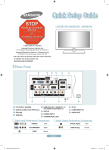
Remote Control
See “Remote Control” in the owner’s instructions for details.
1 POWER
Turns the TV on and off.
!TV
Selects the TV mode directly.
2 NUMERIC BUTTONS
Press to change the channel.
@ PRE.CH
Tunes to the previous channel.
3 _
Press to select additional
channels (digital and analog)
being broadcast by the same
station. For example, to select
channel ‘54-3’, press ‘54’, then
press ‘_’ and ‘3’.
# z
Press to change channels.
4 MUTE M
Press to temporarily cut off the
sound.
% FAV.CH
Press to switch to your favorite
channels.
3
4
@
5 - VOL +
Press to increase or decrease
the volume.
^ MENU
Displays the main on-screen
menu.
5
#
6 CH LIST
Used to display Channel Lists
on the screen.
& RETURN
Returns to the previous menu.
6
$ SOURCE
Press to display and select the
available video sources.
7 TOOLS
Use to quickly select frequently
used functions.
* U
P▲ / DOWN▼ / LEFT◄ /
RIGHT► / ENTERE
Use to select on-screen menu
items and change menu values.
8 INFO
Press to display information on
the TV screen.
( EXIT
Press to exit the menu.
9 COLOR BUTTONS
Use these buttons in the
Channel list menus etc.
0 P.SIZE
Picture size selection.
) CC
Controls the caption decoder.
a MTS
Press to choose stereo, mono or
Separate Audio Program (SAP
broadcast).
1
!
2
7
$
%
^
&
*
8
(
9
0
)
a
English-
BN68-01976A-00Eng.indd 3
2009-01-23 �� 5:35:36