1
Connecting a Digital Audio System
1
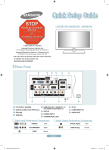
TV Rear Panel
Digital Audio System
1
Connect an Optical Cable
between the DIGITAL AUDIO
OUT (OPTICAL) jacks on the
TV and the Digital Audio Input
jacks on the Digital Audio
System.
Optical Cable (Not supplied)
➣ When a Digital Audio System is connected to the DIGITAL AUDIO OUT (OPTICAL) jack: Decrease the volume of the TV and
adjust the volume level with the system’s volume control.
➣ 5.1CH audio is possible when the TV is connected to an external device supporting 5.1CH.
➣ Each Digital Audio System has a different back panel configuration.
➣ When the Home Theater receiver is set to On, you can hear sound output from the TV’s Optical jack. When the TV is displaying
a DTV(air) signal, the TV will send out 5.1 channel sound to the Home theater receiver. When the source is a digital component
such as a DVD / Blu-ray player / Cable Box / Satellite receiver (Set-Top Box) and is connected to the TV via HDMI, only 2
channel sound will be heard from the Home Theater receiver. If you want to hear 5.1 channel audio, connect the digital audio
out jack on DVD / Blu-ray player / Cable Box / Satellite receiver (Set-Top Box) directly to an Amplifier or Home Theater, not the
TV.
Connecting an Amplifier / DVD Home Theater
1
TV Rear Panel
Amplifier/DVD Home Theater
Connect Audio Cables between the
AUDIO OUT [R-AUDIO-L] jacks on
the TV and Audio Input jacks on the
Amplifier / DVD Home Theater.
➣ When an audio amplifier is connected
to the AUDIO OUT [R-AUDIO-L]
jacks: Decrease the volume of the TV
and adjust the volume level with the
Amplifier’s volume control.
➣ Each Amplifier/DVD Home Theater has
a different back panel configuration.
1
➣ When connecting an Amplifier/DVD
Home Theater, match the color of the
connection terminal to the cable.
Audio Cable (Not supplied)
English-
BN68-01976A-00Eng.indd 6
2009-01-23 �� 5:35:39