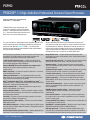
1
PSPHD PROCISE® 7.3 High-Definition Professional Surround Sound Processor
Connectors
DIGITAL SOURCES (optical) 1 – 4: (4) JIS F05 female (TOSLINK) optical
fiber connectors; S/PDIF optical digital audio inputs
DIGITAL SOURCES (coaxial) 1 – 6: (6) RCA female;
S/PDIF coaxial digital audio inputs;
Input Impedance: 75 Ohms;
Input Level: 0.5 Vrms nominal
AES/EBU: (1) 3-pin XLR female; AES/EBU digital audio input;
Input Impedance: 110 Ohms;
Input Level: 0.6 Vrms nominal
HDMI INPUT 1 – 6: (6) 19-pin Type A HDMI female;
HDMI digital audio/video inputs
HDMI OUTPUT: (1) 19-pin Type A HDMI female;
HDMI digital audio/video output;
Audio stream is a 2-channel downmix of the surround sound audio signal
(pre master mixer)
ANALOG SOURCES L/R 1 – 8: (16) RCA female comprising (8) unbalanced
stereo line-level audio inputs;
Input Impedance: 11k Ohms;
Maximum Input Level: 2 Vrms
MULTI-CHANNEL SOURCE FRONT L/R, SURROUND L/R, BACK L/R, CENTER, SUB: (8) RCA female;
Unbalanced line-level 7.1 surround sound audio input;
Input Impedance: 11k Ohms;
Maximum Input Level: 2 Vrms
BALANCED STEREO L/R: (2) 3-pin XLR female;
Balanced stereo line-level audio input;
Input Impedance: 22k Ohms balanced;
Maximum Input Level: 4 Vrms;
Note: For use with balanced source only
MIXER INPUT 1 – 3: (3) 3-pin 3.5mm detachable terminal blocks;
Balanced/unbalanced line-level inputs;
Input Impedance: 22k Ohms balanced, 11k Ohms unbalanced;
Maximum Input Level: 4 Vrms balanced/unbalanced
OUTPUT (unbalanced) LEFT, RIGHT, SURR L., SURR R., SURR BL., SURR
BR., CENTER, SUB 1, SUB 2, SUB 3: (10) RCA female;
Unbalanced line-level 7.3 surround sound audio output;
Output Impedance: 100 Ohms;
Maximum Output Level: 4 Vrms
OUTPUT (balanced) LEFT, RIGHT, SURR L., SURR R., SURR BL., SURR BR.,
CENTER, SUB 1, SUB 2, SUB 3: (10) 3-pin XLR male;
Balanced line-level 7.3 surround sound audio output;
Output Impedance: 200 Ohms;
Maximum Output Level: 8 Vrms
DOWNMIX OUT (unbalanced) LEFT/RIGHT: (2) RCA female;
Unbalanced line-level stereo audio output;
Output Impedance: 100 Ohms;
Maximum Output Level: 4 Vrms
crestron.com
| 800.237.2041
DOWNMIX OUT (balanced) LEFT/RIGHT: (2) 3-pin XLR male;
Balanced line-level stereo audio output;
Output Impedance: 200 Ohms;
Maximum Output Level: 8 Vrms
DOWNMIX OUT (unbalanced) MONO: (1) RCA female;
Unbalanced line-level mono audio output;
Output Impedance: 100 Ohms;
Maximum Output Level: 4 Vrms
DOWNMIX OUT (balanced) MONO: (1) 3-pin XLR male;
Balanced line-level mono audio output;
Output Impedance: 200 Ohms;
Maximum Output Level: 8 Vrms
LAN: (1) 8-wire RJ45 with 2 LED indicators;
10Base-T/100Base-TX Ethernet port;
Green LED indicates link status;
Yellow LED indicates Ethernet activity
NET: (2) 4-pin 3.5mm detachable terminal blocks;
Cresnet slave ports, paralleled
100-240V~50-60Hz 65W: (1) IEC C14 male chassis plug;
Mates with removable power cord (included)
G: (1) 6-32 screw, chassis ground lug
Microphone (front): (1) 3-pin mini-XLR, female (behind front panel);
Input for calibrated microphone (part of CSSTK Surround Sound Tuning Kit,
sold separately)
USB (front): (1) USB Type B female (behind front panel);
USB computer console port (cable included)
Displays
(2) 256 x 64 graphic VFDs (Vacuum Fluorescent Displays); Left display
shows source, decoding mode, setup, info, and installer menus;
Right display shows volume levels; Both displays can show real-time VU
meters or spectrum analyzers
Controls & Indicators
Selection Knob (left): (1) rotary encoder with integral pushbutton, used to
navigate and select various menu options and adjust values
STANDBY: (1) pushbutton and red LED, places PSPHD (and PROAMP if
connected) into “Standby” mode (all outputs turned off)
SOURCE: (1) pushbutton, enters the source selection menu
MODE: (1) pushbutton, enters the decoding mode selection menu
SETUP: (1) pushbutton, enters the compression and equalization setup
menu
INFO: (1) pushbutton, enables display of source information
HOME: (1) pushbutton, returns both displays to their default screens
showing the current source and decoding mode (left) and volume (right)
DISPLAY: (1) pushbutton, normally sets the front panel display brightness;
pressing DISPLAY and HOME simultaneously for 5 seconds enters the
installer menu
METER: (1) pushbutton, enables dual analog meter display