1
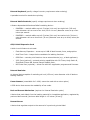
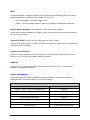
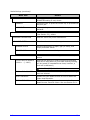
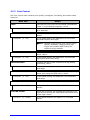
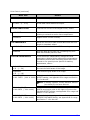
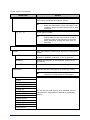
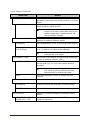
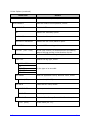
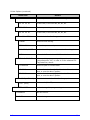
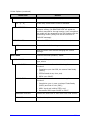
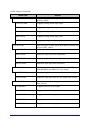
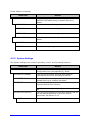
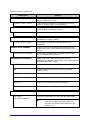
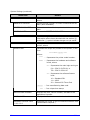
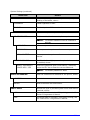
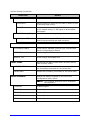
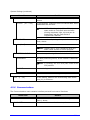
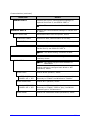
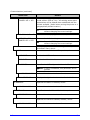
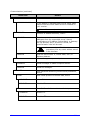
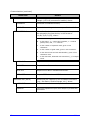
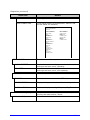
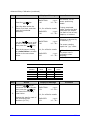
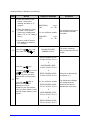
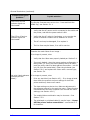
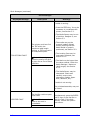
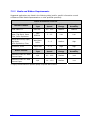
Communications (continued) Menu Item WLAN ADHOC? CANCEL KEY = YES Details Restores the WiFi defaults and initiates infrastructure mode with an SSID of “Any.” All existing access point associations will be deleted then established with the closest available. (Useful when moving the printer to a geographically distant location.) Note: Press the ESC Key to exit the menu item without changing the current settings. SET FACTORY DEFAULTS SET DEFAULTS? CANCEL KEY = YES Returns the factory-programmed values, where: Restores the default settings. Note: Press the ESC Key to exit the menu item without changing the current settings. WLAN Controls the communications settings for the optional DMXrfNetII Card, where: MODE Selects between Wired or WiFi operation, where: ENABLED Enables the WiFi interface. DISABLED Enables the Wired interface. BSS ADDRESS Specifies the WiFi bridge module’s static IP address. Note: If DHCP is ENABLED, this parameter will be ignored. 192.168.010.001 SIGNAL READINGS IP ADDRESS 192.168.010.026 SUBNET MASK 255.255.255.000 GATEWAY 192.168.010.026 I-Class Is the address in standard octet format. Displays the signal and noise ratios for the WLAN. Specifies the static IP Address; where: Is the address in standard octet format. Specifies the static Subnet Mask Address, where: Is the address in standard octet format. Specifies the network Gateway Address, where: Is the address in standard octet format. 47