1
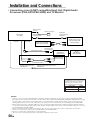
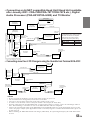
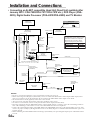
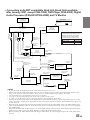
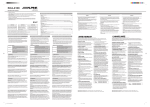
• Connecting an Ai-NET compatible Head Unit (Head Unit available
after January 2001: CDA-7990/CDA-7977/CDA-7878 etc.), Digital
Audio Processor (PXA-H510/PXA-H900) and TV Monitor
System Switch
When connecting a digital audio processor
using Ai-NET feature, place this switch in the
EQ/DIV position.
Monitor
TME-M790 etc
(Sold Separately)
EQ/DIV
Head Unit
with Ai-NET
(Sold Separately)
Ai-NET Connector
Ai-NET Cable
AUX Audio Input
Terminal (AUX1)
AV-Interface Unit
TME-M790 etc
(Sold Separately)
AUX Video
Input Terminal
(AUX1)
Ai-NET Input
Connector
Digital Input
Terminal (Optical)
(Changer)
RCA Extension Cable
Fiber Optic Cable
The DHA-S680’s system settings must be
made after connections are completed.
Before fixing the unit in place, refer to
page 48 to change the system setting.
Ai-NET Output
Connector
Setting Item
Ai-NET setting
Remote Control
Input Lead
(White/Brown)
Video Output
Connector
Ai-NET Cable
H.U.CONTROL setting
FR
Setting
DVD-CHG
ON
Ai-NET Connector
(Black)
Digital Output
Terminal
(Optical)
Digital Output
Terminal (Optical),
Not Usable
Ai-NET Connector
(Gray)
DVD Changer
DHA-S680
RCA Extension
Cable
Setting of DHA-S680
Digital Audio Processor
PXA-H510/PXA-H900
(Sold Separately)
Remote Control
Output Lead (AUX1)
(White/Brown)
ES
Ai-NET Cable
CD Changer
(Sold Separately)
Audio Output
Connector
Only when connecting with rear monitor
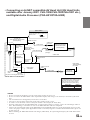
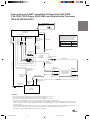
• Connecting more than 2 CD Changers using the Versatile Link Terminal KCA-410C
Ai-NET Input
Connector
Digital Audio Processor
PXA-H510/PXA-H900
(Sold Separately)
RCA Extension Cable
Fiber Optic Cable
Digital Input
Terminal (Optical)
(Changer)
Remote Control
Input Lead
(White/Brown)
Video Output
Connector
DE
Ai-NET Output
Connector
Ai-NET Cable
Digital Output
Terminal
(Optical)
Ai-NET Connector
(Black)
DVD Changer
DHA-S680
Ai-NET Connector
(Gray)
Ai-NET Connector
(HEAD UNIT)
Digital Output
Terminal (Optical),
can't be connected
CD Changer
(Sold Separately)
Ai-NET Connector
(CHANGER 2)
Ai-NET Cable
VERSATILE LINK Terminal
KCA-410C
(Sold Separately)
IT
Ai-NET Cable
Ai-NET Connector
(CHANGER1)
Digital Output
Terminal (Optical),
Not Usable
CD Changer
(Sold Separately)
Ai-NET Cable
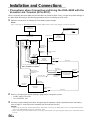
NOTES
• Be sure to switch the head unit's system switch before turning the power on.
• The switched Power Lead (Ignition) connection is not needed.
• Also refer to the operating instructions of the other products in the system.
• To connect a rear monitor, connect to the front monitor's RCA output (TV Tuner Box).
• Inserting a magazine into the DHA-S680 while a connected CD changer is playing, causes the CD Changer audio to
mute. The CD Changer will unmute as soon as the DHA-S680 Disc Check is completed.
• Connect the optical digital output of the DHA-S680 to the CHANGER connectors of the digital audio processor. This
ensures the proper transfer of the digital data stream so the Dolby Digital 5.1 Channel Surround and other effects can
be fully enjoyed.
• When combining the DHA-S680 and the CD changer (CHA-S624), the optical digital output of the CHA-S624 cannot
be used.
53-EN
SE