1
Be sure not to place power wires such as the input point signal wire and the
output point wire, or the power supply, at the same conduit during wiring.
"Use Copper Conductors Only", 60/75OC.
Every output contact possesses the overload capacity that is twice the rated current within 5 minutes, and as
for the common contact, the overload capacity is 1.5 times the rated current within 2 minutes. And if the
range is exceeded, it might result in the contact’s malfunctioning, or even cause internal wire burnt.
There are two types of output modules for the DVP-S Series PLC: relay or transistor. Refer to Functions &
Specifications for relevant electric specifications.
Points of Attention
Environment
DVP-**-**-11-R2
DVP-**-**-11-T2
1. DO NOT install the PLC in a dusty, smoky, or corrosive atmosphere.
2. DO NOT install the PLC in an environment with high temperature or high condensation.
3. DO NOT install the PLC in an environment with immediate vibration and shock.
Y0
LED
T
R
G
LED
POWER
RY
Y0
C0
“POWER” LED
C0
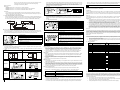
Fig. A
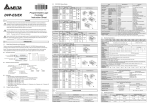
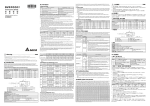
This PLC model uses DC input power. Therefore, make sure that PLC is connected to terminals 24VDC and
0V (power range 20.4VDC~28.8VDC) when the power is ON. PLC will stop the operation and output will be
OFF whenever the power input is lower than 20.4VDC. Consequently, the ERROR LED will blink swiftly.
2
20.4VDC~28.8VDC
+24V 24G
S/S
X0
X1
2.5A
C0 Y0 C1
3
Y1 C2 Y2 Y3 Y4 Y5
1
MC1
3
5V
2
3
4
7
4
8
24V
24V
Guard
Limit
2
3
MC
0V
0V
1
MC
1
L
N
6
AC Power Loading
Power Circuit Protection Fuse (2A)
Power Indicator
Emergency Stop
An “Emergency Stop” button is installed to prevent unexpected situations.
If it does occur, the power will be disconnected immediately.
Isolation Unit of the System Circuit
Utilize the electromagnetic contact and the relay to isolate the unit of the
power circuit, to prevent system unstable possibility when the power is ON
and OFF.
DVPPS01/24VDC Power Module
DVP PLC
Power Supply: 24VDC
6
7
5
5
MC2
9
2
Due to the PLC is used to control numerous devices, a motion in one device could affect that of other devices.
Hence, the breakdown in one device would consequently a detriment to the whole auto control system, and
danger or damage will be significantly. Listed below is the recommended wiring for the power input:
Y2
Y3
Y4
Y5
Fig.
C
Transistor output Example (sink output wiring)
1
Surge Absorbing Diode: increase the contact life of the relay
Emergency Stop: use the external switch
Fuse: use the fuse with a 5~10A capacity at the common end of the output
contact to protect the output circuit.
Surge Absorber: reduce the interferences from the AC loading
DC Power Supply
Indicator: neon indicator
AC Power Supply
Incandescent Lamp (resistive loading)
Mutually Exclusive Output: utilize the external circuit to form an interlock, and
accommodating PLC internal program to provide safety protection if the
unexpected errors occurred.
The Transistor Output Circuit Wiring
◎
4
5
6
6
C0 Y0
C1 Y1
C2 Y2
Y3
MC1
MC2
2
3
3
Y4
Y5
DC Power Supply
Emergency Stop
Circuit Protection Fuse
Since the transistor module output is an Open Collector output, and if Y0 is
set as the pulse series output (use the PLSY command), in order to ensure
that the transistor module is functioning normally, the output elevation
resistance has to be big enough to maintain the output current greater than
0.1A.
Since the transistor module output is an Open Collector output, and if Y1 is
set as the pulse series output (use the PWM command), in order to ensure
that the transistor module is functioning normally, the output elevation
resistance has to be big enough to maintain the
output current greater than
0.1A.
Mutually Exclusive Output: utilize the external circuit to form an interlock, and
accommodating the PLC internal program to provide safety protection if the
unexpected errors occurred.
5
Sinking
1. At the front of the MPU or the expansion unit, there is a “POWER” LED. When the MPU is powered ON, the
LED (in green) will be ON. If the indicator is not on when the MPU is powered up, it means there is problem
that DC power supplies to PLC. Thus, it is important to check whether the wiring of +24V and 0V are properly
conducted. If ERROR LED is blinking swiftly, it means +24VDC does not supply enough power to PLC.
2. If the other indicator, “L. V”, that locates at the front of the extension unit is on, it means that the input power
voltage to the extension unit is insufficient, and the output from the extension unit should be prohibited.
1. Make sure that the power wiring and the I/O wiring are both conducted properly before the power ON. Please
ensure NOT supply AC110V or AC220V to the I/O terminals, or the wiring might be short circuit which would
damage the PLC directly.
2. After using the peripheral devices to write the program into the MPU and that the ERROR LED of the MPU is
not on, it means that the program in use is legitimate, and it is now waiting for the user to give the RUN
command.
3. Use HPP to execute the forced On/Off test of the output contact.
S/S
Sourcing
X0
◎ Wiring
Operation & Test
Equivalent Circuit of the Input Point
Wiring Circuit
+24V
24VDC
0V
DC Type
(DC Signal IN)
SINK
+5V
S/S
+24V OV
X0
24VDC
S/S X0
X1
X2
1. If the ERROR LED of the MPU is not blinking, use the peripheral device to give the RUN command, and the
RUN indicator will then be on.
2. HPP could be utilized to monitor the settings and the registered values of the timer, the counter and the data
register during operation. Also it is used to force the I/O contacts to conduct the On/Off motion. If the ERROR
LED is on (but not blinking), it means that the setting of the user’s program has exceeded the preset time-out
limit. At this case, please turn the PLC RUN/STOP switch to STOP, and find out the address of the time-out
program by special data register D1008. ”WDT” instruction can be used to solve the problem.
The PLC I/O Response Time:
Sink Type
SINK Mode
The total response time of the PLC from the input signal to the output motion is calculated as follows:
“Response Time” = “input interface delay time” + “user’s program scan time” + “output motion delay time”
Equivalent Circuit of the Input Point
Wiring Circuit
Input interface delay time
+24V
24VDC
DC Type
(DC Signal IN)
0V
SOURCE
+5V
+24V
S/S
X0
SOURCE Mode
Overload Capacity of the Output Terminal
0V
S/S X0
X1
24VDC
Source Type
X2
Identify the status of the PLC. When the PLC is in operation, this light will be on, and users could thus use
HPP or the ladder diagram to edit program and give commands to make the PLC “RUN” or “STOP”.
“ERROR” LED
2.
3.
If illegitimate program is input to the MPU, or that the commands and devices of the program exceed the
allowable range, the indicator will thus be blinking. In this case, the user should inquire about the error
code from the special data register D1004 in the MPU and look it up in the Error Code Table. After the
error is found and the program is revised, send the revised version to the MPU.
If the PLC is unable to perform function, and the LED is blinking swiftly, it indicates that 24VDC power
does not supply sufficient power. Please check whether the power supply of 24VDC is normal or not.
When the ERROR LED is on (not blinking), it is an indication that the execution time of the program
circuit has exceeded the preset time-out limit (setting of D1000). To check the program circuit or use the
WDT command to improve the error status. Once program modification is completed, user can
re-download the program of PLC and the ERROR LED will be off. If the ERROR LED is still keep on,
please turn off the power and check if there’s any noise or any conductive invader inside the PLC.
“Input” LED
The On/Off signals of the input point could be displayed through the “Input” LED, or monitor the status of the
input point through the device HPP monitoring function. Once the motion of the input point is valid, the LED is on.
Therefore, if errors are detected via using HPP, the LED and the input signal circuits then are used to check
whether the status is normal. Especially when the electronic switch of great electric leakage is utilized, the input
point is usually witnessed with unexpected motions.
“Output” LED
The “Output” LED is designed mainly for display the On/Off status of the output signals. When the “Output” LED
is On or Off and that the loading is of an opposite motion, the following conditions should be attended to:
1. The output contact might be melted down and blocked up due to overload or load in short-circuit, defect
happened consequently under this situation.
2. If the output contact is function as undesired, be sure to check the output wiring circuit and whether the
screw is tightened or not.
6.2 Error Code Table
Factory setting: 10ms. Please refer to the usage of special registers
D1020~1021.
Explanation
0202
0302
0401
Device S exceeds the usage limit
Label P has been used repetitively or
exceeds the usage limit
KnSm exceeds the usage limit
Interrupt Pointer, I, has been used repetitively
or exceeds the usage limit
Instruction MC exceeds the usage limit
Instruction MCR exceeds the usage limit
Device X exceeds the usage limit
0403
KnXm exceeds the usage limit
0501
Device Y exceeds the usage limit
0503
0601
0604
0801
0803
KnYm exceeds the usage limit
Device T exceeds the usage limit
T register exceeds the usage limit
Device M exceeds the usage limit
KnMm exceeds the usage limit
0D01
Misused DECO operands
0D02
0D03
0D04
0D05
0D06
0D07
Misused ENCO operands
Misused DHSCS operands
Misused DHSCR operands
Misused PLSY operands
Misused PWM operands
Misused FROM/TO operands
0D08
Misused PID operands
0E01
0E04
Component C exceeds the usage limit
C register exceeds the usage limit
0002
Power Indication
Preparation
X0
S/S
“RUN” LED
Error
Code
0001
TRIAL RUN
Wiring of the Input Point
Two types of wiring: SINK or SOURCE, depends on the way of configuration the DC input signal to the DC
input power in, which are defined as follows:
◎ The DC Type, there are two types of wiring to the DC type: SINK and SOURCE, and they are defined as
follows:
Sink = the common terminal for the current
Source = the common terminal for the
inflow S/S
current outflow S/S
There is a “POWER” LED at the front of the MPU. When the MPU is powered On, the green LED light will be
on. If the indicator is not on when the MPU is powered up and with the input power being normal, it is an
indication that the PLC is out of order. Please have this machine replaced or have it repaired at a dealer near
you.
1.
8
Safety Guidelines
C2
Fig.
B
X2
5
DC/DC
Y1
The Relay Output Circuit Wiring
◎
OV
C1
When actual wiring is conducted at the output terminal, pay special attention to the wiring at the common
end. Take DVP14SS11R2 as an example, the output terminal Y0 utilizes the common end C0, and Y2 uses
C1, whereas Y2~Y5 use C2, as shown in Fig. C.
Isolation Circuit: the photocoupler is utilized as the signal isolation between PLC internal circuit and input
module.
4.3 Wiring and Specifications of the Power Terminals
24VDC
Y0
TRANSISTOR OUTPUT
RELAY OUTPUT
FAULT CHECK & MAINTENANCE
When error occurred for the DVP PLC, please check:
< 0.3A
C0
Construction
1. Any accident the drop of conductive debris into the PLC during screwing and wiring has to be avoided.
2. Allow a minimum space of 50mm between PLC and other control components, and keep PLC away from
the high-voltage lines or any power equipment.
6
6.1 Judge the Error through the Indicator at the Front Panel
LOAD
LOAD
DVP-PLC, also the PLC could connect with the DVP14SS MPU through specific transmission wire, and then,
the program transmission, the MPU control and the program monitoring could all be executed.
0003
0102
0E05
Misused Operand CXXX of DCNT
0E18
BCD conversion error
0E19
0F04
Division error (divisor=0)
D register exceeds the usage limit
Error
Code
0F05
Explanation
Misused Operand DXXX of DCNT
0F06
Misused SFTR operands
0F07
0F08
Misused SFTL operands
Misused REF operands
1000
C400
C401
C402
Misused ZRST operands
Illegitimate commands
General circuit error
LD / LDI commands have been used for more than
9 times consecutively
MPS has been used for more than 9 times
consecutively
FOR-NEXT over 6 steps and above
STL/RST used between FOR-NEXT
SRET/IRET used between FOR-NEXT
MC/MCR used between FOR-NEXT
END / FEND used between FOR-NEXT
STL has been used for more than 9 times
consecutively
MC/MCR used within STL
I/P used within STL
STL/RET used within the Subroutine
STL/RET used within the Interrupt Service Routine
MC/MCR used within the Subroutine,
MC/MCR used within the Interrupt Service Routine
MC/MCR does not start from N0 nor of the
discontinuous status
The relative N value of MC/MCR is different
I/P not used properly
IRET should not appear following the last FEND
command.
SRET should not appear following the last FEND
command
I/O points of the extension unit exceed the limit.
END command not existed within the program
C403
C404
C405
C407
C408
C409
C40A
C40B
C40C
C40D
C40E
C41C
C4EE
6.3 Periodic Inspection
User’s program scan time
Refer to the usage on special register D1010 for detail.
Output motion delay time
The relay module is about 10ms.
The transistor module is about 20~30μs.
Basic Commands and Application Commands of the PLC:
◎ The basic commands and the application commands of the MPU of this series are totally applicable to the
DELTA DVP-PLC ES Series MPU. Refer to the DELTA PLC Technique Application Manual for relevant basic
commands and application commands.
◎ The DVPHPP hand-held programming panel, the DPLSoft (the DOS version) ladder diagram editing program
or the WPLSoft (the Windows version) ladder diagram editing program are all good for use with the DELTA
Since the DVP series PLC does not utilize disposable components, there is thus no need to replace most of the
components. However, if the output relay turns on/off frequently, or drive the large load current too often, life of
the output contact will thus be decreased. Under a condition like this, periodic inspection is then needed to
ensure if the contact is of the “Permanently Open” status or of the short-circuit status. Moreover, the following
precautions should be noted:
1. Do not mount the DVP under direct sunlight or near any heat-radiation objects.
2. Do not install the DVP-PLC in places subject to high temperature, high humidity, excessive vibration,
corrosive gasses, liquids, airborne dust and metallic particles.
3. Check periodically whether the wiring and terminals are tightened and conducted properly.