1
Chapter 4: The BIOS Setup Utility
Power Screen
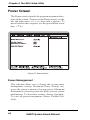
The Power screen controls the power management functions of the system. To move to the Power screen, use the
left and right arrow <←/→> keys until it appears. To
move between the categories, use the up and down arrow
keys <↑/↓>.
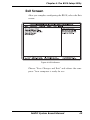
Figure 4-7: Power Screen
Power Management
This selection allows you to change the system power
management settings. Maximum Power Savings conserves the greatest amount of system power. Maximum
Performance conserves power but allows greatest system
performance. To alter these settings, choose Customize.
To turn off power management, choose Disabled (default).
46
M6DPi System Board Manual