1
Playing with Different Tones
Selecting and Playing a Tone
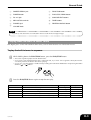
The piano comes with 5 built-in tones.
1
Using Tone Effects
Reverb: Makes your notes resonate
Chorus: Adds more breadth to your notes
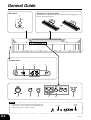
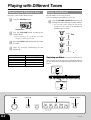
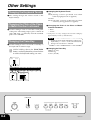
Press the POWER button.
1
• You can find out the current reverb/chorus
configuration by looking at the REVERB and
CHORUS indicator lamps.
POWER button
2
Press the REVERB CHORUS button to cycle
through the effect settings as shown below.
Use the VOLUME knob to adjust the
volume level.
Both on
• Before playing, it is a good idea to set the
volume to a relatively low level.
3
Both off
Press the TONE button of the tone you want
to select.
Reverb on
4
Now try playing something on the
keyboard.
Chorus on
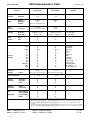
Tone Name
GRAND PIANO 1
GRAND PIANO 2
ELEC PIANO
HARPSICHORD
STRINGS
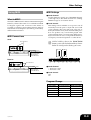
Maximum Polyphony
16
32
32
16
32
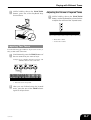
Selecting an Effect
You can select from among four reverb effects and four
chorus effects by pressing the keyboard keys shown
below.
1 Reverb Effect Keys
Room 2
Hall 2
Hall 1
Room 1
▲
C1
▲
C2
▲
C3
▲
C4
▲
C5
▲
C6
▲
C7
▲
C8
2 Chorus Effect Keys
Chorus 2
Chorus 1
VOLUME
E-6
FUNCTION
TONE
Chorus 4
Chorus 3
REVERB CHORUS
403A-E-008A