1
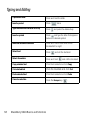
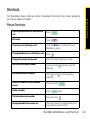
Basics & Shortcuts BlackBerry 9630 Basics and Shortcuts Navigating Screens Lock the BlackBerry® device keyboard From the Home screen or Applications list, click Keyboard Lock Unlock the BlackBerry device keyboard Press Lock the BlackBerry device With a password set (see page 28), from the Home screen or Applications list, click Lock Unlock the BlackBerry device Type your password and press Return to the previous screen Press the Escape key ( Return to the Home screen Press the End/Power key ( Click an item Highlight the item and then click (press) the trackball Select multiple items Press and hold Switch between programs Press and hold and press Escape key ( Turn the BlackBerry device on or off ) ) and roll the trackball and press the ) Press and hold the End/Power key ( ) BlackBerry 9630 Basics and Shortcuts 57