1
01_EN_3P208145-2F.fm Page 17 Thursday, August 20, 2009 5:19 PM
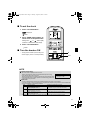
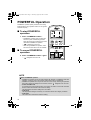
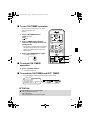
■ To use ON TIMER operation
• Check that the clock is correct. If not, set the
clock to the present time
(page 9.).
R
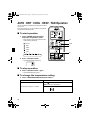
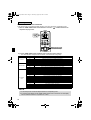
1. Press “ON TIMER button”.
is displayed.
blinks.
2. Press “TIMER Setting button”
until the time setting reaches the
point you like.
• Every pressing of either button increases or
decreases the time setting by 10 minutes.
Holding down either button changes the
setting rapidly.
ECONO
ON/OFF
POWERFUL
TEMP
MODE
FAN
COMFORT
3. Press “ON TIMER button” again.
SWING
• The TIMER lamp lights up.
1, 3
ON
CANCEL
4
OFF
TIMER
2
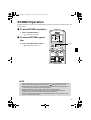
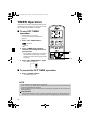
■ To cancel ON TIMER
operation
4. Press “CANCEL button”.
• The TIMER lamp goes off.
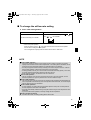
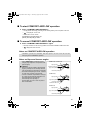
■ To combine ON TIMER and OFF TIMER
• A sample setting for combining the two timers is shown below.
Display
(Example)
Present time: 11:00 p.m.
(The unit operating)
OFF TIMER at 0:00 a.m.
ON TIMER at 7:00 a.m.
Combined
ATTENTION
■ In the following cases, set the timer again.
• After a breaker has turned OFF.
• After a power failure.
• After replacing batteries in the remote controller.
17