1
Operation Manual
ED12-011A
Preparation Before Operation
Preparation Before Operation
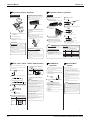
n Operating the remote controller
Remote controller
l To use the remote controller, aim the transmitter at the indoor
n Setting the batteries
unit. If there is anything to block signals between the unit and
the remote controller, such as a curtain, the unit will not
operate.
l Do not drop the remote controller. Do not get it wet.
l The maximum distance for communication is about 7 m.
Position + and
– correctly!
2
Indoor unit
n Setting the air purifying
1l
filters
Open the front grille
.
Hold the grille by the tabs on the two sides and lift it until
it stops with a click. (about 60˚)
n Setting
1
the clock
Press
.
Display
+
AM
–
is displayed.
AM
–
+
blinks.
Receiver
n To fix the remote controller holder
1
Set two dry batteries (AAA).
Set the back cover as before.
1
2
3
Press
to set the clock to the present
time. TIMER
on the wall
Press
with a finger and slide the back
cover to take it off.
2
3l
Push upwards the tab at
the center of each air
filter, then pull it down.
PM
Choose a place from where the signals reach
the unit.
l Holding down (
Fix the holder to a wall, a pillar, etc. with the
screws supplied with the holder.
Fit the claw of the holder into the bottom of
the remote controller, and push the remote
controller onto the wall.
This will cause the figures on the display to flash. Set the
clock at this point.
3l
3
Set the air purifying filters.
4
Remote
controller
holder
Set.
) or (
) button
rapidly increases or decreases the time display.
.
blinks.
PM
Set the air filters in their original
positions and close the front grille .
l Operation without air filters may result in troubles as dust
ATTENTION
Press
Attach an air purifying filter to each air filter.
(See page 14 "Care and cleaning")
Display
1
2
Pull out the air filters.
Display
2l
3
will accumulate inside the indoor unit.
(Now the clock is set.)
n Turn the breaker ON
l Turning ON the breaker opens the flap, then closes it again.
(This is a normal procedure.)
About batteries
NOTE
l When replacing the batteries, use batteries of the same
type, and replace the two old batteries together.
l When the system is not used for a long time, take the
is hard to see and the reception become hard, replace the
batteries with new AAA batteries.
l The attached batteries are provided for the initial use of
the system.
The usable period of the batteries may be short depending
on the manufactured date of the air conditioner.
Tips for saving energy
l Be careful not to cool (heat) the room too much.
l To remove, pull it upwards.
batteries out.
l When the operation display screen of the remote controller
ATTENTION
About the remote controller
l Never expose the remote controller to direct sunlight.
l Dust on the signal transmitter or receiver will reduce the
even while it is not operating.
Recommended temperature setting
l Use the air conditioner in the following conditions.
for example in spring or autumn, turn the breaker OFF.
Mode
For cooling: 26˚C – 28˚C
For heating: 20˚C – 24˚C
l Cover windows with a blind or a curtain.
electronic-starter-type fluorescent lamp (such as
l Clogged air filters cause inefficient operation and waste
inverter-type lamps) is in the room. Consult the shop if that
l The air conditioner always consumes 15 – 35 watts of electricity
l If you are not going to use the air conditioner for a long period,
sensitivity. Wipe off dust with soft cloth.
l Signal communication may be disabled if an
Please note
Keeping the temperature setting at a moderate level helps
save energy.
Blocking sunlight and air from outdoors increases the
cooling (heating) effect.
energy. Clean them once in about every two weeks.
is the case.
l If the remote control signals happen to operate another
Operating conditions
If operation is continued out of this
range:
Outdoor temperature : 10 to 46˚C • A safety device may work to stop the
operation.
(In 2MX, 3MX, and 4MX : 10 to 43˚C)
(In multi system, it may work to stop
: 18 to 32˚C
COOL Indoor temperature
the operation of the outdoor unit only.)
Indoor humidity
: 80% max.
• Condensation may occur on the indoor
unit and drip.
Outdoor temperature : –10 to 21˚C • A safety device may work to stop the
HEAT Indoor temperature
operation.
: 10 to 30˚C
Outdoor temperature : 21 to 46˚C • A safety device may work to stop the
operation.
(In 2MX, 3MX, and 4MX : 21 to 43˚C)
DRY Indoor temperature
: 18 to 32˚C • Condensation may occur on the indoor
unit and drip.
Indoor humidity
: 80% max.
l Operation outside this humidity or temperature range may cause
appliance, move that appliance to somewhere else, or
a safety device to disable the system.
consult the shop.
7
6
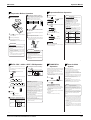
AUTO • DRY • COOL • HEAT • FAN Operation
Press
FAN .
DRY mode
The air flow rate
setting is not
variable.
"
" to "
"plus "
" are available.
(See page 10.)
NOTE
<Note on HEAT mode operation>
<FTX>
indoor unit's operation mode always takes priority.
When the precedence-setting room unit is operated in
l POWERFUL operation ends in 20 minutes.
Then the system
automatically operates again with the settings which were used
before POWERFUL operation.
POWERFUL mode, there are times that air conditioners in other
rooms will temporarily stop in order to centralize power to the
unit in the room.
Please adjust the precedence-room setting to match your life
style. Moreover, for precedence-room settings, please consult
smallwer.
n To change the air flow direction:
<FTK>
When setting the preference-room during installation, the
l Pressing the (POWERFUL) button during operation starts
the service shop where you bought the unit.
1
Press
∗ Precedence-room setting is applied to only 4MX80, 4MK90.
.
Display
in sequence.
l Precedence-room setting
capacity with a touch of a button.
POWERFUL operation.
l At smaller air flow rates, cooling or heating effect is also
l Each pressing of the button advances the mode setting
Note for Multi
System
POWERFUL operation quickly maximizes the cooling
effect in any operation mode. You can get the maximum
AUTO or HEAT or COOL or FAN mode
Five levels of air flow rate setting from
and select a mode.
Display
1
MODE
Press
POWERFUL
Operation
To change the air flow rate setting:
Display
The air conditioner operates with the settings of your
choice.
From the next time on, the air conditioner will operate
with the same settings.
n To cancel
POWERFUL operation:
Press
.
l COOL/HEAT mode
This mode is used to set the unit to only cool or heat. For
information on using this mode, consult the service shop where
you bought the unit.
∗ COOL/HEAT mode is applied to only 4MX80, 4MK90.
Since this air conditioner heats the room by taking heat from
outdoor air to indoors, the heating capacity becomes smaller in
lower outdoor temperatures. If the heating effect is insufficient, it
is recommended to use another heating appliance in
2
ON/OFF
Press
combination with the air conditioner.
.
Then OPERATION lamp lights up.
The heat pump system heats the room by circulating hot air
around all parts of the room. After the start of heating operation,
it takes some time before the room gets warmer.
In heating operation, frost may occur on the outdoor unit and
ON
OFF
lower the heating capacity. In that case, the system switches
into defrosting operation to take away the frost. During
n To stop:
defrosting operation, hot air does not flow out of indoor unit.
<Note on DRY mode operation>
ON/OFF
Press
once again.
This operation dehumidifies the indoor air when it is humid.
Notes on POWERFUL operation
l In COOL and HEAT mode
NOTE
<Note for heat pump multi system>
To maximize the cooling and heating effect, the capacity of
When two or more indoor units have no precedence-room
outdoor unit must be increased and the air flow rate be fixed to
settings and are set to modes that differ from each other, the
the maximum setting.
indoor unit which is operated first activates, while the other
The temperature and air flow settings are not variable.
indoor unit does not activate and the OPERATION lamp blinks.
l In DRY mode
(This is not a malfunction.)
The temperature setting is lowered by 3˚C and the air flow rate
is slightly increased.
An indoor unit that is not in operation will automatically start
and operate in the mode in which a previously operated indoor
unit was stopped. However, if the unit in operation provides
l In FAN mode
only COOL and DRY modes, simultaneous operation is
The air flow rate is fixed to the maximum setting.
possible.
<Note on AUTO operation>
Then OPERATION lamp goes off.
n To change the temperature setting:
DRY or FAN mode
AUTO or HEAT or COOL mode
Press
to raise the temperature and
press
to lower the temperature.
In AUTO operation, the system selects a temperature setting
and an appropriate mode (COOL or HEAT) based on the room
temperature at the start of the operation.
The system automatically reselects setting at a regular interval to
bring the room temperature to user-setting level.
If you do not like AUTO operation, you can select manually,
you like the mode and setting.
Set to the temperature you like.
Display
The temperature
setting is not variable.
C
8
96
9
Room Air Conditioners SUPER MULTI H-Series