1
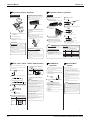
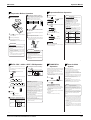
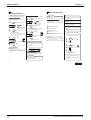
ED12-011A Operation Manual Adjusting the Air Flow Direction You can adjust the air flow direction to increase your comfort. Timer Operation Timer functions are useful for automatically switching the air conditioner on or off at night or in the morning. You can also use OFF TIMER and ON TIMER in combination. Adjusting the louvre Adjusting the horizontal blade (flap) SWING . Hold the knob and move the louvre. (You will find a knob on the left-side and the right-side blades.) AM SWING . ON is displayed. AM blinks. To stop the flap at an angle you like, press ATTENTION l Be careful when adjusting the louvre. Inside the air 2 reaches the point you like. * Previous time setting appears on display. until the time setting Press TIMER reaches the point you like. l Every pressing of either button increases or decreases the time setting by 10 minutes. Holding down either button changes the setting rapidly. 3 TIMER Notes on flap angles Press l Every pressing of either button increases or decreases is selected, the flap swinging range depends the time setting by 10 minutes. Holding down either on the operation mode. (See the figure.) l The real flap angles are differ from the display of remote once again. ON AM ON OFF button changes the setting rapidly. Then the TIMER lamp lights up. n To cancel the timer: controller. 0˚ 25˚ Press OFF once again. Press CANCEL . ON OFF Display 3 In DRY mode or COOL mode When stop operation Upper limit in cooling 2 until the time setting Press is displayed. AM blinks. * Previous time setting appears on display. outlet, a fan is rotating at a high speed. SWING AM is operating. The flap automatically swings up and down. ON ....... Press OFF while the air conditioner Display ....... 1 " appears or disappears. Press ON while the air conditioner is not operating. Display If not, set the clock to the present time. (See page 7.) l Every time the button is pressed, " l When time (See page 7). 1 l Chec k that the clock is correct. Display Press OFF TIMER operation ON TIMER operation l Check that the clock is correct. If not, set the clock to the present AM Then the TIMER lamp goes off. Lower limit in cooling Then the TIMER lamp lights up. In HEAT or FAN mode n To cancel the timer: Press CANCEL . When stop operation 20˚ Upper limit in heating 45˚ Lower limit in heating Combining ON TIMER and OFF TIMER l A sample setting for combining the two timers is shown below. (Example) Present time: 11:00 PM Then the TIMER lamp goes off. (The unit operating) OFF TIMER at 0:00 a.m. Combined ON TIMER at 7:00 a.m. Notes on OFF TIMER ATTENTION When the OFF TIMER is set, the air conditioner automatically you attempt to move it forcibly with hand when it is adjusts the temperature setting (0.5ºC up in COOL, 2.0˚C down swinging, the mechanism may be broken. in HEAT) to prevent excessive cooling (heating) for your AM Display l NIGHT SET MODE l Always use a remote controller to adjust the flap angle. If AM Notes on ON,OFF TIMER l When TIMER is set, the present time is not displayed. l Once you set ON,OFF TIMER, the time setting is kept in the pleasant sleep. memory. (The memory is canceled when remote controller batteries are replaced.) ATTENTION n In the following cases, set the timer again. l After a breaker has turned OFF. l After a power failure. l After replacing batteries in the remote controller. 10 11 Good Sleep Cooling Operation (G-SLEEP) Intelligent Eye "Intelligent Eye" is the infrared sensor which detecs the human movement. •The "Good Sleep Cooling Operation" makes the 1/f Fluctuating Temperature. It brings you comfortable sleep as it prevents from getting chilied. 1 Press -SLEEP 1 Press Intelligent-eye sensor •You can adjust the angle of the Intelligent-eye sensor to remove the detection area. (Adjustable angle: 15˚ to right and left of centre) While the air conditioner is operating. (The Sensor lamp lights up.) in cooling operation. n To cancel the n To change the temperature setting. (See page 8.) press n To change the air flow rate setting. (See page 8.) "Intelligent Eye", SENSOR . (The Sensor lamp goes off.) [EX.] When somebody in the room n To change the air flow direction setting. (See page 10.) n To cancel the "Good Sleep Cooling Operation ", press n Adjusting the angle of the SENSOR 15˚ 15˚ • Normal operation (The sensor lamp lights up.) -SLEEP → Back to the normal cooling opration. . Intelligent-eye sensor •Gently push and slide the sensor to adjust the angle. When nobody in the room • 20 min. after, start save operation.* (The sensor lamp goes off.) Moving the sensor to the left Sombody back in the room A 1/f fluctuation rhythm is used in temperature control. With it, temperature is fluctuated within a ±1˚C range of the set temperature. The 1/f fluctuation is comfortable rhythm existed in the natural world. (refer to "What's the 1/f fluctuation") l Air blow is the lowest when the fan is set to "AUTO". l If you don't like this function, change the operation mode. (See page 8) What is 1/f fluctuation... It seems irregular but there seems to be a self-resemblance rule in our mother nature. For example, the waves in the ocean forms irregularly but when you look at the coast line, there are some places where they look similar. When you look close around you, our heart doesn't beat in regular intervals but shows "1/f fluctuation" in a long term. The research shows this "1/f fluctuation" and comfort has some kind of relation and is applied to the comfort control fiels. (The sensor lamp lights up again.) "Intelligent Eye" is useful for Energy Saving * Save operation l Change the temperature –2˚C in heat/ +2˚C in cool/ +1˚C in Room Air Conditioners SUPER MULTI H-Series can lead to damage and malfunction. Notes on "Intelligent Eye" l Application range is as follows. l Vertical angle 40˚ (Side View) l 50˚ 50˚ 5m l l l 12 CAUTION • Do not hit or violently push the Intelligent-eye sensor. This dry mode from set temperature. l Decrease the air flow rate slightly in fan operation. Horizontal angle 50˚ (Top View) 80˚ Sensor may not respond when you are 5m or more away. (Check the application range) Sensor detection sensitivity changes according to indoor unit location, the speed of passersby, temperature range, etc. The sensor also mistakenly detects pets, sunlight, fluttering curtains and light reflected off of mirrors as passersby. Moving the sensor to the right •After adjusting the angle, gently wipe the sensor with a clean cloth, being careful not to scratch the sensor. • Back to normaloperation. 5m Notes on "Good sleep cooling operation " l We adopt the 1/f fluctuation rhythm in temperature control. l Saving operation will not go on during powerful operation. Night set mode (see page 11.) will not go on during you use Intelligent Eye. You can sleep more comfortablly by using "Good Sleep Cooling Operation (G-SLEEP)" function (see page 12.) at the same time. CAUTION Do not place large objects near the sensor. Also keep heating units or humidifiers outside the sensor's detection area. This sensor can detect objects it shouldn't as well as not detect objects it should. 13 97