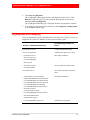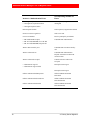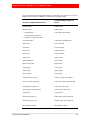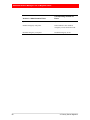
1
RSA® Authentication Manager 6.1 to 8.1 Migration Guide Revision 1 Contact Information Go to the RSA corporate website for regional Customer Support telephone and fax numbers: www.emc.com/domains/rsa/index.htm Trademarks RSA, the RSA Logo and EMC are either registered trademarks or trademarks of EMC Corporation in the United States and/or other countries. All other trademarks used herein are the property of their respective owners. For a list of RSA trademarks, go to www.emc.com/legal/emc-corporation-trademarks.htm#rsa. License Agreement This software and the associated documentation are proprietary and confidential to EMC, are furnished under license, and may be used and copied only in accordance with the terms of such license and with the inclusion of the copyright notice below. This software and the documentation, and any copies thereof, may not be provided or otherwise made available to any other person. No title to or ownership of the software or documentation or any intellectual property rights thereto is hereby transferred. Any unauthorized use or reproduction of this software and the documentation may be subject to civil and/or criminal liability. This software is subject to change without notice and should not be construed as a commitment by EMC. Third-Party Licenses This product may include software developed by parties other than RSA. The text of the license agreements applicable to third-party software in this product may be viewed on the product documentation page on RSA SecurCare Online. By using this product, a user of this product agrees to be fully bound by terms of the license agreements. Note on Encryption Technologies This product may contain encryption technology. Many countries prohibit or restrict the use, import, or export of encryption technologies, and current use, import, and export regulations should be followed when using, importing or exporting this product. Distribution Use, copying, and distribution of any EMC software described in this publication requires an applicable software license. EMC believes the information in this publication is accurate as of its publication date. The information is subject to change without notice. THE INFORMATION IN THIS PUBLICATION IS PROVIDED "AS IS." EMC CORPORATION MAKES NO REPRESENTATIONS OR WARRANTIES OF ANY KIND WITH RESPECT TO THE INFORMATION IN THIS PUBLICATION, AND SPECIFICALLY DISCLAIMS IMPLIED WARRANTIES OF MERCHANTABILITY OR FITNESS FOR A PARTICULAR PURPOSE. Copyright © 1994-2014 EMC Corporation. All Rights Reserved December 2013 Revised: December 2014 H13783 RSA Authentication Manager 6.1 to 8.1 Migration Guide Contents Revision History .............................................................................................................. 7 Preface................................................................................................................................... 9 About This Guide................................................................................................................ 9 RSA Authentication Manager 8.1 Documentation ............................................................. 9 Related Documentation..................................................................................................... 10 Support and Service ...........................................................................................................11 Before You Call Customer Support............................................................................11 Chapter 1: Important RSA Authentication Manager 8.1 Changes.............................................................................................................................. 13 Introduction to RSA Authentication Manager 8.1 ............................................................ 13 Important Changes to Terms and Concepts ...................................................................... 13 Authentication Manager 8.1 Enhancements ..................................................................... 16 Authentication Manager 8.1 License Types ..................................................................... 18 Risk-Based Authentication ............................................................................................... 20 Web Tier ........................................................................................................................... 20 Architectural Changes in Authentication Manager 8.1..................................................... 21 Changes to Sites......................................................................................................... 23 Changes to User Groups ............................................................................................ 24 The Replication Model...................................................................................................... 28 Runtime Updates on a Replica Instance ........................................................................... 28 Administrative Capabilities............................................................................................... 29 Changes to Browser-Based Administration............................................................... 29 Increased Administrative Scoping ............................................................................. 30 Group Administrators ................................................................................................ 33 Custom Administration Applications................................................................................ 33 Authentication Manager Real-Time Activity Monitors.................................................... 33 Report Templates .............................................................................................................. 34 RSA RADIUS ................................................................................................................... 34 Comparison of Cross-Realm Relationships and Trusted Realms ..................................... 35 Chapter 2: Planning For Migration..................................................................... 39 Migration Planning Checklist ........................................................................................... 39 Complete an Authentication Manager 6.1 to 8.1 Migration Assessment ......................... 40 Choosing a Migration Path ............................................................................................... 41 Migration with the Same Hostname and IP Address ................................................. 41 Migration with a New Hostname and IP Address ..................................................... 41 Authentication Agent Support .......................................................................................... 42 Auto-Registration and Legacy Mode......................................................................... 42 Installed RSA Authentication Agents........................................................................ 42 Embedded Agents in Third-Party Hardware and Products........................................ 42 Contents 3 RSA Authentication Manager 6.1 to 8.1 Migration Guide Customized Agents Created Using the Authentication API ...................................... 43 Determine the API Version of Installed Custom Windows Agents .......................... 43 Back Up the Version 8.1 Deployment .............................................................................. 43 Data Migration Options .................................................................................................... 44 Typical Mode ............................................................................................................. 44 Rolling Upgrade Mode .............................................................................................. 44 Custom Mode............................................................................................................. 44 Migration of Self-Service and Provisioning Data............................................................. 47 SNMP Reporting............................................................................................................... 48 Chapter 3: RADIUS Migration ............................................................................... 49 Migrating RADIUS Data to the Primary Instance ............................................................ 49 Install the RSA RADIUS Export Utility........................................................................... 49 Create a RADIUS Migration Package File ....................................................................... 50 Copy the RADIUS Migration Package File to an Import Location.................................. 51 Add Custom RADIUS Dictionary Attributes to Version 8.1............................................ 52 Edit the Version 8.1 RADIUS Dictionary ................................................................. 52 Add a Custom RADIUS Dictionary to the 8.1 Deployment...................................... 53 Migrate the RSA RADIUS 6.1 Data Files on the New Primary Instance ........................ 54 Chapter 4: Primary Server Migration ................................................................ 57 Migrating the Primary Server ........................................................................................... 57 RSA Authentication Manager 6.1 Database Dump .......................................................... 58 Stop RSA Authentication Manager 6.1 Services on a Non-Appliance Server .......... 60 Stop RSA Authentication Manager 6.1 Services on RSA SecurID Appliance 2.0 or Later ................................................................ 60 Dump the Database and Log Files on a Non-Appliance Primary Server .................. 61 Dump the Database and Log Files on RSA SecurID Appliance 2.0 ......................... 62 Dump the Database and Log Files on RSA SecurID Appliance 2.0.1 and Later........................................................... 64 Export the LDAP Directory Certificates ................................................................... 66 Perform a Typical Mode Migration .................................................................................. 66 Perform a Custom Mode Migration .................................................................................. 69 Migrate Log Files.............................................................................................................. 75 Log Migration Event Mapping ......................................................................................... 77 Chapter 5: Replica Server Migration................................................................. 81 Migrating a Replica Server ............................................................................................... 81 Dump the Replica Server Database .................................................................................. 81 Migrate Replica Delta Records to the 8.1 Primary Instance............................................. 83 Rebalance Contact Lists.................................................................................................... 85 4 Contents RSA Authentication Manager 6.1 to 8.1 Migration Guide Chapter 6: Performing Post-Migration Tasks ............................................. 87 Post-Migration Tasks ........................................................................................................ 87 Configuring Custom Ports ................................................................................................ 90 Configure Custom Ports in the Security Console ...................................................... 90 Restart Authentication Manager Services.................................................................. 91 Configure TACACS+ Support.......................................................................................... 93 Appendix A: Migration Data Conversion ....................................................... 95 Conversion of Migrated Data............................................................................................ 95 Migration Report............................................................................................................. 100 Migrating User Extension Data ............................................................................... 100 Users in Multiple Groups in Different Sites ............................................................ 102 Activations on Restricted Agents When LDAP Synchronization Jobs Do Not Contain Group Data ................................................................................. 103 PIN Options for Emergency Codes ......................................................................... 103 View RSA Authentication Manager 6.1 Offline Emergency Settings .................... 104 Add SecurID_Native as a Method of Administrator Authentication ...................... 104 Appendix B: Reverting RSA Authentication Manager 8.1 to Version 6.1 ............................................................................................................... 105 Reverting Migration........................................................................................................ 105 Revert a Migration Using a Different Hostname and IP Address ........................... 106 Revert a Migration Using the Same Hostname and IP Address .............................. 107 Appendix C: Glossary .............................................................................................. 109 Index ....................................................................................................................................119 Contents 5 RSA Authentication Manager 6.1 to 8.1 Migration Guide Revision History Revision Number Date Revision 1 December 2014 Updated for RSA Authentication Manager 8.1 Service Pack 1 (SP1). Added information about Hyper-V checkpoints. Removed information about unsupported characters, which are now supported in version 8.1 patch 1 or later. For more information, see the RSA Authentication Manager 8.1 SP1 Release Notes. Revision History 7 RSA Authentication Manager 6.1 to 8.1 Migration Guide Preface About This Guide This guide is intended for administrators who are planning and implementing a migration of their RSA® Authentication Manager 6.1 deployment to version 8.1. RSA Authentication Manager 8.1 Documentation For information about RSA Authentication Manager 8.1, see the following documentation. RSA recommends that you store the product documentation in a location on your network that is accessible to administrators. Release Notes. Describes what is new and changed in this release, as well as workarounds for known issues. Hardware Appliance Getting Started. Describes how to deploy a hardware appliance and perform the Authentication Manager Quick Setup process. Virtual Appliance Getting Started. Describes how to deploy a virtual appliance and perform the Authentication Manager Quick Setup process. Planning Guide. Describes the high-level architecture of Authentication Manager and how it integrates with your network. Setup and Configuration Guide. Describes how to set up and configure Authentication Manager. Administrator’s Guide. Provides an overview of Authentication Manager and its features. Describes how to configure the system and perform a wide range of administration tasks, including manage users and security policies. Help Desk Administrator’s Guide. Provides instructions for the most common tasks that a Help Desk Administrator performs on a day-to-day basis. SNMP Reference Guide. Describes how to configure Simple Network Management Protocol (SNMP) to monitor an instance of Authentication Manager on a hardware appliance or a virtual appliance. Troubleshooting Guide. Describes the most common error messages in RSA Authentication Manager and provides the appropriate actions to troubleshoot each event. Developer’s Guide. Provides information about developing custom programs using the RSA Authentication Manager application programming interfaces (APIs). Includes an overview of the Authentication Manager APIs and the related Javadoc. Performance and Scalability Guide. Describes what to consider when tuning your deployment for optimal performance. 6.1 to 8.1 Migration Guide. Describes how to migrate from an RSA Authentication Manager 6.1 deployment to an RSA Authentication Manager 8.1 deployment. Preface 9 RSA Authentication Manager 6.1 to 8.1 Migration Guide 7.1 to 8.1 Migration Guide: Migrating to a New Hardware Appliance or Virtual Appliance. Describes how to migrate from an RSA Authentication Manager 7.1 deployment to an RSA Authentication Manager 8.1 deployment on a new hardware appliance or virtual appliance. 7.1 to 8.1 Migration Guide: Upgrading RSA SecurID Appliance 3.0 on Existing Hardware. Describes how to migrate from an RSA Authentication Manager 7.1 deployment to an RSA Authentication Manager 8.1 deployment on existing, supported RSA SecurID Appliance 3.0 hardware. Security Console Help. Describes day-to-day administration tasks performed in the Security Console. Operations Console Help. Describes configuration and setup tasks performed in the Operations Console. Self-Service Console Help. Describes how to use the Self-Service Console. To view the Help, on the Help tab in the Self-Service Console, click Self-Service Console Help. RSA Token Management Snap-In Help. Describes how to use software that works with the Microsoft Management Console (MMC) for deployments that have an Active Directory identity source. Using this snap-in, you can enable or disable a token, assign a token, or perform other token-related tasks without logging on to the Security Console. Related Documentation RADIUS Reference Guide. Describes the usage and settings for the initialization files, dictionary files, and configuration files used by RSA RADIUS. Security Configuration Guide. Describes the security configuration settings available in RSA Authentication Manager. It also describes secure deployment and usage settings, secure maintenance, and physical security controls. 10 Preface RSA Authentication Manager 6.1 to 8.1 Migration Guide Support and Service RSA SecurCare Online https://knowledge.rsasecurity.com Customer Support Information www.emc.com/support/rsa/index.htm RSA Solution Gallery https://gallery.emc.com/community/ma rketplace/rsa?view=overview RSA SecurCare Online offers a knowledgebase that contains answers to common questions and solutions to known problems. It also offers information on new releases, important technical news, and software downloads. The RSA Solution Gallery provides information about third-party hardware and software products that have been certified to work with RSA products. The gallery includes Secured by RSA Implementation Guides with step-by-step instructions and other information about interoperation of RSA products with these third-party products. Before You Call Customer Support Please have the following information available when you call: Access to the RSA Authentication Manager appliance. Your license serial number. To locate the license serial number, do one of the following: • Look at the order confirmation e-mail that you received when your ordered the product. This e-mail contains the license serial number. • Log on to the Security Console, and click License Status. Click View Installed License. The Authentication Manager appliance software version information. You can find this information in the top, right corner of the Quick Setup, or in the Security Console. Log on to the Security Console, and click Software Version Information. Preface 11 RSA Authentication Manager 6.1 to 8.1 Migration Guide 1 Important RSA Authentication Manager 8.1 Changes Introduction to RSA Authentication Manager 8.1 RSA Authentication Manager is the authentication engine and deployment management component of the RSA SecurID two-factor authentication solution. SecurID tokens generate a series of random, ever-changing tokencodes. A tokencode is a pseudorandom number, usually six digits in length. When a user attempts to access a protected resource, an authentication agent installed on the network prompts the user to enter the tokencode and the user’s personal identification number (PIN). This combination of tokencode (something you have) plus the PIN (something you know) is called a passcode. The agent sends the passcode to Authentication Manager, which verifies the user’s identity and grants access to the network. Important Changes to Terms and Concepts The physical and logical structure of RSA Authentication Manager has changed. The following table lists new terms introduced in version 8.1 and maps old terminology to the new terminology. Version 6.1 Term Version 8.1 Term Comment Server Instance An instance is one physical installation of Authentication Manager. A single deployment can have one primary instance and up to 15 replica instances, depending on your license. Each primary and replica instance has an internal database. 1: Important RSA Authentication Manager 8.1 Changes 13 RSA Authentication Manager 6.1 to 8.1 Migration Guide Version 6.1 Term Version 8.1 Term Comment Realm Deployment In version 8.1, a deployment consists of a primary instance and any associated replica instances. A deployment has one realm. In version 6.1, a realm is the physical installation of the primary Authentication Manager and its replica servers. While all objects exist within the realm, the organizational hierarchy follows a simpler model of realm, sites, and groups. Cross-realm Trusted realm In version 8.1, establishing trust between realms requires the delivery of a file called a trust package. Site Security domain A security domain is an organizational container that defines an area of administrative management within a deployment. Security domains can be organized as business units, for example, departments or partners. They establish ownership and namespaces for objects (for example, users, roles, permissions, other security domains) within the deployment. Security domains are hierarchical. Version 8.1 security domains can contain nested security domains and user groups. Version 6.1 sites exist at one level below the realm, and contain only groups or users, but never another site. Group User group User groups are equivalent to groups. The ability to activate a group on an agent host and control access times remains in version 8.1. Version 8.1 user groups are hierarchical and may be nested. User User Version 8.1 no longer supports access time restrictions for individual users. This functionality is provided by user groups. Agents no longer allow user activations, only group activations. 14 1: Important RSA Authentication Manager 8.1 Changes RSA Authentication Manager 6.1 to 8.1 Migration Guide Version 6.1 Term Version 8.1 Term Comment Agent Agent In version 8.1, you do not need to specify a specific agent type (such as UNIX agent or single-transaction server) when adding an agent. As part of the migration process, you can specify whether the IP address of a self-registered agent is maintained when the agent is migrated. Administrative roles Administrative roles The scope and task lists of the Authentication Manager 6.1 default roles (realm, site and group) are migrated. In version 8.1, you can create roles by defining a set of permissions. You then assign the role to an administrator. The scope of the role is defined by the security domain in which the role is created. Scope Scope In version 6.1, the scope of an administrative role defines who the administrator can manage. For example, in version 6.1, the administrator can be scoped to a realm, site, or group. In version 8.1, the ability to scope administrative roles to security domains greatly increases administrative flexibility. With configurable permissions, fine distinctions between the administrative capabilities of each role can be made. Task lists Administrative roles 1: Important RSA Authentication Manager 8.1 Changes The default task lists (realm, site and group) are migrated to sets of administrative permissions called roles. Version 8.1 roles contain permissions that allow administrators to perform certain tasks. Version 6.1 custom task lists are migrated to roles that approximate the same administrative capabilities. Version 8.1 contains additional predefined roles. For more information, see Predefined Administrative Roles on page 31. 15 RSA Authentication Manager 6.1 to 8.1 Migration Guide Version 6.1 Term Version 8.1 Term Comment N/A Identity source The internal database or a specified LDAP directory. User and user group data can reside in either type of identity source. Product-specific data resides in the internal database. LDAP synchronization job N/A Like version 6.1, version 8.1 enables you to use existing user and user group data. In version 8.1 however, the up-to-date LDAP data is accessed at runtime, rather than updated in the internal database by regularly scheduled or manually run LDAP synchronization jobs. As a result, the latest LDAP data is always available and always used to validate authentications. Authentication Manager 8.1 Enhancements The following table compares the features of the RSA Authentication Manager 8.1 appliance to the RSA SecurID Appliance versions 2.0, 2.0.1 and 2.0.2. Features in RSA SecurID Appliance 2.0, 2.0.1, and 2.0.2 New Features in Authentication Manager 8.1 Operating System Microsoft Windows 2003 SUSE Linux Experience Required Familiarity with Microsoft Windows. The system administrator rarely needs to log on to the Linux operating system. Operating System Maintenance The system administrator logs on to the The Appliance web user interface (UI) provides access to basic system management web-based Operations Console. Most system maintenance tasks are also handled through tasks. To maintain the operating system, the system this console. administrator must log on to the Appliance with Microsoft Windows Remote Desktop. This is done directly from a client computer or through the Advanced tab in the Appliance web UI. 16 1: Important RSA Authentication Manager 8.1 Changes RSA Authentication Manager 6.1 to 8.1 Migration Guide Features in RSA SecurID Appliance 2.0, 2.0.1, and 2.0.2 RSA Authentication Manager 6.1, 6.1.1, Preinstalled Authentication 6.1.2, 6.1.3, or 6.1.4 depending upon the version of the Appliance. Manager Version New Features in Authentication Manager 8.1 RSA Authentication Manager 8.1 RSA RADIUS Server RSA RADIUS 8.1 is preinstalled as a RSA RADIUS Server can be downloaded and installed on RSA SecurID Appliance 2.0. fully-integrated component of RSA Authentication Manager 8.1. RSA RADIUS upgrades are included with Appliance upgrades. Feature Availability through Web-Based Interfaces Two web interfaces provide access to some features: Most Authentication Manager features are available through the Security Console, • Common Authentication Manager features Operations Console, and Self-Service Console. A few, less common administrative are available through the Appliance tasks are performed with command line web UI. utilities. • Authentication Manager Quick Admin enables a system or Help Desk administrator to view and modify user, token, and extension record data in the RSA Authentication Manager primary database. For all other features, you must log on to the Appliance desktop and use Authentication Manager. Supported Hardware tokens are supported in the Authentication Appliance web UI. Methods Software tokens are supported by Authentication Manager through Windows Remote Desktop. Hardware and software tokens can be managed using the Security Console. LDAP Integration The RSA Authentication Manager 8.1 database reads user and user group data from an LDAP directory in real time. You can copy user data from LDAP directly to the RSA Authentication Manager 6.1 database. You use the Appliance’s underlying Windows-based 4GL interface to synchronize LDAP. 1: Important RSA Authentication Manager 8.1 Changes Risk-based authentication (RBA) is supported in Authentication Manager 8.1. On-demand tokencodes are supported. If enabled, users with digital mobile devices and home e-mail accounts can receive one-time tokencodes as text messages. Only the LDAP administrator can modify user and user groups through the LDAP native interface. Authentication Manager cannot be used for this purpose. 17 RSA Authentication Manager 6.1 to 8.1 Migration Guide Remote Token-Key Generation (CT-KIP) Features in RSA SecurID Appliance 2.0, 2.0.1, and 2.0.2 New Features in Authentication Manager 8.1 Remote Token-Key Generation (CT-KIP) is not supported. Remote Token-Key Generation (CT-KIP) is supported. CT-KIP enables Authentication Manager and the device that hosts the software token, such as a web browser, to simultaneously and securely generate the same token file. This allows you to put a token file on a user’s device without actually sending the token file through e-mail or putting it on electronic media such as a USB drive. This greatly decreases the chances that the token file will be intercepted by an unauthorized person. SNMP The SNMP Plug-in for RSA SecurID Appliance 2.0 can be downloaded and installed. SNMP is fully integrated. Web-based administrative interfaces allow you to configure SNMP for the Authentication Manager software in the Security Console. Authentication Manager 8.1 License Types Each Authentication Manager deployment must have a license installed. The license grants permission to use the Authentication Manager appliance. RSA Authentication Manager 8.1 supports the use of an existing version 8.0 license, a new version 8.1 license, or a combination of version 8.0 and 8.1 licenses. These are the license types: Base Server. A permanent license allowing 1 primary instance and 1 replica instance of Authentication Manager. Enterprise Server. A permanent license allowing 1 primary instance and up to 15 replica instances of Authentication Manager. The Enterprise Server license also includes the Authenticator Provisioning feature. Each license type limits the number of instances of Authentication Manager that can be installed. User limits are based on the customer’s usage requirements. For example, a customer with 10,000 employees may purchase a license for 11,000 users in order to accommodate current employees and to allow for future hiring. 18 1: Important RSA Authentication Manager 8.1 Changes RSA Authentication Manager 6.1 to 8.1 Migration Guide It is important to know: • You can install multiple licenses. • The Account ID must be the same for all licenses. • The License ID, sometimes referred to as the Stack ID, must be unique for each license. You cannot install the same license twice. • Only users with assigned authenticators count against the license limit. Users with multiple authenticators only count once. • The Security Console displays warning messages as you approach your user limit. A message is displayed when you exceed 85, 95, and 100 percent of the user limit. • The system updates the user counts every hour and each time that a user views the license status in the Security Console. The following table shows the attributes for each license type. License Feature Base Server Enterprise Server Users with Assigned Authenticators Specified by customer Specified by customer at time of purchase at time of purchase Number of instances 21 16 (1 primary and 15 replica instances) RBA/ODA Optional Optional Business Continuity Optional Optional RADIUS Yes Yes Offline Authentication Yes Yes Tokens Yes Yes Self-Service Yes Yes Authenticator Provisioning No Yes 1 Licenses with a two-instance limit allow a third instance for disaster recovery situations. The business continuity option allows you to temporarily enable more users to use RSA SecurID authentication than your license normally allows. RSA recommends that you enable the users created with the business continuity option to receive on-demand tokencodes so that you do not have to assign and deliver tokens to them. However, if you want, you can assign them RSA SecurID tokens. If you need more users enabled for a specific feature, you must obtain an additional license from RSA. 1: Important RSA Authentication Manager 8.1 Changes 19 RSA Authentication Manager 6.1 to 8.1 Migration Guide Risk-Based Authentication Risk-based authentication (RBA) identifies potentially risky or fraudulent authentication attempts by silently analyzing user behavior and the device of origin. RBA strengthens RSA SecurID authentication and traditional password-based authentication. If the assessed risk is unacceptable, the user is challenged to further confirm his or her identity by using one of the following methods: • On-demand authentication (ODA). The user must correctly enter a PIN and a one-time tokencode that is sent to a preconfigured mobile phone number or e-mail account. • Security questions. The user must correctly answer one or more security questions. Correct answers to questions can be configured on the Self-Service Console or during authentication when silent collection is enabled. RSA Authentication Manager contains a risk engine that intelligently accumulates and assesses knowledge about each user’s device and behavior over time. When the user attempts to authenticate, the risk engine refers to the collected data to evaluate the risk. The risk engine then assigns an assurance level such as high, medium, or low to the user's authentication attempt. RBA compares this to the minimum acceptable level of assurance that you have configured. If the risk level is higher than the minimum assurance level, the user is prompted to confirm his or her identity by answering security questions or using ODA. Web Tier A web tier is a lightweight application server that hosts several Authentication Manager services securely in the network DMZ. Services such as risk-based authentication (RBA), the Cryptographic Token Key Initialization Protocol (CT-KIP) for the dynamic provisioning of software tokens, and the Self-Service Console may be required by users outside of your corporate network. If your network has a DMZ, you can use a web tier to deploy these services in the DMZ. A web tier in your DMZ offers the following benefits: • Protects your internal network from any unfiltered internet traffic from the Self-Service Console, the CT-KIP server and RBA users. Web-tier servers receive and manage inbound internet traffic before it enters your private network. • Allows you to customize the RBA service and web-based application user interface. • Improves system performance by removing some processing tasks from the back-end server. The primary and replica instances are inside a firewall in your private network. 20 1: Important RSA Authentication Manager 8.1 Changes RSA Authentication Manager 6.1 to 8.1 Migration Guide Architectural Changes in Authentication Manager 8.1 In version 6.1, the primary server is the administrative server and contains the authoritative data source, the primary database. The primary server is responsible for: • Database administration • Replicating changes to the replica servers • Optional authentication of users In version 8.1, the primary instance can perform these functions. Authentication Manager does not replicate any user or user group data that resides in an LDAP directory. You must configure LDAP to replicate LDAP changes. The logical architecture of RSA Authentication Manager 6.1 is based on a hierarchy of realms, sites, and groups. A realm contains users, sites, and groups; a site contains users and groups; and a group contains users. Version 8.1 expands this strict hierarchy to allow multiple security domains to exist in a hierarchical chain. Version 6.1 supported multiple virtual realms in a deployment. Version 8.1 supports just one. The following table lists the objects in the hierarchy and the names of the objects they may contain in version 6.1 and version 8.1. Object Version 6.1 Version 8.1 Realm (version 6.1) / Deployment (version 8.1) Sites Groups Users Security domains User groups Users Site (version 6.1) / Security domain (version 8.1) Groups Users Security domains User groups Users Group Users User groups Users 1: Important RSA Authentication Manager 8.1 Changes 21 RSA Authentication Manager 6.1 to 8.1 Migration Guide The following figure shows the hierarchy of RSA Authentication Manager 6.1. The following figure shows the hierarchy of RSA Authentication Manager 8.1. 22 1: Important RSA Authentication Manager 8.1 Changes RSA Authentication Manager 6.1 to 8.1 Migration Guide Changes to Sites Security domains in version 8.1 are equivalent to sites in version 6.1. However, security domains can be nested within one another or hierarchically. Additionally, security domains are the only method available to scope administrators to grouped objects. You cannot scope administrators to groups. Security domains represent areas of administrative responsibility, typically business units, departments, partners, and so on. Security domains establish ownership and namespaces for objects (users, roles, permissions, and so on) within the deployment. All Authentication Manager objects are managed by a security domain. Security domains allow you to: • Organize and manage users • Enforce system policies • Delegate administration You can limit an administrator’s managerial scope by limiting access to security domains. When you install a new deployment, a top-level security domain is automatically created in the deployment. By default, all users from an external LDAP identity source are added to the top-level security domain. You can use the Security Console to move these users to a lower-level security domain manually or you can configure domain mapping to add these users to a specific security domain. Users created in the internal database using the Security Console are created in the security domain to which the administrator has access. For example, you can create separate security domains for each department, such as Finance, Research and Development (R&D), and Human Resources (HR), and then move users and user groups from each department into the corresponding security domain. To manage users in a given security domain, an administrator must have permission to manage that security domain. It is important to know: • Security domains are organized in a hierarchy within a deployment. • Security domains are often created to mirror the departmental structure or the geographic locations of an organization. • Authentication Manager version 8.1 supports up to 1000 security domains. If you plan to use more than the supported number, contact RSA Customer Support. 1: Important RSA Authentication Manager 8.1 Changes 23 RSA Authentication Manager 6.1 to 8.1 Migration Guide Policies and Security Domains Security domains enforce system policies which control various aspects of a user’s interaction with Authentication Manager, such as RSA SecurID PIN lifetime and format, fixed passcode lifetime and format, password length, format, and frequency of change. Each security domain has the following assigned policies: • Password policies • Token policies • Lockout policies • Risk-based authentication policies • Self-service troubleshooting policies • Offline authentication policies • Workflow policies • Risk-based authentication message policies When you create a new security domain, the default policy is automatically assigned, or you can assign a custom policy. You can designate which policy is used as the default, and you can change the default as needed. Lower-level security domains do not inherit policies from upper-level security domains. New security domains are assigned the default policy regardless of which policy is assigned to security domains above them in the hierarchy. For example, if the top-level security domain is assigned a custom policy, lower-level security domains are still assigned the default policy. Changes to User Groups The ability to create hierarchies of security domains has lessened the need for groups or user groups, as they are known in version 8.1. As a result, user groups no longer function as they did in version 6.1. User groups have the following characteristics: 24 • They can contain multiple users and user groups. User groups in an external identity source can contain only users and user groups belonging to the same identity source. User groups in the internal database can contain users and user groups from any identity source in the deployment. • They can encompass users and user groups that are managed in different security domains. This means that users in security domain A and users in security domain B can both be members of the same user group and thus access the same protected resources. Because any object in the deployment (users, user groups, agents, and so on) can exist only in one security domain, you may encounter situations where the privileges of the administrators of the security domain, in which the group resides, do not allow them to see all members of the migrated group. • A user can be a member of more than one user group. 1: Important RSA Authentication Manager 8.1 Changes RSA Authentication Manager 6.1 to 8.1 Migration Guide You can create user groups through the Security Console, or for external data sources such as Active Directory, using the directory user interface. Version 8.1 does not permit you to scope administrators to user groups. Administrative control of groups is defined by the security domain in which the group resides, and not by administrative scoping to the group, as in version 6.1. For example, version 6.1 groups that do not belong to a site are migrated to the top-level security domain, which is managed by the Super Admin. If your groups belong to a site, the groups are migrated to the lower-level security domain created for the migrated site. The site administrator, who is the administrator of the lower-level security domain, controls the lower-level security domain. Migrating User and User Group Activation on Agents Version 8.1 supports the activation of groups on authentication agents. However, version 8.1 does not support individual user activation on agents. Because you can no longer activate individual users on agents, migration uses group activations to maintain a similar behavior. Note: In version 8.1, you should only associate a user group with an unrestricted agent when you want to enable the use of logon aliases. Users cannot authenticate with an alias on a restricted or unrestricted agent without belonging to the user group that is associated with the logon alias. The following table describes the effect that migration has on groups activated on agents. Pre-Migration Post-Migration Group activated with access time restrictions The group is migrated with access time restrictions; however, the time restrictions are only activated on a user group that is associated with a restricted agent. In version 8.1, access time restrictions only apply to restricted agents. The migrated group name has the following format: AM61_useraceIDofUserGroup_FQDNofagent_ISname The agent remains restricted or unrestricted. Group associations to agents are migrated. All associated logon aliases are also migrated. Group activated with no access time restrictions The group is migrated with no access time restrictions. The group name has the following format: Agent_Name The agent remains restricted or unrestricted. Group associations to agents are migrated. All associated logon aliases are also migrated. 1: Important RSA Authentication Manager 8.1 Changes 25 RSA Authentication Manager 6.1 to 8.1 Migration Guide The following table describes the effect that migration has on users activated on agents. Pre-Migration Post-Migration User activated with access time restrictions An internal group containing a single user is created and activated on the agent. The group has the same access time restrictions that the user had in version 6.1. However, if the user group is associated with an unrestricted agent, these time restrictions are not activated due to the behavior of unrestricted agents in version 8.1. The agent remains restricted or unrestricted. All associated logon aliases are also migrated. User activated with no access time restrictions A group containing a single user is created and activated on the agent. The group has no access time restrictions. The agent remains restricted or unrestricted. All associated logon aliases are also migrated. Migration of Groups Containing LDAP and Non-LDAP Users Version 6.1 administration allows groups that contain a mix of LDAP and non-LDAP users, that is, users added to the database through an LDAP synchronization job and users added through the Database Administration application. In version 8.1, the migrated internal user groups can contain users and user groups from any identity source in your deployment. 26 1: Important RSA Authentication Manager 8.1 Changes RSA Authentication Manager 6.1 to 8.1 Migration Guide The following table shows how groups containing LDAP and non-LDAP users are migrated. Version 6.1 Version 8.1 (Post Migration) External group, for example, (EG1), contains: Users that are linked to the LDAP directory server’s external group continue to belong to the LDAP and the external group (EG1). • LDAP users linked to an LDAP group • LDAP users not linked to an LDAP group • Non-LDAP users Authentication Manager creates an internal group (IG1) and migrates users as follows: • All non-LDAP users are added to the internal group (IG1). • If the external group (EG1) does not exist in the LDAP directory server, the linked LDAP users are added to the internal group (IG1). • If the external group (EG1) exists in the LDAP directory server, but users are not linked to it, the unlinked LDAP users are added to the internal group (IG1). External group, for example, (EG2), contains only non-LDAP users. Authentication Manager creates an internal group (IG2) and adds all the non-LDAP users. External group, for example, (EG3), contains only LDAP users. • LDAP users that are linked to the external group (EG3) within the LDAP directory server continue to belong to the LDAP and the external group (EG3). • If the external group (EG3) does not exist in the LDAP directory server, Authentication Manager creates a new internal group (IG3). The users linked to this non-existent group are added to the internal group (IG3). • If the external group (EG3) exists in the LDAP directory server, but users are not linked to it, Authentication Manager creates a new internal group (IG3). The unlinked LDAP users are added to the internal group (IG3). Internal group, for example, (IS1), contains LDAP and non-LDAP users. Authentication Manager adds both LDAP and non-LDAP users to an equivalent internal group (IS1). 1: Important RSA Authentication Manager 8.1 Changes 27 RSA Authentication Manager 6.1 to 8.1 Migration Guide The Replication Model The replication model in version 8.1 provides the following benefits: • Data recovery and minimal data loss in the event of a hardware disaster For more information, see the chapter “Disaster Recovery” in the RSA Authentication Manager 8.1 Administrator’s Guide. • Administration failover after promoting a replica instance • Authentication failover, allowing authentication to continue while the primary instance is offline All changes that occur on a replica instance are copied to the primary instance, which then copies the changes to all other replica instances in the deployment. Replication propagates two types of updates to the internal database: Administrative Updates. You must perform all administrative changes, such as adding or deleting users, at the primary instance. The primary instance propagates administrative changes to all replica instances. Runtime Updates. Runtime changes, such as those resulting from user authentication, can be initiated at any primary or replica instance. If the runtime change occurs at a replica instance, the change is first propagated to the primary instance. The primary instance then propagates the change to all other replica instances. Runtime Updates on a Replica Instance The following table lists the runtime updates that can occur on a replica instance. Object Change That Is Replicated User Any change to the user’s fixed passcode or PIN Agent • The creation of an agent through agent auto-registration • Agent assignment to a contact list • Updating a node secret Token Any changes that occur as a result of the following activities: • Authentication • Token replacement, including disabling, unassigning and deleting an existing token, and assigning and enabling a replacement token. The exact changes that occur depend upon how you configure Authentication Manager to handle token replacement. • Emergency passcode processing • Distributing offline authentication data to agents • Seed initialization of a software token 28 1: Important RSA Authentication Manager 8.1 Changes RSA Authentication Manager 6.1 to 8.1 Migration Guide Log data on a replica instance is not replicated in the same way as changes resulting from authentication. Log data is sent only to the primary instance, or to a designated centralized log. It is not replicated to all instances in your deployment. Authentication Manager does not replicate any user or user group data that resides in an LDAP directory. You must configure LDAP to replicate LDAP changes. Administrative Capabilities In version 8.1, you perform administrative tasks through the Security Console just as you did through the Database Administration application in version 6.1. You do not need to install any remote client software on your administration hardware. The Security Console is browser-based, so you can access it from any supported and correctly configured browser. Changes to Browser-Based Administration Version 8.1 provides the following administrative user interfaces for managing and configuring your deployment: • Security Console. The browser-based interface for daily administration, including RSA RADIUS. This console provides access to everyday administrative tasks. The Security Console interface reflects the administrative permissions and scope of the administrator using it so that only the tasks and objects appropriate to the administrator’s assigned role are visible. Almost all of the tasks that you performed in the version 6.1 Database Administration application are now performed through the Security Console. • Operations Console. The browser-based interface for running Authentication Manager utilities, configuring RSA RADIUS, and migrating data. This console handles tasks that you may need to perform only infrequently, such as migrating data from a version 6.1 realm or configuring RADIUS servers. • Self-Service Console. The browser-based interface for users to request tokens (if the provisioning feature is enabled) and perform self-service tasks. This console allows users to activate tokens, test authentication, request enrollment, tokens, and user group membership, or perform troubleshooting tasks. The features that appear in the Self-Service Console depend on the license you use when installing Authentication Manager. 1: Important RSA Authentication Manager 8.1 Changes 29 RSA Authentication Manager 6.1 to 8.1 Migration Guide Increased Administrative Scoping The version 8.1 administrative model is built on the concepts of roles, permissions, and scope. Authentication Manager includes predefined administrative roles, and you can create custom roles. For more information, see Predefined Administrative Roles on page 31. The following table describes the elements that define administrators. Element Controls Role What an administrator can manage. For example, user accounts. Permission What an administrator can perform. For example, assign tokens to users. Scope The boundaries of an administrator’s authority. Scope is limited by the security domain. An administrative role has two components: • A collection of permissions based on a job function profile. Permissions are equivalent to task lists in version 6.1. • The scope in which the permissions apply. Scope functions in the same way as it did in version 6.1. However, scoping in version 8.1 is much more flexible. You can refine or expand the scope based on the security domain hierarchy. In version 6.1, you are limited to realm, site, or group scope. You can assign administrative roles to any user in your scope. The user can perform the administrative actions specified by the role within the specified security domain. You may assign more than one administrative role to an administrator. For more information about administrative roles in version 8.1, the chapter “Preparing RSA Authentication Manager for Administration” in the RSA Authentication Manager 8.1 Administrator’s Guide. 30 1: Important RSA Authentication Manager 8.1 Changes RSA Authentication Manager 6.1 to 8.1 Migration Guide Predefined Administrative Roles In version 6.1, roles are composed of a task list (what tasks can be performed by an administrator assigned the role) and a scope (which objects the administrator can administer). There are three predefined roles: realm, site, and group. Each role can be assigned to an administrator and that administrator can be scoped to the realm or to a particular site or group within the realm. The following sections describe the default administrative roles in version 8.1. • Super Admin The most important predefined role is the Super Admin role. This role is the only role with full administrative permission in all security domains in your deployment. You can use it to create other administrators and to create your security domain hierarchy. RSA recommends that you assign the Super Admin role to at least two administrators. This ensures that you still have full administrative control in situations where a Super Admin leaves for vacation or some other extended absence. RSA recommends that you save the Super Admin role in the top-level security domain, and then save all other administrative roles in a lower-level security domain. This prevents lower-level administrators, for example, Help Desk Administrators, from editing the Super Admin’s password and then using the Super Admin’s password to access the Security Console. • Root Domain Name Administrator. This role grants complete administrative responsibility for managing all aspects of the security domain including objects such as policies and attribute definitions. This role does not include certain Super Admin permissions. • Security Domain Administrator This role grants complete administrative responsibility to manage all aspects of a branch of the security domain tree. This administrator has all permissions within that branch except to manage top-level objects such as policies and attribute definitions. By default, this role’s scope includes the entire deployment. If you want to limit this role’s scope to a lower-level security domain in the deployment, edit this role, or duplicate this role and then edit the scope of the duplicate role. This role is limited to the security domain in which it is created. The Security Domain Administrator can delegate some of the responsibilities of this role. • User Administrator This role grants administrative responsibility to manage users, assign tokens to users, and access selected authentication agents. This administrator cannot delegate any of the responsibilities of this role. • Token Administrator This administrative role grants complete administrative responsibility to import and manage tokens, and to assign tokens to users. This administrator cannot delegate any of the responsibilities of this role. 1: Important RSA Authentication Manager 8.1 Changes 31 RSA Authentication Manager 6.1 to 8.1 Migration Guide • Token Distributor This role grants administrative responsibility to manage token provisioning requests. Token Distributors also determine how to assign and deliver tokens to users. This administrator can delegate the responsibilities of this role. • Request Approver This role grants administrative responsibility to approve, update, and reject token provisioning requests including new user accounts, user group membership, token requests, and the on-demand tokencode service. This administrator can delegate the responsibilities of this role. • Help Desk Administrator This role grants administrative responsibility to resolve user access issues through password reset, and unlocking or enabling accounts. This administrator cannot delegate any of the responsibilities of this role. • Agent Administrator This role grants administrative responsibility to manage authentication agents and grants access to selected authentication agents. This administrator cannot delegate any of the responsibilities of this role. For more information, including lists of the default permissions for these roles, see the chapter “Preparing RSA Authentication Manager for Administration,” in the RSA Authentication Manager 8.1 Administrator’s Guide. You create an initial Super Admin user, who is assigned the Super Admin administrative role, when you install version 8.1. The following table shows how the version 6.1 roles are migrated. 32 Version 6.1 Version 8.1 Realm Administrator Root Domain Administrator Site Administrator Security Domain Administrator. Group Administrator Migrated as a custom administrator role, but not assigned to version 6.1 group administrators. Custom Administrators Migrated as a custom administrator role. 1: Important RSA Authentication Manager 8.1 Changes RSA Authentication Manager 6.1 to 8.1 Migration Guide Group Administrators In version 8.1, it is no longer possible to scope an administrator to a group. Administrators are scoped to security domains only. To ensure that no administrators are migrated with a higher level scope than they had in version 6.1, the group administrator role is migrated, but not assigned to any version 6.1 group administrators. For example, group administrators in version 6.1 can only view and change users in their scoped groups. When these administrators are migrated, if they were assigned a group administrator role, their privileges could only be scoped to a security domain, which could contain other users or groups over which the administrator did not previously have any privileges. Rather than expand the privileges of these administrators, the migration process restricts their privileges. After migration, former group administrators have no administrative power. You must assign administrative roles to these former group administrators, and scope them to particular security domains. Custom Administration Applications You can no longer use any administrative utilities created using the version 6.1 API (application programming interface) because the RSA Authentication Manager 8.1 software has been completely rewritten in Java. The version 6.1 Administrative API includes C and TCL functions that allow you to develop administration applications and TCL scripts. The version 8.1 API includes C#, Java, and Jython only. You must rewrite custom administrative applications using the Java toolkit. Authentication Manager Real-Time Activity Monitors Activity Monitors allow you to view, in real time, log messages from activities that occur in Authentication Manager. Each activity monitor displays a different type of information: Authentication Activity Monitor. Indicates who is authenticating or where the authentication request is coming from. System Activity Monitor. Displays the time of an activity, a description of the activity, and whether the activity succeeded. Administration Activity Monitor. Displays changes to the Authentication Manager deployment, such as when users are added or deleted, or when tokens are assigned. You can no longer leave an Activity Monitor running indefinitely. In version 8.1, Activity Monitors automatically time out after a configurable amount of time. You can configure the messages that display in the Activity Monitors. For example, you can configure the Administration Activity Monitor to view the activity of a specific administrator, User ID, authentication agent, or security domain. 1: Important RSA Authentication Manager 8.1 Changes 33 RSA Authentication Manager 6.1 to 8.1 Migration Guide Report Templates You can use the predefined report templates provided with Authentication Manager to create and run customized reports describing system events and objects (users and tokens, for example). These reports can provide detailed information on system events. Each template includes predefined variables, column headings, and other report information. For a complete list of available report templates, see the Logging and Reporting chapter of the Authentication Manager 8.1 Administrator’s Guide. Important: Any Custom SQL queries or TCL scripts you created in version 6.1 are not migrated to version 8.1. Review the existing report templates to match the functionality of your custom queries to the functionality of the predefined report templates. For information on developing custom queries in version 8.1, see the Authentication Manager 8.1 Developer’s Guide. In version 8.1, you can view reports within the Security Console, and reports in multiple formats, including comma-separated value, HTML, and XML. RSA RADIUS The RSA RADIUS server is now fully integrated into the administrative interface of Authentication Manager. You use the Operations Console to manage the RADIUS server. You can do the following: • View the RADIUS servers in your deployment, and the IP address and replication status of each RADIUS server. • Manage the certificates used by the RSA RADIUS, including the RADIUS server certificate and the trusted root certificates for extensible Authentication Protocol (EAP) authentications. • Manage RADIUS server files, including RADIUS dictionary files and configuration files. • Associate an agent with a RADIUS client. When adding a RADIUS client, you have the option to create an associated agent. If you manually configure an agent with the same hostname and IP address as the RADIUS client, the agent is automatically recognized as a RADIUS client agent. • Restart a RADIUS server. You use the Security Console to administer the RADIUS server. You can use the Security Console to complete most tasks associated with managing RADIUS day-to-day operations related to the RADIUS servers, clients, profiles, and user attributes. 34 1: Important RSA Authentication Manager 8.1 Changes RSA Authentication Manager 6.1 to 8.1 Migration Guide Comparison of Cross-Realm Relationships and Trusted Realms Trusted realms in version 8.1 function much like cross-realm relationships in version 6.1. They both allow access to a network by a visiting user. You can create a trust relationship between two realms, so that users from one realm can be authenticated through agents in the trusted realm. There are four main differences between cross-realm and trusted realms: • Version 8.1 realms must exchange trust packages. • In version 8.1, trust can be one-way or two-way, while in version 6.1 cross-realm relationships are always two-way. • Version 8.1 administrators have increased control over which users can access the trusted realm. • Version 8.1 trusted realms support authentication of RADIUS users from other version 8.1 trusted realms, but not from version 6.1 realms. Version 6.1 cross-realm relationships do not support authentication of RADIUS users from any version 6.1 realm or version 8.1 trusted realm. Version 8.1 does not use the terms “home” realm or “remote” realm, only trusted realm. When establishing a cross-realm relationship in version 6.1, an administrator must provide a set number of passcodes to the administrator of the opposite realm. Once the cross-realm relationship is established and enabled, users from either realm can authenticate in the other realm through any open agent in the realm. In version 8.1, an administrator who wants to allow users from his realm to authenticate to another realm (the trusted realm) must exchange credentials in a trust package. The administrator delivers the trust package to the trusted realm, and the administrator of the trusted realm imports the trust package into his realm. Note: You can migrate all existing realm relationships. You can also establish realm relationships between version 6.1 and version 8.1 realms. You must do this from the 6.1 realm, using the Database Administration application. For more information, see the version 6.1 Help topic “Setting Up Cross-Realm Authentication.” Version 8.1 realms can authenticate users from version 6.1 realms. However, after a trusted version 6.1 realm is migrated into a version 8.1 deployment, the trust between the migrated version 8.1 realm and all other version 8.1 realms is broken. As a result, you must reestablish, or upgrade, these trust relationships. Trust between a migrated version 8.1 realm and any remaining version 6.1 realm is maintained. 1: Important RSA Authentication Manager 8.1 Changes 35 RSA Authentication Manager 6.1 to 8.1 Migration Guide One-Way Or Two-Way Trusted Realms While cross-realm relationships in version 6.1 are always two-way, trusted realm relationships in version 8.1 can be either one-way or two-way. In a one-way trusted realm, users from realm A can authenticate in realm B, but the users from realm B cannot authenticate in realm A. In a two-way trusted realm, the users from either realm may authenticate in the other realm. This capability provides additional administrative control over the realm and ensures that establishing a trusted relationship with another realm is a deliberate act, understood and approved by the realm’s administrator. The following figure shows the two-way trusted realm relationships between three realms. Version 8.1 administrators can control which users access the trusted (opposite) realm by performing these tasks: 36 • Create duplicate authentication agent records in their realm. • Make the agent a restricted agent. • Add the users to a user group. • Activate the user group on the agent. 1: Important RSA Authentication Manager 8.1 Changes RSA Authentication Manager 6.1 to 8.1 Migration Guide The following table describes the three types of trust relationships you can establish with version 8.1. Trust Type Description How Trust is Established One-way between two Users from Realm A can version 8.1 realms authenticate to Realm B, but not vice versa. 1. The administrator in the other realm adds a trusted realm that points to your realm. 2. The administrator in the trusted realm imports a trust package from your realm. Two-way between two version 8.1 realms 1. The administrator in the other realm adds a trusted realm that points to your realm. 2. You create a trusted realm that points to the other realm. 3. Both administrators create, exchange, and import trust packages. Users from Realm A can authenticate to Realm B and vice versa. Version 8.1 users can Two-way between a version 6.1 realm and authenticate to the version a version 8.1 realm 6.1 realm, and vice versa. 1: Important RSA Authentication Manager 8.1 Changes 1. The version 6.1 realm administrator creates a realm in the version 6.1 database, and import the realm secret. 2. Your realm requires the creation of a trusted realm that refers to the version 6.1 realm instead of another version 8.1 realm. 37 RSA Authentication Manager 6.1 to 8.1 Migration Guide 2 Planning For Migration Migration Planning Checklist Before you start the migration process, complete the following tasks. Perform an Authentication Manager 6.1 to 8.1 Migration Assessment. See Complete an Authentication Manager 6.1 to 8.1 Migration Assessment on page 40. Determine the migration path: – Migrate to version 8.1 using the same hostname and IP address as version 6.1. – Migrate to version 8.1 using a new hostname and IP address. Determine which identity sources you want to use: – The internal database – Microsoft Active Directory Server – Sun Java System Directory Server – Oracle Directory Server Enterprise Edition 11g Verify that the administrator responsible for migration has access and sufficient administrative privileges to perform the following tasks on version 6.1: – Dump the database – Perform administrative tasks required to clean up the database For more information on issues that may require cleaning up the database, see Migration Report on page 100. Verify that you are using supported and correctly configured browsers to access the RSA consoles. See the RSA Authentication Manager 8.1 Setup and Configuration Guide for the list of supported web browsers. Determine if the version 6.1 servers use custom ports for administration, authentication, and other services. If your existing servers use custom ports, you must configure version 8.1 to use the same ports after migration. Verify that installed authentication agents are supported, including the following: – RSA authentication agents – RSA Secured third-party devices with embedded agent software – Custom agents created using the version 6.1 authentication API Any custom agent developed using the authentication API prior to version 5 is no longer supported. 2: Planning For Migration 39 RSA Authentication Manager 6.1 to 8.1 Migration Guide Determine how LDAP synchronization jobs map to identity sources. Determine which data you want to migrate from version 6.1. Determine if you want to migrate any data to a specific security domain. Migrating to a specific security domain can affect the administrative capabilities of some administrators. Determine if you need to map user logon names in the NTLM format to the UPN format. Resolve all pending RSA Deployment Manager token provisioning requests. Ensure that RSA Authentication Manager version 8.1 is deployed. For deployment instructions, see the RSA Authentication Manager 8.1 Setup and Configuration Guide. Back up the version 8.1 deployment. If you deployed a virtual appliance, you can create a VMware snapshot or Hyper-V checkpoint instead. For instructions, see Back Up the Version 8.1 Deployment on page 43. Determine whether you are migrating a RADIUS server. You must migrate RADIUS before migrating the primary server. If you plan to add a replica instance, complete the primary instance migration before adding the version 8.1 replica instance. Complete an Authentication Manager 6.1 to 8.1 Migration Assessment Before you migrate to version 8.1, RSA recommends that you run the RSA Authentication Manager 6.1 to 8.1 Migration Assessment Utility. This utility analyzes your database to determine if any issues must be addressed prior to migration, such as data incompatibilities or potential areas for cleanup, such as expired tokens. Addressing obsolete or incompatible data before migrating helps to ensure a successful migration to version 8.1. You can download the RSA Authentication Manager 6.1 to 8.1 Migration Assessment Utility and the RSA Authentication Manager 6.1 to 8.1 Migration Preparation Guide from SecurCare Online. Download the file at https://knowledge.rsasecurity.com/scolcms/set.aspx?id=9620. 40 2: Planning For Migration RSA Authentication Manager 6.1 to 8.1 Migration Guide Choosing a Migration Path One of the most important steps in migration is choosing the correct migration path. Choose one of these methods: • Migrate version 6.1 data to the version 8.1 deployment using the same hostnames and IP addresses as your existing version 6.1 deployment. For more information, see Migration with the Same Hostname and IP Address on page 41. • Migrate version 6.1 data to the version 8.1 deployment using new hostnames and IP addresses. For more information, see Migration with a New Hostname and IP Address on page 41. When you migrate to version 8.1, you must decide if you want to continue using the same hostname and IP address for each instance. There are advantages and disadvantages to either method. Migration with the Same Hostname and IP Address Using the same hostname and IP address can save you the time and effort of updating your authentication agents, because you do not need to generate and distribute new configuration (sdconf.rec) files to each agent. However, your Authentication Manager servers will be unavailable when you remove the existing version 6.1 deployment from the network and add the new version 8.1 deployment using the same name and IP address. You can minimize the impact by deploying version 8.1 in a test environment. You can then shut down the existing version 6.1 deployment and immediately move the version 8.1 deployment from the test environment to your live network. Deploying version 8.1 in a test environment ensures that any issues are discovered and resolved prior to going live. If possible, RSA recommends that you remove the sdstatus.12 file to avoid having agents attempt to contact servers that may be unavailable due to migration. Removing this file eliminates cached server availability information that may cause temporary delays in agent operation. Migration with a New Hostname and IP Address Using a new hostname and IP address for your version 8.1 deployment requires additional time to generate and distribute new configuration files to each authentication agent. The configuration file contains the new hostname and IP address. Until you do this, users cannot authenticate, because the authentication agents do not know the hostname and IP address of the version 8.1 instance. Therefore, the agents cannot send authentication requests to the correct Authentication Manager. Consider the number of agents in your deployment and the length of time it will take to update all of them. You will also need to reestablish each existing cross-realm relationship. 2: Planning For Migration 41 RSA Authentication Manager 6.1 to 8.1 Migration Guide If you find it necessary to revert to RSA Authentication Manager 6.1 or RSA SecurID Appliance 2.0, you must perform these tasks: • Shut down the version 8.1 instances and restart the version 6.1 or version 2.0 servers. • Redistribute configuration (sdconf.rec) files to each authentication agent. • Delete the sdstatus.12 file from each RSA Authentication Agent to ensure that the agents are sent a new contact list, which is the list of all the servers in the deployment. Authentication Agent Support To ensure that users can continue to authenticate through existing agents and RSA Secured hardware, verify that all authentication agents installed on the existing system are supported with Authentication Manager 8.1. Version 5 agents and later are supported. Auto-Registration and Legacy Mode Auto-registration is set to legacy mode when you upgrade from version 6.1 to version 8.1. Legacy mode controls the re-assignment of IP addresses through agent auto-registration. For more information on auto-registration, see the chapter Deploying Authentication Agents in the RSA Authentication Manager 8.1 Administrator’s Guide. Installed RSA Authentication Agents The supported RSA Authentication Agents are listed and available for download on the RSA web site in the Agent Supported Platform Matrix. Go to www.emc.com/security/rsa-securid/rsa-securid-authentication-agents.htm and click Resources. Embedded Agents in Third-Party Hardware and Products The RSA Secured Partner Solutions Directory provides information about third-party hardware and software products that are certified to work with RSA products. The directory includes Implementation Guides with step-by-step instructions and other information about interoperation of RSA products with these third-party products. If you have any third-party agents on your network, go to www.rsasecured.com, search for your products, and verify that they are supported by version 8.1. 42 2: Planning For Migration RSA Authentication Manager 6.1 to 8.1 Migration Guide Customized Agents Created Using the Authentication API Any custom authentication agents that were developed using version 5 of the authentication API are supported. Any custom agent developed using the authentication API prior to version 5 is no longer supported. To determine the version of these agents, see Determine the API Version of Installed Custom Windows Agents on page 43. Determine the API Version of Installed Custom Windows Agents To ensure that users can continue to authenticate through existing custom Windows agents after the migration to RSA Authentication Manager 8.1, determine which version of the authentication API was used to develop the custom Windows agents. RSA Authentication Manager 8.1 supports authentication API version 5 or later. Procedure 1. Locate the aceclnt.dll file for each agent. 2. Right-click the file and select Properties. 3. Click the Version tab. Back Up the Version 8.1 Deployment To verify that your data is properly formatted and secure, RSA recommends that you migrate multiple times to a test system. Before you can re-migrate, you must remove all previously migrated version 6.1 data from the version 8.1 database. To do this, you must do one of the following immediately after installing Authentication Manager 8.1: • If you deployed a VMware virtual appliance, you can take a snapshot of the version 8.1 deployment. When you take a snapshot of an Authentication Manager instance, you must specify the following settings: – Do not save the virtual machine’s memory. – Choose to quiesce (disable) the guest file system. This option pauses running processes on the Authentication Manager instance. For additional instructions, see the VMware vSphere Client documentation. • If you deployed a Microsoft Hyper-V virtual appliance, you can create a checkpoint for the version 8.1 deployment. For additional instructions, see the Hyper-V documentation. • If you deployed a hardware appliance or a virtual appliance, you can back up the version 8.1 database. See the Operations Console Help topic “Create a Backup using Back Up Now.” 2: Planning For Migration 43 RSA Authentication Manager 6.1 to 8.1 Migration Guide Data Migration Options You must choose one of three modes for data migration: • • • Typical Mode on page 44 Rolling Upgrade Mode on page 44 Custom Mode on page 44 Typical Mode A typical migration does the following: • • • • • Performs the actual migration, and not a test migration. Makes a best effort to migrate data, rather than stop the migration when a data conflict is detected. Migrates all found objects. Migrates all users and user groups to the internal database, including any found LDAP users. Migrates all objects into the internal database. Rolling Upgrade Mode Rolling Upgrade Mode migrates only the delta records found in the dump file. Delta records track the database changes that accumulated on the replica instance while the primary instance was being migrated. Select this mode when you migrate a replica server. Custom Mode Custom Mode allows you to select which objects found in the dump file will be migrated, including the ability to perform a test migration. In Custom Mode, you can customize the following: • • • • • • 44 Test Migration on page 45 LDAP Job and Identity Source Synchronization on page 45 Data Conflicts During Migration on page 46 Migration of a Subset of Data on page 46 Data Migration to a Specific Security Domain on page 47 Logon Name Conversion from NTLM to UPN on page 47 2: Planning For Migration RSA Authentication Manager 6.1 to 8.1 Migration Guide Test Migration Custom Mode allows you to perform a test migration. A test migration does the following: • Displays the results of a migration without actually migrating any data, or affecting the database in any way. • Processes the data in the dump file, but does not commit any changes to the database. • Generates a report that details each change that would be made during an actual migration. You can configure the test migration to run just as you want the real migration to run. For example, you can configure it to process all or part of the data in the dump file, or to continue even when data conflicts are found. Once the test migration completes, you can read the generated migration report to learn how your data will be processed, determine the severity of the conflicts, and plan methods for correcting the conflicts after the migration of the data completes. For more information on data conversion and migration reports, see Appendix A, Migration Data Conversion on page 95. LDAP Job and Identity Source Synchronization In Custom Mode you can map LDAP jobs to identity sources. Version 8.1 refers to user and user group data in an LDAP directory in real time. In version 6.1, the database is synchronized with the LDAP directory. The major difference is that in version 6.1, the database contains copies of the LDAP data, while version 8.1 contains references to the data in the LDAP directory. Only the LDAP administrator can update LDAP users and user groups. The Operations Console prompts you to specify how to map LDAP jobs to identity sources as part of migrating the version 6.1 data. RSA recommends that you plan how you will merge synchronization jobs into identity sources before you begin migration. When mapping identity sources, the Operations Console displays only the identity sources linked to the deployment. If you used LDAP synchronization jobs in version 6.1, the migration process can create an identity source for each job. However, you may be able to map multiple synchronization jobs to a single identity source, and minimize the administrative burden of managing identity sources and users. In version 6.1, configuring LDAP synchronization jobs requires you to specify the following information: • An LDAP host • A base DN For each synchronization job, examine the Base DN of the job to determine if there are any common Base DNs that you can merge into a single identity source. 2: Planning For Migration 45 RSA Authentication Manager 6.1 to 8.1 Migration Guide • A scope The scope of the job specifies the number of levels below the base DN that the job extends. If the scope of a job is just the base DN or one level below the base DN, you may have other jobs at lower levels of the directory tree that you can combine into one identity source. • An optional query filter The query filter allows you to select users that meet certain criteria. If you have filtered users in Authentication Manager to overcome any restrictions in the number of records that your directory can update at the same time, you can overcome this restriction by merging the jobs. For example, you may have multiple jobs that filter on the last name of users. One job filters users whose last name begins with letters from A to G, another job filters from H to S, and another filters from T to Z. If these jobs have the same base DN, combine them into one identity source. Data Conflicts During Migration A Custom Mode migration allows you to configure the installation to handle data conflicts in the dump file in these ways: • The installation can detect a data conflict, log it, and continue migrating the remaining data. • The installation can detect a data conflict, and stop the migration. Changes made before a conflict is detected are maintained in the database. A test migration can alleviate any concerns you may have about data conflicts, and allows you to see the migration results before making any changes to the database. Migration of a Subset of Data In Custom Mode, you can select the specific data that you want to dump. Version 8.1 allows you to filter the data in the dump file, and migrate the specific data you want and ignore the rest. You can filter the dump file based on the following types of data: 46 • System settings For example, administrator authentication methods allowed, Windows password integration status, required PIN lengths, and password expiration limits. • Administrative roles • Cross-realm relationships • RSA RADIUS profile names and assignments • Active LDAP synchronization jobs 2: Planning For Migration RSA Authentication Manager 6.1 to 8.1 Migration Guide Data Migration to a Specific Security Domain In Custom Mode, you can choose to migrate the data to a specific security domain. For example, when multiple version 6.1 realms are migrated into a single version 8.1 top level security domain, you may want to maintain some of the existing structure by creating lower-level security domains for each version 6.1 realm, and migrating the data to the lower-level security domain. The Super Admin can migrate data into any security domain in the deployment. If lower-level administrators are migrating the data in the dump file, they can only migrate the data into a security domain over which they have administrative scope. In such a case, the Operations Console displays only those security domains. Logon Name Conversion from NTLM to UPN In Custom Mode, version 8.1 can access and store user logon names in the UPN (User Principal Name) format. An example of a UPN-formatted name is [email protected]. Version 6.1 stores user logon names in the Windows NT LAN Manager (NTLM) format, for example, DOMAIN\auser. You can map NTLM-formatted names to an equivalent UPN-formatted name, so that authentication requests from existing authentication agents can be processed. If you choose not to perform any mapping, be aware that existing agents may not be able to authenticate users. Migration of Self-Service and Provisioning Data RSA Deployment Manager, the self-service and provisioning solution provided by RSA for previous versions of Authentication Manager, has been discontinued. Token provisioning has been integrated into the Security Console and user self-service has been integrated into the Self-Service Console. Deployment Manager data is not migrated to the Self-Service Console. As a result, if you are licensed to use the provisioning features of Deployment Manager, you must make sure that all pending provisioning requests have been processed before you migrate to version 8.1. Once you migrate, any pending requests are lost. You must notify the users who made the requests that they will need to make another request once the Self-Service Console is properly configured. The token provisioning feature requires an Enterprise Server license. Version 8.1 does provide predefined approver and distributor roles that you can assign to administrators responsible for handling account and token requests. 2: Planning For Migration 47 RSA Authentication Manager 6.1 to 8.1 Migration Guide SNMP Reporting In order to use the SNMP functionality included in RSA Authentication Manager version 8.1, you must configure SNMP. Earlier configuration settings are not migrated. RSA SecurID Appliance 2.0 or later supported the SNMP Plug-in for RSA SecurID Appliance 2.0. This optional software set up traps for RSA Authentication Manager 6.1 or later. Third-party SNMP tools were supported with non-Appliance RSA Authentication Manager 6.1 or later servers. RSA Authentication Manager version 8.1 includes fully integrated SNMP reporting. You can configure SNMP for the Authentication Manager software in the Security Console. For more information, see “Advanced Logging and Troubleshooting” in the Logging and Reporting chapter of the Administrator’s Guide. 48 2: Planning For Migration RSA Authentication Manager 6.1 to 8.1 Migration Guide 3 RADIUS Migration Migrating RADIUS Data to the Primary Instance Migrating the RADIUS data imports the version 6.1 data to the version 8.1 database. You must migrate RADIUS data before migrating data from the primary instance. The following procedure describes how to migrate the version 6.1 data to the version 8.1 primary instance. Before You Begin Back Up the Version 8.1 Deployment on page 43. Procedure 1. Install the RSA RADIUS Export Utility 2. Create a RADIUS Migration Package File 3. Copy the RADIUS Migration Package File to an Import Location 4. (Optional) Add Custom RADIUS Dictionary Attributes to Version 8.1 5. Migrate the RSA RADIUS 6.1 Data Files on the New Primary Instance Install the RSA RADIUS Export Utility To export the existing RSA RADIUS 6.1 data, you must install the RSA RADIUS export utility. This utility is provided in the RSA Authentication Manager 6.x RADIUS Export Utility\app directory in the RSA Authentication Manager 8.1 download kit. Before You Begin Copy the RSA RADIUS export utility file to a system from which you can run the Database Administration application. This system can be the primary server, a replica server or any remote administration machine. 3: RADIUS Migration 49 RSA Authentication Manager 6.1 to 8.1 Migration Guide Procedure 1. Open a new command shell, and change directories to the directory where you unpacked the RSA Authentication Manager 6.x RADIUS Export Utility directory. Type: patchRemoteAdmin.bat and press ENTER. 2. Read the explanatory information, type y, and press ENTER. 3. Type the absolute path to the base installation directory, for example, C:\Program Files\RSA Security\RSA Authentication Manager, and press ENTER. If you installed Authentication Manager in the default base installation directory, press ENTER. Create a RADIUS Migration Package File To export the existing RSA RADIUS 6.1 data, you create a RADIUS migration package file using the RADIUS export utility. Before You Begin Install the RSA RADIUS Export Utility. Procedure 1. Do one of the following: • For Authentication Manager on the local host machine, click Start > Programs > RSA Security > RSA Authentication Manager Host Mode to open the RSA Authentication Manager 6.1 Administration client. • For Authentication Manager on a remote host machine, click Start > Programs > RSA Security > RSA Authentication Manager Remote Mode. Log on to the remote host machine to open the RSA Authentication Manager 6.1 Administration client. 2. On the Authentication Manager Administration client toolbar, click RADIUS > Manage RADIUS server. The RADIUS export utility dialog box opens. 3. In the RADIUS export utility dialog box, click Generate Package. 4. When the export is complete, the RADIUS export utility dialog box displays the location of the RADIUS migration package file, RSA_AM_HOME/prog/radius/Admin/. 5. At the Have you completed the export operation and are ready to restore the client to its original state prompt, type y, and press ENTER. 6. At the Do you really want to remove this update prompt, type y, and press ENTER. 7. After the export patch is successfully removed, type exit, and press ENTER. 50 3: RADIUS Migration RSA Authentication Manager 6.1 to 8.1 Migration Guide Copy the RADIUS Migration Package File to an Import Location If you are migrating the RSA Authentication Manager 6.1 primary server to a version 8.1 primary instance, copy the RADIUS migration package file, radiusMigration_time_stamp.pkg, from the RSA_AM_HOME/prog/radius/ Admin/ directory on the RSA Authentication Manager 6.1 primary server host to one of the following locations: • Your local machine. This option allows you to upload the file through your browser. • A Network File System (NFS) • A Windows shared folder • The RSA Authentication Manager 8.1 server in the directory /opt/rsa/am/migration. To copy the file to version 8.1, you can use a Secure Copy Protocol (SCP). If you use an SCP client, log on as rsaadmin, and enter the operating system password that you specified during Quick Setup. RSA recommends that you copy the RADIUS migration package file through a secure network or by removable media. Note the location where you copy the package file. You will supply this location when you migrate the RADIUS data using the Operations Console. If you plan to migrate the RADIUS migration package from an NFS or Windows Shared folder, make sure the file is stored in a separate directory from other migration files such as the database dump file. If you import the log data from the 8.1 server, the /opt/rsa/am/migration location must only contain the RADIUS migration package. Important: If you transfer files using FTP, use binary mode to avoid corrupting the data. The RADIUS migration package contains data from the RADIUS database only. The migration process does not include RADIUS log files or configuration files. To access the log files, manually copy the entire RADIUS installation directory from the version 6.1 Authentication Manager deployment to the version 8.1 deployment. You can then access the version 6.1 RADIUS logs, which are ASCII text files, using the information in the Logging chapter of the RSA RADIUS 6.1 Server Administrator’s Guide. 3: RADIUS Migration 51 RSA Authentication Manager 6.1 to 8.1 Migration Guide Add Custom RADIUS Dictionary Attributes to Version 8.1 If the version 6.1 deployment uses a RADIUS dictionary with custom attributes, you must add these attributes to the version 8.1 RADIUS dictionary before importing the RADIUS data. Important: If you do not add the custom attributes to the version 8.1 RADIUS dictionary before importing the RADIUS data, you must re-migrate the RADIUS data from the same package file after adding the attributes. There are two options for adding the custom attributes from version 6.1 into version 8.1: • Edit the Version 8.1 RADIUS Dictionary to include the custom attributes from the version 6.1 RADIUS dictionary • Add a Custom RADIUS Dictionary to the 8.1 Deployment Edit the Version 8.1 RADIUS Dictionary You can manually edit the version 8.1 RADIUS dictionary to use the custom attributes from the version 6.1. You edit the RADIUS dictionary files in the Operations Console. Edits apply only to the RADIUS server on which you make the changes. Important: Be cautious when editing the configuration files. The changes that you make are not validated, and the existing file is overwritten with the new content. For a detailed explanation of the syntax used in the configuration files, see the RSA Authentication Manager 8.1 RADIUS Reference Guide. Before You Begin You must have Super Admin and Operations Console administrator credentials for the version 8.1 deployment. You must have Super Admin and Operations Console administrator credentials for the version 8.1 deployment. Procedure 1. Log on to the Operations Console on the RSA Authentication Manager instance hosting the RADIUS server. 2. Click Deployment Configuration > RADIUS Servers. 3. If prompted, enter the Super Admin User ID and password, and click OK. 4. Select the RADIUS server hosted on this instance, and select Manage Server Files from the context menu. 52 3: RADIUS Migration RSA Authentication Manager 6.1 to 8.1 Migration Guide 5. On the Manage Server Files page, do one of the following: • Click the Configuration Files tab to see the configuration files, such as .conf, .aut, and .ini. • Click the Dictionary Files tab to see the RADIUS dictionary files. 6. Select the file that you want to edit, and select Edit from the context menu. 7. Edit the text file, and click Save. 8. Click Save & Restart RADIUS Server for the changes to take effect. Next Steps You must copy to other RADIUS servers any edits that must be synchronized across the environment, such as edits to .dct files. To copy edits to another RADIUS server in the deployment, select the appropriate RADIUS server from the Manage RADIUS Server page, and copy or make the edits to the replica. Add a Custom RADIUS Dictionary to the 8.1 Deployment You can add the custom RADIUS dictionary from version 6.1 into version 8.1 through the Operations Console. Before You Begin • You must have Super Admin and Operations Console administrator credentials. • You must copy the customized RADIUS dictionary file to a location accessible by the version 8.1 deployment. Procedure 1. Log on to the Operations Console on the RSA Authentication Manager instance hosting the RADIUS server. 2. Click Deployment Configuration > RADIUS Servers. 3. If prompted, enter the Super Admin User ID and password, and click OK. 4. Select the RADIUS server to which you want to add the dictionary, and select Manage Server Files from the context menu. 5. On the Manage Server Files page, click the Dictionary Files tab. 6. Click Add New. 7. In the RADIUS Dictionary File field, click Browse. 8. Select the RADIUS dictionary you want to add, and click Open. 9. Click Submit. 3: RADIUS Migration 53 RSA Authentication Manager 6.1 to 8.1 Migration Guide 10. Add an entry for the dictionary in the vendor.ini file. a. In the Manage Server Files page, click the Configuration Files tab. b. Click the vendor.ini file, and select Edit from the context menu. c. Add an entry for the dictionary file you just added. The format the entry takes is described in the comments of the vendor.ini file. d. Click Save. 11. Add and entry for the dictionary file in the dictiona.dcm file. a. Click the dictiona.dcm file, and select Edit from the context menu. b. Add an entry for the dictionary file you just added. Under Specific Implementations, type: @name where name is the filename of the dictionary. c. Click Save & Restart RADIUS Server. 12. Repeat this procedure for each RSA RADIUS server in the deployment. Migrate the RSA RADIUS 6.1 Data Files on the New Primary Instance You migrate the RSA RADIUS 6.1 data files on the new primary instance through the Operations Console. Note that if you migrate the RADIUS migration package from an NFS or Windows Shared folder, make sure the file is stored in a separate directory from other migration files such as the database dump file. If you import the log data from the 8.1 server, the /opt/rsa/am/migration location must only contain the RADIUS migration package. Before You Begin • Generate the RADIUS migration package file before you install the primary instance. For more information, see Create a RADIUS Migration Package File on page 50. • Copy the RADIUS Migration Package File to an Import Location Procedure 1. On the primary instance, launch and log on to the Operations Console. 2. Click Deployment Configuration > Migration > From Version 6.1 > RADIUS Database. 3. When prompted, enter the current Super Admin User ID and password. Click OK. 54 3: RADIUS Migration RSA Authentication Manager 6.1 to 8.1 Migration Guide 4. Specify the location of the RADIUS server migration package. Under Server Migration File Location, do one of the following: • Select Local Machine, and browse to locate the file on your local machine. • Select Windows Shared Folder to locate the file on a Windows shared folder. Do the following: – In the Windows Shared Folder field, enter the path to an existing Windows shared folder, for example, \\example.com\migration_folder – If the shared folder requires a user name, enter the user name in the Folder User Name field. – If the shared folder requires a password, enter the password in the Folder Password field. • Select NFS (Network File System) Shared Folder to locate the file on an NFS. In the NFS Shared Folder field, enter the path to an NFS server and file directory, for example, fileserver.example.net:/migration_directory. • Select Authentication Manager 8.1 Server to locate the file at the following location on RSA Authentication Manager 8.1: /opt/rsa/am/migration 5. Click Start Migration. 6. Click Done. 7. Use the Security Console to initiate replication to all RADIUS replica servers: a. On the primary instance, launch and log on to the Security Console. b. Click RADIUS > RADIUS Servers. c. Click Initiate Replication. 3: RADIUS Migration 55 RSA Authentication Manager 6.1 to 8.1 Migration Guide 4 Primary Server Migration Migrating the Primary Server Perform these steps to migrate your existing RSA Authentication Manager server (either a non-Appliance server with RSA Authentication Manager 6.1 or later, or RSA SecurID Appliance 2.0 or later, which includes version 6.1) to RSA Authentication Manager 8.1. Before You Begin • Back up the version 8.1 database. See Back Up the Version 8.1 Deployment on page 43. • If you plan to migrate version 6.1 RADIUS data into the version 8.1 deployment, migrate the RADIUS data before migrating the primary instance data. See RADIUS Migration on page 49. Procedure 1. Dump the database and log from version 6.1, and transfer the dump file and other migration files to a location that you can access through the Operations Console on version 8.1. You can import these files through your local machine, a Network File System (NFS), a Windows shared folder, or from a directory in the Authentication Manager 8.1 server. See RSA Authentication Manager 6.1 Database Dump on page 58. 2. Migrate the version 6.1 data to version 8.1. See Perform a Typical Mode Migration on page 66 or Perform a Custom Mode Migration on page 69. 3. Review the migration report to check for any issues with migration. Correct any issues in the version 6.1 database. 4. If the migration is not successful, restore the version 8.1 database to a freshly installed state and repeat tasks 2, 3, and 4. To return the version 8.1 database to the same state as when it was first installed, you must restore it using a backup. After a restore, the database is effectively empty, except for the Super Admin record and version 8.1 default values, for example, default policies. Once you restore the database, you can repeat the process of creating a dump file of the version 6.1 database and migrating it to version 8.1. Once you have verified that the data is formatted correctly, you can perform the remaining procedures described in this chapter. For instructions on restoring the database from a backup, see “Primary Instance Data Restoration” in the Disaster Recovery chapter of the RSA Authentication Manager 8.1 Administrator’s Guide. 5. Migrate the version 6.1 log files. See Migrate Log Files on page 75. 4: Primary Server Migration 57 RSA Authentication Manager 6.1 to 8.1 Migration Guide RSA Authentication Manager 6.1 Database Dump You must manually collect and transfer the primary database dump file and the version 6.1 license file to one of the following locations: • Your local machine. This option allows you to upload the files through your browser. If the database dump file exceeds 2 GB, you cannot use this option. • A Network File System (NFS) • A Windows shared folder • The RSA Authentication Manager 8.1 server in the directory /opt/rsa/am/migration. To copy the migration server files to version 8.1, you can use a Secure Copy Protocol (SCP). If you use an SCP client, log on as rsaadmin, and enter the operating system password that you specified during Quick Setup. Copy these files to a secure location that you can access. These locations must only contain the files that you require for 6.1 server migration. The following applies: • When migrating the database dump, license, and the startup.pf files from an NFS or the Windows Shared folder, ensure that these files are stored in separate directories from other migration files such as the log dump file or the RADIUS migration package. • If you are migrating data from the Authentication Manager 8.1 server, make sure that the /opt/rsa/am/migration directory only contains the files that you require for a specific import. For example, if you are performing a 6.1 server migration, this directory must only contain the database dump file, license.rec, or if applicable to your deployment, the startup.pf files. If you plan to perform a log database migration, the /opt/rsa/am/migration directory must only contain the log dump file when you are ready to import these records. For more information on migrating these files, see Migrate Log Files on page 75 and Copy the RADIUS Migration Package File to an Import Location on page 51. Also, know the following: 58 • If you are migrating from an Appliance, you must extract the backupCab1.cab file to obtain these files. • If you transfer the files to the 8.1 server using FTP, use binary mode to avoid corrupting the files. 4: Primary Server Migration RSA Authentication Manager 6.1 to 8.1 Migration Guide The following table lists the files required for migration, their locations in RSA Authentication Manager 6.1 application directory, and a short description of the purpose of the files. Filename Location in the Application Directory Description sdserv.dmp data Data from the version 6.1 database. sdlog.dmp data Version 6.1 logs. For more information, see Migrate Log Files on page 75. license.rec data Your original license file from the version 6.1 primary server. The migration uses the license file to decrypt certain encrypted fields in the version 6.1 database. startup.pf rdbms32 The startup parameter file specifies the language used by the system running version 6.1. This file is required if you use any of the following languages: • • • • Chinese Japanese Korean Spanish active.map sunone.map utils/toolkit The LDAP synchronization job map files specify the location of the LDAP directories that contain the user information for LDAP users. These files are required if you are migrating user and user group data to LDAP identity sources. If you are using only the internal database to store user and user group data, you do not need to transfer these files. cert7.db key3.db data The SSL Security certificates required to establish SSL connections to your LDAP directory servers. For instructions on exporting the certificates to version 8.1, see Export the LDAP Directory Certificates on page 66. If you are using only the internal database to store user and user group data, you do not need to export or transfer these files. sdtacplus.arg sdtacplus.cfg 4: Primary Server Migration data The TACACS+ startup file and configuration file. If you use TACACS+ with the version 6.1 Authentication Manager deployment, you must move these files to the new TACACS+ host. For more information, see Configure TACACS+ Support on page 93. 59 RSA Authentication Manager 6.1 to 8.1 Migration Guide Stop RSA Authentication Manager 6.1 Services on a Non-Appliance Server You must stop all RSA Authentication Manager 6.1 services before dumping the database or log so that none of the processes write to the database or log. Use the following procedure to stop RSA Authentication Manager 6.1 services on a non-appliance server. Procedure Do one of the following: • • On Windows: • On the version 6.1 machine, click Start > Programs > RSA Security > RSA Authentication Manager Control Panel. • In the Control Panel menu, click Start & Stop RSA Authentication Manager Services. • Under Stop Services, click Stop All. On a UNIX machine, type: sdconnect stop aceserver stop Stop RSA Authentication Manager 6.1 Services on RSA SecurID Appliance 2.0 or Later You must stop all RSA Authentication Manager 6.1 services before dumping the database or log so that no Authentication Manager processes write to the database or log. Use the following procedure to stop RSA Authentication Manager 6.1 services on an RSA SecurID Appliance version 2.0 or later. Procedure 1. On your computer, click Start > All Programs or Programs > Internet Explorer. 2. Log on to the Appliance web user interface (UI). The Appliance web UI allows you to perform administrative tasks on the Appliance through Internet Explorer, version 6.0. It is available through a link in the Favorites menu, if it has been added, or by entering a URL, such as https://ApplianceName:8098/ or https://ApplianceMachineIP:8098/. 3. Click the Advanced tab. 4. Click Remote Desktop. 5. Enter your Appliance user name and passcode (PIN plus tokencode), and click OK. 6. In Internet Explorer, scroll down to display the Start button for the Appliance. 60 4: Primary Server Migration RSA Authentication Manager 6.1 to 8.1 Migration Guide 7. On the Appliance, click Start > Programs > RSA Security > RSA Authentication Manager Control Panel. 8. In the Control Panel menu, click Start & Stop RSA Authentication Manager Services. 9. Under Stop Services, click Stop All. Dump the Database and Log Files on a Non-Appliance Primary Server Version 6.1 provides a GUI-based utility for dumping the database on Windows and a command line utility for dumping the database on Windows, Linux, or Solaris. You can dump the database without shutting down Authentication Manager by selecting Allow database connection in multiuser mode after step 2 of this procedure. However, the resulting dump file may not contain the most up-to-date changes. Before You Begin • Check the size of the log to verify that there is enough disk space available to save the log dump file. The size of the log file depends on the log criteria that you selected in the system log parameters and the amount of activity on your existing version 6.1 servers. • Stop RSA Authentication Manager 6.1 Services on a Non-Appliance Server on page 60. Procedure 1. Click Start > Programs > RSA Security > RSA Authentication Manager Database Tools > Dump. 2. Under Select Databases to dump, select Dump Server Database and, if you want to migrate log data, Dump Log Database. 3. Under Options, select Include delta tables in dump file to ensure that all unreplicated changes are preserved. 4. Under Selective Dump, do not select any of the boxes. 5. Under Disk Space Requirements, verify that the amount of disk space available exceeds the amount of space required. 6. In the Output Directory field, specify the directory path where you want to create the dump files. 7. Click OK. This displays the status of the dump process. 8. Do one of the following: • If you want to save the status report of the dump process, click Save As, specify a filename and a directory, click Save, and then click Close. • Click Close when the dump process is done. 4: Primary Server Migration 61 RSA Authentication Manager 6.1 to 8.1 Migration Guide Next Steps Manually copy the migration files to one of the following locations: • Your local machine. This option allows you to upload files through your browser. If a file exceeds 2 GB, you cannot use this option. • A Network File System (NFS) • A Windows shared folder • The RSA Authentication Manager 8.1 server in the directory /opt/rsa/am/migration. To copy the files to version 8.1, you can use a Secure Copy Protocol (SCP). If you use an SCP client, log on as rsaadmin, and enter the operating system password that you specified during Quick Setup. If you plan to migrate these files from an NFS or Windows Shared folder, make sure the database dump file, the license file, and if applicable, the startup.pf file are stored in separate directories from other files that you may want to migrate such as the log dump file or a RADIUS migration package. If you plan to import from the 8.1 server, the /opt/rsa/am/migration location must only contain the file that you require at the time of import. Note: Depending on your network and the size of each file, you may want to manually copy the files to the Authentication Manager 8.1 server to expedite the import. Dump the Database and Log Files on RSA SecurID Appliance 2.0 RSA SecurID Appliance 2.0 allows you to dump both the database and log files by running a script. RSA SecurID Appliance 2.0.1 and later provides a quicker procedure that uses the Appliance web user interface (UI). See Dump the Database and Log Files on RSA SecurID Appliance 2.0.1 and Later on page 64. Before You Begin Stop RSA Authentication Manager 6.1 Services on RSA SecurID Appliance 2.0 or Later on page 60. Procedure 1. Using Internet Explorer, log on to the Appliance web user interface (UI). The Appliance web UI allows you to perform administrative tasks on the Appliance through Internet Explorer, version 6.0. It is available through a link in the Favorites menu, if it has been added, or by entering a URL, such as https://ApplianceName:8098/ or https://ApplianceMachineIP:8098/. 2. Click the Advanced tab. 3. Click Remote Desktop. 4. Enter your Appliance user name and passcode (PIN plus tokencode), and click OK. 62 4: Primary Server Migration RSA Authentication Manager 6.1 to 8.1 Migration Guide 5. In Internet Explorer, scroll down to display the Start button for the Appliance. 6. On the Appliance, click Start > Run. 7. Click Browse. 8. On an RSA SecurID Appliance 1.0, navigate to the directory C:\ace\scripts. On an RSA SecurID Appliance 2.0, navigate to the directory C:\authmgr\scripts. 9. Select rotatebackup.bat, and click Open. 10. In the Run dialog box, click OK to create the backup file. No messages appear when the backup is complete, and you do not need to directly access this file. The backup file (backupCab1.cab) contains copies of your user and log databases, license files, and configuration file. 11. In the Appliance web UI, click the Maintenance tab. 12. Click Download Backup File. 13. Click Download backupCab1.cab file. The File Download - Security Warning dialog box opens. 14. Click Save. 15. In the Save As dialog box, navigate to a protected location that is not on the Appliance. For example, a network directory that only administrators can access. RSA recommends that you download the file to a location that is not on the Appliance. Store the backup file in a protected location available only to trusted administrative personnel. 16. Click Save. When the download is complete, all of the dialog boxes close. 17. Click Logout. 18. Exit Internet Explorer on your computer. 19. Navigate to the location that has the backupCab1.cab file, and extract the contents of the backup file into a folder. The necessary files are now available for migration to version 8.1. Next Steps Manually copy the migration files to one of the following locations: • Your local machine. This option allows you to upload files through your browser. If a file exceeds 2 GB, you cannot use this option. • A Network File System (NFS) • A Windows shared folder • The RSA Authentication Manager 8.1 server in the directory /opt/rsa/am/migration. To copy the files to version 8.1, you can use a Secure Copy Protocol (SCP). If you use an SCP client, log on as rsaadmin, and enter the operating system password that you specified during Quick Setup. 4: Primary Server Migration 63 RSA Authentication Manager 6.1 to 8.1 Migration Guide If you plan to migrate these files from an NFS or Windows Shared folder, make sure the database dump file, the license file, and if applicable, the startup.pf file are stored in separate directories from other files that you may want to migrate such as the log dump file or a RADIUS migration package. If you plan to import from the 8.1 server, the /opt/rsa/am/migration location must only contain the file that you require at the time of import. Note: Depending on your network and the size of each file, you may want to manually copy the files to the Authentication Manager 8.1 server to expedite the import. Dump the Database and Log Files on RSA SecurID Appliance 2.0.1 and Later RSA SecurID Appliance 2.0.1 and later allows you to dump both the database and log files through the Appliance web user interface (UI). Before You Begin Stop RSA Authentication Manager 6.1 Services on RSA SecurID Appliance 2.0 or Later on page 60. Procedure 1. Using Internet Explorer, log on to the Appliance web user interface (UI). The Appliance web UI allows you to perform administrative tasks on the Appliance through Internet Explorer, version 6.0. It is available through a link in the Favorites menu, if it has been added, or by entering a URL, such as https://ApplianceName:8098/ or https://ApplianceMachineIP:8098/. 2. Click the Maintenance tab. 3. Click Download Backup File. 4. Click Run Backup. After a few seconds, the date and time that the backup completed displays under the Download backupCab1.cab link. The backup file (backupCab1.cab) contains copies of your user and log databases, license files, and configuration file. 5. Click Download backupCab1.cab file. The File Download - Security Warning dialog box opens. 6. Click Save. 7. In the Save As dialog box, navigate to a protected location that is not on the Appliance. For example, a network directory that only Administrators can access. RSA recommends that you download the file to a location that is not on the Appliance. Store the backup file in a protected location available only to trusted administrative personnel. 64 4: Primary Server Migration RSA Authentication Manager 6.1 to 8.1 Migration Guide 8. Click Save. When the download is complete, all of the dialog boxes close. 9. Click Logout. 10. Exit Internet Explorer on your computer. 11. Navigate to the location that has the backupCab1.cab file, and extract the contents of the backup file into a folder. The necessary files are now available for migration to version 8.1. Next Steps Manually copy the migration files to one of the following locations: • Your local machine. This option allows you to upload files through your browser. If a file exceeds 2 GB, you cannot use this option. • A Network File System (NFS) • A Windows shared folder • The RSA Authentication Manager 8.1 server in the directory /opt/rsa/am/migration. To copy the files to version 8.1, you can use a Secure Copy Protocol (SCP). If you use an SCP client, log on as rsaadmin, and enter the operating system password that you specified during Quick Setup. If you plan to migrate these files from an NFS or Windows Shared folder, make sure the database dump file, the license file, and if applicable, the startup.pf file are stored in separate directories from other files that you may want to migrate such as the log dump file or a RADIUS migration package. If you plan to import from the 8.1 server, the /opt/rsa/am/migration location must only contain the file that you require at the time of import. Note: Depending on your network and the size of each file, you may want to manually copy the files to the Authentication Manager 8.1 server to expedite the import. 4: Primary Server Migration 65 RSA Authentication Manager 6.1 to 8.1 Migration Guide Export the LDAP Directory Certificates The LDAP directory certificate enables you to connect to your LDAP identity source using the Secure Sockets Layer (SSL) protocol. SSL ensures that communication between Authentication Manager and the LDAP directory is encrypted. If you do not have access to the certificate files for each directory server, you can export the certificates from your existing version 6.1 installation using the following procedure. If you can access the certificates, you do not need to perform the procedure. Procedure 1. List the certificates in the files. On the version 6.1 primary server, at the command line prompt, go to the ACEPROG directory, and type: certutil -L -d \ACEDATA\cert7.db + key3.db where ACEDATA is the version 6.1 data directory containing the files. 2. Export each certificate in the list. Type: certutil -L -d -n certname -r >filename.cer where • certname is the name of the certificate. • filename is a name you choose for the certificate file. 3. Copy the exported certificate files to the version 8.1 instance, and import them after migration. Next Step Import the certificates into your version 8.1 deployment. For more information, see “Add an Identity Source SSL Certificate” in the Integrating LDAP Directories chapter of the RSA Authentication Manager 8.1 Administrator’s Guide. Perform a Typical Mode Migration A typical mode migration migrates data with minimal interaction from you. Note the following: 66 • If you import the database dump file, the license file, and if applicable to your deployment, the startup.pf file from an NFS or a Windows Shared folder, these files must be stored in a separate directory from other migration files that you may want to import at a later time such as the log dump file or a RADIUS migration package. • If you import data from the 8.1 server, the /opt/rsa/am/migration location, this location must only contain the database dump file, the license file, and if applicable to your deployment, the startup.pf file. 4: Primary Server Migration RSA Authentication Manager 6.1 to 8.1 Migration Guide Before You Begin • You must be a Super Admin. • See Data Migration Options on page 44 and plan which data you want to migrate, which identity sources you are using, and address any other issues described in that section. • Back up the version 8.1 database. See Back Up the Version 8.1 Deployment on page 43. • Dump the Version 6.1 data. See RSA Authentication Manager 6.1 Database Dump on page 58. • Make sure that you placed the migration files in one of the following locations: – Your local machine If a file exceeds 2 GB, you cannot import the file from the local machine, the option that uploads a file through your browser. – A Windows shared folder – A Network File System (NFS) The RSA Authentication Manager 8.1 server in the directory /opt/rsa/am/migration. To copy the file to version 8.1, you can use a Secure Copy Protocol (SCP). If you use an SCP client, log on as rsaadmin, and enter the operating system password that you specified during Quick Setup. Procedure 1. In the Operations Console, click Deployment Configuration > Migration > From Version 6.1 > Server Database. 2. When prompted, enter the Super Admin User ID and password. 3. Specify the location of the sdserv.dmp file, the version 6.1 license.rec file, and if you are using Japanese, Chinese, Korean, or Spanish, specify the location of the startup.pf file. Under Server Migration File Location, do one of the following: • Select Local Machine, and browse to locate the migration server files on your local machine. If your dump file is in Japanese, Chinese, Korean, or Spanish, select Installing in Japanese, Chinese, Korean, or Spanish, and browse to the location of the startup.pf file. • Select Windows Shared Folder to locate the migration server files on a Windows shared folder. Do the following: – In the Windows Shared Folder field, enter the path to an existing Windows shared folder, for example, \\example.com\migration_folder – If the shared folder requires a user name, enter the user name in the Folder User Name field. – If the shared folder requires a password, enter the password in the Folder Password field. 4: Primary Server Migration 67 RSA Authentication Manager 6.1 to 8.1 Migration Guide • Select NFS (Network File System) Shared Folder to locate the migration server files on an NFS. In the NFS Shared Folder field, enter the path to an NFS server and file directory, for example, fileserver.example.net:/migration_directory. • Select Authentication Manager 8.1 Server to locate the migration server files at the following location on RSA Authentication Manager 8.1: /opt/rsa/am/migration 4. Click Scan Dump File. 5. Review the Scan Results screen to verify that the data found in the dump file is the data you want to migrate. 6. Select Typical Mode. 7. (Optional) If you attempt to migrate a version 6.1 instance that you have already migrated, you will see the Migration Retry Cleanup section on the Scan Results page. When the checkbox is enabled, the version 8.1 instance is prepared for a migration retry. Ensure that you have deleted the version 6.1 migration data in the version 8.1 instance before proceeding. Disable this checkbox if you are not performing a migration retry, or for the following scenarios: • If your migration process consists of multiple version 6.1 dump file. For instance, one dump file contains only users, and another dump file contains only tokens. • You have not deleted the previously migrated data before attempting a re-migration. 8. Click Next. 9. Review the summary page and do one of the following: • If you are satisfied, click Start Server Migration. • To return to the previous page, click Back. • To clear the contents and return to Home, click Cancel. 10. After you start the migration, the Migration Status page is displayed, listing each migration task that is running, the time it started, and the percent of task completed. You can click Cancel Migration at any time or click Refresh to redisplay the status. (The section of the page showing the migration tasks also refreshes automatically.) When the migration completes, the Migration Results page is displayed with a message indicating whether the migration succeeded. If the migration was not successful, or was successful with warnings, error messages are displayed. 68 4: Primary Server Migration RSA Authentication Manager 6.1 to 8.1 Migration Guide 11. Click the links at the bottom of the Migration Results page to view either the migration_summary.html report or the more detailed migration_detail.zip file to learn more about the outcome of the migration. (Both of these files, and other migration information, are in the server's results directory location shown at the bottom of the Migration Results page.) Important: If the migration did not complete successfully, in addition to resolving any of the reported issues, flush the cache on version 8.1 before attempting another migration. In the Operations Console, go to Maintenance > Flush Cache. For instructions, see the Operations Console Help topic “Flush the Cache.” 12. Click Done to exit the Migration Results page. The installation process creates the sdserv.dmp file in the /opt/rsa/am/utils/migration61 directory. The file is created in a folder that is sorted by date and time. For example, 080902010244, if the migration completed in 2008, on September 2nd, at 1:02:44 Perform a Custom Mode Migration A custom mode migration allows you to filter migrated data, configure how certain data is migrated, and specify how LDAP synchronization jobs map to identity sources. Note the following: • If you import the database dump file, the license file, and if applicable to your deployment, the startup.pf file from an NFS or a Windows Shared folder, these files must be stored in a separate directory from other migration files that you may want to import at a later time such as the log dump file or a RADIUS migration package. • If you import data from the 8.1 server, the /opt/rsa/am/migration location, this location must only contain the database dump file, the license file, and if applicable to your deployment, the startup.pf file. Before You Begin • You must be a Super Admin. • See Data Migration Options on page 44 and plan which data you want to migrate, which identity sources you are using, and address any other issues described in that section. • Back up the version 8.1 database. See Back Up the Version 8.1 Deployment on page 43. 4: Primary Server Migration 69 RSA Authentication Manager 6.1 to 8.1 Migration Guide • Dump the Version 6.1 data. See RSA Authentication Manager 6.1 Database Dump on page 58. • Make sure that you placed the migration files in one of the following locations: – Your local machine If a file exceeds 2 GB, you cannot import a file from the local machine, the option that uploads a file through your browser. – A Windows shared folder – A Network File System (NFS) The RSA Authentication Manager 8.1 server in the directory /opt/rsa/am/migration. To copy the file to version 8.1, you can use a Secure Copy Protocol (SCP). If you use an SCP client, log on as rsaadmin, and enter the operating system password that you specified during Quick Setup. Procedure 1. In the Operations Console, click Deployment Configuration > Migration > From Version 6.1 > Server Database. 2. When prompted, enter the Super Admin User ID and password. 3. Specify the location of the sdserv.dmp file, the version 6.1 license.rec file, and if you are using Japanese, Chinese, Korean, or Spanish, specify the location of the startup.pf file. Under Server Migration File Location, do one of the following: • Select Local Machine, and browse to locate the migration server files on your local machine. If your dump file is in Japanese, Chinese, Korean, or Spanish, select Installing in Japanese, Chinese, Korean, or Spanish, and browse to the location of the startup.pf file. • Select Windows Shared Folder to locate the migration server files on a Windows shared folder. Do the following: – In the Windows Shared Folder field, enter the path to an existing Windows shared folder, for example, \\example.com\migration_folder – If the shared folder requires a user name, enter the user name in the Folder User Name field. – If the shared folder requires a password, enter the password in the Folder Password field. • Select NFS (Network File System) Shared Folder to locate the migration server files on an NFS. In the NFS Shared Folder field, enter the path to an NFS server and file directory, for example, fileserver.example.net:/migration_directory. • Select Authentication Manager 8.1 Server to locate the migration server files at the following location on RSA Authentication Manager 8.1: /opt/rsa/am/migration 4. Click Scan Dump File. 70 4: Primary Server Migration RSA Authentication Manager 6.1 to 8.1 Migration Guide 5. Review the Scan Results screen to verify that the data found in the dump file is the data you want to migrate. 6. Select Custom Mode, 7. (Optional) If you are attempting to migrate a version 6.1 instance that you have already migrated, you will see the Migration Retry Cleanup section on the Scan Results page. When the checkbox is enabled, the version 8 instance is prepared for a migration retry. Ensure that you have deleted the version 6.1 migration data in the version 8.1 instance before proceeding. Disable this checkbox if you are not performing a migration retry, or for the following scenarios: • If your migration process consists of multiple version 6.1 dump file. For instance, one dump file contains only users, and another dump file contains only tokens. • You have not deleted the previously migrated data before attempting a re-migration. 8. Click Next. 9. To run a test migration, select Create output report without performing actual migration. You can review the migration reports to see what would happen if you ran the actual migration with your chosen settings. 10. Do one of the following to indicate how you want the migration process to handle data conflicts: • To continue with the migration and describe conflicts in the migration report, select Best Effort. • To stop the migration and describe conflicts in the migration report, select No Conflict. 11. Review the items in the Select objects to migrate section of your RSA Authentication Manager 6.1 dump file. Verify that the selected items are the objects that you want to migrate. Clear any objects that you do not want to migrate. If you are migrating RADIUS 6.1 data and want to migrate both RADIUS settings (such as policy settings) and RADIUS data (profile names, user profile assignments, and RADIUS agent hosts), you must select both Migrate System Settings and Migrate RADIUS in the Select objects to migrate section. Migrate Agents is displayed in the list of objects to migrate only when auto-registered agents are found in the dump file. If you want to maintain the existing agent IP addresses of the auto-registered agents, make sure that the Protect all IP addresses checkbox below Migrate Agents is selected. 4: Primary Server Migration 71 RSA Authentication Manager 6.1 to 8.1 Migration Guide 12. Select the identity source into which you want to migrate users. (If you do not have LDAP synchronization jobs in your deployment, the option Selectively migrate users to appropriate identity sources is not applicable or available.) • Migrate all users to the internal database. Select this option to migrate all users to the Authentication Manager internal database. • Migrate all users to the Identity Source. The drop-down list displays all of the configured external identity sources. Select an identity source to migrate all users to that one identity source. When you select an external identity source, a checkbox and accompanying text are displayed below the Migrate all users to the Identity Source field. Select the checkbox to move the users who are in the dump file and not in the target identity source to the Authentication Manager internal database. If you do not select the checkbox, these users are discarded. • Selectively migrate users to appropriate identity sources. Select this option to map LDAP synchronization jobs to identity sources. This option is available only if you have LDAP synchronization jobs in your deployment. (You can map the LDAP synchronization jobs after completing the Customize Migration page and clicking Next.) When you select this option, a checkbox and accompanying text are displayed below the Selectively migrate users to appropriate identity sources field. Select the checkbox to move the users who are in the dump file and not in the target identity source to the Authentication Manager internal database. If you do not select the checkbox, these users are discarded. 13. Review the User ID Format (Internal Database): field and modify if necessary. If the dump file contains User IDs in NTLM format, User ID Format (Internal Database): is displayed and selected by default. The User IDs are listed in the Domain Name Mapping section below the field. Leave the field selected to map User IDs from NTLM to UPN format during the migration. This mapping changes the format of the User IDs in the Authentication Manager database. If you do not want to perform the mapping during the migration, clear the User ID Format (Internal Database): field. To map a User ID from NTLM to UPN format during migration, click the NTLM User ID in the list in the Domain Name Mapping section. The NTLM User ID displays in the NTLM Name field. Using the Windows 2000 Fully Qualified Domain Names (FQDN) UPN format, enter the corresponding User ID in the UPN Name field, and click Update. Repeat for each User ID that you want to map. You can perform NTLM to UPN format mapping after the migration using the Security Console, but that process does not change the User IDs in the Authentication Manager database. It simply enables Authentication Manager to map authentication requests that are in NTLM format to UPN format at runtime. For more information about performing NTLM to UPN mapping after the migration, see the Security Console Help topic "Configure Agent Settings." 72 4: Primary Server Migration RSA Authentication Manager 6.1 to 8.1 Migration Guide 14. Select Merge duplicate user extensions attributes in a case insensitive way to merge any version 6.1 extension data that is the same but may use different letter cases. Only duplicate user extension data in the dump file is merged. If you previously migrated a user and you are attempting to migrate the user again, this option does not merge extension data in the dump file with data that is already migrated in version 8.1. For more information on how the version 6.1 user extension data is migrated into version 8.1, see Migrating User Extension Data on page 100. 15. Select the security domain into which you want to migrate the users. 16. Select neither, one, or both of the following formats for the migration reports. The reports are saved in the server's migration results directory location shown on the Migration Results page. • Select GZIP Output if you expect the migration output files to be large. This option performs a compressed zip for all output files, not just the summary and detail migration reports. There are quite a few migration output files saved to the migration results directory. • Select Verbose Report if you want details on all migrated data in the form of a migration_detail.zip file. (This format is selected by default.) 17. When you complete the Customize Migration page, click Next. The next steps that you take depend on the selection that you made in step 10. If you selected: • Migrate all users to the internal database, skip to step 20. • Migrate all users to the identity source, complete step 18, and then skip to step 20. • Selectively migrate users to appropriate identity sources, complete all the remaining steps. 18. On the Upload LDAP Files page, browse to and select the location of the Active Directory active.map file and the Sun ONE sunone.map file. (If you are migrating on the same machine, the LDAP files are located in /utils/toolkit in the RSA Authentication Manager 6.1 installation directory. If you are migrating to a different machine, the LDAP files are located wherever you saved them.) 19. On the Map LDAP to Identity Source page, make the following selections. (This step only applies to migrations with LDAP synchronization jobs. This page is displayed only if you choose to selectively migrate users to the appropriate identity sources.) • Select the option that defines what you want to do with users who are not in any LDAP synchronization jobs. • From the Identity Source drop-down list, select an identity source to which you want to map each LDAP synchronization job. When you have selected all of the required identity sources, the Summary page is displayed, where you can review your choices and start the migration. Continue to step 20 of this procedure. 4: Primary Server Migration 73 RSA Authentication Manager 6.1 to 8.1 Migration Guide • If a the identity source you want has not yet been defined and therefore is not in the list, select Add Identity Source from the list. The pages for the Add New Identity Source function in the Operations Console are displayed and populated with information from the LDAP synchronization job being mapped. After you have created the new identity source (or if you click Cancel during the process), you are returned to the Map LDAP to Identity Source page. The new identity source displays in the drop-down list. You can now map the LDAP synchronization job to the newly created identity source. If you have a complex deployment and need to create many identity sources, exit the migration, and create the identity sources using the Operations Console. (From the Operations Console Home page, click Deployment Configuration > Identity Sources > Add New.) When you have finished creating identity sources, restart the migration process, and map the existing identity sources to the LDAP synchronization jobs. 20. Review the Summary page. Do one of the following: • If you are satisfied with the items and settings displayed on the Summary page, click Start Server Migration. (If you selected the test migration option in step 6, click Start Test Server Migration to run the test migration.) • To return to the previous page, click Back. • To clear the contents and return to Home, click Cancel. After you start the migration, the Migration Status page is displayed, listing each migration task that is running, the time it started, and the percent of task completed. You can click Cancel Migration at any time, or click Refresh to redisplay the status. (The section of the page showing the migration tasks also refreshes automatically.) When the migration completes, the Migration Results page is displayed with a message indicating whether the migration succeeded. If the migration was not successful, or was successful with warnings, error messages are displayed. 21. Click the links at the bottom of the Migration Results page to view either the migration_summary.html report or, if you selected it earlier, the more detailed migration_detail.zip file to learn more about the outcome of the migration. (Both of these files and other migration information are in the server's results directory location shown at the bottom of the Migration Results page.) When you have finished reviewing the migration results, click Done to exit the Migration Results page. If you perform a test migration, the same migration reports are produced but an actual migration is not performed and your system is not affected. On the results page for a test migration, click Start Server Migration to perform the actual migration that you just tested, or click Cancel to return to the Operations Console Home page. Important: If the migration did not complete successfully, in addition to resolving any of the reported issues, flush the cache on version 8.1 before attempting another migration. In the Operations Console, go to Maintenance > Flush Cache. For instructions, see the Operations Console Help topic “Flush the Cache.” 74 4: Primary Server Migration RSA Authentication Manager 6.1 to 8.1 Migration Guide The installation process creates the sdserv.dmp file in the /opt/rsa/am/utils/migration61 directory. The file is created in a folder that is sorted by date and time. For example, 080902010244, if the migration completed in 2008, on September 2nd, at 1:02:44. Next Steps Use the version 6.1 Database Administration application to fix any issues that you find in the migration report. For more information on resolving issues, see Appendix A, Migration Data Conversion, on page 95. Migrate Log Files You can migrate the logs from the version 6.1 server to the version 8.1 database. This one-time procedure allows you to keep all log data in one location. Some version 6.1 log messages are migrated to equivalent version 8.1 log messages. For a list of these version 6.1 events and their corresponding version 8.1 events, see Log Migration Event Mapping on page 77. The remaining version 6.1 log messages are migrated as generic log messages into the authentication log event, with the exact text of the message stored in a notes field of the generic message. They use the following standard mapping: Action Key = Authentication_Manager_6.1_migrated_log_message Description = “Authentication_Manager_6.1_migrated_log_message. Original message: Authentication_Manager_6.1_migrated_log_event_name” For example, the version 6.1 event “Changed user admin level” does not have a corresponding version 8.1 event. So the generic log message after migration is as follows: Action Key = AM61 Migrated log message Description = AM61 Migrated log message. Original message: “Changed user admin level” You can import the legacy log messages into version 8.1 using the following procedure. The following also applies: • If you import the log messages more than once, duplicate log entries are created. • If you import the log dump file from an NFS or Windows Shared folder, make sure the file is stored in a separate directory from other migration files such as the database dump file. If you import the log data from the 8.1 server, the /opt/rsa/am/migration location must only contain the log dump file. 4: Primary Server Migration 75 RSA Authentication Manager 6.1 to 8.1 Migration Guide Before You Begin • Dump the version 6.1 log file. For more information, see Dump the Database and Log Files on a Non-Appliance Primary Server on page 61. • Make sure that you placed the dump file in one of the following locations: – Your local machine If the dump file exceeds 2 GB, you cannot import the dump file from the local machine, the option that file through your browser. – A Windows shared folder – A Network File System (NFS) The RSA Authentication Manager 8.1 server in the directory /opt/rsa/am/migration. To copy the file to version 8.1, you can use a Secure Copy Protocol (SCP). If you use an SCP client, log on as rsaadmin, and enter the operating system password that you specified during Quick Setup. Procedure 1. In the Operations Console, Deployment Configuration > Migration > From Version 6.1 > Log Migration. 2. When prompted, enter the Super Admin User ID and password. 3. Specify the location of the log dump file. Under Server Migration File Location, do one of the following: • Select Local Machine, and browse to locate the file on your local machine. • Select Windows Shared Folder to locate the file on a Windows shared folder. Do the following: – In the Windows Shared Folder field, enter the path to an existing Windows shared folder, for example, \\example.com\migration_folder – If the shared folder requires a user name, enter the user name in the Folder User Name field. – If the shared folder requires a password, enter the password in the Folder Password field. • Select NFS (Network File System) Shared Folder to locate the file on an NFS. In the NFS Shared Folder field, enter the path to an NFS server and file directory, for example, fileserver.example.net:/migration_directory. • Select Authentication Manager 8.1 Server to locate the file at the following location on RSA Authentication Manager 8.1: /opt/rsa/am/migration 4. Click Next. 5. Review the Summary - Log Migration page. 76 4: Primary Server Migration RSA Authentication Manager 6.1 to 8.1 Migration Guide 6. Click Start Log Migration. The Log Migration Status page displays each migration task as it runs. Click Refresh to update the page. You can cancel the log migration at any time by clicking Cancel Log Migration. The Log Migration Results page is displayed when the log migration completes. 7. To view the log migration report in the browser, click migration_summary.html, or click Done to exit the page. Log Migration Event Mapping After you migrate the log files, authentication events from your version 6.1 server are mapped in the version 8.1 database, as shown in the following table. Version 6.1 Authentication Event Corresponding Version 8.1 Event Agent host not found Lookup Authentication agent User not on agent host Authentication agent access check • • • • PIN change attempted New PIN received PIN created by user ACCESS DENIED PIN rejected • Passcode accepted • New PIN required New pin mode activated for token Next tokencode On Next tokencode mode activated for token • • • • • • • • • • • Principal authentication Token disabled, too many failures PASSCODE REUSE ATTACK detected ACCESS DENIED, next tokencode bad ACCESS DENIED, previous tokencode ACCESS DENIED, token disabled ACCESS DENIED, passcode incorrect Passcode accepted Next tokencode accepted ACCESS DENIED, bad user password Password authentication Administrator sign on • ACCESS DENIED, syntax error 4: Primary Server Migration Authentication log request 77 RSA Authentication Manager 6.1 to 8.1 Migration Guide Version 6.1 Authentication Event Corresponding Version 8.1 Event • Unassigned replacement token • Unassigned as replacement token • Unassigned replaced token Token replaced, original token unassigned Deleted replaced token Token replaced, original token deleted Node secret sent to agent host Node secret sent User not in database Resolve principal by userid/alias • XR PASSCODE accepted, • XR ACCESS DENIED, next code bad • XR ACCESS DENIED, bad passcode Trusted Realm Authentication XR new PIN created by user Trusted Realm new PIN created by user XR next tokencode On Trusted Realm Authentication Request activated next tokencode mode for token XR next tokencode accepted Trusted realm next token code accepted • Administrator sign off • Administrator sign on failed Principal session logout Principal session logout 78 Offline-Auth Download Requested Offline Authentication Data Download Offline-Auth Download Timed-Out Offline Authentication Data Download Failed Offline-Auth Download Failed Offline Authentication Data Download Failed 4: Primary Server Migration RSA Authentication Manager 6.1 to 8.1 Migration Guide After you migrate the log files, administrative events from your version 6.1 server are mapped in the version 8.1 database, as shown in the following table. Version 6.1 Administrative Event Corresponding Version 8.1 Event Disabled token Disable Token Enabled token Enable Token • Assigned token • Assigned replacement token • Assigned as replacement token Link Token with Principal Unassigned token Unlink Token with Principal PIN cleared Clear Token Pin Added user Create principal Edited user Update principal Deleted user Delete principal Edited token Update Token Deleted SID token Delete Token Deleted AES token Delete Token Added group Create group Edited group Update group Deleted group Delete group Added member to group Associate group with principal Deleted member from group Disassociate Group from Principal Added group to agent host Link Agent with Group Deleted group from agent host UnLink Agent with Group Added realm Create Realm Enabled auto agent reg Enable Agent Auto-registration Disabled auto agent reg Disable Agent Auto-registration Resynchronized token Resynchronize Token 4: Primary Server Migration 79 RSA Authentication Manager 6.1 to 8.1 Migration Guide 80 Version 6.1 Administrative Event Corresponding Version 8.1 Event Synchronized token Sync Token Enabled emergency code punct Token marked as lost. Enabled emergency access fixed token code. Disabled emergency code punct Disabled emergency access 4: Primary Server Migration RSA Authentication Manager 6.1 to 8.1 Migration Guide 5 Replica Server Migration Migrating a Replica Server After you have migrated the primary server and shut down the version 6.1 primary server, the replica servers cannot send database changes (delta records) to the primary instance until you migrate the replica servers. The only important data that needs to be migrated from the replica database are the changes, or delta records, that accumulate as a result of authentications that occur on the replica server while it is not communicating with the primary server. For example, delta records include PIN changes, any tokens that were disabled, or other important information about tokens and authentication agents. Before You Begin Deploy the version 8.1 replica instance. See the Deploying a Replica Appliance chapter of the RSA Authentication Manager 8.1 Setup and Configuration Guide. Procedure 1. Dump the Replica Server Database on page 81. 2. Migrate Replica Delta Records to the 8.1 Primary Instance on page 83. 3. If your deployment has a new hostname and IP address, you must rebalance the contact lists. For instructions, see Rebalance Contact Lists on page 85. Dump the Replica Server Database Dumping the replica database creates a database dump file that you use to migrate the data from the version 6.1 replica database to the version 8.1 database. Version 6.1 provides a GUI-based utility for dumping the database on Windows and a command line utility for dumping the database on Windows, Linux, or Solaris. Before You Begin Do one of the following: • Stop RSA Authentication Manager 6.1 Services on a Non-Appliance Server • Stop RSA Authentication Manager 6.1 Services on RSA SecurID Appliance 2.0 or Later 5: Replica Server Migration 81 RSA Authentication Manager 6.1 to 8.1 Migration Guide Procedure 1. On the version 6.1 machine, click Start > Programs > RSA Security > RSA Authentication Manager Database Tools > Dump. The Authentication Manager Database Dump dialog box opens. 2. Under Select Databases to dump, select Dump Server Database. 3. Under Options, select Include delta tables in dump file to dump all associated delta information. 4. Under Disk Space Requirements, verify that the amount of disk space available exceeds the amount of space required. In the Output Directory box, specify the directory path where you want to create the dump files. 5. Click OK. This displays the status of the dump process. 6. Do one of the following: • Click Close when the dump process is done. • If you want to save the status report of the dump process, click Save As, specify a filename and a directory, click Save, and then click Close. Next Steps Manually copy the replica migration files to one of the following locations: • Your local machine. This option allows you to upload files through your browser. If a file exceeds 2 GB, you cannot use this option. • A Network File System (NFS) • A Windows shared folder • The RSA Authentication Manager 8.1 server in the directory /opt/rsa/am/migration. To copy the files to version 8.1, you can use a Secure Copy Protocol (SCP). If you use an SCP client, log on as rsaadmin, and enter the operating system password that you specified during Quick Setup. If you plan to migrate these files from an NFS or Windows Shared folder, make sure the database dump file, the license file, and if applicable, the startup.pf file are kept in separate directories from other migration files. If you plan to import from the 8.1 server, the /opt/rsa/am/migration location must only contain the file that you require for importing the delta records. Note: Depending on your network and the size of each file, you may want to manually copy the files to the Authentication Manager 8.1 server to expedite the import. 82 5: Replica Server Migration RSA Authentication Manager 6.1 to 8.1 Migration Guide Migrate Replica Delta Records to the 8.1 Primary Instance Database changes, also known as delta records, accumulate as a result of any authentications that occur on the replica server while it is not communicating with the primary instance. You must migrate delta records from each version 6.1 replica instances to the version 8.1 primary instance. If you import delta records from an NFS or Windows Shared folder, make sure the replica migration files are stored in a separate directory from other migration files such as the 6.1 primary database dump file. If you import the log data from the 8.1 server, the /opt/rsa/am/migration location must only contain the log dump file. Before You Begin • You must create the sdserv.dmp file by following the procedure in Dump the Replica Server Database on page 81. • You must have Operations Console administrator and Super Admin credentials. • Make sure that you placed the replica migration files in one of the following locations: – Your local machine If a file exceeds 2 GB, you cannot import the file from the local machine, the option that uploads a file through your browser. – A Windows shared folder – A Network File System (NFS) – The RSA Authentication Manager 8.1 server in the directory /opt/rsa/am/migration. To copy the file to version 8.1, you can use a Secure Copy Protocol (SCP). If you use an SCP client, log on as rsaadmin, and enter the operating system password that you specified during Quick Setup. Procedure 1. On the version 8.1 primary instance, open the Operations Console, and log on using the Operations Console administrator User ID and password. 2. Click Deployment Configuration > Migration > From Version 6.1 > Server Database, and log on using the Super Admin User ID and password. 3. Specify the location of the replica sdserv.dmp file, the version 6.1 license.rec file, and if you are using Japanese, Chinese, Korean, or Spanish, specify the location of the startup.pf file. Under Server Migration File Location, do one of the following: • Select Local Machine, and browse to locate the migration server files on your local machine. If your dump file is in Japanese, Chinese, Korean, or Spanish, select Installing in Japanese, Chinese, Korean, or Spanish, and browse to the location of the startup.pf file. 5: Replica Server Migration 83 RSA Authentication Manager 6.1 to 8.1 Migration Guide • Select Windows Shared Folder to locate the migration server files on a Windows shared folder. Do the following: – In the Windows Shared Folder field, enter the path to an existing Windows shared folder, for example, \\example.com\migration_folder – If the shared folder requires a user name, enter the user name in the Folder User Name field. – If the shared folder requires a password, enter the password in the Folder Password field. • Select NFS (Network File System) Shared Folder to locate the migration server files on an NFS. In the NFS Shared Folder field, enter the path to an NFS server and file directory, for example, fileserver.example.net:/migration_directory. • Select Authentication Manager 8.1 Server to locate the migration server files at the following location on RSA Authentication Manager 8.1: /opt/rsa/am/migration 4. Review the Scan Results screen to verify that the data found in the dump file is the data you want to migrate. 5. Select Rolling Upgrade Mode, which migrates the delta records only. 6. Click Next to display a summary page. 7. Review the summary page. If you are satisfied, click Start Server Migration. To return to the previous page, click Back. To clear the contents and return to Home, click Cancel. After you start the migration, the Migration Status page is displayed, listing each migration task that is running, the time it started, and the percent of task completed. You can click Cancel Migration at any time or click Refresh to redisplay the status. The section of the page showing the migration tasks also refreshes automatically. When the migration completes, the Migration Results page is displayed with a message indicating whether the migration succeeded. If the migration was not successful, or was successful with warnings, error messages are displayed. 8. Click the links at the bottom of the Migration Results page to view either the migration_summary.html report or the more detailed migration_detail.zip file to learn more about the outcome of the migration. (Both of these files, and other migration information, are in the server's results directory location shown at the bottom of the Migration Results page.) When you have finished reviewing the migration results, click Done to exit the Migration Results page. 84 5: Replica Server Migration RSA Authentication Manager 6.1 to 8.1 Migration Guide Rebalance Contact Lists If the appliance has a new hostname and IP address, you must rebalance the contact lists on the Security Console of the primary instance. This updates references to the new replica instances. If you have migrated with the same hostname and IP address, rebalancing the contact lists is not required. If the servers are restarted, the references to the new replica instances are automatically updated. Procedure 1. In the Security Console, click Access > Authentication Agents > Authentication Manager Contact List > Automatic Rebalance. 2. Click Rebalance. 3. Perform an authentication. 5: Replica Server Migration 85 RSA Authentication Manager 6.1 to 8.1 Migration Guide 6 Performing Post-Migration Tasks Post-Migration Tasks After completing a migration, you must complete certain post-migration tasks that apply to your deployment. Task Description Reference Configure custom ports Configuring Custom Ports on page 90 If the RSA Authentication Manager 6.1 servers used custom ports, rather than the default ports, you can continue to use these custom ports for the following services: • Agent authentication • Agent auto-registration • Offline authentication download Configure token policy Version 8.1 no longer allows users to choose between a system-generated PIN and a user-created PIN. You must configure the token policy to require either a system-generated PIN or a user-created PIN. 6: Performing Post-Migration Tasks See the Security Console Help topic “Edit a Token Policy.” 87 RSA Authentication Manager 6.1 to 8.1 Migration Guide Task Description Reference Change the instance IP address The initial IP address on the instance is specified during Quick Setup. If you have changed the instance IP address, you must do the following: See the Operations Console Help topic “Change the Primary Instance IPv4 Network Settings.” • Enter a new URL to access each of the RSA Consoles. For more information, see “Log On to the Consoles” in the Deploying a Primary Instance chapter of the RSA Authentication Manager 8.1 Setup and Configuration Guide. • If you change the IP address of a primary instance, you must provide the new IP address to each of the replica instances in your deployment. The replica instances require the new IP address to contact the primary instance. Generate and deploy a new Authentication Manager configuration file If you change the IP address on a See Generate the Authentication Manager standalone primary instance or if Configuration File on page 91. some authentication agents can only communicate with an instance that has a new IP address, you must generate a new Authentication Manager configuration file (sdconf.rec) and deploy it to all affected authentication agents. Configure RSA RADIUS replication synchronizes RADIUS to replicate data on the RADIUS replica changes. servers with the data on the RADIUS primary server. The primary server detects when an administrator changes RADIUS data through the Security Console and sends all RADIUS data that can be replicated to the replica servers. If no changes have been made, the primary server does not replicate any data. See the section “RADIUS Data Replication” in the chapter Administering RSA RADIUS in the RSA Authentication Manager 8.1 Administrator’s Guide. You can configure automatic replication, known as periodic replication, or you can manually replicate changes. 88 6: Performing Post-Migration Tasks RSA Authentication Manager 6.1 to 8.1 Migration Guide Task Description Reference Edit Clients to the RADIUS Server Migration changes the IP address of the RSA RADIUS server in your deployment under the following conditions: See the documentation for your RADIUS client device. • The version 6.1 RSA RADIUS server was a remote RADIUS server • The version 6.1 RADIUS server was a local RADIUS server and you migrated version 6.1 using a new IP address and hostname When the IP address of the RADIUS server changes, you must update every RADIUS client to use the new IP address, using the tools native to the RADIUS client device. For more information, see the Security Console Configure the default If a RADIUS profile was RADIUS profile designated as the default profile in Help topic “Configuring RADIUS Profiles.” version 6.1, the profile is migrated to version 8.1 but it is no longer designated as the default profile. To specify this profile, or any profile, as the default after migration, use the Security Console. Test the RSA RADIUS operation Verify that RSA RADIUS operates See Test the RSA RADIUS Operation on page 92. properly. Configure TACACS+ support See Configure TACACS+ Support on page 93. Version 8.1 does not support TACACS+ on the same machine as the primary instance. If you used TACACS+ on the same machine as the version 6.1 deployment, you must configure a separate TACACS+ host and add it as an agent in the version 8.1 deployment. 6: Performing Post-Migration Tasks 89 RSA Authentication Manager 6.1 to 8.1 Migration Guide Configuring Custom Ports If the RSA Authentication Manager 6.1 servers used custom ports, rather than the default ports, you can continue to use these custom ports for the following services: • Agent authentication • Agent auto-registration • Offline authentication download Procedure 1. Configure Custom Ports in the Security Console 2. Restart Authentication Manager Services 3. Generate the Authentication Manager Configuration File Configure Custom Ports in the Security Console Use the Security Console to configure custom ports for the version 8.1 deployment. Procedure 1. In the Security Console, click Setup > System Settings. 2. Under Authentication Settings, click Agents. 3. In the Port field for the Authentication Service, enter the port number through which the agent communicates with the Authentication Service. By default, the port number is 5500. 4. In the Port field for the Agent Auto-Registration Service, enter the port number through which the agent communicates with the Agent Auto-Registration Service. By default, the port number is 5550. 5. In the Port field for the Offline Authentication Download Service, enter the port number through which offline authentication data, and requests for offline authentication data are sent. By default, the port number is 5580. 6. Click Save. 90 6: Performing Post-Migration Tasks RSA Authentication Manager 6.1 to 8.1 Migration Guide Restart Authentication Manager Services The Authentication Manager services are automatically started if you reboot the system in the Operations Console. The reboot process can take approximately 10 minutes. When complete, you are redirected to the Operations Console logon page. Before You Begin You must be an Operations Console administrator. Procedure 1. On the appliance instance that you want to reboot, launch and log on to the Operations Console. 2. Click Maintenance > Reboot Appliance. 3. On the Reboot Appliance Confirmation page, select Yes, reboot the appliance, and click Reboot. 4. On the Reboot Appliance Progress page, wait until the reboot process is complete. Generate the Authentication Manager Configuration File You must configure communication between the authentication agents and RSA Authentication Manager. To do this, use the Security Console to generate a zip file (AM_Config.zip) that contains the RSA Authentication Manager configuration file, sdconf.rec. To configure communication, you copy sdconf.rec to each agent host. The sdconf.rec file contains a snapshot of the server topology as it was when the file was generated. The agent uses the data in the sdconf.rec file as a backup. The generated zip file also contains a failover.dat file that can be configured on the agent. The failover.dat file allows agent auto-registration to complete when the primary instance is unavailable or separated from the agent host by a firewall that uses Network Address Translation (NAT).This file includes a list of the primary and replica instances, and their alias IP addresses. Before You Begin • Make sure an agent is connected to Authentication Manager. • Review the configuration settings. See the Security Console Help topic “Configure Agent Settings.” 6: Performing Post-Migration Tasks 91 RSA Authentication Manager 6.1 to 8.1 Migration Guide Procedure 1. In the Security Console, click Access > Authentication Agents > Generate Configuration File. 2. From the Maximum Retries drop-down menu, select the number of times you want the authentication agent to attempt to establish communication with Authentication Manager before returning the message “Cannot initialize agent server communications.” 3. From the Maximum Time Between Each Retry drop-down menu, select the number of seconds that you want to set between attempts by the authentication agent to establish communications with Authentication Manager. 4. Click Generate Config File. 5. Click Download Now, and save AM_Config.zip to your local machine. Next Steps • Copy AM_Config.zip, containing the sdconf.rec file and the failover.dat file, to each agent host. • Configure the agent with the new sdconf.rec file and if necessary, the failover.dat file. For instructions, see your agent documentation. Test the RSA RADIUS Operation There are two ways to test RSA RADIUS operation: • Test to see that RSA SecurID authentication works between the RSA RADIUS server and Authentication Manager. You can use one of the many third-party RADIUS test authentication tools to facilitate your testing. (You can find many of these tools on the Internet.) • Test end-to-end authentication to ensure that a RADIUS client can successfully authenticate using RSA RADIUS and Authentication Manager. Use the following test to ensure that a user can successfully authenticate using RSA RADIUS and Authentication Manager. Procedure 1. Configure a RADIUS client to communicate with the RSA RADIUS server. For more information, see the Security Console Help topic “Add a RADIUS Client.” 2. Provide a test user with an RSA SecurID token and any required software. 3. If you want to test one particular RADIUS server, log in to the client device, run its administration program, bring up its RADIUS configuration interface, and enter the IP address of the RADIUS server. 4. Have the user attempt to access a protected resource using the SecurID token. If the user can successfully authenticate, RADIUS is properly configured. 92 6: Performing Post-Migration Tasks RSA Authentication Manager 6.1 to 8.1 Migration Guide Configure TACACS+ Support Authentication Manager version 8.1 does not support the deployment of TACACS+ on the same server as Authentication Manager. If you use TACACS+ on the same machine as the Authentication Manager version 6.1 deployment, you must perform the following tasks to continue TACACS+ support after migration. 1. Install TACACS+ on a separate supported server. See your TACACS+ documentation for instructions. 2. Copy the sdtacplus.arg and sdtacplus.cfg files from the Authentication Manager 6.1 server to the TACACS+ host. 3. In the Security Console of the version 8.1 primary instance, add the TACACS+ host as a new agent. See the Security Console Help topic “Add an Authentication Agent” for instructions. 4. Generate the Authentication Manager configuration file, sdconf.rec, and distribute it to the TACACS+ host. For instructions, see Generate the Authentication Manager Configuration File on page 91. 6: Performing Post-Migration Tasks 93 RSA Authentication Manager 6.1 to 8.1 Migration Guide A Migration Data Conversion Conversion of Migrated Data The following table describes how different types of data are migrated. Data Migration Result LDAP synchronization jobs Records with direct LDAP associations, like users and groups, are verified to ensure they exist in the identity source. Records with no LDAP associations are created in the internal database if requested. User data User data is migrated, including the following: • The name of the RADIUS profile, if any assigned. • Cross-realm association, if any. • Logons with domain name. The name may be converted from NTLM to UPN. A user’s attributes are not migrated if the user’s security block is empty. The security block holds the Windows logon password and emergency access password, which are both used for SecurID for Windows. PIN data PINs are migrated. Expiration dates for PINs are not migrated. If you want to set expiration dates for migrated PINs, see the Security Console Help topic “Edit a Token Policy.” Site data Sites are migrated to security domains. Group data Groups are migrated to user groups. In version 6.1, groups may contain LDAP and non-LDAP users. Migration creates parallel groups for LDAP and non-LDAP users. Group access restrictions are also migrated. In version 6.1, an administrator can be scoped to a specific group. The association between an administrator and a group is not migrated. User to group membership data Group memberships are migrated to user group memberships. Other group membership data, such as the group alias and shell data is also migrated. Agent to group activation data A: Migration Data Conversion Group activations on authentication agents are migrated. 95 RSA Authentication Manager 6.1 to 8.1 Migration Guide Data Migration Result User agent activation data Existing user-agent associations are maintained by creating a new group, adding the user to the group, and activating the group on the agent. If a user group is activated on an unrestricted agent, any migrated access time restrictions do not apply to the agent in version 8.1. In version 8.1, access time restrictions only apply to user groups that are associated with restricted agents. In cases where multiple users are activated on the same restricted agent, the groups are created based on the access time restrictions. For example, if three users are activated on an agent, and their access times are between 8 a.m. and 5 p.m., and the other user’s access time is between 3 p.m. and 11 p.m., two groups are created: one with access times between 8 p.m. and 5 p.m., and one with access times between 3 p.m. and 11 p.m. The appropriate users are then added to the groups, and the groups are activated on the agent. Agent data Agent data is migrated, including agent name, primary IP address, alternate IP addresses (secondary nodes), and group activations. Individual user activations on agents are migrated to new activated internal groups. Agent auto-registration settings are migrated. For RSA SecurID for Windows Authentication Agent 6.1.2, this includes the ability to allow auto-registration to change the primary IP address of an agent. For RSA SecurID for Windows Authentication Agents prior to version 6.1.2, you can choose to protect the IP addresses of auto-registered agents during the migration process as part of the advanced configuration options. RADIUS connection parameters stored in the agent record are not migrated. Any version 6.1 authentication agent that is configured with the same hostname and IP address as a RADIUS client is migrated as a RADIUS client agent. 96 Token data Token records and their user assignments are migrated. Secondary node data Secondary nodes for authentication agents are migrated. One-time password data One-time password data is migrated, both lost token fixed passwords and one-time tokencode sets. A: Migration Data Conversion RSA Authentication Manager 6.1 to 8.1 Migration Guide Data Migration Result Client type data Agent types are not migrated. Version 8.1 recognizes the following agents types: standard agent and web agent. However, if an agent is associated with a RADIUS client, version 8.1 recognizes the agent type as a RADIUS client agent. The version 6.1 agent types currently have no impact on runtime behavior related to Next Tokencode mode. Additionally, version 8.1 does not support single transaction agents. System settings data You can choose to migrate all system settings, except for the PIN generation setting. The ability to allow users to choose between a system-generated PIN, and a user-created PIN is no longer available. You must set the PIN policy to be either system-generated or user-created. Administrator data • Site administrators are migrated. However, administrators assigned to groups are not migrated as administrators because in version 8.1 administrators cannot be scoped to groups, only to security domains. • Any administrator whose assigned task list contains only the ability to edit system parameters is not migrated as an administrator. Since system parameters are not migrated, administrators with only the ability to edit System Parameters have no equivalent version 8.1 task available to them. • Any administrator whose assigned task list does not include the ability to configure trusted realms cannot view trusted realms (the version 8.1 equivalent of version 6.1 cross-realm relationships). For example, an administrator assigned the version 6.1 Group Task List or Site Task List cannot view trusted realms. In version 8.1, the ability to view trusted realms requires permission to configure trusted realms. Administrative role data Site administrative roles are migrated. The group role is migrated, but not assigned to any administrator. Customized roles are migrated to equivalent custom roles. RSA recommends that you verify the scope and permissions of each migrated administrative role to ensure that assigned administrators retain sufficient privileges. A: Migration Data Conversion 97 RSA Authentication Manager 6.1 to 8.1 Migration Guide Data Migration Result Task lists data Task list data is migrated to version 8.1 permissions, except when there is no equivalent permission. For example, the task allowing administrators to edit System Parameters, any tasks related to LDAP synchronization jobs, or any tasks related to group administration. The following tasks related to logging configuration are not migrated, as there are no equivalent permissions in version 8.1: • Automate log maintenance • Configure logged events • Delete log entries • Edit system log parameters • Enable/disable system logging • Restore filter configuration • Save filter configuration • Log statistics The following tasks related to policies require the Super Admin role. Version 6.1 administrators whose task lists include these tasks can no longer perform these tasks unless they are assigned the Super Admin role. • • • • Add/edit/delete offline auth configuration Add/edit/delete RADIUS policy Add/edit/delete EAP protected OTP policies Add/edit/delete token policies Note: Any administrator whose task list contains only the ability to edit system parameters is not migrated as an administrator. Since system parameters are not migrated, administrators with only the ability to edit system parameters have no equivalent version 8.1 task available to them. 98 User extension data User extension data is migrated to the user attributes field of the user, and is exported to a comma-separated value (.csv) file in the migration output directory. Token extension data Token extension data is migrated to the token attributes field of the token, and is exported to a comma-separated value (.csv) file in the migration output directory. Group extension data Group extension data is migrated to the notes field of the group, and is exported to a comma-separated value (.csv) file in the migration output directory. A: Migration Data Conversion RSA Authentication Manager 6.1 to 8.1 Migration Guide Data Migration Result Agent extension data Agent extension data is migrated to the notes field of the agent, and is exported to a comma-separated value (.csv) file in the migration output directory. Site extension data Site extension data is migrated to the notes field of the migrated security domain, and is exported to a comma-separated value (.csv) file in the migration output directory. RADIUS profile data The RADIUS profile names and profile assignments to users are migrated. The profile attributes and values are stored in the RSA RADIUS server database and migrated separately from Authentication Manager data. Replica data Data about replica servers is not migrated. However, the replica servers themselves can be migrated. The migrated primary instance does not attempt to communicate with legacy replica servers. Cross-realm data Cross-realm relationships are migrated. Version 8.1 implements a new trusted realm model that is different than the legacy cross-realm. For more information see Comparison of Cross-Realm Relationships and Trusted Realms on page 35. Agent delta data Changes to authentication agents made on replica servers are migrated and processed. User delta data Changes to users made on replica servers are migrated and processed. Token delta data Changes to tokens made on replica servers are migrated and processed. This includes the deletion of tokens and the processing of replacement tokens. One-time password delta data Changes to one-time passwords made on replica servers are migrated. This includes the deletion of a one-time password that has been used to authenticate. Log records Log records must be manually migrated. For more information, see Migrate Log Files on page 75. A: Migration Data Conversion 99 RSA Authentication Manager 6.1 to 8.1 Migration Guide Migration Report When the migration completes, it generates a migration report that lists which data was successfully migrated, which data failed to migrate, and any changes that were made to the data to accommodate the new logical model used in RSA Authentication Manager 8.1. • Parameters and options you selected for the migration. • A summary of the dump file analysis results, including which type of data was found in the dump file. • A list of the objects migrated, including users, user groups, tokens, agents, policies, administrative roles, and extension data. • Any issues related to the format of your data that you need to resolve to ensure that your migrated Authentication Manager functions correctly and securely. Use the version 6.1 Database Administration application to fix any of the formatting issues that you find in the migration report. The following sections outline some of the issues that you might see in the migration report and describe how you might clean up your data in version 6.1, so that you can restore the version 8.1 database and then migrate again: • Migrating User Extension Data on page 100 • Users in Multiple Groups in Different Sites on page 102 • Activations on Restricted Agents When LDAP Synchronization Jobs Do Not Contain Group Data on page 103 • PIN Options for Emergency Codes on page 103 • Add SecurID_Native as a Method of Administrator Authentication on page 104 Migrating User Extension Data In RSA Authentication Manager 6.1, extension data can be defined for individual objects only (such as individual users, groups, agents and tokens), and cannot be defined on a system-wide basis (so you cannot define one set of extension data for all users, all groups, all agents, or all tokens). In version 8.1, user extension data is similar to the 8.1 concept of user attributes. Like user extension data, users attribute can be used by administrators for querying and reporting purposes. However, in version 8.1, these settings are system-wide. These settings can also be used to delegate administrative tasks and allow an administrator to manage users with a specific attribute. For example, a role might allow an administrator to manage all users with a certain job title, where “job title” is a user attribute. A role might also allow an administrator to manage all users in a specific department, where “department” is a user attribute. 100 A: Migration Data Conversion RSA Authentication Manager 6.1 to 8.1 Migration Guide In version 8.1, there are default user attributes (such as User ID and Password), internal attributes, and custom attributes. A custom user attribute is known as an identity attribute definition. Identity attribute definitions can be mapped to the internal database or an external identity source to retrieve attribute values from users. For example, suppose that you add a “Location” attribute that represents the office location. If you have locations in London, New York, and Madrid, you can add each of these locations as predefined values that are stored with the user record in the identity source. You can also select the type of data that you want to store in the new attribute such as string, integer, or Boolean data, and what values are associated with the attribute. For more information about user attributes and identity attribute definitions, see the RSA Authentication Manager 8.1 Administrator's Guide. Because you cannot define extension data on a system-wide basis in version 6.1, it is possible that the 6.1 database contains multiple extension fields with the same data that is inconsistently named or is given an inconsistent format. To avoid migrating duplicate extension data that is only formatted differently (for example, by letter case or punctuation), you can select an option to consolidate this data into an attribute. If you do not merge duplicate extension data, migrated users may be defined with multiple attributes that are the same. Depending on whether you perform a test migration or add identity attributes prior to migration, the user extension data in version 6.1 may be migrated differently. In all cases, the user extension data is migrated as a custom identity attribute definition. The following table explains how the 6.1 extension data is migrated based on the state of 8.1 and the state of the data you are migrating. State of Version 8.1 Migration Result A migration occurs for the first time and user The data is migrated. extension data is migrated into version 8.1 with no conflicting user attributes. A 6.1 dump file contains conflicting extension data that shares the same name, but contains different values. If you do not select to merge 6.1 extension data, only one attribute and the associated value is migrated. The other user attribute is skipped during the migration. If you choose to merge extension data, the data is migrated as an attribute with multiple values. You manually created a user attribute that matches version 6.1 user extension data before the attribute is migrated. After migration, the duplicate user attribute is migrated with the "AM61_" prefix. A single valued attribute that was previously The attribute value is updated. migrated on version 8.1 is migrated again but now includes new attribute values. The data type has not changed. A: Migration Data Conversion 101 RSA Authentication Manager 6.1 to 8.1 Migration Guide State of Version 8.1 Migration Result A multivalued attribute that was previously migrated with values is migrated again but now includes new values. The data type has not changed. The attribute values are added to the existing attribute. Before completing migration, a multivalued Because the 6.1 user extension data differs by attribute is created on version 8.1 that has the data type, the attribute is migrated into 8.1 with the "AM61_" prefix. same name as 6.1 user extension data; however, the 8.1 attribute is configured with a different data type. The extension data with the new data type is A 6.1 dump file contains single or not migrated. multivalued extension data that was previously migrated; however, the extension data in the dump file now contains a different data type. Review the migration report to verify how the user extension data is migrated. If necessary, edit the extension data in version 6.1 to create the preferred extension name before attempting another migration. Users in Multiple Groups in Different Sites In RSA Authentication Manager 6.1, a user can have multiple group memberships, with the groups belonging to different sites. In version 8.1, a user or user group can exist in only one external identity source. Therefore, a user from one external identity source cannot be a member of a user group from a different external identity source. After migration to version 8.1, sites are converted to subdomains within a security domain. The version 6.1 groups are migrated to these subdomains, and the user becomes a member of these user groups, all within the same security domain. In the following diagram, a user belonging to group 1 and group 2 under site 1 and site 2 respectively is migrated to subdomain 1 and subdomain 2 within the same security domain in version 8.1. 102 A: Migration Data Conversion RSA Authentication Manager 6.1 to 8.1 Migration Guide Activations on Restricted Agents When LDAP Synchronization Jobs Do Not Contain Group Data LDAP users cannot authenticate through certain agents after migration, if the following conditions exist prior to migration: • The LDAP synchronization job that synchronizes the user is not configured to synchronize the LDAP group to which the user belongs. • The directory server accessed by the LDAP synchronization job is read-only. • The user belongs to a group that exists only in the RSA Authentication Manager 6.1 database. For example, the administrator adds an LDAP user to a group created using the version 6.1 Database Administration application. • If the user is activated on an authentication agent, migration attempts to create a user group with the user as a member, and activate the user group on the agent. In version 6.1, it is possible to synchronize LDAP users without synchronizing their LDAP groups. Users synchronized by such a job may have a group specified, but the group resides only in the internal database, meaning that the group relationship is known only to Authentication Manager. Any group membership specified in the directory server is unknown to Authentication Manager. To resolve this problem, contact the administrator responsible for the directory server, and request the group data so that you can add it to the LDAP synchronization job. PIN Options for Emergency Codes In version 6.1, there are two methods available for users who have lost or damaged their tokens: fixed password or one-time password sets. The administrator selects PIN options for the fixed password or one-time password sets when the password or sets are generated. Version 6.1 has no system-wide parameter for the PIN options. In version 8.1, these emergency access methods are known as online emergency tokencodes. Version 8.1 applies the same PIN options for online authentication as it does for offline emergency authentication. After you migrate, the values configured for the generation of offline emergency codes are applied to these online emergency codes as well. Existing fixed passwords and one-time password sets are migrated, and continue to function in the migrated version 8.1 deployment, but any newly generated fixed passwords (known as fixed passcodes in version 8.1) and one-time password sets (known as emergency codes in version 8.1) adhere to the PIN options configured for the version 6.1 offline emergency codes. A: Migration Data Conversion 103 RSA Authentication Manager 6.1 to 8.1 Migration Guide View RSA Authentication Manager 6.1 Offline Emergency Settings After migration to version 8.1, Authentication Manager applies the PIN options for version 6.1 offline emergency codes to newly generated fixed passwords and one-time password sets. You can view the version 6.1 settings that Authentication Manager applies to these passwords. Procedure 1. Open the RSA Authentication Manager 6.1 Database Administration application. 2. From the System menu, click System Configuration > Edit Offline Auth Config. 3. Under Codes Contain, view the settings. Add SecurID_Native as a Method of Administrator Authentication If you see the following message in the migration report, you must configure the Security Console to use the SecurID_Native method of authentication: SecurId_Native authentication is allowed in the dump file. As system settings were not migrated, an admin may not be able to log into admin console using SecurID as an authentication method. This message is displayed in migration reports under the following conditions: • Your version 6.1 Authentication Manager System Parameters include SecurID cards, fobs, or USB as an Administrator Authentication Method. • You did not migrate the System Parameters. As a result, any Authentication Manager administrators who use SecurID cards, fobs or USB tokens as their exclusive method of authenticating to the version 6.1 Database Administration application will not be able to log on to the Security Console. You can resolve this issue by migrating the System Parameters, or by enabling SecurID_Native as a method of Console Authentication. Procedure 1. In the Security Console, click Setup > System Settings. 2. Click Security Console Authentication Methods. 3. In the Console Authentication field, add SecurID_Native as an authentication method. 4. Click Save. 5. Select Yes, update authentication methods configuration. 6. Click Update Authentication Methods Configuration. 104 A: Migration Data Conversion RSA Authentication Manager 6.1 to 8.1 Migration Guide B Reverting RSA Authentication Manager 8.1 to Version 6.1 Reverting Migration After migration to version 8.1, all of the required version 6.1 data and application files still exist on the original Authentication Manager hardware. However, reverting to version 6.1 is not just simply stopping version 8.1 and restarting version 6.1. Consider these important issues before reverting: • Data loss All data concerning any version 8.1 administration or authentication activity is lost and cannot be recovered for use in version 6.1. Your version 6.1 servers will be in the same state they were in at the time of migration. • Authentication downtime and updating authentication agents The amount of administration downtime is minimal, since in all cases, reverting involves stopping version 8.1 and restarting version 6.1. However, the ability to authenticate is affected by the time it takes to update all the authentication agents. • Authentication agents To enable authentication agents to communicate with the reverted version 6.1 servers, you must either generate new configuration files for all agents, or delete the sdstatus.12 file from all authentication agents, depending on the type of migration. • Replication traffic The reverted version 6.1 replica databases still contain delta records that will be replicated to the primary server when the replica server is started. Therefore, you may see a lot of activity occurring between the primary server and any replica servers on your network. B: Reverting RSA Authentication Manager 8.1 to Version 6.1 105 RSA Authentication Manager 6.1 to 8.1 Migration Guide Revert a Migration Using a Different Hostname and IP Address If you migrated with a new hostname or IP address, the process of reverting to version 6.1 requires that you generate new version 6.1 configuration files for any agent that authenticated to an version 8.1 instance. Procedure 1. On the version 8.1 primary instance, stop all Authentication Manager services. See “Manage RSA Authentication Manager Services Manually” in the Advanced Administration chapter of the RSA Authentication Manager 8.1 Administrator’s Guide for instructions. 2. Start the version 6.1 primary server. On Windows: a. On the version 6.1 primary server, click Start > Programs > RSA Security > RSA Authentication Manager Control Panel. b. In the left-hand menu, click Start & Stop RSA Authentication Manager Services. c. Under Start Services, click Start All. On Solaris and Linux: On the version 6.1 primary server, at the command line, type: ACEPROG/sdconnect start ACEPROG/aceserver start 3. In the Database Administration application, generate new configuration files for all authentication agents. a. Click Agent Host > Generate Configuration Files. b. Click All Agent Hosts. c. Click OK. The sdconf.rec file is created in a directory in the ACEDATA/config_files directory. The directory is named for the assigned Acting Master (or Acting Master/Slave pair) and the IP addresses of the assigned Acting Servers. 4. On each version 8.1 replica instance, stop all Authentication Manager services. 5. Restart any version 6.1 replica servers. 6. Distribute the new sdconf.rec files to any agents that authenticated to the version 8.1 instances. 106 B: Reverting RSA Authentication Manager 8.1 to Version 6.1 RSA Authentication Manager 6.1 to 8.1 Migration Guide Revert a Migration Using the Same Hostname and IP Address If you migrated using the same hostname or IP address, the process of reverting to version 6.1 requires that you remove the version 8.1 primary instance from the network, start the version 6.1 primary instance, and delete the sdstatus12 file from each RSA Authentication Agent. This results in each agent receiving a new server list with the version 6.1 servers. Procedure 1. On the version 8.1 primary instance, stop all Authentication Manager services. See “Manage RSA Authentication Manager Services Manually” in the Advanced Administration chapter of the RSA Authentication Manager 8.1 Administrator’s Guide for instructions. 2. Remove the version 8.1 primary instance from the network. 3. Add the version 6.1 primary server to the network using the same hostname and IP address as the version 8.1 primary instance. 4. Start the version 6.1 primary server. On Windows: a. On the version 6.1 primary server, click Start > Programs > RSA Security > RSA Authentication Manager Control Panel. b. In the left-hand menu, click Start & Stop RSA Authentication Manager Services. On Solaris and Linux: On the version 6.1 primary server, at the command line, type: ACEPROG/sdconnect start ACEPROG/aceserver start 5. Stop all version 8.1 replica instances. 6. For each RSA Authentication Agent, delete the sdstatus12 file. Deleting this file forces each agent to read the sdconf.rec file, which contains the names of the primary server and a replica server. When the agent contacts one of these servers, a new version 6.1 server list is sent from the server to the agent. Until the agent receives the new server list, it can communicate with the servers listed in the sdeconf.rec file only. 7. Remove all version 8.1 replica instances from the network. 8. Add the version 6.1 replica servers to the network using the same hostname and IP address as the version 8.1 replica instances. B: Reverting RSA Authentication Manager 8.1 to Version 6.1 107 RSA Authentication Manager 6.1 to 8.1 Migration Guide C Glossary Active Directory The directory service that is included with Microsoft Windows Server 2003 SP2, Microsoft Windows Server 2008, and Microsoft Windows Server 2008 R2. Active Directory forest A federation of identity servers for Windows Server environments. All identity servers share a common schema, configuration, and Global Catalog. administrative role A collection of permissions and the scope within which those permissions apply. administrator Any user with one or more administrative roles that grant administrative permission to manage the system. agent host The machine on which an agent is installed. appliance The hardware or guest virtual machine running RSA Authentication Manager. The appliance can be set up as a primary instance or a replica instance. approver A Request Approver or an administrator with approver permissions. assurance level For risk-based authentication, the system categorizes each authentication attempt into an assurance level that is based on the user’s profile, device, and authentication history. If the authentication attempt meets the minimum assurance level that is required by the RBA policy, the user gains access to the RBA-protected resource. Otherwise, the user must provide identity confirmation to access the RBA-protected resource. attribute A characteristic that defines the state, appearance, value, or setting of something. In Authentication Manager, attributes are values associated with users and user groups. For example, each user group has three standard attributes called Name, Identity Source, and Security Domain. attribute mapping The process of relating a user or user group attribute, such as User ID or Last Name, to one or more identity sources linked to the system. No attribute mapping is required in a deployment where the internal database is the primary identity source. C: Glossary 109 RSA Authentication Manager 6.1 to 8.1 Migration Guide audit information Data found in the audit log representing a history of system events or activity including changes to policy or configuration, authentications, authorizations, and so on. audit log A system-generated file that is a record of system events or activity. The system includes four such files, called the Trace, Administrative, Runtime Audit, and System logs. authentication The process of reliably determining the identity of a user or process. authentication agent A software application installed on a device, such as a domain server, web server, or desktop computer, that enables authentication communication with Authentication Manager on the network server. See agent host. authentication method The type of procedure required for obtaining authentication, such as a one-step procedure, a multiple-option procedure (user name and password), or a chained procedure. authentication protocol The convention used to transfer the credentials of a user during authentication, for example, HTTP-BASIC/DIGEST, NTLM, Kerberos, and SPNEGO. authentication server A component made up of services that handle authentication requests, database operations, and connections to the Security Console. authenticator A device used to verify a user's identity to Authentication Manager. This can be a hardware token (for example, a key fob) or a software token. authorization The process of determining if a user is allowed to perform an operation on a resource. backup A file that contains a copy of your primary instance data. You can use the backup file to restore the primary instance in a disaster recovery situation. An RSA Authentication Manager backup file includes: the internal database, appliance-only data and configuration, keys and passwords used to access internal services, and internal database log files. It does not include all the appliance and operating system log files. certificate An asymmetric public key that corresponds with a private key. It is either self-signed or signed with the private key of another certificate. certificate DN The distinguished name of the certificate issued to the user for authentication. command line utility (CLU) A utility that provides a command line user interface. 110 C: Glossary RSA Authentication Manager 6.1 to 8.1 Migration Guide core attributes The fixed set of attributes commonly used by all RSA products to create a user. These attributes are always part of the primary user record, whether the deployment is in an LDAP or RDBMS environment. You cannot exclude core attributes from a view, but they are available for delegation. Cryptographic Token-Key Initialization Protocol (CT-KIP) A client-server protocol for the secure initialization and configuration of software tokens. The protocol requires neither private-key capabilities in the tokens, nor an established public-key infrastructure. Successful execution of the protocol results in the generation of the same shared secret on both the server as well as the token. custom attributes An attribute you create in Authentication Manager and map to a field in an LDAP directory. For example, you could create a custom attribute for a user’s department. data store A data source, such as a relational database (Oracle or DB2) or directory server (Microsoft Active Directory or Oracle Directory Server). Each type of data source manages and accesses data differently. delegated administration A scheme for defining the scope and responsibilities of a set of administrators. It permits administrators to delegate a portion of their responsibilities to another administrator. delivery address The e-mail address or the mobile phone number where the on-demand tokencodes will be delivered. deployment An installation of Authentication Manager that consists of a primary instance and, optionally, one or more replica instances. demilitarized zone The area of a network configured between two network firewalls. device history For risk-based authentication, the system maintains a device history for each user. It includes the devices that were used to gain access to protected resources. device registration For risk-based authentication, the process of saving an authentication device to the user’s device history. distribution file password A password used to protect the distribution file when the distribution file is sent by e-mail to the user. distributor A Token Distributor or an administrator with distributor permissions. DMZ See demilitarized zone. C: Glossary 111 RSA Authentication Manager 6.1 to 8.1 Migration Guide dynamic seed provisioning The automation of all the steps required to provide a token file to a device that hosts a software token, such as a web browser, using the Cryptographic Token-Key Initialization Protocol (CT-KIP). e-mail notifications Contain status information about requests for user enrollment, tokens, and user group membership that is sent to users who initiated the request. For token requests, e-mail notifications also contain information about how to download and activate tokens. Request Approvers and Token Distributors receive e-mail notifications about requests that require their action. See e-mail templates. e-mail templates Templates that administrators can use to customize e-mail notifications about user requests for user enrollment, tokens, user group membership, or the on-demand tokencode service. See e-mail notifications. excluded words dictionary A dictionary containing a record of words that users cannot use as passwords. It prevents users from using common, easily guessed words as passwords. fixed passcode Similar to a password that users can enter to gain access in place of a PIN and tokencode. The format for fixed passcodes is defined in the token policy assigned to a security domain. An administrator creates a fixed passcode in a users authentication settings page. Fixed passcodes can be alphanumeric and contain special characters, depending on the token policy. Global Catalog A read-only, replicated repository of a subset of the attributes of all entries in an Active Directory forest. Global Catalog identity source An identity source that is associated with an Active Directory Global Catalog. This identity source is used for finding and authenticating users, and resolving group membership within the forest. identity attribute Customer-defined attributes that are mapped to an existing customer-defined schema element. They are always stored in the same physical repository as the user’s or user group’s core attribute data. You can search, query, and report on these attributes. Each identity attribute definition must map to an existing attribute in an LDAP directory or RDBMS. identity confirmation method For risk-based authentication, an authentication method that can be used to confirm a user’s identity. identity source A data store containing user and user group data. The data store can be the internal database or an external directory server, such as Microsoft Active Directory. 112 C: Glossary RSA Authentication Manager 6.1 to 8.1 Migration Guide instance An installation of RSA Authentication Manager that can be set up as a primary instance or a replica instance. An instance also includes a RADIUS server. internal database The Authentication Manager proprietary data source. keystore The facility for storing keys and certificates. load balancer A deployment component used to distribute authentication requests across multiple computers to achieve optimal resource utilization. The load balancer is usually dedicated hardware or software that can provide redundancy, increase reliability, and minimize response time. See Round Robin DNS. lower-level security domain In a security domain hierarchy, a security domain that is nested within another security domain. minimum assurance level See assurance level. node secret A long-lived symmetric key that the agent uses to encrypt the data in the authentication request. The node secret is known only to Authentication Manager and the agent. on-demand tokencode Tokencodes delivered by SMS or SMTP. These tokencodes require the user to enter a PIN to achieve two-factor authentication. On-demand tokencodes are user-initiated, as Authentication Manager only sends a tokencode to the user when it receives a user request. An on-demand tokencode can be used only once. The administrator configures the lifetime of an on-demand tokencode. See on-demand tokencode service. on-demand tokencode service A service that allows enabled users to receive tokencodes by text message or e-mail, instead of by tokens. You configure the on-demand tokencode service and enable users on the Security Console. Operations Console An administrative user interface through which the user configures and sets up Authentication Manager, for example, adding and managing identity sources, adding and managing instances, and disaster recovery. permissions Specifies which tasks an administrator is allowed to perform. preferred instance The Authentication Manager instance that the risk-based authentication service in the web tier communicates with first. Also, the instance that provides updates to the web tier. Any instance can be the preferred instance. For example, you can configure a replica instance as the preferred instance. C: Glossary 113 RSA Authentication Manager 6.1 to 8.1 Migration Guide primary instance The installed deployment where authentication and all administrative actions are performed. promotion, for disaster recovery The process of configuring a replica instance to become the new primary instance. During promotion, the original primary instance is detached from the deployment. All configuration data referring to the original primary instance is removed from the new primary instance. promotion, for maintenance The process of configuring a replica instance to become the new primary instance when all instances are healthy. During promotion, a replica instance is configured as a primary instance. The original primary instance is demoted and configured as a replica instance. provisioning See token provisioning. provisioning data The provisioning server-defined data. This is a container of information necessary to complete the provisioning of a token device. RADIUS See Remote Authentication Dial-In User Service. RBA See risk-based authentication. RBA integration script A script that redirects the user from the default logon page of a web-based application to a customized logon page. This allows Authentication Manager to authenticate the user with risk-based authentication. To generate an integration script, you must have an integration script template. realm A realm is an organizational unit that includes all of the objects managed within a single deployment, such as users and user groups, tokens, password policies, and agents. Each deployment has only one realm. Remote Authentication Dial-In User Service (RADIUS) A protocol for administering and securing remote access to a network. A RADIUS server receives remote user access requests from RADIUS clients, for example, a VPN. replica instance The installed deployment where authentication occurs and at which an administrator can view the administrative data. No administrative actions are performed on the replica instance. replica package A file that contains configuration data that enables the replica appliance to connect to the primary appliance. You must generate a replica package before you set up a replica appliance. 114 C: Glossary RSA Authentication Manager 6.1 to 8.1 Migration Guide requests Allows users to enroll, as well as request tokens, the on-demand tokencode service, and user group membership. Request Approver A predefined administrative role that grants permission to approve requests from users for user enrollment, tokens, or user group membership. risk-based authentication (RBA) An authentication method that analyzes the user’s profile, authentication history, and authentication device before granting access to a protected resource. risk engine In Authentication Manager, the risk engine intelligently assesses the authentication risk for each user. It accumulates knowledge about each user’s device and behavior over time. When the user attempts to authenticate, the risk engine refers to its collected data to evaluate the risk. The risk engine then assigns an assurance level, such as high, medium, or low, to the user’s authentication attempt. round robin DNS An alternate method of load balancing that does not require dedicated software or hardware. When the Domain Name System (DNS) server is configured and enabled for round robin, the DNS server sends risk-based authentication (RBA) requests to the web-tier servers. See Load Balancer. scope In a deployment, the security domain or domains within which a role’s permissions apply. Secure Sockets Layer (SSL) A protocol that uses cryptography to enable secure communication over the Internet. SSL is widely supported by leading web browsers and web servers. Security Console An administrative user interface through which the user performs most of the day-to-day administrative activities. security domain A container that defines an area of administrative management responsibility, typically in terms of business units, departments, partners, and so on. Security domains establish ownership and namespaces for objects (users, roles, permissions, and so on) within the system. They are hierarchical. security questions A way of allowing users to authenticate without using their standard method. To use this service, a user must answer a number of security questions. To authenticate using this service, the user must correctly answer all or a subset of the original questions. self-service A component of Authentication Manager that allows the user to update user profiles, change passwords for the Self-Service Console, configure life questions, clear devices enabled for risk-based authentication, change e-mail addresses or phone numbers for on-demand authentication, and manage on-demand authentication PINs. The user can also request, maintain, and troubleshoot tokens. C: Glossary 115 RSA Authentication Manager 6.1 to 8.1 Migration Guide Self-Service Console A user interface through which the user can update user profiles, change passwords for the Self-Service Console, configure life questions, clear devices enabled for risk-based authentication, change e-mail addresses or phone numbers for on-demand authentication, and manage on-demand authentication PINs. Users can also request, maintain, and troubleshoot tokens on the Self-Service Console. session An encounter between a user and a software application that contains data pertaining to the user’s interaction with the application. A session begins when the user logs on to the software application and ends when the user logs off of the software application. shipping address An address used by distributors to distribute hardware tokens. silent collection For risk-based authentication, a period during which the system silently collects data about each user’s profile, authentication history, and authentication devices without requiring identity confirmation during logon. SSL See Secure Sockets Layer. Super Admin An administrator with permissions to perform all administrative tasks in the Security Console. A Super Admin: • Can link identity sources to system • Has full permissions within a deployment • Can assign administrative roles within a deployment system event System-generated information related to nonfunctional system events, such as server startup and shutdown, failover events, and replication events. System log A persistable store for recording system events. time-out The amount of time (in seconds) that the user’s desktop can be inactive before reauthentication is required. token distributor A predefined administrative role that grants permission to act upon requests from users for tokens. Distributors record how they plan to deliver tokens to users and close requests. token provisioning The automation of all the steps required to provide enrollment, user group membership, RSA SecurID tokens, and the on-demand tokencode service to users. See also self-service. 116 C: Glossary RSA Authentication Manager 6.1 to 8.1 Migration Guide top-level security domain The top-level security domain is the first security domain in the security domain hierarchy. The top-level security domain is unique in that it links to the identity source or sources and manages the password, locking, and authentication policy for the entire deployment. Trace log A persistable store for trace information. trusted realm A trusted realm is a realm that has a trust relationship with another realm. Users on a trusted realm have permission to authenticate to another realm and access the resources on that realm. Two or more realms can have a trust relationship. A trust relationship can be either one-way or two-way. trust package An XML file that contains configuration information about the deployment. UDP See User Datagram Protocol. User Datagram Protocol (UDP) A protocol that allows programs on networked computers to communicate with one another by sending short messages called datagrams. User ID A character string that the system uses to identify a user attempting to authenticate. Typically a User ID is the user’s first initial followed by the last name. For example, Jane Doe’s User ID might be jdoe. virtual host Physical computer on which a virtual machine is installed. A virtual host helps manage traffic between web-based applications, web-tier deployments, and the associated primary instance and replica instances. virtual hostname The publicly-accessible hostname. End users use this virtual hostname to authenticate through the web tier. The system also generates SSL information based on the virtual hostname. The virtual hostname must be same as the load balancer hostname. web tier A web tier is a platform for installing and deploying the Self-Service Console, Dynamic Seed Provisioning, and the risk-based authentication (RBA) service in the DMZ. The web tier prevents end users from accessing your private network by receiving and managing inbound internet traffic before it enters your private network. workflow The movement of information or tasks through a work or business process. A workflow can consist of one or two approval steps and a distribution step for different requests from users. workflow participant Either approvers or distributors. Approvers review, approve, or defer user requests. Distributors determine the distribution method for token requests and record the method for each request. See also workflow. C: Glossary 117 RSA Authentication Manager 6.1 to 8.1 Migration Guide Index A access restrictions group, 95 post-migration, 25 time restrictions for users, 14 activity monitors, 33 administration, 29 activity monitor, 33 custom applications created using version 6.1 API, 33 administrative roles custom, 30 migrated data, 97 predefined, 31 task lists, 15 version comparison, 15 administrator migrated data, 97 predefined roles, 31 appliance enhancements, 16 authentication activity monitor, 33 mapping events from version 6.1, 77 authentication agent auto-registration, 42, 96 changes, 15 custom, 43 data, 96 group activations, 95 ports, 87 restricted, 25, 103 supported, 42 authentication agents configuration file, 91 authentication method supported, 17 B backup version 8.1 database, 43 backupCab1.cab, 58 Base Server license, 19 C certificates LDAP directory, 66 Index configuration file RSA Authentication Manager, 91 contact lists rebalancing, 85 cross-realm relationships changes, 14 comparison with trusted realms, 35 custom migration, 44, 69 custom mode, 44 performing custom mode migration, 69 test migration, 45 custom ports configuring, 90 D data restore, 57 database backup, 43 dumping, 58, 61, 62, 64 non-appliance primary server, 61 restoring, 57 deployments architectural changes, 21 comparison to realms, 14 E Enterprise Server license, 19 export utility RADIUS, 49, 50 extension data, 100 G groups changes, 14 migrated membership, 102 migration, 95 GZIP output, 73 I identity source overview, 16 instance changes, 13 IP address changing, 88 119 RSA Authentication Manager 6.1 to 8.1 Migration Guide L PINs migration, 95 token policy, 87 policies configuring token, 87 security domains, 24 ports custom, 87 primary instance architectural changes, 21 changing IP address, 88 migrating, 57 provisioning data migration, 47 license, 19 M R mapping authentication events, 77 log migration event, 77 NTLM to UPN, 47 migration modes custom, 44, 69 rolling, 44 typical, 44, 66 migration report, 68, 100 migration results, 68 GZIP output, 73 verbose report, 73 migration retry, 68 multivalued user extension data, 100 RADIUS, 34 connection parameters, 96 export utility, 49, 50 migrating profile names and profile assignments, 99 migration package file, 50 replication, 88 testing operation, 92 updating clients, 89 realms architectural changes, 21 changes, 14 migrating relationships, 35 trusted realms and cross-realm relationships, 35 replica instances delta records, 83 migrated data, 99 migrating, 81 rebalancing contact lists, 85 replication model, 28 reports real-time activity monitors, 33 SNMP, 48 templates, 34 restarting services, 91 retry, 68 risk-based authentication support, 17 N NT LAN Manager mapping to User Principal Name format, 47 NTLM See NT LAN Manager O on-demand tokencodes support, 17 Operations Console administrative capabilities, 29 URL, 88 120 options Business Continuity, 19 provisioning, 19 LDAP exporting certificates, 66 integration, 17 mapping jobs to identity sources, 45 replication, 29 synchronization jobs, 16, 45, 95 license adding users, 18 Base Server, 19 Business Continuity option, 19 Enterprise Server, 19 ID, 11 maximum number of users, 18 serial number, 11 upgrading, 19 log migration events mapping, 77 log records migration, 99 P Index RSA Authentication Manager 6.1 to 8.1 Migration Guide RSA Authentication Manager generate configuration file, 91 runtime changes, 28 S sdconf.rec, 91 Security Console administrative capabilities, 29 URL, 88 security domains, 23 architectural changes, 21 changes to sites, 23 comparison to sites, 14 system policies, 24 self-service data migration, 47 Deployment Manager, 47 services restart, 91 stopping, 60 SNMP reporting, 48 Super Admin administrative role, 31 synchronization jobs, 95 T task lists, 15 migrated data, 98 migration, 15 test migration, 45, 69 Index time-out activity monitors, 33 token policy configuring, 87 trust packages, 14, 35 trusted realms changes, 14 comparison with cross-realm relationships, 35 typical mode migration performing, 66 U UPN. See User Principal Name user data, 95 user groups activation on agents, 25 changes, 14 changes from version 6.1, 24 migration, 95 User Principal Name mapping, 47 users adding to license, 18 changes, 14 group membership, 95 migrated data, 95 V version viewing, 11 121