1
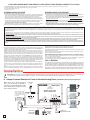
B. Line Powered Entry Phone to CO Line or Analog PABX/KSU Station (Talk Battery Provided by Line In)
12V DC Adapter
(included)
Share power with 12-24V
AC/DC doorstrike with 200mA
available current or use the
included 12V DC adapter.
MODEL SRC-1
OR
TPG
POWER 12V DC
VIKING
ELECTRONICS
HUDSON, WI 54016
COM
2
N.O.
1
TRIGGER
INPUT
Power Input
Polarity
N.C.
TALK
BATTERY
PWR ON
OFF
E-10A (not included)
3 4
5 6 7
8
9
OR
* K-1900-5
(not included)
C
LED 1
E-20B (not included)
8
1
ENTRY
DEVICE
SECURE TOUCH TONE
RELAY CONTROLLER
LINE IN
OR
Doorstrike
Power Supply
12-24V AC or DC
VIKING ©
E-40-PB
(not included)
E-50-SS
(not included)
C
LED 2
Door
OR
OR
Doorstrike
Postal Lock /
Request to
Exit Contact
*** CO Line or Analog
PABX/KSU Station
E-30 (not included)
* Note: The K-1900-5 Dialer is not required if installed on a ringdown circuit. The K-1900-5’s
touch tone and flash restrictions must be disabled (Q02).
** Note: K-1700-3, K-1705-3 or other touch tone phone required for keyless entry feature.
*** Note: Set unit to Q1 or Q5 mode (timed/unlimited dialing) unless installed on a ringdown
circuit. Enable keyless entry/ringdown hang-up (Q3) when installed on a ringdown circuit.
E-35 (not included)
OR
** K-1700-3 (not included) ** K-1705-3 (not included)
Programming
Note: To program a product wired to ENTRY DEVICE, remove power from the SRC-1. This prevents the SRC-1 from reacting to touch
tones and connects LINE IN to ENTRY DEVICE.
A. Entering the Programming Mode
Note: All programming must be performed from the secure (LINE IN) side of the SRC-1.
1. Programming with Line Powered Entry Phone Connected (Talk Battery OFF)
Step 1.
Call into the C.O. line or PABX extension connected to ‘Line In’ of the unit.
Step 2.
Come off-hook with the entry phone (all Viking handsfree phones can auto answer).
Step 3.
Enter Q and the Security Code (factory 845464) from the ‘Line In’ phone.
Step 4.
Two beeps should be heard, you are now in the programming mode.
2. Programming with Adapter-Powered Doorbox Connected (Talk Battery ON)
Step 1.
Go off-hook or ring from the doorbox, or go off-hook with the ‘Line In’ phone.
Step 2.
Come off-hook with the ‘Line In’ phone, or answer with the doorbox.
Step 3.
Enter Q and the Security Code (factory 845464) from the ‘Line In’ phone.
Step 4.
Two beeps should be heard, you are now in the programming mode.
Step 4.
After programming, move JP1 jumper back
to pins 3 & 4.
TALK
BATTERY
PWR ON
OFF
1
C
LED 1
C
LED 2
JP1
2
3 4
8
1
JP1
4
N.C.
Two beeps will be heard on the ‘Line In’ phone,
you are now in the programming mode.
SECURE TOUCH TONE
RELAY CONTROLLER
COM
Step 3.
TPG
N.O.
Follow steps 1 and 2 from the appropriate
procedure above.
MODEL SRC-1
VIKING
ELECTRONICS
HUDSON, WI 54016
TRIGGER
INPUT
Step 2.
VIKING ©
ENTRY
DEVICE
Move JP1 jumper onto pins 1 & 2, as shown in
the diagram right.
LINE IN
Step 1.
POWER 12V DC
3. Programming without the Security Code
5 6 7
8
9
3
2
1
Normal
Position
"Learn"
Position
B. Security Code
This six digit number is used to access the programming mode. It is factory set to 845464 (V-I-K-I-N-G). It is recommended that you
change the security code to a personal 6 digit number. To change the security code, access programming (see Programming section A). Enter six digits 0-9 followed by #47. If you have forgotten your security code, follow the steps in Programming section A,
3. Programming without the Security Code.
C. Keyless Entry Codes
The SRC-1 can be programmed with up to 32 keyless entry codes. This feature allows a user to activate the relay by entering a
pre-programmed code on the entry phone keypad. Each keyless entry code can contain 1-6 digits (0-9 or Q) and is programmed
by entering the digits to any of the locations #00 - #31. To clear a location, enter # + the position number without any
preceding numbers.
3