1
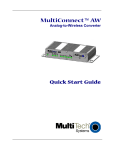
MultiConnect AW Analog-to-Wireless Converter
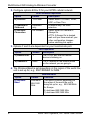
2. Configure options B thru D for your GPRS cellular network.
GPRS Network Dependent
Option
B) Protocol
Default
Description
TCPClient
C) Inbound or
Outbound
D) Wireless
Connection
Outbound
only
On Demand
Select either TCPClient, Telnet,
UDP, or Pass Thru.
Outbound only. No other
selection.
Select either On Demand or
Always On.
ATTN: If Always On is desired,
wait until you have made all your
other configuration changes
before selecting this option.
3. Options F and G are dependent on your local/remote port.
Option
Port Dependent
Default
Description
F) Remote Port
1
The TCP/IP port that the remote
device is listening on.
G) Remote IP
None
The IP address of the remote device
on the network you are going to.
4. The Wireless Band is set depending on the region of the world the
unit is set up for, e.g., 850/1900MHz for NAM.
8
Option
Default
K) Wireless
Band
Dual-band
850-1900
MHz
Wireless Band
Selection
This option is default depending on
the region of the world the unit is
being set up for, e.g., 900/1800MHz
for Europe.
0) dual-band 850/1900 MHz
1) dual-band 900/1800 MHz
Multi-Tech Systems, Inc. Quick Start Guide