1
R
User and Installation Guide
Note: This product requires the Model 400 Multi Channel Audio Transmitter for operation (not
included).
Unpacking: Check that this package contains:
One 5.8 GHz Wireless Audio amplifier - Model 480, one 36 V AC adapter (wallwart), one short
speaker cable.
Step 1
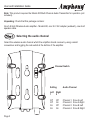
Selecting the audio channel
Select the wireless audio channel which the amplifier should receive by using a small
screwdriver and toggling the red switch at the bottom of the amplifier.
Channel Switch
ON
1 2
Setting
Page 3
Left
1
Right
2
Off
Off
On
On
Off
On
Off
On
Audio Channel
Channel 1
Channel 2
Channel 3
Channel 4
Zone A Left
Zone A Right
Zone B Left
Zone B Right