1
Content
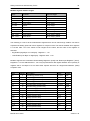
Safety Instructions and Warranty Terms .................................................................. 1
Safety Instructions ............................................................................................................... 1
Intended use ........................................................................................................................................1
Hazard warnings .................................................................................................................................1
Information on disposal .......................................................................................................................1
Warranty Terms .................................................................................................................. 1
Description .................................................................................................................. 2
Special features .................................................................................................................. 3
Connections ................................................................................................................ 3
Overview S0 model ............................................................................................................. 3
Overview RS485 model ....................................................................................................... 4
Voltage path connections .................................................................................................... 4
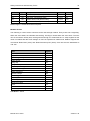
Current path connections .................................................................................................... 4
Ethernet connection ............................................................................................................ 5
Indicators and operating controls......................................................................................... 5
S0 model ............................................................................................................................. 5
RS485 model .......................................................................................................................................5
Installation Instructions ............................................................................................. 6
Mounting the device on the top hat rail ................................................................................ 6
Connecting the voltage path ................................................................................................ 6
Installing the econ sens + in a 690V grid ............................................................................. 9
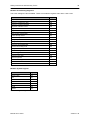
Installing the current sensors ............................................................................................... 9
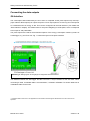
Connecting the data outputs ................................................................................... 11
S0-Interface....................................................................................................................... 11
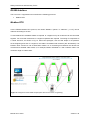
RS485-Interface ................................................................................................................ 12
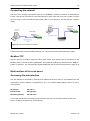
Connecting the network ..................................................................................................... 13
Web Interface of the econ sens+ ............................................................................. 13
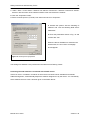
Accessing the web interface .............................................................................................. 13
Home menu....................................................................................................................... 15
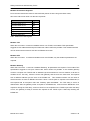
Meter menu ....................................................................................................................... 16
Installation check routine „Installation check“....................................................................................18
Graph menu ...................................................................................................................... 20
Events menu ..................................................................................................................... 21