1
Network-MIDI Driver
Network-MIDI Driver is software for Mac that transfers MIDI data back and forth between your computer and your
Yamaha device via Ethernet cable.
To operate your device from your computer via Ethernet, you'll need to install the Network-MIDI Driver software.
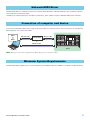
Connection of computer and device
Connect the computer to device by using an Ethernet cable via a network switch. You can connect the computer to
device directly, use an Ethernet cable.
Editor
Ethernet cable
Ethernet cable
Network switch
Driver
or
Ethernet cable
Device
Computer
n When you connect the computer to the M7CL directly, use a crossover cable.
Minimum System Requirements
Network-MIDI Driver applies to the system requirements of Editor. Refer to the Editor’s Installation Guide for details.
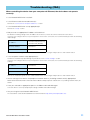
Network-MIDI Driver Installation Guide
3