1
Section 2
Connecting the Print Server
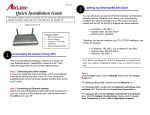
Warning: Only a USB printer may be connected to the USB port of the print server. Connecting any
other USB device to the print server may damage the print server.
Note: It is strongly recommended that you configure the print server through a wired connection first
before configuring it for wireless printing.
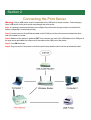
Step 1Connect one end of the Ethernet cable to the RJ-45 port of the print server and attach the other
end of the cable to a router.
Step 2 Make sure the printer is powered OFF, then connect one end of the USB cable to the USB port of
the print server and attach the other end of the cable to the USB port of the printer.
Step 3 Turn ON the printer.
Step 4 Plug one end of the power cord into the print server and the other end into an electrical outlet.