1
Model # APSUSB201
Quick Installation Guide
Ver. 1A
Section 1
Setup Preparation
Warning: Before beginning the installation, make sure that the printer driver is installed locally on each
computer that will print through the print server. Otherwise, the print server will not be configured
successfully. Please refer to your printer’s manual for instructions on how to install the printer driver.
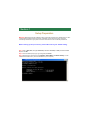
Before setting up the print server, please take note of your TCP/IP setting.
Step 1 Click on Start, Run, and type command (for Windows 95/98/ME) or cmd (for Windows 2000/
XP) and click OK.
Step 2 At the command prompt, type ipconfig and press Enter.
Step 3 Write down the information for the IP Address, Subnet Mask, and Default Gateway. You will
need these information later. (This is the IP Address of your computer).
Section 2
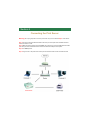
Connecting the Print Server
Warning: Do not plug the power cord to the print server until you have reached Step 4 of this section.
Step 1Connect one end of the Ethernet cable to the RJ-45 port of the print server and attach the other
end of the cable to a router.
Step 2 Make sure all the printers are powered OFF, then connect one end of the USB cable to the USB
port of the print server and attach the other end of the cable to the USB port of the printer.
Step 3 Turn ON the printer.
Step 4 Plug one end of the power cord into the print server and the other end into an electrical outlet.
Section 3
Installing Software
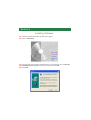
Step 1 Insert the provided CD and wait for the setup menu to appear.
Step 2 Click on Install Utility.
Note: If the setup menu does not appear automatically after you have inserted the CD, go to Start, Run,
type D:\PS Utility\setup.exe (where D is the letter of your CD drive) and click OK.
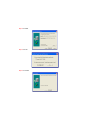
Step 3 Click Next.
Step 4 Click Next.
Step 5 Click Yes.
Step 6 Click Finish.
Section 4
Running PS Utility
Note: If your TCP/IP setting from Section 1 has an IP Address of 192.168.1.x (where x is a number
between 2 - 253) AND your Default Gateway is 192.168.1.1, you may skip this section and proceed to
Section 5, Verifying Network Connection. If either criteria does not match, please follow the
instructions below to configure the network setting of the print server.
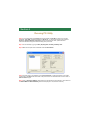
Step 1 Run the PS Utility by going to Start, (All) Programs, PS Utility, PS Utility v2.00.
Step 2 Make sure the print server is detected under the Device Name.
Note: If the print server is not detected, click on Discover Device. If nothing still appears, use a paper
clip and hold in the Reset button at the back of the print server for ten seconds while it is on then click on
Discover Device again.
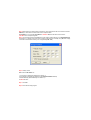
Step 3 Click on Change IP Address. Refer back to the TCP/IP setting noted in Section 1 and make sure
the Subnet Mask and Default Gateway match those displayed. If not, enter them manually.
Step 4 Refer back to the TCP/IP setting from Section 1. Note the first three sets of numbers from the IP
Address you wrote down and enter them into the respective fields.
For example: If your computer’s IP Address is 192.168.0.100, enter the same three numbers:
192.168.0 in the corresponding fields.
Step 5 You can leave the last number 254 as is unless another network device (i.e. the Default Gateway
from Section 1) is already using that number. If another network device is already using 254, then change
it to another number that is currently not in use (preferably 200 - 253).
Step 6 Validity Check:
Make sure the last number on:
1. Computer’s IP Address (IP Address from Section 1)
2. Print Server’s IP Address (IP Address on the Change IP Address window)
3. Default Gateway (Default Gateway from Section 1)
are NOT the same.
Step 7 Click OK.
Step 8 Close the PS Utility program.
Section 5
Verifying Network Connection
Step 1 Click on Start, Run.
Step 2 For Windows 95/98/ME type command and click OK. For Windows 2000/XP, type cmd and
click OK.
Step 3 At the command prompt, type ping and the IP Address of the print server and press Enter.
For example, if you have changed the IP Address of the print server to 192.168.0.254, type
ping 192.168.0.254
If you kept the factory default IP address, type ping 192.168.1.254
You should get four Reply from messages back from the print server similar to the following picture.
Step 4 Once you have received the four Reply from messages, you can proceed to the next section.
If you get Request timed out or Destination host unreachable message, please double-check your
network cable connection and try again.
If you still do not get any Reply from messages, use a paper clip and hold in the Reset button at the back
of the print server for ten seconds while it is turned on.
Note: Resetting the print server with the Reset button will reset the print server’s IP address to the factory
default. If you need to change the IP address of the print server again, use the PS Utility. After you have
changed the print server’s IP address, try to ping the print server again.
Section 6
Running PS Wizard
Warning: Make sure you have installed the printer driver locally on every computer in your network
before running the PS Wizard. Otherwise, the PS Wizard will not run properly. Be sure to run the PS
Wizard on all the computers in your network.
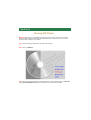
Step 1 Insert the provided CD and wait for the setup menu to appear.
Step 2 Click on PS Wizard.
Note: If the setup menu does not appear automatically after you have inserted the CD, go to Start, Run,
type D:\PS Utility\PS Wizard.exe (where D is the letter of your CD drive) and click OK.
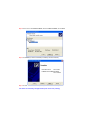
Step 3 Click Next.
Section 4
Step 4 Select the printer that is connected to the print server and click Next.
Step 5 Double-click on the Print Server Name, select the Printer Port Name, and click Next.
Step 6 Click Reboot (for Windows 95/98/ME) or Finish (for Windows 2000/XP).
Step 7 Run the PS Wizard on all the computers in your network that will use the print server.
You have successfully configured the print server for printing.
Note: This print server does not support most multi-functional printers (i.e.
printers with scanner, fax, copier, etc. functions). If your printer is a
multi-functional printer it may not work with this print server. For a list of
compatible printers, please visit our web site at www.airlinkplus.com
For more information on how to use the web configuration or setup for Mac
OS, please refer to the User’s Manual in the provided CD.
Section 8
Technical Support
E-mail: [email protected]
Toll Free: 1-888-746-3238
Web Site: www.airlinkplus.com