1
VRC2500
REMOTE FACILITIES MANAGEMENT
Installation &
Operations Manual
VRC2500 Installation & Operation Manual
January 2002 (revision A)
Copyright © 2002 Burk Technology Incorporated. All rights reserved. No part of this manual may be
reproduced in any form, or by any means, without written permission from Burk Technology
Incorporated. Printed in the United States of America. Burk Technology Incorporated reserves
specification privileges. Information in this manual is subject to change without notice.
This equipment complies with the requirements of the EU guidelines:
89/336/EEC
73/23/EEC
“Electromagnetic Compatibility”
“Electrical operating material for use within specific voltage limits”
Conformity of the equipment with the above guidelines is attested by the CE mark.
iii
Table Of Contents
Chapter 1: Introduction . . . . . . . . . . . . . . . . . . . . . . . . . . . . . . . . . . . . . . . . . . . 1
What’s In This Manual . . . . .
Contacting Burk Technology.
Customer Support . . . . .
Sales . . . . . . . . . . . . . .
Unpacking . . . . . . . . . . . . . .
.
.
.
.
.
.
.
.
.
.
.
.
.
.
.
.
.
.
.
.
.
.
.
.
.
.
.
.
.
.
.
.
.
.
.
.
.
.
.
.
.
.
.
.
.
.
.
.
.
.
.
.
.
.
.
.
.
.
.
.
.
.
.
.
.
.
.
.
.
.
.
.
.
.
.
.
.
.
.
.
.
.
.
.
.
.
.
.
.
.
.
.
.
.
.
.
.
.
.
.
.
.
.
.
.
.
.
.
.
.
.
.
.
.
.
.
.
.
.
.
.
.
.
.
.
.
.
.
.
.
.
.
.
.
.
.
.
.
.
.
.
.
.
.
.
.
.
.
.
.
.
.
.
.
.
.
.
.
.
.
.
.
.
.
.
.
.
.
.
.
.
.
.
.
.
.
.
.
.
.
.
.
.
.
.
.
.
.
.
.
.
.
.
.
.
.
.
.
.
.
.
.
.
.
.
.
.
.
.
.
.
.
.
.
.
.
.
.
.
.
.
.
.
.
.
.
.
.
.
.
2
2
2
2
3
Chapter 2: Overview. . . . . . . . . . . . . . . . . . . . . . . . . . . . . . . . . . . . . . . . . . . . . . 5
About the VRC2500. . . . . . . . . . . . . . . . . . . . . . . . . . . . . . . . . . . . . . . . . . . . . . . . . . . . . 5
Controls and Connections . . . . . . . . . . . . . . . . . . . . . . . . . . . . . . . . . . . . . . . . . . . . . . . . 6
VRC2500 Unit . . . . . . . . . . . . . . . . . . . . . . . . . . . . . . . . . . . . . . . . . . . . . . . . . . . . . . 6
Wiring Interface Unit . . . . . . . . . . . . . . . . . . . . . . . . . . . . . . . . . . . . . . . . . . . . . . . . . 8
Command Relay Unit . . . . . . . . . . . . . . . . . . . . . . . . . . . . . . . . . . . . . . . . . . . . . . . . . 8
Safety Information . . . . . . . . . . . . . . . . . . . . . . . . . . . . . . . . . . . . . . . . . . . . . . . . . . . . . . 9
Software Requirements . . . . . . . . . . . . . . . . . . . . . . . . . . . . . . . . . . . . . . . . . . . . . . . . . . 9
Pre-Installation Information . . . . . . . . . . . . . . . . . . . . . . . . . . . . . . . . . . . . . . . . . . . . . . 10
Power Connections . . . . . . . . . . . . . . . . . . . . . . . . . . . . . . . . . . . . . . . . . . . . . . . . . 10
Surge Protection . . . . . . . . . . . . . . . . . . . . . . . . . . . . . . . . . . . . . . . . . . . . . . . . . . . 10
Battery Backup . . . . . . . . . . . . . . . . . . . . . . . . . . . . . . . . . . . . . . . . . . . . . . . . . . . . 10
GSC3000 Lynx Users . . . . . . . . . . . . . . . . . . . . . . . . . . . . . . . . . . . . . . . . . . . . . . . 10
Chapter 3: Installation & Setup . . . . . . . . . . . . . . . . . . . . . . . . . . . . . . . . . . . . 11
Software Installation . . . . . . . . . . . . . . . . . . . . . .
Install . . . . . . . . . . . . . . . . . . . . . . . . . . . . . .
Communication Properties. . . . . . . . . . . . . . . . . .
PC COM Port Setup in Windows . . . . . . . . . .
Configuring PC COM Ports . . . . . . . . . . . . .
Setting the Workstation Address . . . . . . . . . .
Site Setup . . . . . . . . . . . . . . . . . . . . . . . . . . . . . .
Communicating with VRC Site . . . . . . . . . . . . . . .
Direct Connection . . . . . . . . . . . . . . . . . . . . .
Connecting Equipment. . . . . . . . . . . . . . . . . . . . .
Modems . . . . . . . . . . . . . . . . . . . . . . . . . . . .
Dial-Up Modem Configuration . . . . . . . . . . . . .
Dial-Up Modem Connection . . . . . . . . . . . . . .
Four Wire Leased-Line Modem Configuration
Four-Wire Modem Connection . . . . . . . . . . . .
Two-Wire Leased-Line Modem . . . . . . . . . . . .
Wiring Interface Unit. . . . . . . . . . . . . . . . . . . .
Command Relay Unit . . . . . . . . . . . . . . . . . . .
.
.
.
.
.
.
.
.
.
.
.
.
.
.
.
.
.
.
.
.
.
.
.
.
.
.
.
.
.
.
.
.
.
.
.
.
.
.
.
.
.
.
.
.
.
.
.
.
.
.
.
.
.
.
.
.
.
.
.
.
.
.
.
.
.
.
.
.
.
.
.
.
.
.
.
.
.
.
.
.
.
.
.
.
.
.
.
.
.
.
.
.
.
.
.
.
.
.
.
.
.
.
.
.
.
.
.
.
.
.
.
.
.
.
.
.
.
.
.
.
.
.
.
.
.
.
.
.
.
.
.
.
.
.
.
.
.
.
.
.
.
.
.
.
.
.
.
.
.
.
.
.
.
.
.
.
.
.
.
.
.
.
.
.
.
.
.
.
.
.
.
.
.
.
.
.
.
.
.
.
.
.
.
.
.
.
.
.
.
.
.
.
.
.
.
.
.
.
.
.
.
.
.
.
.
.
.
.
.
.
.
.
.
.
.
.
.
.
.
.
.
.
.
.
.
.
.
.
.
.
.
.
.
.
.
.
.
.
.
.
.
.
.
.
.
.
.
.
.
.
.
.
.
.
.
.
.
.
.
.
.
.
.
.
.
.
.
.
.
.
.
.
.
.
.
.
.
.
.
.
.
.
.
.
.
.
.
.
.
.
.
.
.
.
.
.
.
.
.
.
.
.
.
.
.
.
.
.
.
.
.
.
.
.
.
.
.
.
.
.
.
.
.
.
.
.
.
.
.
.
.
.
.
.
.
.
.
.
.
.
.
.
.
.
.
.
.
.
.
.
.
.
.
.
.
.
.
.
.
.
.
.
.
.
.
.
.
.
.
.
.
.
.
.
.
.
.
.
.
.
.
.
.
.
.
.
.
.
.
.
.
.
.
.
.
.
.
.
.
.
.
.
.
.
.
.
.
.
.
.
.
.
.
.
T E C H N I C A L S U P P O R T 9 7 8 - 4 8 6 - 0 0 8 6 • s u p p o r t @ b u r k . c o m • w w w. b u r k . c o m
.
.
.
.
.
.
.
.
.
.
.
.
.
.
.
.
.
.
.
.
.
.
.
.
.
.
.
.
.
.
.
.
.
.
.
.
.
.
.
.
.
.
.
.
.
.
.
.
.
.
.
.
.
.
.
.
.
.
.
.
.
.
.
.
.
.
.
.
.
.
.
.
.
.
.
.
.
.
.
.
.
.
.
.
.
.
.
.
.
.
.
.
.
.
.
.
.
.
.
.
.
.
.
.
.
.
.
.
12
12
14
14
16
17
18
20
20
23
23
23
25
26
29
31
32
33
iv
CONTENTS
Chapter 4: Site Management . . . . . . . . . . . . . . . . . . . . . . . . . . . . . . . . . . . . . . 37
Button Descriptions . . . . . . . . . . . . . . .
Control Bar Properties . . . . . . . . . . . . .
Properties Window. . . . . . . . . . . . . . . . .
Site Properties. . . . . . . . . . . . . . . . . . . .
Adjusting Site Properties . . . . . . . . .
Opening a Site . . . . . . . . . . . . . . . .
General Setup . . . . . . . . . . . . . . . . . . . .
Toolbars . . . . . . . . . . . . . . . . . . . . .
Firmware . . . . . . . . . . . . . . . . . . . .
Network . . . . . . . . . . . . . . . . . . . . .
Date/Time . . . . . . . . . . . . . . . . . . . .
Site Description . . . . . . . . . . . . . . . .
Site Access . . . . . . . . . . . . . . . . . . .
Metering Inputs . . . . . . . . . . . . . . . .
Status Inputs . . . . . . . . . . . . . . . . . .
Commands Output . . . . . . . . . . . . .
Macros . . . . . . . . . . . . . . . . . . . . . .
Timed Events . . . . . . . . . . . . . . . . .
Muting . . . . . . . . . . . . . . . . . . . . . .
Data Browser . . . . . . . . . . . . . . . . .
Monitor . . . . . . . . . . . . . . . . . . . . . .
Calibraton . . . . . . . . . . . . . . . . . . . .
Configuration Printouts . . . . . . . . . .
Alarms . . . . . . . . . . . . . . . . . . . . . .
Dial-Up Setup . . . . . . . . . . . . . . . . . . . .
Firmware . . . . . . . . . . . . . . . . . . . .
Network . . . . . . . . . . . . . . . . . . . . .
Site Description . . . . . . . . . . . . . . . .
Site Access . . . . . . . . . . . . . . . . . . .
Site Dialing . . . . . . . . . . . . . . . . . . .
Voice Setup . . . . . . . . . . . . . . . . . .
Configuration Printouts . . . . . . . . . .
Using Archives. . . . . . . . . . . . . . . . . . . .
Creating Archives . . . . . . . . . . . . . .
Loading Archive Files into VRC Unit
Explorer Archive Feature . . . . . . . . .
.
.
.
.
.
.
.
.
.
.
.
.
.
.
.
.
.
.
.
.
.
.
.
.
.
.
.
.
.
.
.
.
.
.
.
.
.
.
.
.
.
.
.
.
.
.
.
.
.
.
.
.
.
.
.
.
.
.
.
.
.
.
.
.
.
.
.
.
.
.
.
.
.
.
.
.
.
.
.
.
.
.
.
.
.
.
.
.
.
.
.
.
.
.
.
.
.
.
.
.
.
.
.
.
.
.
.
.
.
.
.
.
.
.
.
.
.
.
.
.
.
.
.
.
.
.
.
.
.
.
.
.
.
.
.
.
.
.
.
.
.
.
.
.
.
.
.
.
.
.
.
.
.
.
.
.
.
.
.
.
.
.
.
.
.
.
.
.
.
.
.
.
.
.
.
.
.
.
.
.
.
.
.
.
.
.
.
.
.
.
.
.
.
.
.
.
.
.
.
.
.
.
.
.
.
.
.
.
.
.
.
.
.
.
.
.
.
.
.
.
.
.
.
.
.
.
.
.
.
.
.
.
.
.
.
.
.
.
.
.
.
.
.
.
.
.
.
.
.
.
.
.
.
.
.
.
.
.
.
.
.
.
.
.
.
.
.
.
.
.
.
.
.
.
.
.
.
.
.
.
.
.
.
.
.
.
.
.
.
.
.
.
.
.
.
.
.
.
.
.
.
.
.
.
.
.
.
.
.
.
.
.
.
.
.
.
.
.
.
.
.
.
.
.
.
.
.
.
.
.
.
.
.
.
.
.
.
.
.
.
.
.
.
.
.
.
.
.
.
.
.
.
.
.
.
.
.
.
.
.
.
.
.
.
.
.
.
.
.
.
.
.
.
.
.
.
.
.
.
.
.
.
.
.
.
.
.
.
.
.
.
.
.
.
.
.
.
.
.
.
.
.
.
.
.
.
.
.
.
.
.
.
.
.
.
.
.
.
.
.
.
.
.
.
.
.
.
.
.
.
.
.
.
.
.
.
.
.
.
.
.
.
.
.
.
.
.
.
.
.
.
.
.
.
.
.
.
.
.
.
.
.
.
.
.
.
.
.
.
.
.
.
.
.
.
.
.
.
.
.
.
.
.
.
.
.
.
.
.
.
.
.
.
.
.
.
.
.
.
.
.
.
.
.
.
.
.
.
.
.
.
.
.
.
.
.
.
.
.
.
.
.
.
.
.
.
.
.
.
.
.
.
.
.
.
.
.
.
.
.
.
.
.
.
.
.
.
.
.
.
.
.
.
.
.
.
.
.
.
.
.
.
.
.
.
.
.
.
.
.
.
.
.
.
.
.
.
.
.
.
.
.
.
.
.
.
.
.
.
.
.
.
.
.
.
.
.
.
.
.
.
.
.
.
.
.
.
.
.
.
.
.
.
.
.
.
.
.
.
.
.
.
.
.
.
.
.
.
.
.
.
.
.
.
.
.
.
.
.
.
.
.
.
.
.
.
.
.
.
.
.
.
.
.
.
.
.
.
.
.
.
.
.
.
.
.
.
.
.
.
.
.
.
.
.
.
.
.
.
.
.
.
.
.
.
.
.
.
.
.
.
.
.
.
.
.
.
.
.
.
.
.
.
.
.
.
.
.
.
.
.
.
.
.
.
.
.
.
.
.
.
.
.
.
.
.
.
.
.
.
.
.
.
.
.
.
.
.
.
.
.
.
.
.
.
.
.
.
.
.
.
.
.
.
.
.
.
.
.
.
.
.
.
.
.
.
.
.
.
.
.
.
.
.
.
.
.
.
.
.
.
.
.
.
.
.
.
.
.
.
.
.
.
.
.
.
.
.
.
.
.
.
.
.
.
.
.
.
.
.
.
.
.
.
.
.
.
.
.
.
.
.
.
.
.
.
.
.
.
.
.
.
.
.
.
.
.
.
.
.
.
.
.
.
.
.
.
.
.
.
.
.
.
.
.
.
.
.
.
.
.
.
.
.
.
.
.
.
.
.
.
.
.
.
.
.
.
.
.
.
.
.
.
.
.
.
.
.
.
.
.
.
.
.
.
.
.
.
.
.
.
.
.
.
.
.
.
.
.
.
.
.
.
.
.
.
.
.
.
.
.
.
.
.
.
.
.
.
.
.
.
.
.
.
.
.
.
.
.
.
.
.
.
.
.
.
.
.
.
.
.
.
.
.
.
.
.
.
.
.
.
.
.
.
.
.
.
.
.
.
.
.
.
.
.
.
.
.
.
.
.
.
.
.
.
.
.
.
.
.
.
.
.
.
.
.
.
.
.
.
.
.
.
.
.
.
.
.
.
.
.
.
.
.
.
.
.
.
.
.
.
.
.
.
.
.
.
.
.
.
.
.
.
.
.
.
.
.
.
.
.
.
.
.
.
.
.
.
.
.
.
.
.
.
.
.
.
.
.
.
.
.
.
.
.
.
.
.
.
.
.
.
.
.
.
.
.
.
.
.
.
.
.
.
.
.
.
.
.
.
.
.
.
.
.
.
.
.
.
.
.
.
.
.
.
.
.
.
.
.
.
.
.
.
.
.
.
.
.
.
.
.
.
.
.
.
.
.
.
.
.
.
.
.
.
.
.
.
.
.
.
.
.
.
.
.
.
.
.
.
.
.
.
.
.
.
.
.
.
.
.
.
.
.
.
.
.
.
.
.
.
.
.
.
.
.
.
.
.
.
.
.
.
.
.
.
.
.
.
.
.
.
.
.
.
.
.
.
.
.
.
.
.
.
.
.
.
.
.
.
.
.
.
.
.
.
.
.
.
.
.
.
.
.
.
.
.
.
.
.
.
.
.
.
.
.
.
.
.
.
.
.
.
.
.
.
.
.
.
.
.
.
.
.
.
.
.
.
.
.
.
.
.
.
.
.
.
.
.
.
.
.
.
.
.
.
.
.
.
.
.
.
.
.
.
.
.
.
.
.
.
.
.
.
.
.
38
39
39
41
41
44
45
45
47
50
51
52
52
54
57
59
60
60
65
66
67
68
69
70
71
72
74
75
75
76
77
79
80
80
81
81
Chapter 5: Using Dial-Up . . . . . . . . . . . . . . . . . . . . . . . . . . . . . . . . . . . . . . . . . 83
Connections . . . . . . . . . . . . . . . . . . . . . . . .
Selecting the Correct Mode . . . . . . . . . . . . .
Retrieving Information & Issuing Commands
Calling the VRC2500 . . . . . . . . . . . . . . .
Status and Meter Channel Readings . . .
Commands, Macros and Captures . . . .
Ending A Call . . . . . . . . . . . . . . . . . . . .
.
.
.
.
.
.
.
.
.
.
.
.
.
.
.
.
.
.
.
.
.
.
.
.
.
.
.
.
.
.
.
.
.
.
.
.
.
.
.
.
.
.
.
.
.
.
.
.
.
.
.
.
.
.
.
.
.
.
.
.
.
.
.
.
.
.
.
.
.
.
.
.
.
.
.
.
.
.
.
.
.
.
.
.
.
.
.
.
.
.
.
.
.
.
.
.
.
.
.
.
.
.
.
.
.
.
.
.
.
.
.
.
.
.
.
.
.
.
.
.
.
.
.
.
.
.
.
.
.
.
.
.
.
.
.
.
.
.
.
.
.
.
.
.
.
.
.
.
.
.
.
.
.
.
.
.
.
.
.
.
.
.
.
.
.
.
.
.
.
.
.
.
.
.
.
.
.
.
.
.
.
.
.
.
.
.
.
.
.
.
.
.
.
.
.
.
.
.
.
.
.
.
.
.
.
.
.
.
.
.
.
.
.
.
.
.
.
.
.
.
.
.
.
.
.
.
.
.
.
.
.
83
84
85
85
85
86
87
7 B e a v e r B r o o k R o a d , L i t t l e t o n , M A 0 1 4 6 0 • 9 7 8 - 4 8 6 - 0 0 8 6 • w w w. b u r k . c o m
CONTENTS
Checking and Clearing Alarms. . . . . . . . . . . . . . . . . . . . . . . . .
Check For Alarms . . . . . . . . . . . . . . . . . . . . . . . . . . . . . . .
Clear Alarms . . . . . . . . . . . . . . . . . . . . . . . . . . . . . . . . . . .
Status Channel Alarms . . . . . . . . . . . . . . . . . . . . . . . . . . .
Meter Channel Alarms . . . . . . . . . . . . . . . . . . . . . . . . . . . .
General Usage . . . . . . . . . . . . . . . . . . . . . . . . . . . . . . . . . . . .
Rembering VRC2500 Codes . . . . . . . . . . . . . . . . . . . . . . .
Muting Outbound Telephone Numbers . . . . . . . . . . . . . . . .
Query Current VRC Unit. . . . . . . . . . . . . . . . . . . . . . . . . . .
Checking Current Date & Time . . . . . . . . . . . . . . . . . . . . . .
Using the Sound Sensor . . . . . . . . . . . . . . . . . . . . . . . . . .
Using the Audio Out Connector . . . . . . . . . . . . . . . . . . . . .
Using the Audio In Connector . . . . . . . . . . . . . . . . . . . . . .
Report Mode . . . . . . . . . . . . . . . . . . . . . . . . . . . . . . . . . . .
Report Site Number & Security Level . . . . . . . . . . . . . . . .
Report Firmware Version Number . . . . . . . . . . . . . . . . . . .
Escape/Cancel Command . . . . . . . . . . . . . . . . . . . . . . . . .
Single/Multiple Responses from Status/Metering Channels
.
.
.
.
.
.
.
.
.
.
.
.
.
.
.
.
.
.
.
.
.
.
.
.
.
.
.
.
.
.
.
.
.
.
.
.
.
.
.
.
.
.
.
.
.
.
.
.
.
.
.
.
.
.
.
.
.
.
.
.
.
.
.
.
.
.
.
.
.
.
.
.
.
.
.
.
.
.
.
.
.
.
.
.
.
.
.
.
.
.
.
.
.
.
.
.
.
.
.
.
.
.
.
.
.
.
.
.
.
.
.
.
.
.
.
.
.
.
.
.
.
.
.
.
.
.
. . . . . . . . . . . . 88
. . . . . . . . . . . . 88
. . . . . . . . . . . . 88
. . . . . . . . . . . . 88
. . . . . . . . . . . . 89
. . . . . . . . . . . . 93
. . . . . . . . . . . . 89
. . . . . . . . . . . . 89
. . . . . . . . . . . . 90
. . . . . . . . . . . . 91
. . . . . . . . . . . . 91
. . . . . . . . . . . . 91
. . . . . . . . . . . . 92
. . . . . . . . . . . . 93
. . . . . . . . . . . . 93
. . . . . . . . . . . . 93
. . . . . . . . . . . . 93
. . . . . . . . . . . . 94
Chapter 6: Creating Macros . . . . . . . . . . . . . . . . . . . . . . . . . . . . . . . . . . . . . . . 95
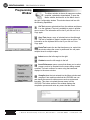
Programming Window . . . . . . . . . . . . . . . . . . . . . . . . . . . . . . . . . . . . . . . . . . . . . . . . . . 96
Macro Structure . . . . . . . . . . . . . . . . . . . . . . . . . . . . . . . . . . . . . . . . . . . . . . . . . . . . . . . 97
Source Code Components . . . . . . . . . . . . . . . . . . . . . . . . . . . . . . . . . . . . . . . . . . . . 98
Types of Macros . . . . . . . . . . . . . . . . . . . . . . . . . . . . . . . . . . . . . . . . . . . . . . . . . . 100
Mathematical Statements . . . . . . . . . . . . . . . . . . . . . . . . . . . . . . . . . . . . . . . . . . . 107
Metering Macros . . . . . . . . . . . . . . . . . . . . . . . . . . . . . . . . . . . . . . . . . . . . . . . . . . 112
Macro Examples . . . . . . . . . . . . . . . . . . . . . . . . . . . . . . . . . . . . . . . . . . . . . . . . . . 115
Chapter 7: Managing Tasks & Data . . . . . . . . . . . . . . . . . . . . . . . . . . . . . . . . 123
Data Browser. . . . . . . . . . . . . . . . . . . .
Creating Data Captures . . . . . . . . .
Collecting Data . . . . . . . . . . . . . . .
Printing Data . . . . . . . . . . . . . . . . .
Custom Print Job Report Samples .
Administrative Tools . . . . . . . . . . . .
Customizing The Database Grid . . .
Organizing Data . . . . . . . . . . . . . . .
Database Compact Utility . . . . . . . .
VRC2500 Scheduler . . . . . . . . . . . . . .
.
.
.
.
.
.
.
.
.
.
.
.
.
.
.
.
.
.
.
.
.
.
.
.
.
.
.
.
.
.
.
.
.
.
.
.
.
.
.
.
.
.
.
.
.
.
.
.
.
.
.
.
.
.
.
.
.
.
.
.
.
.
.
.
.
.
.
.
.
.
.
.
.
.
.
.
.
.
.
.
.
.
.
.
.
.
.
.
.
.
Appendix A: Voice Interface Modes & Codes
Appendix B: Configuration Documents. . . . .
Appendix C: Database Table Configuration. .
Appendix D: Specifications . . . . . . . . . . . . . .
Appendix E: Pinouts . . . . . . . . . . . . . . . . . . .
Appendix F: Troubleshooting. . . . . . . . . . . . .
Glossary . . . . . . . . . . . . . . . . . . . . . . . . . . . . .
Index . . . . . . . . . . . . . . . . . . . . . . . . . . . . . . . .
.
.
.
.
.
.
.
.
.
.
.
.
.
.
.
.
.
.
.
.
.
.
.
.
.
.
.
.
.
.
.
.
.
.
.
.
.
.
.
.
.
.
.
.
.
.
.
.
.
.
.
.
.
.
.
.
.
.
.
.
.
.
.
.
.
.
.
.
.
.
.
.
.
.
.
.
.
.
.
.
.
.
.
.
.
.
.
.
.
.
.
.
.
.
.
.
.
.
.
.
.
.
.
.
.
.
.
.
.
.
.
.
.
.
.
.
.
.
.
.
.
.
.
.
.
.
.
.
.
.
.
.
.
.
.
.
.
.
.
.
.
.
.
.
.
.
.
.
.
.
.
.
.
.
.
.
.
.
.
.
.
.
.
.
.
.
.
.
.
.
.
.
.
.
.
.
.
.
.
.
.
.
.
.
.
.
.
.
.
.
.
.
.
.
.
.
.
.
.
.
.
.
.
.
.
.
.
.
.
.
.
.
.
.
.
.
.
.
.
.
.
.
.
.
.
.
.
.
.
.
.
.
.
.
.
.
.
.
.
.
.
.
.
.
.
.
.
.
.
.
.
.
.
.
.
.
.
.
.
.
.
.
.
.
.
.
.
.
.
.
.
.
.
.
.
.
.
.
.
.
.
.
.
.
.
.
.
.
.
.
.
.
.
.
.
.
.
.
.
.
.
.
.
.
.
.
.
.
.
.
.
.
.
.
.
.
.
.
.
.
.
.
.
.
.
.
.
.
.
.
.
.
.
.
.
.
.
.
.
.
.
.
.
.
.
.
.
.
.
.
.
.
.
.
.
.
.
.
.
.
.
.
.
.
.
.
.
.
.
.
.
.
.
.
.
.
.
.
.
.
.
.
.
.
.
.
.
.
.
.
.
.
.
.
.
.
.
.
.
.
.
.
.
.
.
.
.
.
.
.
.
.
.
.
.
.
T E C H N I C A L S U P P O R T 9 7 8 - 4 8 6 - 0 0 8 6 • s u p p o r t @ b u r k . c o m • w w w. b u r k . c o m
.
.
.
.
.
.
.
.
.
.
.
.
.
.
.
.
.
.
.
.
.
.
.
.
.
.
.
.
.
.
124
124
124
127
129
131
133
137
140
141
.
.
.
.
.
.
.
.
.
.
.
.
.
.
.
.
145
147
155
195
201
205
213
217
v
vi
CONTENTS
7 B e a v e r B r o o k R o a d , L i t t l e t o n , M A 0 1 4 6 0 • 9 7 8 - 4 8 6 - 0 0 8 6 • w w w. b u r k . c o m
CHAPTER 1 • INTRODUCTION
1
Introduction
The VRC2500 is a remote facilities management system
designed to monitor and control equipment and facilities in
remote locations. Intelligence, reliability, and versatility make the
VRC2500 system one of the best values in remote facilities
management today.
The VRC2500 has the unique ability to operate unattended. A PC
is only required for setup and monitoring, not for smart operation.
Included with the VRC2500 is the highly innovative operating
software package built around the VRC2500 hardware platform.
The software is used in the configuration and monitoring of I/O
units. Using the software, the VRC2500 is ready to help users
face the challenges of the new millennium.
T E C H N I C A L S U P P O R T 9 7 8 - 4 8 6 - 0 0 8 6 • s u p p o r t @ b u r k . c o m • w w w. b u r k . c o m
1
2
INTRODUCTION • UNPACKING
What’s In This
Manual
Overview gives product descriptions, operation requirements and
pre-installation information. This section is designed to help
familiarize you with the controls and connections before you
begin installing the equipment.
Installation & Setup provides detailed information on installing
the VRC2500 software and connecting the hardware to your
equipment.
Site Management takes you through each of the Unit and Voice
functions and describes how to configure your unit.
Using Dial-Up describes the Dial-Up features and shows you
how to manage your equipment via telephone.
Managing Tasks and Data illustrates the data process from
captures to printouts using Data Browser and Scheduler.
Creating Macros explains the structure and language of macros,
as well as providing many examples of macro commands.
Appendices provide troubleshooting and specification
information. A section on pinouts includes diagrams of cables,
connectors, and jumpers. A glossary and index are located after
the Appendices.
Contacting
Burk Technology
Customer Support
For additional help on installing, setting up or operating the
VRC2500, please contact us at the following:
Phone:
Fax:
E-mail:
Website:
978-486-0086
978-486-0081
[email protected]
www.burk.com
Sales
Phone:
Fax:
E-mail:
Website:
978-486-0086
800-255-8090 (sales only)
978-486-0081
[email protected]
www.burk.com
7 B e a v e r B r o o k R o a d , L i t t l e t o n , M A 0 1 4 6 0 • 9 7 8 - 4 8 6 - 0 0 8 6 • w w w. b u r k . c o m
INTRODUCTION • UNPACKING
Unpacking
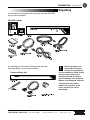
You should have received the following items with each VRC2500
unit you have purchased.
VRC2500 Package
You should have received the following items with each
Command Relay unit you have purchased.
Command Relay Unit
Burk Technology is not
responsible for product
damage during shipment.
You must make any claims directly
with the carrier. Inspect your
shipment carefully for obvious
signs of damage. If the shipment
appears to be damaged, retain the
original boxes and packing
material for inspection by the
carrier. Contact your carrier
immediately.
!
T E C H N I C A L S U P P O R T 9 7 8 - 4 8 6 - 0 0 8 6 • s u p p o r t @ b u r k . c o m • w w w. b u r k . c o m
3
4
INTRODUCTION • UNPACKING
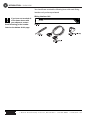
You should have received the following items with each Wiring
Interface unit you have purchased.
Wiring Interface Unit
If you have not received all
of the items shown with
your shipment, contact
Burk Technology at the number
listed on the bottom of this page.
!
7 B e a v e r B r o o k R o a d , L i t t l e t o n , M A 0 1 4 6 0 • 9 7 8 - 4 8 6 - 0 0 8 6 • w w w. b u r k . c o m
CHAPTER 2 • OVERVIEW
2
Overview
About the VRC2500
•
Automatic functions are embedded in the VRC unit — no
external PC required after the initial setup and calibration
•
Fully customizable macros allow the VRC2500 to respond
automatically to situations
•
Alarm notifications by telephone, pager, or computer
•
Programmable data-capture function that collects metering
and status data and inserts it into a Microsoft Access®
compatible database
•
Establish remote connection to VRC2500 via dial-up
and dedicated telephone lines, radio links (RF), or direct
serial port connection
•
Dial-Up option allows you to monitor status and metering
channels, and issue commands with any touch-tone phone
•
Create custom print jobs using collected data stored in the
VRC2500 software’s database
•
Automate print jobs and data collections by scheduling them
as recurring or one-time tasks
T E C H N I C A L S U P P O R T 9 7 8 - 4 8 6 - 0 0 8 6 • s u p p o r t @ b u r k . c o m • w w w. b u r k . c o m
5
6
OVERVIEW • CONTROLS & CONNECTIONS
Controls &
Connections
VRC2500, Front View
VRC2500 UNIT
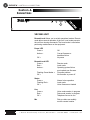
Remote/Local Allows you to switch operational modes. Remote
mode allows normal operation of the unit. Local mode prevents
the unit from issuing commands. The Local mode is used when
performing maintenance on the equipment.
Power LED
Green =
Amber =
Off =
Remote/Local LED
Green =
Red =
Amber =
Flashing Green/Amber =
Off =
OK
Corrupt firmware or
hardware failure
No power
Remote mode
Local mode
Operating system failure
must upload new firmware
Firmware problem
No firmware or power off
Status
Green =
Flashing Red =
Off =
Normal voice operation
Local mode
Voice firmware not loaded
Line
Green =
Red =
Off =
Voice mode session in progress
Data mode session in progress
Telephone line not in use
Mic
Dial-up callers can audibly
monitor remote location
7 B e a v e r B r o o k R o a d , L i t t l e t o n , M A 0 1 4 6 0 • 9 7 8 - 4 8 6 - 0 0 8 6 • w w w. b u r k . c o m
OVERVIEW • CONTROLS & CONNECTIONS
VRC2500, Rear View
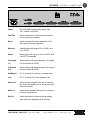
Power
The VRC2500 accommodates power from
100 - 240VAC at 50/60Hz.
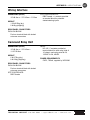
Full-Time
Serial connection for full-time data connection
such as a four-wire modem.
Direct
Serial connection for direct connection to PC.
Also used for firmware upgrades.
Metering
Analog inputs with range of 0 to +10VDC and
-5 to +5VDC.
Status
Binary inputs with range of -30 to +30VDC with
CMOS/TTL thresholds.
Command
1-8
Open collector A/B output channels 1 through 8
can sink 250mA at 30VDC.
Command
9-16
Open collector A/B output channels 9 through 16
can sink 250mA at 30VDC.
Set/Modem
RJ-11 connector for modem or telephone set.
Line
RJ-11 connector for on-site telephone line.
Audio Out
Audio from the telephone line can be routed to
this output for possible use as emergency audio
feed to transmitter.
Audio In
Allows external audio (such as off-air monitor) to
be fed to the phone line.
Dial-Up
Serial connection for external dial-up modem.
Also used when upgrading voice firmware.
T E C H N I C A L S U P P O R T 9 7 8 - 4 8 6 - 0 0 8 6 • s u p p o r t @ b u r k . c o m • w w w. b u r k . c o m
7
8
OVERVIEW • CONTROLS & CONNECTIONS
Wiring Interface Unit, Front View
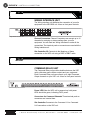
WIRING INTERFACE UNIT
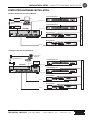
The Wiring Interface unit facilitates the connection of your site
equipment to the VRC2500 unit. It has no front panel controls.
Wiring Interface Unit, Rear View
Channel Connectors Channel Connectors can accept up to 16
channels for metering or status readings from your site
equipment. You will need two Wiring Interfaces to make all the
connections. Two-terminal push-on connectors are used with the
Wiring Interface unit.
Site Controller I/O Connects to the Metering or Status
connection on the VRC unit using a DB37-to-DB37 cable.
Command Relay Unit, Front View
COMMAND RELAY UNIT
The Command Relay unit provides isolation between the VRC
unit’s solid-state open-collector outputs and your equipment.
Each Command Relay unit can connect up to eight Command
Output channels on your VRC unit. It has no front panel controls.
Command Relay Unit, Rear Panel
Power LED When the VRC unit is powered up, both power
LEDs should be green, indicating 5VDC power.
Connectors for Command Channels Three-terminal push-on
connectors are inserted here.
Site Controller Connects to the Command 1-8 or Command
9-16 connection on the VRC unit.
7 B e a v e r B r o o k R o a d , L i t t l e t o n , M A 0 1 4 6 0 • 9 7 8 - 4 8 6 - 0 0 8 6 • w w w. b u r k . c o m
OVERVIEW • SAFETY INFORMATION
If you are performing maintenance on your communications
equipment, you should press the REMOTE/LOCAL button on your
VRC2500 unit to switch into Local mode. The LED indicator
changes to a solid red color. Local mode prevents the unit from
issuing command outputs. All metering and status information is
still available to remote users.
The VRC software also indicates whether a unit is in Remote or
Local mode. If the unit is in Local mode, a small padlock appears
on the General Setup icon in the Site window.
Safety
Information
WARNING! Possible
severe injury may occur if
a command channel is
activated while you are performing
maintenance on your equipment. It
is critical that you switch the I/O
unit from REMOTE to LOCAL
mode before working with
connected equipment.
!
Remote/Local Button on VRC2500
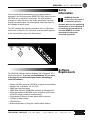
The VRC2500 software requires Windows® 98 or Windows® NT 4
with Service Pack 5. If you are running Windows NT, you need
to be logged in as the Administrator before attempting to
install the software.
•
•
•
•
•
•
•
•
•
Software
Requirements
Pentium 166 MHz minimum (200 MHz or higher recommended)
Windows® 98 or Windows® NT 4 w/ SP5
50MB free hard drive space
32MB RAM minimum (64MB RAM minimum for Windows NT)
Video card capable of 800x600 screen resolution at 256 colors
(1024x760 screen resolution recommended)
One available COM port for each direct cable connection
19.2kbps or faster modem
CD-ROM Drive
Multimedia speakers (if using the audible alarm feature)
T E C H N I C A L S U P P O R T 9 7 8 - 4 8 6 - 0 0 8 6 • s u p p o r t @ b u r k . c o m • w w w. b u r k . c o m
9
10
OVERVIEW • PRE-INSTALLATION INFORMATION
Pre-Installation
Information
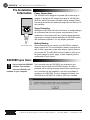
Power Connections
The VRC2500 unit is designed to operate with a wide range of
voltages. It accepts an AC voltage input range of 100-240 VAC,
50/60 Hz, without the need to manually change settings. Powerline swings and brownouts within this range have no effect on I/O
unit operation.
Surge Protection
Although the VRC2500 has built-in resistance to voltage changes,
we recommend that you use a power surge protector or line
conditioner on the incoming AC line. Lightning strikes and other
high surges in voltage levels will damage your VRC2500 system
and connected equipment if it is not properly protected.
Battery Backup
VRC Unit Power Source
We recommend that you connect your VRC2500 to a battery
backup system. An I/O unit connected to battery backup will be
able to start a generator or take other steps to restore power to
your remote site. The VRC2500 will also be able to notify you of
the power outage by phone, pager, or data, depending on the
configuration of your system.
GSC3000 Lynx Users
Do not install the VRC2500
software if you already
have the GSC3000 Lynx
software on your computer.
!
If you currently have the GSC3000 Lynx software on your
computer, do not install the VRC2500 software. You will be
prompted with a warning message (shown below) advising you
not to continue with the installation. Use the Lynx software to
connect to your VRC2500. The Lynx software will identify your
VRC2500 as a GSC3000 I/O 16 and a GSC Voice Interface.
7 B e a v e r B r o o k R o a d , L i t t l e t o n , M A 0 1 4 6 0 • 9 7 8 - 4 8 6 - 0 0 8 6 • w w w. b u r k . c o m
CHAPTER 3 • INSTALLATION & SETUP
3
Installation
& Setup
This section outlines the step by step process that should be
followed in order to ensure proper installation of your VRC
products.
Only program functions that are relevant to the installation are
described in this chapter. More detailed descriptions and
operation information are provided in subsequent chapters.
We strongly recommend that you bench test the equipment to
ensure it is functioning properly and that you have made the right
connections before you install at your transmitter site.
T E C H N I C A L S U P P O R T 9 7 8 - 4 8 6 - 0 0 8 6 • s u p p o r t @ b u r k . c o m • w w w. b u r k . c o m
11
12
INSTALLATION & SETUP • SOFTWARE INSTALLATION
Software
Installation
If you are installing on a
PC running Windows NT,
you must be logged in as
the Administrator.
✍
VRC2500 software will not
run properly if Lynx
software is installed on
your PC. The software packages
are mutually exclusive. If you are
using GSC3000 Lynx software and
VRC2500 units, do NOT install the
VRC2500 software. Abort the
installation. Use the Lynx software
to set up and operate your
VRC2500 unit(s).
!
INSTALL
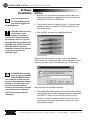
1. Boot the PC to the Windows operating system. Make sure
that all other programs or applications are closed. Insert the
VRC2500 CD into the CD-ROM drive.
2. If the Autorun feature is enabled on the PC, a window pops
up with the option to install the VRC2500 software or exit.
(See figure below.)
3. Click INSTALL to launch the InstallShield Wizard.
VRC2500 Install Menu
If the Autorun window does not open, click on the Windows
START menu and choose RUN. Type "<drive>:\setup.exe" where
<drive> is the letter of the CD-ROM drive (e.g., D:\setup.exe).
A DCOM98 error message
pops up during installation
if the DCOM98 version on
your computer is newer than the
version included with the software
package. If you would like to use
the version included with the
software you will need to uninstall
your current version. Otherwise,
click OK and proceed with the
installation.
✍
Setup launches the InstallShield Wizard.
4. The InstallShield Wizard guides you through several screens,
including Welcome, License Agreement and User Information.
Click NEXT or YES to move to the next screen or NO or
CANCEL to end the installation process. You must enter a
serial number at the User Information screen if one is not
automatically inserted.
7 B e a v e r B r o o k R o a d , L i t t l e t o n , M A 0 1 4 6 0 • 9 7 8 - 4 8 6 - 0 0 8 6 • w w w. b u r k . c o m
INSTALLATION & SETUP • SOFTWARE INSTALLATION
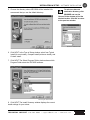
5. Choose the directory where VRC2500 will be installed. We
recommend that you use the default directory.
13
To select an alternate
destination directory, click
BROWSE and use the
Choose Folder window to find the
desired location. Click OK to return
to the previous window.
✍
Browse for Installation Folder
Choose Destination Location Window
6. Click NEXT. In the Type of Setup window, select from Typical
Install (for most users), Compact Install (minimum install), and
Custom Install.
7. Click NEXT. The Select Program Folder window shows which
Program Folder starts the VRC2500 software.
Select Program Folder Window
8. Click NEXT. The Install Summary window displays the current
install settings for your review.
T E C H N I C A L S U P P O R T 9 7 8 - 4 8 6 - 0 0 8 6 • s u p p o r t @ b u r k . c o m • w w w. b u r k . c o m
14
INSTALLATION & SETUP • SOFTWARE INSTALLATION
9. Click NEXT to begin installation.
After a few moments, a window appears on the screen indicating
that installation is complete.
10. You must restart your computer to finalize the installation
process. You can restart now or wait until later. Click the
appropriate radio button in the Setup Complete window and
then FINISH to end the installation procedure.
The VRC2500 Program Folder is now installed in your Start
Menu. You start the VRC2500 program from this location.
Clicking on Site Manager and VRC2500 Scheduler inserts a
program icon for each on your Windows taskbar system tray and
runs them in the background. Clicking on the Site Manager icon
opens the VRC Explorer program.
The Registered Components Checker is a used if by Technical
Support you ever need to contact Technical Support. It has no
other function.
Communication
Properties
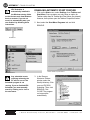
PC COM PORT SETUP IN WINDOWS
In order to use the VRC2500 software, you must establish
configuration parameters for the PC’s serial ports.
1. Go to the Windows Start menu, select Settings, and open the
Control Panel.
Windows Control Panel
7 B e a v e r B r o o k R o a d , L i t t l e t o n , M A 0 1 4 6 0 • 9 7 8 - 4 8 6 - 0 0 8 6 • w w w. b u r k . c o m
INSTALLATION & SETUP • COMMUNICATION PROPERTIES
2. Double-click the System icon to open the System Properties
window.
3. Click on the
Device Manager
tab. Double-click
on PORTS to
display a list of
ports recognized
by Windows.
Windows Device Manager
4. Double-click on the COM port that will be used with the
VRC2500 software to open the COM Port Properties window.
5. Click on the Port Settings tab. If you are using more than one
COM port, you need to check the settings on each one. Use
the following settings for VRC2500 units:
Bits per second:
19200
Data bits:
8
Parity:
None
Stop bits:
1
Flow control:
Xon / Xoff
Use the same settings for a modem or a direct serial connection
from the PC to the VRC unit.
T E C H N I C A L S U P P O R T 9 7 8 - 4 8 6 - 0 0 8 6 • s u p p o r t @ b u r k . c o m • w w w. b u r k . c o m
15
16
INSTALLATION & SETUP • COMMUNICATION PROPERTIES
CONFIGURING PC COM PORTS
After setting up the PC COM ports through Windows, you need to
configure them in the VRC2500 software using the
Communications Properties utility.
1. Open VRC Explorer from the VRC2500 Program Group in the
Windows Start menu. The first time you open VRC Explorer, a
message box asks if you want to configure COM ports. Click
YES to open the Communications Properties window. The
prompt only appears the first time you open Explorer. The
Configure Serial Ports and Modems icon on the VRC Explorer
toolbar also opens this utility.
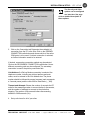
2. Click RE-DETECT SERIAL PORTS. The program checks
the PC’s serial COM ports numbered 1-4. If the PC running
the VRC2500 software has a serial port expander, select the
radio button labeled THIS PC HAS 5 OR MORE PORTS. The
program then checks COM ports numbered 1-9. VRC
software only supports COM ports 1-9.
3. Select the COM ports by
clicking on the entry and then
clicking the double right arrow.
To remove a previously
selected COM port, click on the
entry and then click the double
left arrow. Click APPLY to set
your selections.
7 B e a v e r B r o o k R o a d , L i t t l e t o n , M A 0 1 4 6 0 • 9 7 8 - 4 8 6 - 0 0 8 6 • w w w. b u r k . c o m
INSTALLATION & SETUP • COMMUNICATION PROPERTIES
4. Single-click on the active port in the PC Serial Ports area to
display more configuration choices.
5. Click on the radio button that corresponds with the type of
modem or connection you are using.
6. Check on the Link Loss box if you want this port to listen for
link loss. Link loss notification alerts any PC that is connected
to a site if the connection fails. The PC automatically attempts
to reconnect up to three times when it senses a link loss,
provided the option is enabled.
Repeat steps 4-6 for each active port.
7. Click APPLY to save changes. Click OK to close the window
or click on the tabs at the top to move to another option.
SETTING THE WORKSTATION ADDRESS
This address allows the VRC2500 unit to identify which PC is
connected to the site. It is necessary that each of your PCs
connecting to a VRC site have a unique workstation address.
A default workstation address is automatically generated. You can
accept this number as long as it is not used by another PC.
To change the default address, click on the Workstation Address
tab of the Site Manager Communication Properties window. Enter
a number from 85 to 254 in the white box. Click APPLY or OK to
save changes.
T E C H N I C A L S U P P O R T 9 7 8 - 4 8 6 - 0 0 8 6 • s u p p o r t @ b u r k . c o m • w w w. b u r k . c o m
17
18
INSTALLATION & SETUP • SITE SETUP
Site Setup
When you close the Communication Properties utility, a prompt
window opens asking you to set up your site icons. This only
happens the first time you set up a site icon. Click YES to open
the New Site Properties window.
You can also open the New Site Properties window by
clicking on the New Site icon on the Explorer toolbar.
Each site must have a
unique network address.
To avoid confusion, we
recommend numbering your first
site “0,” your second site “1,” your
third site “2,” and so forth.
✍
1. Enter a name for the site. The site name can be any
combination of characters up to 28 characters long. The site
name will replace the default label of New Site on the site
icon and site windows as shown in the figure above.
2. Assign a site network address to the site. The Network
Address must be numbered in the range of 0 to 84 and must
be unique to that site.
7 B e a v e r B r o o k R o a d , L i t t l e t o n , M A 0 1 4 6 0 • 9 7 8 - 4 8 6 - 0 0 8 6 • w w w. b u r k . c o m
INSTALLATION & SETUP • SITE SETUP
19
The Security and Other
options can be configured
at a later time. See page
44 for a detailed description of
these options.
✍
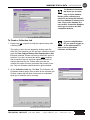
3. Click on the Connection tab. Determine the method(s) of
connection from the PC to the Site. Click on the PRIMARY
CONNECTION radio button and choose which of the active
COM ports is to be used. If a direct connection is selected,
no further information needs to be entered.
If desired, a secondary connection method may be selected.
Click on the SECONDARY CONNECTION radio button. Now a
different connection path may be configured. The secondary
connection is used if the primary connection fails.
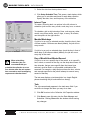
Link Address If a Dial-up Modem connection is selected, the
telephone number, including any dial-out prefixes and area
codes, must be entered in the Link Address box. The phone
number should be followed by several commas (each represents
a 2 second pause) and the code 020 for Data Mode (,,,,,020).
Timeout and Attempts Choose the number of seconds the PC
waits for the answering modem to connect before it disconnects,
and the number of attempts to connect to the site before
stopping. The number of idle seconds before disconnecting
defaults to 3600 seconds (1hr).
4. Set up site icons for all of your sites.
T E C H N I C A L S U P P O R T 9 7 8 - 4 8 6 - 0 0 8 6 • s u p p o r t @ b u r k . c o m • w w w. b u r k . c o m
20
INSTALLATION & SETUP • COMMUNICATING WITH VRC SITE
Communicating
with VRC Site
If your PC’s COM port is a
DB25 connector, you need
a DB25 female-to-DB9 male
straight-through adapter to
connect to the provided cable. See
Appendix E for cable pinouts.
✍
DIRECT CONNECTION
Before you can configure your VRC unit settings, you must first
establish a direct connection from your PC to the VRC unit.
Connect the VRC unit’s DIRECT port to the COM port you set up
as the Primary Connection for your PC (see page 22). The
DIRECT port is a DB9 male connector. Your PC COM port is
either a DB9 male connector or a DB25 male connector. Cables
are provided for connection to a DB9 COM port (most common).
Whether making a direct connection or connecting through a
modem, use only the provided null-modem cable. This cable is
wired to meet the specific requirements of the VRC unit. To
extend the serial cable, connect the serial cable to your VRC unit
and plug a straight-through extension cable into the cable. You
need a female-to-male extension to make the connections. See
Appendix E: Pinouts for more information.
✍
A description of all
connection ports can be
found on page 7.
Establishing Software Connection
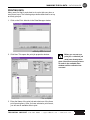
1. Once a direct serial connection is established, open your VRC
Explorer by clicking on the Explorer Main Program shortcut in
the Start menu.
2. Double-click on the site icon (see page 21) that corresponds
with the VRC unit you are directly connected to from your PC.
7 B e a v e r B r o o k R o a d , L i t t l e t o n , M A 0 1 4 6 0 • 9 7 8 - 4 8 6 - 0 0 8 6 • w w w. b u r k . c o m
INSTALLATION & SETUP • COMMUNICATING WITH VRC SITE
✍
Configuration setup is
described in the following
chapter.
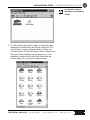
3. The Site window (which has the name you assigned) opens
displaying the General Setup and Dial-up Setup icons. The
General Setup is used to configure Metering, Status, and
Command inputs. The Dial-Up Setup is used to configure Site
Dialing and Voice Properties and and allows you to use a
telephone to interact with the VRC2500. Double click the
General Setup icon to open the Configure window.
T E C H N I C A L S U P P O R T 9 7 8 - 4 8 6 - 0 0 8 6 • s u p p o r t @ b u r k . c o m • w w w. b u r k . c o m
21
22
INSTALLATION & SETUP • COMMUNICATING WITH VRC SITE
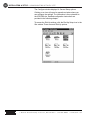
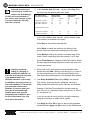
The Configure window displays 14 General Setup options.
Clicking on an icon will open its respective window where you
can configure the settings. The information is then uploaded to
the VRC2500 site. Detailed configuration instructions are
provided in the following chapter.
To access the Dial-Up settings, click the Dial-Up Setup icon in the
Site window. There are seven Dial-Up options.
7 B e a v e r B r o o k R o a d , L i t t l e t o n , M A 0 1 4 6 0 • 9 7 8 - 4 8 6 - 0 0 8 6 • w w w. b u r k . c o m
INSTALLATION & SETUP • CONNECTING EQUIPMENT
Modems
There are several ways to communicate with your VRC2500. In
addition to the direct COM port connection, you can use a PC
with a modem to communicate remotely with the site modem
connected to a VRC unit. If you connect a dial-up modem to the
Dial-Up port on the VRC unit, you can also use any Touch-tone™
telephone to retrieve information or issue commands. The
following pages describe how to install and configure different
types of modems.
Follow the manufacturer’s instructions for installing the modem
into the monitoring PC. Your PC modem does not need to be
configured through the VRC software utilities. You may manually
adjust the DIP switches as needed according to the instructions in
the modem User Guide.
Recommended Modems
You may use an internal or external full feature modem for your
monitoring PC. Site modems must be external.
23
Connecting
Equipment
DO NOT use a cellular
modem. A cellular
connection is not reliable
and although it may support the
required baud rate for a VRC2500
system, it is not supported by
Burk Technology.
!
A Winmodem®, or any
software modem, does not
provide the proper control
signals required by the VRC
software and hardware.
✍
The recommended dial-up modem is the U.S. Robotics 56K V.90
External Fax Modem.
The recommended two-wire and four-wire leased line modems
are Motorola V.3400, MultiTech MT2838BL and MultiTech
MT5600BL. These recommendations are subject to change
without notice.
DIAL-UP MODEM CONFIGURATION
DIP Switches The required DIP switch settings for the U.S.
Robotics Sportster® 33.6 and 56K V.90 are shown below.
PC or Voice (Dial-Up Port)
DIP Switch Settings for Modem connected to
PC or Dial-Up Port
If you are using a different modem, the DIP switches (or
command equivalents) must be configured to enable your modem
to operate in the same manner. The table on the following page
defines the operational parameters associated with each DIP
switch on the U.S. Robotics 56K V.90 modem.
T E C H N I C A L S U P P O R T 9 7 8 - 4 8 6 - 0 0 8 6 • s u p p o r t @ b u r k . c o m • w w w. b u r k . c o m
24
INSTALLATION & SETUP • CONNECTING EQUIPMENT
You must cycle the power
on the VRC unit before the
modem is detected and
before any outbound calls for
alarms are made.
✍
DIP SWITCH
POSITION
DEFINITION
1
UP
Data Terminal Ready
2
UP
Verbal Result Codes
3
DOWN
Enables Result Code Display
4
DOWN
No echo, offline commands
5
UP
Enables auto answer
DOWN
Disables auto answer
6
UP
Carrier detect normal
7
UP
Load NVRAM defaults
8
DOWN
Smart mode
Communication Properties
The initialization strings and baud rates generated by the
Communication Properties utility are for use with the US Robotics
56K V.90 modem. If you are using a different brand, you may
modify them using the Communications Properties utility and
selecting PROPERTIES FOR COM “X”.
COM Port Connections
Modem Programming Window
7 B e a v e r B r o o k R o a d , L i t t l e t o n , M A 0 1 4 6 0 • 9 7 8 - 4 8 6 - 0 0 8 6 • w w w. b u r k . c o m
INSTALLATION & SETUP • CONNECTING EQUIPMENT
Search the modem command strings for functional equivalents.
You may need to modify Set Auto Answer, Unset Auto Answer,
and Initialization strings in order to match the VRC's
requirements.
COMMAND
DEFINITION
AT
S0
The table at left defines each of the commands used in these
strings.
S0=1
S0=0
&F
Required Command Prefix.
Sets the number of rings in
Auto Answer Mode. When
set to 0, Auto Answer is OFF.
Auto Answer after 1 ring.
Auto Answer disabled.
Loads a generic template.
&F is the same as &F0.
Sets local echo OFF.
Sets Carrier Detect (CD)
signal to normal operations.
Sets DTR operations. 14.4:
Reserved and 28.8:
reserved.
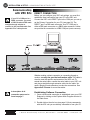
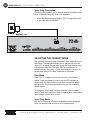
DIAL-UP MODEM CONNECTION
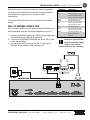
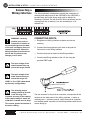
This connection enables you to remotely retrieve information and
issue commands using any Touch-tone telephone or your PC.
1. Route the telephone line through a TELCO surge suppressor
(not included) to the LINE jack on VRC2500.
2. Connect the VRC2500 SET/MODEM jack to the TELCO jack
on the dial-up modem.
3. Use the serial cable to connect the DIAL-UP port on the
VRC2500 to the modem's serial interface port.
E0
&C1
&D1
Damage to your VRC2500
system caused by voltage
surges is not covered
under the terms of your warranty.
!
T E C H N I C A L S U P P O R T 9 7 8 - 4 8 6 - 0 0 8 6 • s u p p o r t @ b u r k . c o m • w w w. b u r k . c o m
25
26
INSTALLATION & SETUP • CONNECTING EQUIPMENT
COMMAND
DEFINITION
AT
S0
Required Command Prefix.
Sets the number of rings in
Auto Answer Mode. When
set to 0, Auto Answer is OFF.
Auto Answer after 1 ring.
Auto Answer disabled.
Loads a generic template.
&F is the same as &F0.
Sets local echo OFF.
Sets Carrier Detect (CD)
signal to normal operations.
Sets DTR operations. 14.4:
Reserved and 28.8:
reserved.
S0=1
S0=0
&F
E0
&C1
&D1
FOUR WIRE LEASED-LINE
MODEM CONFIGURATION
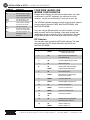
Program and configure your four-wire modem before you make
connections to your RF equipment. You need two four-wire
modems: one for your monitoring PC, and one for your site.
The VRC2500 software package currently supports three types of
4-wire modems: Motorola V.3400, MultiTech MT5600BL, and
MultiTech MT2834BL.
If you are using a different brand or model of modem, you may
need to modify the Set Auto Answer, Unset Auto Answer and
Initialization strings to match the VRC's requirements. The table
at right defines each of the commands used in these strings.
DIP Switches
You may also need to adjust the DIP switch settings. The table
below provides the DIP switch definitions required for the
MultiTech MT2834BL.
DIP SWITCH
POSITION
DEFINITION
1
DOWN
DTR (Data Terminal Ready)
forced ON at all times
2
UP
SDLC (Synchronous Data Link
Control) Mode ON
3
UP
Command Mode Response OFF
4
UP
AS/400 Mode OFF
5*
UP
DOWN
Answer Mode ON (Transmitter)
Originate Mode ON (Studio)
6
UP
Slave Clocking OFF
7
DOWN
RTS (Request to Send signal
forced ON at all times
8
DOWN
Command Mode ON
9
DOWN
Remote Digital Loopback ON
10
UP
Lease Line Operation
11
DOWN
Internal Clock Selected
12
DOWN
Asynchronous Mode ON
13
14
DOWN
UP
19,200 bps Operation
15
UP
CD/DSR (Carrier Detect/Data
Set Ready) from Interface
16
UP
DOWN
2-Wire Leased Line
4-Wire Leased Line
* Use appropriate setting for your installation.
7 B e a v e r B r o o k R o a d , L i t t l e t o n , M A 0 1 4 6 0 • 9 7 8 - 4 8 6 - 0 0 8 6 • w w w. b u r k . c o m
INSTALLATION & SETUP • CONNECTING EQUIPMENT
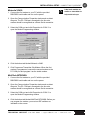
Motorola V.3400
1. Connect the first modem to your PC with the provided
DB9-DB25 serial cable and turn on the power.
✍
Label each modem as
studio or transmitter to
help avoid mix-ups.
2. Open the Communication Properties window and re-detect
the ports. The PC COM port connected to the four-wire
modem should be recognized as a Direct Serial connection.
3. Select the COM port and click Properties for COM “x” to
open the Modem Programming window.
Modem Programming Window, Motorola V.3400
4. Click the bottom tab labeled Motorola v.3400.
5. Click Program as Transmitter Site Modem. When the first
modem is programmed, connect the second modem to the
PC COM port and program it as the studio modem.
MultiTech MT2834BL
1. Connect the first modem to your PC with the provided
DB9-DB25 serial cable and turn on the power.
2. Open the Communication Properties window and re-detect
the ports. The PC COM port connected to the four-wire
modem should be recognized as a Direct Serial connection.
3. Select the COM port and click Properties for COM “x” to
open the Modem Programming window.
4. Click the bottom tab labeled MultiTech MT2834BL. Before you
can program the modem, you must set DIP switches as
indicated on the screen.
T E C H N I C A L S U P P O R T 9 7 8 - 4 8 6 - 0 0 8 6 • s u p p o r t @ b u r k . c o m • w w w. b u r k . c o m
27
28
INSTALLATION & SETUP • CONNECTING EQUIPMENT
Modem Programming Window, MultiTech MT2834BL
5. Turn on modem. The lights on the front of the modem will
flash as the modem begins to initialize. When the lights stop
flashing, you have approximately 10 seconds to click the
appropriate Program button. If the modem finishes initializing
before you click the Program button, it will not accept the
programming. You will need to power cycle the modem and
program again.
6. Program the first modem as either Studio or Transmitter.
Make sure you label your modem so that you know which
modem is which.
7. After the window shows a successful modem programming,
change the DIP switches as instructed onscreen. When
finished, connect the second modem directly to the PC COM
port and program it using the other option.
Successful Modem Programming
Before programming the MT5600BL,
set the modem to the following:
Studio Modem
Set to 4 WIRE LEASE ORIG mode
SYNC/ASYNC option set to ASYN NORM
Transmitter Modem
Set to 4 WIRE LEASE ANSWER mode
SYNC/ASYNC option set to ASYN NORM
MultiTech MT5600BL
1. Designate one modem as the Studio modem and one as the
Transmitter modem. Connect the first modem to your PC with
the provided DB9-DB25 serial cable and turn on the power.
2. Use your modem user’s guide to setup your modem to use
the settings listed to the left.
7 B e a v e r B r o o k R o a d , L i t t l e t o n , M A 0 1 4 6 0 • 9 7 8 - 4 8 6 - 0 0 8 6 • w w w. b u r k . c o m
INSTALLATION & SETUP • CONNECTING EQUIPMENT
3. In the Modem Programming window, select the bottom tab
labeled MultiTech MT2834BL.
The modem status needs
to be idle when you
program it. If the modem
immediately tries to connect, turn
it off, then back on while pressing
ENTER. Once the status reads idle,
press the “down arrow” two times.
This will step the modem down the
menu and prevent it from
connecting until it is returned to
the status screen.
✍
Please disregard the DIP
switch settings shown on
screen. They are for the
MT2834BL. The MT5600BL does
not have DIP switches.
✍
4. Change the initialization string to
AT&SB19200&E0&E4&D2&W.
5. Click either Program as Studio Modem or Program as
Transmitter Modem depending on which modem you are
working with. A message window will indicate successful
programming.
6. Connect the second modem and repeat the programming
process.
Label your modem as transmitter or studio as soon as you finish
programming to ensure they do not get mixed up.
FOUR-WIRE MODEM CONNECTION
Begin by testing your four-wire modem on the bench. This allows
you to ensure that the modems are communicating and to
calibrate your RF equipment before you attempt remote operation.
Connect the modem using the instructions given by the modem
manufacturer.
29
The RF audio channel
used for your connection
needs to handle 19,200
bps in both directions, or your
connection may be unnecessarily
slow or unreliable.
✍
RS-232 Interface
The serial interface port on the back of the modem is a DB25
female connector. Use the provided null-modem serial cable to
connect the modem to your PC or I/O unit. A four-wire modem
should always be connected to COM1 on the I/O unit, never to
COM2. See Four-Wire Installation Diagram on the next page.
The VRC unit must be power cycled before the modem is
detected and any outbound calls for alarms are made.
T E C H N I C A L S U P P O R T 9 7 8 - 4 8 6 - 0 0 8 6 • s u p p o r t @ b u r k . c o m • w w w. b u r k . c o m
30
INSTALLATION & SETUP • CONNECTING EQUIPMENT
7 B e a v e r B r o o k R o a d , L i t t l e t o n , M A 0 1 4 6 0 • 9 7 8 - 4 8 6 - 0 0 8 6 • w w w. b u r k . c o m
INSTALLATION & SETUP • CONNECTING EQUIPMENT
TWO-WIRE LEASED-LINE MODEM
If connecting to a two-wire leased-line (also called dedicated or
private lines), you need a two-wire modem capable of leased-line
operation. We recommend the MultiTech four-wire modem. You
need to make sure the modem is set up for two-wire leased line
operation. If using a MT2834BL, adjust DIP switch 16. See DIP
switch table on page 36.
Follow the four-wire modem configuration instructions beginning
on page 26.
!
✍
31
Never use the DIRECT
Port for leased-line
operation.
You must cycle the power
on the VRC unit before the
modem is detected.
Connect the Studio modem to the PC using the manufacturer's
instructions. Connect the Transmitter modem to the VRC unit
using the FULL-TIME (COM 1) port
Modem serial connections should be made using the provided
null-modem serial cable.
Connecting Two-Wire Leased-Line Modem to VRC Unit
T E C H N I C A L S U P P O R T 9 7 8 - 4 8 6 - 0 0 8 6 • s u p p o r t @ b u r k . c o m • w w w. b u r k . c o m
32
INSTALLATION & SETUP • CONNECTING A WIRING INTERFACE
Connecting a
Wiring Interface
WARNING! Carefully
position your push-on
connectors in relation to
the screened legend on the back
of the unit; overlapping from one
channel to the other causes the
Wiring Interface to feed incorrect
data to the I/O units and may
damage your I/O units.
!
The Wiring Interface is designed to simplify the connection of
metering and status inputs to the GSC3000 or the VRC2500. It
provides easy pin-for-pin wiring using push-on blocks. No
soldering is required. You will need two Wiring Interfaces (one for
metering and one for status) if you are connecting to a 16channel unit.
CONNECTING INPUTS
1. Designate one Wiring Interface as status and one as
metering.
2. Connect the site equipment input wires to the push-on
connectors on the Wiring Interface.
3. Connect the push-on blocks to the Wiring Interface.
4. Connect the Wiring Interface to the I/O unit using the
provided DB37 cable.
✍
The input voltage of the
status channel must not
exceed the range of ±30V.
The input voltage of the
meter channel must not
exceed the range of 010VDC or -5 to 5VDC (determined
by the setup configuration).
✍
The metering sample
voltage should be at least
in the 2V range. This
increases accuracy of the reading.
If the sample voltage is small, the
calibration constant must be large.
This causes greater fluctuations in
the meter reading.
✍
The two terminals on the push-on connector correspond with the
contacts on the back panel of the Wiring Interface: + (status or
metering) and – (common ground). Insert the push-on connector
into the back-panel connector on the Wiring Interface with the set
screws facing up.
7 B e a v e r B r o o k R o a d , L i t t l e t o n , M A 0 1 4 6 0 • 9 7 8 - 4 8 6 - 0 0 8 6 • w w w. b u r k . c o m
INSTALLATION & SETUP • CONNECTING A COMMAND RELAY UNIT
33
Floating Grounds
You may use an isolation amplifier if the metering or status inputs
have a floating ground. If any ground for these inputs is a floating
ground, it must be connected to an isolation amplifier before you
connect it to the Wiring Interface. The VRC2500’s inputs will not
tolerate a floating ground.
The Command Relay unit provides isolation between your GSC
or VRC unit and your equipment. Each Command Relay unit can
connect up to eight Command output channels. You will need two
Command Relay units to make all the channel connections on a
16 channel unit. No soldering is required.
Connecting a
Command Relay Unit
WARNING! Carefully
position your push-on
Connectors in relation to
the screened legend on the back of
the unit. Overlapping from one
channel to the other can cause
improper command-channel
operation or damage to your
equipment.
!
The Command outputs on
the I/O unit are open
collector outputs,
maximum 250 mA 30VDC,
momentary or latching. The
Command Relay Unit is required if
the current draw is more than 250
mA or to provide protection and
isolation for your GSC or VRC unit.
✍
CONNECTING INPUTS
1. Wire your equipment to the provided three-terminal push-on
connectors. Insert the correct wire into the connector opening
and tighten down the top screw. One three-terminal push-on
block is provided for each relay. Each Command channel has
two relays: A and B. The three terminals in the push-on
connector correspond with the contacts on the back panel of
the Command Relay unit (standard Form C, from left to right):
NO (normally open), NC (normally closed), and C (common).
Insert the push-on connector into the back-panel connector
on the Command Relay unit, with the set screws facing up.
Power is supplied through
the DB37 command-output
connector. No external
power is required for operation
with a GSC3000 or VRC2500
system. If used with the VRC2000,
the Command Relay Unit will
require an optional power supply
for proper operation.
✍
T E C H N I C A L S U P P O R T 9 7 8 - 4 8 6 - 0 0 8 6 • s u p p o r t @ b u r k . c o m • w w w. b u r k . c o m
34
INSTALLATION & SETUP • CONNECTING A COMMAND RELAY UNIT
2. Connect the Command Relay Unit to the I/O unit using the
provided DB37 cable. Two pins on the DB37 connector are
used to power the Command Relay unit. When your GSC or
VRC unit is powered up, verify that both power LEDs on the
back panel of the Command Relay unit are green, indicating
5VDC power.
Connecting Site Equipment to the VRC Unit Using a Command Relay Unit
7 B e a v e r B r o o k R o a d , L i t t l e t o n , M A 0 1 4 6 0 • 9 7 8 - 4 8 6 - 0 0 8 6 • w w w. b u r k . c o m
INSTALLATION & SETUP • COMPLETED HARDWARE INSTALLATION
COMPLETED HARDWARE INSTALLATION
Hardware Install with Leased-Line Modem
Command Relay Unit
PC
Leased-Line
Modem
SITE CONTROLLER
Command 1-8
DedicatedTelephone Line
RF Link
Surge
Supressor
Command Relay Unit
Leased-Line
Modem
SITE CONTROLLER
VRC2500
S
I
T
E
E
Q
U
I
P
M
E
N
T
Command 9-16
Wiring Interface
SITE CONTROLLER I/O
SITE CONTROLLER I/O
Status
Wiring Interface
SITE CONTROLLER I/O
SITE CONTROLLER I/O
Metering
Hardware Install with Dial-Up Modem
Any Touch-Tone
Telephone
Dial-Up Telephone Line
Command Relay Unit
Dial-Up
Modem
Surge
Supressor
VRC2500
SITE CONTROLLER
Command 1-8
Command Relay Unit
SITE CONTROLLER
Command 9-16
Wiring Interface
SITE CONTROLLER I/O
SITE CONTROLLER I/O
Status
Wiring Interface
SITE CONTROLLER I/O
SITE CONTROLLER I/O
Metering
T E C H N I C A L S U P P O R T 9 7 8 - 4 8 6 - 0 0 8 6 • s u p p o r t @ b u r k . c o m • w w w. b u r k . c o m
S
I
T
E
E
Q
U
I
P
M
E
N
T
35
36
INSTALLATION & SETUP
7 B e a v e r B r o o k R o a d , L i t t l e t o n , M A 0 1 4 6 0 • 9 7 8 - 4 8 6 - 0 0 8 6 • w w w. b u r k . c o m
CHAPTER 4 • SITE MANAGEMENT
4
Site Management
VRC Explorer Control Bar
The VRC Explorer control bar is the tool you will use the most in
managing your site and units. All of the available features of the
software can be launched from this control bar.
This chapter describes the different programs accessed through
the VRC Explorer control bar and explains how to use them to
configure your site and units.
To display the VRC Explorer toolbar, go to the Start menu and
select the VRC2500 program group, and then click on VRC
Explorer - Main Program. The white area of the control bar
displays an icon for your site which you can click on to connect
with your site. Shortcut buttons are located on the toolbar to help
you configure your site, connections, and program.
T E C H N I C A L S U P P O R T 9 7 8 - 4 8 6 - 0 0 8 6 • s u p p o r t @ b u r k . c o m • w w w. b u r k . c o m
37
38
SITE MANAGEMENT • VRC EXPLORER
BUTTON DESCRIPTIONS
New Site creates a new site entry in the control bar.
Whenever a new VRC2500 site needs to be set up, click
this button.
Open Site connects you to the selected site. Doubleclicking on a site's icon also creates a connection.
Adjust Properties for Site allows properties of any
selected site or sites to be edited. You can also right-click on
a site's icon and select the Properties menu item.
Create an Archive allows you to create all the configuration
settings, macros, timed events, and Voice Interface
information for a VRC unit.
Open a Unit Archive allows you to open a previously saved
archive file for editing or uploading to the I/O or Voice
Interface unit.
Set Explorer Preferences allows you to customize the
position, sound, and other properties associated with VRC
Explorer.
Configure Serial Ports and Modems provides the control
and configuration information needed to have the VRC2500
software connect to your various VRC2500 sites.
Data Browser allows you to open, import and export any
VRC database. Limited print options are also available
through this program.
Scheduler Task Editor opens the Scheduler program so
you can view, add, delete, or modify any jobs that need to
run automatically and are associated with the VRC software.
Minimize and Exit allow you to exit the program completely
or minimize the program so that only the entry on the
Windows task bar is visible.
About shows the version, build, and serial number of the
VRC2500 control software.
7 B e a v e r B r o o k R o a d , L i t t l e t o n , M A 0 1 4 6 0 • 9 7 8 - 4 8 6 - 0 0 8 6 • w w w. b u r k . c o m
SITE MANAGEMENT • VRC EXPLORER
CONTROL BAR PROPERTIES
Right-clicking the mouse in any open area of the control bar pops
up a menu that allows the features and characteristics of Explorer
to be changed.
New Site creates a new site entry.
Refresh updates the control bar display.
Control Bar Position adjusts the position of the control bar
to either bottom (default), left, right, or top of your screen.
Arrange Windows makes the viewable windows arrange
themselves in whatever pattern you select in the Properties
window under the Explorer Tab and Window Placement.
Keep on Top keeps VRC Explorer on top of other windows
on the desktop.
Properties Menu Showing Position Options
Close closes Explorer.
Properties opens the Properties Window which has four tabs:
Explorer, Viewer, Industry and Audio Properties.
About shows the version, build, and serial number of the
VRC2500 software.
PROPERTIES WINDOW
To open the Explorer Properties window, click Set Explorer
Preferences.
Explorer Tab
This section changes the position of the of the VRC Explorer
control bar to either the bottom, left, top, or right edge of the your
desktop. You can also choose to have VRC Explorer stay on top
of all other windows (including any other Windows programs you
may be running).
Settings will be saved anytime you click Apply or OK. Clicking
Reset Saved Windows List before clicking Apply or OK discards
any changes made.
T E C H N I C A L S U P P O R T 9 7 8 - 4 8 6 - 0 0 8 6 • s u p p o r t @ b u r k . c o m • w w w. b u r k . c o m
39
40
SITE MANAGEMENT • VRC EXPLORER
Industry Tab
This section allows you to choose from a list of standard industry
icons for use as your site icon in the VRC Explorer control bar. All
site icons will be the same and you cannot mix icons.
Audio Properties Tab
This section allows you to select whether an audible sound will
occur for the listed events. The default .WAV file for each event is
shown when the tab is viewed.
C clears the entry.
> plays the .WAV file.
… opens a standard browse window enabling you to find and
select a different .WAV file to be played by that event.
7 B e a v e r B r o o k R o a d , L i t t l e t o n , M A 0 1 4 6 0 • 9 7 8 - 4 8 6 - 0 0 8 6 • w w w. b u r k . c o m
SITE MANAGEMENT • SITE PROPERTIES
Site Properties
ADJUSTING SITE PROPERTIES
Adjusting site properties is done through the Site Properties
window. There are two ways to open this window.
The new site button opens a New Site Properties window
that is used to create a new icon for your site on the VRC
Explorer control bar. You will also use the properties window to
name your site, assign a network number, and also defining the
connection to the site.
To change or add information in a site’s property window,
click on the site icon and then the Adjust Site Properties
button from the toolbar, or right-click on the Site icon and select
Properties from the menu.
All database records use
the site network number
and unit number as
references. If you do not assign a
different network address to each
of your sites, all data will be
merged together as though it
came from a single site.
!
The Site Properties window has four tabs: General, Connection,
Security and Other.
General
The general tab is where you enter your site’s name and network
address here. See page 19 for more detailed instructions.
Connection
Configure the connection method you are using to communicate
with your site. See page 18 for more detailed instructions.
T E C H N I C A L S U P P O R T 9 7 8 - 4 8 6 - 0 0 8 6 • s u p p o r t @ b u r k . c o m • w w w. b u r k . c o m
41
42
SITE MANAGEMENT • SITE PROPERTIES
Security
The security tab allows default passwords to be saved for either
the logged in user of the PC or for the site itself.
The default password is “gentner.” The user password must be
entered when logging on to your site unless you have checked
the Save Password box on the Windows Password Prompt box.
The site password is used for automated processes such as
collection jobs which connect and download data captures from
units. The site password cannot be changed from this
location. Use the Site Access utility (see page 56 for details).
7 B e a v e r B r o o k R o a d , L i t t l e t o n , M A 0 1 4 6 0 • 9 7 8 - 4 8 6 - 0 0 8 6 • w w w. b u r k . c o m
SITE MANAGEMENT • SITE PROPERTIES
43
To disable the “Remember
My Password” feature
when you log on to your
site, erase the password entry in
the User Password box.
✍
If you are using a product
like PC Anywhere or
Remotely Possible,
changing the Monitor Readings
refresh rate can improve the
Viewer display.
✍
Other Tab
The other tab is used to set data collection options, time options
and viewing options.
Data Collection Options
The “Clear Capture History after downloaded to this PC” option
will delete data captures from the I/O units buffer upon
downloading. Although it is checked by default, only one
computer should have this option selected. To prevent alarms
from reporting to this connection, simply un-check the box for
“Accept Alarm Notifications From this Site.” When not selected,
that PC will not receive any alarm notices from that site.
Site Time Options
Change the VRC's internal clock to adjust for Daylight Savings
Time. If the site and the PC are in different Time Zones, enter the
number of minutes the site time zone differs from the PC time
zone (e.g., 60, -120).
Only one PC should be
designated to capture and
clear the history. All other
PCs connecting to your VRC2500
should have the “Clear Capture
History” option unchecked.
✍
Site Viewing Options
Show inactive units that have been connected to a G-bus network
at this site, but are not connected at this time. Change the refresh
rate for monitor readings (1000ms to 30000ms). The default
setting is 3000ms. If you are using programs like PC Anywhere
and Remotely Possible that affect the viewing display, try
increasing the refresh rate.
T E C H N I C A L S U P P O R T 9 7 8 - 4 8 6 - 0 0 8 6 • s u p p o r t @ b u r k . c o m • w w w. b u r k . c o m
44
SITE MANAGEMENT • SITE PROPERTIES
OPENING A SITE
To open or connect to a site, click on
the Open Site icon on the toolbar or
right-click on the site icon and select connect,
or double-click the site icon.
VRC2500 prompts you to enter your VRC
password, which is default set to "gentner."
Once a connection is established, the Site
window displays the General Setup and DialUp Setup icons for the VRC2500.
Site Window Toolbar
Site Window Showing General and Dial-Up Setups
The Site window toolbar allows you to quickly
access functions that are also found under
the menu options.
Refresh updates the window and displays the most current
information.
Configure Unit Programming opens the Configure window
for the highlighted Setup icon.
Close Item closes the selected auxiliary windows.
View (Monitor) this Unit opens the monitoring program
and allows you to monitor the site.
Data Browser opens the Data Browser program and allows
you to create collection and print jobs.
You can also right-click on
the General Setup and
Dial-Up Setup icons to
open a menu that offers most of
the options on the toolbar.
✍
Firmware uploads firmware to the VRC2500.
Delete Cached Information empties the computer’s cache
of the VRC’s settings.
Close closes the Site window.
7 B e a v e r B r o o k R o a d , L i t t l e t o n , M A 0 1 4 6 0 • 9 7 8 - 4 8 6 - 0 0 8 6 • w w w. b u r k . c o m
SITE MANAGEMENT • GENERAL SETUP
45
General Setup
The section describes unit options that are accessed and
configured through General Setup. Each VRC2500 unit has some
or all of the features described in this section available for
modification. Not all of the settings need to be changed or have
data entered in order for the software or hardware to function fully.
This is left the user’s discretion.
To configure the General Setup, open the site through the VRC
Explorer Control bar. Click on the General Setup icon in the site
window. This will open the General Setup Configure window.
General and Dial-Up Icons in Site Window
✍
The Alarms icon is only
visible when alarms are
pending.
General Setup Configuration Window
TOOLBARS
There are two toolbars used when configuring your unit. The first
is the configure toolbar at the top of the configure window. The
second is the auxiliary windows toolbar which appears on the left
side of the window for each setup option. Both toolbars are
descibed on the following pages.
T E C H N I C A L S U P P O R T 9 7 8 - 4 8 6 - 0 0 8 6 • s u p p o r t @ b u r k . c o m • w w w. b u r k . c o m
46
SITE MANAGEMENT • GENERAL SETUP
Configuration Toolbar
Archive Item saves unit settings into an archive file for use
with another unit or as a back-up copy.
Extract Item from Archive opens a browse window of
archived files. Selecting a file applies the archived settings
to the unit.
Open Item opens the selected unit setting or function
window. Double-clicking the setting icon will also open the
window.
Close Item closes the selected auxiliary windows.
Delete Item deletes selected items within the auxiliary
windows.
Refresh this View updates the window and displays the
most current information.
Download Item moves information from the VRC unit to the
PC workbench.
Upload Item moves information from the PC workbench to
the VRC unit.
Close this Window closes the Configuration window.
Auxiliary Toolbar
Upload Component moves information into the VRC unit
from the PC workbench.
Download Component moves information from the chosen
VRC unit onto the PC workbench.
Copy to Clipboard copies settings to the Windows
clipboard. This information can be copied into another VRC
unit’s setup.
Copy from Clipboard copies settings from the clipboard to
the VRC unit setup.
Clear to Defaults resets the current window to the system
defaults.
7 B e a v e r B r o o k R o a d , L i t t l e t o n , M A 0 1 4 6 0 • 9 7 8 - 4 8 6 - 0 0 8 6 • w w w. b u r k . c o m
SITE MANAGEMENT • GENERAL SETUP
FIRMWARE
The Firmware utility in the General Setup
Configuration window allows you to upgrade
your current firmware when new versions
become available.
1. Connect your computer via the included cable to the DIRECT
port on your VRC2500 unit.
2. Double-click the Firmware icon in the Configure Unit window
to open the Firmware Wizard. You can also right-click on the
unit icon in the Site window and select “Upload Firmware.”
47
The VRC2500 comes
preloaded with current
firmware. It is not
necessary to upload firmware to a
new unit. If you are replacing
corrupt firmware or if your unit
has no firmware loaded on it,
please follow the firmware upload
procedure in the Troubleshooting
section on page 210.
✍
Firmware Wizard, Warning Tab
3. Continue to the Select Units tab by clicking Next.
The FORCE option should
only be used if advised by
technical support. This
forces the version of firmware
uploaded to be based on the
address of the Unit or Voice
component, rather than the
detected device type.
✍
Firmware Wizard, Select Units Tab
T E C H N I C A L S U P P O R T 9 7 8 - 4 8 6 - 0 0 8 6 • s u p p o r t @ b u r k . c o m • w w w. b u r k . c o m
48
SITE MANAGEMENT • GENERAL SETUP
4. Continue to the Select Firmware tab by clicking Next.
Firmware Wizard, Select Firmware Tab
5. Select the default files or browse for alternate firmware files.
To select an alternate file, click Browse to locate the new file
you wish to use. Once you have selected the new file, click
Open. This file will now be selected and listed in the
VRC2500 Unit or Dial-Up firmware field.
6. Click Finish. A warning window will ask you if you are sure
the process should continue. This is your last chance to
change your mind. To continue, click Yes.
Final Warning
7 B e a v e r B r o o k R o a d , L i t t l e t o n , M A 0 1 4 6 0 • 9 7 8 - 4 8 6 - 0 0 8 6 • w w w. b u r k . c o m
SITE MANAGEMENT • GENERAL SETUP
7. The Execute tab displays the progress of the Firmware
update. When the upload is completed, the Firmware Wizard
moves to the Finished tab.
Firmware Wizard, Execute Tab
Firmware Wizard, Finished Tab
8. Click Close to close the wizard.
T E C H N I C A L S U P P O R T 9 7 8 - 4 8 6 - 0 0 8 6 • s u p p o r t @ b u r k . c o m • w w w. b u r k . c o m
49
50
SITE MANAGEMENT • GENERAL SETUP
NETWORK
The Network function allows you to change the
Network number you originally assigned in the
Site Properties window.
1. Double-click the Network icon in the General Setup
Configuration window to open the Network Address window.
The Advanced button
opens additional options
and should only be used
with assistance from a Technical
Support representative.
✍
Changing the Network Address
All database records use
the site network number as
a reference. If you do not
assign different network numbers
to each of your sites, all data will
be merged together as though it
came from a single site.
!
2. Enter the new number in the TO box. The number must be
between 0 and 84. Click Apply to set the change. Each site
must have a different network number. It is recommended that
you number your first site “0,” your second site “1,” your third
site “2,” and so on.
3. When finished, click OK or Apply. A confirmation window
opens. Click Yes to complete the change or NO to cancel.
Change Address Confirmation Window
The network number change is automatically entered in the DialUp Setup so there is no need to open the Network function in the
Dial-Up Configure window.
7 B e a v e r B r o o k R o a d , L i t t l e t o n , M A 0 1 4 6 0 • 9 7 8 - 4 8 6 - 0 0 8 6 • w w w. b u r k . c o m
SITE MANAGEMENT • GENERAL SETUP
DATE/TIME
The Date/Time feature synchronizes the
VRC2500’s clock to the clock of a connected PC.
The Date/Time synchronization feature works
best if you use a 3rd-Party program to
synchronize your computer’s clock to national and/or international
time standards through a modem or internet connection.
1. Click on the Date/Time icon to open the Time Sync window
which displays the current Site and PC times.
Time Sync General Setup Window
2. Click Sync Site Time with PC Time.
You can configure your VRC to use Daylight Savings hours and
changeover dates if desired. Please note that the Daylight Savings
change does not change any times listed in Timed Events.
Any Time Zone differences between the PC and the Site may be
entered in order to keep the proper time on the unit when
synchronizing.
T E C H N I C A L S U P P O R T 9 7 8 - 4 8 6 - 0 0 8 6 • s u p p o r t @ b u r k . c o m • w w w. b u r k . c o m
51
52
SITE MANAGEMENT • GENERAL SETUP
SITE DESCRIPTION
The site was named in the Site Properties
window, see page 21, however, up to this point
the the General Setup unit has had no name.
Description allows you to name the General
Setup icon.
1. Double-click the Description icon in the Configure window to
open the Description window.
Site Description Window
2. Enter the Unit name. The name can consist of any
alphanumeric title up to 20 characters long.
The Site name cannot be changed from this location. Use the
Site Properties window instead.
3
Click OK, Apply or Upload Component to save the
name.
The Configure window and General Setup icon in the Site
window now use the unit name.
SITE ACCESS
The Site Access utility enables an administrative
user to set up access levels for any other user,
as well as assign user passwords.
1. To set up or change the Site Access, double-click the Site
Access icon in the Configure window. This opens the Site
Access window.
2. Enter the user’s name (limit 32 characters) and password
(limit 8 characters). Clicking the “A” button next to the access
code toggles the password from readable text to asterisks.
7 B e a v e r B r o o k R o a d , L i t t l e t o n , M A 0 1 4 6 0 • 9 7 8 - 4 8 6 - 0 0 8 6 • w w w. b u r k . c o m
SITE MANAGEMENT • GENERAL SETUP
3. Select the user access level. System—read all settings, issue
commands and macros, view and edit other users’ access
settings, and program settings for inputs, outputs, and
macros. Operator—read all settings and issue commands
and macros. Observer—read only all settings.
4. Click Add to add a new user. Click Update to open
the selected user and make any necessary
changes to the user's settings. Click Remove to
remove the user from the Site Access list.
All changes and additions are enabled by clicking OK, Apply, or
the blue Upload Component arrow.
The Change Site Access button allows you to change the site
password the system uses to run automated tasks.
Changing the Site Password
T E C H N I C A L S U P P O R T 9 7 8 - 4 8 6 - 0 0 8 6 • s u p p o r t @ b u r k . c o m • w w w. b u r k . c o m
53
54
SITE MANAGEMENT • GENERAL SETUP
METERING INPUTS
The analog, or Metering Inputs, on a VRC2500 unit are
programmed in the Meter Table window. To open the Meter Table,
double-click on the Metering icon in the Configure window.
Metering Inputs Table
The following parameters are edited through this window:
7 B e a v e r B r o o k R o a d , L i t t l e t o n , M A 0 1 4 6 0 • 9 7 8 - 4 8 6 - 0 0 8 6 • w w w. b u r k . c o m
SITE MANAGEMENT • GENERAL SETUP
✍
Meter calibration is done
through the Monitor
program. See page xx.
The 2nd Upper and 2nd Lower options, not listed, function in
the same manner as the 1st Upper and 1st Lower. Refer to
the 1st Upper and 1st Lower instructions in the table above
when setting up the 2nd Upper and 2nd Lower options.
T E C H N I C A L S U P P O R T 9 7 8 - 4 8 6 - 0 0 8 6 • s u p p o r t @ b u r k . c o m • w w w. b u r k . c o m
55
56
SITE MANAGEMENT • GENERAL SETUP
Action Window
The Action window opens when you
click on the drop-down arrow in the
column for 1U Action, 1L Action,
2UAction, or 2L Action. In the Site/Unit
pane, you select the which unit is to
receive the action.
Commands Tab Select any command
channel from any unit connected via the
G-bus at this site and activate it. Select
unit first, then select command to issue.
Macros Tab Select any macro from any
unit connected via the G-Bus at this site
and run it.
CAUTION: If only one upper and
lower limit is needed, use the second
upper (2U) and second lower (2L).
When the second limits are
exceeded, the unit takes the action
specified for the second limits and
ignores the first. Setting the first
limits only could create a situation
where the action is ignored because
the second limit was passed also.
Capture Tab Select whether or not this
unit captures information at this time for
future downloads or archives using the
VRC Database software.
7 B e a v e r B r o o k R o a d , L i t t l e t o n , M A 0 1 4 6 0 • 9 7 8 - 4 8 6 - 0 0 8 6 • w w w. b u r k . c o m
SITE MANAGEMENT • GENERAL SETUP
STATUS INPUTS
The digital inputs, or status inputs, on an I/O unit
are programmed in the Status Input Table. To
open the Input Table window, double-click on the
Status icon in the General Setup window.
Status Input Window
The following areas can be edited through this window:
Type
Depending on the output method used by the equipment being
monitored, either Pull-Up or Pull-Down must be selected.
Pull-Up should be selected if monitored equipment provides a
contact closure to indicate a Low state. Pull-Down should be
selected if monitored equipment provides a DC voltage to indicate
a High state.
Low Name
Label shown on monitoring software when status condition is in a
Low or False state.
High Name
Label shown on monitoring software when status condition is in a
High or True state.
T E C H N I C A L S U P P O R T 9 7 8 - 4 8 6 - 0 0 8 6 • s u p p o r t @ b u r k . c o m • w w w. b u r k . c o m
57
58
SITE MANAGEMENT • GENERAL SETUP
Alarm
Use the pull-down menu to choose the type of alarm you want
issued when a change in state occurs. If you do not want to
receive alarms, select None. If you want the alarms to register
and display on-screen, but do not want the VRC unit to attempt to
notify you, choose Warning. If you want to be notified of an alarm,
select Critical and the VRC unit will attempt to call out (or open
the alarm window) when the input changes state. Alarms may be
set to occur when the status makes a transition from the
predetermined optimal state to the opposite logic level.
Delay
Is the amount of time, definable to tenths of a second, that the
unit waits after the alarm condition is continuously asserted
before executing the programmed action and/or issuing an alarm.
If the input status changes back to the non-alarmed state before
the delay time has elapsed, alarms or actions will not occur at
that time.
Action
The Action Window allows you to select what kind of response
the VRC2500 unit uses whenever the specified alarm state is
achieved and the delay is exceeded. Clicking on the drop-down
menu, pops up a window allowing you to select the desired
action. An action can be executed on any unit on the G-Bus
network. Refer back to page 56 for a description of each tab in
the Action Window.
7 B e a v e r B r o o k R o a d , L i t t l e t o n , M A 0 1 4 6 0 • 9 7 8 - 4 8 6 - 0 0 8 6 • w w w. b u r k . c o m
SITE MANAGEMENT • GENERAL SETUP
COMMANDS OUTPUT
The command output channels are programmed
in the Commands Output Table. To open the
Output Table window, double-click on the
Commands icon in the General Setup window.
The following parameters can be edited:
Type
There are two possible types of command outputs: Momentary
should be selected if the command signal sent lasts only as long
as the Delay setting has been configured. Latching should be
selected if the command signal sent stays active until changed by
another command. Ignores the delay setting.
Delay
The amount of time, definable to 1/10 second increments up to
25.5 seconds, that a momentary command output is activated.
Command channels A and B are mutually exclusive. When
channel A is active, channel B will be inactive. When channel B is
active, channel A is inactive.
A Name
The label displayed by monitoring
software when a channel’s last
command output activation was the
A state.
B Name
The label displayed by monitoring
software when a channel’s last
command output activation was the
B state.
One you have made your changes, click
on the Apply button or the blue Upload
Component button to upload the
changes to your VRC unit.
T E C H N I C A L S U P P O R T 9 7 8 - 4 8 6 - 0 0 8 6 • s u p p o r t @ b u r k . c o m • w w w. b u r k . c o m
59
60
SITE MANAGEMENT • GENERAL SETUP
MACROS
Macros are written and compiled in the Macro
Programming window. To open this window,
double-click the Macros icon in the Configure
Unit window.
See Chapter 6: Creating Macros, for detailed information on
writing and using macros.
TIMED EVENTS
Timed Events is the internal scheduling program
of the VRC2500 unit. It is most commonly used
to execute data captures but can also control
command outputs and macros.
The Timed Events program is accessed through the Configure
window. Click on the Timed Events icon to open the Timed
Events window. From this window you can create new timed
events as well as edit existing entries.
Creating a New Entry
New Entry Window
To create a new entry, click on the double-left arrow next to the
time field. This opens the Command Schedule Time window
where you specify the date and time for the event. Click OK or
Apply to set the time and return to the main window. Once you
have defined the time for the event, choose the double-left arrow
next to action to define what action will occur. You will define the
action using the Action Window (see page 56).
7 B e a v e r B r o o k R o a d , L i t t l e t o n , M A 0 1 4 6 0 • 9 7 8 - 4 8 6 - 0 0 8 6 • w w w. b u r k . c o m
SITE MANAGEMENT • GENERAL SETUP
Getting the Date Right
If the event is to occur during a specific month, enter a value from
1 to 12 in the month area. If the event is to occur on a specific
day of each month, or of any particular month, enter a value from
1 to 31 in the day area. If no values are entered in any field, all
possible dates or times are assumed.
The VRC2500 will handle
192 captures before
overwriting the oldest
capture to store the next one.
✍
For example, if an event is to occur each month on the 15th, the
MM/DD entry would look like this:
If the event is to occur only on July 15th, the MM/DD entry would
look something like this:
To set an event to occur on only one day of the week, select that
day. The default is set for every day of the week.
Getting the Time Right
Specify in hours, minutes, and seconds, when this event is to take
place. In any of the three openings, if no value is entered, the
event will occur in every possible combination of times
where the values are true.
For example, if the event is to occur every hour at thirty minutes
after the hour, and only once during that hour, the entry would
look like this:
If the event was to occur at a particular hour, but execute every
second of every minute during that hour, the entry looks like this:
2. Click on the double-left arrow on the line titled ACTION. This
opens the Select an Action window. Make sure the unit you
are configuring is highlighted. Choose one of the three
possible actions - command, macro, or capture. To execute a
command and a capture in the same entry, you must create a
macro. See page 119.
T E C H N I C A L S U P P O R T 9 7 8 - 4 8 6 - 0 0 8 6 • s u p p o r t @ b u r k . c o m • w w w. b u r k . c o m
61
62
SITE MANAGEMENT • GENERAL SETUP
Avoid this configuration.
The program will attempt
to execute the action on
every second of every minute
during that hour.
✍
3. Single-click on the unit label in the area in the left half of the
window to select the appropriate VRC unit.
4. Click on the tab which corresponds with the type of action
(either commands, macros, or capture) you are scheduling.
5. Select the Action and Click OK.
Commands
The default tab lists the Command Channels available for the
selected unit on the current site. If no labels have been
programmed into the unit, only the channel number and switches
‘A’ and ‘B’ are visible. After selecting the appropriate command
channel and state, click on the OK button to close the window
and to insert the information into the Timed Events window.
7 B e a v e r B r o o k R o a d , L i t t l e t o n , M A 0 1 4 6 0 • 9 7 8 - 4 8 6 - 0 0 8 6 • w w w. b u r k . c o m
SITE MANAGEMENT • GENERAL SETUP
Macros
This tab lists the available macros on the selected VRC unit.
Highlight the desired macro by clicking on it once, and then click
OK to close the window and to insert the information into the
Timed Events window.
Capture
Check the box to select data capture as the action. Click on the
OK button to close the window and insert the information into the
Timed Events window.
Clicking on the CANCEL button closes the Action window, and no
entries are saved or transferred to the Timed Events window.
T E C H N I C A L S U P P O R T 9 7 8 - 4 8 6 - 0 0 8 6 • s u p p o r t @ b u r k . c o m • w w w. b u r k . c o m
63
64
SITE MANAGEMENT • GENERAL SETUP
6. Once you have set the time and the action, click Insert to
insert the task on the schedule table.
7. Click OK or Apply to upload the event into the VRC2500.
Use the following options listed below to add, move, update, or
remove timed events.
UPDATE allows you to save an edited event.
REMOVE permanently deletes the selected event
from the list.
MOVE UP and MOVE DOWN change the order in
which the events are displayed in the schedule
table.
OK uploads the event and closes the window.
CANCEL restores an event if you inadvertently
remove it. It also closes the window.
APPLY uploads the event and leaves the window
open for further editing.
7 B e a v e r B r o o k R o a d , L i t t l e t o n , M A 0 1 4 6 0 • 9 7 8 - 4 8 6 - 0 0 8 6 • w w w. b u r k . c o m
SITE MANAGEMENT • GENERAL SETUP
MUTING
The Muting utility allows you to define a condition
that causes one or more Metering or Status
channels to ignore alarms, macros, or commands
that may have occurred in the unmuted state. For
example, if the main transmitter is on, you can
mute conditions on the standby transmitter.
✍
65
You can creat a macro to
handle more complex
mute functions.
To open the Mute window, click on the Muting icon. All previously
programmed mute states are displayed in the main area.
1. To create a new entry, select a source status or command
channel and the state to enable the mute function (e.g., Status
12 Low, Command 1B, etc.).
2. Select the metering or status input channel to be muted (e.g.,
Meter 2, Status 4, etc.).
3. Click Insert to move the mute entry into the main display
area. Upload (blue up arrow) must be clicked before the
change is loaded into the VRC unit. All entries have an icon
on the left hand side of the main view area.
To modify an existing mute entry, select the entry, make the
changes needed, and then click Update. This updates the main
view area.
To delete an unwanted mute entry, select the entry and then click
Remove. The entry is deleted from the list.
T E C H N I C A L S U P P O R T 9 7 8 - 4 8 6 - 0 0 8 6 • s u p p o r t @ b u r k . c o m • w w w. b u r k . c o m
Mute Selection
66
SITE MANAGEMENT • GENERAL SETUP
Mute entries are executed
in the order they appear in
the list shown in the main
view area. If multiple entries for the
same channel are entered, the
desired result may not occur due
to the command sequence. To
modify the order of execution,
select the desired entry and use
the Move Up or Move Down
buttons. For complex muting
assignments, the use of macros,
with MUTEMETER(X) and
MUTESTATUS(X) commands may
be necessary.
✍
To make viewing easier, the amount of space provided for the
three columns (#, Time, Action) can be adjusted by positioning
the mouse cursor over the line separating two of the headings
until the cursor becomes a dark black crosshair. Hold the left
mouse button down and move the column separator to the
desired position.
Changes will not go into effect until they have been uploaded into
the selected VRC unit.
DATA BROWSER
The Data Browser enables you to set data
collection and print jobs. To open the Data
Browser, double-click the Data Browser icon in
the Configure window or click the Data Browser
icon on the VRC Explorer Control Panel.
See Chapter 7: Managing Tasks & Data for information on using
the Data Browser.
7 B e a v e r B r o o k R o a d , L i t t l e t o n , M A 0 1 4 6 0 • 9 7 8 - 4 8 6 - 0 0 8 6 • w w w. b u r k . c o m
SITE MANAGEMENT • GENERAL SETUP
MONITOR
The VRC2500 software provides you with a
Monitor window that shows all Status,
Command, Meter, and Macro channels you have
entered information for.
To open the Monitor window, double-click the Monitor icon in the
Configure window.
General Tab
Channels in an alarm condition are shown with a red background.
A muted channel has a light gray background. You can view the
states of the Status inputs, analog values of the Meter inputs,
states of the Command outputs, the last time the PC updated the
display, which connection last cleared any alarms, and the
current time of the PC’s clock.
You can also specify up to 16 Commands (A and B) which can
be manually executed on the VRC unit.
Default Monitoring View
T E C H N I C A L S U P P O R T 9 7 8 - 4 8 6 - 0 0 8 6 • s u p p o r t @ b u r k . c o m • w w w. b u r k . c o m
67
68
SITE MANAGEMENT • GENERAL SETUP
Macros Tab
Conditional automatic command functions can be done with
macros. Click on the Macros tab to see available macros.
Always calibrate your
input when the sample is
at it’s peak level. If you
calibrate using a lower sample,
the calibrated value may change
dramatically once the peak value
is reached.
!
CALIBRATION
To calibrate a metering channel, double-click on the meter for that
channel in the Monitor window to open the Calibration window.
The Calibration window (shown below) allows modification of both
Upper and Lower Limits, the minimum and maximum views
displayed, and the calibration of the currently displayed value.
Meter Calibration Window
To change the calibration, click on the value field to edit the
displayed calibrated value. Once you have made the changes,
click on the Calibrate button instead of hitting enter. This will
change the displayed calibrated value to the new value. The view
fields will use the new calibration constant for all future input
values on this channel. When you are finished adjusting the limit
parameters and calibration, click OK or Apply to save changes
and return to the Monitor window.
The displayed calibrated value will not change on other PCs that
are connected at the same time. To see the new values on the
other connected PCs, the user must download the changes from
the unit or reconnect to the unit.
7 B e a v e r B r o o k R o a d , L i t t l e t o n , M A 0 1 4 6 0 • 9 7 8 - 4 8 6 - 0 0 8 6 • w w w. b u r k . c o m
SITE MANAGEMENT • GENERAL SETUP
CONFIGURATION PRINTOUTS
The Configuration Printouts Utility allows you to
select and print a hard copy of your unit settings.
To open the Configuration Printouts window, click
on the Configuration Printouts icon in the
Configure Unit window.
1. Click on the box next to the settings you want printed. You can
also choose select all to print all of your setups.
2. Click Next to open a preview window. If you select more than
one configuration area, the Forward and Back buttons let you
navigate through the different pages.
Configuration Printouts Preview Window
T E C H N I C A L S U P P O R T 9 7 8 - 4 8 6 - 0 0 8 6 • s u p p o r t @ b u r k . c o m • w w w. b u r k . c o m
69
70
SITE MANAGEMENT • GENERAL SETUP
SAVE AS RTF saves output pages as a
Rich Text File. Select the destination
location and name via the standard Windows browser. To
combine the areas on the same page, click SAVE AS RTF and
do a copy and paste from each RTF to a new document.
PRINT PAGE only prints the current page.
PRINT ALL prints all of the selected pages.
BACK and FORWARD enable you to navigate
through the different pages.
CANCEL stops the print process and returns you to
the Configuration Printouts window.
ALARMS
When a unit has an alarm, the Configure window
displays an icon for the Alarm Handler program.
Double-click the Alarms icon to open the Alarm
Handler window.
An alarm is also displayed in the Site window above the affected
unit (see image to the left).
Unit Indicating Alarms
The Alarm Handler window shows the date/time of the alarm, the
type, the channel, and the alarm text message.
You can close the window without clearing the alarms or you can
click Clear Unit to clear the alarm.
Alarm Handler Window
7 B e a v e r B r o o k R o a d , L i t t l e t o n , M A 0 1 4 6 0 • 9 7 8 - 4 8 6 - 0 0 8 6 • w w w. b u r k . c o m
SITE MANAGEMENT • DIAL-UP SETUP
71
Dial-Up Setup
This section describes in detail the Dial-Up settings and how to
configure them. Each VRC2500 unit has some or all of the
features described in this section available for modification. Not all
of the features need to be changed or have data entered in order
for the software or hardware to function fully. This is left to the
user’s discretion.
To configure the Dial-Up settings, open the site through the
Control Bar. Click on the Dial-Up Setup icon in the Site window to
open the Configure window for Dial-Up.
Dial-Up Setup Icon in Site Window
Dial-Up Configure Window
Toolbars
There are two toolbars you will use in configuring the Dial-Up
component. The first is the Configure toolbar found at the top of
the Dial-Up Configure window. The second appears on the left
side of the auxiliary windows which open when you click on an
icon in the Configure window. For a detailed description of these
toolbars, see page 46.
T E C H N I C A L S U P P O R T 9 7 8 - 4 8 6 - 0 0 8 6 • s u p p o r t @ b u r k . c o m • w w w. b u r k . c o m
72
SITE MANAGEMENT • DIAL-UP SETUP
The VRC2500 comes
preloaded with current
firmware. It is not
necessary to upload firmware to a
new unit. If you are replacing
corrupt firmware or if your unit has
no firmware loaded on it, please
follow the firmware upload
procedure in the Troubleshooting
section on page 210.
FIRMWARE
The FORCE option should
only be used if advised by
technical support. This
forces the version of firmware
uploaded to be based on the
address of the Unit or Voice
component, rather than the
detected device type.
3. Continue to the Select Units tab by clicking NEXT
✍
✍
The Firmware utility in the Dial-Up Configure
window allows you to upgrade your current DialUp firmware when new versions become
available.
1. Connect to the DIAL-UP port on your VRC2500 unit.
2. Double-click the Firmware icon in the Dial-Up Configure
window to open the Firmware Wizard. You can also right-click
on the Dial-Up icon in the Site window and select “Upload
Firmware.”
7 B e a v e r B r o o k R o a d , L i t t l e t o n , M A 0 1 4 6 0 • 9 7 8 - 4 8 6 - 0 0 8 6 • w w w. b u r k . c o m
SITE MANAGEMENT • DIAL-UP SETUP
4. Continue to the Select Firmware tab by clicking NEXT.
5. Select default or browse for alternate firmware files.
To select an alternate file, click the Dial-up Firmware BROWSE
button, which opens a standard Windows browse window. Locate
the alternate file and click OPEN. This selects the file and returns
you to the Select Firmware tab.
6. Click FINISH. A warning window asks if you are sure the
process should continue. This is your last chance to change
your mind. To continue, click YES.
7. The Execute tab displays the progress of the Firmware
update. When the upload is completed, the Firmware Wizard
moves to the Finished tab. Click CLOSE to close the wizard.
**The Execute and Finished Tabs are shown on page 49.
T E C H N I C A L S U P P O R T 9 7 8 - 4 8 6 - 0 0 8 6 • s u p p o r t @ b u r k . c o m • w w w. b u r k . c o m
73
74
SITE MANAGEMENT • DIAL-UP SETUP
The Advanced button
opens additional options
and should only be used
with assistance from Technical
Support .
✍
NETWORK
The network number can be changed using this
function or through the General Setup Configure
window. The network number must be the same
in both the General and Dial-Up Setups of the
VRC2500 unit.
1. Double-click the Network icon in the Dial-Up Configure
window to open the Network Address window.
2. Enter the new number in the TO box. The number must be
between 0 and 84. Click APPLY to set the change.
3. When finished, click OK or APPLY. A confirmation window
opens. Click YES to complete the change or NO to cancel.
7 B e a v e r B r o o k R o a d , L i t t l e t o n , M A 0 1 4 6 0 • 9 7 8 - 4 8 6 - 0 0 8 6 • w w w. b u r k . c o m
SITE MANAGEMENT • DIAL-UP SETUP
SITE DESCRIPTION
The site was named in the Site Properties
window, see page 21, and the General Setup
icon was named in the last section see page 56,
however, up to this point the Dial-Up icon has
had no name. The Description function in the
Dial-Up Configure window allows you to name the Dial-Up icon.
1. Double-click the Description icon in the Configure window to
open the Description window.
2. Enter the Dial-Up component name. The name can consist of
any alphanumeric title up to 20 characters long.
The Site name cannot be changed from this location.
3. Click OK, APPLY or UPLOAD to save the name.
SITE ACCESS
To avoid confusion, the Dial-Up Site Access
settings should be the same as the General
Setup Site Access settings. Open the General
Setup Site Access window and use the Copy to
the Clipboard function to capture the settings. In
the Dial-Up Site Access window click the Copy From the
Clipboard icon to paste the settings into the Dial-Up Site Access
window.
T E C H N I C A L S U P P O R T 9 7 8 - 4 8 6 - 0 0 8 6 • s u p p o r t @ b u r k . c o m • w w w. b u r k . c o m
75
76
SITE MANAGEMENT • DIAL-UP SETUP
When using a modem, the
VRC unit must be power
cycled before the modem
is detected and any outbound calls
for alarms are made.
✍
SITE DIALING
The Site Dialing settings allow you to configure
how the VRC unit dials out whenever there is an
Alarm condition.
The unit can call a pager, make a data
connection, leave a message on a telephone, or call a telephone
number and wait for an access code to be entered.
1. Click on the site dialing icon to open the
Site Dialing setup window.
2. Check the box for “Dial with touch-tone
(Not Pulse)”
3. In the number box, enter the phone
number to be dialed (limit 48 characters).
Include all prefixes and area codes if
needed. For pagers, include a comma for
every two-second wait needed before
sending the DTMF numbers to be
displayed by the receiving pager.
4. Select the number of attempts the
VRC2500 unit makes to call a phone
number before moving to the next phone
entry. There is a one minute pause
between each attempt.
Site Dialing Window
Start and Stop times
cannot cross midnight. If
an entry would normally
cross midnight, two entries must
be used (5:00 PM to 11:59 PM and
also 0:00 AM to 3:00 AM).
✍
5. The Dial When pull down menu allows the options of Always
dialing the number (24 hours a day, 7 days a week), Every
Day (between the start and stop times), Weekdays (Monday
through Friday between start and stop times), and Weekends
(Saturday and Sunday between start and stop times).
6. Select one of the following contact methods; Pager, Data,
Voice Leave Message or Voice Enter Password. If you
select Data, you must have an external modem connected.
The other contact methods do not require a modem. See
Chapter 5: Using Dial-Up for more information.
7. To activate these settings, click OK, Apply, or the blue
upload arrow.
7 B e a v e r B r o o k R o a d , L i t t l e t o n , M A 0 1 4 6 0 • 9 7 8 - 4 8 6 - 0 0 8 6 • w w w. b u r k . c o m
SITE MANAGEMENT • DIAL-UP SETUP
VOICE SETUP
The VRC2500 has text-to-speech capabilities that
enable it to read the information to you over a
standard telephone connection. You can retrieve
data for command, metering and status channels,
alarms, and macros.
77
Detailed usage information
for the Dial-Up feature is
provided in Chapter 5:
Using Dial-Up.
✍
The Voice properties are configured in the Voice Setup window.
To open this window, double-click on the Voice Setup icon in the
Dial-Up Configure window.
Dial-Up Voice Setup Window
Voice Properties
Personality – adjusts the vocal characteristics of the Dial-Up.
The five options are Perfect Paul (default), Vader, Big Bob,
Precise Pete, and Ricochet Randy.
Volume – adjusts audio level coupled onto the phone line and
can be adjusted from a level of 0 (softest) to 9 (loudest). Five is
the default level.
Pitch – adjusts the basic audio pitch of the synthesized voice.
There are three choices – Bass, Normal (default), and Treble. In
some noisy environments, setting the voice to Treble makes it
easier to understand.
T E C H N I C A L S U P P O R T 9 7 8 - 4 8 6 - 0 0 8 6 • s u p p o r t @ b u r k . c o m • w w w. b u r k . c o m
78
SITE MANAGEMENT • DIAL-UP SETUP
Speed – adjusts the voice’s delivery speed from 0 (slowest) to 9
(fastest). Five is the default speed.
Timing Properties Settings
Command Delay – The command delay function can be set from
0-15 seconds (default is zero). This function allows a delay time
after a command is issued via DTMF before the command is
performed. This allows time for a miskeyed command to be
cancelled (0# - Escape/Cancel Command).
Inactivity Timeout – can be set from 1 to 15 minutes; default is 2
minutes. If no DTMF tones are issued to the Dial-Up in this
amount of time, the Dial-Up will automatically drop the line.
Audio Input Timeout – can be set from 1 to 15 minutes with the
default being 3 minutes. This timeout pertains to any audio being
sent along the RJ-11 LINE jack. When audio is coming in from
the microphone or Audio In connector, that audio automatically
stops being transmitted when this timer runs out.
Dial-In Properties Settings
Number of Rings – is the number of rings the Dial-Up detects
before it seizes the line. This value can be from 1 to 10 with 1
being the default.
Welcome – is the greeting the voice unit gives when a user calls
in, or when the unit calls out with verbal alarms.
The welcome phrase can be customized (limit 250 characters) to
include the station call letters or other words relevant to the
facility. If the unit has difficulty pronouncing certain words, it may
be necessary to spell the word(s) phonetically.
Some users may prefer to begin with the words “Welcome to the
…” and include the words “Please enter access code” at the end
of the Welcome. This will remind users that they have to enter an
access code to operate the Dial-Up. However for security
purposes, we suggest using a phrase that will remind you to
enter the access code without using the words “access code” or
“passcode.”
Goodbye – is also programmable. The Goodbye phrase must be
no more than 250 characters.
7 B e a v e r B r o o k R o a d , L i t t l e t o n , M A 0 1 4 6 0 • 9 7 8 - 4 8 6 - 0 0 8 6 • w w w. b u r k . c o m
SITE MANAGEMENT • DIAL-UP SETUP
CONFIGURATION PRINTOUTS
The Configuration Printouts Utility allows you to
select any Dial-Up settings to be printed for a
hard copy archive.
To open the Configuration Printouts window, click
on the Configuration Printouts icon in the Dial-Up
Configure window.
Check the function settings you want printed.
Click NEXT to open a preview window. If you select more than
one configuration area, the FORWARD and BACK buttons let you
navigate through the different pages.
T E C H N I C A L S U P P O R T 9 7 8 - 4 8 6 - 0 0 8 6 • s u p p o r t @ b u r k . c o m • w w w. b u r k . c o m
79
80
SITE MANAGEMENT • USING ARCHIVES
Using Archives
CREATING ARCHIVES
Once you have configured the General and Dial-Up settings, you
should archive the settings for use as a back-up copy or for use
with another VRC2500.
You can select settings
separately. Use <CTRL> +
Mouse click to highlight
the setup icons you want archived.
✍
1. To create an archive, open the General Setup Configure
window.
2. From the Edit menu, choose SELECT ALL SETUPS. The
setup icons are highlighted.
3. Click the Archive Item icon which opens a Save window.
7 B e a v e r B r o o k R o a d , L i t t l e t o n , M A 0 1 4 6 0 • 9 7 8 - 4 8 6 - 0 0 8 6 • w w w. b u r k . c o m
SITE MANAGEMENT • USING ARCHIVES
4. Name the file. The name should help you easily identify the
archive file and corresponding unit. The file will have a .SET
extension.
5. To archive your Dial-Up settings, open the Dial-Up configure
window and follow steps 2-4.
81
You can select settings
separately for loading. Use
<CTRL> + Mouse click to
highlight the setup icons for the
settings you want updated.
✍
LOADING ARCHIVE FILES INTO VRC UNIT
1. To load archive files into a VRC2500 unit, open the site and
click on the General Setup or Dial-Up Setup icon (depending
on which .SET files you are loading).
2. From the Edit menu, choose SELECT ALL SETUPS. The
setup icons will be highlighted.
3. Click the EXTRACT ITEM FROM ARCHIVE icon which
opens a Browse window.
4. Select the appropriate .SET file and click open. This will load
your archived settings.
EXPLORER ARCHIVE FEATURE
The Create a Unit Archive icon on the Explorer toolbar
enables you to create a .SET file without being connected to
a VRC2500. Click on the icon to open the Archive Setup window
and select the setting you want to configure. Follow the
instructions above for saving and loading .SET files.
The Open a Unit Archive icon opens a Browse window that
allows you to open an existing .SET file and edit the
settings. Follow the instructions above for saving and loading
.SET files.
T E C H N I C A L S U P P O R T 9 7 8 - 4 8 6 - 0 0 8 6 • s u p p o r t @ b u r k . c o m • w w w. b u r k . c o m
82
SITE MANAGEMENT
7 B e a v e r B r o o k R o a d , L i t t l e t o n , M A 0 1 4 6 0 • 9 7 8 - 4 8 6 - 0 0 8 6 • w w w. b u r k . c o m
CHAPTER 5 • USING DIAL-UP
83
5
Using Dial-Up
The Dial-Up feature of the VRC2500 operates by DTMF tones.
Using any Touch-tone telephone, you can call the VRC2500 to
request readings on status and metering channels, issue
commands, check for pending alarms, and/or clear the alarms.
This chapter describes how to access and operate the Dial-Up
feature.
Please refer to Appendix
A for a complete list of the
DTMF codes to use when
accessing the Voice Interface in
Voice Mode.
!
CONNECTIONS
There are two ways to connect to your VRC2500: Data
Connection or Voice Only Connection. Decide which
communication mode you will use and make the appropriate
connections to the VRC2500 unit.
Data Mode
The Data Connection requires a dial-up modem to be connected
to the DIAL-UP port on the VRC2500. This connection is
illustrated in Chapter 3: Installation & Setup. The dial-up
modem connection allows you to use both the Data (PC) and
Voice (telephone) modes of the VRC2500.
✍
Numbers and phrases sent
to the VRC2500 with a
DTMF keypad will be offset
with a telephone icon () and
quotation marks (“ ”). In instances
where the VRC2500 responds
verbally, the VRC’s verbiage will be
set off by a bullet (•) and printed in
SMALL CAPS.
Voice Only
Voice Only Connection requires only a telephone line routed from
your wall jack to the LINE jack on the VRC2500. This connection
supports the Voice Only mode of the VRC2500 and is illustrated
on the following page.
T E C H N I C A L S U P P O R T 9 7 8 - 4 8 6 - 0 0 8 6 • s u p p o r t @ b u r k . c o m • w w w. b u r k . c o m
84
USING DIAL-UP • VOICE & DATA CONNECTION
Voice Only Connection
This connection enables you to remotely retrieve information and
issue commands using any Touch-tone telephone.
1. Route the telephone line through a TELCO surge suppressor
to the LINE jack on VRC2500.
Connecting a Telephone Line to the VRC2500
SELECTING THE CORRECT MODE
The VRC2500 has two modes of operation: Data Mode and Voice
Only Mode. The Data Mode allows you to interact with your site
using a PC or laptop. You can also access the Voice feature using
a Touch-tone telephone. The Voice Only Mode allows you to
interact with your site using a Touch-tone telephone. You can not
retrieve data using a PC when connected for this mode.
Data Mode
From your PC or laptop, click on the site icon in the Explorer
toolbar. Once connected to the site, use the VRC software to
retrieve and view data. Make sure you have entered the proper
settings in the Site Properties window including the connection
phone number.
To access the Voice Mode, call the connection phone number
using a Touch-tone telephone. When prompted, enter your access
code to begin a Voice Mode session.
Voice Only Mode
Call the Dial-Up using a Touch-tone telephone. When prompted,
enter your access code to begin a Voice mode session.
7 B e a v e r B r o o k R o a d , L i t t l e t o n , M A 0 1 4 6 0 • 9 7 8 - 4 8 6 - 0 0 8 6 • w w w. b u r k . c o m
USING DIAL-UP • RETRIEVING INFORMATION & ISSUING COMMANDS
CALLING THE VRC2500
Dial the connection number. The VRC2500 will answer after the
programmed number of rings and give its programmed welcome
phrase.
85
Retrieving
Information &
Issuing Commands
Enter Access Code
Enter your observer or operator access code followed by the #
key. The default password is "4368637#." The VRC2500
responds:
• SCANNING NETWORK. [BEEP] ... [BEEP] ...
If alarms are pending, the VRC2500 will report the alarms. When
finished scanning the network, the VRC2500 says:
• DONE SCANNING NETWORK. X UNITS FOUND
The VRC will allow you
three attempts to enter
the password. If three
consecutive mistakes are made
entering the password, the
VRC2500 will automatically hang
up. A “#” must be entered at the
end of the password being used
when entering DTMF key strokes.
✍
If alarms are pending, the VRC2500 will read the alarm
messages. If alarms are not pending, the VRC2500 will say:
• NO ALARMS PENDING
The VRC2500 will then announce:
• CONNECTION TO UNIT
X
COMPLETE
STATUS AND METER CHANNEL READINGS
After the initial login stage and VRC unit selection, the following
status and meter channels can be monitored.
List Status Titles
To receive a verbal list of status titles for the VRC2500, enter:
“7 #”
The VRC2500 will respond with the status-channel description(s)
if a text description has been entered via the General Setup
Configuration window. If no text has been entered, the VRC2500
will remain silent.
Request Status Reading
Enter the following code in order to request a reading from a
status channel:
“7 x x *”
Please refer to Appendix
A for a complete list of the
DTMF codes to use when
accessing the Voice Interface in
Voice Mode.
!
Substitute the
appropriate code for the
x x that corresponds with
the channel number to be
accessed (e.g. 01 is channel one,
11 is channel 11).
✍
T E C H N I C A L S U P P O R T 9 7 8 - 4 8 6 - 0 0 8 6 • s u p p o r t @ b u r k . c o m • w w w. b u r k . c o m
86
USING DIAL-UP • RETRIEVING INFORMATION & ISSUING COMMANDS
Substitute the appropriate
code for the x x that
corresponds with the
channel number to be accessed
(e.g. 01 is channel one, 11 is
channel 11).
List Meter Titles
Please refer to Appendix
A for a complete list of the
DTMF codes to use when
accessing the Voice Interface in
Voice Mode.
Request Meter Reading
✍
!
To receive a verbal list of metering titles, enter:
“6 #”
The VRC2500 will respond with the metering-channel
description(s) if a text description has been entered via the
General Setup Configuration window. If no text has been entered,
the VRC2500 will remain silent.
Enter the following code in order to request information about a
metering channel:
“6 x x *”
The VRC2500 will respond with the phrase set up for the
metering channel followed by the actual current reading of the
metering.
COMMANDS, MACROS AND CAPTURES
List Commands
To receive a verbal list of the commands, enter:
“2 #”
The VRC2500 will respond with the command description(s) if a
text description has been entered via the General Setup
Configuration window. If no text has been entered, the VRC2500
will remain silent.
Access Command Channel
Access the command channel by entering the following code:
“2 x x *” or “2 x x #”
The VRC2500 will respond with the command-channel
description. The "*" activates switch A and the "#" activates switch
B.
Activate Switch (A or B)
Enter the following code to activate switch A:
“2 x x *”
The VRC2500 will respond with the programmed phrase
identifying switch A and activate the selected command channel’s
switch A.
OR
7 B e a v e r B r o o k R o a d , L i t t l e t o n , M A 0 1 4 6 0 • 9 7 8 - 4 8 6 - 0 0 8 6 • w w w. b u r k . c o m
USING DIAL-UP • RETRIEVING INFORMATION & ISSUING COMMANDS
Enter the following code to activate switch B:
“2 x x #”
The VRC2500 will respond with the programmed phrase
identifying switch B and energize the selected command
channel’s switch B.
Each switch is activated after entering “*” or “#” and the
command-delay time elapses. Either symbol can be entered
several times in a row (if desired).
You can then enter additional “*” or “#” to adjust the output as
desired.
List Macros
87
✍
The VRC2500 will also
automatically hang up if
no codes are entered for
the user-defined number of
minutes.
Please refer to Appendix
A for a complete list of the
DTMF codes to use when
accessing the Voice Interface in
Voice Mode.
!
To receive a verbal list of the macro titles and numbers, enter:
“5 #”
The VRC2500 will respond with the macro titles and numbers if a
text description has been entered via the General Setup
Configuration window. If no text has been entered, the VRC will
remain silent.
Run Macros
To run a macro, enter the following code:
“5 x x #”
The VRC2500 will perform the functions detailed in the macro.
Perform Data Capture
Enter the following code to perform a data capture:
“0 4 0 *”
The VRC2500 will capture data for later reference at a logged-on
PC and say:
• UNIT INFORMATION CAPTURED
ENDING A CALL
Sign off from the Dial-Up by entering the following code:
“9 9 9”
The VRC2500 will respond with the programmed goodbye
message, then hang up the telephone line.
T E C H N I C A L S U P P O R T 9 7 8 - 4 8 6 - 0 0 8 6 • s u p p o r t @ b u r k . c o m • w w w. b u r k . c o m
88
USING DIAL-UP • CHECKING & CLEARING ALARMS
Checking &
Clearing Alarms
CHECK FOR ALARMS
To determine what alarms are present, enter the following code:
Please refer to Appendix
A for a complete list of the
DTMF codes to use when
accessing the Voice Interface in
Voice Mode.
!
“0 0 0”
The VRC2500 will respond:
• CHECKING FOR ALARMS ON UNIT
X
If no alarms are present, the VRC2500 will respond:
• NO ALARMS PENDING ON CURRENT UNIT
The VRC2500 will also tell what mode the user is in (operator
mode or observer mode).
Alarm Actions
#
*
8
6*
3 or 0#
010
Step Forward
Step Back
Repeat Last Alarm
Report Mode
Exit Alarm Reporting
Erase All Alarms and
Exit
Clearing an alarm does
not mean that the
condition that caused the
alarm has been corrected.
✍
If alarms are present, the VRC2500 will list the alarm conditions,
beginning with the oldest alarm stored in the system. After each
alarm is reported, the following options are possible: scroll
forward and back through the alarm list using the # (forward) and
* (back) keys; repeat the alarm just reported with the 8 key; report
the current mode by entering 6* ; exit the alarm routine with 3 or
0#; or erase all alarms with 010.
Once the cause of an alarm is determined, the problem can be
corrected by issuing commands to the appropriate command
channels.
CLEAR ALARMS
To clear all alarms stored through the Dial-Up, enter:
“0 1 0”
This clears all alarms. Be careful with this command, since
alarms cannot be recalled once they have been cleared.
STATUS CHANNEL ALARMS
Status-channel alarms are generated when the sample changes
its state (e.g. a status channel sample goes low or high). For
example, if an alarm is generated and cleared, a new alarm will
not be generated until the status channel goes back to its
nominal condition then changes state to the alarm condition. The
alarm is generated by the change between high and low states.
7 B e a v e r B r o o k R o a d , L i t t l e t o n , M A 0 1 4 6 0 • 9 7 8 - 4 8 6 - 0 0 8 6 • w w w. b u r k . c o m
USING DIAL-UP • GENERAL USAGE
89
METERING CHANNEL ALARMS
Metering-channel alarms are generated the same way as statuschannel alarms. The second high limit for a metering channel
could be set to generate an alarm. If an alarm is generated and
cleared, a new alarm will not be generated until the meteringchannel’s sample returns to the metering-channel’s nominal
range and then rises to above the second high limit. Once again,
the alarm is generated by the transition over the tolerance limit.
General Usage
REMEMBERING VRC2500 CODES
The codes for status, metering, and command channels
correspond to the letters that are etched into the number keys of
a standard DTMF telephone.
Thus, command corresponds with 2, metering corresponds with
6, and status corresponds with 7.
MUTING OUTBOUND TELEPHONE NUMBERS
DTMF keypad
The VRC2500 can be prevented from calling alarms to an
outbound telephone number(s) by entering the following code:
“1 0 1 *” through “1 0 5 *”
The VRC2500 will respond:
• PHONE NUMBER
X
DISABLED
This disables alarm reporting for that outbound telephone
number. To enable the outbound telephone number(s) again,
enter:
“1 0 1 #” through “1 0 5 #”
The VRC2500 will respond:
• PHONE NUMBER
X
ENABLED
The disabled outbound
telephone number will
remain disabled until
reactivated via DTMF code.
✍
Please refer to Appendix
A for a complete list of the
DTMF codes to use when
accessing the Voice Interface in
Voice Mode.
!
You can also disable alarm reporting to all outbound telephone
numbers can for one hour. To disable alarm reporting, enter:
“0 3 0 *”
The VRC2500 will respond:
• ALARM REPORTING DISABLED
T E C H N I C A L S U P P O R T 9 7 8 - 4 8 6 - 0 0 8 6 • s u p p o r t @ b u r k . c o m • w w w. b u r k . c o m
90
USING DIAL-UP • GENERAL USAGE
Please refer to Appendix
A for a complete list of the
DTMF codes to use when
accessing the Voice Interface in
Voice Mode.
!
This is useful when reprogramming the unit or making changes to
connected site equipment.
Sample Scenario
Maintenance needs to be performed on the transmitter. Naturally,
the best time for the transmitter to be down is around 2 a.m. Just
shutting down the transmitter will generate alarms, calling a
supervisor at 2 a.m. or calling the station engineer who is
performing the maintenance (and already knows the transmitter is
down). Thus, the station engineer could shut down the transmitter
for a one-hour period to perform the maintenance, and with the
alarms disabled, the system would not call the outbound
telephone numbers to report them. If maintenance is
finished prior to the one-hour period, the alarm reporting can be
enabled manually.
To enable alarm reporting before the end of the one-hour period,
enter:
“0 3 0 #”
The VRC2500 will respond:
• ALARM REPORTING ENABLED
QUERY CURRENT VRC UNIT
Occasionally, it may be necessary to query the VRC2500 to
determine its network address, the security level where the user
is logged on, etc. To do so, enter:
“0 *”
The VRC2500 will respond with it’s network number and identify
the access level (observer or operator).
Remote/Local Status
To determine the state of the Remote/Local button on the
VRC2500 unit, enter:
“0 9 0”
The VRC2500 will respond with the state of the Remote/Local
button (remote mode or local mode).
7 B e a v e r B r o o k R o a d , L i t t l e t o n , M A 0 1 4 6 0 • 9 7 8 - 4 8 6 - 0 0 8 6 • w w w. b u r k . c o m
USING DIAL-UP • GENERAL USAGE
CHECKING CURRENT DATE AND TIME
To check the VRC2500’s real-time clock, enter:
“0 6 0”
91
Please refer to Appendix
A for a complete list of the
DTMF codes to use when
accessing the Voice Interface in
Voice Mode.
!
The VRC2500 will respond with the current date and time (in
military time).
USING THE SOUND SENSOR
The VRC2500 unit contains a small condenser microphone built
into its front panel. This microphone can be activated at any time
to listen to any sounds being generated in the vicinity of the
VRC2500. This is handy to check for proper operation of cooling
fans or other noisy equipment or even listening for voices in the
area of your VRC2500 (in the case of a security alarm).
To activate the sound sensor, enter:
“0 5 0 #”
The VRC2500 will respond:
• INTERNAL MICROPHONE ON
To deactivate the sound sensor at any time prior to the end of the
user-defined duration, enter:
“0 5 0 *”
The VRC2500 will respond:
• INTERNAL MICROPHONE OFF
USING THE AUDIO OUT CONNECTOR
The VRC2500 can patch incoming telephone audio to the
VRC2500’s Audio Out back-panel connector. This is helpful if you
need to broadcast audio directly from the telephone over your
transmitter.
Selecting the Audio Out path can be done using DTMF tones.
To route telephone audio to the Audio Out connector, enter:
“0 8 0 #”
T E C H N I C A L S U P P O R T 9 7 8 - 4 8 6 - 0 0 8 6 • s u p p o r t @ b u r k . c o m • w w w. b u r k . c o m
92
USING DIAL-UP • GENERAL USAGE
Please refer to Appendix
A for a complete list of the
DTMF codes to use when
accessing the Voice Interface in
Voice Mode.
!
The VRC2500 will respond:
• EXTERNAL AUDIO OUTPUT ON
Telephone audio will continue to be routed to the Audio Out
connector until the user-defined number of seconds runs out, or
until the Audio Out routing is manually deactivated (whichever
comes first).
To deactivate the two-wire Telco audio routing through the Audio
Out connector, enter:
“0 8 0 *”
The VRC2500 will respond:
• EXTERNAL AUDIO OUTPUT OFF
USING THE AUDIO IN CONNECTOR
The VRC2500 can send audio to the telephone line from the
Audio In back-panel connector. When checking to see if the
transmitter is broadcasting from a location outside of the station's
coverage area, this feature is especially useful.
Selecting the Audio In path can be done using DTMF tones.
To send the VRC2500’s Audio In to the telephone, enter:
“0 7 0 #”
The VRC2500 will respond:
• EXTERNAL AUDIO INPUT ON
Audio will continue to be routed from the Audio In connector until
the Audio In routing is manually deactivated or until the inactivity
timer times out (see Inactivity Timeout, page 72).
To deactivate the two-wire Telco audio routing from the Audio In
connector, enter:
“0 7 0 *”
The VRC2500 will respond:
• EXTERNAL AUDIO INPUT OFF
7 B e a v e r B r o o k R o a d , L i t t l e t o n , M A 0 1 4 6 0 • 9 7 8 - 4 8 6 - 0 0 8 6 • w w w. b u r k . c o m
USING DIAL-UP • GENERAL USAGE
REPORT MODE
To determine the mode the VRC2500 is currently in, enter:
“6 *”
93
Please refer to Appendix
A for a complete list of the
DTMF codes to use when
accessing the Voice Interface in
Voice Mode.
!
The VRC2500 will respond with either operator or observer mode.
REPORT SITE NUMBER AND SECURITY LEVEL
To report the site number of the VRC2500 and the security level,
enter:
“0 *”
The VRC2500 will respond with the site number and observer or
operator access.
REPORT FIRMWARE VERSION NUMBER
To report the firmware version number of the VRC2500, enter:
“8 0 0”
The VRC2500 will respond with the site number and the firmware
version number for the Dial-Up.
ESCAPE/CANCEL COMMAND
The VRC2500 can be programmed to pause for a specified length
of time (See Command Delay, page 82 before issuing commands.
This gives you a chance to clear/escape entered DTMF codes
before the codes are acted on in the case of error.
To clear the VRC2500 memory command buffer, enter:
“0 #”
The VRC2500 responds:
• CANCELED
New commands can now be entered.
T E C H N I C A L S U P P O R T 9 7 8 - 4 8 6 - 0 0 8 6 • s u p p o r t @ b u r k . c o m • w w w. b u r k . c o m
94
USING DIAL-UP • GENERAL USAGE
SINGLE/MULTIPLE RESPONSES FROM
STATUS/METERING CHANNELS
Either single or multiple responses can be requested from status
and metering channels.
Single Response
A single response is requested by entering “*” after the status or
metering-channel code. This instructs the VRC2500 to send only
a single response to your request, which will be accurate as of
the exact time the “*” was entered.
Multiple Response
A multiple response is requested by entering “#” after the status
or metering-channel code. This instructs the VRC2500 to give
three consecutive responses (at five-second intervals) for the
metering or status channel. Each response will be accurate as of
the time of the response. Multiple responses allow changes in
status or metering-channel inputs to be tracked over a short
period of 15 seconds.
7 B e a v e r B r o o k R o a d , L i t t l e t o n , M A 0 1 4 6 0 • 9 7 8 - 4 8 6 - 0 0 8 6 • w w w. b u r k . c o m
CHAPTER 6 • CREATING MACROS
95
6
Creating Macros
Macros are powerful tools for maximizing the capabilities of your
VRC2500 system. When the VRC2500 runs a macro, it issues a
string of software commands that can be complex and precise.
The macros can be automatically initiated by a timed event or as
an action associated with an out-of-tolerance condition in
Metering or Status. Macros may also be run manually by clicking
on the macro button from within the monitoring software.
Macro #1 will execute
automatically on power-up.
Unless a macro is
specifically written for a startup
procedure, it is not advisable to
use the memory location for macro
#1 on any unit.
✍
The VRC2500 is capable of holding a maximum of 32 macros
with a maximum storage space of 10KB total for all macros.
T E C H N I C A L S U P P O R T 9 7 8 - 4 8 6 - 0 0 8 6 • s u p p o r t @ b u r k . c o m • w w w. b u r k . c o m
96
CREATING MACROS • PROGRAMMING WINDOW
Programming
Window
The Macro window is where all macros are written,
compiled, uploaded or downloaded. To open the
Macro window, double-click on the Macro icon in
the Unit Configuration window. This window has a tool bar with
the following capabilities:
Cut Text removes selected text from the window and places
it on the clipboard. The text is available to paste in another
area or macro. The information will be lost if you click on Cut or
Copy again.
Copy Text places a copy of selected text on the clipboard.
The text is available to paste in another area or macro. The
information on the clipboard will be lost if you click on Cut or
Copy again.
Paste Text inserts the text that has been cut or copied into
the window where the cursor is positioned. You can paste
multiple times for multiple copies.
Macro Window
Indent moves the left margin to the right.
Outdent moves the left margin to the left.
Insert References opens a menu that allows you to select
a macro code to be inserted into the macro being created
or edited. The basic outline of a macro using that command
displays in the macro window.
Reference Menu
Compile takes the text entered into the Macro window and
compiles it into machine code that the VRC2500 can use
and checks the macro for obvious errors such as syntax and
formation. This does not upload the new macro into the
VRC2500. The bottom screen of the window displays the
compilation process and notes any errors that are found.
Macro Compiler Section of Macro Window
7 B e a v e r B r o o k R o a d , L i t t l e t o n , M A 0 1 4 6 0 • 9 7 8 - 4 8 6 - 0 0 8 6 • w w w. b u r k . c o m
CREATING MACROS • PROGRAMMING WINDOW
97
Macro Structure
A macro consists of the macro name, a sequence of instructions,
and an instruction to end the macro. Macros can be any length,
and with the exception of macro and alarm names, lines within
the macro may be any desired length. The macro will continue to
the next line automatically unless you have entered a [CR] or a “ :
” (ENTER or a colon) to end the line. The total compressed
memory used for macro programming cannot exceed 10KB per
I/O unit. It is unlikely that you’ll ever reach this limit.
Beginning a Macro
Each macro must be identified by name in the first line of the
macro itself. The word MACRO is used just prior to the name with
the name enclosed in double-quote marks (“ ”). All macros must
end with the line MEND for macro end. Alarms or warnings
issued within a macro also use double-quote marks and are
identified by typing: ALARM “text” or WARNING “statement.”
Remarks may be inserted anywhere in the macro by using single
quote (‘ ‘) marks around them.
Ending a Macro
There is one manual method and five software methods of
ending a macro. The manual method is to right-click on the macro
button on the monitor view window. This brings up a list of the
currently running macros and their titles. Click on the macro to kill
it and then click on the End Macro button.
The software methods include the five commands that can be
inserted into any macro. See table at right.
Macro Source Code
END [CR] Stops the macro
immediately and exits.
EXIT [CR] – Stops the macro
immediately and exits.
KILL X [CR] – Terminates macro #X
on this I/O unit.
MEND [CR] – Used as the last line
of every macro. Macro is exited
because it is finished.
RETURN [CR] – Stops the macro
immediately and exits.
The near-English text that you create a macro with is called
source code. The source code syntax is shown on the next page.
EXP and NUM, as used in the table, are not valid source code.
They denote the use of a number. When programming macros,
enter the appropriate Site or I/O unit ID number, status, metering,
or command channels, or macro number instead of EXP or NUM.
CR refers to a carriage return or enter; a colon ( : ) can also be
used to separate instructions within a macro line. Where
parentheses “( )” are shown, the parentheses must be included in
the source code. Where brackets “[ ]” are shown, the brackets are
there to set off the item only – such as [CR] – the brackets are
not included in the source code. Commas “ , ” that are shown
must be included.
Although macro structures
include an argument for
addressing different sites,
I/O units configured at one site
cannot activate commands or
macros at another site. Therefore,
the sites should always be
referenced as ME.
✍
T E C H N I C A L S U P P O R T 9 7 8 - 4 8 6 - 0 0 8 6 • s u p p o r t @ b u r k . c o m • w w w. b u r k . c o m
98
CREATING MACROS • SOURCE CODE
7 B e a v e r B r o o k R o a d , L i t t l e t o n , M A 0 1 4 6 0 • 9 7 8 - 4 8 6 - 0 0 8 6 • w w w. b u r k . c o m
CREATING MACROS • SOURCE CODE
T E C H N I C A L S U P P O R T 9 7 8 - 4 8 6 - 0 0 8 6 • s u p p o r t @ b u r k . c o m • w w w. b u r k . c o m
99
100 CREATING MACROS • TYPES OF MACROS
TYPES OF MACROS
COMMANDS
To issue a command in a macro, begin a new line with the word
“Command.” This is followed by the location of the command
output that will be triggered.
1. Identify the site (your VRC2500 unit). This is the site network
number or the word “ME.”
2. Identify the VRC unit controlling the command output by using
the word “ME.”
3. The final entry in the command line is the actual command
output that is to change state. Possible values here are 1-16
and either A or B. If desired, a number based on a variable
can be inserted into the command channel location instead
of a channel number and letters A or B. This can be useful in
"While loops” that increment the variable value each pass.
Switch A for channels 1 - 16 would equal a variable value of
1 - 16. Switch B would equal 17 - 32.
Macro Line Example
Command ME, ME, 10A [CR]
Description
“Command” tells the macro it will issue a command
The first “ME” refers to the site. The second “ME” refers to
this VRC unit. 10A refers to the command output to be
executed (CR) Carriage Return or Enter
NESTED MACROS
A macro can also trigger another macro. As with commands,
macros are identified by site and VRC unit. Start the line with the
word “Macro ME, ME,” followed by the macro number to be run.
Macro Line Example
Macro ME, ME, 5 [CR]
Description
“Macro” tells the macro it will be triggering another macro
The first “ME” refers to the site. The second “ME” refers to
this VRC unit. The “5” means Macro #5 on this I/O will be
run. [CR] Carriage Return or Enter.
An example of a nested macro would be a macro re-defining
upper and lower metering limits that are placed at the end of a
power change macro.
7 B e a v e r B r o o k R o a d , L i t t l e t o n , M A 0 1 4 6 0 • 9 7 8 - 4 8 6 - 0 0 8 6 • w w w. b u r k . c o m
CREATING MACROS • TYPES OF MACROS
CAPTURE
Captures are used to obtain a snapshot of the VRC unit. Captures
include data from the metering, status, and command channels
and includes the date and time of the capture.
To create a capture of the VRC unit, begin a new line in the
macro with the word “CAPTURE” followed by the site and unit ID
numbers, then end the line with a carriage return or colon.
Macros within macros do
not act as sub-routines.
They will run concurrently
with the originating macro. If you
need to execute a full macro
sequence prior to running another
macro, see the sub-procedure
example on page 119.
✍
Each VRC2500 can store up to 192 captures. An alarm will be
generated any time that the buffer is 75% full. The VRC Scheduler
can be configured to automatically download these captures.
Macro Line Example
Capture ME, ME [CR]
Description
A capture will occur for this I/O unit at this site immediately
DELAY
For various reasons, it may occasionally be necessary to include
a pause between lines of code. The DELAY command will
accomplish this task. Delay time is set in seconds and tenths of
seconds. You will need to use a decimal point to indicate tenths of
seconds. The maximum value available for a delay time is 6,553.5
seconds or 1 hour 49 minutes and 13.5 seconds.
Macro Line Example
Delay 60.4 [CR]
Delay 3600 [CR]
Description
Wait 60.4 seconds before executing the next line of code
Wait 6 minutes before executing the next line of code
REMARK
Remarks can be placed anywhere within a macro. Remarks must
be enclosed by single quote (‘ ‘) marks. A remark is not a
functioning part of the macro. It is for user understanding only.
Macro Line Example
‘Limits changed for lower power’ [CR]
Description
Any text in single quote marks is a remark.
T E C H N I C A L S U P P O R T 9 7 8 - 4 8 6 - 0 0 8 6 • s u p p o r t @ b u r k . c o m • w w w. b u r k . c o m
101
102 CREATING MACROS • TYPES OF MACROS
ALARM
An alarm message can be generated within a macro by using the
word “ALARM” followed by the descriptive text within double
quotation marks (“ ”). The alarm messages will show up in the
Alarm window whenever the alarm statement is executed. Macro
alarms are treated as critical alarms. All normal alarm notification
procedures will apply including dial-out messaging. Each alarm
message can contain up to 32 characters.
Macro Line Example
Alarm “The building is on fire!” [CR]
Description
The statement in quotes will appear in the alarm
window when this line is executed.
WARNING
A warning message can be generated within a macro by using
the word “WARNING” followed by the desired text within double
quote (“ ”) marks (the warning message will show up in the alarm
window whenever the next critical alarm condition occurs). Macro
warnings are treated as non-critical alarms. No alarm notification
will occur until a critical alarm occurs. Up to 32 characters may be
in each warning message. Multiple warning statements may be in
a single macro if more characters are needed.
Macro Line Example
Warning “Power change complete” [CR]
Description
The statement in double-quotes will appear in the
alarm window when the next critical alarm occurs.
7 B e a v e r B r o o k R o a d , L i t t l e t o n , M A 0 1 4 6 0 • 9 7 8 - 4 8 6 - 0 0 8 6 • w w w. b u r k . c o m
CREATING MACROS • TYPES OF MACROS
IF/THEN/ELSE
This feature allows the macro to perform conditional functions,
such as initiating a command output if a metering or status
channel gives a certain reading. IF/THEN/ELSE statements can
be placed anywhere within a macro. The “IF” and the “THEN”
must be on the same line in the macro. The “ELSE” statement is
on a line by itself and is not required in order for the IF/THEN
condition to be evaluated. The “ENDIF” statement must be
included as the last line for any IF/THEN statement.
Macro Line Example
IF status(3)=low THEN [CR]
Command ME, ME, 1A [CR]
Delay 50 [CR]
Command ME, ME, 16A [CR]
Description
“IF” begins the IF/THEN statement
These command lines will execute only if
status input is equal to LOW
ENDIF [CR]
“ENDIF” ends the IF/THEN statement (more
command statements in a macro can be included
before and/or after this IF/THEN portion)
Macro Line Example
IF MUTESTATESTATUS(5)=1 AND meter(12)>3500 THEN [CR]
MACRO ME, ME, 2 [CR]
ELSE [CR]
COMMAND ME, ME, 9B [CR]
ENDIF [CR]
Description
Status Channel 5 must be
muted AND Meter Channel
12 must be more than 3500
before Macro #2 on this unit
executes
If the above is FALSE then
Command Channel 9 on
this unit will close ‘B’ output
WHILE/WEND
This statement is used to repeat a command or set of commands
as long as a specific condition exists. The statement begins with
the word “WHILE” followed by a specific condition. The next few
lines are instructions that are followed while that condition is still
valid. The “WEND” instruction is the last line of the WHILE
statement and concludes the set of instructions.
Macro Line Example
WHILE meter(5)<50 [CR]
Command ME, ME, 12A [CR]
WEND [CR]
Description
While Meter Channel 5’s value is less than 50 then execute
Command Channel 12’s ‘A’ output
Ends the WHILE statement – macro may continue
T E C H N I C A L S U P P O R T 9 7 8 - 4 8 6 - 0 0 8 6 • s u p p o r t @ b u r k . c o m • w w w. b u r k . c o m
103
104 CREATING MACROS • TYPES OF MACROS
A WHILE statement can also be set up as a variable loop which
executes a specific set of commands as long as the value of the
variable is within a specified parameter.
Macro Line Example
X=1
While X<10 [CR]
Command ME, ME, 6B [CR]
Capture ME, ME [CR]
X=X+1
WEND
Description
Initializes the variable ‘X’ to a value of 1
While ‘X’ is less than 10, the next few lines will be repeated
Command Channel 6 on this unit activates the ‘B’ output
A snapshot of this unit will occur each pass at this point
The value of variable ‘X’ is increased by 1
While loop ends here when X=10
Note: This will create 10 captures within a few seconds.
MUTE/UNMUTE
Any or all metering and status inputs can be muted so that any
alarm conditions that may be caused by an out-of-tolerance
meter reading or by an unwanted status condition will not occur
as it normally would. The “UNMUTE” statement can return any
selected muted inputs to their nominal states. This may be useful
if site maintenance work is being done. If a critical alarm is
inadvertently triggered, it will take no action.
Monitoring views have a background change on any meter or
status input channel that is muted. The view returns to normal
when unmuted.
To mute either a meter or status channel, begin the macro line
with the words “MUTEMETER” or “MUTESTATUS” followed by the
channel number in parentheses. To unmute either a meter or
status channel, begin the macro line with the words
“UNMUTEMETER” or “UNMUTESTATUS” followed by the channel
number in parentheses.
Macro Line Example
MUTEMETER(5) [CR]
MUTESTATUS(12) [CR]
UNMUTEMETER(5) [CR]
UNMUTESTATUS(12) [CR]
Description
Meter Channel 5 on this unit is now muted
Status Channel 12 on this unit is now muted
Meter Channel 5 on this unit is now unmuted
Status Channel 12 on this unit is now unmuted
7 B e a v e r B r o o k R o a d , L i t t l e t o n , M A 0 1 4 6 0 • 9 7 8 - 4 8 6 - 0 0 8 6 • w w w. b u r k . c o m
CREATING MACROS • TYPES OF MACROS
105
MUTESTATEMETER/MUTESTATESTATUS
These commands check to see if the input channel selected is in
a muted state. They do nothing to modify the state. When the
channel is muted it will return a value of 1. When the channel is
un-muted, it will return a value of 0.
To find out what the state of an input channel is, begin the macro
line with the words “MUTESTATEMETER” or
“MUTESTATESTATUS” followed by the channel number in
parentheses.
Macro Line Example
While MUTESTATUSMETER(5) = 1
Description
While Meter Channel 5 of this unit is muted,
execute the WHILE statement
VARIABLES
There are two types of variables available for use in a macro. The
first type is a LOCAL variable. This type of variable is usable only
in the currently running macro. Any results saved or equated to a
variable inside of a particular macro will be deleted or lost as
soon as that macro is finished. There may be up to 32 local
variables. Local variable names may be from 1 up to 64
characters in length and must start with an alphabetic character.
Local variables cannot use reserved names that are on the
source code list.
A global variable, changed
on one macro, will cause
a change to the
corresponding global variable in
all macros on that unit. The global
variable on one unit will not affect
the global variables on other units
in the network.
✍
The second type of variable is a GLOBAL variable. This type of
variable can be used by multiple macros on the same I/O unit
and is not lost unless power to an I/O unit is lost. Global variables
must start with the letter “G” followed by the variable number in
parentheses. There are eight variable names available for global
variables (G(1) to G(8)).
Macro Line Example
POWER = meter(3)/meter(9) [CR]
Description
Sets the variable POWER equal to this unit's Meter
Channel 3 divided by this unit's Meter Channel 9.
G(1)=STATUS(9) [CR]
Sets the Global Variable 1 to 0 if Status Channel 9 on
this unit is low, and to 1 if it is high.
T E C H N I C A L S U P P O R T 9 7 8 - 4 8 6 - 0 0 8 6 • s u p p o r t @ b u r k . c o m • w w w. b u r k . c o m
106 CREATING MACROS • SUBHEAD ONE
CONSTANTS
There are constants that cannot have any other value. These
constants may be used in any macro or combination and may
have other variable's values set to theirs.
HIGH
LOW
ON
OFF
=
=
=
=
1
0
1
0
REMLOC
The REMLOC statement allows the I/O unit to return a value to
indicate if it is in a REMOTE or LOCAL state. This equates to the
front panel push button on each I/O that causes the
REMOTE/LOCAL LED to illuminate solid or flash RED when
pressed. It does not matter which I/O unit caused the changes of
state as each I/O on the site's network returns the same value.
Macro Line Example
IF REMLOC=1 THEN [CR]
END [CR]
ELSE [CR]
MACRO ME, ME, 4 [CR]
ENDIF [CR]
Description
Check REMOTE/LOCAL state
If in local mode, end macro. If not in local
local mode, run Macro #4 on this unit. Then
end statement.
STATUS
The status statement returns the high or low state of the desired
status channel. Enter the word “STATUS” followed immediately by
the channel number inside of parentheses.
Macro Line Example
IF STATUS(3)=LOW THEN [CR]
Description
If Status Channel 3 is low, then the instruction continues
7 B e a v e r B r o o k R o a d , L i t t l e t o n , M A 0 1 4 6 0 • 9 7 8 - 4 8 6 - 0 0 8 6 • w w w. b u r k . c o m
CREATING MACROS • MATHEMATICAL STATEMENTS
MATHEMATICAL STATEMENTS
The macro program has a wide range of mathematical
statements that may be used to achieve your desired outcome.
Each statement will use standard notation with parentheses
being used to define a computational hierarchy. Some standard
trigonometric operators may be used as well.
Numerical results of mathematical computations are not always
exact. For example, -4 would not come back as 2. It would come
back as 1.9999 or 2.0001. Take this into consideration when
using mathematical statements in any macro.
A list of supported mathematical statements is available on the
table on page 120.
>
GREATER THAN
Macro Line Example
If meter(3)>50 Then [CR]
End [CR]
Else [CR]
Command ME, ME, 1A [CR]
ENDIF [CR]
<
LESS THAN
Macro Line Example
If meter(3)<50 Then [CR]
End [CR]
Else [CR]
Command ME, ME, 1A [CR]
ENDIF [CR]
<>
Description
Compares Meter Channel 3 of this unit to the value of 50.
If Meter Channel 3 is GREATER THAN 50, the macro ends.
If Meter Channel 3 is NOT GREATER THAN 50, then issue
command 1A on this unit.
Description
Compares Meter Channel 3 of this unit to the value of 50.
If Meter Channel 3 is LESS THAN 50, the macro ends.
If Meter Channel 3 is NOT LESS THAN 50, then issue
command 1A on this unit.
NOT EQUAL TO
Macro Line Example
If meter(3)<>50 Then [CR]
End [CR]
Else [CR]
Command ME, ME, 1A [CR]
ENDIF [CR]
Description
Compares Meter Channel 3 of this unit to the value of 50.
If Meter Channel 3 is NOT EQUAL TO 50, the macro ends.
If Meter Channel 3 is EQUAL TO 50, then issue command
1A on this unit.
T E C H N I C A L S U P P O R T 9 7 8 - 4 8 6 - 0 0 8 6 • s u p p o r t @ b u r k . c o m • w w w. b u r k . c o m
107
108 CREATING MACROS • MATHEMATICAL STATEMENTS
=
EQUAL TO
Macro Line Example
If meter(3)=50 Then [CR]
End [CR]
Else [CR]
Command ME, ME, 1A [CR]
ENDIF [CR]
+
ADD
Macro Line Example
Z = meter(1)+meter(2) [CR]
-
Description
Compares Meter Channel 3 of this unit to the value of 50
If Meter Channel 3 is EQUAL TO 50, the macro ends
If Meter Channel 3 is NOT EQUAL TO 50 then issue
Command 1A on this unit.
Description
The variable Z is now equal to the floating point value of
Meter Channels 1 and 2 of this unit ADDED together
SUBTRACT
Macro Line Example
Z = meter(1)-meter(2) [CR]
*
Description
The variable Z is now equal to the floating point value of
Meter Channel 1 MINUS Meter Channel 2 of this unit
MULTIPLY
Macro Line Example
Z = meter(1)*meter(2) [CR]
/
Description
The variable Z is now equal to the floating point value of
Meter Channels 1 and 2 of unit MULTIPLIED together
DIVIDE
Macro Line Example
Z = meter(1)/meter(2) [CR]
%
Description
The variable Z is now equal to the floating point value of
Meter Channel 1 DIVIDED by Meter Channel 2 of this unit
Returns the integer value of the remainder of a division problem. 5%2=1
Macro Line Example
X = meter(3)%98 [CR]
Description
The value of X is now equal to the integer remainder of
Meter Channel 3 of this unit divided by 98
7 B e a v e r B r o o k R o a d , L i t t l e t o n , M A 0 1 4 6 0 • 9 7 8 - 4 8 6 - 0 0 8 6 • w w w. b u r k . c o m
CREATING MACROS • MATHEMATICAL STATEMENTS
()
PARENTHESES
Parentheses must be in pairs. The computation of the innermost
pair is resolved before moving outward to the next computation.
Macro Line Example
Z = (meter(1)+meter(2))/35 [CR]
Description
The variable Z is now equal to the floating point value of
Meter Channels 1 and 2 of this unit ADDED together then
divided by 35
!
BOOLEAN NOT OPERATOR
The “!” operator makes the statement following it the opposite of
what it normally would have been.
Macro Line Example
If !(MONTH=12) Then [CR]
Macro ME, ME, 18 [CR]
Else [CR]
Macro ME, ME, 19 [CR]
ENDIF
Description
If the current month on this unit is NOT 12 run Macro
#18 on this unit. If the current month is 12, run Macro #19
on this unit.
AND BOOLEAN OPERATOR
All conditions joined by the AND operator must be true or the
whole statement is considered false.
Macro Line Example
IF (A=B) AND (B=C) THEN [CR]
Description
Both statements must be TRUE before THEN will execute
OR
BOOLEAN OPERATOR
At least one statement separated by an OR operator must be
true for the whole expression to be considered true.
Macro Line Example
IF (A=B) OR (B=C) THEN [CR]
COS
COSINE
Macro Line Example
IF COS(x)>.5 THEN [CR]
SIN
Description
If either statement is TRUE, THEN execute
Description
Returns the cosine value of variable ‘X’ in comparison to
.5 (Values expressed in radians)
SINE
Macro Line Example
IF Sin(x)<.5 THEN [CR]
Description
Returns the sine value of variable ‘X’ in comparison to
.5 (Values expressed in radians)
T E C H N I C A L S U P P O R T 9 7 8 - 4 8 6 - 0 0 8 6 • s u p p o r t @ b u r k . c o m • w w w. b u r k . c o m
109
110 CREATING MACROS • MATHEMATICAL STATEMENTS
TAN
TANGENT
Macro Line Example
WHILE Tan(y) >1.0 [CR]
EXP EXPONENTIAL
exp(x + y) = exp(x)exp(y)
Description
Will stay in While loop as long as the Tangent of ‘Y’ is
above 1 (Values expressed in radians)
exp(0) = 1
Macro Line Example
Z = EXP(meter(3)) [CR]
exp(- x) = 1/exp(x)
Description
Variable ‘Z’ is now equal to the exponential of Meter
Channel 3 of this unit
LOGE NATURAL LOGARITHM
Returns the natural logarithm of a number. Natural logarithms are
based on the constant e (2.71828182845904). Values entered
must be a positive real number for which you want the logarithm.
Macro Line Example
Z = Loge(meter(4)*meter(12)) [CR]
Description
Variable ‘Z’ is now equal to the natural logarithm of the
Product of Meter Channels 4 and 12 of this unit
POW POWER
Raises variable x to the power of y. XY
Macro Line Example
Z = POW (meter(3), meter(2)) [CR]
Description
Variable ‘Z’ is now equal to the floating point value of
Meter Channel 3 raised to the power of the floating point
value of Meter Channel 2 of this unit
SQR SQUARE ROOT
Returns the square root of X. -X
Macro Line Example
meter(10)=SQR(meter(3)) [CR]
Description
Meter Channel 10 on this unit is now equal to the SQUARE
ROOT of Meter Channel 3 of this unit
YEAR
Returns the four-digit year in the current I/O unit.
Macro Line Example
IF YEAR<2001 Then [CR]
Description
Compares the four-digit year of this I/O unit to 2001
7 B e a v e r B r o o k R o a d , L i t t l e t o n , M A 0 1 4 6 0 • 9 7 8 - 4 8 6 - 0 0 8 6 • w w w. b u r k . c o m
CREATING MACROS • MATHEMATICAL STATEMENTS
MONTH
Returns the decimal equivalent of the current month (1-12).
Macro Line Example
IF MONTH=4 Then [CR]
Description
Compares the current month of this I/O unit to 4 (April)
DAY
Returns the decimal equivalent of the Day of the Month (1-31).
Macro Line Example
IF DAY<16 Then [CR]
Description
Executes statement if it is the first half of the month
DAY OF WEEK
Returns the numeric equivalent of the Day of the Week starting
with Sunday (0-6)
Macro Line Example
IF DAYOFWEEK=0 [CR]
Description
Executes statement only on Sunday
HOUR
Returns the current hour of this I/O unit based on a 24-hour clock
Macro Line Example
While HOUR=0 [CR]
Description
Executes following command statements continuously
during first HOUR of each day
MINUTE
Returns the current minute (0-59)
Macro Line Example
While MINUTE=30 [CR]
Description
Executes following command statements continuously
during 30th MINUTE of an hour
SECOND
Returns the current second (0-59)
Macro Line Example
IF SECOND=45 THEN [CR]
Description
Executes statement if SECOND equals 45
T E C H N I C A L S U P P O R T 9 7 8 - 4 8 6 - 0 0 8 6 • s u p p o r t @ b u r k . c o m • w w w. b u r k . c o m
111
112 CREATING MACROS • METERING MACROS
METERING MACROS
Macros can be used to modify all parameters pertaining to the
metering input channels, including the A/D values, calibration
constants, and upper and lower alarm limits. They can
enable/disable each channel’s input and retrieve the current
floating point value of any meter channel.
This ability is useful for long-term functions such as when a
transmitter changes its power output. A macro can make the
power change and also change the upper and lower limits.
When making these changes, it is suggested that the meter
channel being modified use the previously described
MUTEMETER command as one of its first lines of code. Also,
remember to use the UNMUTEMETER command when finishing
the macro.
METER
The METER command allows a macro to retrieve the floating
point value of a particular meter channel. A metering channel can
be set to the same value as another metering channel or to a set
value. For these values to remain unchanged, the meter channel
must stop collecting new data by the use of the METEROFF
command explained later.
The METER statement must be immediately followed by
parentheses with the channel number inside.
Macro Line Example
METER (5) = METER(9) [CR]
Description
Meter Channel 5 of this unit is now equal to Meter
Channel 9
WHILE METER(12)<100
As long as Meter Channel 12 of this unit is less than
100 the WHILE loop will cycle
7 B e a v e r B r o o k R o a d , L i t t l e t o n , M A 0 1 4 6 0 • 9 7 8 - 4 8 6 - 0 0 8 6 • w w w. b u r k . c o m
CREATING MACROS • METERING MACROS
METERAD
After receiving the analog input voltage on a meter input, it is
converted to a digital integer value. This value is called the A/D (A
to D) value. A macro can read or modify that value. The A/D
hardware has 4096 “bins” that it fills up in proportion to the
maximum input value (typically +10VDC) and the actual input
value. If the input range was set to 0VDC to +10VDC and the
actual input value was +5VDC, then the A/D value would be 2047
((4096÷2)-1).
The METERAD statement is immediately followed by the channel
number inside of parentheses.
Macro Line Example
METERAD(5) = 390 [CR]
METERAD(3) = METERAD(13) [CR]
Description
Sets the A/D value of Meter Channel 5 on this unit to 390
Sets the A/D value of Meter Channel 3 on this unit to
the same value as Meter Channel 13 on this unit
METERCC
The calibration constant of each metering channel is unique and
may be modified manually or by a macro. The calibration constant
is a multiplier that is applied to the input A/D value before being
usable by monitoring software or mathematical functions in a
macro. This way a +3VDC input can be made to equate to 2.1KW
(Kilowatts). The calibration constant in this instance would be
approximately 0.00171 (2.1÷(4096*.3)). For a displayed reading of
50,000 and an input of +8.5VDC, the calibration constant would
be approximately 14.3596 (50000÷(4096*.85)). The .3 and .85 in
the above equations represent a percentage of a maximum value:
3 volts of 10 volts possible and 8.5 volts out of 10 volts possible.
The METERCC value is a floating point value and is entered in an
equation form with METERCC followed by the channel number
inside of parentheses on one side of the equation and its floating
point value on the other.
Macro Line Example
METERCC(14) = 2.583 [CR]
Description
Assigns the value of 2.583 to Meter Channel 14’s
calibration constant on this unit
METERCC(12) = METERCC(3)/14 [CR]
Assigns the value of this unit's Meter Channel 3’s
calibration constant divided by 14 to this unit's Meter
Channel 12’s calibration constant
T E C H N I C A L S U P P O R T 9 7 8 - 4 8 6 - 0 0 8 6 • s u p p o r t @ b u r k . c o m • w w w. b u r k . c o m
113
114 CREATING MACROS • METERING MACROS
L1METER 1st Lower Limit U1METER 1st Upper Limit
L2METER 2nd Lower Limit U2METER 2nd Upper Limit
The definition of a meter channel’s lower or upper limit is defined
in the configuration section. The use of these statements allows a
macro to receive a limit's value or change that setting to a
predefined value. This is useful when changing existing limits in a
pre-planned manner, without the need to mute one input channel
and unmute another. See the Power Change macro example on
the following page.
The statement is followed by the channel number within
parentheses and is then set equal to another floating point value.
All values are after the calibration constant is applied.
Macro Line Example
L1METER(1) = 65.00 [CR]
U2METER(1) = 115 [CR]
IF L2METER(1) = 50 THEN [CR]
Description
Sets the 1st Lower Limit on Meter Channel 1 of this unit to 65
Sets the 2nd Upper Limit on Meter Channel 1 of this unit to 115
Allows a conditional command to execute if the 2nd Lower
Limit of Meter Channel 1 on this unit is equal to 50
METERF(n)
The NewValue is a floating point number and must be within the
calibrated A-D range of the given channel.
Macro Line Example
METEROFF(16) [CR]
METERF(16) = 8.321 [CR]
Description
Turns off Meter Channel 16 from new display updates
Meter Channel 16 will now display the value 8.321
METEROFF/METERON
The METERON/METEROFF commands allow a macro to start or
stop a metering channel from converting the analog value into a
digital value. This is useful when a calculated value needs to be
displayed in a monitoring view. When given the command of
Meteroff, the meter channel will not display analog readings taken
from the input. A value can now be entered by using meterAD(x)
or meterF(x) statements.
Either statement is followed by the metering channel number to
be turned on or off inside of parentheses.
Macro Line Example
METEROFF(14) [CR]
METERON(15) [CR]
Description
Turns this unit's Meter Channel 14 off
Turns this unit's Meter Channel 15 on
7 B e a v e r B r o o k R o a d , L i t t l e t o n , M A 0 1 4 6 0 • 9 7 8 - 4 8 6 - 0 0 8 6 • w w w. b u r k . c o m
CREATING MACROS • MACRO EXAMPLES
Macro Examples
The following pages contain several examples of typical macros.
If further assistance is needed in learning how to program
macros, visit the support section of the Burk Technology website
at www.burk.com.
Power Change
Power Change Macro
This example shows a power change and a limit change. First,
the macro mutes Meter Channel 2 to prevent any alarms that
might be triggered before the new limits are established. The
macro issues three commands to initiate the power change. Then
the macro sets new limits for Meter Channel 2. The 2nd Lower
Limit is set to 7 and the 1st Lower Limit is set to 7.4. The 1st
Upper Limit is set to 7.6 and the 2nd Upper Limit is set to 8. The
macro also sets new upper and lower limits for Meter Channel 3
but does not mute the channel. After all adjustments are
completed, the macro unmutes Meter Channel 2 and ends.
T E C H N I C A L S U P P O R T 9 7 8 - 4 8 6 - 0 0 8 6 • s u p p o r t @ b u r k . c o m • w w w. b u r k . c o m
115
116 CREATING MACROS • MACRO EXAMPLES
While Delay
This example shows how a While statement
can set up a variable loop which pauses a
macro until a defined set of conditions are met.
First, the macro mutes Status Channel 11,
then issues Command 13a. The While
statement checks the reading of Status
Channel 11. As long as Status Channel 11 is
“High,” the macro will continue to loop and
check the status. When Status Channel 11 is
no longer High, the While statement ends and
the macro issues Command 13b. Last, the
macro unmutes Status Channel 11 and ends.
While Delay Macro
Start Transmitter
This is an example of a macro that starts other
macros after a short time delay. The first line
starts Macro #2. There is a 10-second delay,
then Macro #3 is started. After another delay of
ten seconds, Macro #5 begins. Each line of
code takes approximately .2 seconds to run.
Start Transmitter Macro
NOTE: This macro shows a time delay only.
Each macro will start immediately after the
specified amount of delay time whether or
not the previous macro has finished. This
type of macro should be used with caution
because too many macros running
simultaneously (more than eight) will cause
an alarm. If a macro needs to be completed
before continuing on to the next part of the
macro, follow the sub-procedure example
on page 119.
7 B e a v e r B r o o k R o a d , L i t t l e t o n , M A 0 1 4 6 0 • 9 7 8 - 4 8 6 - 0 0 8 6 • w w w. b u r k . c o m
CREATING MACROS • MACRO EXAMPLES
117
OR in an IF/THEN Statement
This example shows how a macro can
examine a situation, then choose the
appropriate course of action. The first line
sets an individual variable “X.” This line is
important because it enables the macro to
recognize whether or not it has already
taken some kind of action. The first “IF”
statement checks Status Channel 2. If the
reading on this channel is “High,” then the
macro issues Commands 16b and 12a,
and changes the individual variable to X =
1. If the reading on Status Channel 2 is not
“High,” the “IF” statement ends without
issuing the commands or changing the
variable.
The next “IF” statement checks the
individual variable. IF X = 1, then
commands have been issued, the “IF”
statement is skipped and the macro ends.
If X = 0 still, then the “IF” statement
continues execution. Here another “IF”
statement checks Status Channel 5. If the
reading on this channel is “High,” the macro
issues Commands 16b and 12a, then ends
the macro.
Or In If/Then Statement Macro
The second example shows how the same
results can be achieved by the use of the
"OR" statement in an “IF/THEN” command.
Or in If/Then Statement Macro
T E C H N I C A L S U P P O R T 9 7 8 - 4 8 6 - 0 0 8 6 • s u p p o r t @ b u r k . c o m • w w w. b u r k . c o m
118 CREATING MACROS • MACRO EXAMPLES
AND in an IF/THEN Statement
This example shows a macro examining
two factors in a situation and then taking
action if both factors require it.
First, the macro checks Status Channel 5.
If the reading on this channel is not “Low,”
the IF statement is skipped and the macro
ends. If the reading on Status Channel 5 is
“Low,” then the macro checks Status
Channel 6. If the reading on Status
Channel 6 is also “Low,” the macro then
issues Commands 10a and 11a. If Status
Channel 6 is not “Low,” then no action is
taken and the macro ends.
In order for any commands to be issued,
both conditions must be true.
And In If/Then Statement Macro
The second example shows how the same
results can be achieved by the use of the
“AND” statement in the “IF/THEN”
command.
And in If/Then Statement Macro
7 B e a v e r B r o o k R o a d , L i t t l e t o n , M A 0 1 4 6 0 • 9 7 8 - 4 8 6 - 0 0 8 6 • w w w. b u r k . c o m
CREATING MACROS • MACRO EXAMPLES
119
Sub Procedure
These examples show how global variables may be
used in nested macros to ensure that each macro is
finished before another one begins. The first line
sets the global variable number one to a value of
zero. This line sets up a variable loop that prevents
subsequent macros from starting before the current
one has finished running. The second line launches
Macro #8 which issues three Commands; 10a, 11a,
and 12a, after which the global variable is made
equal to 1.
While Macro #8 is executing, Macro #7 is paused in
a variable loop established by the WHILE statement
that lasts as long as G(1) = 0. When Macro #8
changes the global variable to 1, Macro #7 ends the
WHILE statement and launches Macro 9. Macro #9
issues three commands and then changes the value
of the global variable to 2 and then ends.
Sub Procedure Macro
Macro #7 is paused by the second WHILE statement
until Macro #9 changes the global variable to 2.
Macro #7 then ends the WHILE statement and ends
the macro.
Sub Procedure Macro
Sub Procedure Macro
T E C H N I C A L S U P P O R T 9 7 8 - 4 8 6 - 0 0 8 6 • s u p p o r t @ b u r k . c o m • w w w. b u r k . c o m
120 CREATING MACROS • MACRO EXAMPLES
Self-Directed Startup
This example shows some more of the
versatility of the macro language. Here, a
status channel triggered Macro #10 to run.
The macro first tests to find out if the
REMOTE/LOCAL button on the front panel
is in LOCAL mode. If it is, the macro ends
immediately.
If the unit is in REMOTE mode, then the
macro proceeds. The unit MUTES the
status channel that starts the macro.
Meter Channel 1 is then turned off along
with the muting of Meter Channels 2, 3,
and 4. The Calibration Constants of Meter
Channels 2, 3, and 4 are adjusted for the
new power output levels of the backup
transmitter. The displayed value viewed by
monitoring software of Meter Channel 1 is
equated to the product of Meter Channels
5 and 6.
Self-Directed Startup Macro
Since other macros could have made
changes to various meter or status input
channels, Status Channel 4 and Meter
Channel 10 are tested to make sure they
are active or unmuted. Then Macro #20 on
this unit is started, which is the full powerup routine. This macro waits 2 minutes for
Macro #20 to finish. Status Channel 3 is
unmuted. An alarm is generated, notifying
the dial-out connections and any full-time
direct connect stations that the backup
transmitter is now going on-air. A capture
is made to show the current state of all
inputs and outputs for database use as
needed. Just in case any other macros
dealing with the backup transmitter are
running, they are terminated to stop any
interference. The macro then ends
normally.
7 B e a v e r B r o o k R o a d , L i t t l e t o n , M A 0 1 4 6 0 • 9 7 8 - 4 8 6 - 0 0 8 6 • w w w. b u r k . c o m
CREATING MACROS • MACRO WORKSHEET
T E C H N I C A L S U P P O R T 9 7 8 - 4 8 6 - 0 0 8 6 • s u p p o r t @ b u r k . c o m • w w w. b u r k . c o m
121
122 CREATING MACROS
7 B e a v e r B r o o k R o a d , L i t t l e t o n , M A 0 1 4 6 0 • 9 7 8 - 4 8 6 - 0 0 8 6 • w w w. b u r k . c o m
CHAPTER 7 • MANAGING TASKS & DATA
7
Managing Tasks
& Data
The data management process consists of three steps:
1. Captures Using your VRC2500’s Timed Events program you
can schedule routine data captures on your VRC2500. Data
captures are also an available action choice when setting up
Metering and Status channel alarm conditions. Macros can also
be used to generate captures. Once a capture is taken, it is
stored in VRC2500’s memory until the next time you connect to
the site at which point the data is downloaded to a file on your
PC. When data is being downloaded, a small Data icon appears
over the unit icon. When the download is finished, the icon
disappears.
2. Collection Once the captures have been stored, they will
need to be collected and imported into the database. When the
data is collected, you can browse and select data, create reports
and schedule print jobs.
3. Print Jobs The third step is creating a hard copy of the data.
This chapter discusses two powerful tools that facilitate data and
task management. The Data Browser enables you to manage
your data and perform collection and print jobs. The Scheduler is
used to manage tasks and to create automated tasks for running
any VRC2500 program or Windows executable file.
T E C H N I C A L S U P P O R T 9 7 8 - 4 8 6 - 0 0 8 6 • s u p p o r t @ b u r k . c o m • w w w. b u r k . c o m
123
124 MANAGING TASKS & DATA • DATA BROWSER
Data Browser
CREATING DATA CAPTURES
You can create a data capture using one of the following
methods:
If the Data Browser can’t
find the default database,
or if the default database
doesn’t match the backup
database, it will open the Data
Manager which allows you to
manually select the correct
database. When a usable database
is selected, the Data Browser will
open.
✍
• Schedule routing data captures in Timed Events (page 60).
• Select data capture as the metering or status channel alarm
action (page 54).
• Program a data capture macro (page 101).
COLLECTING DATA
After data is captured, you need to collect the data. This is done
through the Data Manager utility.
Open the Data Browser by clicking on the button in the
VRC Explorer control bar.
Or you can click on the Data Browser icon in the
Unit Configuration Window. It may take a few
moments for Data Browser to open.
Data Browser Main Screen
Click the Data Manager button on the Data Browser
toolbar. The Data Manager window opens on the Database
Information tab.
7 B e a v e r B r o o k R o a d , L i t t l e t o n , M A 0 1 4 6 0 • 9 7 8 - 4 8 6 - 0 0 8 6 • w w w. b u r k . c o m
MANAGING TASKS & DATA • DATA BROWSER
125
The Database Information
tab allows you to create,
copy or find a database.
Browse opens a allows you to
search for and select the database
file.Copy Database To allows you to
save a copy of the database to a
new location. Create New Database
allows you to create a new VRC
compatible database.
✍
Data Manager Window, Database Information tab
To Create a Collection Job
1. Enable only one computer to clear the capture history after
collection jobs.
This option is set in the site properties window under the
Other tab. The computer you will use to do collections should
have the Clear Capture History After Downloaded to this
PC option selected. Please note that by default this option is
selected. If you don’t unselect this option, every computer
that connects to this site and does captures will erase all
capture data from the site. Please make sure that you
unselect this option for other computers that connect to the
site. Only one computer should have this option checked.
If you are using Windows
NT, you must be logged on
as the Administrator in
order to set up scheduled
Collection and Print jobs.
✍
2. On the Collection Jobs tab, Click New. The Collection Job
Properties window opens. Enter a name for the collection job.
Choose a name that will allow future users to understand
what type of collection job is occurring.
New Collection Job Selection
Data Manager Window, Collection Jobs Tab
T E C H N I C A L S U P P O R T 9 7 8 - 4 8 6 - 0 0 8 6 • s u p p o r t @ b u r k . c o m • w w w. b u r k . c o m
126 MANAGING TASKS & DATA • DATA BROWSER
3. Select the site from the drop-down menu.
4. Click Setup Schedule Time. This opens a task window, which
allows you to set dates and times for each data collection.
Specify the date, time, and frequency of the collection.
Interval Type
To create a recurring task, use options in the left column to
schedule a job to occur every month, week, day, hour, or minute.
To schedule a job to skip intervals of time, such as every other
month, every three weeks, every 5 days, or every 30 minutes,
use the options in the right column.
Months/Weekdays
If a job is to run only on selected months, check the box in front
of those months. If all boxes are blank (default), the job will run
every month.
Setting Times for Job Collection
If a job is to run only on selected days, check the box in front of
those days. If all boxes are blank (default), the job will run on
every day of the week.
Day of Month/Hour/Minute/Second
When scheduling
Collection jobs, we
recommend that you
schedule the collection to occur
five minutes after the unit capture
has occurred to avoid overlapping
capture and collection times.
✍
If a job is to run on a specific day of the month, or at a specific
hour, minute, or second of the day, use the drop down boxes. All
time intervals, that are more specific than the interval type
selected, must be filled in or all possible combinations are
executed. For example, a daily task must have the hour, minute,
and seconds specified or the job will attempt to execute every
second of that day.
The text area displays a text description in a simple English
phrase describing the job’s scheduled run time(s).
Task
The Job name already appears in the task name field. If you
would like to change the name you may do so here.
5. Click OK to return to the Collection Job Properties window.
6. Click Save to save this entry into the Data Manager and
Scheduler. Clicking Close exits the window without saving
any changes.
7 B e a v e r B r o o k R o a d , L i t t l e t o n , M A 0 1 4 6 0 • 9 7 8 - 4 8 6 - 0 0 8 6 • w w w. b u r k . c o m
MANAGING TASKS & DATA • DATA BROWSER
127
PRINTING DATA
Many users find that it works best to do a print job every hour or
every three hours. The following steps demonstrate how to set up
an hourly print job.
1. Click on the Print Jobs tab in the Data Manager window.
Data Manager Window, Print Jobs tab
2. Click New. This opens the print job properties window.
Before you can set up a
print job, a collection job
must have already taken
place. You will not see any sites or
I/O units in the available sites
window until the collection has
occurred.
✍
Print Job Properties
3. Enter the Name of the print job and select one of the three
print format options. Once you have selected a print format,
you will see all available sites to print.
T E C H N I C A L S U P P O R T 9 7 8 - 4 8 6 - 0 0 8 6 • s u p p o r t @ b u r k . c o m • w w w. b u r k . c o m
128 MANAGING TASKS & DATA • DATA BROWSER
Print and Collection jobs
should only be created and
edited in the Data Manager.
Do NOT edit in the Scheduler. If
you need to make changes to jobs,
it is best to delete the old entry
and enter a new job.
✍
4. In the Includes Data For Last ... section, select Day. Enter
the time using the following table as a guide.
For captures taken
during the hours from ...
midnight to 1:00 A.M.
1:00 A.M. to 2:00 A.M.
2:00 A.M. to 3:00 A.M.
Setting in table
Date/Time From
Hour
Minute
00
00
01
01
02
01
Setting in table
Date/Time To
Hour
Minute
01
01
02
01
03
01
22
22
23
23
continue in same manner
10:00 P.M. to 11:00 P.M.
11:00 P.M. to midnight
01
59
01
59
If you want a different data selection, specify the date range
for the data to be included in the report.
Select Day for the previous calendar day.
Select Week to enable the options at the bottom of the
window. Select the starting and ending days of the week.
Select Month to change the options to calendar days of the
month. Select a date range from the previous 1 to 31 days.
Select Fixed Date(s) to change the Date/Time options. Select
the date range by entering the precise month, day, year, hour,
minute and second.
Importing, exporting,
adding to, changing, or
deleting the database can
affect the print jobs that are stored
in the database and in the
VRC2500 Scheduler. If you modify
the database, the print job loses its
link to the database. To reassociate
your print jobs to the current
database, you need to open your
print jobs in the Data Manager
window. Select each print job
individually and click Edit to open
the Print Job window. Then click
OK to close the window.
!
5. Select sites, units, and channels from the Available Sites
window and click Add. Clicking on the plus sign (+) in front of
the site name allows you to view units and channels. Only
sites with collected data appear in the Available Sites window.
6. Click Setup Scheduled Time. Select Daily in the Interval
Type section. Leave the Months, Weekdays, and Day of
Month areas blank. define the Hours, Minutes, and Seconds.
Example: If the Date/Time settings for the data range are
from 5:01 to 6:01, schedule the print time as Hour: 6, Minute:
01, and Second: 10.
If you do not want an hourly print job, set up the frequency
using the instructions on page 126 as a guide.
7. Click Apply and then OK to return to the print job properties
window and then Apply and OK to return to the Data Browser.
7 B e a v e r B r o o k R o a d , L i t t l e t o n , M A 0 1 4 6 0 • 9 7 8 - 4 8 6 - 0 0 8 6 • w w w. b u r k . c o m
MANAGING TASKS & DATA • DATA BROWSER
CUSTOM PRINT JOB REPORT SAMPLES
Cross Tab Report
T E C H N I C A L S U P P O R T 9 7 8 - 4 8 6 - 0 0 8 6 • s u p p o r t @ b u r k . c o m • w w w. b u r k . c o m
129
130 MANAGING TASKS & DATA • DATA BROWSER
Date Report
Unit Report
7 B e a v e r B r o o k R o a d , L i t t l e t o n , M A 0 1 4 6 0 • 9 7 8 - 4 8 6 - 0 0 8 6 • w w w. b u r k . c o m
MANAGING TASKS & DATA • DATA BROWSER
131
ADMINISTRATIVE TOOLS
The Administrative Tools allow you to delete database
information, set up users with passwords, monitor actions to the
database, read the error log and delete the error log.
To access the administrative tools, click on the
Administrative Tools icon on the Data Browser Toolbar.
You must enter a password to use the administrative tools. The
default Administrator password is stored in the database as
"gentner.” The Administrator password can be changed from the
Administrative Tools window.
Password Prompt
All passwords are encrypted and then stored in the database.
The default password to the database is "gentner.” The
passwords can not be seen in the database and will be shown
as 0’s and 1’s.
After correctly entering your password, the Administrative Tools
window opens.
Administrative Tools Toolbar
The following features are available in the Administrative Tools
toolbar:
Add New User opens a new window where the
administrator can enter a new name and password for a
user. This person is now able to modify or delete any
database used by the VRC2500 software.
Administrative Tools Window
Login Screen
Edit User allows an Administrator to edit the selected user’s
name in the Administrative Tools window.
Delete User allows an Administrator to delete the selected
user’s name in the Administrative Tools window.
T E C H N I C A L S U P P O R T 9 7 8 - 4 8 6 - 0 0 8 6 • s u p p o r t @ b u r k . c o m • w w w. b u r k . c o m
132 MANAGING TASKS & DATA • DATA BROWSER
View Monitor File allows the Administrator to see who has
deleted information from the database, with the timestamp
of when it occurred.
Time Stamp File
View Error Log File opens the error log for review. This
should only be used with the assistance of a technical
support representative.
Delete Error Log File allows an Administrator to
permanently delete the error log. Use sparingly and only if
everything has been working well or as instructed by
support personnel.
Click Close to close the Administrative Tools window.
7 B e a v e r B r o o k R o a d , L i t t l e t o n , M A 0 1 4 6 0 • 9 7 8 - 4 8 6 - 0 0 8 6 • w w w. b u r k . c o m
MANAGING TASKS & DATA • DATA BROWSER
CUSTOMIZING THE DATABASE GRID
Database Grid
The “database grid” is a major component of the Data Browser. It
is here that you can select your sites, units, metering, status, and
command channels and view the information in a spreadsheetlike grid. You can also permanently delete data for a site or unit or
delete a time stamp.
There are two tabs on the Database Grid. One displays captures
for the selected units and channels, the other displays alarms.
T E C H N I C A L S U P P O R T 9 7 8 - 4 8 6 - 0 0 8 6 • s u p p o r t @ b u r k . c o m • w w w. b u r k . c o m
133
134 MANAGING TASKS & DATA • DATA BROWSER
Grid Column Definitions
Captures
Unit Name displays the name you assigned to the selected unit.
Channel # displays the metering, status, and/or command
channel number 1-16 (1-8 for an I/O 8 unit) you have selected. If
you have selected all three types of channels, they will be
grouped on the same row by channel number.
Log Time shows the time of the last data capture on the selected
channel(s).
Type displays the type of meter (represented by a numeric value)
used by the selected channel. 0 = 0 – 10 Volt Scale, 1 = -5 – +5
Volt Scale, 2 = Linear to Power Scale, 3 = Indirect Power Scale.
Meter gives the meter value at the time of the last log capture.
M Tolerance displays the first and second upper and lower limits
set for the selected meter channel.
M Mute shows if the selected meter channel is muted or
unmuted.
Units gives the unit of measurement used by the meter channel
(Volts, Amps, Kilowatts, etc.)
Status displays an H or L indicating whether the channel is a high
or low channel.
S Tolerance displays the user specified condition that will trigger
an alarm on this channel.
S Mute shows if the selected status channel is muted or
unmuted.
Command displays an A or B depending on the last command
given on the selected channel.
Note opens a note window where you can enter comments.
Alarms
Site Name displays the name you assigned to the selected site.
Unit Name displays the name you assigned to the selected unit.
Alarm Time displays the time of alarms reported on the selected
channel.
Type shows whether the alarm was reported on a metering or
status channel.
7 B e a v e r B r o o k R o a d , L i t t l e t o n , M A 0 1 4 6 0 • 9 7 8 - 4 8 6 - 0 0 8 6 • w w w. b u r k . c o m
MANAGING TASKS & DATA • DATA BROWSER
Condition gives the alarm threshold for the channel, displaying
the preset condition for an alarm and current condition. A meter
condition might show 5.2V > 5 meaning that the preset condition
for the meter channel is 5 and the current condition is 5.2 thus
triggering an alarm. A status condition might show XMTR OFF
signifying that if the transmitter is off an alarm is triggered.
Message displays the textual description of the alarm.
Note opens a note window allowing you to document alarms,
conditions, and actions taken.
To Delete a Time Stamp
1. In the make selection pane, select the unit that has a time
stamp to be deleted.
2. Select the time stamp to be deleted. The complete row needs
to be selected.
135
Advanced users can open
their site's database with
Microsoft Access® which
provides them with a much wider
range of database capabilities than
those provided with the Data
Browser. Customized queries,
sorting, storage, and reporting are
some of these capabilities. Burk
Technology is not able to provide
any technical assistance to users
wishing to explore these enhanced
features. All modifications to the
database are done by the user with
the understanding that any and/or
all data may be lost by doing this.
There is no possible way to
reconstruct damaged or destroyed
data when done outside of the
VRC2500 software.
!
3. Right-click on the unit and then click Delete Site or Unit Data.
T E C H N I C A L S U P P O R T 9 7 8 - 4 8 6 - 0 0 8 6 • s u p p o r t @ b u r k . c o m • w w w. b u r k . c o m
136 MANAGING TASKS & DATA • DATA BROWSER
4. Select This Time Stamp for the Unit Above and verify the
time stamp shown is correct. Click Delete. A confirmation
window will open. Click Yes to delete the time stamp and
rebuild the database.
To Delete Time Stamps by Date Range
1. Click the Export Database button
on the Data Browser toolbar.
2. In the Export Database Window, enter the date range to be
deleted.
You must define the date
range for the data you
wish to export. The Export
Database Window will not reflect
the date range selected in the
Database Grid.
✍
Export Database Window
3. Select Delete data from the current database. This removes
the data from the Data Browser.
4. Click Export. The data will be exported to the destination
database. If you desire to delete the information completely,
you can use Windows Explorer to delete the database you
have exported the information to.
If you do not select the delete option, the data will remain in the
Data Browser as well as the database you export to.
7 B e a v e r B r o o k R o a d , L i t t l e t o n , M A 0 1 4 6 0 • 9 7 8 - 4 8 6 - 0 0 8 6 • w w w. b u r k . c o m
MANAGING TASKS & DATA • DATA BROWSER
ORGANIZING DATA
The Data Browser toolbar and menus have options that allow you
to arrange the columns, to sort, and even to add notations. Data
can be displayed for the current year, month, day, or you can
specify a date range, or view all data.
In the example on page 133, only unit 0 in the New Site location
is seen. Then, the data is sorted by Channel Number and Time
Stamp. Only information from channel #1 is displayed.
The Alarms data can be sorted and filtered in the same fashion.
Once the data is organized as desired, click on the print icon for a
hard copy.
Data Browser Tools
Data Manager opens the Data Manager utility, which
enables you to schedule data and print jobs.
Administrative Tools opens the Administrative Tools
window.
Refresh Data refreshes the data grid. The Data Browser
automatically refreshes after downloading new site data.
Download Now allows you to get information from a site
immediately.
To Create an Immediate Capture and Collection
1. Connect to the site.
2. Create a Capture on Demand macro (see page 101).
3. Open the monitor view and click the capture macro.
4. In Data Browser, click on the Download Now button to open
the Import Data window.
5. Select the site to download from the drop-down menu.
Data Import Window
6. Click Download. This will retrieve any captures currently in
the I/O unit to be downloaded to the database.
T E C H N I C A L S U P P O R T 9 7 8 - 4 8 6 - 0 0 8 6 • s u p p o r t @ b u r k . c o m • w w w. b u r k . c o m
137
138 MANAGING TASKS & DATA • DATA BROWSER
Report Preview
Preview Report allows you to preview the data before
printing. You can select a report type to show only the
capture readings (metering, status, and command data) or the
history of alarms generated by sites where data has been
downloaded. You can also choose a report that combines both
types of reports sorted by date. The report is displayed exactly as
it appears on the paper and can be printed from this screen.
Print Report prints site and unit data using a standard
report format. This format is not one of the report formats
in the scheduled Print Jobs. If you are using the Database Grid
view options and are viewing information by date range, the print
feature will still print all data from the selected site/unit. The
Database Grid sort and date range option will not affect the way
the printout looks.
Export to a Text File takes the data in your database and
exports it to a text file. This data can then be put into a
spreadsheet or other formats.
To Print Selected Data
1. Click the Export to Text File button on the Data Browser
toolbar.
2. Name the .txt file in the file save path or accept the default
name. Choose the format for the text export and select the
data to be included. Click OK.
3. Import the text file into a spreadsheet. Edit and print as desired.
MDB Import and Export imports or exports a
Microsoft database type database into or from the
Data Browser. It cannot import a database file that is not
configured the same as a database created by the software.
7 B e a v e r B r o o k R o a d , L i t t l e t o n , M A 0 1 4 6 0 • 9 7 8 - 4 8 6 - 0 0 8 6 • w w w. b u r k . c o m
MANAGING TASKS & DATA • DATA BROWSER
Data Manipulation Tools
These functions work only on the Database Grid. They do not
affect any other report created in the print jobs section.
The first two buttons are for sorting. You can sort alphabetically
from A-Z or Z-A using the Meter Name field.
The first drop down menu allows the font size to be adjusted from
8 - 24 pitch.
The second drop down menu adjusts the accuracy of the
metering channel to the desired decimal point of accuracy, e.g. if
the data was 1.679 and the accuracy was changed to 0.0 the
displayed data would be 1.7.
The third drop down menu adjusts the basic filtering of data.
Normally, all 16 channels are displayed, but one single channel
can be chosen if desired, and the meter, status, and command
information for that channel is visible.
Notes lets you insert a comment in the note column of the
Database Grid on the selected row. You can also doubleclick in any cell to open the notes window.
Custom Sort allows you to select one or more columns for
the sort sequence. The display window next to the button
shows the sort order. Click Default Sort to remove the custom
sort order.
Default Sort causes the Data Grid to sort by unit ID, then
Time Stamp then channel number. This is also the default
seen whenever the Data Browser program is started.
Display data for the current selection by the current year, month,
day, or view all data or a specified date range by selecting the
appropriate button.
T E C H N I C A L S U P P O R T 9 7 8 - 4 8 6 - 0 0 8 6 • s u p p o r t @ b u r k . c o m • w w w. b u r k . c o m
139
140 MANAGING TASKS & DATA • DATA BROWSER
DATABASE COMPACT UTILITY
The Database Compact program allows you to reduce the size of
your database by removing deleted time stamp entries (deleted
entries are not visible through the Data Browser but still occupy
space in the database) and saving only the current entries in a
new database.
To Compact your Database
There is no icon for database compact utility in the VRC2500
program group. To access this utility, you must do the following:
1. Click on the My Computer icon on your Windows Desktop,
2. Choose the drive you have the VRC2500 software installed
on, and choose the VRC2500 program directory. By default
the program will be installed in C:\VRC2500, but you may
have installed it to another location.
3. In ther VRC2500 program directory, click on the icon for
GSCompDB.exe.
4. In the VRC2500 Compact and Repair Database window,
browse to and select the source database.
5. Click Browse to determine the location of the new file. Type in
the name of the new database or use the default name.
6. Click Compact Database.
You will use the compacted database as your current database.
After compacting, you can then delete the original database and
rename the new compacted database with the original name.
7 B e a v e r B r o o k R o a d , L i t t l e t o n , M A 0 1 4 6 0 • 9 7 8 - 4 8 6 - 0 0 8 6 • w w w. b u r k . c o m
MANAGING TASKS & DATA • VRC2500 SCHEDULER
VRC2500 Scheduler
The VRC2500 Scheduler is a scheduling program that
needs to be active on the PC in order for the tasks to
execute. The types of events controlled by the VRC2500
Scheduler include reports, and capture downloads, as well as
Windows executable files and other software components.
Scheduler is accessed through the VRC Explorer Control Bar.
Click on the Scheduler icon to open the Scheduler Task Editor
window. From this window you can create new timed events as
well as edit existing entries.
Creating a New Entry
Click on the New Task icon. This will open a window
allowing you to setup a new scheduled task. Please see
“User Defined Tasks” on the following page for information
on setting up a new task.
T E C H N I C A L S U P P O R T 9 7 8 - 4 8 6 - 0 0 8 6 • s u p p o r t @ b u r k . c o m • w w w. b u r k . c o m
141
142 MANAGING TASKS & DATA • VRC2500 SCHEDULER
User Defined Tasks
User defined tasks are set through the New Scheduled Task
window. These tasks are programs or executable files that run at
a specified time, such as batch files, e-mail programs, and
internet searches.
1. Specify the date, time and frequency.
Interval Type
To create a recurring task, use the options in the left
column to schedule a job to occur every month, week,
day, hour, or minute.
To schedule a job to skip intervals of time, such as;
every other month, every three weeks, every 5 days,
or every 30 minutes, use the options in the right
column.
Months/Weekdays
If a job is to run only on selected months, check the
box in front of those months. If all boxes are blank,
the job will run every month.
If a job is to run only on selected days, check the box
in front of those days. If all boxes are blank, the job
will run every day of the week.
Setting Times in Scheduled Task Window
Day of Month/Hour/Minute/Second
If a job is to run on a specific day of the month, or at
a specific hour, minute, or second of the day, use the
drop down boxes. All time intervals, that are more
specific than the interval type selected, must be filled
in or all possible combinations will be executed. For
example, a daily task must have the hour, minute, and
seconds specified or the job will attempt to execute
every second of that day.
Text Area
The Text Area displays a text description in a simple English
phrase describing the job’s scheduled run-time(s).
2. Enter the name of the task. This is the entry text visible in the
Scheduler window.
3. Specify the program path or click on Browse (...) to open a
Browse window and select the program manually.
4. If you need any program arguments to be parsed, enter the
information. Not all programs require data to be present here.
7 B e a v e r B r o o k R o a d , L i t t l e t o n , M A 0 1 4 6 0 • 9 7 8 - 4 8 6 - 0 0 8 6 • w w w. b u r k . c o m
MANAGING TASKS & DATA • VRC2500 SCHEDULER
5. Check Execute if Time is Passed to force the job to run if it
was not able to run at the specified time.
Once all the necessary information is entered, click on the OK
button to add this job to the VRC2500 Scheduler. The job is now
visible in the Scheduler's job window.
143
Scheduled events will not
update the "Occurs Next"
field while the Scheduler
window is open, unless you
refresh the screen or close and
re-open the window.
✍
When the task is selected (highlighted), the rest of the icons on
the tool bar become active.
Task Editor Window with Active Toolbar
Click refresh to recalculate all the listed jobs according to
their next execution date.
By highlighting a schedule entry and then clicking edit, you
can modify any of the parameters associated with the job.
If a job is no longer needed, it can be removed by
highlighting the job and clicking delete. The job is then
permanently removed.
The activate icon forces the Scheduler to run the selected
job the next time it is scheduled to run.
The deactivate icon forces the Scheduler to ignore a
particular job until it is activated again.
You can create a shortcut to a task by clicking on the
shortcut icon.
The execute icon executes the task immediately.
The help on this program button brings up the help
application and open up the section on the VRC Scheduler.
T E C H N I C A L S U P P O R T 9 7 8 - 4 8 6 - 0 0 8 6 • s u p p o r t @ b u r k . c o m • w w w. b u r k . c o m
144 MANAGING TASKS & DATA
7 B e a v e r B r o o k R o a d , L i t t l e t o n , M A 0 1 4 6 0 • 9 7 8 - 4 8 6 - 0 0 8 6 • w w w. b u r k . c o m
APPENDIX A • VOICE INTERFACE MODES & CODES
A
Appendix A
Voice Interface Modes & Codes
Modes
The Voice Interface, also called “dial-up”, has two basic modes,
Voice and Data.
Normally, the Voice Interface will answer the line in voice mode.
This allows it to respond to DTMF commands and it will respond
to these commands with text-to-speech vocal responses. At dialin, the Voice Interface will ask for the site access password. You
will have three attempts to enter the correct password. After three
incorrect tries you will be disconnected.
The Voice Interface can be switched to data mode at dial-in by
adding commas (two second pause) and the digits “020” to the
modem dial-out number (ie. 555-1212,,,020). This change is
made in the “Site Dialing” window.
Configuration and setup of the Voice Interface can only be done
using a PC and you must be connected to the Voice Interface in
data mode. You cannot configure and setup the Voice Interface in
voice mode.
There are two levels of access in voice mode. Operator access
allows you to issue commands, run macros, and monitor your
metering and status channels. Observer access allows you to
only monitor metering and status channels.
You can call up to five telephone numbers, which are entered in
the “Site Dialing” configuration. You can call out in one of the
following modes: Pager, Data, Voice (Leave Message) and
Voice (Enter Password).
T E C H N I C A L S U P P O R T 9 7 8 - 4 8 6 - 0 0 8 6 • s u p p o r t @ b u r k . c o m • w w w. b u r k . c o m
145
146 APPENDIX A • VOICE INTERFACE MODES & CODES
Codes
The following is a list of DTMF commands you can enter when
accessing the Voice Interface in voice mode. These commands
allow you to issue commands, run macros, and monitor your
metering and status channels.
COMMAND
FUNCTION
000
ALARM MODE - REPORT ALL ALARMS (CURRENT I/O UNIT)
010
#
NEXT ALARM
*
PREVIOUS ALARM
8
REPEAT CURRENT ALARM
3
EXIT ALARM MODE (#0)
6*
MODE PLUS ACCESS LEVEL (OBSERVER, OPERATOR)
0#
ESCAPE/CANCEL
CLEAR ALL ALARMS AND EXIT ALARM MODE
020
AT DIAL-IN, SWITCHES FROM VOICE TO DATA MODE
030#
ENABLE ALARM REPORTING
030*
DISABLE ALARM REPORTING FOR ONE HOUR
040#
REQUERY NETWORK
040*
CAPTURE DATA (CURRENT I/O UNIT)
050#
INTERNAL MICROPHONE ON
050*
INTERNAL MICROPHONE OFF
060
TIME (REAL TIME CLOCK)
070#
EXTERNAL AUDIO INPUT ON
070*
EXTERNAL AUDIO INPUT OFF
080#
EXTERNAL AUDIO OUTPUT ON
080*
EXTERNAL AUDIO OUTPUT OFF
090
REMOTE/LOCAL BUTTON STATE
101* - 105*
DISABLE DIAL-OUT NUMBER 1-5
101# - 105#
ENABLE DIAL-OUT NUMBER 1-5
201* - 216*
COMMAND CHANNEL SWITCH A
201# - 216#
COMMAND CHANNEL SWITCH B
501# - 532#
MACRO (RUN)
601# - 616#
METERING CHANNEL 1-16, REPORT ONCE
601* - 616*
METERING CHANNEL 1-16, REPORT THREE TIMES
701# - 716#
STATUS CHANNEL 1-16, REPORT ONCE
701* - 716*
STATUS CHANNEL 1-16, REPORT THREE TIMES
800
REPORT FIRMWARE VERSION NUMBER
900-915
SELECT I/O UNIT
999
DISCONNECT (GOODBYE MESSAGE, END SESSION)
2#
REPORT CURRENT I/O UNIT COMMAND TITLES
5#
REPORT CURRENT I/O UNIT MACRO TITLES
6#
REPORT CURRENT I/O UNIT METERING TITLES
6*
REPORT CURRENT MODE (OBSERVER, OPERATOR, ALARM)
7#
REPORT CURRENT I/O UNIT STATUS TITLES
0#
ESCAPE/CANCEL
0*
REPORT CURRENT I/O UNIT SECURITY LEVEL
*Bold titles indicate commands that can be issued only with operator access.
7 B e a v e r B r o o k R o a d , L i t t l e t o n , M A 0 1 4 6 0 • 9 7 8 - 4 8 6 - 0 0 8 6 • w w w. b u r k . c o m
APPENDIX B • CONFIGURATION DOCUMENTS
B
Appendix B
Configuration Documents
The following worksheets are provided as a tool for planning an
installation or archiving settings in hard copy format.
SITE DIALING
T E C H N I C A L S U P P O R T 9 7 8 - 4 8 6 - 0 0 8 6 • s u p p o r t @ b u r k . c o m • w w w. b u r k . c o m
147
148 APPENDIX B • CONFIGURATION DOCUMENTS
SITE ACCESS
7 B e a v e r B r o o k R o a d , L i t t l e t o n , M A 0 1 4 6 0 • 9 7 8 - 4 8 6 - 0 0 8 6 • w w w. b u r k . c o m
APPENDIX B • CONFIGURATION DOCUMENTS
METERING
T E C H N I C A L S U P P O R T 9 7 8 - 4 8 6 - 0 0 8 6 • s u p p o r t @ b u r k . c o m • w w w. b u r k . c o m
149
150 APPENDIX B • CONFIGURATION DOCUMENTS
STATUS
7 B e a v e r B r o o k R o a d , L i t t l e t o n , M A 0 1 4 6 0 • 9 7 8 - 4 8 6 - 0 0 8 6 • w w w. b u r k . c o m
APPENDIX B • CONFIGURATION DOCUMENTS
COMMANDS
T E C H N I C A L S U P P O R T 9 7 8 - 4 8 6 - 0 0 8 6 • s u p p o r t @ b u r k . c o m • w w w. b u r k . c o m
151
152 APPENDIX B • CONFIGURATION DOCUMENTS
MACROS
7 B e a v e r B r o o k R o a d , L i t t l e t o n , M A 0 1 4 6 0 • 9 7 8 - 4 8 6 - 0 0 8 6 • w w w. b u r k . c o m
APPENDIX B • CONFIGURATION DOCUMENTS
TIMED EVENTS
T E C H N I C A L S U P P O R T 9 7 8 - 4 8 6 - 0 0 8 6 • s u p p o r t @ b u r k . c o m • w w w. b u r k . c o m
153
154 APPENDIX B • CONFIGURATION DOCUMENTS
MUTING
7 B e a v e r B r o o k R o a d , L i t t l e t o n , M A 0 1 4 6 0 • 9 7 8 - 4 8 6 - 0 0 8 6 • w w w. b u r k . c o m
APPENDIX C • DATABASE TABLE CONFIGURATION
C
Appendix C
Database Table Configuration
TABLE: CAPTURECHANNEL_T
Properties
Date Created:
Last Updated:
RecordCount:
10/11/1999 3:10:51 PM Def.
01/06/2000 11:20:19 AM
0
Updatable:
OrderByOn:
RowHeight:
True
True
285
Columns
Name
Type
Size
ID
Number (Long)
4
AllowZeroLength:
Attributes:
Collating Order:
ColumnHidden:
ColumnOrder:
ColumnWidth:
Ordinal Position:
Required:
Source Field:
Source Table:
IDTitle
AllowZeroLength:
Attributes:
Collating Order:
ColumnHidden:
ColumnOrder:
ColumnWidth:
Decimal Places:
Default Value:
DisplayControl:
Ordinal Position:
Required:
Source Field:
Source Table:
False
Fixed Size, Auto-Increment
General
False
1
Default
1
False
ID
CaptureChannel_T
Number (Long)
4
False
Fixed Size
General
False
Default
Default
Auto
0
Text Box
2
True
IDTitle
CaptureChannel_T
T E C H N I C A L S U P P O R T 9 7 8 - 4 8 6 - 0 0 8 6 • s u p p o r t @ b u r k . c o m • w w w. b u r k . c o m
155
156 APPENDIX C • DATABASE TABLE CONFIGURATION
Name
Type
Size
TimeStamp
Date/Time
8
AllowZeroLength:
Attributes:
Collating Order:
ColumnHidden:
ColumnOrder:
ColumnWidth:
Format:
Ordinal Position:
Required:
Source Field:
Source Table:
Value
AllowZeroLength:
Attributes:
Collating Order:
ColumnHidden:
ColumnOrder:
ColumnWidth:
Decimal Places:
DisplayControl:
Ordinal Position:
Required:
Source Field:
Source Table:
Muted
AllowZeroLength:
Attributes:
Collating Order:
ColumnHidden:
ColumnOrder:
ColumnWidth:
DisplayControl:
Format:
Ordinal Position:
Required:
Source Field:
Source Table:
AllowZeroLength:
Attributes:
Collating Order:
ColumnHidden:
ColumnOrder:
ColumnWidth:
Ordinal Position:
Required:
Source Field:
Source Table:
False
Fixed Size
General
False
Default
2940
General Date
3
True
TimeStamp
CaptureChannel_T
Number (Double)
8
False
Fixed Size
General
False
Default
Default
Auto
Text Box
4
False
Value
CaptureChannel_T
Yes/No
1
False
Fixed Size
General
False
Default
Default
106
Yes/No
5
False
Muted
CaptureChannel_T
False
Variable Length
General
False
Default
Default
6
False
Note
CaptureChannel_T
7 B e a v e r B r o o k R o a d , L i t t l e t o n , M A 0 1 4 6 0 • 9 7 8 - 4 8 6 - 0 0 8 6 • w w w. b u r k . c o m
APPENDIX C • DATABASE TABLE CONFIGURATION
Name
Type
Size
Tolerance
Text
3
AllowZeroLength:
Attributes:
Collating Order:
ColumnHidden:
ColumnOrder:
ColumnWidth:
DisplayControl:
Ordinal Position:
Required:
Source Field:
Source Table:
ValueCommand
AllowZeroLength:
Attributes:
Collating Order:
ColumnHidden:
ColumnOrder:
ColumnWidth:
DisplayControl:
Format:
Ordinal Position:
Required:
Source Field:
Source Table:
IDCommand
AllowZeroLength:
Attributes:
Collating Order:
ColumnHidden:
ColumnOrder:
ColumnWidth:
Decimal Places:
DisplayControl:
Ordinal Position:
Required:
Source Field:
Source Table:
ValueStatus
AllowZeroLength:
Attributes:
Collating Order:
ColumnHidden:
ColumnOrder:
ColumnWidth:
DisplayControl:
Format:
Ordinal Position:
Required:
Source Field:
Source Table:
Source Field:
Source Table:
False
Variable Length
General
False
Default
Default
Text Box
7
False
Tolerance
CaptureChannel_T
Yes/No
1
False
Fixed Size
General
False
Default
Default
106
Yes/No
8
False
ValueCommand
CaptureChannel_T
Number (Long)
4
False
Fixed Size
General
False
Default
Default
Auto
Text Box
9
False
IDCommand
CaptureChannel_T
Yes/No
1
False
Fixed Size
General
False
Default
Default
106
Yes/No
10
False
ValueStatus
CaptureChannel_T
IDStatus
CaptureChannel_T
T E C H N I C A L S U P P O R T 9 7 8 - 4 8 6 - 0 0 8 6 • s u p p o r t @ b u r k . c o m • w w w. b u r k . c o m
157
158 APPENDIX C • DATABASE TABLE CONFIGURATION
Name
Type
Size
IDStatus
Number (Long)
4
AllowZeroLength:
Attributes:
Collating Order:
ColumnHidden:
ColumnOrder:
ColumnWidth:
Decimal Places:
DisplayControl:
Ordinal Position:
Required:
Source Field:
Source Table:
STolerance
False
Fixed Size
General
False
Default
Default
Auto
Text Box
11
False
IDStatus
CaptureChannel_T
Text
AllowZeroLength:
Attributes:
Collating Order:
ColumnHidden:
ColumnOrder:
ColumnWidth:
DisplayControl:
Ordinal Position:
Required:
Source Field:
Source Table:
SMuted
3
False
Variable Length
General
False
Default
Default
Text Box
12
False
STolerance
CaptureChannel_T
Yes/No
AllowZeroLength:
Attributes:
Collating Order:
ColumnHidden:
ColumnOrder:
ColumnWidth:
DisplayControl:
Format:
Ordinal Position:
Required:
Source Field:
Source Table:
1
False
Fixed Size
General
False
Default
Default
106
Yes/No
13
False
SMuted
CaptureChannel_T
Relationships
UnitRevC_TCaptureChannel_T
Attributes:
Attributes:
ID
1
•
IDCommand
UnitRevM_T
CaptureChannel_T
ID
1
•
IDTitle
ID
1
•
IDStatus
Enforced, Cascade Updates, Cascade Deletes
One-To-Many
UnitRevS_TCaptureChannel_T
Attributes:
Attributes:
CaptureChannel_T
Enforced, Cascade Updates, Cascade Deletes
One-To-Many
UnitRevM_TCaptureChannel_T
Attributes:
Attributes:
UnitRevC_T
UnitRevS_T
CaptureChannel_T
Enforced, Cascade Updates, Cascade Deletes
One-To-Many
7 B e a v e r B r o o k R o a d , L i t t l e t o n , M A 0 1 4 6 0 • 9 7 8 - 4 8 6 - 0 0 8 6 • w w w. b u r k . c o m
APPENDIX C • DATABASE TABLE CONFIGURATION
Table Indexes
Name
Number of Fields
CaptureChannel_TID
Clustered:
Distinct Count:
Foreign:
Ignore Nulls:
Name:
Primary:
Required:
Unique:
Fields:
1
False
0
False
False
CaptureChannel_TID
False
False
False
ID, Ascending
IDCommand
Clustered:
Distinct Count:
Foreign:
Ignore Nulls:
Name:
Primary:
Required:
Unique:
Fields:
1
False
0
False
False
IDCommand
False
False
False
IDCommand, Ascending
IDStatus
Clustered:
Distinct Count:
Foreign:
Ignore Nulls:
Name:
Primary:
Required:
Unique:
Fields:
1
False
0
False
False
IDStatus
False
False
False
IDStatus, Ascending
iTitleTime
Clustered:
Distinct Count:
Foreign:
Ignore Nulls:
Name:
Primary:
Required:
Unique:
Fields:
TimeStamp,
2
False
0
False
False
iTitleTime
False
True
True
IDTitle, Ascending
Ascending
Muted
Clustered:
Distinct Count:
Foreign:
Ignore Nulls:
Name:
Primary:
Required:
Unique:
Fields:
1
False
0
False
False
Muted
False
False
False
Muted, Ascending
T E C H N I C A L S U P P O R T 9 7 8 - 4 8 6 - 0 0 8 6 • s u p p o r t @ b u r k . c o m • w w w. b u r k . c o m
159
160 APPENDIX C • DATABASE TABLE CONFIGURATION
Name
Number of Fields
PrimaryKey
2
Clustered:
Distinct Count:
Foreign:
Ignore Nulls:
Name:
Primary:
Required:
Unique:
Fields:
TimeStamp,
False
0
False
False
PrimaryKey
True
True
True
IDTitle, Ascending
Ascending
UnitRevC_TCaptureChannel_T
Clustered:
Distinct Count:
Foreign:
Ignore Nulls:
Name:
Primary:
Required:
Unique:
Fields:
UnitRevM_TCaptureChannel_T
Clustered:
Distinct Count:
Foreign:
Ignore Nulls:
Name:
Primary:
Required:
Unique:
Fields:
1
False
0
True
False
UnitRevS_TCaptureChannel_T
False
False
False
IDStatus, Ascending
Value
Clustered:
Distinct Count:
Foreign:
Ignore Nulls:
Name:
Primary:
Required:
Unique:
Fields:
1
False
0
True
False
UnitRevM_TCaptureChannel_T
False
False
False
IDTitle, Ascending
UnitRevS_TCaptureChannel_T
Clustered:
Distinct Count:
Foreign:
Ignore Nulls:
Name:
Primary:
Required:
Unique:
Fields:
1
False
0
True
False
UnitRevC_TCaptureChannel_T
False
False
False
IDCommand, Ascending
1
False
0
False
False
Value
False
False
False
Value, Ascending
7 B e a v e r B r o o k R o a d , L i t t l e t o n , M A 0 1 4 6 0 • 9 7 8 - 4 8 6 - 0 0 8 6 • w w w. b u r k . c o m
APPENDIX C • DATABASE TABLE CONFIGURATION
User Permissions
Group Permissions
admin
Admins
Users
TABLE: DELUSER_T
Properties
Date Created:
Last Updated:
RecordCount:
10/14/1999 1:19:50 PM
01/06/2000 11:20:19 AM
0
Columns
Name
Id
Def. Updatable:
OrderByOn:
Type
Number (Long)
AllowZeroLength:
Attributes:
Collating Order:
ColumnHidden:
ColumnOrder:
ColumnWidth:
Ordinal Position:
Required:
Source Field:
Source Table:
UserID
Number (Long)
AllowZeroLength:
Attributes:
4
False
Fixed Size
General
False
Default
Default
Auto
Text Box
2
False
UserID
DelUser_T
Date/Time
AllowZeroLength:
Attributes:
Collating Order:
ColumnHidden:
ColumnOrder:
ColumnWidth:
Format:
Ordinal Position:
Required:
Source Field:
Source Table:
Activities
Size
4
False
Fixed Size, Auto-Increment
General
False
Default
Default
1
False
Id
DelUser_T
AllowZeroLength:
Attributes:
Collating Order:
ColumnHidden:
ColumnOrder:
ColumnWidth:
Decimal Places:
DisplayControl:
Ordinal Position:
Required:
Source Field:
Source Table:
TimeStamp
True
False
8
False
Fixed Size
General
False
Default
3360
General Date
3
False
TimeStamp
DelUser_T
Text
200
False
Variable Length
T E C H N I C A L S U P P O R T 9 7 8 - 4 8 6 - 0 0 8 6 • s u p p o r t @ b u r k . c o m • w w w. b u r k . c o m
161
162 APPENDIX C • DATABASE TABLE CONFIGURATION
Name
Type
Collating Order:
ColumnHidden:
ColumnOrder:
ColumnWidth:
DisplayControl:
Ordinal Position:
Required:
Source Field:
Source Table:
Size
General
False
Default
8580
Text Box
4
False
Activities
DelUser_T
Relationships
Password_TDelUser_T
Attributes:
Attributes:
Password_T
DelUser_T
ID
1
UserID
Enforced, Cascade Updates, Cascade Deletes
One-To-Many
Table Indexes
Name
Number of Fields
ID
1
Clustered:
Distinct Count:
Foreign:
Ignore Nulls:
Name:
Primary:
Required:
Unique:
Fields:
False
0
False
False
Id
False
False
False
Id, Ascending
Password_TDelUser_T
Clustered:
Distinct Count:
Foreign:
Ignore Nulls:
Name:
Primary:
Required:
Unique:
Fields:
PrimaryKey
Clustered:
Distinct Count:
Foreign:
Ignore Nulls:
Name:
Primary:
Required:
Unique:
Fields:
1
False
0
True
False
Password_TDelUser_T
False
False
False
UserID, Ascending
1
False
0
False
False
PrimaryKey
True
True
True
Id, Ascending
7 B e a v e r B r o o k R o a d , L i t t l e t o n , M A 0 1 4 6 0 • 9 7 8 - 4 8 6 - 0 0 8 6 • w w w. b u r k . c o m
APPENDIX C • DATABASE TABLE CONFIGURATION
Name
Number of Fields
UserID
1
Clustered:
Distinct Count:
Foreign:
Ignore Nulls:
Name:
Primary:
Required:
Unique:
Fields:
False
0
False
False
UserID
False
False
False
UserID, Ascending
User Permissions
Group Permissions
admin
Admins
Users
TABLE: NPREPORT_T
Properties
Date Created:
Last Updated:
RecordCount:
09/27/1999 2:00:07 PM
01/06/2000 11:20:19 AM
3
Def. Updatable:
OrderByOn:
True
False
Columns
Name
Type
Size
ID
Number (Long)
4
AllowZeroLength:
Attributes:
Collating Order:
ColumnHidden:
ColumnOrder:
ColumnWidth:
Ordinal Position:
Required:
Source Field:
Source Table:
PathNameReport
AllowZeroLength:
Attributes:
Collating Order:
ColumnHidden:
ColumnOrder:
ColumnWidth:
DisplayControl:
Ordinal Position:
Required:
Source Field:
Source Table:
False
Fixed Size, Auto-Increment
General
False
Default
Default
0
False
ID
NPReport_T
Text
50
False
Variable Length
General
False
Default
5535
Text Box
1
False
PathNameReport
NPReport_T
T E C H N I C A L S U P P O R T 9 7 8 - 4 8 6 - 0 0 8 6 • s u p p o r t @ b u r k . c o m • w w w. b u r k . c o m
163
164 APPENDIX C • DATABASE TABLE CONFIGURATION
Table Indexes
Name
Number of Fields
ID
1
Clustered:
Distinct Count:
Foreign:
Ignore Nulls:
Name:
Primary:
Required:
Unique:
Fields:
False
3
False
False
ID
False
False
False
ID, Ascending
PathNameReport
Clustered:
Distinct Count:
Foreign:
Ignore Nulls:
Name:
Primary:
Required:
Unique:
Fields:
1
False
3
False
False
PathNameReport
False
False
True
PathNameReport, Ascending
PrimaryKey
Clustered:
Distinct Count:
Foreign:
Ignore Nulls:
Name:
Primary:
Required:
Unique:
Fields:
1
False
3
False
False
PrimaryKey
True
True
True
ID, Ascending
User Permission
Group Permissions
admin
Admins
Users
7 B e a v e r B r o o k R o a d , L i t t l e t o n , M A 0 1 4 6 0 • 9 7 8 - 4 8 6 - 0 0 8 6 • w w w. b u r k . c o m
APPENDIX C • DATABASE TABLE CONFIGURATION
TABLE: PASSWORD_T
Properties
Date Created:
Last Updated:
RecordCount:
10/14/1999 12:46:27 PM
01/06/2000 11:20:19 AM
1
Def. Updatable:
OrderByOn:
True
False
Columns
Name
Type
Size
ID
Number (Long)
4
AllowZeroLength:
Attributes:
Collating Order:
ColumnHidden:
ColumnOrder:
ColumnWidth:
Ordinal Position:
Required:
Source Field:
Source Table:
Password
False
Fixed Size, Auto-Increment
General
False
Default
Default
0
False
ID
Password_T
Text
AllowZeroLength:
Attributes:
Collating Order:
ColumnHidden:
ColumnOrder:
ColumnWidth:
Description:
DisplayControl:
Ordinal Position:
Required:
Source Field:
Source Table:
UserName
AllowZeroLength:
Attributes:
Collating Order:
ColumnHidden:
ColumnOrder:
ColumnWidth:
DisplayControl:
Ordinal Position:
Required:
Source Field:
Source Table:
100
False
Variable Length
General
False
Default
3390
Password has to be unique because it is the
only way to identify the user
Text Box
1
False
Password
Password_T
Text
50
False
Variable Length
General
False
Default
Default
Text Box
2
False
UserName
Password_T
Relationships
Password_TDelUser_T
Attributes:
Attributes:
Password_T
DelUser_T
ID
1
UserID
Enforced, Cascade Updates, Cascade Deletes
One-To-Many
T E C H N I C A L S U P P O R T 9 7 8 - 4 8 6 - 0 0 8 6 • s u p p o r t @ b u r k . c o m • w w w. b u r k . c o m
165
166 APPENDIX C • DATABASE TABLE CONFIGURATION
Table Indexes
Name
Number of Fields
ID
1
Clustered:
Distinct Count:
Foreign:
Ignore Nulls:
Name:
Primary:
Required:
Unique:
Fields:
False
1
False
False
ID
False
False
False
ID, Ascending
Password
1
Clustered:
Distinct Count:
Foreign:
Ignore Nulls:
Name:
Primary:
Required:
Unique:
Fields:
False
0
False
False
Password
False
False
True
Password, Ascending
PrimaryKey
1
Clustered:
Distinct Count:
Foreign:
Ignore Nulls:
Name:
Primary:
Required:
Unique:
Fields:
False
1
False
False
PrimaryKey
True
True
True
ID, Ascending
User Permissions
Group Permissions
admin
Admins
Users
TABLE: PASTE ERRORS
Properties
Date Created:
Last Updated:
12/20/1999 4:48:54 PM
12/20/1999 4:48:54 PM
Def. Updatable:
RecordCount:
True
0
Columns
Name
Type
Size
Tolerance
Text
255
AllowZeroLength:
Attributes:
Collating Order:
Ordinal Position:
Required:
Source Field:
Source Table:
False
Variable Length
General
0
False
Tolerance
Paste Errors
7 B e a v e r B r o o k R o a d , L i t t l e t o n , M A 0 1 4 6 0 • 9 7 8 - 4 8 6 - 0 0 8 6 • w w w. b u r k . c o m
APPENDIX C • DATABASE TABLE CONFIGURATION
User Permissions
Group Permissions
admin
Admins
Users
TABLE: PRINTTASKS_T
Properties
Date Created:
Last Updated:
RecordCount:
09/27/1999 2:00:07 PM
01/06/2000 11:20:19 AM
0
Def. Updatable:
OrderByOn:
True
False
Columns
Name
Type
Size
ID
Number (Long)
4
AllowZeroLength:
Attributes:
Collating Order:
ColumnHidden:
ColumnOrder:
ColumnWidth:
Ordinal Position:
Required:
Source Field:
Source Table:
WhereClause
AllowZeroLength:
Attributes:
Collating Order:
ColumnHidden:
ColumnOrder:
ColumnWidth:
DisplayControl:
Ordinal Position:
Required:
Source Field:
Source Table:
TimeFrom
AllowZeroLength:
Attributes:
Collating Order:
ColumnHidden:
ColumnOrder:
ColumnWidth:
Description:
Format:
Ordinal Position:
Required:
Source Field:
Source Table:
False
Fixed Size, Auto-Increment
General
False
1
1170
1
False
ID
PrintTasks_T
Text
255
False
Variable Length
General
False
Default
15030
Text Box
2
False
WhereClause
PrintTasks_T
Date/Time
8
False
Fixed Size
General
False
Default
Default
If it is run for the current date
General Date
3
False
TimeFrom
PrintTasks_T
T E C H N I C A L S U P P O R T 9 7 8 - 4 8 6 - 0 0 8 6 • s u p p o r t @ b u r k . c o m • w w w. b u r k . c o m
167
168 APPENDIX C • DATABASE TABLE CONFIGURATION
Name
Type
Size
TimeTo
Date/Time
8
AllowZeroLength:
Attributes:
Collating Order:
ColumnHidden:
ColumnOrder:
ColumnWidth:
Description:
Format:
Ordinal Position:
Required:
Source Field:
Source Table:
Weekly/Monthly
AllowZeroLength:
Attributes:
Collating Order:
ColumnHidden:
ColumnOrder:
ColumnWidth:
Description:
DisplayControl:
Format:
Ordinal Position:
Required:
Source Field:
Source Table:
DaysFrom
AllowZeroLength:
Attributes:
Collating Order:
ColumnHidden:
ColumnOrder:
ColumnWidth:
Decimal Places:
Description:
DisplayControl:
Ordinal Position:
Required:
Source Field:
Source Table:
False
Fixed Size
General
False
Default
Default
If the report is run for the current date
Medium Time
4
False
TimeTo
PrintTasks_T
Yes/No
1
False
Fixed Size
General
False
Default
Default
If It is Weekly then = true
106
Yes/No
5
False
Weekly/Monthly
PrintTasks_T
Number (Long)
4
False
Fixed Size
General
False
Default
Default
Auto
Date range for the filter report
Text Box
6
False
DaysFrom
PrintTasks_T
7 B e a v e r B r o o k R o a d , L i t t l e t o n , M A 0 1 4 6 0 • 9 7 8 - 4 8 6 - 0 0 8 6 • w w w. b u r k . c o m
APPENDIX C • DATABASE TABLE CONFIGURATION
Name
Type
Size
DaysTo
Number (Long)
4
AllowZeroLength:
Attributes:
Collating Order:
ColumnHidden:
ColumnOrder:
ColumnWidth:
Decimal Places:
Description:
False
Fixed Size
General
False
Default
Default
Auto
If it is end of the month refers it has to
be set to zero
Text Box
7
False
DaysTo
PrintTasks_T
DisplayControl:
Ordinal Position:
Required:
Source Field:
Source Table:
DisplayedName
AllowZeroLength:
Attributes:
Collating Order:
ColumnHidden:
ColumnOrder:
ColumnWidth:
Description:
DisplayControl:
Ordinal Position:
Required:
Source Field:
Source Table:
IdReport
AllowZeroLength:
Attributes:
Collating Order:
ColumnHidden:
ColumnOrder:
ColumnWidth:
Decimal Places:
Default Value:
Description:
DisplayControl:
Ordinal Position:
Required:
Source Field:
Source Table:
Text
50
False
Variable Length
General
False
Default
1950
If it is end of the month refers it has to
be set to zero
Text Box
8
False
DisplayedName
PrintTasks_T
Number (Long)
4
False
Fixed Size
General
False
Default
Default
Auto
0
Indexed
Text Box
9
False
IdReport
PrintTasks_T
T E C H N I C A L S U P P O R T 9 7 8 - 4 8 6 - 0 0 8 6 • s u p p o r t @ b u r k . c o m • w w w. b u r k . c o m
169
170 APPENDIX C • DATABASE TABLE CONFIGURATION
Name
Type
Size
DateFrom
Date/Time
8
AllowZeroLength:
Attributes:
Collating Order:
ColumnHidden:
ColumnOrder:
ColumnWidth:
Description:
Format:
Ordinal Position:
Required:
Source Field:
Source Table:
DateTo
False
Fixed Size
General
False
Default
2865
When is run once a year
General Date
10
False
DateFrom
PrintTasks_T
Date/Time
AllowZeroLength:
Attributes:
Collating Order:
ColumnHidden:
ColumnOrder:
ColumnWidth:
Description:
Format:
Ordinal Position:
Required:
Source Field:
Source Table:
PrinterName
AllowZeroLength:
Attributes:
Collating Order:
ColumnHidden:
ColumnOrder:
ColumnWidth:
Description:
DisplayControl:
Ordinal Position:
Required:
Source Field:
Source Table:
PrintRangeFromPage
AllowZeroLength:
Attributes:
Collating Order:
ColumnHidden:
ColumnOrder:
ColumnWidth:
Decimal Places:
Default Value:
Description:
DisplayControl:
Ordinal Position:
Required:
Source Field:
Source Table:
8
False
Fixed Size
General
False
Default
4845
When the report is run once a year
General Date
11
False
DateTo
PrintTasks_T
Text
255
False
Variable Length
General
False
Default
4500
Sets printer handle to print to
Text Box
12
False
PrinterName
PrintTasks_T
Number (Byte)
1
False
Fixed Size
General
False
Default
Default
Auto
1
Sets starting page number
Text Box
13
False
PrintRangeFromPage
PrintTasks_T
7 B e a v e r B r o o k R o a d , L i t t l e t o n , M A 0 1 4 6 0 • 9 7 8 - 4 8 6 - 0 0 8 6 • w w w. b u r k . c o m
APPENDIX C • DATABASE TABLE CONFIGURATION
Name
Type
Size
PrintRangeToPage
Number (Byte)
1
AllowZeroLength:
Attributes:
Collating Order:
ColumnHidden:
ColumnOrder:
ColumnWidth:
Decimal Places:
Default Value:
Description:
DisplayControl:
Ordinal Position:
Required:
Source Field:
Source Table:
Copies
AllowZeroLength:
Attributes:
Collating Order:
ColumnHidden:
ColumnOrder:
ColumnWidth:
Decimal Places:
Default Value:
Description:
DisplayControl:
Ordinal Position:
Required:
Source Field:
Source Table:
False
Fixed Size
General
False
Default
Default
Auto
1
Sets EndPage default all
Text Box
14
False
PrintRangeToPage
PrintTasks_T
Number (Byte)
1
False
Fixed Size
General
False
Default
Default
Auto
1
number of copies to print
Text Box
15
False
Copies
PrintTasks_T
Table Indexes
Name
Number of Fields
ID
1
Clustered:
Distinct Count:
Foreign:
Ignore Nulls:
Name:
Primary:
Required:
Unique:
Fields:
False
0
False
False
ID
False
False
False
ID, Ascending
IdReport
Clustered:
Distinct Count:
Foreign:
Ignore Nulls:
Name:
Primary:
Required:
Unique:
Fields:
1
False
0
False
False
IdReport
False
False
False
IdReport, Ascending
T E C H N I C A L S U P P O R T 9 7 8 - 4 8 6 - 0 0 8 6 • s u p p o r t @ b u r k . c o m • w w w. b u r k . c o m
171
172 APPENDIX C • DATABASE TABLE CONFIGURATION
Name
Number of Fields
PrimaryKey
1
Clustered:
Distinct Count:
Foreign:
Ignore Nulls:
Name:
Primary:
Required:
Unique:
Fields:
False
0
False
False
PrimaryKey
True
True
True
ID, Ascending
Table: PrintTasks_T
User Permissions
Group Permissions
admin
Admins
Users
TABLE: SITE_T
Properties
Date Created:
Last Updated:
RecordCount:
09/27/1999 2:00:08 PM
01/06/2000 11:20:19 AM
0
Def. Updatable:
OrderByOn:
True
False
Columns
Name
Type
Size
ID
Number (Long)
4
AllowZeroLength:
Attributes:
Collating Order:
ColumnHidden:
ColumnOrder:
ColumnWidth:
Ordinal Position:
Required:
Source Field:
Source Table:
SiteName
AllowZeroLength:
Attributes:
Collating Order:
ColumnHidden:
ColumnOrder:
ColumnWidth:
DisplayControl:
Ordinal Position:
Required:
Source Field:
Source Table:
False
Fixed Size, Auto-Increment
General
False
Default
Default
0
False
ID
Site_T
Text
50
False
Variable Length
General
False
Default
Default
Text Box
1
True
SiteName
Site_T
7 B e a v e r B r o o k R o a d , L i t t l e t o n , M A 0 1 4 6 0 • 9 7 8 - 4 8 6 - 0 0 8 6 • w w w. b u r k . c o m
APPENDIX C • DATABASE TABLE CONFIGURATION
Name
Type
Size
SiteNetworkNumber
Number (Integer)
2
AllowZeroLength:
Attributes:
Collating Order:
ColumnHidden:
ColumnOrder:
ColumnWidth:
Decimal Places:
DisplayControl:
Ordinal Position:
Required:
Source Field:
Source Table:
HeaderText
False
Fixed Size
General
False
Default
2055
Auto
Text Box
2
True
SiteNetworkNumber
Site_T
Text
AllowZeroLength:
Attributes:
Collating Order:
ColumnHidden:
ColumnOrder:
ColumnWidth:
DisplayControl:
Ordinal Position:
Required:
Source Field:
Source Table:
50
True
Variable Length
General
False
Default
3285
Text Box
3
False
HeaderText
Site_T
Relationships
Site_TUnit_T
Attributes:
Attributes:
Site_T
Unit_T
Number of Fields
ID
1
•
SiteID
False
0
False
False
ID
False
False
False
ID, Ascending
PrimaryKey
Clustered:
Distinct Count:
Foreign:
Ignore Nulls:
Name:
Primary:
Required:
Unique:
Fields:
1
Enforced, Cascade Updates, Cascade Deletes
One-To-Many
Table Indexes
Name
Clustered:
Distinct Count:
Foreign:
Ignore Nulls:
Name:
Primary:
Required:
Unique:
Fields:
ID
1
False
0
False
False
PrimaryKey
True
True
True
ID, Ascending
T E C H N I C A L S U P P O R T 9 7 8 - 4 8 6 - 0 0 8 6 • s u p p o r t @ b u r k . c o m • w w w. b u r k . c o m
173
174 APPENDIX C • DATABASE TABLE CONFIGURATION
Name
Number of Fields
SiteName
1
Clustered:
Distinct Count:
Foreign:
Ignore Nulls:
Name:
Primary:
Required:
Unique:
Fields:
False
0
False
False
SiteName
False
False
False
SiteName, Ascending
SiteNetworkNumber
Clustered:
Distinct Count:
Foreign:
Ignore Nulls:
Name:
Primary:
Required:
Unique:
Fields:
1
False
0
False
False
SiteNetworkNumber
False
False
False
SiteNetworkNumber, Ascending
User Permissions
Group Permissions
admin
Admins
Users
TABLE: UNIT_T
Properties
Date Created:
Last Updated:
RecordCount:
09/27/1999 2:00:09 PM
01/06/2000 11:20:19 AM
0
Def. Updatable:
OrderByOn:
True
False
Columns
Name
Type
Size
ID
Number (Long)
4
AllowZeroLength:
Attributes:
Collating Order:
ColumnHidden:
ColumnOrder:
ColumnWidth:
Ordinal Position:
Required:
Source Field:
Source Table:
False
Fixed Size, Auto-Increment
General
False
Default
Default
0
False
ID
Unit_T
7 B e a v e r B r o o k R o a d , L i t t l e t o n , M A 0 1 4 6 0 • 9 7 8 - 4 8 6 - 0 0 8 6 • w w w. b u r k . c o m
APPENDIX C • DATABASE TABLE CONFIGURATION
Name
Type
Size
SiteID
Number (Long)
4
AllowZeroLength:
Attributes:
Collating Order:
ColumnHidden:
ColumnOrder:
ColumnWidth:
Decimal Places:
DisplayControl:
Ordinal Position:
Required:
Source Field:
Source Table:
UnitName
False
Fixed Size
General
False
Default
Default
Auto
Text Box
1
False
SiteID
Unit_T
Text
AllowZeroLength:
Attributes:
Collating Order:
ColumnHidden:
ColumnOrder:
ColumnWidth:
DisplayControl:
Ordinal Position:
Required:
Source Field:
Source Table:
UnitAlias
Text
AllowZeroLength:
Attributes:
Collating Order:
ColumnHidden:
ColumnOrder:
ColumnWidth:
DisplayControl:
Ordinal Position:
Required:
Source Field:
Source Table:
UnitAddress
AllowZeroLength:
Attributes:
Collating Order:
ColumnHidden:
ColumnOrder:
ColumnWidth:
DisplayControl:
Ordinal Position:
Required:
Source Field:
Source Table:
50
True
Variable Length
General
False
Default
Default
Text Box
2
True
UnitName
Unit_T
20
False
Variable Length
General
False
Default
Default
Text Box
3
True
UnitAlias
Unit_T
Text
30
False
Variable Length
General
False
Default
Default
Text Box
4
True
UnitAddress
Unit_T
T E C H N I C A L S U P P O R T 9 7 8 - 4 8 6 - 0 0 8 6 • s u p p o r t @ b u r k . c o m • w w w. b u r k . c o m
175
176 APPENDIX C • DATABASE TABLE CONFIGURATION
Relationships
Site_TUnit_T
Site_T
Attributes:
Attributes:
Unit_TUnitRevC_T
Unit_T
ID
1
SiteID
1
UnitID
1
UnitID
1
UnitID
Enforced, Cascade Updates, Cascade Deletes
One-To-Many
Unit_T UnitRevC_T
Attributes:
Attributes:
ID
Enforced, Cascade Updates, Cascade Deletes
One-To-Many
TABLE: UNIT_T
Unit_TUnitRevM_T
Unit_T UnitRevM_T
Attributes:
Attributes:
Unit_TUnitRevS_T
ID
Enforced, Cascade Updates, Cascade Deletes
One-To-Many
Unit_T UnitRevS_T
Attributes:
Attributes:
ID
Enforced, Cascade Updates, Cascade Deletes
One-To-Many
Table Indexes
Name
Number of Fields
ID
1
Clustered:
Distinct Count:
Foreign:
Ignore Nulls:
Name:
Primary:
Required:
Unique:
Fields:
False
0
False
False
ID
False
False
False
ID, Ascending
PrimaryKey
Clustered:
Distinct Count:
Foreign:
Ignore Nulls:
Name:
Primary:
Required:
Unique:
Fields:
Site_TUnit_T
Clustered:
Distinct Count:
Foreign:
Ignore Nulls:
Name:
Primary:
Required:
Unique:
Fields:
1
False
0
False
False
PrimaryKey
True
True
True
ID, Ascending
1
False
0
True
False
Site_TUnit_T
False
False
False
SiteID, Ascending
7 B e a v e r B r o o k R o a d , L i t t l e t o n , M A 0 1 4 6 0 • 9 7 8 - 4 8 6 - 0 0 8 6 • w w w. b u r k . c o m
APPENDIX C • DATABASE TABLE CONFIGURATION
Name
Number of Fields
UnitAddress
1
Clustered:
Distinct Count:
Foreign:
Ignore Nulls:
Name:
Primary:
Required:
Unique:
Fields:
False
0
False
False
UnitAddress
False
False
False
UnitAddress, Ascending
UnitAlias
1
Clustered:
Distinct Count:
Foreign:
Ignore Nulls:
Name:
Primary:
Required:
Unique:
Fields:
False
0
False
False
UnitAlias
False
False
False
UnitAlias, Ascending
UnitID
1
Clustered:
Distinct Count:
Foreign:
Ignore Nulls:
Name:
Primary:
Required:
Unique:
Fields:
False
0
False
False
UnitID
False
False
False
SiteID, Ascending
UnitName
1
Clustered:
Distinct Count:
Foreign:
Ignore Nulls:
Name:
Primary:
Required:
Unique:
Fields:
False
0
False
False
UnitName
False
False
False
UnitName, Ascending
User Permissions
Group Permissions
admin
Admins
Users
TABLE: UNITALARM_T
Properties
Date Created:
Last Updated:
RecordCount:
12/30/1999 6:19:43 PM
01/06/2000 11:20:19 AM
0
Def. Updatable:
OrderByOn:
RowHeight:
True
False
240
T E C H N I C A L S U P P O R T 9 7 8 - 4 8 6 - 0 0 8 6 • s u p p o r t @ b u r k . c o m • w w w. b u r k . c o m
177
178 APPENDIX C • DATABASE TABLE CONFIGURATION
Columns
Name
Type
Size
ID
Number (Long)
4
AllowZeroLength:
Attributes:
Collating Order:
ColumnHidden:
ColumnOrder:
ColumnWidth:
Ordinal Position:
Required:
Source Field:
Source Table:
UnitID
AllowZeroLength:
Attributes:
Collating Order:
ColumnHidden:
ColumnOrder:
ColumnWidth:
Decimal Places:
DisplayControl:
Ordinal Position:
Required:
Source Field:
Source Table:
AlarmTimeStamp
AllowZeroLength:
Attributes:
Collating Order:
ColumnHidden:
ColumnOrder:
ColumnWidth:
Format:
Ordinal Position:
Required:
Source Field:
Source Table:
AlarmType
AllowZeroLength:
Attributes:
Collating Order:
ColumnHidden:
ColumnOrder:
ColumnWidth:
Decimal Places:
DisplayControl:
Ordinal Position:
Required:
Source Field:
Source Table:
False
Fixed Size, Auto-Increment
General
False
Default
Default
0
False
ID
UnitAlarm_T
Number (Long)
4
False
Fixed Size
General
False
Default
Default
Auto
Text Box
1
True
UnitID
UnitAlarm_T
Date/Time
8
False
Fixed Size
General
False
Default
2805
General Date
2
False
AlarmTimeStamp
UnitAlarm_T
Number (Byte)
1
False
Fixed Size
General
False
Default
Default
Auto
Text Box
3
True
AlarmType
UnitAlarm_T
7 B e a v e r B r o o k R o a d , L i t t l e t o n , M A 0 1 4 6 0 • 9 7 8 - 4 8 6 - 0 0 8 6 • w w w. b u r k . c o m
APPENDIX C • DATABASE TABLE CONFIGURATION
Name
Type
Size
AlarmCond
Number (Integer)
2
AllowZeroLength:
Attributes:
Collating Order:
ColumnHidden:
ColumnOrder:
ColumnWidth:
Decimal Places:
DisplayControl:
Ordinal Position:
Required:
Source Field:
Source Table:
AlarmMsg
False
Fixed Size
General
False
Default
Default
Auto
Text Box
4
True
AlarmCond
UnitAlarm_T
Text
AllowZeroLength:
Attributes:
Collating Order:
ColumnHidden:
ColumnOrder:
ColumnWidth:
DisplayControl:
Ordinal Position:
Required:
Source Field:
Source Table:
AlarmNote
AllowZeroLength:
Attributes:
Collating Order:
ColumnHidden:
ColumnOrder:
ColumnWidth:
Description:
DisplayControl:
Ordinal Position:
Required:
Source Field:
Source Table:
100
True
Variable Length
General
False
Default
Default
Text Box
5
True
AlarmMsg
UnitAlarm_T
Text
50
True
Variable Length
General
False
Default
Default
The notes according FCC rules Ea
Text Box
6
False
AlarmNote
UnitAlarm_T
Table Indexes
Name
Number of Fields
AlarmTimeStamp
1
Clustered:
Distinct Count:
Foreign:
Ignore Nulls:
Name:
Primary:
Required:
Unique:
Fields:
False
0
False
False
AlarmTimeStamp
False
False
False
AlarmTimeStamp, Ascending
T E C H N I C A L S U P P O R T 9 7 8 - 4 8 6 - 0 0 8 6 • s u p p o r t @ b u r k . c o m • w w w. b u r k . c o m
179
180 APPENDIX C • DATABASE TABLE CONFIGURATION
Name
Number of Fields
AlarmType
1
Clustered:
Distinct Count:
Foreign:
Ignore Nulls:
Name:
Primary:
Required:
Unique:
Fields:
False
0
False
False
AlarmType
False
False
False
AlarmType, Ascending
Clustered:
Distinct Count:
Foreign:
Ignore Nulls:
Name:
Primary:
Required:
Unique:
Fields:
False
0
False
False
ID
False
False
False
ID, Ascending
ID
1
PrimaryKey
Clustered:
Distinct Count:
Foreign:
Ignore Nulls:
Name:
Primary:
Required:
Unique:
Fields:
1
False
0
False
False
PrimaryKey
True
True
True
ID, Ascending
UnitID
Clustered:
Distinct Count:
Foreign:
Ignore Nulls:
Name:
Primary:
Required:
Unique:
Fields:
1
False
0
False
False
UnitID
False
False
False
UnitID, Ascending
User Permissions
Group Permissions
admin
Admins
Users
7 B e a v e r B r o o k R o a d , L i t t l e t o n , M A 0 1 4 6 0 • 9 7 8 - 4 8 6 - 0 0 8 6 • w w w. b u r k . c o m
APPENDIX C • DATABASE TABLE CONFIGURATION
TABLE: UNITLOGS_T
Properties
Date Created:
Last Updated:
RecordCount:
09/27/1999 2:00:10 PM
01/06/2000 11:20:19 AM
0
Def. Updatable:
OrderByOn:
True
False
Columns
Name
Type
Size
ID
Number (Long)
4
AllowZeroLength:
Attributes:
Collating Order:
ColumnHidden:
ColumnOrder:
ColumnWidth:
Ordinal Position:
Required:
Source Field:
Source Table:
UnitID
AllowZeroLength:
Attributes:
Collating Order:
ColumnHidden:
ColumnOrder:
ColumnWidth:
Decimal Places:
DisplayControl:
Ordinal Position:
Required:
Source Field:
Source Table:
LogTimeStamp
AllowZeroLength:
Attributes:
Collating Order:
ColumnHidden:
ColumnOrder:
ColumnWidth:
Format:
Ordinal Position:
Required:
Source Field:
Source Table:
False
Fixed Size, Auto-Increment
General
False
Default
Default
0
False
ID
UnitLogs_T
Number (Long)
4
False
Fixed Size
General
False
Default
Default
Auto
Text Box
1
True
UnitID
UnitLogs_T
Date/Time
8
False
Fixed Size
General
False
Default
Default
General Date
2
True
LogTimeStamp
UnitLogs_T
T E C H N I C A L S U P P O R T 9 7 8 - 4 8 6 - 0 0 8 6 • s u p p o r t @ b u r k . c o m • w w w. b u r k . c o m
181
182 APPENDIX C • DATABASE TABLE CONFIGURATION
Name
Type
Size
LogMsg
Text
32
AllowZeroLength:
Attributes:
Collating Order:
ColumnHidden:
ColumnOrder:
ColumnWidth:
DisplayControl:
Ordinal Position:
Required:
Source Field:
Source Table:
LogsNotes
AllowZeroLength:
Attributes:
Collating Order:
ColumnHidden:
ColumnOrder:
ColumnWidth:
Description:
DisplayControl:
Ordinal Position:
Required:
Source Field:
Source Table:
True
Variable Length
General
False
Default
Default
Text Box
3
True
LogMsg
UnitLogs_T
Text
50
True
Variable Length
General
False
Default
Default
Notes according FCC rules Ea
Text Box
4
False
LogsNotes
UnitLogs_T
Table Indexes
Name
Number of Fields
ID
1
Clustered:
Distinct Count:
Foreign:
Ignore Nulls:
Name:
Primary:
Required:
Unique:
Fields:
False
0
False
False
ID
False
False
False
ID, Ascending
LogTimeStamp
Clustered:
Distinct Count:
Foreign:
Ignore Nulls:
Name:
Primary:
Required:
Unique:
Fields:
1
False
0
False
False
LogTimeStamp
False
False
False
LogTimeStamp, Ascending
7 B e a v e r B r o o k R o a d , L i t t l e t o n , M A 0 1 4 6 0 • 9 7 8 - 4 8 6 - 0 0 8 6 • w w w. b u r k . c o m
APPENDIX C • DATABASE TABLE CONFIGURATION
Name
Number of Fields
PrimaryKey
1
Clustered:
Distinct Count:
Foreign:
Ignore Nulls:
Name:
Primary:
Required:
Unique:
Fields:
False
0
False
False
PrimaryKey
True
True
True
ID, Ascending
UnitID
1
Clustered:
Distinct Count:
Foreign:
Ignore Nulls:
Name:
Primary:
Required:
Unique:
Fields:
False
0
False
False
UnitID
False
False
False
UnitID, Ascending
User Permissions
Group Permissions
admin
Admins
Users
TABLE: UNITREVC_T
Properties
Date Created:
Last Updated:
RecordCount:
09/27/1999 2:00:10 PM
01/06/2000 11:20:19 AM
0
Def. Updatable:
OrderByOn:
True
False
Columns
Name
Type
Size
ID
Number (Long)
4
AllowZeroLength:
Attributes:
Collating Order:
ColumnHidden:
ColumnOrder:
ColumnWidth:
Ordinal Position:
Required:
Source Field:
Source Table:
False
Fixed Size, Auto-Increment
General
False
1
Default
0
False
ID
UnitRevC_T
T E C H N I C A L S U P P O R T 9 7 8 - 4 8 6 - 0 0 8 6 • s u p p o r t @ b u r k . c o m • w w w. b u r k . c o m
183
184 APPENDIX C • DATABASE TABLE CONFIGURATION
Name
Type
Size
UnitID
Number (Long)
4
AllowZeroLength:
Attributes:
Collating Order:
ColumnHidden:
ColumnOrder:
ColumnWidth:
Decimal Places:
Default Value:
DisplayControl:
Ordinal Position:
Required:
Source Field:
Source Table:
CNameA
AllowZeroLength:
Attributes:
Collating Order:
ColumnHidden:
ColumnOrder:
ColumnWidth:
DisplayControl:
Ordinal Position:
Required:
Source Field:
Source Table:
CNameB
AllowZeroLength:
Attributes:
Collating Order:
ColumnHidden:
ColumnOrder:
ColumnWidth:
DisplayControl:
Ordinal Position:
Required:
Source Field:
Source Table:
ChannelNumber
AllowZeroLength:
Attributes:
Collating Order:
ColumnHidden:
ColumnOrder:
ColumnWidth:
Decimal Places:
Default Value:
DisplayControl:
Ordinal Position:
Required:
Source Field:
Source Table:
False
Fixed Size
General
False
Default
Default
Auto
0
Text Box
1
False
UnitID
UnitRevC_T
Text
50
True
Variable Length
General
False
Default
Default
Text Box
2
False
CNameA
UnitRevC_T
Text
32
True
Variable Length
General
False
Default
Default
Text Box
3
False
CNameB
UnitRevC_T
Number (Byte)
1
False
Fixed Size
General
False
Default
Default
Auto
0
Text Box
4
False
ChannelNumber
UnitRevC_T
7 B e a v e r B r o o k R o a d , L i t t l e t o n , M A 0 1 4 6 0 • 9 7 8 - 4 8 6 - 0 0 8 6 • w w w. b u r k . c o m
APPENDIX C • DATABASE TABLE CONFIGURATION
Relationships
Unit_TUnitRevC_T
Attributes:
Attributes:
Unit_T UnitRevC_T
UnitRevC_T
CaptureChannel_T
ID
1
IDCommand
Number of Fields
ChannelNumber
1
False
0
False
False
ChannelNumber
False
False
False
ChannelNumber, Ascending
CNameA
Clustered:
Distinct Count:
Foreign:
Ignore Nulls:
Name:
Primary:
Required:
Unique:
Fields:
UnitID
Enforced, Cascade Updates, Cascade Deletes
One-To-Many
Table Indexes
Name
Clustered:
Distinct Count:
Foreign:
Ignore Nulls:
Name:
Primary:
Required:
Unique:
Fields:
1
Enforced, Cascade Updates, Cascade Deletes
One-To-Many
UnitRevC_TCaptureChannel_T
Attributes:
Attributes:
ID
1
False
0
False
False
CNameA
False
False
False
CNameA, Ascending
CNameB
1
Clustered:
Distinct Count:
Foreign:
Ignore Nulls:
Name:
Primary:
Required:
Unique:
Fields:
False
0
False
False
CNameB
False
False
False
CNameB, Ascending
Clustered:
Distinct Count:
Foreign:
Ignore Nulls:
Name:
Primary:
Required:
Unique:
Fields:
False
0
False
False
ID
False
False
False
ID, Ascending
ID
1
T E C H N I C A L S U P P O R T 9 7 8 - 4 8 6 - 0 0 8 6 • s u p p o r t @ b u r k . c o m • w w w. b u r k . c o m
185
186 APPENDIX C • DATABASE TABLE CONFIGURATION
Name
Number of Fields
PrimaryKey
1
Clustered:
Distinct Count:
Foreign:
Ignore Nulls:
Name:
Primary:
Required:
Unique:
Fields:
False
0
False
False
PrimaryKey
True
True
True
ID, Ascending
Unit_TUnitRevC_T
Clustered:
Distinct Count:
Foreign:
Ignore Nulls:
Name:
Primary:
Required:
Unique:
Fields:
1
False
0
True
False
Unit_TUnitRevC_T
False
False
False
UnitID, Ascending
UnitID
1
Clustered:
Distinct Count:
Foreign:
Ignore Nulls:
Name:
Primary:
Required:
Unique:
Fields:
False
0
False
False
UnitID
False
False
False
UnitID, Ascending
User Permissions
Group Permissions
admin
Admins
Users
TABLE: UNITREVM_T
Properties
Date Created:
Last Updated:
RecordCount:
09/27/1999 2:00:10 PM
01/06/2000 11:20:19 AM
0
Def. Updatable:
OrderByOn:
True
False
Columns
Name
Type
Size
ID
Number (Long)
4
AllowZeroLength:
Attributes:
Collating Order:
ColumnHidden:
ColumnOrder:
ColumnWidth:
Ordinal Position:
Required:
Source Field:
Source Table:
False
Fixed Size, Auto-Increment
General
False
1
Default
1
False
ID
UnitRevM_T
7 B e a v e r B r o o k R o a d , L i t t l e t o n , M A 0 1 4 6 0 • 9 7 8 - 4 8 6 - 0 0 8 6 • w w w. b u r k . c o m
APPENDIX C • DATABASE TABLE CONFIGURATION
Name
Type
Size
UnitID
Number (Long)
4
AllowZeroLength:
Attributes:
Collating Order:
ColumnHidden:
ColumnOrder:
ColumnWidth:
Decimal Places:
DisplayControl:
Ordinal Position:
Required:
Source Field:
Source Table:
Name
False
Fixed Size
General
False
Default
Default
Auto
Text Box
2
True
UnitID
UnitRevM_T
Text
AllowZeroLength:
Attributes:
Collating Order:
ColumnHidden:
ColumnOrder:
ColumnWidth:
DisplayControl:
Ordinal Position:
Required:
Source Field:
Source Table:
Units
AllowZeroLength:
Attributes:
Collating Order:
ColumnHidden:
ColumnOrder:
ColumnWidth:
DisplayControl:
Ordinal Position:
Required:
Source Field:
Source Table:
Text
Type
Text
AllowZeroLength:
Attributes:
Collating Order:
ColumnHidden:
ColumnOrder:
ColumnWidth:
DisplayControl:
Ordinal Position:
Required:
Source Field:
Source Table:
50
True
Variable Length
General
False
Default
Default
Text Box
3
False
Name
UnitRevM_T
50
True
Variable Length
General
False
Default
Default
Text Box
4
False
Units
UnitRevM_T
50
True
Variable Length
General
False
Default
Default
Text Box
5
False
Type
UnitRevM_T
T E C H N I C A L S U P P O R T 9 7 8 - 4 8 6 - 0 0 8 6 • s u p p o r t @ b u r k . c o m • w w w. b u r k . c o m
187
188 APPENDIX C • DATABASE TABLE CONFIGURATION
Name
Type
Size
Limit2U
Number (Double)
8
AllowZeroLength:
Attributes:
Collating Order:
ColumnHidden:
ColumnOrder:
ColumnWidth:
Decimal Places:
Default Value:
DisplayControl:
Ordinal Position:
Required:
Source Field:
Source Table:
Limit1U
AllowZeroLength:
Attributes:
Collating Order:
ColumnHidden:
ColumnOrder:
ColumnWidth:
Decimal Places:
Default Value:
DisplayControl:
Ordinal Position:
Required:
Source Field:
Source Table:
Limit1L
AllowZeroLength:
Attributes:
Collating Order:
ColumnHidden:
ColumnOrder:
ColumnWidth:
Decimal Places:
Default Value:
DisplayControl:
Ordinal Position:
Required:
Source Field:
Source Table:
Limit2L
AllowZeroLength:
Attributes:
Collating Order:
ColumnHidden:
ColumnOrder:
ColumnWidth:
Decimal Places:
Default Value:
DisplayControl:
Ordinal Position:
False
Fixed Size
General
False
Default
Default
Auto
0
Text Box
6
False
Limit2U
UnitRevM_T
Number (Double)
8
False
Fixed Size
General
False
Default
Default
Auto
0
Text Box
7
False
Limit1U
UnitRevM_T
Number (Double)
8
False
Fixed Size
General
False
Default
Default
Auto
0
Text Box
8
False
Limit1L
UnitRevM_T
Number (Double)
8
False
Fixed Size
General
False
Default
Default
Auto
0
Text Box
9
7 B e a v e r B r o o k R o a d , L i t t l e t o n , M A 0 1 4 6 0 • 9 7 8 - 4 8 6 - 0 0 8 6 • w w w. b u r k . c o m
APPENDIX C • DATABASE TABLE CONFIGURATION
Name
Type
Required:
Source Field:
Source Table:
False
Limit2L
UnitRevM_T
ChannelNumber
Number (Byte)
AllowZeroLength:
Attributes:
Collating Order:
ColumnHidden:
ColumnOrder:
ColumnWidth:
Decimal Places:
Default Value:
DisplayControl:
Ordinal Position:
Required:
Source Field:
Source Table:
Size
1
False
Fixed Size
General
False
Default
Default
Auto
0
Text Box
10
False
ChannelNumber
UnitRevM_T
Relationships
Unit_TUnitRevM_T
Unit_T
UnitRevM_T
ID
Attributes:
Enforced, Cascade Updates, Cascade Deletes
Attributes:
One-To-Many
UnitRevM_TCaptureChannel_T
UnitRevM_T
CaptureChannel_T
ID
Attributes:
Enforced, Cascade Updates, Cascade Deletes
Attributes:
One-To-Many
Table Indexes
Name
1
UnitID
1
IDTitle
Number of Fields
ChannelNumber
1
Clustered:
Distinct Count:
Foreign:
Ignore Nulls:
Name:
Primary:
Required:
Unique:
Fields:
False
0
False
False
ChannelNumber
False
False
False
ChannelNumber, Ascending
Clustered:
Distinct Count:
Foreign:
Ignore Nulls:
Name:
Primary:
Required:
Unique:
Fields:
False
0
False
False
ID
False
False
False
ID, Ascending
ID
1
T E C H N I C A L S U P P O R T 9 7 8 - 4 8 6 - 0 0 8 6 • s u p p o r t @ b u r k . c o m • w w w. b u r k . c o m
189
190 APPENDIX C • DATABASE TABLE CONFIGURATION
Name
Number of Fields
Name
1
Clustered:
Distinct Count:
Foreign:
Ignore Nulls:
Name:
Primary:
Required:
Unique:
Fields:
False
0
False
False
Name
False
False
False
Name, Ascending
PrimaryKey
Clustered:
Distinct Count:
Foreign:
Ignore Nulls:
Name:
Primary:
Required:
Unique:
Fields:
1
False
0
False
False
PrimaryKey
True
True
True
ID, Ascending
Type
Clustered:
Distinct Count:
Foreign:
Ignore Nulls:
Name:
Primary:
Required:
Unique:
Fields:
1
False
0
False
False
Type
False
False
False
Type, Ascending
Unit_TUnitRevM_T
Clustered:
Distinct Count:
Foreign:
Ignore Nulls:
Name:
Primary:
Required:
Unique:
Fields:
1
False
0
True
False
Unit_TUnitRevM_T
False
False
False
UnitID, Ascending
UnitID
Clustered:
Distinct Count:
Foreign:
Ignore Nulls:
Name:
Primary:
Required:
Unique:
Fields:
1
False
0
False
False
UnitID
False
False
False
UnitID, Ascending
7 B e a v e r B r o o k R o a d , L i t t l e t o n , M A 0 1 4 6 0 • 9 7 8 - 4 8 6 - 0 0 8 6 • w w w. b u r k . c o m
APPENDIX C • DATABASE TABLE CONFIGURATION
Name
Number of Fields
Units
1
Clustered:
Distinct Count:
Foreign:
Ignore Nulls:
Name:
Primary:
Required:
Unique:
Fields:
False
0
False
False
Units
False
False
False
Units, Ascending
User Permissions
Group Permissions
admin
Admins
Users
TABLE: UNITREVS_T
Properties
Date Created:
Last Updated:
RecordCount:
09/27/1999 2:00:11 PM
01/06/2000 11:20:19 AM
0
Def. Updatable:
OrderByOn:
True
False
Columns
Name
Type
Size
ID
Number (Long)
4
AllowZeroLength:
Attributes:
Collating Order:
ColumnHidden:
ColumnOrder:
ColumnWidth:
Ordinal Position:
Required:
Source Field:
Source Table:
UnitID
AllowZeroLength:
Attributes:
Collating Order:
ColumnHidden:
ColumnOrder:
ColumnWidth:
Decimal Places:
DisplayControl:
Ordinal Position:
Required:
Source Field:
Source Table:
False
Fixed Size, Auto-Increment
General
False
Default
Default
0
False
ID
UnitRevS_T
Number (Long)
4
False
Fixed Size
General
False
Default
Default
Auto
Text Box
1
False
UnitID
UnitRevS_T
T E C H N I C A L S U P P O R T 9 7 8 - 4 8 6 - 0 0 8 6 • s u p p o r t @ b u r k . c o m • w w w. b u r k . c o m
191
192 APPENDIX C • DATABASE TABLE CONFIGURATION
Name
Type
Size
SNameH
Text
32
AllowZeroLength:
Attributes:
Collating Order:
ColumnHidden:
ColumnOrder:
ColumnWidth:
DisplayControl:
Ordinal Position:
Required:
Source Field:
Source Table:
SNameL
AllowZeroLength:
Attributes:
Collating Order:
ColumnHidden:
ColumnOrder:
ColumnWidth:
DisplayControl:
Ordinal Position:
Required:
Source Field:
Source Table:
NumberChannel
AllowZeroLength:
Attributes:
Collating Order:
ColumnHidden:
ColumnOrder:
ColumnWidth:
Decimal Places:
Default Value:
DisplayControl:
Ordinal Position:
Required:
Source Field:
Source Table:
True
Variable Length
General
False
Default
Default
Text Box
2
False
SNameH
UnitRevS_T
Text
32
True
Variable Length
General
False
Default
Default
Text Box
3
False
SNameL
UnitRevS_T
Number (Byte)
1
False
Fixed Size
General
False
Default
1590
Auto
0
Text Box
4
False
NumberChannel
UnitRevS_T
Relationships
Unit_TUnitRevS_T
Attributes:
Attributes:
Unit_T
UnitRevS_T
Enforced, Cascade Updates, Cascade Deletes
One-To-Many
ID
1
UnitID
UnitRevS_TCaptureChannel_T
Attributes:
Attributes:
UnitRevS_T
CaptureChannel_T
Enforced, Cascade Updates, Cascade Deletes
One-To-Many
ID
1
IDStatus
7 B e a v e r B r o o k R o a d , L i t t l e t o n , M A 0 1 4 6 0 • 9 7 8 - 4 8 6 - 0 0 8 6 • w w w. b u r k . c o m
APPENDIX C • DATABASE TABLE CONFIGURATION
Table Indexes
Name
Number of Fields
ID
1
Clustered:
Distinct Count:
Foreign:
Ignore Nulls:
Name:
Primary:
Required:
Unique:
Fields:
False
0
False
False
ID
False
False
False
ID, Ascending
NumberChannel
Clustered:
Distinct Count:
Foreign:
Ignore Nulls:
Name:
Primary:
Required:
Unique:
Fields:
1
False
0
False
False
NumberChannel
False
False
False
NumberChannel, Ascending
PrimaryKey
Clustered:
Distinct Count:
Foreign:
Ignore Nulls:
Name:
Primary:
Required:
Unique:
Fields:
1
False
0
False
False
PrimaryKey
True
True
True
ID, Ascending
SNameH
Clustered:
Distinct Count:
Foreign:
Ignore Nulls:
Name:
Primary:
Required:
Unique:
Fields:
1
False
0
False
False
SNameH
False
False
False
SNameH, Ascending
SNameL
Clustered:
Distinct Count:
Foreign:
Ignore Nulls:
Name:
Primary:
Required:
Unique:
Fields:
1
False
0
False
False
SNameL
False
False
False
SNameL, Ascending
T E C H N I C A L S U P P O R T 9 7 8 - 4 8 6 - 0 0 8 6 • s u p p o r t @ b u r k . c o m • w w w. b u r k . c o m
193
194 APPENDIX C • DATABASE TABLE CONFIGURATION
Name
Number of Fields
Unit_TUnitRevS_T
Clustered:
Distinct Count:
Foreign:
Ignore Nulls:
Name:
Primary:
Required:
Unique:
Fields:
1
False
0
True
False
Unit_TUnitRevS_T
False
False
False
UnitID, Ascending
UnitID
Clustered:
Distinct Count:
Foreign:
Ignore Nulls:
Name:
Primary:
Required:
Unique:
Fields:
1
False
0
False
False
UnitID
False
False
False
UnitID, Ascending
User Permissions
Group Permissions
admin
Admins
Users
7 B e a v e r B r o o k R o a d , L i t t l e t o n , M A 0 1 4 6 0 • 9 7 8 - 4 8 6 - 0 0 8 6 • w w w. b u r k . c o m
APPENDIX D • SPECIFICATIONS
D
Appendix D
Specifications
VRC2500
DIMENSIONS (W/H/D)
19" (48.3 cm) x 3.5" (8.9 cm) x
10.75" (27.3 cm); 2 rack units high
WEIGHT
11 lb (4.99 kg) - dry
16.95 lb (7.69 kg) - shipping
OPERATING TEMPERATURE
0 to 50°C
STORAGE TEMPERATURE
-30 to 70°C
FRONT PANEL CONTROLS
“Remote/Local” button for suspending
the generation of command outputs.
Power, Status, and Line indicator
LEDs. “MIC” input for audibly
monitoring remote location.
REAR PANEL CONNECTORS
POWER:
100 to 240 VAC, 50 to 60Hz, at 15W
FULL-TIME & DIRECT PORTS:
DB9; serial communication at
19.2kbps
COMMAND 1–8:
DB37; open collector, 30VDC, 250mA
maximum, clamped, momentary or
latching, momentary duration
programmable 0.1–25.5 seconds
COMMAND 9–16:
DB37; open collector, 30VDC, 250mA
max, clamped, momentary or latching
duration programmable 0.1–25.5
seconds
METERING:
DB37; input impedance > 100kOhms,
unbalanced during measurement;
>10mOhms, unbalanced, quiescent
(nonsampling); 0–10VDC and -5 to
5VDC nominal; 2.44mVDC resolution
(12-bit resolution over 10V range);
input limits not to exceed –16VDC or
16VDC; sampling rate eight times per
second per channel; RFI immunity at
70dB at 1MHz, 140dB at 100MHz,
170dB at 500MHz
T E C H N I C A L S U P P O R T 9 7 8 - 4 8 6 - 0 0 8 6 • s u p p o r t @ b u r k . c o m • w w w. b u r k . c o m
195
196 APPENDIX D • SPECIFICATIONS
STATUS:
DB37; 16 binary (low/high) channels;
input impedance > 24kOhms; input
voltage range –30 to 30VDC
continuous; toggle threshold
low-to-high with pull-down at 2.5VDC
(CMOS compatible), high-to-low with
pull-up at 1.5VDC (TTL compatible);
RFI immunity 70dB at 1MHz, 140dB
at 100MHz, 170dB at 500MHz
SET/MODEM:
RJ-11 connector for on-site modem or
telephone set.
LINE:
RJ-11 connector for telephone line.
AUDIO OUT:
Audio from the telephone line can be
routed to this output for possible use
as an emergency audio feed to
transmitter.
AUDIO IN:
Allows external audio (such as off-air
monitor) to be fed into the phone line.
SYSTEM TYPE
Embedded microprocessor-based with
battery backed real-time clock.
MEMORY TYPE
CMOS Static RAM/Flash EPROM
(battery backed)
INTERCONNECTION CIRCUIT
Standard toll-grade telephone circuit
or dedicated two or four wire
interconnection with toll-grade
performance; FCC registered;
Automatic answering
All specifications subject to change
without notice.
7 B e a v e r B r o o k R o a d , L i t t l e t o n , M A 0 1 4 6 0 • 9 7 8 - 4 8 6 - 0 0 8 6 • w w w. b u r k . c o m
APPENDIX D • SPECIFICATIONS
Wiring Interface
DIMENSIONS (W/H/D)
19”/48.3cm x 1.75”/4.5cm x 1”/2.5cm
WEIGHT
1.2 lb/0.55kg (dry)
2 lb/9kg (shipping)
SITE CONTROLLER I/O:
DB37 female; +/- contacts provided
at terminal block for polarized
status/metering inputs
REAR PANEL CONNECTORS
PUSH-ON BLOCK:
Push-on terminal block with slotted
set-screw connectors
Command Relay Unit
DIMENSIONS (W/H/D)
19”/48.3cm x 1.75”/4.5cm x
11.25”/28.6cm
WEIGHT
6 lb/2.72kg (dry)
8 lb/3.6kg (shipping)
RELAY:
NO, NC, C contacts provided at
terminal block for each relay (total of
16 relays); each relay rated at 5A,
125VAC or 3A, 48VDC
POWER REQUIREMENTS
5VDC, 750mA, supplied by VRC2500
REAR PANEL CONNECTORS
PUSH-ON BLOCK:
Push-on terminal block with slotted
set-screw connectors
SITE CONTROLLER:
DB37 female
T E C H N I C A L S U P P O R T 9 7 8 - 4 8 6 - 0 0 8 6 • s u p p o r t @ b u r k . c o m • w w w. b u r k . c o m
197
198 APPENDIX D • SPECIFICATIONS
FCC PART 15 COMPLIANCE STATEMENT
This equipment has been tested and found to comply with the
limits for a Class A digital device, pursuant to Part 15 of the FCC
rules. These limits are designed to provide reasonable protection
against harmful interference when the equipment is operated in a
commercial environment. This equipment generates, uses, and
can radiate radio frequency energy and, if not installed and used
in accordance with the instruction manual, may cause harmful
interference to radio communications. Operation of this
equipment in a residential area is likely to cause harmful
interference, in which case the user will be required to correct the
interference at his/her own expense.
Changes or modifications not expressly approved by Burk
Technology Incorporated could void the user’s authority to
operate the equipment.
WARRANTY
Burk Technology Incorporated (Manufacturer) warrants that this
product is free of defects in both materials and workmanship.
Should any part of this equipment be defective, the Manufacturer
agrees, at its option, to:
A. Repair or replace any defective part free of charge (except
transportation charges) for a period of one year from the date of
the original purchase, provided the owner returns the equipment
to the Manufacturer at the address set forth below. No charge will
be made for parts or labor during this period;
B. Furnish replacement for any defective parts in the equipment
for a period of one year from the date of original purchase.
Replacement parts shall be furnished without charge, except
labor and transportation.
This Warranty excludes assembled products not manufactured by
the Manufacturer whether or not they are incorporated in a
Manufacturer product or sold under a Manufacturer part or model
number.
THIS WARRANTY IS VOID IF:
A. The equipment has been damaged by negligence, accident,
act of God, or mishandling, or has not been operated in
accordance with the procedures described in the operating and
technical instructions; or,
7 B e a v e r B r o o k R o a d , L i t t l e t o n , M A 0 1 4 6 0 • 9 7 8 - 4 8 6 - 0 0 8 6 • w w w. b u r k . c o m
APPENDIX D • SPECIFICATIONS
B. The equipment has been altered or repaired by other than the
Manufacturer or an authorized service representative of the
Manufacturer; or,
C. Adaptations or accessories other than those manufactured or
provided by the Manufacturer have been made or attached to the
equipment which, in the determination of the Manufacturer, shall
have affected the performance, safety or reliability of the
equipment; or,
D. The equipment's original serial number has been modified or
removed.
NO OTHER WARRANTY, EXPRESSED OR IMPLIED,
INCLUDING WARRANTY OF MERCHANTABILITY OR FITNESS
FOR ANY PARTICULAR USE, APPLIES TO THE EQUIPMENT,
nor is any person or company authorized to assume any warranty
for the Manufacturer or any other liability in connection with the
sale of the Manufacturer’s products.
Manufacturer does not assume any responsibility for
consequential damages, expenses, or loss of revenue or
property, inconvenience, or interruption in operation experienced
by the customer due to a malfunction in the purchased
equipment. No warranty service performed on any product shall
extend the applicable warranty period.
In case of unsatisfactory operation, the purchaser shall promptly
notify the Manufacturer at the address set forth below in writing,
giving full particulars as to the defects or unsatisfactory operation.
Upon receipt of such notice, the Manufacturer will give
instructions respecting the shipment of the equipment, or such
other matters as it elects to honor this warranty as above
provided. This warranty does not cover damage to the equipment
during shipping and the Manufacturer assumes no responsibility
for such damage. All shipping costs will be paid by the customer.
This warranty extends only to the original purchaser and is not
assignable or transferable.
Burk Technology
7 Beaver Brook Road
Littleton, MA 01460
T E C H N I C A L S U P P O R T 9 7 8 - 4 8 6 - 0 0 8 6 • s u p p o r t @ b u r k . c o m • w w w. b u r k . c o m
199
200 APPENDIX D
7 B e a v e r B r o o k R o a d , L i t t l e t o n , M A 0 1 4 6 0 • 9 7 8 - 4 8 6 - 0 0 8 6 • w w w. b u r k . c o m
APPENDIX E • PINOUTS
E
Appendix E
Pinouts
Command 1-8 Pinouts
Pin
Description
Pin
Description
1
Command 1A
11
Command 6A
2
Command 1B
12
Command 6B
3
Command 2A
13
Command 7A
4
Command 2B
14
Command 7B
5
Command 3A
15
Command 8A
6
Command 3B
16
Command 8B
7
Command 4A
17-19
Reserved-Accessory Cnx
8
Command 4B
20-35
Command Return
9
Command 5A
36-37
Reserved-Accessory Cnx
10
Command 5B
Command 9-16 Pinouts
Pin
Description
Pin
Description
1
Command 9A
11
Command 14A
2
Command 9B
12
Command 14B
3
Command 10A
13
Command 15A
4
Command 10B
14
Command 15B
5
Command 11A
15
Command 16A
6
Command 11B
16
Command 16B
7
Command 12A
17-19
Reserved-Accessory Cnx
8
Command 12B
20-35
Command Return
9
Command 13A
36-37
Reserved-Accessory Cnx
10
Command 13B
T E C H N I C A L S U P P O R T 9 7 8 - 4 8 6 - 0 0 8 6 • s u p p o r t @ b u r k . c o m • w w w. b u r k . c o m
201
202 APPENDIX E • PINOUTS
Metering Pinouts
Pin
Description
Pin
Description
1
Metering 1
11
Metering 11
2
Metering 2
12
Metering 12
3
Metering 3
13
Metering 13
4
Metering 4
14
Metering 14
5
Metering 5
15
Metering 15
6
Metering 6
16
Metering 16
7
Metering 7
17-19
Reserved-Accessory Cnx
8
Metering 8
20-35
Metering Return
9
Metering 9
36-37
Reserved-Accessory Cnx
10
Metering 10
Status Pinouts
Pin
Description
Pin
Description
1
Status 1
11
Status 11
2
Status 2
12
Status 12
3
Status 3
13
Status 13
4
Status 4
14
Status 14
5
Status 5
15
Status 15
6
Status 6
16
Status 16
7
Status 7
17-19
Reserved-Accessory Cnx
8
Status 8
20-35
Status Return
9
Status 9
36-37
Reserved-Accessory Cnx
10
Status 10
7 B e a v e r B r o o k R o a d , L i t t l e t o n , M A 0 1 4 6 0 • 9 7 8 - 4 8 6 - 0 0 8 6 • w w w. b u r k . c o m
APPENDIX E • PINOUTS
Cable Pinouts
Jumper Settings
Jumper
Default
JP1
Disengaged
JP2
Disengaged
JP3
Disengaged
JP4
Disengaged
JP5
Disengaged
JP6
Disengaged
JP7
Disengaged
JP8
Disengaged
JP9*
Disengaged
*Engaging JP9 will clear only the
I/O module's standard memory, or
standard memory and firmware.
T E C H N I C A L S U P P O R T 9 7 8 - 4 8 6 - 0 0 8 6 • s u p p o r t @ b u r k . c o m • w w w. b u r k . c o m
203
204 APPENDIX E
7 B e a v e r B r o o k R o a d , L i t t l e t o n , M A 0 1 4 6 0 • 9 7 8 - 4 8 6 - 0 0 8 6 • w w w. b u r k . c o m
APPENDIX F • TROUBLESHOOTING
F
Appendix F
Troubleshooting
CLEARING STANDARD MEMORY & FIRMWARE
1. To clear the I/O module's standard memory and firmware,
power down the VRC unit and remove the lid. Find the JP9
jumper. The I/O board is on the bottom level of the chassis.
To clear the memory and
firmware for the voice
interface module, follow
the same procedure but use the
JP1 jumper on the voice board
instead of JP9 on the I/O.
✍
2. Engage the JP9 jumper. This is done by pushing the jumper
onto both pins to complete the circuit (refer to the drawing on
the next page).
T E C H N I C A L S U P P O R T 9 7 8 - 4 8 6 - 0 0 8 6 • s u p p o r t @ b u r k . c o m • w w w. b u r k . c o m
205
206 APPENDIX F • TROUBLESHOOTING
To clear the memory and
firmware for the voice
interface module, follow
the same procedure but use the
JP1 jumper on the voice board
instead of JP9 on the I/O.
✍
3. Power on the VRC unit. This will wipe the I/O module's
standard memory and firmware. The REMOTE/LOCAL LED
will turn off indicating that the I/O firmware and memory has
been erased.
4. Power off the VRC unit.
5. Disengage the jumper by removing it and reconnecting it to
one pin. When powered on again, you will need to reload the
firmware and reconfigure your I/O unit.
You must cycle the power as described above to erase the
firmware, otherwise only the standard memory will be erased.
7 B e a v e r B r o o k R o a d , L i t t l e t o n , M A 0 1 4 6 0 • 9 7 8 - 4 8 6 - 0 0 8 6 • w w w. b u r k . c o m
APPENDIX F • TROUBLESHOOTING
207
If this happens...
It could be that...
Try this...
My mouse locks up when I try to connect
to the site.
The COM port is either using the same
interrupts as the mouse, or the COM
ports share the same interrupts.
Try a different COM port. If you are using
a serial port expansion card, check your
settings to make sure it does not share
settings with your mouse's COM port.
I cannot connect to the site using a
modem.
The software is unable to establish
communication with the modem or site.
Check your modem’s dial string, the
phone number you are trying to call, and
your site settings.
Listen for your modem trying to negotiate
a connection with the modem at the site.
If they do not appear to be negotiating,
check the modem at the site to make sure
auto-answer is turned on (only if your
modem is connected to an I/O unit).
The modem does not appear to be
working.
I’m directly connected to the site but I am
still having trouble communicating with it.
Radio frequency interference (RFI) is
preventing a clear communication.
Install an RFI filter next to the modem or
voice interface unit – whichever one is
closest to the telephone line.
The modem is not turned on.
Make sure the modem has power and is
plugged in.
The modem is not setup properly.
Check the DIP switch settings. Use other
communications programs such as
HyperTerminal to see if your modem is
working correctly. Enter the dial,
initialization, reset and auto-answer
strings are setup in the VRC software. You
should get a dial tone with the dial string
and an OK on the other strings. If it
doesn’t work, you may need to change
the default strings being used. You may
need to consult your modem manual for
further assistance.
The serial cable is not compatible.
Make sure you are using the proper nullmodem cable to connect to your modem.
The cable between the PC and modem
should be a full implementation (nine-pin
connection) cable supporting carrier
detect, RTS/CTS and send/receive.
You are not using the proper COM port.
For a direct serial connection, you should
be connected to the FULL-TIME port. For
a dial-up modem connection, and for
firmware upgrades, you must use the
DIRECT port. The FULL-TIME port is for
a four-wire or two-wire leased line modem
or direct connection.
T E C H N I C A L S U P P O R T 9 7 8 - 4 8 6 - 0 0 8 6 • s u p p o r t @ b u r k . c o m • w w w. b u r k . c o m
208 APPENDIX F • TROUBLESHOOTING
If this happens...
It could be that...
Try this...
I can’t connect to the site using the
VRC2500 software.
The modem is not answering.
Check the connection between the on-site
modem and the VRC unit. Check the
auto-answer status lights on the modem
and make sure it is on.
The VRC2500 unit is not powered or has The modem must be turned on, plugged
not been power-cycled since installing the into the correct COM port, and the VRC
modem.
unit must be power cycled before the
modem will be detected by any outbound
calls for alarms will be made.
The COM ports aren’t configured
properly.
Direct connect the PC to the VRC unit to
make sure they can communicate. Run
the VRC Site Manager and make sure the
ports are configured correctly.
The modem isn’t configured properly.
If you hear two sets of tones (both
modems are attempting to connect),
make sure that both modems are set to
the same baud rate – 19,200 is
recommended. Both modems should be
set for the same speed. If they are not,
the faster modem may not be autobauding down fast enough.
Radio Frequency Interference is inhibiting Install an RFI filter next to the modem.
communications.
My dial-up modem connection is
unreliable at the 19,200 baud rate.
Close proximity to a transmitter or other
RF sources may cause interference with
the modem signal.
Install an RFI filter in line with the modem
or Voice Interface – whichever is
connected to the TELCO line.
The power LED on the Command Relay
Unit(s) does not light, or only one lights.
The unit is not properly connected.
Check and tighten the DB37 cable
connection.
A fuse may have blown.
The VRC unit's 5VDC outputs are
protected by chemical (self-healing) fuses
which will reset in about 30 seconds once
an overload has been removed. Unplug
the DB37 connector and wait at least 30
seconds. Then, plug the connector back
in. The power LEDs should light. If the
problem persists, please call technical
support.
The site password set in the Site Access
window is not the same as the site
password set under Site Properties.
Make sure that the site password in the
Site Access window is the same as the
password in the Site Properties window.
Typically a change in one window
automatically updates the other.
The Alarm Handler does not report
alarms. It says that the unit is not
recognized.
7 B e a v e r B r o o k R o a d , L i t t l e t o n , M A 0 1 4 6 0 • 9 7 8 - 4 8 6 - 0 0 8 6 • w w w. b u r k . c o m
APPENDIX F • TROUBLESHOOTING
209
If this happens...
It could be that...
Try this...
I can’t change the unit number.
You are not connected to the DIRECT
port.
Connect to the DIRECT port on the back
of the VRC unit.
The serial cable is not compatible.
Use only the provided null-modem cable.
You are not connected to the DIRECT
port.
Connect to the DIRECT port on the back
of the VRC unit.
The serial cable is not compatible.
Use only the provided null-modem cable.
I can’t upload firmware or change the unit
number.
Unit needs to be reset.
Install jumper JP9 and power cycle the
unit. Remove the jumper and proceed
with the upload firmware process and
assign the unit number.
The front panel LEDs flash green and
amber.
Unit has a defective chip.
The unit needs to be returned to the
manufacturer for repairs.
I can’t upload firmware.
The Power LED is green, the unit accepts Unit has a hardware failure.
programming, but the Remote/Local LED
is off.
The unit needs to be returned to the
manufacturer for repairs.
The firmware is corrupt.
Use the JP9 jumper to clear the firmware
from the I/O module and then reload the
firmware.
Unit has a hardware failure.
The unit needs to be returned to the
manufacturer for repairs.
Remote/Local LED is red and no
commands are being issued.
The VRC unit is in local mode.
Press the Remote/Local button to switch
the unit to remote mode.
The VRC unit loses its programming
every time the power is cycled off an on.
JP9 jumper is not properally connected.
Verify that the JP9 jumper is disengaged.
If disengaged, the jumper will be
connected to one pin. If the jumper is
engaged, both pins will be jumpered and
your unit's memory will be cleared each
time the unit is power cycled.
I am running Windows® 98 and I am
getting DCOM errors.
The DCOM version you are running is
older than the version the software is
trying to install.
Choose “run” from the start menu. Type
“command” and click ok. Change the
directory by typing “cd
C:\WINDOWS\SYSTEM\DCOM98\OLDO
LE”. Type “uninstall” and follow the
instruction prompts. Reboot your machine
to complete the uninstall. Re-installing the
VRC2500 software will install the updated
version of DCOM.
The LEDs are a solid amber color.
T E C H N I C A L S U P P O R T 9 7 8 - 4 8 6 - 0 0 8 6 • s u p p o r t @ b u r k . c o m • w w w. b u r k . c o m
210 APPENDIX F • TROUBLESHOOTING
VRC Scheduler is
automatically installed in
the Windows startup folder
so that it starts each time Windows
boots or restarts. If you do not
want it to automatically start, you
can disable it by following these
instructions.
✍
DISABLING AUTOMATIC START FEATURE
1. Click on the Start menu, select Settings, then Taskbar and
Start Menu. Some systems may only show an option for
Taskbar rather then for Taskbar and Start Menu (as pictured).
However, both options open the Taskbar Properties window.
2. Next, select the Start Menu Programs tab, and click
REMOVE.
Scheduler icon
Windows Taskbar Properties Window
Windows Start Menu
Any scheduled events
requiring actions by the
PC will not occur if the
Scheduler program is not
running. If you’ve disabled VRC
Scheduler, you must manually
start it by clicking on it’s icon in
the start menu.
✍
3. In the Remove
Shortcuts/ Folders
window, select the
StartUp directory. Click
once on VRC2500
Scheduler. Then, click
REMOVE. Click
CLOSE. The program
no longer starts
automatically.
7 B e a v e r B r o o k R o a d , L i t t l e t o n , M A 0 1 4 6 0 • 9 7 8 - 4 8 6 - 0 0 8 6 • w w w. b u r k . c o m
APPENDIX F • TROUBLESHOOTING
WINSOCK.DLL
If you receive a system error message
when you start the server program stating
that WINSOCK.DLL cannot be found, you
will need to complete the procedure
outlined on this page.
1. Click on the Start menu. Select
Settings and then Control Panel to
open the Control Panel window.
2. Double-click on the Network icon to
open the Network window. Select DialUp Adapter and click ADD to open the
Select Network Component Type
window. Select Adapter and click ADD.
3. The Select Network Adapters window
opens. Select Microsoft and Dial-Up
Adapter. Click OK.
You will be prompted to reboot the PC.
Click OK. If no network card is actually
present or needed for this PC, after the
above procedure is completed, you can
open the network configuration window
once again and remove the network
components you just added. The
WINSOCK.DLL file remains installed and
the VRC2500 software functions normally.
T E C H N I C A L S U P P O R T 9 7 8 - 4 8 6 - 0 0 8 6 • s u p p o r t @ b u r k . c o m • w w w. b u r k . c o m
211
212 APPENDIX F • TROUBLESHOOTING
UNINSTALLING VRC2500 SOFTWARE
1. Copy the Archives, Custview, and Database folders in your
VRC2500 Program Directory to a backup or temporary folder.
2. Close all VRC programs including Scheduler and Site
Manager. Right-click on the icons for these two programs on
the Windows Taskbar and select Exit.
3. From the Start menu, open Control Panel. Double-click
Add/Remove Programs. Select VRC2500 (your version of
software may be listed as Gentner VRC2500) and click the
Add/Remove button. Click OK to confirm removal.
7 B e a v e r B r o o k R o a d , L i t t l e t o n , M A 0 1 4 6 0 • 9 7 8 - 4 8 6 - 0 0 8 6 • w w w. b u r k . c o m
GLOSSARY
Glossary
Alarm Handler: The Alarm Handler is a component of the VRC
software. Whenever the VRC Site Manager receives an alarm,
the Alarm Handler will inform you of the alarm.
Capture: A capture is a snapshot of the current readings on a
VRC2500 unit. Information collected by a capture event includes
the current state of the link loss, command output activity, and
meter input readings. Captures are stored in the VRC unit until a
user connects to the unit and downloads them to the connected
PC, where they are stored in the VRC Database. A VRC unit will
handle 192 captures before discarding the oldest capture in order
to store the next one.
Command Relay Unit: The Command Relay Unit is a device that
provides isolation between the VRC's I/O unit's solid-state open
collector outputs and the site equipment that requires relay
switching for operation.
Database: The database is a storage device that keeps the data
for all the VRC2500 sites and units. If the user has multiple sites
and units, only one database is needed to receive all data. The
VRC database is compatible with Microsoft Access software.
Data Browser: Allows the user to sort, gather, and print the
captured data from the VRC2500 unit(s). The Data Browser
interfaces directly with the database to receive all of the shown
data. The database can be stored on the local PC or on a
network drive.
Dedicated Telephone Line: Also known as a leased-line. A
dedicated line is a telephone line that is leased from the
telephone company for reserved use. No dialing is required to
connect via a dedicated telephone line. When connected to a
VRC2500 system using a two or four-wire modem, a dedicated
line operates in the same manner as a direct serial connection.
DIP Switch: Miniature rocker switches used by many modems for
configuration purposes.
DTMF: Dual-tone multi-frequency (Touch-tone™) for dialing on a
telephone system.
T E C H N I C A L S U P P O R T 9 7 8 - 4 8 6 - 0 0 8 6 • s u p p o r t @ b u r k . c o m • w w w. b u r k . c o m
213
214 GLOSSARY
Firmware: Software that is stored in EPROM (Erasable
Programmable Read Only Memory). Firmware can be uploaded
from the configuration program to a VRC unit and also updates
the unit's programming.
Floating Point: A decimal notation that describes a number. For
example, 3.14 is referred to as a floating point number since the
decimal value may appear at any position.
General Setup: General Setup is a component of the VRC2500
software. It is the primary tool in setting up the VRC2500
hardware and software. This application is used to setup all VRC
unit functions such as status inputs, meter limits, command
outputs, time of day events, and macros. Configuration is also
used to setup site security, site time, and dial-out information.
Latching: A control signal that remains in a fixed state until
released. This is opposed to a momentary control which is a
pulsed signal.
Leased-Line: See Dedicated Telephone Line.
LED Light Emitting Diode. A semiconductor diode used in an
electronic display that emits a light when subjected to an applied
voltage.
Logging: A scheduled routine of having the PC connect to a
VRC2500 site and gather current information on selected units
and their respective input or output conditions. The Data Browser
and Scheduler programs handle this function.
Macro: A string of software commands to a system that allows it
to perform complex functions. Macros allow VRC2500 units to
evaluate a situation and take corrective action based on the
programmer's desired responses.
Monitoring: Handled by the viewer application. Live data viewing
of input and output channels is available, as well as the ability to
issue commands or run macros.
Network Address Number: Refers to the unique number that
each VRC2500 site is assigned during configuration. This number
allows the software to differentiate between more than one site
when simultaneously connected.
Null-modem Cable: An RS-232 cable that reverses pins two and
three. Use only the provided custom null-modem cable when
connecting your PC to a VRC2500 unit.
7 B e a v e r B r o o k R o a d , L i t t l e t o n , M A 0 1 4 6 0 • 9 7 8 - 4 8 6 - 0 0 8 6 • w w w. b u r k . c o m
GLOSSARY
PBX: Post Branch Exchange.
POTS: Plain Old Telephone Service. See Telephone Line.
Push-On Block: A connector block that simplifies pin-for-pin
wiring between a VRC I/O unit and a Command Relay Unit or
Wiring Interface Unit. No soldering is required; the block uses
setscrews to lock down connections.
Remote Control System: Any system that is used to monitor
and control equipment from a distance. The VRC2500 is a remote
control system.
Remote Facilities Management: A more expansive term for
remote control system. It refers to a remote control that is
completely self-sufficient and self-monitoring, capable of
controlling complete facilities instead of only limited equipment.
RF Link: Radio-Frequency communications link. An RF link
refers to any modulated frequency communication between the
VRC software and any other system including the VRC2500. This
includes any sub-carrier generator/demodulator link using STL
transmitters and receivers, microwave communication, spreadspectrum transceivers, etc.
RS-232: A standard DB9 serial connector used for connecting
data processing units and control systems.
Serial Cable: The cable which connects the PC to a VRC2500
unit or modem. See Null-Modem Cable.
Source Code: The textual representation of programming
instructions. With macros, the source code tells each macro how
to perform its function and may include logical statements,
functions, unit commands, and comments.
Telephone Line: In this manual, a telephone line is defined as
the line delivered by the telephone company to an individual
subscriber. Sometimes known as a POTS line, this is an analog
line required by modems or fax machines.
Wiring Interface Unit: The Wiring Interface is designed to
simplify connection of equipment to the VRC's I/O unit. It provides
easy pin-for-pin wiring using push-on blocks. Used for connecting
status and metering inputs only.
T E C H N I C A L S U P P O R T 9 7 8 - 4 8 6 - 0 0 8 6 • s u p p o r t @ b u r k . c o m • w w w. b u r k . c o m
215
216 GLOSSARY
7 B e a v e r B r o o k R o a d , L i t t l e t o n , M A 0 1 4 6 0 • 9 7 8 - 4 8 6 - 0 0 8 6 • w w w. b u r k . c o m
INDEX
Index
A
D
access code 52, 76, 78, 84, 85
access level 52, 90
Administrative Tools 131-132, 137
Alarm Handler 70, 206, 211
alarms 43, 58, 65, 67, 70, 78, 83, 88–89, 102, 133, 134, 146, 208
clearing 88
critical 58, 102, 104
warning 58, 97, 102
none 58
notification of 44, 102
preventing 43, 89, 115
archives 80–81, 210
creating 80
loading 81
Data Browser 38, 44, 66, 123–140, 211
Administrative Tools 131, 132, 137
Data Manager 124–128, 137
collection jobs 42, 124–126
print jobs 44, 66, 123, 127–128, 137, 138, 139
Database Grid 133–136, 138, 139
alarm 134
capture 134
data capture 43, 60, 63, 87, 123, 124, 134
data mode 7, 19, 83, 84, 145, 146
Date/Time 51, 70, 128
decimal precision 139
delay 58–59, 78, 87, 101, 116
dial-up modem 23, 84, 207, 208
configuring 23
connecting 25
Dial-Up Setup 21, 22, 71–79
dialing 76. See also Site Dialing.
DIP switch 23, 24, 26, 27, 28, 29, 31, 207, 213
DIRECT port 7, 20, 47, 209
disconnect 20, 146. See also Link Loss.
download 42, 43, 46, 68, 96, 101, 123, 137, 211
.SET files 80–81
VRC2500 settings 36, 46, 80–81
B
battery backup 10
baud rate 23, 24, 206
C
cable 8, 20, 25, 27–32, 34, 47, 203, 207–209, 214–215
DB37 8, 32–34, 206
null-modem 20, 29, 31, 209, 214–215
serial 21, 25, 27–29, 31, 207, 209, 213, 215
calibrate/calibration 68, 112–114, 120
collection job 42, 125–128
COM port 9, 14–16, 19–20, 23–24, 27–29, 31, 207–208
command channel 56, 59, 62, 65, 86, 88–89, 98
Command Relay Unit 3, 8, 33–35, 195, 208, 213
Commands Output 59
latching 59
momentary 59
Communication Properties 14–18, 24, 27
Configuration Printouts 69, 70, 79
connectors
DB25 20, 27–29
DB37 8, 32–34, 208
DB9 20, 27–28, 215
push-on 8, 32–34, 215
RS-232 9, 29, 214, 215
contact closure 57
critical alarms. See alarms.
cross tab 129
E
error log 131, 132
export 38, 136, 138
Explorer. See VRC Explorer.
F
firmware 44, 47–49, 72–73, 93, 146, 203, 206, 207, 209, 214
Firmware Wizard 47–49, 72–73
updating 47–49, 72–73
uploading 47–49, 72–73
floating point 108
four-wire modem 7, 23, 26, 27, 29, 31, 207, 214
configuring 26–29
connecting 29–30
G
General Setup 21, 22, 44, 45–70, 75, 80, 81, 86, 87, 214
grid 133, 134, 136, 137, 138, 139
T E C H N I C A L S U P P O R T 9 7 8 - 4 8 6 - 0 0 8 6 • s u p p o r t @ b u r k . c o m • w w w. b u r k . c o m
217
218 INDEX
I
P
import 38, 137, 138
inactivity timeout 78, 93
interference 120, 207, 208
pager 76, 145
password 42, 44, 52, 53, 76, 85, 131, 208
Site Access 52–53
pinouts 201–203
power 6, 7, 8, 10, 34, 207, 208, 209
power connection 10, 34
power cycle 28, 29, 205, 206, 209
power LED 6, 8, 208, 209
print job. See Data Browser.
printouts. See Configuration Printouts.
J
jumper
201, 207, 208
L
latching 33, 59, 214. See also Commands Output.
leased line 23, 26, 31, 205, 213, 214
LED 6, 8, 9, 106, 204, 208, 209, 214
line 6, 7, 78, 84, 215
link address 19
link loss 17, 211
local mode 6, 9, 90, 106, 120, 209
log file 132
lower limit 56, 68, 112, 114, 115, 134
M
Macros 56, 60, 63, 95–122, 214, 215
alarm 102
commands 97–99, 100
examples 115–120
mathematical statements 107–111
metering 112–114
operators 109
source code 97–99
structure 97
types 100–106
variables 105
Metering Inputs 32–33, 54
action 54–55, 56
alarms 54–55
analog 54
type 54–55
metering channel 68, 83, 86, 89, 94, 112, 113, 114, 139, 146
modem 15, 16, 17, 23–31, 83, 207, 208, 209
momentary. See Commands Output.
Monitor 44, 67–68
monitor file 132
monitoring 44, 57, 59, 67–68, 95, 214
Muting 65–66, 89, 120
source 65–66
state 65–66
N
network address 19, 42, 50, 74, 90, 214
network number 41, 50, 74, 90, 100
null-modem cable 20, 209, 214. See also cable.
O
operators. See Macros.
R
Radio Frequency Interference (RFI) 207, 208
remote mode 6, 90, 120, 209
remote/local 6, 9, 90, 106, 120, 140, 206, 209
reports 123, 127–130, 138, 141
Cross Tab Report 129
Date Report 130
Unit Report 130
RF link 213
S
safety 9
Scheduler 14, 38, 101, 123, 126, 141–143
Task Editor 141-143
User Defined 141-143
security 41, 42, 90, 91, 93, 146, 212
Observer 53, 145, 146
Operator 53, 145, 146
System 53
site password 42, 53, 208
user password 42, 52
serial cable. See cable.
serial port 9, 14, 16, 17, 38, 207
site setup 18–19
adjusting site properties 41–43
creating new site 18–19, 38, 39, 41
opening a site 44
Site Access 52–53
Site Description 52, 75
Site Dialing 76, 21, 145
data 76
pager 76
Site Manager 14, 17, 208, 213
site network number 100
site number 93
Site Properties 18, 41–45, 208
Site Window 21, 22, 44, 45, 47, 52, 70, 71, 72
software installation 12–14
requirements 9
source code 97, 98–99, 215
status channel 85, 88, 94, 123, 134, 145, 146
7 B e a v e r B r o o k R o a d , L i t t l e t o n , M A 0 1 4 6 0 • 9 7 8 - 4 8 6 - 0 0 8 6 • w w w. b u r k . c o m
INDEX
Status Inputs 57
surge protection
10
T
Task Editor. See Scheduler.
telephone line 6, 7, 25, 83, 84, 87, 92, 207, 215
Timed Event 60, 62, 63, 64, 123, 124, 141
capture 63
command 62
macro 63
Time Sync. See Scheduler.
two-wire modem 23, 31, 207
U
unit archive. See Archives.
Unit Configuration. See General Setup.
upload 46
.SET files 80–81
upper limit. See Meter Inputs.
V
Viewer 212
Voice Interface 84, 145, 146
voice mode 84, 145, 146
commands 146
W
warning. See alarms.
Wiring Interface 4, 8, 32–33, 213
Worksheets. See Appendix B.
Command Channel 151
Macros 152
Metering Channel 149
Mute Assignment 154
Site Access 148
Site Dialing 147
Status Channel 150
Timed Event 153
workstation address 17
T E C H N I C A L S U P P O R T 9 7 8 - 4 8 6 - 0 0 8 6 • s u p p o r t @ b u r k . c o m • w w w. b u r k . c o m
219