1
GENERAL GUIDE
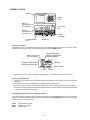
Display
Number
Keys
ON key —
Press this key to
turn power on.
Cursor Key
Pad
OFF key —
Press this key to
turn power off.
COLOR SELECT
keys
Alpha
keyboard
MENU key
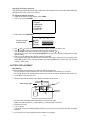
About the desktop...
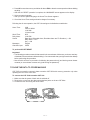
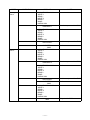
The desktop gives you point-and-select access to the data management features of the CSF-7950.
Whenever you want to return to the desktop, simply press the MENU button.
Home Time, World
Time, and Alarm
Calendar, Schedule
Keeper, Reminder and
Expense Manager
Calculator
Telephone Directory and
Business Card Directory
Secret Drawer
To Do
Memo
• Note that one of the icons on the desktop is flashing, This means that the icon is selected.
How to use the desktop
1. Use the cursor keys to move the flashing around the desktop until the one you want is selected
(flashing).
2. After selecting an icon, press OK to access the functions of that icon.
• Selecting some icons (like the Clock and Telephone) cause another selection screen to appear.
• Details on actually using the features and functions that you access from the desktop are described
in the other sections of this manual.
Changing the Desktop Screen's Window Scenery
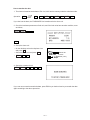
You can change the scenery that is outside the desktop screen's window to any one of the scenes
shown below. Simply display the desktop screen and press the COLOR SELECT key that corresponds
to the scenery you want to select.
ORG:
BLU:
GRN:
Night-time city scene
Daytime city scene
Beach scene
—4—