1
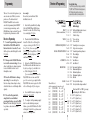
Congratulations • Easy-to-use Programming lets you customize up to 7 features. • Exclusive AutoScan mode intelligently reduces unwanted false alarms. • Ultra-bright text-display provides easy to read information from any angle. • Tech Display provides actual numeric radar frequency for any radar signal. • Programmable Bands (on/off). • Detects and decodes up to 64 Safety Warning System messages If you’ve used a radar detector before, a review of the Quick Reference Guide on pages 4 and 5, and the Programming information on pages 6 through 9 will briefly explain the new features. If this is your first detector, please read the manual in detail to get the most out of your BELTRONICS STi-R’s outstanding performance and innovative features. Please drive safely. Remove card along perforations BELTRONICS STi-R Quick Reference Card There are 7 user-selectable options so you can customize your STi-R for your own preferences. The buttons labeled VOL/MUTE and SENS are also used to enter the Programming Mode, REVIEW your current program settings, and to CHANGE any settings as desired. Remove card along perforations The BELTRONICS STi-R is the most advanced stealth-installed radar, laser and safety detector ever designed. The STi-R includes full X, K, SuperWide Ka, and Safety Warning System radar capability, front laser detection, dual LNA (low noise amplifier) microwave receivers, digital signal processing (DSP) for superior range and reduced false alarms, our patented Mute and AutoMute, audible and visual band alerts, and all the performance you’d expect from BELTRONICS. In addition, the BELTRONICS STi-R contains the following revolutionary features: • Dual LNA (low noise amplifier) receivers provide the longest possible warning against all radar threats. • TotalShield™ RF Technology provides the ultimate in undetectability. • High and low voltage warning is given any time the vehicle’s voltage drops below 10.5 volts, or goes above 16.5 volts. Quick Reference Card FCC Note: Modifications not expressly approved by the manufacturer could void the user’s FCC granted authority to operate the equipment. 1 How to use Programming 1 To enter Program Mode, press and hold both VOL/MUTE and SENS buttons down for 2 seconds. The unit will beep twice, and display the word Program. 2 Then press the VOL/MUTE button to review the current settings. You can either tap the button to change from item to item, or hold the button to scroll through the items. 3 Press the SENS button to change any setting. You can either tap the button to change from setting to setting, or hold the button to scroll through all the options. 4 To leave Program Mode, simply wait 8 seconds without pressing any button, or mometarily press the PWR button. The unit will display Complete, beep 4 times, and return to normal operation. Factory Default Settings To reset the STi-R to its original factory settings, press and hold the “VOL/ MUTE” and “SENS” buttons while turning the power on. The STi-R’s display will provide a Reset message, accompanied by an audible alert acknowledging the reset. An example Here is how you would turn the STi-R’s AutoMute feature off. 1 Enter the Program Mode by holding both the VOL/MUTE and SENS buttons down for 2 seconds. The STi-R will beep twice and display Program . 2 Then hold the VOL/MUTE button down. The STi-R will scroll through the categories, starting with power-on indication ( Pilot), Voice, Power-on sequence, signal strength meter, and then AutoMute. 3 Release the VOL/MUTE button when the STi-R shows the AutoMute item. Since the factory setting is for AutoMute to be on, the STi-R will display aMute ON. If you accidentally don’t release the Review button in time, and the STi-R goes to the next category, hold the VOL/MUTE button down again, and scroll through the categories again until aMute is displayed. 4 Press the SENS button to change from aMute ON to aMute OFF. 5 To complete the Programming, simply wait 8 seconds without pressing any button, or press the PWR button. The STi-R will display Complete, beep 4 times, and return to normal operation. Programming Details