1
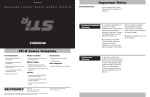
Quick Reference Guide
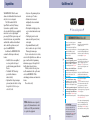
Once your STi-R has been installed,
just follow these simple steps
1
2
AutoMute
STi-R’s patented AutoMute automatically
reduces the volume level of the audio alert
after a brief period. If you prefer, you can
turn AutoMute off. Page 10
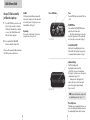
Press the PWR button, located on the
left side of the controller, to turn the
STi-R on/off. If installed to a switched
accessory, the Sti-R will turn on/off
with the vehicle’s ignition.
Programming
You can also easily change 7 features for
your preferences. Pages 12-14
Press and hold the VOL/MUTE
button to adjust the volume level.
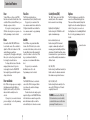
Power-on LED Indicator
Power
Press the PWR button to turn the STi-R on
or off.
VOL/MUTE Button
Press and hold the VOL/MUTE button to
adjust the alert volume level.
Briefly press this button to silence the
audio for a specific alert. (The audio will
alert you to the next encounter.) Page 6
Control Module
Sensitivity Button (SENS)
Switches between Highway, AutoScan,
City and City NoX settings. In general, we
recommend the AutoScan mode. Page 7
Please read the manual to fully understand
the STi-R’s operation and features.
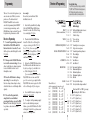
Alphanumeric Display
The STi-R’s display will
show Highway, AutoScan, City,
or City NoX as its power-on indication.
If you prefer, you can choose other poweron indications. Pages 10-12
During an alert, the display will
indicate the radar or laser band, and a
precise bar graph of signal strength.
Pages 8 and 13
Display Module
NOTE: In the Dark Mode the display will
not light during an alert. Pages 7, 14
Photocell Light Sensor
The light sensor automatically increases or
decreases the display brightness based on
the ambient light in the vehicle’s interior.
4
5