1
Base Set
English
Alternate Network Routing (ANR)
This function will automatically select the telephone network operator of
choice. The telephone can be set up to add digits and/or replace certain digits in
telephone numbers.
To choose a certain network operator, you would normally dial a prefix code
before the actual phone number.
If you have chosen a different operator for international calls, to use their
service you must dial a prefix code before the telephone number, for example
9301. You can program the ANR function to insert the prefix code before
the international access digits 00. For example: 0046 46 2805000 would
automatically be dialled as 930100 46 46 2805000
Please note!
In order to place your call with a certain operator you must be a registered subscriber.
Only one ANR (Alternate Network Routing) setting can be active at a time.
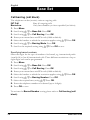
Setting up an ANR number
1. Press Menu.
2. Scroll using v/V to Base Set. Press OK.
3. Scroll using v/V to Net. Provider. Press OK.
4. Enter your current base unit PIN code (0000 at default).
5. Select a provider location using v/V. Press OK.
6. Enter the dialling code to be replaced (up to five digits, e.g. 00). Press V.
7. Enter the new number to be added (up to ten digits, e.g. 930100). Press V.
8. Select either On or Off using < /> .
9. Press OK to save.
Automatic network prefix using ANR
If the dialling code to be replaced is left empty the telephone will dial all
numbers with the added ANR prefix.
www.doro.com
29