1
Controls and Connection
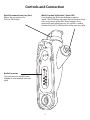
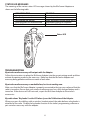
Quick Disconnect Accessory Port
Allows the connection of a
Push-to-Talk button.
Multi-Function Talk Switch / Status LED
Used to place the BluComm Adapter in pairing
mode. The LED flashes messages that let the user know
the current status of the BluComm Adapter. Once
paired with an audio accessory, this switch is used to
activate the Push-To-Talk function of the two-way radio.
Radio Connector
This port connects the BluComm
Adapter to a compatible two-way
radio.
2