1
QUICK START
1. Connect the BluComm Adapter to a compatible two-way radio.
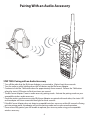
2. Pair the BluComm Adapter with a compatible wireless audio accessory.
3. Connect a wired audio or PTT accessory to the Quick-Disconnect accessory port on the
BluComm Adapter (optional).
4. Test and use.
Connecting the Adapter to Radio
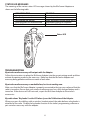
STEP ONE: Connecting to Two-Way Radio
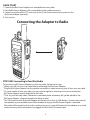
To connect your BluComm Adapter to a two-way radio, follow these steps:
* Always turn off your two-way radio before connecting the BluComm Adapter.
* Plug the BluComm Adapter into the speaker-microphone / audio accessory jack of your two-way radio.
* On some models of two-way radio, you may need to tighten a retaining screw to ensure that the
BluComm Adapter remains attached to the radio.
* Turn on your two-way radio. Because no wireless audio accessory will yet be paired to the
BluComm Adapter, received signals should be muted.
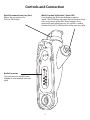
* The Talk button on the BluComm Adapter will function as a Push-to-Talk button. However the internal
microphone in your portable radio will be disabled as long as the BluComm Adapter is attached.
Mic audio will be muted until a wireless audio accessory is successfully paired to the adapter, or a wired
audio accessory with a microphone is plugged into the Quick-Disconnect port.
3