1
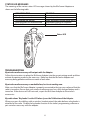
Communications Priority
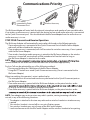
#1
PTT button
connected to Quick
Disconnect Port
#2
Wireless Accessory
The BluComm Adapter will mute both the internal microphone and speaker of your portable radio
if no wireless audio accessory is paired with the device and no wired audio accessory is connected
to the Quick-Disconnect port. You should detach the BluComm Adapter from the radio when no
audio accessory is in use.
STEP FOUR: Transmit and Receive Operation
The BluComm Adapter will automatically route radio calls based on the following priority:
* If an audio accessory is connected to the Quick-Disconnect Port of the BluComm Adapter
radio calls will be routed to this accessory.
* If no wired accessory is connected, calls will be routed to a wireless accessory, if one is paired
with the BluComm Adapter.
* If no wireless headset or audio accessory is paired to the BluComm Adapter or the wireless
accessory is turned off, received calls will be muted and will not be heard as long as
the BluComm Adapter is attached to the radio..
NOTE:
several seconds for the audio from received radio calls to be routed appropriately.
Push-to-Talk can be activated by any of the following methods:
* Pressing and holding the Talk button of the BluComm Adapter
* Using the PTT button on a wired Quick-Disconnect accessory (if one is connected to the
BluComm Adapter)
When transmitting, the operator’s voice is picked-up by:
* The microphone in the wired-audio accessory connected to the Quick-Disconnect port on
the BluComm Adapter.
* If no audio accessory is paired with the BluComm Adapter, or the paired wireless audio
as long as the BluComm Adapter is attached to the radio.
* If no audio accessory is paired with the BluComm Adapter, or the paired wireless audio
NOTE: Your adapter may mute your two way radio’s speaker, causing incoming calls to be
missed, in any of the following situations:
* The adapter is attached to the two-way radio and no wireless headset or wired accessory
is paired
* Your wireless headset is turned off or runs out of battery power
* Your wireless headset goes out of range of the BluComm Adapter
* Local interference causes the BluComm Adapter and the wireless headset to lose pairing
5