1
Troubleshooting chart (continued)
■
■
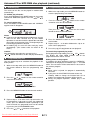
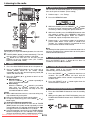
USB
Symptom
Possible cause
● Device cannot be ● Is there any MP3/WMA file
detected.
available?
● Is the device properly
connected?
● Is it an MTP device?
● Does the device contain
AAC file only?
● Playback does not ● Is it a copyright protected
start.
WMA file?
● Is it a false MP3 file?
● Wrong time display. ● Is Variable Bitrate file being
● Wrong file name
played back?
display.
● Is the File Name written in
Chinese
or
Japanese
characters?
■
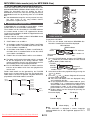
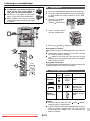
iPod
Possible cause
● The iPod is not playing.
● The iPod is not properly
connected to the unit.
● Is the AC power cord of the
unit plugged in?
● The video cable is not
properly connected.
● The TV/monitor’s input
selection is not properly
set.
● iPod will not charge. ● Wrong iPod adaptor is
used.
● The iPod is not making full
contact with the iPod
connector.
● The main unit is in stand-by
mode.
● Using 3rd generation iPod.
■
Condensation
Sudden temperature changes, storage or operation in an
extremely humid environment may cause condensation
inside the cabinet (CD pickup, etc.) or on the transmitter on
the remote control. Condensation can cause the unit to
malfunction. If this happens, leave the power on with no
disc in the unit until normal playback is possible (about 1
hour). Wipe off any condensation on the transmitter with a
soft cloth before operating the unit.
■
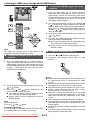
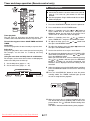
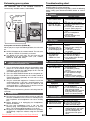
stand-by mode.
2 While pressing down the OPEN/CLOSE button, press
the POWER ON/STAND-BY button until “ALL CLEAR”
appears.
POWER
ON/STAND-BY
Caution:
This operation will erase all data stored in memory
including clock, timer settings, tuner preset, and CD
program.
■
Symptom
● No sound is
produced.
No image appears
on the TV/monitor.
Factory reset, clearing all memory
1 Press the ON/STAND-BY button to enter the power
Before transporting the unit
Remove all CDs from the unit. Make sure there is no CD in
the disc tray. Then, set the unit to the power stand-by
mode. Carrying the unit with discs left inside can damage
the unit.
■
Care of compact discs
Compact discs are fairly resistant to damage, however
mistracking can occur due to an accumulation of dirt on the
disc surface. Follow the guidelines below for maximum
enjoyment from your CD collection and player.
● Do not write on either side of the disc, particularly the
non-label side from which signals are read. Do not
mark this surface.
● Keep your discs away from direct sunlight, heat, and
excessive moisture.
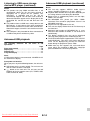
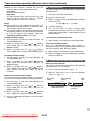
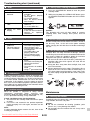
● Always hold the CDs by the edges. Fingerprints, dirt, or
water on the CDs can cause noise or mistracking. If a
CD is dirty or does not play properly, clean it with a soft,
dry cloth, wiping straight out from the center, along the
radius.
NO
YES
Correct
If problem occurs
When this product is subjected to strong external
interference (mechanical shock, excessive static
electricity, abnormal supply voltage due to lightning, etc.)
or if it is operated incorrectly, it may malfunction.
If such a problem occurs, do the following:
1 Set the unit to the stand-by mode and turn the power
on again.
2 If the unit is not restored in the previous operation,
unplug and plug in the unit again, and then turn the
power on.
Note:
If neither operation above restores the unit, clear all the
memory by resetting it.
Downloaded From Disc-Player.com Sharp Manuals
Maintenance
■
Cleaning the cabinet
Periodically wipe the cabinet with a soft cloth and a diluted
soap solution, then with a dry cloth.
Caution:
● Do not use chemicals for cleaning (gasoline, paint
thinner, etc.). It may damage the cabinet.
● Do not apply oil to the inside of the unit. It may cause
malfunctions.
E-20