1
Contents
●
●
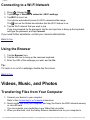
Connecting to a Wi-Fi Network
Using the Browser
Videos, Music, and Photos
●
●
●
Transferring Files from Your Computer
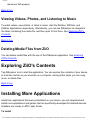
Viewing Videos, Photos, and Listening to Music
Deleting Media Files
Exploring ZiiO’s Contents
Installing More Applications
Settings
●
●
●
●
●
●
●
Accessing the Settings Screen
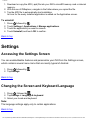
Changing the Screen and Keyboard Language
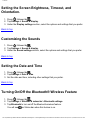
Setting the Screen Brightness, Timeout, and Orientation
Customizing the Sounds
Setting the Date and Time
Turning On/Off the Bluetooth® Wireless Feature
More About Your Device
Safety and Regulatory Information
Licence and Copyright
Introduction
ZiiO is a portable entertainment center, an Internet access, a game station, an e-book
reader, and much more. This versatile touchscreen tablet runs the Android™ operating
system, enabling you to easily install more applications from thousands of cool choices
on the Web.
Getting Started
file:///D|/Madcap%20Flare/Phuket%20HTML%20Help/Outp...ineda/MyWebHelp/Content/Resources/HTMs/Contents.htm (2 of 21)12/8/2010 8:58:55 AM