1
WELCOME
Congratulations on purchasing your Visioneer USB flatbed scanner.
With your scanner, you can quickly scan paper documents and color
photos to place their electronic images on your computer.
WHAT’S IN THE BOX
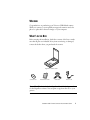
Before starting the installation, check the contents of the box to make
sure that all parts are included. If any items are missing or damaged,
contact the dealer where you purchased the scanner.
PaperPort USB Scanner
Software CD
Installation Guide
USB cable
Power cord
Note: The CD also includes the PaperPort User’s Guide, the manual
for the PaperPort software. You can print a copy from the CD to your
printer.
VISIONEER USB FLATBED SCANNER INSTALLATION GUIDE
1