1
10 Avocent® Matrix High Performance KVM Switching System Installer/User Guide
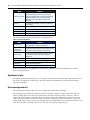
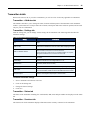
Option
Description
DHCP plus zeroconf
The switch attempts to obtain an IP address using
DHCP. If DHCP times out, then it uses zeroconf to
obtain an IP address. Zeroconf picks an IP address out
of the block 169.254.0.0/16. To use zeroconf the
network must use the 169.254.0.0/16 block of IP
addresses.
Zeroconf
The switch will immediately use zeroconf to determine
an IP address.
Static
The user will enter the IP address manually.
IP Address
The IP address of the switch.
Netmask
The Netmask of the switch.
Default Gateway
The default gateway of the switch.
The following table describes the options for configuring IPv6.
Table 2.4: IPv6 Configuration
Option
Description
Stateless only
The switch uses IPv6 stateless address
autoconfiguration to obtain an IPv6 address.
Dynamic Host
Configuration
Protocol (DHCP)
The switch is a DHCP client and receives all the network
parameters from a DHCP server on the network.
DHCP info only
The switch obtains configuration information from the
DHCP server but does not perform any address
assignment.
Static
The user will enter the IP address manually.
IP Address
The IP address of the switch.
Prefix Length
The size of the link-local prefix.
Default Gateway
The default gateway of the switch.
After the network has been configured, you can access the OBWI to add users and manage the Avocent™ Matrix Switching System.
Appliance mode
The appliance mode menu option allows you to toggle the switch between cascade master and cascade slave. If the switch is configured as a cascade slave, this option allows the administrator to select the cascade master using the switch EID. Username/password
The username/password menu allows the user to change the username and or password.
The change setup port password option allows the user to enable or change a setup port password. This will enable or disable access to the boot menu which allows the user to select the current or previous version of firmware for booting. While connected to the switch from the setup port, administrators can also select a boot image. W hen new firmware is loaded into Matrix switch, the switch keeps a copy of the previous version in a separate flash image. There is a short boot menu that allows the administrator to select which boot image is to be used. The boot menu is accessed in the first five5 seconds of booting by pressing any key.