1
V102 GPS Compass
User Guide
Part No. 875-0276-000 Rev B1
This device complies with part 15 of the FCC Rules. Operation is subject to the following two
conditions:
(1) This device may not cause harmful interference, and
(2) this device must accept any interference received, including interference that may cause
undesired operation.
Copyright Notice
Hemisphere GPS Precision GPS Applications
Copyright © Hemisphere GPS (2011). All rights reserved.
No part of this manual may be reproduced, transmitted, transcribed, stored in a retrieval system or
translated into any language or computer language, in any form or by any means, electronic,
mechanical, magnetic, optical, chemical, manual or otherwise, without the prior written permission
of Hemisphere GPS.
Trademarks
Hemisphere GPS®, the Hemisphere GPS logo, A100TM, A20TM, A21TM, A220TM, A221TM, A30TM,
A52TM, AerialACETM, AirStarTM, AirTracTM, AutoMateTM, BaseLineHDTM, BaseLineXTM, BEELINE®,
COASTTM, Contour LockTM, Crescent®, Earthworks®, EclipseTM, e-Dif®, eDrive®, eDriveTCTM,
eDriveXTM, FliteTracTM, G100TM, GateMateTM, GPSteerTM, HQTM, IntelliFlow®, IntelliGateTM,
IntelliStarTM, IntelliTracTM, Just Let GoTM, L-DifTM, LiteStar IITM, LV101TM, LX-1TM, M3TM, MapStar®,
MBX-4TM, miniEclipseTM, OutbackTM, Outback 360TM, Outback Guidance CenterTM, Outback
Guidance®, Outback HitchTM, Outback STM, Outback S2TM, Outback S3TM, Outback S-LiteTM, Outback
StsTM, Outback Steering GuideTM, PocketMAX PCTM, PocketMAXTM, PocketMax3TM, R100TM, R131TM,
R220TM, R320TM, Satloc®, the Satloc logo, SBX-4TM, V101TM, V102TM, V111TM, VS101TM, VS111TM,
VectorTM, X200TM, X300TM, XF100TM, XF101TM, and XF102TM are proprietary trademarks of
Hemisphere GPS. Other trademarks are the properties of their respective owners.
Patents
The Outback STM and S-LiteTM automated navigation and steering guide system is covered by U.S.
Patents No. 6,539,303 and No. 6,711,501. The Outback HitchTM automated hitch control system is
covered by U.S. Patent No. 6,631,916. The Outback eDriveTCTM GPS assisted steering system is
covered by U.S. Patent No. 7,142,956. Hemisphere GPS products may be covered by one or more of
the following U.S. Patents:
6,111,549
6,549,091
6,876,920
7,292,186
7,429,952
6,397,147
6,631,916
7,142,956
7,373,231
7,437,230
6,469,663
6,711,501
7,162,348
7,400,956
7,460,942
Other U.S. and foreign patents pending.
6,501,346
6,744,404
7,277,792
7,400,294
6,539,303
6,865,465
7,292,185
7,388,539
Notice to Customers
Contact your local dealer for technical assistance. To find the authorized dealer near you, contact us
at:
Hemisphere GPS
4110 9th Street S.E.
Calgary, Alberta, Canada T2G 3C4
Phone: 403-259-3311
Fax: 403-259-8866
[email protected]
www.hemispheregps.com
Technical Support
For product-related questions contact Technical Support at:
8444 N 90th St, Suite 130
Scottsdale, AZ 85258 USA
Phone: (480) 348-9919
Fax: (480) 348-6370
[email protected]
Documentation Feedback
Hemisphere GPS is committed to the quality and continuous improvement of our products and
services. We urge you to provide Hemisphere GPS with any feedback regarding this guide by writing
to the following email address: [email protected].
V102 GPS Compass User Guide
Contents
Chapter 1
Introduction
Overview. . . . . . . . . . . . . . . . . . . . . . . . . . . . . . . . . . . . . . . . . . . . . . . . . . . . 2
Parts List . . . . . . . . . . . . . . . . . . . . . . . . . . . . . . . . . . . . . . . . . . . . . . . . . . . . 3
Chapter 2
Installation
Mounting Location. . . . . . . . . . . . . . . . . . . . . . . . . . . . . . . . . . . . . . . . . . . . 6
GPS Reception. . . . . . . . . . . . . . . . . . . . . . . . . . . . . . . . . . . . . . . . . . . . . . . 6
V102 Environmental Considerations . . . . . . . . . . . . . . . . . . . . . . . . . . . . . 7
VHF Interference . . . . . . . . . . . . . . . . . . . . . . . . . . . . . . . . . . . . . . . . . . . . . 7
Mounting Orientation . . . . . . . . . . . . . . . . . . . . . . . . . . . . . . . . . . . . . . . . . 9
V102 Alignment. . . . . . . . . . . . . . . . . . . . . . . . . . . . . . . . . . . . . . . . . . . . . 11
Mounting Options . . . . . . . . . . . . . . . . . . . . . . . . . . . . . . . . . . . . . . . . . . . 12
V102 Dimensions . . . . . . . . . . . . . . . . . . . . . . . . . . . . . . . . . . . . . . . . . . . 13
Power/Data Cable Considerations . . . . . . . . . . . . . . . . . . . . . . . . . . . . . . 14
Flush Mount. . . . . . . . . . . . . . . . . . . . . . . . . . . . . . . . . . . . . . . . . . . . . . . . 14
Pole Mount . . . . . . . . . . . . . . . . . . . . . . . . . . . . . . . . . . . . . . . . . . . . . . . . . 18
Powering the V102 . . . . . . . . . . . . . . . . . . . . . . . . . . . . . . . . . . . . . . . . . . . 21
Power Considerations. . . . . . . . . . . . . . . . . . . . . . . . . . . . . . . . . . . . . . . . 21
Connecting to a Power Source . . . . . . . . . . . . . . . . . . . . . . . . . . . . . . . . 21
Electrical Isolation . . . . . . . . . . . . . . . . . . . . . . . . . . . . . . . . . . . . . . . . . . . 21
Connecting the V102 to External Devices . . . . . . . . . . . . . . . . . . . . . . . . 22
Power/Data Cable Considerations . . . . . . . . . . . . . . . . . . . . . . . . . . . . . . 22
Power/Data Cable Pinout Specifications . . . . . . . . . . . . . . . . . . . . . . . . . 23
iii
Contents
Serial Ports . . . . . . . . . . . . . . . . . . . . . . . . . . . . . . . . . . . . . . . . . . . . . . . . 24
Default Parameters . . . . . . . . . . . . . . . . . . . . . . . . . . . . . . . . . . . . . . . . . . 25
Chapter 3
Operation
GPS Overview . . . . . . . . . . . . . . . . . . . . . . . . . . . . . . . . . . . . . . . . . . . . . . 28
GPS Operation . . . . . . . . . . . . . . . . . . . . . . . . . . . . . . . . . . . . . . . . . . . . . 28
Differential Operation. . . . . . . . . . . . . . . . . . . . . . . . . . . . . . . . . . . . . . . . 29
V102 Overview . . . . . . . . . . . . . . . . . . . . . . . . . . . . . . . . . . . . . . . . . . . . . 30
Fixed Baseline Moving Base Station RTK. . . . . . . . . . . . . . . . . . . . . . . . 30
Supplemental Sensors . . . . . . . . . . . . . . . . . . . . . . . . . . . . . . . . . . . . . . . 31
Time Constants . . . . . . . . . . . . . . . . . . . . . . . . . . . . . . . . . . . . . . . . . . . . . 34
Watchdog . . . . . . . . . . . . . . . . . . . . . . . . . . . . . . . . . . . . . . . . . . . . . . . . . 35
Common Commands and Messages . . . . . . . . . . . . . . . . . . . . . . . . . . . 36
Appendix A Troubleshooting . . . . . . . . . . . . . . . . . . . . . . . . . . . . . . 41
Appendix B
Specifications . . . . . . . . . . . . . . . . . . . . . . . . . . . . . . . . 45
Index . . . . . . . . . . . . . . . . . . . . . . . . . . . . . . . . . . . . . . . . . . . . . . . . . . 49
End User License Agreement . . . . . . . . . . . . . . . . . . . . . . . . . . . . . . . 51
Warranty Notice . . . . . . . . . . . . . . . . . . . . . . . . . . . . . . . . . . . . . . . . . 54
iv
Chapter 1: Introduction
Overview
Parts List
Chapter 1: Introduction
Overview
The V102™ GPS Compass is based upon Hemisphere GPS’ exclusive
Crescent® and Crescent Vector™ II technology
The V102 is a complete GPS compass and positioning system in a single
enclosure that requires only one power/data cable connection. With its CAN
support and ease of installation, the V102 is the perfect solution for both
marine and land-based applications such as mine construction, earthworks
and machine guidance.
The V102 is an integrated system that houses the following:
•
Crescent and Crescent Vector II technology
•
Dual integrated GPS antennas
•
Power supply
•
Single axis gyro
•
Tilt sensor on each axis (X and Y axes)
The gyro and tilt sensors are present to improve system performance and to
provide backup heading information in the event that a GPS heading is not
available due to signal blockage.
Crescent Vector II technology supports multiple RF front ends - enabling
tighter coupling of measurements from separate antennas for use in
heading-based products. Users will achieve excellent accuracy and stability
due to Crescent’s more accurate code phase measurements, improved
multipath mitigation, and fewer components.
The V102’s GPS antennas are separated by 27.5 cm between their phase
centers, resulting in better than 0.75° rms heading performance. The V102
provides heading and positioning updates of up to 20 Hz and delivers
positioning accuracy of better than 1.0 m 95% of the time when using
differential GPS corrections from Space Based Augmentation Systems
(SBAS).
The V102 also features Hemisphere GPS’ exclusive COAST™ technology that
enables Hemisphere GPS receivers to utilize old differential GPS correction
data for up to 40 minutes without significantly affecting the positioning
2
V102 GPS Compass User Guide
quality. The V102 is less likely to be affected by differential signal outages
due to signal blockages, weak signals, or interference when using COAST.
If you are new to GPS and SBAS, refer to the GPS Technical Reference for
further information on these services and technologies before proceeding.
The GPS Technical Reference is available from the Hemisphere GPS website
at www.hemispheregps.com.
Parts List
Note: The V102’s parts comply with IEC 60945 Section 4.4: “exposed to the
weather.”
The V102 GPS Compass and the power/data cable (accessory item) are the
only two required components.
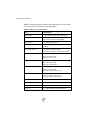
Table 1-1: Parts list
Part Name
Qty
Part Number
V102 GPS Compass
1
804-0075-000#
(Accessory item)
Kit containing the following:
880-1036-000
•
Power/data cable, 15 m
1
•
Clamp
1
•
Screw
1
•
Washer
1
Quick Reference Guide
1
875-0277-000
This User Guide is available for download from the Hemisphere GPS
website at www.hemispheregps.com.
3
Chapter 2: Installation
Mounting Location
Mounting Orientation
Mounting Options
Powering the V102
Connecting the V102 to External Devices
Chapter 2: Installation
Mounting Location
This section provides information on determining the best location for the
V102.
GPS Reception
When considering where to mount the V102, consider the following GPS
reception recommendations:
•
Consider GPS (and hence SBAS) reception, ensuring there is a clear
view of the sky available to the V102 so the GPS and SBAS satellites
are not masked by obstructions that may reduce system
performance
•
Since the V102 computes a position based on the internal primary
GPS antenna element, mount the V102 where you desire a position
with respect to the primary GPS antenna (located on the end
opposite the recessed arrow on the underside of the enclosure)
•
Locate any transmitting antennas away from the V102 by at least a
several feet to ensure tracking performance is not compromised,
giving you the best performance possible
•
Make sure there is enough cable length to route into the vessel to
reach a breakout box or terminal strip
•
Do not locate the antenna where environmental conditions exceed
those specified in Table B-5 on page 48
6
V102 GPS Compass User Guide
V102 Environmental Considerations
The V102 is designed to withstand harsh environmental conditions;
however, adhere to the following limits when storing and using the V102:
•
Operating temperature: -30°C to +70°C (-22°F to +158°F)
•
Storage temperature: -40°C to +85°C (-40°F to +185°F)
•
Humidity: 100% non-condensing
VHF Interference
VHF interference from such devices as cellular phones and radio
transmitters may interfere with GPS operation. For example, if installing the
V102 near marine radios consider the folowing:
•
VHF marine radio working frequencies (Channels 1 to 28 and 84 to
88) range from 156.05 to 157.40 MHz. The L1 GPS working center
frequency is 1575.42 MHz. The bandwidth is +/- 2MHz to +/- 10 MHz,
which is dependent on the GPS antenna and receiver design.
•
VHF marine radios emit strong harmonics. The 10th harmonic of
VHF radio, in some channels, falls into the GPS working frequency
band, which may cause the SNR of GPS to degrade significantly.
•
The radiated harmonic signal strength of different brands/models
varies.
•
Follow VHF radio manufacturers’ recommendations on how to
mount their radios and what devices to keep a safe distance away.
•
Handheld 5W VHF radios may not provide suitable filtering and may
interfere with the V102’s operation if too close.
7
Chapter 2: Installation
Before installing the V102 use the following diagram to ensure there are no
nearby devices that may cause VHF interference.
VHF Antenna
1.5 m radius at top
(minimum)
Use these minimum
distances to determine
where to place the V102
1.0 m radius at base
(minimum)
Figure 2-1: V102 distance from nearby VHF radios
8
V102 GPS Compass User Guide
Mounting Orientation
The V102 outputs heading, pitch, and roll readings regardless of the
orientation of the antennas. However, the relation of the antennas to the
boat’s axis determines whether you will need to enter a heading, pitch, or
roll bias. The primary antenna is used for positioning and the primary and
secondary antennas, working in conjunction, output heading, pitch, and roll
values.
Note: Regardless of which mounting orientation you use, the V102 provides
the ability to output the heave of the vessel. This output is available via the
$GPHEV message. For more information on this message refer to
Hemisphere GPS’ GPS Technical Reference.
Parallel Orientation: The most common installation is to orient the V102
parallel to, and along the centerline of, the axis of the boat. This provides a
true heading. In this orientation:
•
If you use a gyrocompass, you can enter a heading bias in the V102
to calibrate the physical heading to the true heading of the vessel.
•
You may need to adjust the pitch/roll output to calibrate the
measurement if the Vector is not installed in a horizontal plane.
Perpendicular Orientation: You can also install the antennas so they are
oriented perpendicular to the centerline of the boat’s axis. In this orientation:
•
You will need to enter a heading bias of +90° if the primary antenna
is on the starboard side of the boat and -90° if the primary antenna
is on the port side of the boat.
•
You will need to configure the receiver to specify the GPS antennas
are measuring the roll axis using $JATT,ROLL,YES.
•
You will need to enter a roll bias to properly output the pitch and roll
values.
•
You may need to adjust the pitch/roll output to calibrate the
measurement if the Vector is not installed in a horizontal plane.
9
Chapter 2: Installation
Figure 2-2 and Figure 2-3 provide mounting orientation examples.
Forward
motion
Recessed arrow
located on
bottom of
enclosure
Figure 2-2: Recommended orientation and resulting signs of HPR values
Recessed arrow
located on
bottom of
enclosure
Forward
motion
Figure 2-3: Alternate orientation and resulting signs of HPR values
10
V102 GPS Compass User Guide
V102 Alignment
The top of the V102 enclosure incorporates sight design features to help you
align the enclosure with respect to an important feature on your vessel.
To use the sights, center the small post on the opposite side of the enclosure
from you, within the channel made in the medallion located in the center of
the enclosure top as shown in Figure 2-4 and Figure 2-5. Alignment accuracy
when looking through the long site (Figure 2-4) is approximately +/- 1°, while
alignment through the short site (Figure 2-5) is approximately +/- 2.5°.
Figure 2-4: Long site alignment
Figure 2-5: Short sight alignment
If you have another accurate source of heading data on your vessel, such as
a gyrocompass, you may use its data to correct for a bias in V102 alignment
within the V102 software configuration. Alternatively, you can physically
adjust the heading of the V102 so that it renders the correct heading
measurement; however, adding a software offset is an easier process.
11
Chapter 2: Installation
Mounting Options
The V102 allows for two different mounting options: flush mount and pole
mount.
•
Flush mount - The bottom of the V102 contains four M8 holes for
flush mounting the unit to a flat surface (see Figure 2-6 on page 13).
•
Pole mount - The bottom of the V102 contains a mounting hole (1"
thread, 0.9" depth) for easy pole mounting. Hand tighten until snug
(do not overtighten). The set screws on the long sides of the base
(see middle drawing in Figure 2-6 on page 13) allow you to secure
the V102 in place (3/16" Allen wrench not included).
12
V102 GPS Compass User Guide
V102 Dimensions
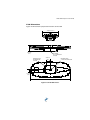
Figure 2-6 illustrates the physical dimensions of the V102.
157.89 mm (6.21”)
68.90 mm
(2.71”)
SET SCREW
3/8-16 THREAD SIZE
2 PLACES
MOUNTING HOLE
M8 THREAD SIZE
4 PLACES
46.99 mm
(1.85”)
CL
CL
31.75 mm
(1.25”)
414.39 mm (16.31”)
Figure 2-6: V102 dimensions
13
MOUNTING HOLE
1-14 UNS-2A THREAD SIZE
Chapter 2: Installation
Power/Data Cable Considerations
Before mounting the V102 consider the following regarding power/data
cable routing:
•
Cable must reach an appropriate power source
•
Cable may connect to a data storage device, computer, or other
device that accepts GPS data
•
Avoid running the cable in areas of excessive heat
•
Keep cable away from corrosive chemicals
•
Do not run the cable through door or window jams
•
Keep cable away from rotating machinery
•
Do not crimp or excessively bend the cable
•
Avoid placing tension on the cable
•
Remove unwanted slack from the cable at the V102 end
•
Secure along the cable route using plastic wraps
Improperly installed cable near machinery can be dangerous
Flush Mount
The bottom of the V102 contains four holes for flush mounting the unit to a
flat surface (Figure 2-7). The flat surface may be something you fabricate per
your installation, an off-the-shelf item (such as a radar mounting plate), or an
existing surface on your vessel.
Note: Hemisphere GPS does not supply the mounting surface hardware.
You must supply the appropriate fastening hardware required to complete
the installation of the V102.
14
V102 GPS Compass User Guide
Figure 2-7: Flush mounting holes on bottom of V102
Note: You do not necessarily need to orient the antenna precisely as you
can enter a software offset to accommodate for any bias in heading
measurement due to installation.
Before flush mounting the V102
•
Determine your mounting orientation. See “Mounting Orientation”
on page 9 for more information.
•
Choose a location that meets the mounting location requirements.
•
Using the fixed base as a template, mark and drill the mounting
holes as necessary for the mounting surface.
•
Attach the power/data cable to the cable clamp and attach the clamp
to the bottom of the V102 using the screw and washer. Do not fully
tighten the screw so you can adjust the cable as necessary when
15
Chapter 2: Installation
attaching the cable end to the port on the V102 (see “Connecting the
power/data cable” on page 17).
Flush mounting the V102
1.
Photocopy the section of the V102 that contains the four mounting
holes for use as a template to plan the mounting hole locations.
Make sure the photocopy is scaled one to one with the
mounting holes on the bottom of the V102.
2.
Mark the mounting hole centers on the mounting surface.
3.
Place the V102 over the marks to ensure the planned hole centers
align with the true hole centers (adjusting as necessary).
4.
Use a center punch to mark the hole centers.
5.
Drill the mounting holes with a 9 mm bit appropriate for the surface.
6.
Place the V102 over the mounting holes and insert the mounting
screws through the bottom of the mounting surface and into the
V102.
When installing the V102, hand tighten only. Damage
resulting from overtightening is not covered by the warranty.
16
V102 GPS Compass User Guide
Note: See “V102 Dimensions” on page 13 for information on routing the
power/data cable.
Connecting the power/data cable
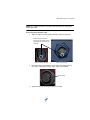
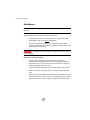
1.
Align the cable connector keyway with the V102 connector key.
Make sure the connector
keyway on the cable matches
up with the connector key on
the V102
Cable connector keyway
2.
V102 connector key
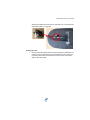
Rotate the cable ring clockwise until it locks. The locking action is
firm, but you will feel a positive “click” when it has locked.
Cable ring
3.
Tighten the clamp securing the cable to the V102.
17
Chapter 2: Installation
Pole Mount
Note: This pole mount does not meet the IEC 60945, section 8.7 for
vibration.
Keep the following in mind when using a pole mount:
•
Thread type of the four mounting holes is 1" thread, 0.9" depth
•
Hand tighten until snug (do not overtighten)
•
Use the set screws on the long sides of the base (see middle
drawing in Figure 2-6 on page 13) to secure the V102 in place (3/16"
Allen wrench not included)
Overtightening may damage the system. This is not covered
under warranty.
Before pole mounting the V102
•
Decide if you need the roll measurement. If you need roll
measurement, the V102 will need to be installed perpendicular to
the vessel axis. If it you do not need roll measurement, install the
V102 parallel with the vessel’s axis.
•
Choose a location that meets the mounting location requirements.
•
Mark and drill the mounting holes as necessary for the threaded
pole.
•
Attach the power/data cable to the cable clamp and attach the clamp
to the bottom of the V102 using the screw and washer. Do not fully
tighten the screw so you can adjust the cable as necessary when
18
V102 GPS Compass User Guide
attaching the cable end to the port on the V102 (see “Connecting the
power/data cable” on page 20).
Routing the cable
•
Run the cable through the pole and then through any bulkheads as
needed. Leave some slack to move the cable in and out of the pole
mount by a few inches (centimeters) to allow you to connect the
cable to the V102 easily.
19
Chapter 2: Installation
Connecting the power/data cable
1.
Align the cable connector keyway with the V102 connector key.
Make sure the connector
keyway on the cable matches
up with the connector key on
the V102
Cable connector keyway
2.
V102 connector key
Rotate the cable ring clockwise until it locks. The locking action is
firm, but you will feel a positive “click” when it has locked.
Cable ring
3.
Tighten the clamp securing the cable to the V102.
Note: See “V102 Dimensions” on page 13 for information on routing the
power/data cable.
20
V102 GPS Compass User Guide
Powering the V102
Power Considerations
For best performance use a clean and continuous power supply. The V102
power supply features reverse polarity protection but will not operate with
reverse polarity.
See Table B-3 on page 47 for complete power specifications.
Connecting to a Power Source
Before you power up the V102 you must terminate the wires of the power
cable as required. There are a variety of power connectors and terminals on
the market from which to choose, depending on your specific requirements.
Do not apply a voltage higher than 36 VDC. This will damage
the receiver and void the warranty.
To interface the V102 power cable to the power source:
•
Connect the red wire of the cable’s power input to DC positive (+)
•
Connect the black wire of the cable’s power input to DC negative (-)
The V102’s smart antenna will start when an acceptable voltage is applied to
the power leads of the extension cable.
Electrical Isolation
The V102’s power supply is isolated from the communication lines and the
PC-ABS plastic enclosure isolates the electronics mechanically from the
vessel (addressing the issue of vessel hull electrolysis).
21
Chapter 2: Installation
Connecting the V102 to External Devices
Power/Data Cable Considerations
The V102 uses a single 15 m (49 ft) cable for power and data input/output.
15 m
100 mm
J1
P1
30 mm
25 mm
Strip and tin 3 mm
Figure 2-8: Power/data cable, 15 m
The receiver end of the cable is terminated with an environmentally sealed
12-pin connection while the opposite end is unterminated and requires field
stripping and tinning.
Depending on the application and installation needs, you may need to
shorten this cable. However, if you require a longer cable run than 15 m, you
can bring the cable into a break-out box that incorporates terminal strips,
within the vessel.
When lengthening the cable keep the following in mind:
•
To lengthen the serial lines inside the vessel, use 20-gauge twisted
pairs and minimize the additional wire length.
•
When lengthening the power input leads to the V102, ensure the
additional voltage drop is small enough that your power system can
continue to power the system above the minimum voltage of the
system. Wire of 18-gauge or larger should also be used.
•
Minimize RS-232 cable length to ensure reliable communication
22
V102 GPS Compass User Guide
Power/Data Cable Pinout Specifications
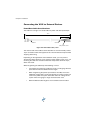
Figure 2-9 show the power/data cable pinout, while Table 2-1 shows the
cable’s pinout specifications.
Figure 2-9: Power/data cable pin assignment
Table 2-1: Power/data cable pinout
Pin
Function
Wire Color
1
Port C, RS-232 female DB9 pin 2, device out
White
2
Port C, RS-232 female DB9 pin 3, device in
Green
3
N/C
N/C
4
N/C
N/C
5
Power input
Red
6
N/C
N/C
7
Signal ground
Yellow
8
Port A, RS-232 female DB9 pin 3, device in
Brown
9
Port A, RS-232 female DB9 pin 2, device out
Blue
10
Power ground
Black
11
CH_GND
Drain
12
N/C
N/C
23
Chapter 2: Installation
Serial Ports
The V102 offers position and heading data via two full-duplex (bi-directional)
RS-232 serial ports. In addition to outputting data, these ports are used for
firmware upgrades.
Note: When selecting your baud rate and message types, use the following
calculation to determine your baud rate for your required data throughput.
Messages * Message output rate * Message length (bytes) * bits in byte
Ex: 5 * 20Hz * 40 bytes * 10 = 40,000 bits/sec
For information on message output rates refer to GPS Technical Reference
available from the Hemisphere GPS website at www.hemispheregps.com.
You may configure Port A or Port C of the GPS receiver to output any
combination of data that you want. Port A can have a different configuration
from Port C in terms of data message output, data rates, and the baud rate of
the port. This allows you to configure the ports independently based upon
your needs. For example, if you want one generalized port and one
heading-only port, you can configure the ports as follows:
•
Port A to have GPGGA, GPVTG, GPGSV, GPZDA, and GPHDT all
output at 1 Hz over a 9600 baud rate
•
Port C to have GPHDT and GPROT output at their maximum rate of
20 Hz over a 19200 baud rate
A personal computer (PC) typically uses a DB9-male connector for RS-232
serial port communications.
Note: For successful communications use the 8-N-1 protocol and set the
baud rate of the V102’s serial ports to match that of the devices to which they
are connected. Flow control is not supported.
When interfacing to other devices, ensure the transmit data output from the
V102 is connected to the data input of the other device. The signal grounds
must also be connected.
24
V102 GPS Compass User Guide
There is likely little reason to connect the receive data input of the V102 to
another device unless it is able to send configuration commands to the V102.
Since the V102 uses proprietary NMEA 0183 commands for control over its
configuration, the vast majority of electronics will not be able to configure its
settings unless the other device has a terminal setting where you can
manually issue commands.
Default Parameters
Table 2-2 and Table 2-3 provide details on the default port settings, available
baud rates, differential age, elevation mask, and default differential mode.
Note: Use the $JSAVE command to save changes you make to the V102’s
configuration for the changes to be present in subsequent power cycles.
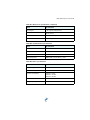
Table 2-2: Default port settings
Port
Baud Rate
NMEA Messages
Update Rate
Port A
(RS-232)
19200
GPGGA, GPVTG, GPGSV, GPZDA,
GPHDT, GPROT
1 Hz
Port C
(RS-232)
19200
GPGGA, GPVTG, GPGSV, GPZDA,
GPHDT, GPROT
1 Hz
Power
6 - 36 VDC
RED (+)
BLK (-)
Note: The default update rate for NMEA 0183 messages is 1 Hz. 10 Hz is the
standard maximum rate, but you can purchase a subscription to upgrade the output
rate to 20 Hz.
Table 2-3: Additional default settings
Parameter
Specification
Max DGPS age (correction age)
2700 seconds
Elevation mask
5°
Differential mode
SBAS (WAAS/EGNOS)
25
Chapter 3: Operation
GPS Overview
V102 Overview
Common Commands and Messages
Chapter 3: Operation
GPS Overview
For your convenience, both the GPS and SBAS operation of the V102
features automatic operational algorithms. When powered for the first time,
the V102 performs a "cold start," which involves acquiring the available GPS
satellites in view and the SBAS differential service.
If SBAS is not available in your area, an external source of RTCM SC-104
differential corrections may be used. If you use an external source of
correction data, it must support an eight data bit, no parity, one stop bit
configuration (8-N-1).
GPS Operation
The GPS receiver is always operating, regardless of the DGPS mode of
operation. The following sections describe the general operation of the
V102’s internal GPS receiver.
Note: Differential source and status have no impact on heading, pitch, or
roll. They only have an impact on positioning and heave.
Automatic Tracking
The V102’s internal GPS receiver automatically searches for GPS satellites,
acquires the signals, and manages the navigation information required for
positioning and tracking.
Receiver Performance
The V102 works by finding four or more GPS satellites in the visible sky. It
uses information from the satellites to compute a position within 2.5 m.
Since there is some error in the GPS data calculations, the V102 also tracks a
differential correction. The V102 uses these corrections to improve its
position accuracy to better than 1.0 m.
There are two main aspects of GPS receiver performance:
•
Satellite acquisition
•
Positioning and heading calculation
28
V102 GPS Compass User Guide
When the V102 is properly positioned, the satellites transmit coded
information to the antennas on a specific frequency. This allows the receiver
to calculate a range to each satellite from both antennas. GPS is essentially a
timing system. The ranges are calculated by timing how long it takes for the
signal to reach the GPS antenna. The GPS receiver uses a complex algorithm
incorporating satellite locations and ranges to each satellite to calculate the
geographic location and heading. Reception of any four or more GPS signals
allows the receiver to compute three-dimensional coordinates and a valid
heading.
Differential Operation
The purpose of differential GPS (DGPS) is to remove the effects of selective
availability (SA), atmospheric errors, timing errors, and satellite orbit errors,
while enhancing system integrity. Autonomous positioning capabilities of
the V102 will result in positioning accuracies of 2.5 m 95% of the time. In
order to improve positioning quality to better than 1.0 m 95%, the V102 is
able to use differential corrections received through the internal SBAS
demodulator or externally-supplied RTCM corrections.
Automatic SBAS Tracking
The V102 automatically scans and tracks SBAS signals without the need to
tune the receiver. The V102 features two-channel tracking that provides an
enhanced ability to maintain a lock on an SBAS satellite when more than one
satellite is in view. This redundant tracking approach results in more
consistent tracking of an SBAS signal in areas where signal blockage of a
satellite is possible.
29
Chapter 3: Operation
V102 Overview
The V102 provides accurate and reliable heading and position information at
high update rates. To accomplish this task, the V102 uses a high
performance GPS receiver and two antennas for GPS signal processing. One
antenna is designated as the primary GPS antenna and the other is the
secondary GPS antenna. Positions computed by the V102 are referenced to
the phase center of the primary GPS antenna. Heading data references the
vector formed from the primary GPS antenna phase center to the secondary
GPS antenna phase center.
The heading arrow located on the bottom of the V102 enclosure defines
system orientation. The arrow points in the direction the heading
measurement is computed (when the antenna is installed parallel to the
fore-aft line of the vessel). The secondary antenna is directly above the
arrow.
Fixed Baseline Moving Base Station RTK
The V102’s internal GPS receiver uses both the L1 GPS C/A code and carrier
phase data to compute the location of the secondary GPS antenna in relation
to the primary GPS antenna with a very high sub-centimeter level of
precision. The technique of computing the location of the secondary GPS
antenna with respect to the primary antenna, when the primary antenna is
moving, is often referred to as moving base station Real Time Kinematic (or
moving base station RTK).
Generally, RTK technology is very sophisticated and requires a significant
number of possible solutions to be analyzed where various combinations of
integer numbers of L1 wavelengths to each satellite intersect within a certain
search volume. The integer number of wavelengths is often referred to as
the “ambiguity” as they are initially ambiguous at the start of the RTK
solution.
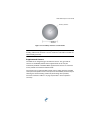
The V102 restricts the RTK solution. It does this knowing that the secondary
GPS antenna is 0.275 m from the primary GPS antenna. This is called a fixed
baseline and it defines the search volume of the secondary antenna as the
surface of a sphere with radius 0.275 m centered on the location of the
primary antenna (see Figure 3-1).
30
V102 GPS Compass User Guide
Primary antenna
0.275 m
baseline
Figure 3-1: Secondary antenna’s search volume
Note: The V102 moving base station algorithm only uses GPS to calculate
heading. Differential corrections are not used in this calculation and will not
affect heading accuracy.
Supplemental Sensors
The V102 has an integrated gyro and two tilt sensors. The gyro and tilt
sensors are enabled by default. Each supplemental sensor may be
individually enabled or disabled. Both supplemental sensors are mounted
on the printed circuit board inside the V102.
The sensors act to reduce the RTK search volume, which improves heading
startup and reacquisition times. This improves the reliability and accuracy of
selecting the correct heading solution by eliminating other possible,
erroneous solutions. Table 3-1 on page 32 provides a sensor operation
summary.
31
Chapter 3: Operation
Table 3-1: Sensor operation summary
Feature
Normal Operation
Coasting (no GPS)
Heading
GPS
Gyro
Heave
GPS
None
Pitch
GPS
Inertial sensor
Roll
Inertial sensor
Inertial sensor
Hemisphere GPS’ GPS Technical Reference describes the commands and
methodology required to recalibrate, query, or change the sensors status.
Tilt Aiding
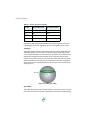
The V102’s accelerometers (internal tilt sensors) are factory calibrated and
enabled by default. This constrains the RTK heading solution beyond the
volume associated with just a fixed antenna separation. This is because the
V102 knows the approximate inclination of the secondary antenna with
respect to the primary antenna. The search space defined by the tilt sensor
will be reduced to a horizontal ring on the sphere’s surface by reducing the
search volume. This considerably decreases startup and reacquisition times.
(See Figure 3-2)
Tilt angle
Figure 3-2: V102’s tilt aiding
Gyro Aiding
The V102’s internal gyro offers several benefits. It reduces the sensor volume
for an RTK solution. This shortens reacquisition times when a GPS heading
32
V102 GPS Compass User Guide
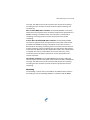
is lost because the satellite signals were blocked. The gyro provides a
relative change in angle since the last computed heading, and, when used in
conjunction with the tilt sensor, defines the search space as a wedge-shaped
location (see Figure 3-3).
Figure 3-3: V102’s gyro aiding
The gyro aiding accurately smoothes the heading output and the rate of
turn. It provides an accurate substitute heading for a short period depending
on the roll and pitch of the vessel, ideally seeing the system through to
reacquisition. The gyro provides an alternate source of heading, accurate to
within 1º for up to three minutes, in times of GPS loss for either antenna. If
the outage lasts longer than three minutes, the gyro will have drifted too far
and the V102 begins outputting null fields in the heading output messages.
There is no user control over the timeout period of the gyro.
Calibration, which is set at the factory, is required for the gyro to remove
latency from the heading solution as well as provide backup heading when
GPS is blocked. The receiver will calibrate itself after running for a while but
it may be important to follow the manual calibration instructions if you want
to guarantee performance quickly after powering up the receiver.
The gyro initializes itself at powerup and during initialization, or you can
calibrate it as outlined in Hemisphere GPS’ GPS Technical Reference. When
the gyro is first initializing, it is important that the dynamics that the gyro
experiences during this warmup period are similar to the regular operating
dynamics. For example, if you use the V102 on a high speed, maneuverable
craft, it is essential that when gyro aiding in the V102 is first turned on, use it
33
Chapter 3: Operation
in an environment that has high dynamics for the first five to ten minutes
instead of sitting stationary.
With the gyro enabled, the gyro is also used to update the post HTAU
smoothed heading output from the moving base station RTK GPS heading
computation. This means that if the HTAU value is increased while gyro
aiding is enabled, there will be little to no lag in heading output due to
vehicle maneuvers. Hemisphere GPS’ GPS Technical Reference includes
information on setting an appropriate HTAU value for the application.
Time Constants
The V102 incorporates user-configurable time constants that can provide a
degree of smoothing to the heading, course over ground (COG), and speed
measurements. You can adjust these parameters depending on the expected
dynamics of the vessel. For example, increasing the time is reasonable if the
vessel is very large and is not able to turn quickly or would not pitch quickly.
The resulting values would have reduced “noise,” resulting in consistent
values with time. However, if the vessel is quick and nimble, increasing this
value can create a lag in measurements. Formulas for determining the level
of smoothing are located in Hemisphere GPS’ GPS Technical Reference. If
you are unsure on how to set this value, it is best to be conservative and
leave it at the default setting.
Note: For heading and rate of turn there is no lag once the gyro is calibrated
and enabled.
Heading time constant: Use the $JATT,HTAU command to adjust the level
of responsiveness of the true heading measurement provided in the
$GPHDT message. The default value of this constant is 10.0 seconds of
smoothing when the gyro is enabled. The gyro is enabled by default, but can
be turned off. By turning the gyro off, the equivalent default value of the
heading time constant would be 0.5 seconds of smoothing. This is not
automatically done and therefore you must manually enter it. Increasing the
time constant increases the level of heading smoothing and increases lag.
Pitch time constant: Use the $JATT,PTAU command to adjust the level of
responsiveness of the pitch measurement provided in the $PSAT,HPR
34
V102 GPS Compass User Guide
message. The default value of this constant is 0.5 seconds of smoothing.
Increasing the time constant increases the level of pitch smoothing and
increases lag.
Rate of Turn (ROT) time constant: Use the $JATT,HRTAU command to
adjust the level of responsiveness of the ROT measurement provided in the
$GPROT message. The default value of this constant is 2.0 seconds of
smoothing. Increasing the time constant increases the level of ROT
smoothing.
Course Over Ground (COG) time constant: Use the $JATT,COGTAU
command to adjust the level of responsiveness of the COG measurement
provided in the $GPVTG message. The default value of this constant is
0.0 seconds of smoothing. Increasing the time constant increases the level
of COG smoothing. COG is computed using only the primary GPS antenna
and its accuracy depends upon the speed of the vessel (noise is proportional
to 1/speed). This value is invalid when the vessel is stationary, as tiny
movements due to calculation inaccuracies are not representative of a
vessel’s movement.
Speed time constant: Use the $JATT,SPDTAU command to adjust the
level of responsiveness of the speed measurement provided in the $GPVTG
message. The default value of this constant is 0.0 seconds of smoothing.
Increasing the time constant increases the level of speed measurement
smoothing.
Watchdog
The watchdog is a timer that is controlled by the software that monitors if
the heading is lost. The watchdog software is compliant with IEC 60495.
35
Chapter 3: Operation
Common Commands and Messages
Note: When selecting your baud rate and message types, use the following
calculation to determine your baud rate for your required data throughput.
Messages * Message output rate * Message length (bytes) * bits in byte
Ex: 5 * 20Hz * 40 bytes * 10 = 40,000 bits/sec
For information on message output rates refer to GPS Technical Reference
available from the Hemisphere GPS website at www.hemispheregps.com.
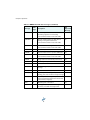
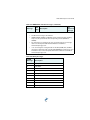
Table 3-2 below through Table 3-4 provide brief descriptions of common
commands and messages for the V102. Refer to the Hemisphere GPS
Technical Reference for more detailed information.
Table 3-2: Commands
Command
Description
$JAGE
Specify maximum DGPS (COAST) correction age (6 to 8100
seconds)
$JAPP
Query or specify receiver application firmware
$JASC
Specify ASCII messages to output to specific ports (see ASCII
messages in Table 3-3)
$JBAUD
Specify RS-232, RS-422 (output) communication rate
$JBIN
Specify binary messages to output to specific ports (see
Table 3-4)
$JDIFF
Query or specify differential correction mode
$JGEO
Query or specify SBAS for current location and SBAS satellites
$JI
Query unit’s serial number and firmware versions
$JOFF
Turn off all data messages
$JQUERY,GUIDE
Query accuracy suitability for navigation
36
V102 GPS Compass User Guide
Table 3-2: Commands (continued)
Command
Description
$JRESET
Reset unit’s configuration to firmware defaults
Note: $JRESET clears all parameters. For the V102 you will
have to issue the $JATT, FLIPBRD,YES command to properly
redefine the circuitry orientation inside the product once the
receiver has reset. Failure to do so will cause radical heading
behavior.
$JSAVE
Save session’s configuration changes
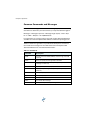
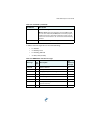
In Table 3-3 the Info Type value is one of the following:
•
P = Position
•
V = Velocity, Time
•
H = Heading, Attitude
•
S = Sats, Stats, Quality
Table 3-3: NMEA 0183 and other messages
Message
Info
Type
Description
IEC
Approved
Message
$GPDTM
P
Datum reference
Yes
$GPGGA
P
GPS position and fix data
Yes
$GPGLL
P
Geographic position - lat/long
Yes
$GPGNS
P
GNSS position and fix data
Yes
$GPGRS
S
GNSS range residual (RAIM)
Yes
$GPGSA
S
GNSS DOP and active satellites
Yes
$GPGST
S
GNSS pseudo range error statistics and
position accuracy
Yes
$GPGSV
S
GNSS satellites in view
Yes
37
Chapter 3: Operation
Table 3-3: NMEA 0183 and other messages (continued)
Message
Info
Type
*$GPHDG
H
Description
Provides magnetic deviation and variation for
calculating magnetic or true heading
IEC
Approved
Message
Yes
*see last bullet in Note at end of this table
*$GPHDM
H
Magnetic heading (based on GPS-derived
heading and magnetic declination)
No
*see last bullet in Note at end of this table
*$GPHDT
H
GPS-derived true heading
Yes
*see last bullet in Note at end of this table
$GPHEV
H
Heave value (in meters)
Yes
$GPRMC
P
Recommended minimum specific GNSS data
Yes
*$GPROT
H
GPS-derived rate of turn (ROT)
Yes
*see last bullet in Note at end of this table
$GPRRE
S
Range residual and estimated position error
Yes
$GPVTG
V
COG and ground speed
Yes
$GPZDA
V
Time and date
Yes
$PASHR
H
Time, heading, roll, and pitch data in one
message
No
$PSAT,GBS
S
Satellite fault detection (RAIM)
Yes
$PSAT,HPR
H
Proprietary NMEA message that provides
heading, pitch, roll, and time in single message
No
$PSAT,INTLT
H
Proprietary NMEA message that provides the
pitch and roll measurements from the internal
inclinometers (in degrees)
Yes
$RD1
S
SBAS diagnostic information
Yes
$TSS1
H
Heading, pitch, roll, and heave message in the
commonly used TSS1 message format
No
38
V102 GPS Compass User Guide
Table 3-3: NMEA 0183 and other messages (continued)
Message
Info
Type
Description
IEC
Approved
Message
Notes:
•
The GP of the message is the talker ID.
•
GPGRS, GPGSA, GPGST, and GPGSV support external integrity checking.
They are to be synchronized with corresponding fix data (GPGGA or
GPGNS).
•
For information on outputting roll, pitch, and heave data in one message
refer to the Hemisphere GPS Technical Reference available at
www.hemispheregps.com.
•
* You can change the message header for the HDG, HDM, HDT, and ROT
messages to either GP or HE using the $JATT,NMEAHE command. For more
information refer to the Hemisphere GPS Technical Reference available at
www.hemispheregps.com.
Table 3-4: Binary messages
$JBIN
Message
Description
1
GPS position
2
GPS DOPs
80
SBAS
93
SBAS ephemeris data
94
Ionosphere and UTC conversion parameters
95
Satellite ephemeris data
96
Code and carrier phase
97
Processor statistics
98
Satellites and almanac
99
GPS diagnostics
39
Chapter 3: Operation
Table 3-5: Parameters specific to $JATT command
Parameter
Description
Query
Specify
COGTAU
Set/query COG time constant (0.0 to 3600.0 sec)
X
X
CSEP
Query antenna separation
X
EXACT
Enable/disable internal filter reliance on the
entered antenna separation
X
X
FLIPBRD
Turn the flip feature on/off
X
X
GYROAID
Enable/disable gyro
X
X
HBIAS
Set/query heading bias (-180.0º to 180.0º)
X
X
HELP
Show the available commands for GPS heading
operation and status
X
HIGHMP
Set/query the high multipath setting for use in
poor GPS environments
X
X
HRTAU
Set/query ROT time constant (0.0 to 3600.0 sec)
X
X
HTAU
Set/query heading time constant (0.0 to 3600.0
sec)
X
X
LEVEL
Enable/disable level operation
X
X
MSEP
Manually set or query antenna separation
X
X
NEGTILT
Enable/disable negative tilt
X
X
NMEAHE
Change the HDG, HDM, HDT, and ROT message
headers between GP and HE
X
X
PBIAS
Set/query pitch/roll bias (-15.0º to 15.0º)
X
X
PTAU
Set/query pitch time constant (0.0 to 3600.0 sec)
X
X
ROLL
Configure for roll or pitch GPS orientation
X
X
SEARCH
Force a new GPS heading search
SPDTAU
Set/query speed time constant (0.0 to 3600.0 sec)
X
SUMMARY
Display a summary of the current Crescent
Vector settings
X
TILTAID
Enable/disable accelerometer, pre-calibrated
X
TILTCAL
Calibrate accelerometers
40
X
X
X
X
Appendix A: Troubleshooting
Appendix A: Troubleshooting
Table A-1 provides troubleshooting for common problems.
Table A-1: Troubleshooting
Symptom
Possible Solution
Receiver fails to power
•
Verify polarity of power leads
•
Check integrity of power cable connectors
•
Check power input voltage (6 to 36 VDC)
•
Check current restrictions imposed by power
source (minimum available should be > 1.0 A)
•
Check receiver power status to ensure the receiver
is powered (an ammeter can be used for this)
•
Verify desired messages are activated (using
PocketMax or $JSHOW in any terminal program)
•
Ensure the baud rate of the V102 matches that of
the receiving device
•
Check integrity and connectivity of power and data
cable connections
•
Verify the RTCM or binary messages are not being
output accidentally (send a $JSHOW command)
•
Ensure the baud rate of the V102 matches that of
the remote device
•
Potentially, the volume of data requested to be
output by the V102 could be higher than the current
baud rate supports (try using 19200 as the baud
rate for all devices or reduce the amount of data
being output)
•
Verify the V102 has a clear view of the sky
•
Verify the lock status of GPS satellites (this can be
done with PocketMax)
No data from V102
Random data from
V102
No GPS lock
42
V102 GPS Compass User Guide
Table A-1: Troubleshooting (continued)
Symptom
Possible Solution
No SBAS lock
•
Verify the V102 has a clear view of the sky
•
Verify the lock status of SBAS satellites (this can be
done with PocketMax - monitor BER value)
•
SBAS lock can only get if you are in an appropriate
SBAS region (currently, there is limited SBAS
availability in the southern hemisphere)
•
Set SBAS mode to automatic with the
$JWAASPRN,AUTO command
•
Check CSEP value is fairly constant without varying
more than 1 cm (0.39 in)—larger variations may
indicate a high multipath environment and require
moving the receiver location
•
Recalibrate the tilt sensor with $JATT,TILTCAL
command if heading is calculated then lost at
consistent time intervals
•
Heading is from primary GPS antenna to secondary
GPS antenna, so the arrow on the underside of the
V102 should be directed to the bow side
•
$JATT,SEARCH command forces the V102 to
acquire a new heading solution (unless gyro is
enabled)
•
Enable GYROAID to provide heading for up to three
minutes during GPS signal loss
•
Enable TILTAID to reduce heading search times
•
Monitor the number of satellites and SNR values
for both antennas within PocketMax—at least four
satellites should have strong SNR values
•
Potentially, the volume of data requested to be
output by the V102 could be higher than the current
baud rate supports (try using 19200 as the baud
rate for all devices or reduce the amount of data
being output)
No heading or incorrect
heading value
43
Appendix A: Troubleshooting
Table A-1: Troubleshooting (continued)
Symptom
Possible Solution
No DGPS position in
external RTCM mode
•
Verify the baud rate of the RTCM input port
matches the baud rate of the external source
•
Verify the pinout between the RTCM source and the
RTCM input port (transmit from the source must go
to receive of the RTCM input port and grounds
must be connected)
•
Ensure corrections are being transmitted to the
correct port—using the $JDIFF,PORTB command on
Port A will cause the receiver to expect the
corrections to be input through Port B
44
Appendix B: Specifications
Appendix B: Specifications
Table B-1 through Table B-5 provide the V102’s GPS sensor, communication,
power, mechanical, and environmental specifications.
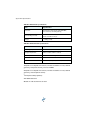
Table B-1: GPS sensor specifications
Item
Specification
Receiver type
L1, C/A code with carrier phase smoothing
Channels
Two 12-channel, parallel tracking
(Two 10-channel when tracking SBAS)
SBAS tracking
2-channel, parallel tracking
Update rate
Standard 10 Hz, optional 20 Hz (position and
heading)
Horizontal accuracy
< 1.0 m 95% confidence (DGPS1)
< 2.5 m 95% confidence (autonomous, no SA2)
Heading accuracy
< 0.75° rms
Normal operation: GPS
Coasting (no GPS): Gyro
Heave accuracy
< 30 cm rms5
Normal operation: GPS
Coasting (no GPS): None
Pitch accuracy
< 1.5° rms
Normal operation: GPS
Coasting (no GPS): Inertial sensor
Roll accuracy
< 1.5° rms using accelerometer
Normal operation: Inertial sensor
Coasting (no GPS): Inertial sensor
Rate of turn
90°/s maximum
Cold start
< 60 s typical (no almanac or RTC)
Warm start
< 20 s typical (almanac and RTC)
Hot start
< 1 s typical (almanac, RTC, and position)
46
V102 GPS Compass User Guide
Table B-1: GPS sensor specifications (continued)
Item
Specification
Heading fix
< 10 s typical (valid position)
Compass safe distance
30 cm (11.8 in)4
Maximum speed
1,850 kph (999 kts)
Maximum altitude
18,288 m (60,000 ft)
Table B-2: Communication specifications
Item
Specification
Serial ports
2 full-duplex RS-232
Baud rates
4800, 9600, 19200, 38400, 57600, 115200
Correction I/O protocol
RTCM SC-104
Data I/O protocol
NMEA 0183, Crescent binary3, CAN
Table B-3: Power specifications
Item
Specification
Input voltage
6 to 36 VDC
Power consumption
~ 3 W nominal
Current consumption
320 mA @ 9 VDC
240 mA @ 12 VDC
180 mA @ 16 VDC
Power isolation
Isolated to enclosure
Reverse polarity protection
Yes
47
Appendix B: Specifications
Table B-4: Mechanical specifications
Item
Specification
Enclosure
UV resistant, white plastic, AES HW 600G,
non-corrosive, self extinguishing
Dimensions
(not including mounts)
41.7 L x 15.8 W x 6.9 H (cm)
Weight
~ 1.50 kg (3.3 lb)
16.4 L x 6.2 W x 2.7 H (in)
Table B-5: Environmental specifications
Item
Specification
Operating temperature
-30°C to +70°C (-22°F to +158°F)
Storage temperature
-40°C to +85°C (-40°F to +185°F)
Humidity
100% non-condensing
Vibration
IEC 60945
EMC
FCC Part 15, Subpart B; CISPR22; IEC 60945 (CE)
1Depends
on multipath environment, number of satellites in view, satellite
geometry, ionospheric activity, and use of SBAS
2Depends
on multipath environment, number of satellites in view, satellite
geometry, and ionospheric activity
3
Hemisphere GPS proprietary
4IEC
5
60945 Standard
Based on a 40 second time constant
48
V102 GPS Compass User Guide
Index
A
alarm
watchdog 35
alignment 11
automatic
SBAS tracking 29
tracking 28
automatic tracking 28
operation 28
overview 28
receiver performance 28
sensor specifications 46
GPS reception 6
gyro aiding 32
C
H
cable See power/data cable 14
COGTAU 35, 40
commands (common) 36
common commands and messages 36
communication specifications 47
connect
to a power source 21
to external devices 22
course over ground time constant 35
heading time constant 34
heave 9, 38
accuracy 46
HRTAU 35, 40
HTAU 34, 40
L
long sight alignment 11
M
E
mechanical specifications 48
message (common) 36
mounting
alignment 11
cable considerations 14
environmental considerations 7
flush mount 14
GPS reception 6
location 6
orientation 9
parallel orientation 9
perpendicular orientation 9
pole mount 18
VHF interference 7
moving base station RTK 30
electrical isolation 21
environmental
considerations 7
specifications 48
environmental considerations 7
external devices 22
F
flush mount 14
G
GPHEV 9, 38
GPS
automatic SBAS tracking 29
49
Index
O
HRTAU 35
HTAU 34
PTAU 34
SPDTAU 35
tracking
automatic 28
automatic SBAS 29
troubleshooting 42
orientation for mounting 9
P
parallel mounting 9
part numbers 3
parts list 3
perpendicular mounting 9
pitch time constant 34
pole mount 18
power
connecting to a power source 21
considerations 21
electrical isolation 21
power specifications 47
PTAU 34, 40
V
V102
gyro aiding 32
moving base station RTK 30
parts list 3
specifications 46
supplemental sensors 31
tilt aiding 32
time constants 34
VHF interference 7
R
rate of turn (ROT) time constant 35
receiver performance 28
RS-232 47
W
watchdog 35
S
sensor specifications 46
short site alignment 11
SPDTAU 35, 40
specifications
communication 47
environmental 48
GPS sensor 46
mechanical 48
power 47
speed time constant 35
supplemental sensors 31
T
tilt aiding 32
time constants 34
COGTAU 35
50
End User License Agreement
IMPORTANT - This is an agreement (the "Agreement") between you, the end purchaser ("Licensee") and Hemisphere GPS Inc.
("Hemisphere") which permits Licensee to use the Hemisphere software (the "Software") that accompanies this Agreement. This Software
may be licensed on a standalone basis or may be embedded in a Product. Please read and ensure that you understand this Agreement
before installing or using the Software Update or using a Product.
In this agreement any product that has Software embedded in it at the time of sale to the Licensee shall be referred to as a "Product". As well,
in this Agreement, the use of a Product shall be deemed to be use of the Software which is embedded in the Product.
BY INSTALLING OR USING THE SOFTWARE UPDATE OR THE PRODUCT, LICENSEE THEREBY AGREES TO BE LEGALLY BOUND BY THE
TERMS OF THIS AGREEMENT. IF YOU DO NOT AGREE TO THESE TERMS, (I) DO NOT INSTALL OR USE THE SOFTWARE, AND (II) IF YOU
ARE INSTALLING AN UPDATE TO THE SOFTWARE, DO NOT INSTALL THE UPDATE AND PROMPTLY DESTROY IT.
HEMISPHERE PROVIDES LIMITED WARRANTIES IN RELATION TO THE SOFTWARE. AS WELL, THOSE WHO USE THE EMBEDDED
SOFTWARE DO SO AT THEIR OWN RISK. YOU SHOULD UNDERSTAND THE IMPORTANCE OF THESE AND OTHER LIMITATIONS SET OUT IN
THIS AGREEMENT BEFORE INSTALLING OR USING THE SOFTWARE OR THE PRODUCT.
1.
2.
3.
4.
5.
6.
7.
8.
9.
LICENSE. Hemisphere hereby grants to Licensee a non-transferable and non-exclusive license to use the Software as embedded in a
Product and all Updates (collectively the "Software"), solely in binary executable form.
RESTRICTIONS ON USE. Licensee agrees that Licensee and its employees will not directly or indirectly, in any manner whatsoever:
a.
install or use more copies of the Software than the number of copies that have been licensed;
b.
use or install the Software in connection with any product other than the Product the Software was intended to be used or
installed on as set out in the documentation that accompanies the Software.
c.
copy any of the Software or any written materials for any purpose except as part of Licensee's normal backup processes;
d.
modify or create derivative works based on the Software;
e.
sub-license, rent, lease, loan or distribute the Software;
f.
permit any third party to use the Software;
g.
use or operate Product for the benefit of any third party in any type of service outsourcing, application service, provider service
or service bureau capacity;
h.
reverse engineer, decompile or disassemble the Software or otherwise reduce it to a human perceivable form;
i.
Assign this Agreement or sell or otherwise transfer the Software to any other party except as part of the sale or transfer of the
whole Product.
UPDATES. At Hemisphere's discretion Hemisphere may make Updates available to Licensee. An update ("Update") means any
update to the Software that is made available to Licensee including error corrections, enhancements and other modifications.
Licensee may access, download and install Updates during the Warranty Period only. All Updates that Licensee downloads, installs or
uses shall be deemed to be Software and subject to this Agreement. Hemisphere reserves the right to modify the Product without any
obligation to notify, supply or install any improvements or alterations to existing Software.
SUPPORT. Hemisphere may make available directly or through its authorized dealers telephone and email support for the Software.
Contact Hemisphere to find the authorized dealer near you. As well, Hemisphere may make available user and technical
documentation regarding the Software. Hemisphere reserves the right to reduce and limit access to such support at any time.
BACKUPS AND RECOVERY. Licensee shall back-up all data used, created or stored by the Software on a regular basis as necessary
to enable proper recovery of the data and related systems and processes in the event of a malfunction in the Software or any loss or
corruption of data caused by the Software. Licensee shall assume all risks of loss or damage for any failure to comply with the
foregoing.
OWNERSHIP. Hemisphere and its suppliers own all rights, title and interest in and to the Software and related materials, including all
intellectual property rights. The Software is licensed to Licensee, not sold.
TRADEMARKS. "Hemisphere GPS", "Outback Guidance", "BEELINE", "Crescent", "Eclipse" and the associated logos are trademarks
of Hemisphere. Other trademarks are the property of their respective owners. Licensee may not use any of these trademarks without
the consent of their respective owners.
LIMITED WARRANTY. Hemisphere warrants solely to the Licensee, subject to the exclusions and procedures set forth herein below,
that for a period of one (1) year from the original date of purchase of the Product in which it is embedded (the "Warranty Period"), the
Software, under normal use and maintenance, will conform in all material respects to the documentation provided with the Software
and any media will be free of defects in materials and workmanship. For any Update, Hemisphere warrants, for 90 days from
performance or delivery, or for the balance of the original Warranty Period, whichever is greater, that the Update, under normal use
and maintenance, will conform in all material respects to the documentation provided with the Update and any media will be free of
defects in materials and workmanship. Notwithstanding the foregoing, Hemisphere does not warrant that the Software will meet
Licensee's requirements or that its operation will be error free.
WARRANTY EXCLUSIONS. The warranty set forth in Section (8) will not apply to any deficiencies caused by (a) the Product not
being used as described in the documentation supplied to Licensee, (b) the Software having been altered, modified or converted in
any way by anyone other than Hemisphere approved by Hemisphere, (c) any malfunction of Licensee's equipment or other software,
or (d) damage occurring in transit or due to any accident, abuse, misuse, improper installation, lightning (or other electrical discharge)
or neglect other than that caused by Hemisphere. Hemisphere GPS does not warrant or guarantee the precision or accuracy of
positions obtained when using the Software (whether standalone or embedded in a Product). The Product and the Software is not
intended and should not be used as the primary means of navigation or for use in safety of life applications. The potential positioning
and navigation accuracy obtainable with the Software as stated in the Product or Software documentation serves to provide only an
10.
11.
12.
13.
14.
15.
16.
17.
18.
19.
20.
21.
estimate of achievable accuracy based on specifications provided by the US Department of Defense for GPS positioning and DGPS
service provider performance specifications, where applicable.
WARRANTY DISCLAIMER. EXCEPT AS EXPRESSLY SET OUT IN THIS AGREEMENT, HEMISPHERE MAKES NO REPRESENTATION,
WARRANTY OR CONDITION OF ANY KIND TO LICENSEE, WHETHER VERBAL OR WRITTEN AND HEREBY DISCLAIMS ALL
REPRESENTATIONS, WARRANTIES AND CONDITIONS OF ANY KIND INCLUDING FITNESS FOR A PARTICULAR PURPOSE,
MERCHANTABILITY, ACCURACY, RELIABILITY OR THAT THE USE OF THE SOFTWARE WILL BE UNINTERRUPTED OR ERROR-FREE
AND HEREBY DISCLAIMS ALL REPRESENTATIONS, WARRANTIES AND CONDITIONS ARISING AS A RESULT OF CUSTOM, USAGE
OR TRADE AND THOSE ARISING UNDER STATUTE.
LIMITS ON WARRANTY DISCLAIMER. Some jurisdictions do not allow the exclusion of implied warranties or conditions, so some
of the above exclusions may not apply to Licensee. In that case, any implied warranties or conditions which would then otherwise
arise will be limited in duration to ninety (90) days from the date of the license of the Software or the purchase of the Product. The
warranties given herein give Licensee specific legal rights and Licensee may have other rights which may vary from jurisdiction to
jurisdiction.
CHANGE TO WARRANTY. No employee or agent of Hemisphere is authorized to change the warranty provided or the limitation or
disclaimer of warranty provisions. All such changes will only be effective if pursuant to a separate agreement signed by senior officers
of the respective parties.
WARRANTY CLAIM. In the event Licensee has a warranty claim Licensee must first check for and install all Updates that are made
available. The warranty will not otherwise be honored. Proof of purchase may be required. Hemisphere does not honor claims
asserted after the end of the Warranty Period.
LICENSEE REMEDIES. In all cases which involve a failure of the Software to conform in any material respect to the documentation
during the Warranty Period or a breach of a warranty, Hemisphere's sole obligation and liability, and Licensee's sole and exclusive
remedy, is for Hemisphere, at Hemisphere's option, to (a) repair the Software, (b) replace the Software with software conforming to
the documentation, or (c) if Hemisphere is unable, on a reasonable commercial basis, to repair the Software or to replace the Software
with conforming software within ninety (90) days, to terminate this Agreement and thereafter Licensee shall cease using the Software.
Hemisphere will also issue a refund for the price paid by Licensee less an amount on account of amortization, calculated on a straightline basis over a deemed useful life of three (3) years.
LIMITATION OF LIABILITY. IN NO EVENT WILL HEMISPHERE BE LIABLE TO LICENSEE FOR ANY INCIDENTAL, CONSEQUENTIAL,
SPECIAL OR INDIRECT DAMAGES INCLUDING ARISING IN RELATION TO ANY LOSS OF DATA, INCOME, REVENUE, GOODWILL OR
ANTICIPATED SAVINGS EVEN IF HEMISPHERE HAS BEEN INFORMED OF THE POSSIBILITY OF SUCH LOSS OR DAMAGE. FURTHER,
IN NO EVENT WILL HEMISPHERE'S TOTAL CUMULATIVE LIABILITY HEREUNDER, FROM ALL CAUSES OF ACTION OF ANY KIND,
EXCEED THE TOTAL AMOUNT PAID BY LICENSEE TO HEMISPHERE TO PURCHASE THE PRODUCT. THIS LIMITATION AND
EXCLUSION APPLIES IRRESPECTIVE OF THE CAUSE OF ACTION, INCLUDING BUT NOT LIMITED TO BREACH OF CONTRACT,
NEGLIGENCE, STRICT LIABILITY, TORT, BREACH OF WARRANTY, MISREPRESENTATION OR ANY OTHER LEGAL THEORY AND WILL
SURVIVE A FUNDAMENTAL BREACH.
LIMITS ON LIMITATION OF LIABILITY. Some jurisdictions do not allow for the limitation or exclusion of liability for incidental or
consequential damages, so the above limitation or exclusion may not apply to Licensee and Licensee may also have other legal rights
which may vary from jurisdiction to jurisdiction.
BASIS OF BARGAIN. Licensee agrees and acknowledges that Hemisphere has set its prices and the parties have entered into this
Agreement in reliance on the limited warranties, warranty disclaimers and limitations of liability set forth herein, that the same reflect
an agreed-to allocation of risk between the parties (including the risk that a remedy may fail of its essential purpose and cause
consequential loss), and that the same forms an essential basis of the bargain between the parties. Licensee agrees and acknowledges
that Hemisphere would not have been able to sell the Product at the amount charged on an economic basis without such limitations.
PROPRIETARY RIGHTS INDEMNITY. Hemisphere shall indemnify, defend and hold harmless Licensee from and against any and all
actions, claims, demands, proceedings, liabilities, direct damages, judgments, settlements, fines, penalties, costs and expenses,
including royalties and attorneys' fees and related costs, in connection with or arising out of any actual infringement of any third party
patent, copyright or other intellectual property right by the Software or by its use, in accordance with this Agreement and
documentation, PROVIDED THAT: (a) Hemisphere has the right to assume full control over any action, claim, demand or proceeding,
(b) Licensee shall promptly notify Hemisphere of any such action, claim, demand, or proceeding, and (c) Licensee shall give
Hemisphere such reasonable assistance and tangible material as is reasonably available to Licensee for the defense of the action,
claim, demand or proceeding. Licensee shall not settle or compromise any of same for which Hemisphere has agreed to assume
responsibility without Hemisphere's prior written consent. Licensee may, at its sole cost and expense, retain separate counsel from
the counsel utilized or retained by Hemisphere.
INFRINGEMENT. If use of the Software may be enjoined due to a claim of infringement by a third party then, at its sole discretion and
expense, Hemisphere may do one of the following: (a) negotiate a license or other agreement so that the Product is no longer subject
to such a potential claim, (b) modify the Product so that it becomes non-infringing, provided such modification can be accomplished
without materially affecting the performance and functionality of the Product, (c) replace the Software, or the Product, with noninfringing software, or product, of equal or better performance and quality, or (d) if none of the foregoing can be done on a
commercially reasonable basis, terminate this license and Licensee shall stop using the Product and Hemisphere shall refund the price
paid by Licensee less an amount on account of amortization, calculated on a straight-line basis over a deemed useful life of three (3)
years.
The foregoing sets out the entire liability of Hemisphere and the sole obligations of Hemisphere to Licensee in respect of any claim
that the Software or its use infringes any third party rights.
INDEMNIFICATION. Except in relation to an infringement action, Licensee shall indemnify and hold Hemisphere harmless from any
and all claims, damages, losses, liabilities, costs and expenses (including reasonable fees of lawyers and other professionals) arising
out of or in connection with Licensee's use of the Product, whether direct or indirect, including without limiting the foregoing, loss of
data, loss of profit or business interruption.
TERMINATION. Licensee may terminate this Agreement at any time without cause. Hemisphere may terminate this Agreement on 30
days notice to Licensee if Licensee fails to materially comply with each provision of this Agreement unless such default is cured within
22.
23.
24.
25.
26.
27.
28.
the 30 days. Any such termination by a party shall be in addition to and without prejudice to such rights and remedies as may be
available, including injunction and other equitable remedies. Upon receipt by Licensee of written notice of termination from
Hemisphere or termination by Licensee, Licensee shall at the end of any notice period (a) cease using the Software; and (b) return to
Hemisphere (or destroy and provide a certificate of a Senior Officer attesting to such destruction) the Software and all related material
and any magnetic or optical media provided to Licensee. The provisions of Sections 6), 7), 8), 9), 10), 15), 21), 26) and 27) herein shall
survive the expiration or termination of this Agreement for any reason.
EXPORT RESTRICTIONS. Licensee agrees that Licensee will comply with all export control legislation of Canada, the United States,
Australia and any other applicable country's laws and regulations, whether under the Arms Export Control Act, the International Traffic
in Arms Regulations, the Export Administration Regulations, the regulations of the United States Departments of Commerce, State,
and Treasury, or otherwise as well as the export control legislation of all other countries.
PRODUCT COMPONENTS. The Product may contain third party components. Those third party components may be subject to
additional terms and conditions. Licensee is required to agree to those terms and conditions in order to use the Product.
FORCE MAJEURE EVENT. Neither party will have the right to claim damages as a result of the other's inability to perform or any
delay in performance due to unforeseeable circumstances beyond its reasonable control, such as labor disputes, strikes, lockouts, war,
riot, insurrection, epidemic, Internet virus attack, Internet failure, supplier failure, act of God, or governmental action not the fault of
the non-performing party.
FORUM FOR DISPUTES. The parties agree that the courts located in Calgary, Alberta, Canada and the courts of appeal there from
will have exclusive jurisdiction to resolve any disputes between Licensee and Hemisphere concerning this Agreement or Licensee's
use or inability to use the Software and the parties hereby irrevocably agree to attorn to the jurisdiction of those courts.
Notwithstanding the foregoing, either party may apply to any court of competent jurisdiction for injunctive relief.
APPLICABLE LAW. This Agreement shall be governed by the laws of the Province of Alberta, Canada, exclusive of any of its choice
of law and conflicts of law jurisprudence.
CISG. The United Nations Convention on Contracts for the International Sale of Goods will not apply to this Agreement or any
transaction hereunder.
GENERAL. This is the entire agreement between Licensee and Hemisphere relating to the Product and Licensee's use of the same,
and supersedes all prior, collateral or contemporaneous oral or written representations, warranties or agreements regarding the
same. No amendment to or modification of this Agreement will be binding unless in writing and signed by duly authorized
representatives of the parties. Any and all terms and conditions set out in any correspondence between the parties or set out in a
purchase order which are different from or in addition to the terms and conditions set forth herein, shall have no application and no
written notice of same shall be required. In the event that one or more of the provisions of this Agreement is found to be illegal or
unenforceable, this Agreement shall not be rendered inoperative but the remaining provisions shall continue in full force and effect.
Warranty Notice
COVERED PRODUCTS: This warranty covers all products manufactured by Hemisphere GPS and purchased by the end purchaser (the
"Products"), unless otherwise specifically and expressly agreed in writing by Hemisphere GPS.
LIMITED WARRANTY: Hemisphere GPS warrants solely to the end purchaser of the Products, subject to the exclusions and procedures set
forth below, that the Products sold to such end purchaser and its internal components shall be free, under normal use and maintenance,
from defects in materials, and workmanship and will substantially conform to Hemisphere GPS’s applicable specifications for the Product,
for a period of 12 months from delivery of such Product to such end purchaser (the ”Warranty Period”). Repairs and replacement
components for the Products are warranted, subject to the exclusions and procedures set forth below, to be free, under normal use and
maintenance, from defects in material and workmanship, and will substantially conform to Hemisphere GPS’s applicable specifications for
the Product, for 90 days from performance or delivery, or for the balance of the original Warranty Period, whichever is greater.
EXCLUSION OF ALL OTHER WARRANTIES. The LIMITED WARRANTY shall apply only if the Product is properly and correctly installed,
configured, interfaced, maintained, stored, and operated in accordance with Hemisphere GPS’s relevant User’s Manual and Specifications,
AND the Product is not modified or misused. The Product is provided “AS IS” and the implied warranties of MERCHANTABILITY and
FITNESS FOR A PARTICULAR PURPOSE and ALL OTHER WARRANTIES, express, implied or arising by statute, by course of dealing or by
trade usage, in connection with the design, sale, installation, service or use of any products or any component thereof, are EXCLUDED from
this transaction and shall not apply to the Product. The LIMITED WARRANTY is IN LIEU OF any other warranty, express or implied, including
but not limited to, any warranty of MERCHANTABILITY or FITNESS FOR A PARTICULAR PURPOSE, title, and non-infringement.
LIMITATION OF REMEDIES. The purchaser’s EXCLUSIVE REMEDY against Hemisphere GPS shall be, at Hemisphere GPS’s option, the
repair or replacement of any defective Product or components thereof. The purchaser shall notify Hemisphere GPS or a Hemisphere GPS’s
approved service center immediately of any defect. Repairs shall be made through a Hemisphere GPS approved service center only. Repair,
modification or service of Hemisphere GPS products by any party other than a Hemisphere GPS approved service center shall render this
warranty null and void. The remedy in this paragraph shall only be applied in the event that the Product is properly and correctly installed,
configured, interfaced, maintained, stored, and operated in accordance with Hemisphere GPS’s relevant User’s Manual and Specifications,
AND the Product is not modified or misused. NO OTHER REMEDY (INCLUDING, BUT NOT LIMITED TO, SPECIAL, INDIRECT, INCIDENTAL,
CONSEQUENTIAL OR CONTINGENT DAMAGES FOR LOST PROFITS, LOST SALES, INJURY TO PERSON OR PROPERTY, OR ANY OTHER
INCIDENTAL OR CONSEQUENTIAL LOSS) SHALL BE AVAILABLE TO PURCHASER, even if Hemisphere GPS has been advised of the
possibility of such damages. Without limiting the foregoing, Hemisphere GPS shall not be liable for any damages of any kind resulting from
installation, use, quality, performance or accuracy of any Product.
HEMISPHERE IS NOT RESPONSIBLE FOR PURCHASER’S NEGLIGENCE OR UNAUTHORIZED USES OF THE PRODUCT. IN NO
EVENT SHALL HEMISPHERE GPS BE IN ANY WAY RESPONSIBLE FOR ANY DAMAGES RESULTING FROM PURCHASER’S OWN
NEGLIGENCE, OR FROM OPERATION OF THE PRODUCT IN ANY WAY OTHER THAN AS SPECIFIED IN HEMISPHERE GPS’S RELEVANT
USER’S MANUAL AND SPECIFICATIONS. Hemisphere GPS is NOT RESPONSIBLE for defects or performance problems resulting from (1)
misuse, abuse, improper installation, neglect of Product; (2) the utilization of the Product with hardware or software products, information,
data, systems, interfaces or devices not made, supplied or specified by Hemisphere GPS; (3) the operation of the Product under any
specification other than, or in addition to, the specifications set forth in Hemisphere GPS’s relevant User’s Manual and Specifications; (4)
damage caused by accident or natural events, such as lightning (or other electrical discharge) or fresh/salt water immersion of Product; (5)
damage occurring in transit; (6) normal wear and tear; or (7) the operation or failure of operation of any satellite-based positioning system or
differential correction service; or the availability or performance of any satellite-based positioning signal or differential correction signal.
THE PURCHASER IS RESPONSIBLE FOR OPERATING THE VEHICLE SAFELY. The purchaser is solely responsible for the safe
operation of the vehicle used in connection with the Product, and for maintaining proper system control settings. UNSAFE DRIVING OR
SYSTEM CONTROL SETTINGS CAN RESULT IN PROPERTY DAMAGE, INJURY, OR DEATH. The purchaser is solely responsible for his/her
safety and for the safety of others. The purchaser is solely responsible for maintaining control of the automated steering system at all times.
THE PURCHASER IS SOLELY RESPONSIBLE FOR ENSURING THE PRODUCT IS PROPERLY AND CORRECTLY INSTALLED, CONFIGURED,
INTERFACED, MAINTAINED, STORED, AND OPERATED IN ACCORDANCE WITH HEMISPHERE GPS’S RELEVANT USER’S MANUAL AND
SPECIFICATIONS. Hemisphere GPS does not warrant or guarantee the positioning and navigation precision or accuracy obtained when
using Products. Products are not intended for primary navigation or for use in safety of life applications. The potential accuracy of Products
as stated in Hemisphere GPS literature and/or Product specifications serves to provide only an estimate of achievable accuracy based on
performance specifications provided by the satellite service operator (i.e. US Department of Defense in the case of GPS) and differential
correction service provider. Hemisphere GPS reserves the right to modify Products without any obligation to notify, supply or install any
improvements or alterations to existing Products.
GOVERNING LAW. This agreement and any disputes relating to, concerning or based upon the Product shall be governed by and
interpreted in accordance with the laws of the State of Arizona.
OBTAINING WARRANTY SERVICE. In order to obtain warranty service, the end purchaser must bring the Product to a Hemisphere GPS
approved service center along with the end purchaser's proof of purchase. Hemisphere GPS does not warrant claims asserted after the end
of the warranty period. For any questions regarding warranty service or to obtain information regarding the location of any of Hemisphere
GPS approved service center, contact Hemisphere GPS at the following address:
Hemisphere GPS
8444 N. 90th Street, Suite 130
Scottsdale, AZ 85258
Phone: 480-348-9919 Fax: 480-348-6370
[email protected]
www.hemispheregps.com
www.hemispheregps.com