1
1
DESCRIPTION
The Alpha 'X' Range of boilers are wall mounted, fan assisted room-sealed combination boilers, providing both central heating
and domestic hot water at mains pressure.
The Alpha 240XP and 240XE boilers are suitable for central heating loads of between 9.3 and 23.3 kW (31 700 and 79 500 Btu/h).
The boilers will provide central heating (as required) during the 'on' times set on your clock (if fitted). Hot water is always
available whenever a hot tap is opened and takes priority over the central heating.
Note: The Alpha 240XP uses a permanent pilot for lighting the burner, and the Alpha 240XE burner is lit electronically.
2
USER CONTROLS
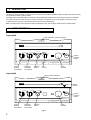
Alpha 240XP
Pilot and Burner Viewing Window
OCEAN
0 THERMOSTAT
0 THERMOSTAT
SELECTOR
GAS
2
OFF
3
1
0
4
bar
240XP
HELPLINE (OI322) 669443
QUOTE SERIAL NO. (SEE UNDER BOILER)
Domestic
Hot Water
Thermostat
Central
Heating
Thermostat
TO LIGHT
TO SET HEATING CLOCK (Mechanical)
PRESSURE GAUGE
Press in gas knob
for 60 seconds then release.
Warning: If pilot does not light or goes out wait at least
3 minutes. Then repeat.
Push tappets out for heating ON and IN for heating OFF. Set correct time
by turning 24hr dial. Manual switch to left - permanent OFF.,
middle - heating as tappets, right - permanent ON.
(If in doubt, see User Instructions).
When the boiler is cold the needle should be in green band.
To increase pressure connect filling loop under boiler.
Open valves. Close when needle is in green band.
Disconnect loop. (Contact your installer if in doubt).
Selector
Switch
System
Pressure
Gauge
Clock
(if fitted)
Gas
Control
Alpha 240XE
Burner Viewing Window
RESET
OCEAN
Reset
Button
0 THERMOSTAT
0 THERMOSTAT
0 SELECTOR
2
3
1
0
4
bar
240XE
HELPLINE (OI322) 669443
QUOTE SERIAL NO. (SEE UNDER BOILER)
Central
Heating
Thermostat
Domestic
Hot Water
Thermostat
PRESSURE GAUGE
When the boiler is cold the needle should be in green band.
To increase pressure connect filling loop under boiler.
Open valves. Close when needle is in green band.
Disconnect loop. (Contact your installer if in doubt).
Clock
(if fitted)
Selector
Switch
Fig. 1
2
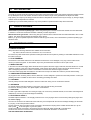
TO SET HEATING CLOCK (Mechanical)
Push tappets out for heating ON and IN for heating OFF. Set correct time
by turning 24hr dial. Manual switch to left - permanent OFF.,
middle - heating as tappets, right - permanent ON.
(If in doubt, see User Instructions).
System
Pressure
Gauge