1
Operating Instruction
� Set Menu Mode
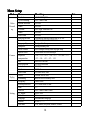
1. In photo taking/video/replay mode, press “MENU” to set relevant menus, please refer to the
“Set Menu” for details.
2. In “Set Menu” in any mode, press OK to get into the next menu, press Up and Down to
select relevant settings, and then press OK to confirm and then press MENU to exit.
� Turn on/off and Auto-off Settings of Camera
1. Press on Power button for about 1s to turn on the camera, when it is on, press on the Power
button for 3s and then release it to turn it off.
2. To save battery power, you can set auto-off time in the menu. When no operation happens
within the setting time, it will shut down automatically.
3. Turn the power on, press MENU button twice to switch to Setup Menu, and then press
Down to select “Auto-off” and then press OK to get into the next menu. The auto-off time can
be set as “OFF, 2Min, 5Min and 10Min”.
� Set Date and Time
Turn the power on, press MENU button twice and switch to the Setup Menu, then press Down
to select “Date/Time” and then press OK to enter into Year, Month, Day, Hour, Minute and
Second, then press Up, Down, Left and Right to select the item to be set and then press OK.
When the item turns red, press Up or Down to make adjustment, after that, press OK to exit,
and then press Down to move to “√” and then press OK.
9