1
Agilent Technologies
E8362B, E8363B and E8364B Option H85
User’s and Service Guide Supplement
Use this manual with the following documents:
PNA Series Microwave Network Analyzer (E8362B, E8363B and E8364B) Service Guide
Part Number E8364-90026
PNA Series Network Analyzer On-line Help System
Application Note 1408-12
Manufacturing Part Number: E8364-90027
Printed in USA
January 2006
© Copyright 2004, 2005, 2006 Agilent Technologies, Inc. All rights reserved.
Warranty Statement
THE MATERIAL CONTAINED IN THIS DOCUMENT IS PROVIDED “AS IS,” AND IS SUBJECT
TO BEING CHANGED, WITHOUT NOTICE, IN FUTURE EDITIONS. FURTHER, TO THE
MAXIMUM EXTENT PERMITTED BY APPLICABLE LAW, AGILENT DISCLAIMS ALL
WARRANTIES, EITHER EXPRESS OR IMPLIED WITH REGARD TO THIS MANUAL AND
ANY INFORMATION CONTAINED HEREIN, INCLUDING BUT NOT LIMITED TO THE
IMPLIED WARRANTIES OF MERCHANTABILITY AND FITNESS FOR A PARTICULAR
PURPOSE. AGILENT SHALL NOT BE LIABLE FOR ERRORS OR FOR INCIDENTAL
OR CONSEQUENTIAL DAMAGES IN CONNECTION WITH THE FURNISHING, USE, OR
PERFORMANCE OF THIS DOCUMENT OR ANY INFORMATION CONTAINED HEREIN.
SHOULD AGILENT AND THE USER HAVE A SEPARATE WRITTEN AGREEMENT WITH
WARRANTY TERMS COVERING THE MATERIAL IN THIS DOCUMENT THAT CONFLICT
WITH THESE TERMS, THE WARRANTY TERMS IN THE SEPARATE AGREEMENT WILL
CONTROL.
DFARS/Restricted Rights Notice
If software is for use in the performance of a U.S. Government prime contract or
subcontract, Software is delivered and licensed as “Commercial computer software” as
defined in DFAR 252.227-7014 (June 1995), or as a “commercial item” as defined in FAR
2.101(a) or as “Restricted computer software” as defined in FAR 52.227-19 (June 1987) or
any equivalent agency regulation or contract clause. Use, duplication or disclosure of
Software is subject to Agilent Technologies’ standard commercial license terms, and
non-DOD Departments and Agencies of the U.S. Government will receive no greater than
Restricted Rights as defined in FAR 52.227-19(c)(1-2) (June 1987). U.S. Government users
will receive no greater than Limited Rights as defined in FAR 52.227-14 (June 1987) or
DFAR 252.227-7015 (b)(2) (November 1995), as applicable in any technical data.
ii
User’s and Service Guide Supplement
Safety Notes
The following safety notes are used throughout this document. Familiarize yourself with
each of these notes and its meaning before performing any of the procedures in this
document.
WARNING
Warning denotes a hazard. It calls attention to a procedure
which, if not correctly performed or adhered to, could result in
injury or loss of life. Do not proceed beyond a warning note
until the indicated conditions are fully understood and met.
CAUTION
Caution denotes a hazard. It calls attention to a procedure that, if not
correctly performed or adhered to, could result in damage to or
destruction of the instrument. Do not proceed beyond a caution sign
until the indicated conditions are fully understood and met.
Definitions
• Specifications describe the performance of parameters covered by the product warranty
(temperature – 0 to 55 °C, unless otherwise noted.)
• Typical describes additional product performance information that is not covered by the
product warranty. It is performance beyond specification that 80% of the units exhibit
with a 95% confidence level over the temperature range 20 to 30 °C. Typical
performance does not include measurement uncertainty.
• Nominal values indicate expected performance, or describe product performance that is
useful in the application of the product, but is not covered by the product warranty.
User’s and Service Guide Supplement
iii
iv
User’s and Service Guide Supplement
Contents
General Overview
Introduction . . . . . . . . . . . . . . . . . . . . . . . . . . . . . . . . . . . . . . . . . . . . . . . . . . . . . . . . . . . . . . . . . 2
Description . . . . . . . . . . . . . . . . . . . . . . . . . . . . . . . . . . . . . . . . . . . . . . . . . . . . . . . . . . . . . . . . . . 2
Operation . . . . . . . . . . . . . . . . . . . . . . . . . . . . . . . . . . . . . . . . . . . . . . . . . . . . . . . . . . . . . . . . . . . 3
Typeface Key Conventions . . . . . . . . . . . . . . . . . . . . . . . . . . . . . . . . . . . . . . . . . . . . . . . . . . . . 4
Specifications . . . . . . . . . . . . . . . . . . . . . . . . . . . . . . . . . . . . . . . . . . . . . . . . . . . . . . . . . . . . . . . . 5
Making High Power Measurements With Option H85 . . . . . . . . . . . . . . . . . . . . . . . . . . . . . . 10
Initial Setup . . . . . . . . . . . . . . . . . . . . . . . . . . . . . . . . . . . . . . . . . . . . . . . . . . . . . . . . . . . . . . 10
Determining Power Levels . . . . . . . . . . . . . . . . . . . . . . . . . . . . . . . . . . . . . . . . . . . . . . . . . . . 11
Additional Setup . . . . . . . . . . . . . . . . . . . . . . . . . . . . . . . . . . . . . . . . . . . . . . . . . . . . . . . . . . . 12
Selecting Power Ranges and Attenuator Settings. . . . . . . . . . . . . . . . . . . . . . . . . . . . . . . . . 13
Final Setup and Response Calibration . . . . . . . . . . . . . . . . . . . . . . . . . . . . . . . . . . . . . . . . . 15
Service Information . . . . . . . . . . . . . . . . . . . . . . . . . . . . . . . . . . . . . . . . . . . . . . . . . . . . . . . . . . 18
Replaceable Parts . . . . . . . . . . . . . . . . . . . . . . . . . . . . . . . . . . . . . . . . . . . . . . . . . . . . . . . . . . . . 19
Safety and Regulatory Information. . . . . . . . . . . . . . . . . . . . . . . . . . . . . . . . . . . . . . . . . . . . . . 20
Introduction. . . . . . . . . . . . . . . . . . . . . . . . . . . . . . . . . . . . . . . . . . . . . . . . . . . . . . . . . . . . . . . 20
Before Applying Power . . . . . . . . . . . . . . . . . . . . . . . . . . . . . . . . . . . . . . . . . . . . . . . . . . . . . . 20
Shipping Instructions . . . . . . . . . . . . . . . . . . . . . . . . . . . . . . . . . . . . . . . . . . . . . . . . . . . . . . . 20
Warnings . . . . . . . . . . . . . . . . . . . . . . . . . . . . . . . . . . . . . . . . . . . . . . . . . . . . . . . . . . . . . . . . . 21
Cautions. . . . . . . . . . . . . . . . . . . . . . . . . . . . . . . . . . . . . . . . . . . . . . . . . . . . . . . . . . . . . . . . . . 22
Instrument Markings . . . . . . . . . . . . . . . . . . . . . . . . . . . . . . . . . . . . . . . . . . . . . . . . . . . . . . . 23
Contacting Agilent . . . . . . . . . . . . . . . . . . . . . . . . . . . . . . . . . . . . . . . . . . . . . . . . . . . . . . . . . . . 24
User’s and Service Guide Supplement
Contents-1
Contents
Contents-2
User’s and Service Guide Supplement
General Overview
User’s and Service Guide Supplement
1
General Overview
Introduction
E8362B, E8363B and E8384B Option H85
Introduction
This document describes the differences between the Agilent E8362B, E8363B and
E8364B with Option H85 and the standard E8362B, E8363B and E8364B PNA Series
Network Analyzer.
Information can be viewed or printed regarding the PNA Series Network Analyzer
Data sheets, white papers, or manuals by visiting our web site at
http://www.agilent.com/find/pna.
Description
The Agilent E8362B, E8363B and E8364B Option H85 is a modified version of the
standard E8362B, E8363B and E8364B PNA Series Network Analyzer. Option H85 is
designed to permit insertion of high power amplifiers and other signal conditioning
equipment to allow high power network measurements at RF levels up to 20 Watts
(+43 dBm) from 10 MHz to 40 GHz and 10 Watts (+40 dBm) from 40 GHz to 50 GHz. Refer
to Figure 3, Figure 4, and Figure 5 depending on the type of high power configuration. The
Option H85 is similar to the Option UNL with one exception; the modification supplies
source attenuators without bias tees.
NOTE
The Bias Tee's are removed from the Option H85 to allow high power
operation. Specifications for the Agilent E8362B, E8363B and E8364B Option
H85, when configured in Bypass Configuration, are the same as those of an
E8362B, E8363B and E8364B PNA Series Network Analyzer with Options
014, 016, 080, 081 and UNL.
The instrument is shipped from the factory with jumper cables installed on the front panel
in what is referred to as the “Bypass Configuration.” Refer to Figure 2 on page 7. This
configuration will allow the instrument to operate as a standard E8362B, E8363B and
E8364B PNA Series Network Analyzer with Options 014, 016, 080, 081 and UNL.
Additional options are available for the Agilent E8362B, E8363B and E8364B Option H85.
The Agilent E8362B, E8363B and E8364B Option H85 bundles Options 014, 016, 080 and
081 and are part of the H85.
2
User’s and Service Guide Supplement
E8362B, E8363B and E8384B Option H85
General Overview
Operation
Operation
The Agilent Option H85 can be configured differently for many applications. Included in
this manual insert are four typical configurations:
• Figure 2, “Bypass Configuration and Major Assemblies.”
• Figure 3, “High Power One-way Input/Output.”
• Figure 4, “High Power DUT One-way to Output.”
• Figure 5, “High Power Two-way Configuration.”
NOTE
The internal firmware of the PNA has not been modified for this option. The
power levels indicated on the Agilent E8362B, E8363B and E8364B Option
H85 may differ depending on the user configuration that is chosen.
Refer to the configuration diagrams for external component connections and/or operating
constraints when utilizing the high power capability of the Agilent E8362B, E8363B and
E8364B Option H85. External components are not supplied with this option.
When using the Agilent E8362B, E8363B and E8364B Option H85 in the high power
configuration, the Frequency Offset mode (Option 080) and External R1 (Option 081) must
be activated. This will ensure phase lock and allow R1 and R2 to receive the new reference
power levels from the amplifiers. Refer to Table 1 on page 4.
CAUTION
The A and B maximum attenuator setting is 35 dB. The PNA Option 016,
Receiver Step Attenuators, reduces the power to the A and B receivers. Power
measurements to Test Ports 1 and 2 above +35 dBm will require additional
attenuation. Add the appropriate amount of attenuation that will keep the
coupler arm output power below –12 dBm. Refer to Table 1 on page 4.
Refer to Table 2 on page 16 for information regarding the PNA frequency Band-Crossing
with high power devices with ALC and Table 3 on page 17 for Watts to dBm Reference
Table.
User’s and Service Guide Supplement
3
General Overview
Operation
E8362B, E8363B and E8384B Option H85
Prior to powering-up the booster amplifier, it is highly recommended that the
user verify the RF power levels seen by the various elements of the test setup.
At high power levels a mistake could permanently damage the instrument.
Refer to Figure 1.
CAUTION
Accordingly, the following power level values are given:
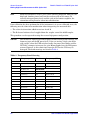
Table 1
Power Levels
Test Setup
Power Level
Max Recommended RF Level at A/B/R1/R2 Receivers
– 12 dbm
Damage Level at A/B/R1/R2 Receivers
+15 dbm
Max Recommended RF Level at Port 1, 2 Source
+0 dBm
Damage Level to Port 1, 2 Source Out
+20 dBm
Max Level to Port 1, 2 Test Ports
+43 dBm @ 10 MHz to 40 GHz
Max Level to Port 1, 2 Test Ports
+40 dBm @ 40 GHz to 50 GHz
Max Level to Port 1, 2 CPLR THRU
+43 dBm @ 10 MHz to 40 GHz
Max Level to Port 1, 2 CPLR THRU
+40 dBm @ 40 GHz to 50 GHz
NOTE
Refer to your PNA specifications to optimize the power levels in the receivers.
NOTE
We recommend that you do not operate components near damage or
maximum levels. The power levels should be kept at less than 3 dB,
preferably 6 dB, below damage and maximum levels.
Typeface Key Conventions
The following key conventions are used throughout this document.
• [HARDKEYS] are labeled front panel keys.
• SOFTKEYS are unlabeled key whose function is indicated on the instrument display.
4
User’s and Service Guide Supplement
E8362B, E8363B and E8384B Option H85
General Overview
Specifications
Specifications
Specifications for Option H85 are the same as those of the Standard Microwave E836xB
PNA Series with Option UNL. The Option H85 is a modified version of Option UNL. This
modification eliminates the bias tees from the Port 1 and Port 2 Source paths. The Option
H85 basic arrangement is configured with PNA Options 014, 016, 022, 080, and 081.
Specifications can be viewed or printed from the PNA Series Data Sheet (a condensed
version of the specifications). Visit our web site at http://www.agilent.com/find/pna, select
your analyzer model (E836xB) and click on the link to the data sheet.
The high power or large signal capability specifications for the Option H85 are not tested
at the factory, in the field, or at service centers.
User’s and Service Guide Supplement
5
General Overview
Specifications
Figure 1
6
E8362B, E8363B and E8384B Option H85
Maximum Power Levels
User’s and Service Guide Supplement
E8362B, E8363B and E8384B Option H85
Figure 2
General Overview
Specifications
Bypass Configuration and Major Assemblies
User’s and Service Guide Supplement
7
General Overview
Specifications
E8362B, E8363B and E8384B Option H85
In the following diagrams a high power isolator or attenuator must be inserted at the Port
1 or Port 2 front panel jumper (CPLR THRU and SOURCE OUT ports) to protect the
internal solid state transfer switch (30 dB isolation recommended), or if reverse isolation of
the amplifier is less than 30 dB. Maximum power into the SOURCE OUT is 20 dBm.
Optimum power level to all receivers is –12 dBm.
• Insert attenuators (A, B, R1 and R2 ports) to reduce power to receivers accordingly.
• Set the initial instrument state to –65 dBm test port power level to reduce the risk of
damage when powering on the unit.
• The recommended sweep mode is [STEP].
• Frequency Offset mode must be On and the R1 reference channel should be set to
External.
Figure 3
8
High Power One-way Input/Output
User’s and Service Guide Supplement
E8362B, E8363B and E8384B Option H85
Figure 4
High Power DUT One-way to Output
Figure 5
High Power Two-way Configuration
User’s and Service Guide Supplement
General Overview
Specifications
9
General Overview
Making High Power Measurements With Option H85
E8362B, E8363B and E8384B Option H85
Making High Power Measurements With Option H85
This section describes how to set up the analyzer to perform high power measurements.
Analyzers equipped with the Option H85 can be configured to measure high power devices.
This ability is useful if the required power for the device under test is greater than the
analyzer can provide, or if the maximum output power from an amplifier under test
exceeds safe input limits for a standard analyzer.
Initial Setup
1. If the analyzer is in the bypass mode configuration remove the jumper between
SOURCE OUT and CPLR THRU connector on the front panel for Port 1. This can also
be done for Port 2 if high power measurements are necessary for the reverse parameters
of a device under test (DUT). Two booster amplifiers and two 20 dB couplers are
required for both forward and reverse measurements. Refer to Figure 1, “Maximum
Power Levels.”
2. Connect the booster amplifier RF INPUT connector to the Port 1 SOURCE OUT
connector on the front panel of the analyzer.
3. Connect a 20 dB coupler (that operates within the frequency range of interest) to the
booster amplifier RF OUTPUT connector.
Figure 6
10
Booster Amplifier and 20 dB Coupler Connection Setup
User’s and Service Guide Supplement
E8362B, E8363B and E8384B Option H85
General Overview
Making High Power Measurements With Option H85
Determining Power Levels
Before continuing, save this state and set it up as the User Preset key. The User Preset
Conditions can be found in the PNA Series Network Analyzer’s help menu.
4. Press [Menu/Dialog] then tab to Help. Select Network Analyzer Help. Type in User
Preset, this will describe how to setup a User Preset. The final state should be saved as
the User Preset to avoid an over power condition from the factory preset.
To find the User Preset:
5. Press [Menu/Dialog] then tab to System. Scroll down to User Preset. Click on User
Preset Enable and press Save, then OK. This will save the current state as User Preset.
6. Turn on the analyzer and decrease the power level to –20 dBm by pressing
[Menu/Dialog] then tab to Channel. In the pull down menu select Power. Scroll to Port
Selection enter [–20]. Select Port Power Coupled to ensure that Ports 1 and 2 power
levels are the same. Uncoupled ports should be used when adjusting the S12 power
level or when Port 1 has a very low power level in comparison to Port 2.
7. Turn on the booster amplifier.
NOTE
Depending on the power used, additional attenuation may have to be added
between the coupler and the power meter.
8. Using a power meter and sensor measure the output power from the coupled arm and
the open port of the coupler.
9. Verify the gain of the booster amplifier(s). For example; if the analyzer output power
level was set to –20 dBm and the output power measured from the open end of the
coupler was –5 dBm, the gain of the booster amplifier would be +15 dB.
10. Verify that the power measured in the previous steps is within the acceptable limits
(less than –12 dBm for the coupled arm, less than +43 dBm for the open port). The
maximum power level between 40 GHz and 50 GHz is +40 dBm.
11. Estimate the maximum power level that will be needed to force the DUT into
compression. Determine if the maximum output power from the coupled arm of the
coupler will be higher than the acceptable limit. If so, add the appropriate amount of
attenuation that will keep the coupler arm output power below –12 dBm.
User’s and Service Guide Supplement
11
General Overview
Making High Power Measurements With Option H85
E8362B, E8363B and E8384B Option H85
Additional Setup
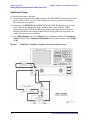
12. Turn off the booster amplifier.
13. Connect the open port of the 20 dB coupler to the CPLR THRU connector on the front
panel for Port 1. This can also be done on Port 2 if reverse parameters high power
measurements are required.
14. Disconnect the REFERENCE SOURCE OUT and RCVR R1 IN jumper on the front
panel. Connect the coupled arm of the 20 dB coupler (along with any added
attenuation) to the RCVR R1 IN. The same instructions apply to Port 2 with one
exception; disconnect the jumper to RCVR R2 IN if high power measurements are
required for the reverse parameters.
15. Press [Menu/Dialog] then tab to Channel. In the pull down menu select Frequency
Offset and turn on the Frequency Offset Mode. In the Offset Setting set the Offset
to [0].
Figure 7
12
PNA Port 1 Amplifier, Coupler, Attenuator Connections
User’s and Service Guide Supplement
E8362B, E8363B and E8384B Option H85
General Overview
Making High Power Measurements With Option H85
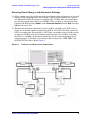
Selecting Power Ranges and Attenuator Settings
16. Select a power range that will not exceed the maximum estimated power level, but will
force the DUT into compression. For example; if your booster amplifier has a gain of
+15 dB and the DUT will compress if supplied with +15 dBm, then you would adjust
the analyzer output power not to exceed 0 dBm. This can done by setting Attenuator
Control to 10 dB by pressing Power, under Attenuator Control uncheck Auto and enter
[10] into the entry area.
17. Estimate the maximum amount of gain that could be provided by the DUT and as a
result, the maximum amount of power that could be received by Test Port 2 when the
DUT is in compression. For example; if a DUT with a maximum gain of +10 dB receives
an input of +10 dBm, then the maximum amount of power that could be received by
Test Port 2 is +20 dBm. An isolator or attenuator may be require depending on the
amount of power at Test Port 2. An isolator is place between the CPLR THRU and
SOURCE OUT for Port 2. Refer Figure 8.
Figure 8
Isolators and Attenuator Connections
User’s and Service Guide Supplement
13
General Overview
Making High Power Measurements With Option H85
E8362B, E8363B and E8384B Option H85
18. Calculate the amount of attenuation needed between the analyzer's coupler and
receivers so that you do not exceed the optimum receiver power level of –12 dBm.
It will be necessary to take the following into consideration:
• Receiver A will be coupled to the analyzer RF path that could receive power reflections
as high as +10 dBm.
• Receiver B will be coupled to the analyzer RF path that could receive a maximum of
+20 dBm from the DUT.
• Analyzer coupler loss is –13 dB.
• The optimum receiver power level is –12 dBm.
19. Set the internal step attenuator to the value calculated below (rounding off to the
highest 5 dB step). Setting the receiver attenuation will set the internal attenuation.
Press [Menu/Dialog] then tab to Channel. In the pull down menu select Power, under
Receiver Attenuation set Receiver A to [10] and Receiver B to [20]. Power levels greater
than +35 dBm will require additional attenuation between Port 2 access ports CPLR
ARM and RCVR B IN, see Figure 8.
With the previous points in mind, the amount of attenuation can be calculated from the
following equations:
Receiver Attenuator A = 10dBm – 13dBm – ( – 12dBm )
Attenuator A = 10dBm
Receiver Attenuator B = 20dBm – 13dBm – ( – 12dBm )
Attenuator B = 20dBm
20. Turn on the booster amplifier.
CAUTION
From this point forward, do not press Preset unless you have turned off the
booster amplifier(s), or you have saved this state and renamed it to User
Preset. Pressing Preset will return the analyzer to its default power level and
default internal attenuator settings. This increase in power may result in
damage to the DUT or analyzer.
21. Press [Menu/Dialog] to activate the R1 Input Path then tab to Channel. In the pull
down menu select Test Set. A window for the R1 Input Path will be displayed. Select
the External R1 Loop.
22. Measure the output power from the Test Port 1 using a power meter and verify that it
is as you would expect.
If you are measuring a highly reflective device, high power isolators should be inserted
between the 20 dB coupler and CPLR THRU front panel ports.
14
User’s and Service Guide Supplement
E8362B, E8363B and E8384B Option H85
General Overview
Making High Power Measurements With Option H85
Final Setup and Response Calibration
23. Verify that all of the power and attenuator settings are correct, and set the following
measurement. Press [Menu/Dialog] then tab to Trace. In the pull down menu select
Measure then S21.
24. Connect the test port cables of the analyzer to form a thru configuration.
25. Press [Menu/Dialog] then tab to Calibration. In the pull down menu select Calibration
Wizard then Unguided Calibration Use Mechanical Standards. Select THRU
Response. Follow analyzers window prompts to finish calibration.
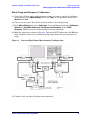
26. Make the connection as shown in Figure 9. Turn on the DUT and measure the S21 gain
of the amplifier under test to confirm the proper operation of the measurement test
setup.
Figure 9
Forward High Power Measurement Configuration
27. Continue with any other high power measurements.
User’s and Service Guide Supplement
15
General Overview
Making High Power Measurements With Option H85
NOTE
E8362B, E8363B and E8384B Option H85
Ratio measurements, such as gain, will be correctly displayed. However, the
displayed absolute power levels on the analyzer will not be correct. To
correctly interpret power levels and the gain of the booster amplifier, the
attenuator setting must be taken into consideration.
If no calibration has been performed or if the instrument is in an un-calibrated state, the
following must be taken into consideration when interpreting the measured data:
• The value of attenuation added to receiver A and B.
• The R channel reference level supplied from the coupler arm of the 20 dB coupler.
This procedure can be repeated to setup the reverse high power configuration.
CAUTION
The microwave PNA has over 20 frequency bands. During band-crossings, the
firmware turns off the RF power level. If you are testing a high-gain device
with an ALC when the PNA switches bands, the power shuts down and the
DUT ALC attempts to increase the gain. Microseconds later the PNA power
returns. However, in this short time frame the DUT or the VNA may be
damaged. The band-crossings are listed in Table 2.
Table 2 Frequency Band-Crossing
Band
Frequency (GHz)
Band
Frequency (GHz)
E8362/63/64B:
0
0 to 0.045
14
15.2 to 16.0
1
0.045 to 0.748
15
16.0 to 20.0
2
0.748 to 1.5
E8363/64B:
3
1.5 to 3.0
16
20.0 to 22.8
4
3.0 to 3.8
17
22.8 to 25.6
5
4.0 to 4.5
18
25.6 to 30.0
6
4.5 to 4.8
19
30.0 to 32.0
7
4.8 to 6.0
20
32.0 to 36.0
8
6.0 to 6.4
21
36.0 to 38.4
9
6.4 to 7.6
22
38.4 to 40
10
7.6 to 10.0
E8364B:
11
10.0 to 12.0
23
40.0 to 45.6
12
12.0 to 12.8
24
45.6 to 48.0
13
12.8 to 15.2
25
48.0 to 50.0
16
User’s and Service Guide Supplement
E8362B, E8363B and E8384B Option H85
General Overview
Making High Power Measurements With Option H85
Table 3 Watts to dBm Reference Table
Linear (watts)
Log (dBm)
0.001
+0
0.01
+10
0.1
+20
1
+30
2
+33
4
+36
10
+40
20
+43
40
+46
50
+47
100
+50
200
+53
User’s and Service Guide Supplement
17
General Overview
Service Information
E8362B, E8363B and E8384B Option H85
Service Information
Servicing information can be found in the Agilent Technologies PNA Series Microwave
Network Analyzers E8362B, E8363B, E8364B Service Guide (E8364-90026). This guide
can be found using the our web site at http://www.agilent.com/find/pna. Select he link
Manuals & Guides and type E8364-90026 in the search field.
In the Replaceable Parts Listing section of the service guide, look up "Parts Included with
Options 014, 080, 081 and Parts Included with Options UNL, 014, 016, 080, 081. Both
chapters show the parts added and deleted, and the part assembly placement.
The Agilent Technologies PNA Series Microwave Network Analyzers E8362BH85,
E8363BH85, and E8364BH85 will display Options 014, 016, 080, 081 and UNL. The
Option H85 deletes bias tees from the Option UNL. Service software is available for
servicing the E8362BH85, E8363BH85 and E8364BH85 at local service centers.
Follow the Service Guide instructions for all repair, replacement procedures, tests and
adjustments.
18
User’s and Service Guide Supplement
E8362B, E8363B and E8384B Option H85
General Overview
Replaceable Parts
Replaceable Parts
NOTE
Reference
Designator
Special options are built to order, so long lead times may be encountered
when ordering replacement parts.
PNA
Description
Agilent
Part Number
Add:
W631
E8362B
RF Cable: Port 1 CPLR THRU to
A25 test port 1 coupler
E8362-20018
W631
E8363B/
E8364B
RF Cable: Port 1 CPLR THRU to
A25 test port 1 coupler
E8364-20073
W642
E8362B
RF Cable: Port 2 CPLR THRU to
A26 test port 1 coupler
E8362-20019
W642
E8363B/
E8364B
RF Cable: Port 2 CPLR THRU to
A26 test port 1 coupler
E8364-20074
All
User’s and Service Guide
Supplement
E8364-90027
Delete:
A38/A39
E8362B
Bias tee with cable
5086-7239
A38/A39
E8363B/
E8364B
Bias tee with cable
5086-7239
W55
All
RF Cable: A38 bias tee to
A25 test port 1 coupler
E8364-20167
W56
All
RF Cable: A39 bias tee to
A26 test port 1 coupler
E8364-20168
W83
E8363B/
E8364B
RF Cable: Port 1 CPLR THRU to
A38 bias tee
E8362-20012
W83
E8362B
RF Cable: Port 1 CPLR THRU to
A38 bias tee
E8364-20039
W84
E8363B/
E8364B
RF Cable: Port 2 CPLR THRU to
A39 bias tee
E8362-20013
W84
E8363B/
E8364B
RF Cable: Port 2 CPLR THRU to
A39 bias tee
E8364-20040
1. W63 replaces W55, A38 and W83.
2. W64 replaces W56, A39 and W84.
User’s and Service Guide Supplement
19
General Overview
Safety and Regulatory Information
E8362B, E8363B and E8384B Option H85
Safety and Regulatory Information
Introduction
Review this product and related documentation to familiarize yourself with safety
markings and instructions before you operate the instrument. This product has been
designed and tested in accordance with international standards.
Before Applying Power
Verify that the product is configured to match the available main power source. If this
product is to be powered by autotransformer, make sure the common terminal is connected
to the neutral (grounded) side of the ac power supply.
Shipping Instructions
You must always call the Agilent Technologies Instrument Support Center to initiate
service before retuning your instrument to a service office. See “Contacting Agilent” on
page 24. Always transport or ship the instrument using the original packaging if possible.
If not, comparable packaging must be used. Attach a complete description of the failure
symptoms.
20
User’s and Service Guide Supplement
E8362B, E8363B and E8384B Option H85
General Overview
Safety and Regulatory Information
Warnings
WARNING
The WARNING notice denotes a hazard. It calls attention to a
procedure, practice, or the like, which if not correctly performed or
adhered to, could result in personal injury. Do not proceed beyond a
WARNING notice until the indicated conditions are fully understood
and met.
Warnings applicable to this instrument are:
WARNING
If this instrument is not used as specified, the protection provided by
the equipment could be impaired. This instrument must be used in a
normal condition (in which all means for protection are intact) only.
WARNING
For continued protection against fire hazard replace line fuse only
with same type and rating:
• United States—F 3A/250V, Part Number 2110-0780
• Europe—F 3.15A/250V, Part Number 2110-0655
The use of other fuses or material is prohibited.
WARNING
This is a Safety Class I product (provided with a protective earthing
ground incorporated in the power cord). The mains plug shall be
inserted only into a socket outlet provided with a protective earth
contact. Any interruption of the protective conductor, inside or
outside the instrument, is likely to make the instrument dangerous.
Intentional interruption is prohibited.
WARNING
The power cord is connected to internal capacitors that may retain
dangerous electrical charges for 5 seconds after disconnecting the
plug from its power supply.
WARNING
These servicing instructions are for use by qualified personnel only.
To avoid electrical shock, do not perform any servicing unless you are
qualified to do so.
WARNING
The opening of covers or removal of parts is likely to expose
dangerous voltages. Disconnect the instrument from all voltage
sources while it is being opened.
WARNING
This product is designed for use in Installation Category II and
Pollution Degree 2 per IEC 1010 and 664 respectively.
WARNING
No operator serviceable parts inside. Refer servicing to qualified
personnel. To prevent electrical shock do not remove covers.
User’s and Service Guide Supplement
21
General Overview
Safety and Regulatory Information
WARNING
E8362B, E8363B and E8384B Option H85
If this product is not used as specified, the protection provided by the
equipment could be impaired. This product must be used in a normal
condition (in which all means for protection are intact) only.
Cautions
CAUTION
The CAUTION notice denotes a hazard. It calls attention to an
operating procedure, practice, or the like, which if not correctly
performed or adhered to, could result in damage to the product or loss of
important data. Do not proceed beyond a CAUTION notice until the
indicated conditions are fully understood and met.
Cautions applicable to this instrument are:
CAUTION
Always use the three-prong ac power cord supplied with this
instrument. Failure to ensure adequate earth grounding (by not using
this cord) can cause instrument damage.
CAUTION
This instrument has autoranging line voltage input; be sure the supply
voltage is within the specified range.
CAUTION
Ventilation Requirements: When installing the instrument in a
cabinet, the convection into and out of the instrument must not be
restricted. The ambient temperature (outside the cabinet) must be less
than the maximum operating temperature of the instrument by 4 °C for
every 100 watts dissipated in the cabinet. If the total power dissipated
in the cabinet is greater than 800 watts, forced convection must be
used.
22
User’s and Service Guide Supplement
E8362B, E8363B and E8384B Option H85
General Overview
Safety and Regulatory Information
Instrument Markings
!
When you see this symbol on your instrument, you should refer to
the instrument’s instruction manual for important information.
This symbol indicates hazardous voltages.
The laser radiation symbol is marked on products that have a
laser output.
This symbol indicates that the instrument requires alternating
current (ac) input.
The CE mark is a registered trademark of the European
Community. If it is accompanied by a year, it indicates the year the
design was proven.
The CSA mark is a registered trademark of the Canadian
Standards Association.
This symbol indicates the product meets the Australian
Standards.
This symbol indicates separate collection for electrical and
electronic equipment, mandated under EU law as of August 13,
2005. All electric and electronic equipment are required to be
separated from normal waste for disposal (Reference WEEE
Directive, 2002/96/EC).
This text indicates that the instrument is an Industrial Scientific
and Medical Group 1 Class A product (CISPR 11, Clause 4).
This symbol indicates that the power line switch is ON.
This symbol indicates that the power line switch is OFF or in
STANDBY position.
Safety Earth Ground. This is a Safety Class I product (provided
with a protective earthing terminal). An uninterruptible
safety earth ground must be provided from the main power
source to the product input wiring terminals, power cord, or
supplied power cord set. Whenever it is likely that the
protection has been impaired, the product must be made
inoperative and secured against any unintended operation.
User’s and Service Guide Supplement
23
General Overview
Contacting Agilent
E8362B, E8363B and E8384B Option H85
Contacting Agilent
By internet, phone, or fax, get assistance with all your test and measurement needs.
This information supersedes all prior contact information.
Online assistance: www.agilent.com/find/assist
Americas
Brazil
(tel) (+55) 11 3351 7012
(fax) (+55) 11 3351 7024
Mexico
(tel) 1800 254 2440 Ext 2703
(alt) from USA 18008374039
(fax) 1 800 254 422
Canada
(tel) +1 877 894 4414
(alt) +1 303 662 3369
(fax) +1 800 746 4866
United States
(tel) 800 829 4444
(alt) (+1) 303 662 3998
(fax) 800 829 4433
Asia Pacific and Japan
Australia
(tel) 1 800 225 574
(fax) 1 800 681 776
(fax) 1 800 225 539
China
(tel) 800 810 0189
(fax) 800 820 2816
Hong Kong
(tel) 800 933 229
(fax) 800 900 701
India
(tel) 1600 112 626
(alt) +65 6275 0800
(fax) 1600 113 040
Japan (Bench)
(tel) 0120 421 345
(alt) (+81) 426 56 7832
(fax) 0120 01 2144
Japan (On-Site)
(tel) 0120 421 345
(alt) (+81) 426 56 7832
(fax) 0120 012 114
Malaysia
(tel) 1800 880 399
(fax) 1800 801 054
New Zealand
(tel) +64 4 939 0635
(alt) 0800 738 378
(fax) +64 4 972 5364
Singapore
(tel) 1 800 275 0880
(fax) (+65) 6755 1214
South Korea
(tel) 080 778 0011
(fax) 080 778 0013
Taiwan
(tel) 0800 047 669
(fax) 0800 047 667
(fax) +886 3492 0779
Thailand
(tel) +66 2 267 5913
(tel) 1 800 2758 5822
(fax) 1 800 653 336
Europe
Austria
(tel) 0820 87 44 11*
(fax) 0820 87 44 22
Belgium
(tel) (+32) (0)2 404 9340
(fax) (+32) (0)2 404 9395
Denmark
(tel) (+45) 7013 1515
(fax) (+45) 7013 1555
Finland
(tel) (+358) (0) 10 855 2100
(fax) (+358) (0) 10 855 2923
France
(tel) 0825 010 700*
(fax) 0825 010 701*
Germany
(tel) 01805 24 6333*
(fax) 01805 24 6336*
Ireland
(tel) (+353) 1 890 924 204
(fax) 1 890 924 024
Israel
(tel) (+972) 3 9288 504
(alt) (+972) 3 9288 544
(fax) (+972) 3 9288 520
Italy
(tel) (+39) (0)2 9260 8484
(fax) (+39) (0)2 9544 1175
Luxemburg
(tel) (+32) (0)2 404 9340
(fax) (+32) (0)2 404 9395
Netherlands
(tel) (+31) (0)20 547 2111
(fax) (+31) (0)20 547 2190
Russia
(tel) (+7) 095 797 3963
(alt) (+7) 095 797 3900
(fax) (+7) 095 797 3901
Spain
(tel) (+34) 91 631 3300
(fax) (+34) 91 631 3301
Sweden
(tel) 0200 88 22 55*
(alt) (+46) (0)8 5064 8686
(fax) 020 120 2266*
Switzerland (French)
(tel) 0800 80 5353 opt. 2*
(fax) (0) 22 567 5313
Switzerland (German)
(tel) 0800 80 5353 opt. 1*
(fax) 0 44 272 7373
Switzerland (Italian)
(tel) 0800 80 5353 opt. 3*
(fax) (0) 22 567 5314
United Kingdom
(tel) (+44) (0)7004 666666
(fax) (+44) (0)7004 444555
(tel) = primary telephone number; (alt) = alternate telephone number; (fax) = FAX number; * = in country number
24
8/10/05
User’s and Service Guide Supplement