1
Model fitted with a f an
A few recommendations:
Read the instructions before installing the device.
Isolate from the mains before working on it, and check the power supply voltage.
Store the instructions, even after installing the device.
A n t i d u s t
f i l t e r
Characteristics of the device:(shown on the rating label)
IP24: Device protected against water projections.
Class II
INSTALLING THE
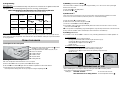
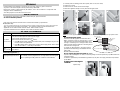
The fan is fitted with an antidust filter which, when
clogged, can result in its stoppage (red indicator lit
on the device).
For better use, clean your filter regularly, according
to the following instructions.
: Double insulation.
DEVICE
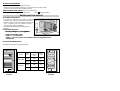
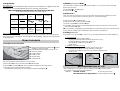
1) Location of the device
Zone
3
Locate the device beyond minimum distances from .
obstacles
1. Power off the device.
60 cm
Zone
2
60 cm
Do not install the device:
ªIn
ªIn aa dra
draugh
ughtt likely
likely to
to upset
upset its
its regulation
regulation
2,25 m
- This device was designed to be installed in residential
premises. In any other case, please call your distributor.
- Installation must be ensured according to the wiring rules
and in compliance with the standards currently
enforced in the country of installation.
Red indicator
2. Extract the filter from the back of the machine.
3m
Zone
1
Control
unit
ON/OFF switch
60
cm
ªUnder a fixed mains outlet.
ªInside zone 1 in bathrooms.
ªInside zone 2 if the controls are accessible to persons using the shower or
the bath tub.
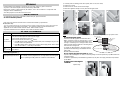
2) How to install the device
3. Clean the filter.
4. Refit the filter.
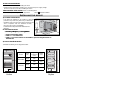
1) Position according to the diagrams below:
15 cm min
15 cm min
Version
Power
(W)
Height with
control box
(mm)
Width
(mm)
500W
656
400
Part to clean
OUTLINE
15 cm min
750W
1066
400
600W
984
470
750W
1035
470
15 cm min
5.Wait 10 minutes before restarting the device.
SKYLINE
20 cm min
Outline
These instructions are shown on the fan in the following form:
20 cm min
Skyline