1
Functions and Measurements
3
Copying a File
To copy a file from internal storage to a USB storage device,
follow this procedure:
1
Press
2
Connect a USB storage device to the USB connector (DEV).
3
Select the type of file. Assume you need to copy a trace file:
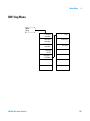
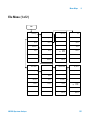
File/
Print
> Catalog > Local to select the path
Press Return > Copy > Type > Trace
4
Using the knob or arrow keys to highlight the file name you
need. In this example, highlight the file TEST1.TRC.
5
Press Copy Now to execute the operation. A “Copying file”
indicator displays. Then “/USB/TEST1.TRC file copied” appears
on the status bar. You have now copied the file TEST1.TRC
from the internal storage to the USB storage device.
Deleting a File
Perform the following process to delete a specific file. Note
that once a file is deleted from local memory, it cannot be
recovered.
N9320A Spectrum Analyzer
1
Press
2
Press Return > Delete to access the Delete menu
3
Select the type of file. Assume you need to delete a trace file
press Type > Trace
4
Using the knob or arrow keys to highlight the file name you
want to load. In this example, selecting the file TEST1.TRC.
5
Press Delete Now. “Deleting file” indicates the operation is in
process. Then, “Local/TEST1.TRC file deleted” shown on the
status bar indicates the file has been deleted.
File/
Print
> Catalog > Local to select the path
69